

dsh-theme-dracula
DiscoveredDracula color theme for DeepSeek Harness — token-level reskin of the whole Web GUI, switchable in Settings → General.
Dracula for DeepSeek Harness
A dark theme for DeepSeek Harness — sidebar, chat, composer, menus and settings in Dracula colors.
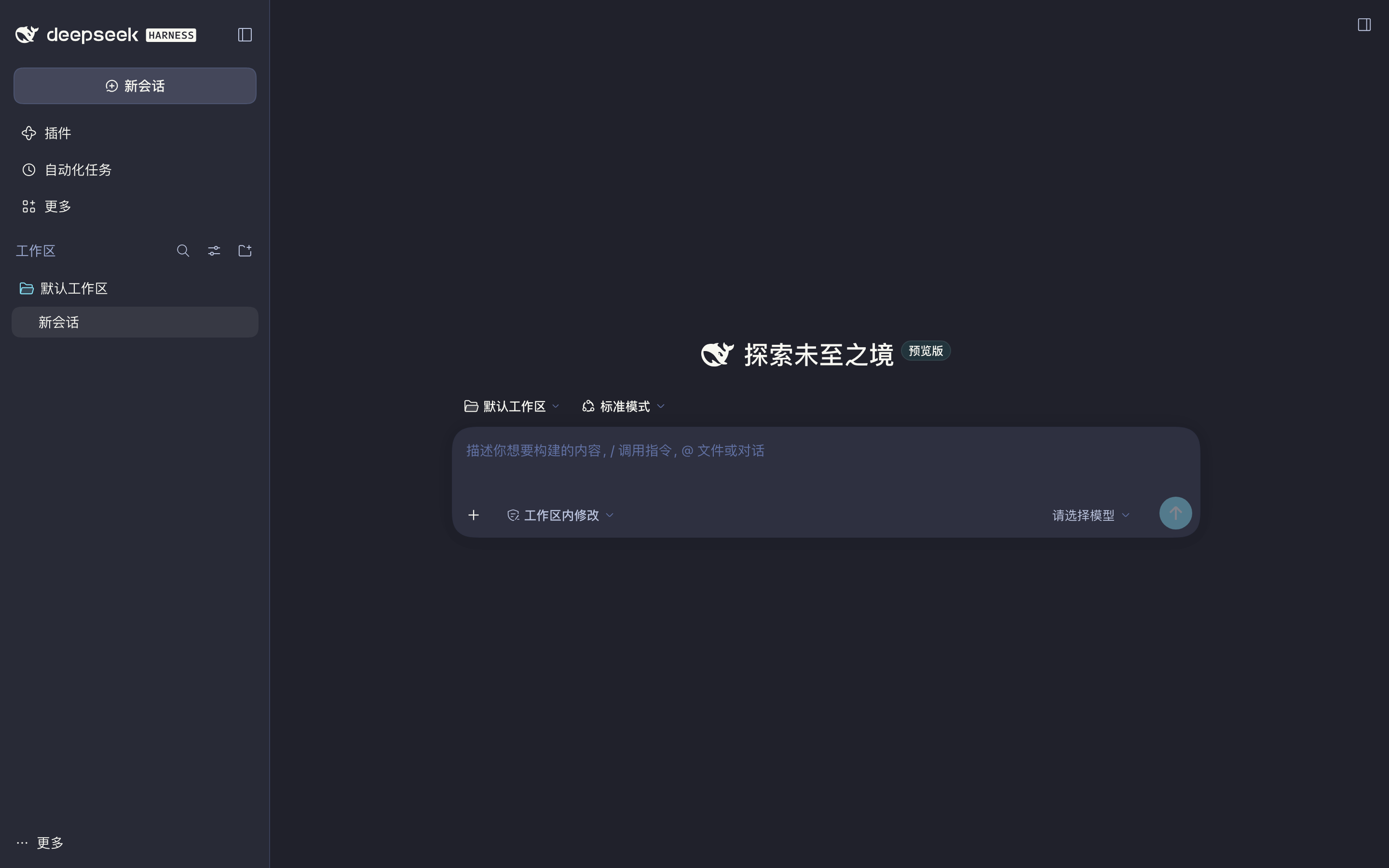
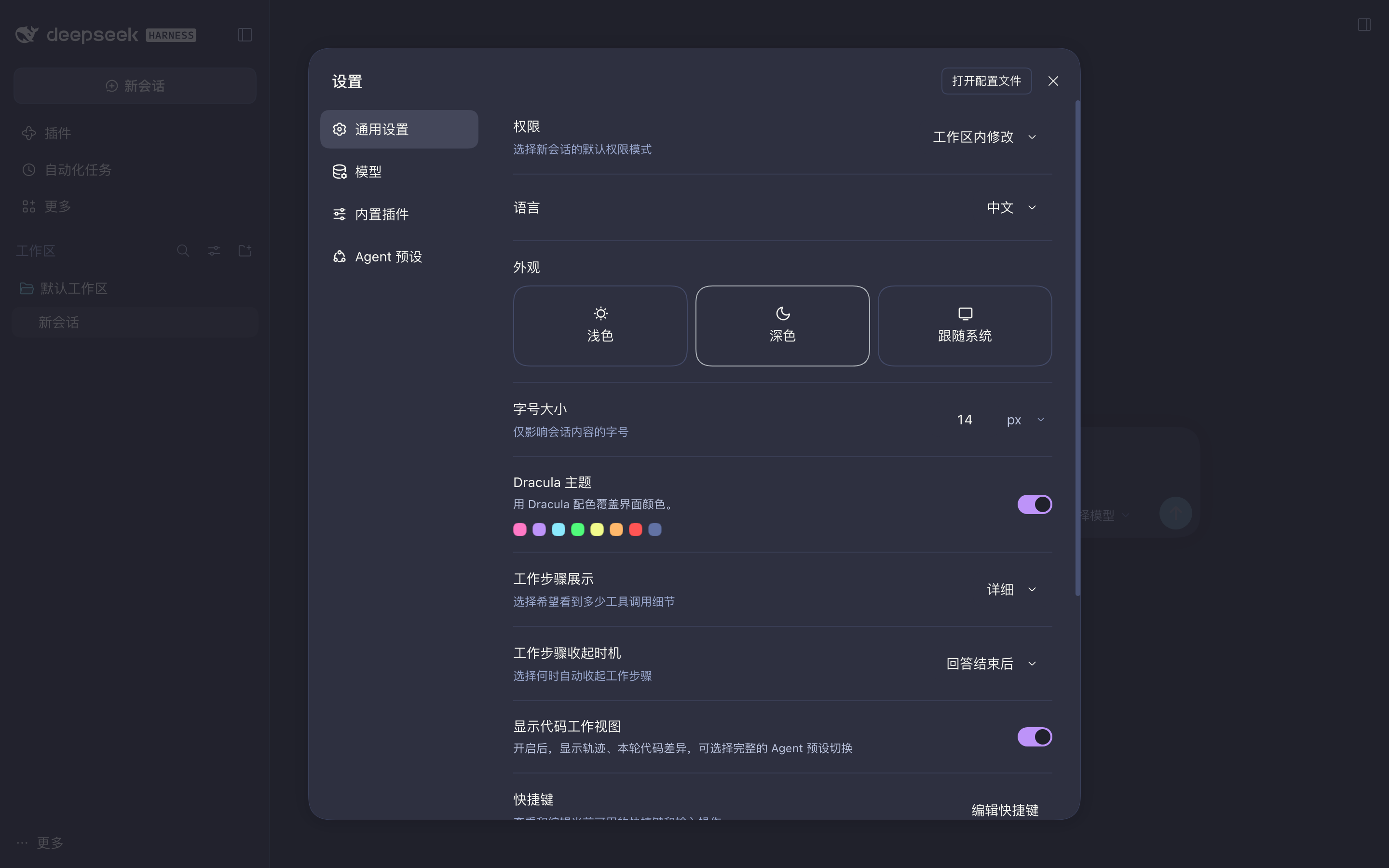
把 Dracula 配色搬进 DeepSeek Harness:整站(侧栏、对话区、输入框、菜单、设置页、代码高亮)换成 #20212B / #282A36 / #44475A 这套配色,取值对齐 官方 DeepSeek 移植版。
特点 / Highlights
- 整站换肤:101 个
--dsw-alias-*、11 个--dsw-specific-*(侧栏 / 输入框 / 气泡 / 菜单这类模块专属层)、11 个--shiki-token-*(代码高亮)、两条 think 渐变与选区色,全部按 Dracula 取值重述。 - 首帧就是 Dracula:宿主半随 HTML 注入
<style>与一段首帧脚本,页面加载时不会先闪一下内置深色。 - 不抢浅色:只在应用处于深色外观时生效;用户切到「浅色」,主题自动让位。
- 零依赖:宿主半只用 Node 内建模块,不引入任何
@deepseek-ai/*包,不需要构建。
安装 / Install
插件市场(收录后)
在 DeepSeek Harness 的「插件」页搜索 dsh-theme-dracula,安装后重启应用。
本地安装
git clone https://github.com/PuerJJJ/dsh-theme-dracula
cd dsh-theme-dracula
node scripts/install.mjs --profile desktop           # dry-run:先看清要改什么
node scripts/install.mjs --profile desktop --apply   # 建软链并登记到 dsh.profile.bundles
重启 DeepSeek Harness,然后打开 设置 → 通用设置,找到「Dracula 主题」并打开开关。
脚本只在 $DSH_HOME/profiles/<profile>/node_modules/ 下建一个软链,并把包名追加进该 profile 的 dsh.profile.bundles;写入前会备份 package.json.bak-dracula,不改 dependencies、不动 pnpm-lock.yaml(bundle 只需能按包名解析,与内置 bundle 的加载方式一致)。
卸载 / Uninstall
node scripts/install.mjs --profile desktop --uninstall --apply
或手动删除 node_modules/dsh-theme-dracula 软链、把包名从 dsh.profile.bundles 移除,然后重启。
工作原理 / How it works
插件分两半,都是手写零依赖实现:
宿主半 lib/index.js — 订阅 webserver/index-inject,向每次页面渲染注入一个 <style>(到 <head>)和一段内联 <script>(到 <body> 末尾):
- 样式写在
:root:root body[data-dsh-dracula]{…}下。重复伪类把特异度提到 (0,3,1),压过设计平台运行时 append 的body、body[data-ds-dark-theme]、html[data-platform=darwin] body规则,不依赖注入顺序。 - 覆盖四层变量:
--dsw-alias-*、--dsw-specific-*(不改这层侧栏不跟着变色)、--shiki-token-*(DSH 的代码高亮走theme: "css-variables",改变量即可)、以及 think/select 渐变与--dsh-boot-bg。 - 首帧脚本在任何客户端 bundle 之前执行:读
localStorage开关 → 挂到globalThis.__DSH_DRACULA__给客户端半读 → 按body[data-ds-dark-theme]决定是否给<body>加data-dsh-dracula→MutationObserver跟随后续外观切换。
客户端半 lib/client.js — 一个 window.__ModuleLoader__.load({ id: "dsh-theme-dracula", … }) bundle,inject = ["theme", "slots", "locale"]:
- 从
ctx.theme.getTheme().active.colorScheme取当前外观,ctx.on("theme/change", …)跟随变化; - 用
ctx.slots.register往settings.general.item槽位注册一行设置(order 12),左侧标题 / 描述 / 八色圆点,右侧是 primitives 的Switch; - 开关写回
localStorage,paint()只做document.body.toggleAttribute("data-dsh-dracula", enabled && dark)。
文案走 ctx.locale.register("dsh-theme-dracula", { zh, en })。
没有注册成 ui-theme 的第三方主题:ui-theme 只持久化
light | dark | system,任何一次字体或外观设置变更都会把第三方 id 顶回内置值,主题会静默消失。CSS 皮肤层跟随外观状态,行为更稳。
调色板 / Palette
| 用途 | 变量 | 取值 |
|---|---|---|
| 页面底色 | --dsw-alias-bg-base | #20212b |
| 侧栏 / 代码块 | --dsw-specific-sidebar-fill、--dsw-alias-bg-layer-1、--dsw-alias-markdown-code-block | #282a36 |
| 卡片 / 输入框 / 悬浮 | --dsw-alias-bg-layer-2、--dsw-specific-input-major | #2e3040 |
| 选中 / 抬升 | --dsw-alias-bg-layer-3、--dsw-specific-sidebar-nav-item-active | #44475a |
| 主文字 | --dsw-alias-label-primary | #f8f8f2 |
| 次级 / 三级 / 注释 | --dsw-alias-label-secondary、-tertiary、-caption | #bbc4de / #9ba9d0 / #6272a4 |
| 强调 / 主按钮 | --dsw-alias-brand-primary、--dsw-alias-button-primary-fill | #bd93f9 |
| 链接 / 焦点 | --dsw-alias-link、--dsw-alias-state-business-primary | #8be9fd |
| 成功 / 警告 / 错误 | --dsw-alias-state-success-primary 等 | #50fa7b / #ffb86c / #ff5555 |
| 代码高亮 | --shiki-token-keyword、-string、-comment、-function、-parameter | #ff79c6 / #f1fa8c / #6272a4 / #50fa7b / #8be9fd |
| 文字选区 | ::selection | #bd93f9 42% 叠底 |
选区没有直接用 Dracula 的选中色
#44475a:行内代码的背景也是这个值,选中命令时高亮会和底色糊在一起。改成 42% 的紫色叠底后,在页面、卡片、代码块上都还能看清选了什么。
和 draculatheme.com/deepseek 的关系 / Relation to the official port
draculatheme.com/deepseek 是给 chat.deepseek.com 网页版的 Stylus 用户样式,靠覆盖 --dsw-static-* 与 Prism 类名生效,只在浏览器里那个域名下有用。这里是同一套配色在 DeepSeek Harness 设计 token 上的移植:DSH 的 dark alias 里有 32 个是字面值,侧栏 / 输入框 / 菜单走独立的 --dsw-specific-* 层,代码高亮走 --shiki-token-*,只搬 static 会大面积漏色,所以这版把三层都重述了。
自检 / Self-check
node scripts/verify.mjs
# 可选:对比内置 alias token 表,确认 101 个 token 一个不漏
node scripts/verify.mjs --audit /tmp/dsh-probe/alias-table.txt
校验内容:宿主注入行、CSS 大括号配平、首帧脚本可解析、客户端半在 stub 环境下的开关 / 属性联动、调色板完整性。
Team
Maintained by PuerJJJ.
Community
License
Comments
Loading…
Similar plugins
by HoodyHuo
DSH (DeepSeek Harness) Web GUI 主题插件:官方 Dracula 配色,覆盖 alias + specific 两层 design token 与 shiki 语法高亮,并可接管系统主题偏好。Official Dracula theme (draculatheme.com) for the DeepSeek Harness web GUI.
★ 0
MIT
JavaScript
Sep 21, 2026
dsh plugin --profile web add dsh-plugin-dracula-color-theme 4
4No screenshots
by Erbsen16
把 VS Code 的 Dracula(吸血鬼)配色搬到 DeepSeek Harness 的网页界面,顺带做了一组程序员向的排版调优。深色模式专用,随时可整页还原。
★ 1
MIT
JavaScript
Oct 1, 2026
dsh plugin --profile web add dsh-client-ui-dracula
No screenshots
Dracula theme plugin for the DSH Web GUI: the classic dark palette and the Soft variant registered into the native theme runtime, one-click switching with a persisted choice.
★ 0
dsh plugin --profile web add dsh-dracula-theme✦
No screenshots
by RexCue
Wallpaper skin for the DeepSeek Harness (dsh) web UI: image background with opacity, mask and blur controls.
★ 4
↓ 358/wk
JavaScript
Aug 14, 2026
dsh plugin --profile web add dsh-wallpaper 3
3No screenshots
by sayzwx
Deep-space theme for the Harness Web GUI: two fully designed light and dark palettes over a seamless cross-dissolve nebula wallpaper, plus a model probe that reports which configured models actually a
★ 1
MIT
JavaScript
Oct 11, 2026
dsh plugin --profile web add dsh-xingkong-themeby MoYu-CN
Extra light and dark color themes for the DSH UI, registered as pure color tokens on top of the official theme runtime.
★ 0
MIT
JavaScript
Oct 12, 2026
dsh plugin --profile web add dsh-theme-pack