
dsh-one-click-new-session
Manifest validAdds a sidebar footer button that opens a blank, ready-to-type chat without asking you to pick a workspace; a dedicated scratch workspace is created automatically and an existing blank session is reus
dsh-one-click-new-session
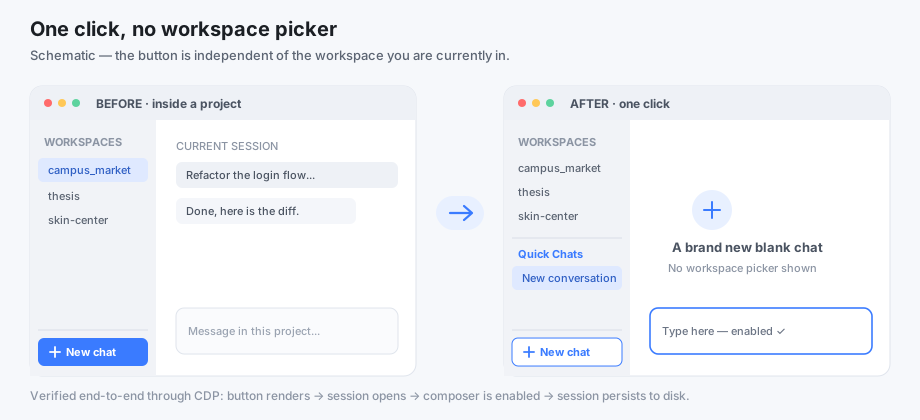
One click → a blank, ready-to-type chat in DeepSeek Harness. No workspace picker, no context switching. 中文文档





Quick start
- Download the latest zip from Releases.
- Unzip it, then double-click
install.bat(Windows) or runnode install.mjs. - Fully quit DSH and reopen it — a "New chat" button appears at the bottom of the sidebar.
Needs Node.js 18+. No Node yet? Install the LTS build from nodejs.org first, then repeat step 2.
Listed in the awesome-dsh-plugin community catalog under UI Enhancements.
The problem
In the DSH desktop UI, "New session" is tied to the currently selected workspace. If you are inside a project and just want to ask a quick question, you either pollute that project with a throwaway session, or go build/select a folder first.
Worse: a blank session with no workspace at all is inert. The conversation view disables the composer via
const inert = sessionId === undefined || (hero && chipTitle === undefined);
A blank session (hero === true) without a workspace has no chipTitle, so the input is disabled and the placeholder becomes "select a workspace". Creating a workspace-free session through the API alone therefore produces a chat you can look at but not use.
This plugin fixes both halves: an entry point that is independent of the selected workspace, and a session that is actually typeable.
What it does
- Registers a New chat button in the
sidebar.footer.actionslot — a list slot that is always appended and never stolen by another plugin. It renders regardless of which workspace is selected. - On click, ensures a dedicated scratch workspace exists (
workspaces.createis idempotent by path), then calls the officialuiWorkspace.openWorkspace()path, which reuses an existing blank session. Clicking twice does not pile up empty chats. - Falls back to
sessions.create({ workspaceId })+uiWorkspace.openSession()if the official path throws. - Failures are visible: the button turns red, says "New chat failed", and its tooltip carries the error. No silent failures.
- Uses host theme CSS variables only, so light/dark themes work.
Install
Requires Node.js 18+ (DSH already depends on Node). Windows / macOS / Linux.
Option A — zip installer (this is the path for the desktop app):
# download dsh-one-click-new-session-vX.Y.Z.zip from Releases, unzip it, then inside:
node install.mjs            # English UI
node install.mjs --lang zh  # Chinese UI
On Windows you can simply double-click install.bat (Chinese UI).
The installer auto-detects your DSH profile, creates ~/dsh-blank-sessions, writes the four plugin files into node_modules/dsh-one-click-new-session, and registers the bundle in the profile's package.json.
node install.mjs --dry-run                  # preview, writes nothing
node install.mjs --profile /path/to/profile
node install.mjs --dir /path/to/scratch
node install.mjs --uninstall
Option B — plugin manager (only if your setup ships the dsh CLI; the desktop app does not):
dsh plugin --profile desktop add dsh-one-click-new-session
Use --profile web instead of desktop when you run the Web UI.
Option C — manual: see docs/INSTALL.md.
Then fully quit and restart DSH. See docs/INSTALL.md for troubleshooting.
Usage
- Expand the sidebar.
- Click New chat at the bottom (next to Settings).
- Type and send. That's it.
Every new chat lands in the same Quick Chats workspace; sessions themselves are fully independent (own history, title, context). Clicking again while the current chat is still blank reuses it.
Configuration
The scratch folder defaults to ~/dsh-blank-sessions. The host half resolves it at startup and writes it into the client bundle, so you never edit a path by hand; set the DSH_BLANK_SESSION_DIR environment variable to use a different folder.
lib/client.js still carries the UI strings, which install.mjs --lang localises:
| Setting | Meaning | Default |
|---|---|---|
DSH_BLANK_SESSION_DIR (env) | Folder used for workspace-free chats | ~/dsh-blank-sessions |
SCRATCH_TITLE | Workspace group name in the sidebar | Quick Chats / 临时对话 |
LABEL, HINT, FAIL_LABEL | Button text | localised by --lang |
How it works
The technical write-up — the inert root cause, why host-side inline-script injection fails, the slot registry, and the client service call chain — is in docs/HOW-IT-WORKS.md.
Known limitations
- A dedicated workspace still exists (visible as "Quick Chats"). DSH's UI does not accept input for a blank session with no workspace, so this is a deliberate, invisible-to-the-user workaround. Chats share that one folder — files written in chat A are visible in chat B.
- The button hides when the sidebar is collapsed, because the host hides the whole footer action area in rail mode. Expand the sidebar to see it.
- Verified on the Windows desktop build. The web profile should work but has not been end-to-end tested — please report.
Compatibility
| DSH | >= 0.1.7-rc.1 (developed against 0.2.x) |
| Runtime | Node.js 18+, browser renderer |
| Platforms | Windows (verified), macOS / Linux (installer is cross-platform) |
Contributing
Issues and PRs are welcome — read CONTRIBUTING.md first. To report a security issue privately, see SECURITY.md.
License
MIT — do whatever you want, just keep the notice.
Disclaimer
This is an unofficial community plugin. It is not affiliated with, endorsed by, or published by DeepSeek. "DeepSeek Harness" is a trademark of its respective owner. This repository contains only the four files written for this plugin — no DSH source code, no app.asar contents, no credentials.
Comments
Loading…
Similar plugins
Adds a Quick Chat entry to the Web UI sidebar that opens a floating chat window with its own model and reasoning-effort picker, optionally seeded with the current session's transcript, and keeps every
★ 0
dsh plugin --profile web add dsh-plugin-quick-chatby P1gG0dG0d
Opens a dedicated question chat in the right sidebar for text selected in a DSH conversation, so follow-up questions do not push the main conversation away and never appear in the session list.
★ 0
MIT
JavaScript
Oct 30, 2026
dsh plugin --profile web add dsh-study-askby SpookySandwich
DSH 免工作区插件:不选工作区也能直接开始对话,独立会话在侧边栏平铺显示,原生工作区界面保持不变。Start chatting without picking a workspace; standalone conversations list flat in the sidebar.
★ 5
↓ 817/wk
MIT
JavaScript
Nov 17, 2026
dsh plugin --profile web add dsh-plugin-no-workspaceAdds a Branch Chat tab to dsh-better-sidebar that opens independent archived sessions with a head/middle/tail context digest and the same tools as the main agent.
★ 0
dsh plugin --profile web add @kuanfu0430/dsh-sidebar-branch-chatby Alone-show
DSH 插件:/new 新建对话 + Shift+Tab 一键切换计划模式
★ 0
MIT
JavaScript
Oct 28, 2026
dsh plugin --profile web add dsh-quick-keysby lumine-423
让你可以从侧边栏拖拽会话,使其成为一个独立窗口,省得来回切换会话的插件!
★ 5
NOASSERTION
JavaScript
Oct 20, 2026
dsh plugin --profile web add dsh-session-popout