

dsh-adrian-inject-context
Manifest valid★ 1Injects your own saved context entries as a Remember row after each user message, per turn or once per session, with a Settings editor and a manager page.
dsh-adrian-inject-context
Inject Context for DeepSeek Harness (DSH): persist your own context entries and have them injected as a standalone Remember: row — right after your message — on every turn or once per session, per entry.
Features
- Standalone sourced row — never touches the initial system prompt or the shared runtime-context snapshot
- Simple / Advanced datasets — two independent context lists; the active mode's dataset is what gets injected (exclusive)
- Per-entry checkboxes — toggle any entry on/off, applies from the next request
- Per-entry frequency (v0.3.0) — each entry has an Every turn switch: ticked (default) the entry is injected right after every message; unticked it is injected only at the start of a session and never again — restart-safe, detected from the session's persisted sourced-message surface plus in-memory per-session tracking
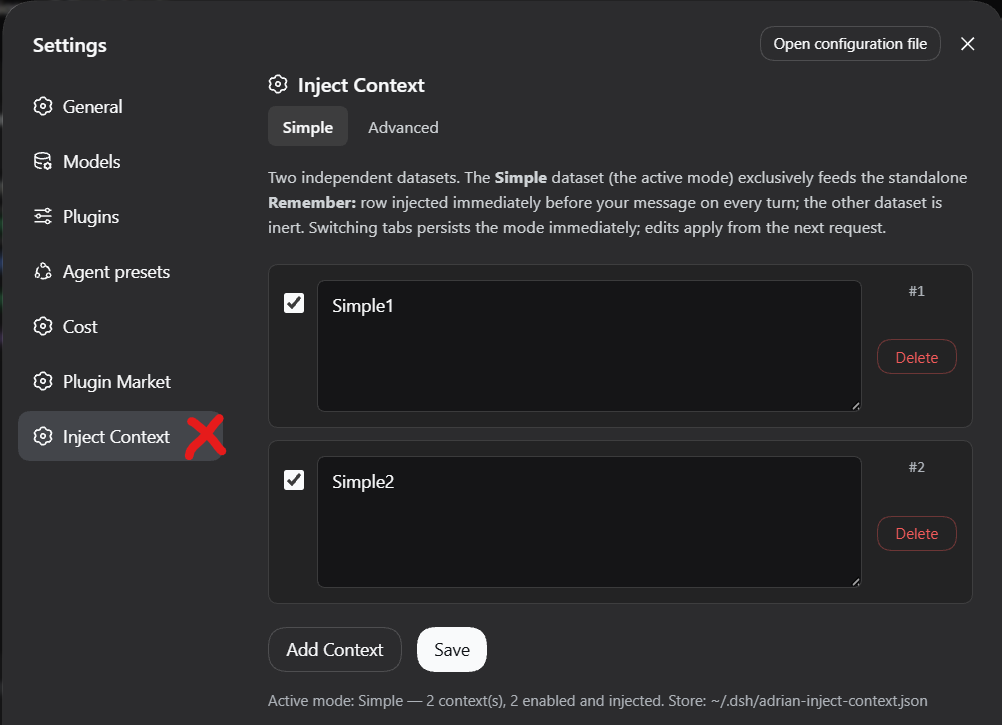
- Native Settings UI — Settings → Inject Context: add, edit, delete, toggle, save
- Persistent — datasets and active mode survive sessions and restarts
- Standalone manager page — also available at
/adrian-inject-context
Screenshots
Settings → Inject Context — manage your datasets
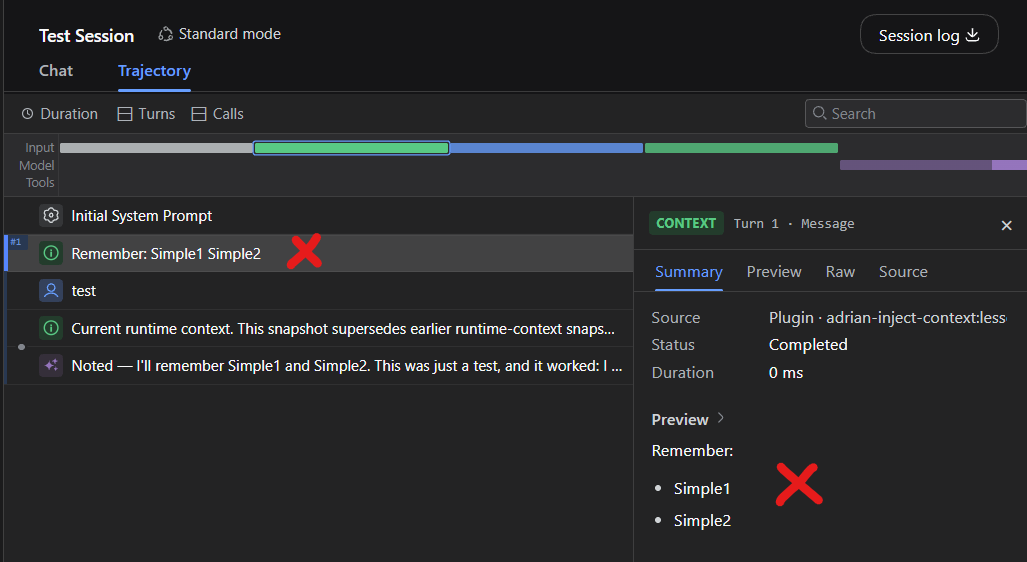
Remember: row in the Trajectory
Install
dsh plugin --profile web add polohot/dsh-adrian-inject-context
Usage
- Open Settings → Inject Context
- Add context entries; per row, two switches:
- Enabled — off = never injected
- Every turn (ticked by default) — ticked = injected right after every message; unticked = only the first message of a session
- Pick the active tab (Simple/Advanced) — its dataset feeds the injection
- Send any message and check the Trajectory: your message sits above the
Remember:block (order: SYSTEM → your message →Remember:)
Per-entry frequency (v0.3.0)
| Enabled | Every turn | Behavior |
|---|---|---|
| off | — | never injected |
| on | ticked | injected right after every message of every session (the default, and the migration default for existing entries) |
| on | unticked | injected only at the start of a session (its first turn), never again in that session |
Once-per-session entries are restart-safe: a process restart never re-injects a once-entry into a session that already carries it. Prior injection is detected from the session's persisted sourced-message surface (the adrian-inject-context:lessons rows) plus in-memory per-session tracking while the process lives. Unticking an entry mid-session lets it appear on the next message exactly once more, then never again — per dataset, so Simple and Advanced stay fully independent.
Configuration
Store: ~/.dsh/adrian-inject-context.json (schema v2, auto-migrated from v1):
{
  "version": 2,
  "mode": "simple",
  "simple":   { "lessons": [{ "id": 1, "text": "…", "enabled": true, "everyTurn": true }] },
  "advanced": { "lessons": [] }
}
everyTurn was added in v0.3.0 without a schema bump — entries missing the field default to true (the previous every-turn behavior).
Requirements
- DeepSeek Harness
dsh≥ 0.1.2-rc.1 (tested on web profile)
How it works
Host-side: an agent/pre-step waterfall listener composes the block per step — all enabled every-turn entries plus enabled once-entries not yet delivered to that session — and splices the plugin's own independently-sourced user-role message right after the turn's user message (the same pattern as dsh-agent-instructions), freshly read from the store on every step. It never injects into an empty entering batch (the agent loop's turn-close signal). Client-side: a settings-section module renders the manager against two host routes. Zero system-prompt modification.
License
MIT
Comments
Loading…
Similar plugins
User-authored tiered long-term memory for DeepSeek Harness: injected as a system-prompt section, with a Chinese panel to view and edit it. The AI never writes to memory on its own.
★ 1
MIT
JavaScript
dsh plugin --profile web add dsh-user-memoryby ly028716
Intelligent memory system for DSH - Track user preferences, tool usage, and project context to provide personalized recommendations
★ 3
MIT
JavaScript
Sep 29, 2026
dsh plugin --profile web add @ly028716/dsh-memory-pluginby yangyongzhen
Long-term memory injected at session start: preferences/facts/summaries/knowledge in global and per-project scopes, budgeted recall via `agent/pre-step`, durable JSON store.
★ 1
↓ 669/wk
JavaScript
Aug 15, 2026
dsh plugin --profile web add dsh-memoryby LittleBlackTong
Long-term cross-session markdown memory with an LLM-Wiki structure and a SOUL.md persona, injected at session start (by default only after the first user message and only in the active session), plus
★ 20
↓ 4.7k/wk
MIT
JavaScript
Oct 30, 2026
dsh plugin --profile web add dsh-plugin-memoryby menotbobbybrown
Persistent long-term memory for DeepSeek Harness: a JSON store of typed entries (fact, preference, entity, rule, episodic) exposed as the memory_remember and memory_recall agent tools, with recall ran
★ 0
MIT
TypeScript
Sep 8, 2026
dsh plugin --profile web add @modelnorth/dsh-plugin-memoryby 1497105876
在 dsh 官方设置页左侧栏添加「文字注入」:把文字注入系统提示词或会话上下文,内容存于独立文件,支持热加载与历史备份。Text injection into the system prompt or session context from a DSH Settings page, persisted in a standalone file with hot-reload and history.
★ 0
MIT
JavaScript
Sep 30, 2026
dsh plugin --profile web add @gw/dsh-text-inject