

dsh-sheet-diff
Manifest validRead-only CSV/XLSX change review for DeepSeek Harness: align business keys, inspect values and formulas, and export review comments.
SheetDiff
Review spreadsheet changes before trusting them.
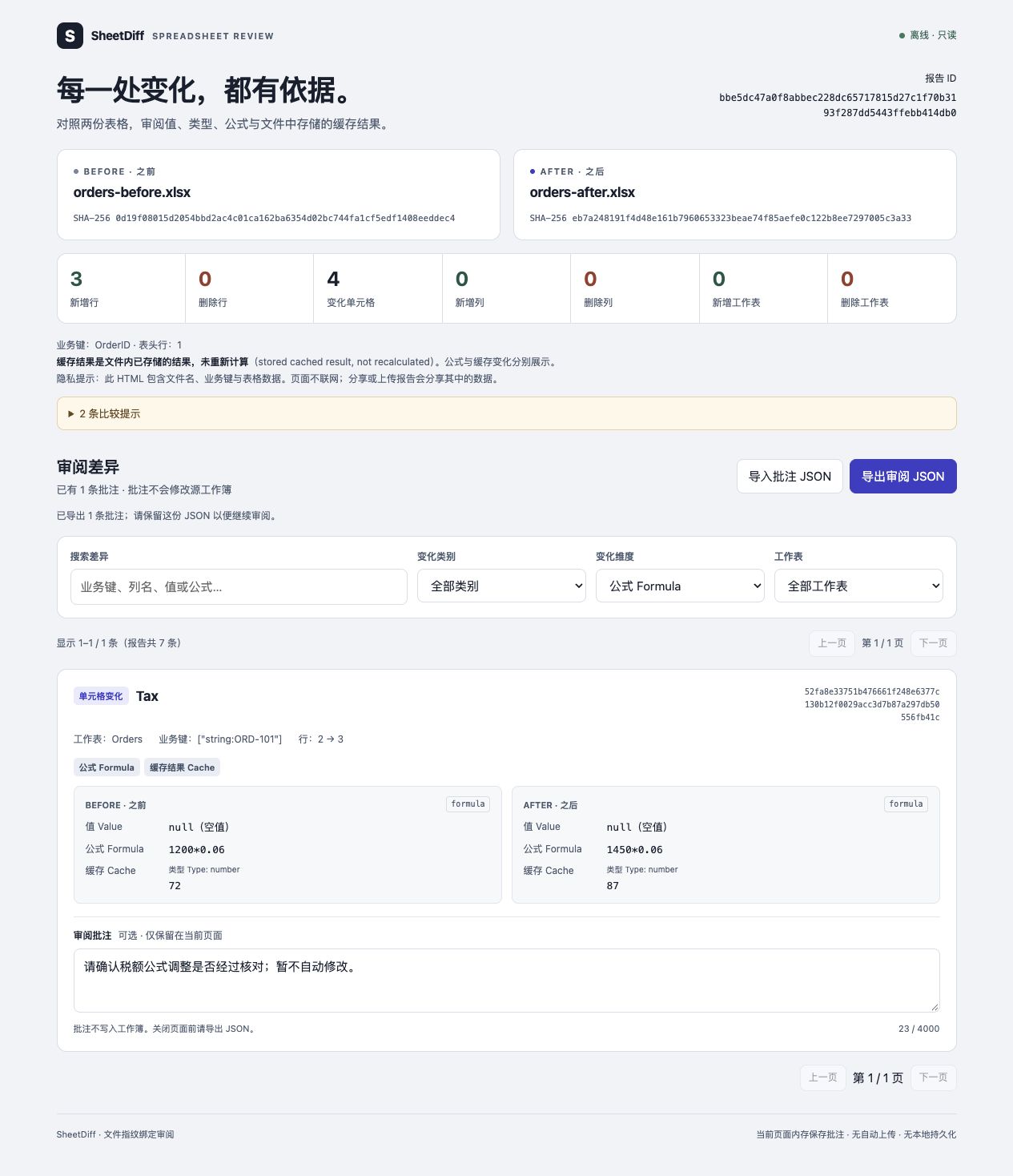
SheetDiff compares two CSV or XLSX files by a business key, not by row position. It produces a local HTML report where you can inspect values, types, formulas and stored formula results, then leave comments for a follow-up with your agent.
It is an independent DeepSeek Harness plugin. It also has a small CLI. It does not edit workbooks, calculate formulas, upload data, or require an API key.
Try it locally
Requires Node.js 22.19 or newer. Clone the repository and try the synthetic demo:
git clone https://github.com/po-et/dsh-sheet-diff.git
cd dsh-sheet-diff
npm ci --ignore-scripts
npm test
npm run demo
The demo writes two synthetic workbooks and a report.html to a new directory under artifacts/. Open the printed report path in a browser. The expected result is three added rows and four changed cells: two amounts, one formula with a changed stored result, and one number changed to text. Reordering rows and columns adds no changes.
For your own files:
node src/cli.js before.xlsx after.xlsx --key OrderID --out review-001
node src/cli.js examples/before.csv examples/after.csv --key OrderID --out review-csv
--out must name a new directory. Use repeated --key flags for a composite key. --sheet Orders selects one sheet; --header-row 3 changes the header row. Otherwise, all sheets use row 1 as their header and must have the chosen key columns. CSV has one logical sheet named CSV.
Compare CSV with CSV, or XLSX with XLSX. Mixed-format comparisons are rejected in this release.
Use with DeepSeek Harness
Install the versioned release bundle into a profile:
dsh plugin --profile YOUR_PROFILE add https://github.com/po-et/dsh-sheet-diff/releases/download/v0.1.0/dsh-sheet-diff-0.1.0.tgz
Restart that profile after installation. The package ships JavaScript and a dsh.bundle patch; there is no plugin build step or install script. You can also build the bundle from source with npm pack and install its local absolute path. Releases are distributed through GitHub Releases; this project is not published to npm.
Tested against Harness 0.2.0-rc.2 and 0.2.1-alpha.2, with explicit preview-version peer ranges. Both were installed into fresh profiles and exercised through the official profile boot entrypoint without a model call. HMR was disabled only in the test profiles; the source-built alpha host also logged unrelated optional Typert import warnings.
Ask Harness:
Compare
before.xlsxandafter.xlsxusingOrderIDas the key. Save a SheetDiff report inreviews/run-001. Do not change either workbook.
The plugin registers two tools:
| Tool | Input | Result |
|---|---|---|
sheet_diff_compare | before, after, keyColumns, outputDir; optional sheet, headerRow | New HTML/JSON paths, hashes, summary and warnings |
sheet_diff_review | reportJson, reviewJson | Validated comments with the corresponding changes |
Paths must stay inside the current session workspace, including resolved symlink targets. Report creation needs a writable sandbox. Existing reports are never overwritten. If the second output write fails, the tool reports the retained first file rather than deleting it.
The interactive report opens in a normal browser. A Harness preview that disables JavaScript cannot run its comment controls. There is no custom in-app spreadsheet editor in this release.
Review, then hand comments back
- Open the HTML report, filter changes, and write comments beside the changes you want checked.
- Export the review JSON. Draft comments stay only in page memory until exported.
- Put the export inside the workspace and pass it, with the original report JSON, to
sheet_diff_review.
The CLI equivalent is:
node src/cli.js review review-001/report.json review-comments.json
Comments must match the report ID, both input hashes and known change IDs. Old or unrelated reviews are rejected. A hash match is not a digital signature and does not prove that a report has not been deliberately rewritten. Comments and cell contents are untrusted data; this plugin never executes their instructions or applies their suggested edits.
Comparison rules
- Column names and keys match exactly. Composite keys include cell types; numeric
42is different from text"42". Duplicate keys, missing keys and duplicate headers fail rather than being guessed. - CSV is comma-delimited UTF-8, with quoted fields, embedded newlines and a BOM supported. Values remain text; CSV formulas are not inferred.
- XLSX preserves the distinction between numbers, text, booleans, dates, errors and formulas. Formula text and saved cached results are separate aspects of a change. A cache is not a fresh calculation.
- Formula caches containing an explicit empty string are rejected in v0.1: the underlying reader cannot reliably distinguish them from a missing cache. Zero and false caches are preserved.
- Formula text is compared literally. Moving a formula can change its A1 references while preserving meaning; SheetDiff does not normalize that equivalence.
- Blank rows are skipped. Added/removed rows include their populated fields. Added/removed columns produce structural changes, plus cell changes for populated values in retained rows.
- Sheet renames are reported as removal and addition. Key changes are reported as row removal and addition.
This is a table-data review tool, not a whole-workbook fidelity check. Formatting, number formats, merged layout, charts, pivots, images, comments and hyperlink targets are outside its scope. Hidden data is still read; visibility itself is not compared. Legacy XLS, macros, encrypted archives and external workbook connections are unsupported. Complex multi-table sheets may need to be exported to separate tables first.
Limits and privacy
Inputs are capped at 20 MiB each, XLSX expanded contents at 64 MiB and 8 MiB per ZIP part, and comparisons at 10,000 change records or 24 MiB of serialized changes. The parser also caps serialized cells/rows at 100,000 and checks expanded merge, column and validation ranges before parsing. Exceeding a limit fails the comparison; a shortened report is never presented as complete.
Reports include changed cell data, source filenames and hashes. Treat HTML, report JSON and review JSON as sensitive as the workbooks. Sharing is manual. The page has no remote resources, analytics or automatic persistence. When used inside an AI host, tool results and imported comments may be sent to that host's configured model as part of its normal operation.
Development
npm test
npm run smoke:host
npm pack --dry-run
smoke:host loads the shipped patch using a real Cordis loader and dispatches both tools through the real tool runtime, filesystem provider and sandbox policy. It also checks source bytes, overwrite rejection and plugin disposal. It uses a fresh temporary workspace; it does not change an existing Harness profile. The test is separate from a full CLI installation and does not use a live model.
中文简介
AI 改完表格后,先看清楚改了什么,再决定是否采用。SheetDiff 按订单号、账户号等业务主键对齐记录,避免把行列重排当成大量修改;数值、类型、公式和保存的计算结果分开显示。你可以在本地报告中逐条评论,导出后交回 Harness 继续处理。
首版只读 CSV/XLSX,不上传表格、不重算公式、不自动改文件。它不是表格编辑器,也不承诺检测格式、图表或所有 Excel 功能的变化。
MIT licensed. Bug reports are most useful with a small anonymized example and the expected comparison result. Please do not post confidential workbooks.
Comments
Loading…