
dsh-conv-progress
Manifest validLive per-turn progress capsule with an empirical ETA table and a click-to-open turn history, docked under the composer.
dsh-conv-progress
DSH(DeepSeek Harness)插件:在对话输入框下方常驻一条任务进度胶囊 —— 运行中显示实时进度条、预估剩余时间与当前阶段;空闲时保持 100%;点击胶囊可回看该会话每一轮任务的历史记录。
A DSH plugin that keeps a progress capsule under the composer: live progress bar, ETA and current phase while a turn runs, a permanent 100% state when idle, and a click-to-open history of every turn in the session.
GitHub: https://github.com/picklerick422/dsh-conv-progress · Releases: https://github.com/picklerick422/dsh-conv-progress/releases · Issues: https://github.com/picklerick422/dsh-conv-progress/issues

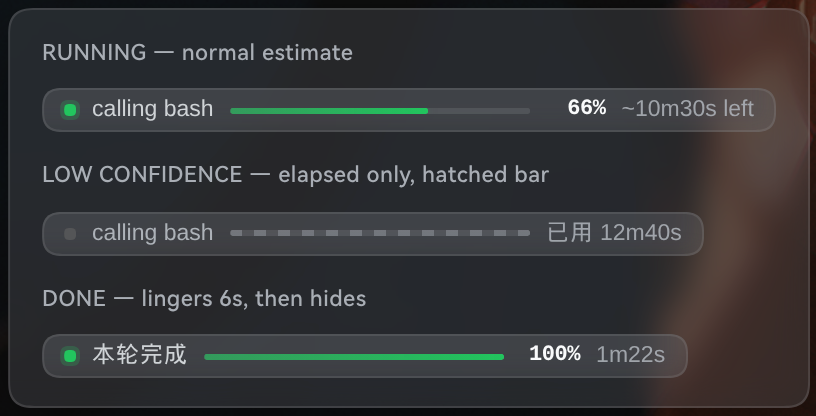
它长什么样
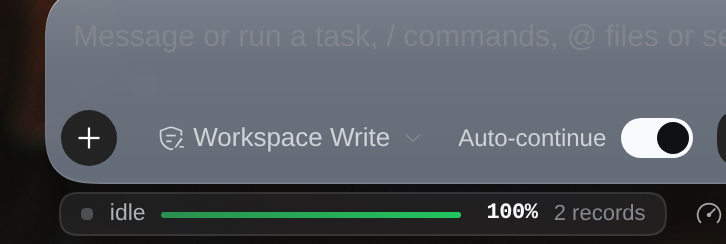
- 运行中:
● calling bash │ ▓▓▓▓░░ 87% │ ~5m17s left,进度条 150×3px,ETA 每秒刷新。 - 低置信度(当前采样不足以支撑估算):斜纹不确定条,只显示
已用 12m40s,绝不硬凑一个数字。 - 空闲:
● idle │ 100% │ 2 records,胶囊不消失;点击查看历史。 - 结束:正常结束的一轮以
本轮完成 100%停留约 6s(linger)后转入空闲态。
功能
| 能力 | 说明 |
|---|---|
| 进度条 | 时间型估算:已用 / (已用 + 剩余时间条件中位数),上限 97%;无把握时退化为不确定态 |
| ETA | 来自 7108 轮真实会话拟合的经验生存表(条件中位数)+ EMA 显示平滑;不可靠时自动隐藏 |
| 阶段标签 | thinking(模型流式中)· calling <tool>(工具执行中)· preparing · done · idle |
| 计划校准 | 会话出现 todo/write 时,进度 = 计划完成度 0.6 + 时间进度 0.4;计划全完成但仍在干活时退回纯时间进度 |
| 历史记录 | 点击胶囊向上弹出该会话的任务列表:轮次 / 结束原因 / 时间 / 耗时 / 步数 / 工具次数 / 计划完成数 / 置信度,可滚动 |
| 历史来源 | 宿主内存环形缓冲(默认 100 条/会话),重启后由 bootstrap() 从会话事件流重放重建,无需额外落盘 |
| 主题适配 | 只用 DSH 主题令牌(--dsw-alias-*),深浅色 / 玻璃质感一致;prefers-reduced-motion 自动降级 |
| 无障碍 | 胶囊为 <button aria-haspopup="dialog">,内部 role="progressbar" aria-valuenow;Esc / 外部点击关闭浮层 |
| i18n | 中 / 英双语,跟随 DSH locale |
安装
已在 dsh
0.2.1-rc.2、profileweb、Node 22 上验证。
A. 从 Release 安装(推荐)
# 直接从 GitHub 仓库安装(仓库根即插件包)
dsh plugin add github:picklerick422/dsh-conv-progress

# 或用 Release 里的预构建 tarball 手动安装
curl -LO https://github.com/picklerick422/dsh-conv-progress/releases/latest/download/dsh-conv-progress.tgz
mkdir -p /tmp/dsh-conv-progress && tar -xzf dsh-conv-progress.tgz -C /tmp/dsh-conv-progress
cp -r /tmp/dsh-conv-progress/package ~/.dsh/profiles/web/node_modules/dsh-conv-progress
# 再在 ~/.dsh/profiles/web/cordis.patch.yml 追加:
#   - insert:
#       - id: conv-progress
#         name: dsh-conv-progress
或在 dsh-market 的 Discover 里搜 dsh-conv-progress 一键安装。
B. 热注入(开发期,重启后失效)
dev_inject_plugin({ dir: "<本仓库>" })                              // 回执:host ✓ client ✓
dev_plugin_status()                                                // 清单出现 (dsh-conv-progress)
dev_reload_package("conv-progress")                                // 改代码后热重载
C. 持久安装(重启后仍在)
dev_install_package({ dir: "<本仓库>", profile: "web" })
它会把 link: 依赖写进 profile 的 package.json(dependencies + bundles)并建 node_modules junction —— 这会修改 profile 配置,请自行确认后执行。
D. 手动安装(等价于 C)
ln -s <本仓库>  ~/.dsh/profiles/web/node_modules/dsh-conv-progress
# 再在 ~/.dsh/profiles/web/cordis.patch.yml 追加:
#   - insert:
#       - id: conv-progress
#         name: dsh-conv-progress
依赖解析:lib/index.js 以裸 import 引用 @deepseek-ai/{dsh-typert-protocol,schemastery},需从 dsh 安装目录解析。仓库不提交 node_modules;从源码本地开发时重建软链:
cd <本仓库>
D=<dsh 安装目录>/node_modules/@deepseek-ai      # 如 ~/.nvm/.../node_modules/@deepseek-ai/dsh/node_modules/@deepseek-ai
mkdir -p node_modules/@deepseek-ai
for p in dsh-typert-protocol schemastery cordis; do ln -sfn "$D/$p" "node_modules/@deepseek-ai/$p"; done
配置
宿主服务 Config(cordis.patch.yml 的 config: 段):
| 键 | 默认 | 说明 |
|---|---|---|
debug | false | 把每次快照写入 ~/.dsh/conv-progress/debug.jsonl(256KB 轮转,每会话最多 3 条) |
priorStepMs | 13200 | 单步先验耗时(ms),仅用于退化路径与展示 |
priorStepsPerTurn | 9 | 单轮先验步数(实测中位 9 / 均值 21),仅用于退化路径与展示 |
historyLimit | 100 | 每会话保留的历史条数(环形缓冲,保留最新) |
其余超参见 lib/estimator.js 的 DEFAULT_PARAMS(percentCap 0.97、etaAlpha 0.4、planPercentWeight 0.6…)。
算法与准确性
ETA 不是公式外推,而是查表:lib/eta-model.js 是 1198 个会话日志(785 个文件 → 7108 轮 turn / 758 个会话)拟合出的经验生存表,给出「已完成 k 步、本轮已用 e 时间」时剩余时间的条件中位数(小样本向粗表做对数空间收缩)。
离线回放(test 集,completed 轮,314,556 采样 / 1,600 轮 / 239 会话):
| 指标 | v1(step 当量 + 双 EMA) | v2(生存表 + 时间进度) | 变化 |
|---|---|---|---|
| MAE | 341.1s (5.7m) | 266.4s (4.4m) | −21.9% |
| medianAE | 214.1s (3.6m) | 137.1s (2.3m) | −36.0% |
| 中位相对误差 p50 | +58.1s | +5.2s | −91% |
| MAPE | 1.69 | 1.35 | −20% |
分时长 MAE(v1 → v2):<30s 4.4m → 1.85m、30–120s 4.4m → 1.77m、2–5m 3.2m → 1.65m、5–15m 3.9m → 2.9m、>15m 9.6m → 8.7m。
数据抽取、拟合与离线评估脚本在 tools/(见下);完整方法论、候选方案对比与偏差分析见 docs/dsh-conv-progress.md。
目录结构
.                               # ← 仓库根就是插件包(可直接 dsh plugin add github:…)
├── lib/
│   ├── index.js                # 宿主:session/event 采集 + 状态机 + @Remote('snapshot'/'history')
│   ├── estimator.js            # 纯函数估算器:查表 + 时间进度 + 平滑
│   ├── eta-model.js            # 拟合产物:FINE/COARSE 生存表 + lookupEtaMs()
│   ├── history.js              # 纯函数:任务标题提取 / 结束原因归一 / 置信度评级 / 环形缓冲
│   └── client.js               # 浏览器 bundle:胶囊 + 历史浮层 + 样式 + i18n
├── test/                       # node:test(10 估算器 + 7 历史,共 17 用例)
├── assets/                     # README 截图
├── cordis.patch.yml            # 宿主装配
└── package.json                # dsh.bundle + dsh.client 声明
tools/                          # 数据管线:抽取 → 拟合 → 离线评估(含 v1 基线 fixture)
docs/dsh-conv-progress.md       # 设计文档:调研 / 可行性 / 实现 / 验证 / 算法
research/                       # 立项调研:同类项目与 DSH 内部机制
开发
cd <本仓库>
node --test test/estimator.test.mjs test/history.test.mjs   # 17 pass / 0 fail
node --check lib/client.js && node --check lib/index.js
离线评估(需要自己的会话日志,不入库):
node tools/extract-turns.mjs 0 data/turns-all.jsonl     # 读 ~/.dsh/sessions,产出每轮紧凑记录
node tools/build-eta-model.mjs --data data/turns-all.jsonl \
  --out lib/eta-model.js      # 只用 train 划分拟合生存表
node tools/eval-eta.mjs --data data/turns-all.jsonl \
  --impl lib/estimator.js --reasons completed --split test --json data/eval-v2.json
node tools/eval-eta.mjs --data data/turns-all.jsonl \
  --impl tools/fixtures/estimator-v1.mjs --reasons completed --split test --json data/eval-v1.json   # 基线
data/、probes/(真实会话日志与 GUI 截图,含个人内容)与node_modules/已在.gitignore中排除。Release/npm tarball 只打包运行所需文件(
lib/、assets/、cordis.patch.yml、README.md、LICENSE);test/、tools/、research/、docs/仅存在于源码仓库。
已知限制
- 百分比是统计推断:DSH 没有「总工作量」事件,进度只能来自可观测信号(模型自报进度不可靠,见
research/research-progress-eta.md)。 - 没有
todo/write时退化为纯时间型进度(tool-todo 默认可能未启用,属常态)。 - 生存表有保鲜期:换模型/换工具分布后建议重跑
tools/build-eta-model.mjs(ETA_MODEL_META记录数据量、分位与伪计数)。 - 轮尾偏保守:进度 90–100% 时 ETA 平均高估约 245s(仅凭「步数 + 已用时间」无法判断轮次即将结束),结束时直接跳 100%。
- 依赖 dsh 内部 API(
session/event、TypertRemoteService、slot 名conversation.composer.dock),dsh 升级需回归。 - 空闲时胶囊常驻占 22px 高度;如不想要,可删掉
idle分支或加 CSSdisplay:none。 - 历史记录是宿主内存态;dsh 重启后靠
bootstrap()重放事件流重建,因此只有仍保留在会话 JSONL 里的轮次。
许可证
BSD-3-Clause,见 LICENSE。
Comments
Loading…
Similar plugins
Predicts the remaining wall time of the live DeepSeek Harness turn from its step history and shows it as a progress bar with a live percentage under the composer.
★ 0
dsh plugin --profile web add @dsh-external/dsh-session-turn-etaFloating card with live progress for background jobs: progress bar, percentage, speed, ETA and the latest output line.
★ 0
MIT
JavaScript
dsh plugin --profile web add dsh-job-progressby dgy970516
A status bar in the composer footer showing the current phase, how long it has been running, the current step token count and a no-progress warning, projected from session logs without polling the hos
★ 0
MIT
JavaScript
Oct 19, 2026
dsh plugin --profile web add dsh-status-turboby chen8923
Live progress for long-running DSH tasks: scripts report structured progress, the Web UI shows it in a floating overlay, a sidebar tab, and a settings page.
★ 0
MIT
TypeScript
Sep 24, 2026
dsh plugin --profile web add dsh-task-progressAdds a Reading tab to the DSH web client that shows process steps and live reasoning in source order, collapses successful turns to the final answer, and keeps the original tabs, composer, and tooling
★ 2
NOASSERTION
TypeScript
dsh plugin --profile web add dsh-clearviewA developer toolkit for the DeepSeek Harness (DSH) web console: a real multi-tab PTY terminal docked under the composer plus an AI-output file browser sidebar with syntax highlighting, Markdown render
★ 0
↓ 138/wk
dsh plugin --profile web add dsh-devpanel