
dsh-sidebar-density
Manifest validSidebar density controls for DeepSeek Harness: row height, spacing, font size, logo size, new-session height, double-column plugins, plus patch-gated caption height/font and unlocked sidebar width. It
左侧栏密度(dsh-sidebar-density)
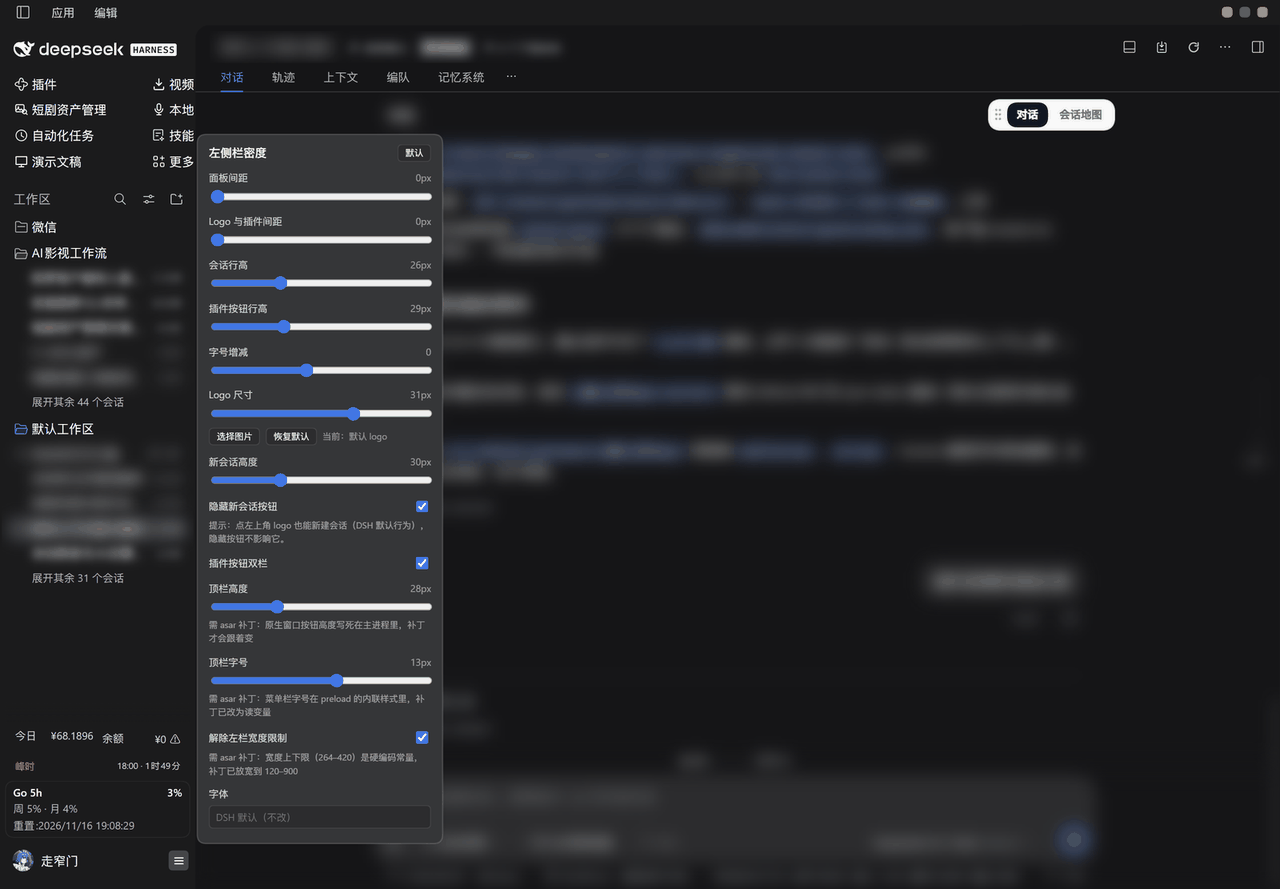
把 DeepSeek Harness 左侧栏的行高、间距、字号、Logo 尺寸、新会话按钮高度搬进一个浮层,拖动滑块即时生效;「应用 / 编辑」标题栏的高度与字号、以及左栏宽度上下限,也能在同一个浮层里调(这三项需要给 app.asar 打配套补丁,见下)。
它解决什么
DSH 左侧栏的几何是写死的:会话行固定高度、内边距固定、Logo 固定、插件按钮固定两行。屏幕小的时候一屏装不下几个会话,屏幕大的时候又空得厉害;想换字体、想让 Logo 大一点,都没有入口。
这个插件把这些数字变成滑块,改的是左侧栏自己的 CSS 变量与几何,不碰任何业务逻辑。
怎么打开
鼠标移到左侧栏底部账号按钮那一行,点最右边的「密度」图标(三横线),浮层贴着左栏右边缘向上展开。
- 拖动即生效,没有「保存」按钮;
- 点浮层外面收起;
- 右上角「默认」一键回到出厂值(只重置配置,不卸载插件)。
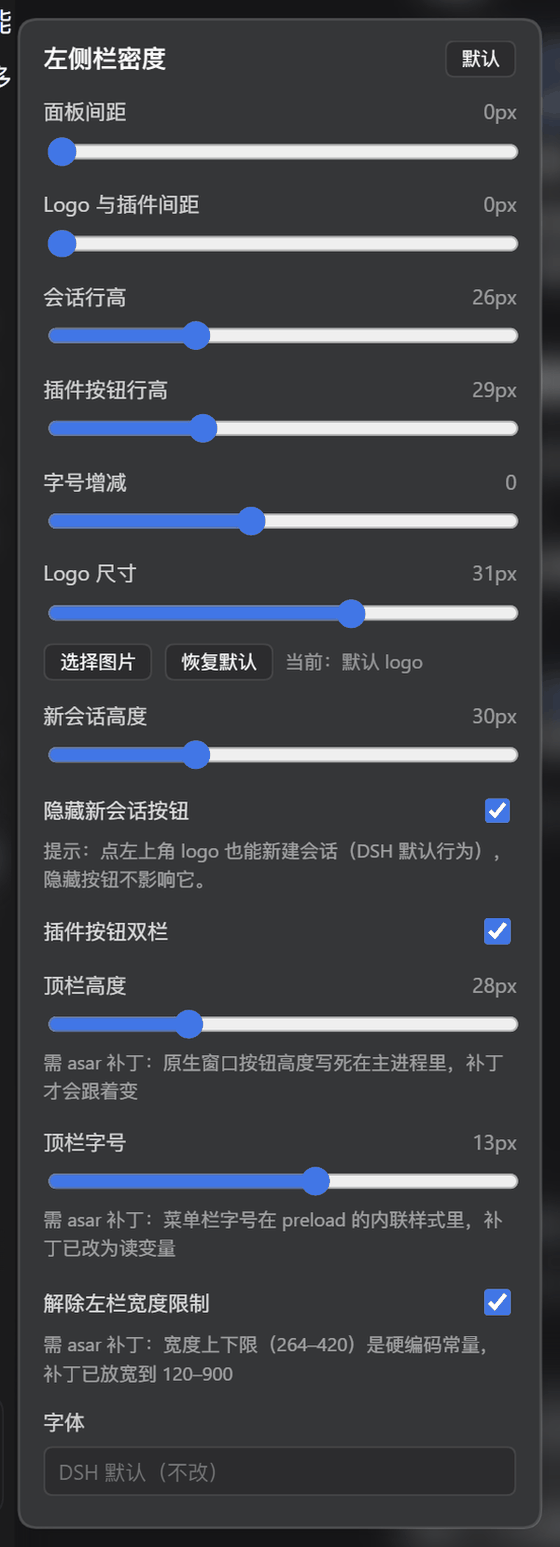
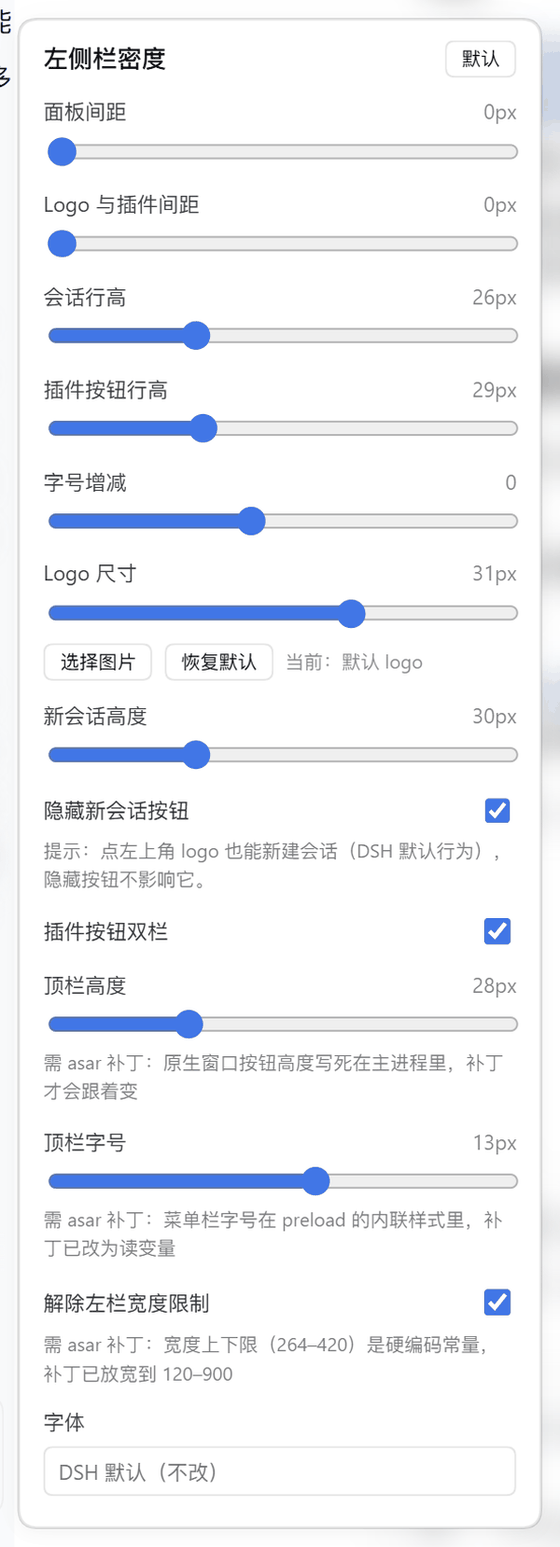
| 暗色 | 亮色 |
|---|---|
 |  |
能调什么
| 控件 | 默认 | 范围 | 改的是什么 |
|---|---|---|---|
| 面板间距 | 1px | 0–12 | 侧栏里插件按钮之间的竖直间距 |
| Logo 与插件间距 | 4px | 0–40 | 品牌 Logo 行与下方插件区之间留多少空 |
| 会话行高 | 26px | 20–40 | 会话列表每一行的高度(原本写死 32px) |
| 插件按钮行高 | 29px | 22–44 | 插件区每个按钮的高度 |
| 字号增减 | 0 | −3 ~ +4 | 在各自原始字号上做偏移,不是绝对值 |
| Logo 尺寸 | 24px | 14–40 | 品牌 Logo 的宽高;也可以「选择图片」换成自己的 logo |
| 新会话高度 | 30px | 24–44 | 顶部「新会话」按钮的高度 |
| 隐藏新会话按钮 | 关 | 开关 | 隐藏后仍可点左上角 logo 新建会话(DSH 默认行为) |
| 插件按钮双栏 | 关 | 开关 | 插件区改两列排布,条目多时省一半竖向空间;列宽按每一项的文字实测宽度自动取 |
| 双栏列间距 | 8px | 0–24 | 两列之间的额外空档 |
| 顶栏高度 | 28px | 20–48 | 「应用 / 编辑」标题栏高度,需 asar 补丁 |
| 顶栏字号 | 12px | 9–16 | 标题栏菜单文字字号,需 asar 补丁 |
| 解除左栏宽度限制 | 开 | 开关 | 左栏宽度上下限从 264–420 放宽到 120–900,需 asar 补丁 |
| 字体 | DSH 默认 | 系统字体搜索 | 只作用于左侧栏文字,可选预设或搜索本机字体 |
配置存在 localStorage 的 dsh-sidebar-density:settings,跨会话保留、跟着 profile 走。
三个需要 asar 补丁的项
DSH 把这几处写死在 app.asar 里,插件层改不到,所以浮层里这三项下方都标了「需 asar 补丁」。配套补丁脚本是 dsh-enhance-tools/tools/patch-density.cjs(等长字面量替换 + 原地改 integrity hash,改完过 node --check)。
| 项 | 打补丁前 | 打补丁后 |
|---|---|---|
| 标题栏高度 | titleBarOverlay.height = 40,preload 里写死 40px 内联变量 | 24px 起可调;frame: false + 自绘按钮,顶栏才能继续缩 |
| 标题栏字号 | preload 内联样式里直接写死像素 | 改读 --dsh-caption-font 变量,滑块才跟得上 |
| 左栏宽度 | SIDEBAR_MIN = 264、SIDEBAR_MAX = 420、clampWidth(…,264,420) | 120 / 900,sidebar 默认从 280 收到 220 |
不打补丁时:这三项拖了也不报错,只是不生效——原生窗口按钮高度和宽度上限仍然按 DSH 的原值走。补丁只改你自己那份安装的 app.asar,升级 DSH 后要重打。
20px 是原生按钮的安全下限,再小会被裁掉像素;补丁默认 24px。
它改的是什么
只覆盖左侧栏自己的变量与几何:
--dsh-sidebar-inline-padding/--dsh-sidebar-row-padding/--dsh-sidebar-label-gap;[role="treeitem"]的写死高度(会话行与工作区行);- 插件区
nav[aria-label]的行高与列数; - 品牌行 logo 尺寸、新会话按钮高度、
--dsh-caption-*三个顶栏变量。
选择器只用结构与语义钩子(data-sidebar-scrollport、role="treeitem"、nav[aria-label]、#dsh-sidebar-density-*),不写构建产物里带哈希的类名——那些跨版本必变。浮层配色全部取自宿主主题令牌(--dsw-*),亮暗都跟。
安装
# 从仓库装
dsh plugin add pcysanji/dsh-sidebar-density

# 或从 npm
dsh plugin add dsh-sidebar-density
装完重启 DSH;宿主侧只多一个字体枚举路由(/sidebar-density/fonts),其余全在客户端。
边界
- 窗口宽度低于 1024px 时,官方布局会把左栏整体收成 56px 图标栏,这段不由本插件接管。
- 右侧面板宽度、会话语义、任何功能开关都不改。
- 会话正文的字号不在这里(设置 → 通用设置 → 字号大小)。
- 三个 asar 项依赖补丁;DSH 大版本升级后补丁会失效,需要重打。
- 双栏列宽是按每一项的文字实测宽度算的;侧栏窄到两列加起来放不下时,只会让最长的那个走省略号,其余不受影响。
English
Sidebar density controls for DeepSeek Harness. A small popover next to the account button in the sidebar footer exposes sliders for session row height, plugin row height and spacing, logo size, font size delta, new-session button height, a double-column plugin layout, and an optional custom logo. Changes apply while you drag and persist in localStorage.
Three controls — window caption height, caption font size, and the sidebar width clamp — live inside app.asar and only take effect with the companion patch (patch-density.cjs), which rewrites those constants and the integrity hashes in place. The popover labels them as patched items; without the patch they simply do nothing.
Only the sidebar's own CSS variables and geometry are touched. Nothing about sending, sessions, or model behaviour changes.
License
MIT
Comments
Loading…
Similar plugins
by nullifyi
DeepSeek Harness plugin: VS Code-style sash dividers in the left sidebar, per-row compact mode with auto-shrinking content, and per-block collapse into icons above the avatar.
★ 0
MIT
JavaScript
Oct 21, 2026
dsh plugin --profile web add dsh-sidebar-widthby secyborg
DSH web plugin: a settings card to tune chat reading density — font size, line height, and block spacing of the conversation area (assistant markdown + user bubbles), applied live
★ 0
MIT
JavaScript
Aug 28, 2026
dsh plugin --profile web add dsh-compact-chat-uiby G57651
Customizes the DSH home sidebar plugin entries without harness source changes: one- or two-column panel list, icon-only mode with 500ms hover tooltips, and per-entry ordering, hiding, and a settings p
★ 1
TypeScript
Oct 25, 2026
dsh plugin --profile web add dsh-diy-layoutby MiraculousGu
DeepSeek Harness Web GUI toolbar + KDE tray + plugin settings: tray toggle, per-feature visibility, remembered default window size, check/update DSH, quit/restart.
★ 0
MIT
JavaScript
Nov 17, 2026
dsh plugin --profile web add dsh-app-controlsby TLEWA
DeepSeek Harness (DSH) sidebar plugin: long-press drag to reorder the global panel strip, tuck panels into the More menu and drag them back.
★ 3
MIT
JavaScript
Nov 17, 2026
dsh plugin --profile web add dsh-sidebar-organizerby hutao562
DeepSeek Harness plugin: a sidebar tab that takes over the whole page with another DSH instance's Web GUI, plus a remote session-state badge. 在侧边栏顶部加一个「远程」标签,整页切到另一台主机上的 DSH。
★ 2
↓ 289/wk
MIT
JavaScript
Sep 11, 2026
dsh plugin --profile web add dsh-remote-dsh