

dsh-wayland-vdesk
Manifest validPer-conversation off-screen Wayland desktops for DeepSeek Harness: run, screenshot, drive and watch GUI programs without touching your real desktop.
dsh-wayland-vdesk
A private Wayland desktop for every DeepSeek Harness conversation. Run, screenshot, drive and watch GUI programs off-screen — the windows never touch your real compositor.


English · 中文
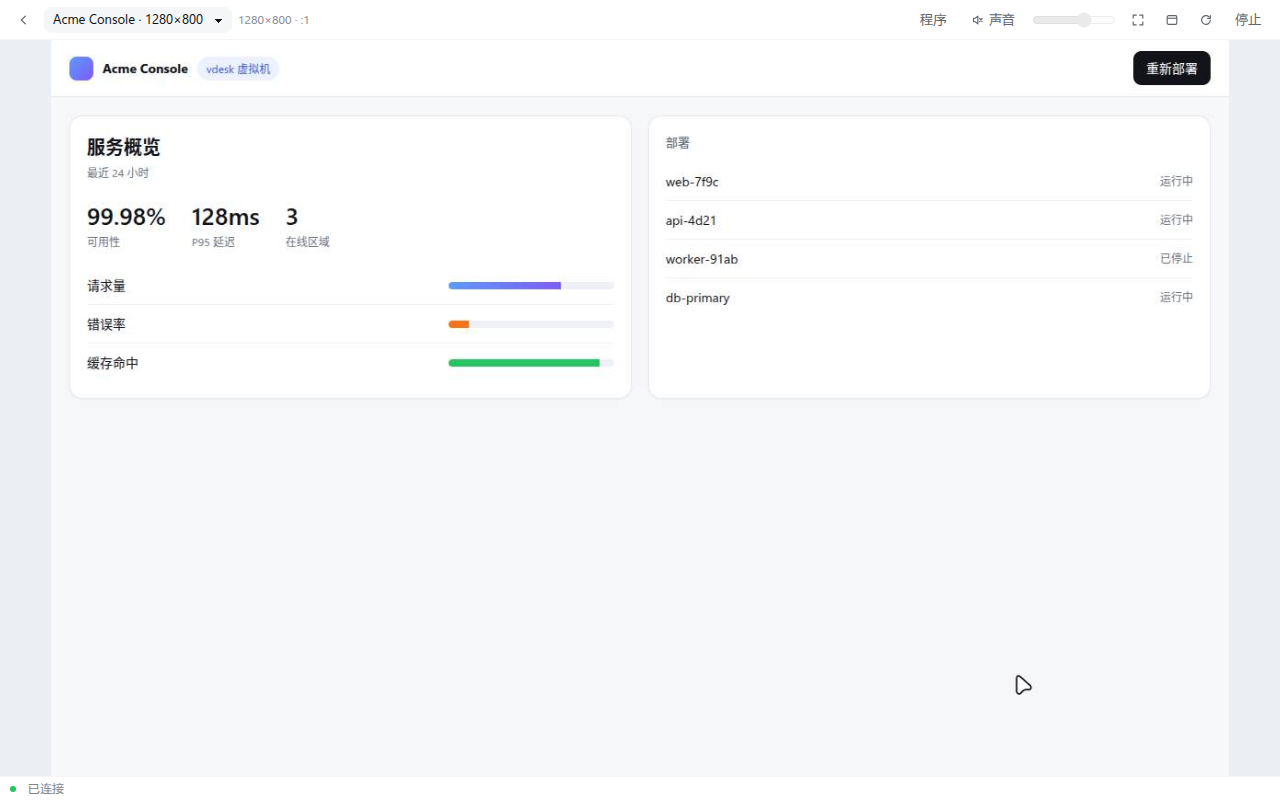
A DeepSeek Harness bundle that gives each conversation its own headless sway compositor (Wayland + Xwayland), streams it into the Web UI over VNC, and exposes it to the agent as ordinary tools:
vdesk_create()                                   → open this conversation's desktop
vdesk_run({command: "npm run dev"})              → start a program inside it
vdesk_shot()                                     → PNG straight into the model context
vdesk_input({actions: [{type: "click", x, y}]})  → click / drag / type / press keys
vdesk_apps() / vdesk_kill({pid})                 → see and stop what is running
vdesk_resize({width, height})                    → change the resolution live
Why
An agent that can look at pixels is a much better UI engineer — but pointing a real screen-driver at your desktop is
unpleasant: windows steal focus, pop up over your work, and global input injection (ydotool, /dev/uinput) hits
whatever session is focused, including yours.
dsh-wayland-vdesk gives every conversation a private compositor instead:
- Off-screen by construction. Its own
XDG_RUNTIME_DIR, its ownWAYLAND_DISPLAY, its own Xwayland display.hyprctl clientsnever shows a thing. - Wayland native and X11. sway's Xwayland runs side by side, so GTK 4, Qt, Electron and Wine all work.
- Safe input. Keyboard goes through the compositor's virtual-keyboard protocol, the pointer through sway's own
seat — never through
/dev/uinput. The two never meet. - Live and two-way. You watch the same framebuffer the agent screenshots, and you can take over with your own mouse and keyboard at any moment.
Screenshots
| Overview of every conversation's desktop | Embedded in a DSH conversation |
|---|---|
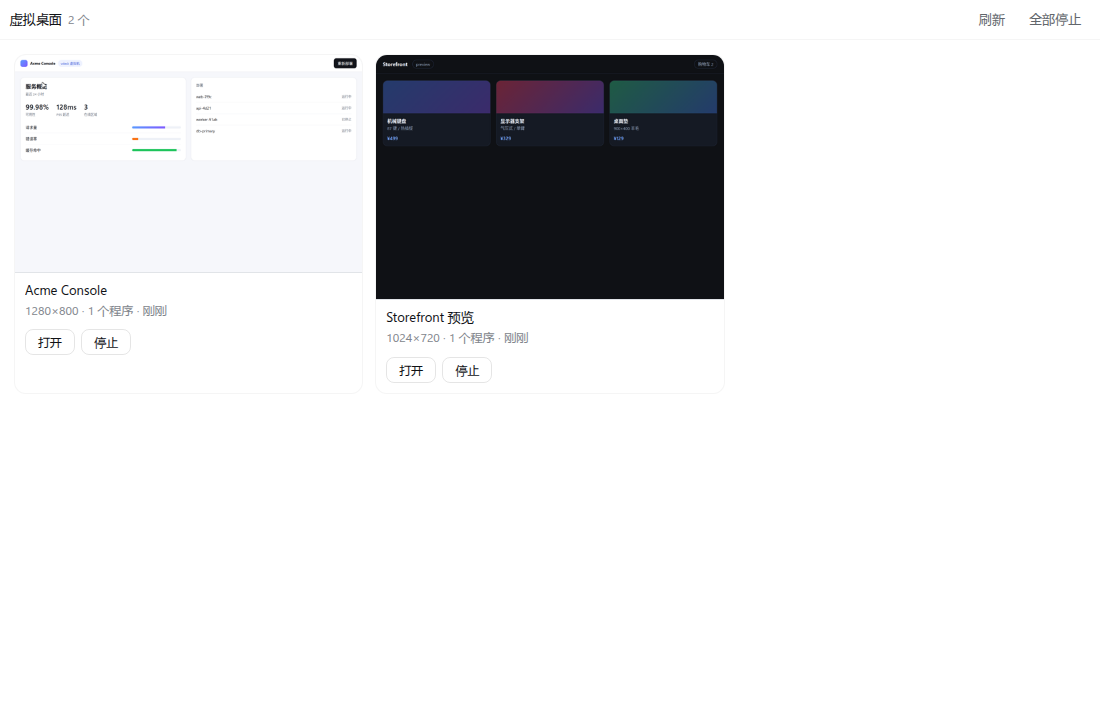 | 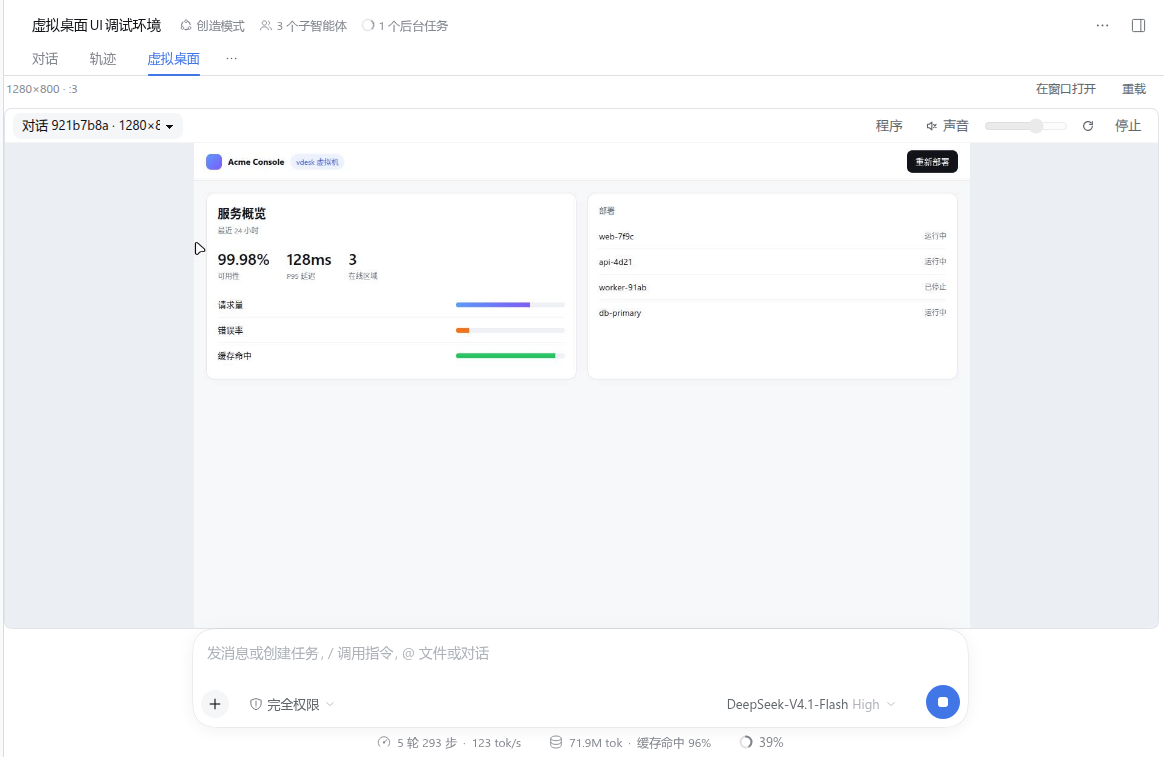 |
The overview lives in the sidebar (live thumbnails, open/stop, stop-all). The per-conversation tab shows one desktop full-size; the 程序 popover lists the programs and windows inside it and lets you stop them one by one.
Features
| Per-conversation isolation | One sway instance per DSH session, keyed by conversation id. |
| Any resolution | Pick it at creation, change it any time (vdesk_resize, 320–7680 px). |
| Wayland + X11 | Xwayland is started inside the desktop; both are captured and injected the same way. |
| Live view | noVNC over WebSocket, served from one loopback port, embedded in the DSH Web UI. |
| Screenshots to the model | vdesk_shot stores a PNG in DSH's attachment store and returns an image block. |
| Audio | Each desktop gets its own null sink; PCM is streamed to the page and played through a GainNode. Muted until you click 🔊. |
| Program control | List and kill the programs and windows a desktop owns — from the UI or from tools. |
| CLI | The same daemon is reachable from a shell: dsh-vdesk run, shot, env, exec, … |
| GPU when available | sway renders through the DRM render node; falls back to software automatically. |
Requirements
Linux with a Wayland or X11 session and PipeWire/PulseAudio.
# Arch
sudo pacman -S sway wayvnc grim wtype wl-clipboard novnc

# Debian/Ubuntu (noVNC is packaged as novnc + python3-websockify)
sudo apt install sway wayvnc grim wtype wl-clipboard novnc
| Program | Why |
|---|---|
sway | the headless compositor (Wayland + Xwayland) |
wayvnc | exposes the framebuffer/input over RFB on loopback |
grim | screenshots |
wtype | keyboard injection through the virtual-keyboard protocol |
wl-clipboard | paste-based input for CJK and long text (optional) |
wlrctl | relative pointer motion, needed for mouse-look and games (optional) |
| noVNC | the browser-side RFB client (any core/rfb.js tree; DSH_VDESK_NOVNC overrides the path) |
ffmpeg is used to downscale screenshots, xdotool is optional. Node ≥ 22.
Install
-
Install the bundle. Open Settings → Plugins → Install bundle and point it at this repository, or from a checkout:
dsh plugin --profile web add /path/to/dsh-wayland-vdeskthen add
dsh-wayland-vdesktodsh.profile.bundlesin the profile'spackage.json. The Plugin manager does both steps for you, so prefer it. -
Reload the DSH Web UI. A 虚拟桌面 entry appears in the sidebar, and every conversation gains a 虚拟桌面 view tab.
-
Check the daemon:
dsh-vdesk statusIt reports the hub port, which capabilities were found, and the current desktops.
Using it
From the Web UI
- Sidebar → 虚拟桌面 — the overview: every desktop with a live thumbnail,
打开/停止, and全部停止. - Conversation → 虚拟桌面 tab — this conversation's desktop, full size.
- 程序 — programs and windows inside the desktop; ✕ kills a program or closes a window.
- 停止 — tears the desktop down.
- 🔊 — audio, muted by default; the slider next to it sets the gain.
- 鼠标 — capture the mouse for games: moves become relative
looksteps instead of absolute warps (Esc releases). Absolute pointer events cannot drive a pointer-locked client.
From an agent
vdesk_create({width: 1440, height: 900})
vdesk_run({command: "python -m http.server 5173", wait: false})
vdesk_run({command: "chromium --app=http://localhost:5173"})
vdesk_run({command: "sleep 4", wait: true})
vdesk_shot()
vdesk_input({actions: [{type: "click", x: 320, y: 180}]})
vdesk_input({actions: [{type: "type", text: "hello"}]})
vdesk_shot()
Full parameter reference: docs/tools.md.
From a shell
dsh-vdesk create --conv my-app --size 1440x900
dsh-vdesk run  my-app -- cargo run
dsh-vdesk shot my-app --out /tmp/shot.png
dsh-vdesk env  my-app            # export lines you can eval into your shell
dsh-vdesk click my-app 640 400 && dsh-vdesk type my-app "hello"
Full command reference: docs/cli.md.
How it works
DSH Web (127.0.0.1:3080)
 └── conversation view / overview panel
        │ iframe
        ▼
   dsh-vdesk hub (127.0.0.1:7317, token-guarded)
        ├── /            viewer page        ├── /overview   overview page
        ├── /vnc/<id>    RFB over WebSocket ├── /audio/<id> PCM over WebSocket
        └── /api/*       JSON API
        │
        ▼
   dsh-vdesk daemon (one long-lived Node process)
        └── session s-xxxx  (one per conversation)
              ├── sway  (WLR_BACKENDS=headless, private XDG_RUNTIME_DIR)
              │     ├── wayland-1
              │     └── Xwayland :N
              ├── wayvnc → 127.0.0.1:<random port>
              ├── null sink dsh_vdesk_<id> + parec (on demand)
              └── the programs you started
The daemon is deliberately outside the DSH process: the CLI and the tools share one state, and a DSH restart or a plugin reload cannot orphan a compositor. Details and the reasoning behind each choice: docs/architecture.md.
Security model
- The hub binds 127.0.0.1 only, and every URL carries a per-daemon random token; the API and both WebSockets reject requests without it. Cross-origin pages cannot read the iframe URL, so they cannot obtain the token.
- Input never leaves the desktop: no
/dev/uinput, no synthetic events into your session. - This is display isolation, not a sandbox — programs run as you, with your files. Run untrusted code in a container or VM.
Limitations
- Linux only (Wayland compositor + PipeWire/PulseAudio).
- No IME inside the desktop. Use
method: "paste"for CJK or long text;wtypetypes Latin text directly. - If DSH is served over HTTPS, browsers block the
http://viewer iframe as mixed content. - One noVNC view per desktop is fine; many simultaneous viewers are not a design goal.
- Software rendering is used when the compositor cannot get a DRM render node.
FAQ
Does this show anything on my real desktop? No. The desktop is a separate headless sway instance with its own runtime dir; nothing is ever mapped onto your session.
Can the agent and I use it at the same time? Yes. The agent's vdesk_input goes through the compositor's seat and
your browser's input goes through wayvnc's virtual devices — both land in the same desktop.
Where does audio go? Into a per-desktop null sink. Nothing reaches your speakers unless you unmute the viewer; the gain is applied in the browser, so your system volume is untouched.
How do I stop everything?
dsh-vdesk stop-hub # daemon + all desktops
Repository layout
index.js              Host half: tools + authenticated routes      web/          viewer + overview pages
client.js             Client half: sidebar entry, panel, view tab   src/          daemon, sessions, audio, hub, CLI
cordis.patch.yml      bundle patch (one row)                        docs/         tool, CLI, architecture docs
locale/{en,zh}.json   Plugin Manager metadata                       docs/images/  screenshots
Contributing
Issues and pull requests are welcome. The repository uses Conventional Commits and signed commits.
node --check index.js && node --check client.js && node --check src/cli.js
dsh-vdesk status
License
Comments
Loading…
Similar plugins
by momasiku
Give DeepSeek Harness hands and eyes: screen_view hands the model a real PNG of your desktop, desktop_control drives the mouse, keyboard and windows, desktop_sequence runs a whole task in one call.
★ 205
↓ 1k/wk
MIT
JavaScript
Nov 5, 2026
dsh plugin --profile web add dsh-pilotby jing-hy
Windows-only computer use for DeepSeek Harness: captures the virtual screen and drives mouse & keyboard through 9 tools built on PowerShell and Win32 SendInput; pairs with picturereader so text-only m
★ 5
↓ 1.4k/wk
MIT
JavaScript
Oct 1, 2026
dsh plugin --profile web add computer-userby Loping151
VibeOS inside DeepSeek Harness: the whole web UI becomes a virtual desktop whose app windows are HTML the model writes as you use them.
★ 6
TypeScript
Oct 23, 2026
dsh plugin --profile web add dsh-vibeosWindows-native computer use for DeepSeek Harness: two tools drive and read any desktop app. One batch call runs find, click, type, key, read, wait and screenshot steps in a single engine pass, so a ta
★ 0
dsh plugin --profile web add dsh-win-computer-useby baldovinmarques391-design
Turn desktop operation into discrete tool calls that each return the frames captured around the call.
★ 0
MIT
JavaScript
Oct 3, 2026
dsh plugin --profile web add dsh-computer-controlby 988hj7tczd-oss
Cross-platform Computer Use plugin for DeepSeek Harness: observable desktop automation with an isolated virtual cursor, AX/UIA observation, screenshot vision, and 12 guarded tools.
★ 69
↓ 1.8k/wk
MIT
JavaScript
Oct 5, 2026
dsh plugin --profile web add dsh-computer-use