

dsh-deepcanary
Manifest valid★ 92Evidence-first attention supervision for DeepSeek Harness with C0–C3 policy, deduplicated Inbox alerts, quiet hours, and redacted outcome records.
DeepCanary
Let tasks run quietly. Know when they need you. Return to the right session.



English · 简体中文 · Documentation · Changelog
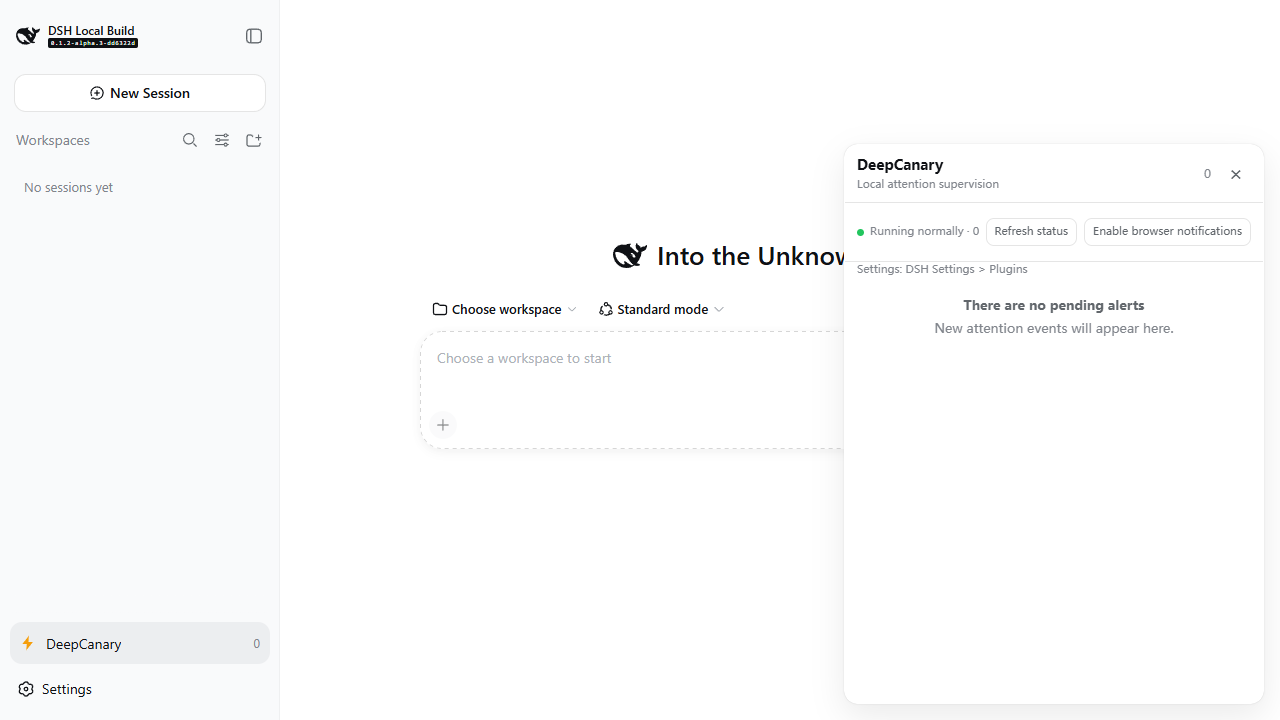
DeepCanary adds a local task inbox to DeepSeek Harness. It brings questions, approvals, failures and completion summaries together, with quiet notification policies and a direct return to the relevant session.
Version: 0.1.4-rc.1 · Host baseline: DSH 0.2.0-rc.2. This is a release candidate. The npm latest and next channels both select this RC; their channel names describe installation defaults. See compatibility and device coverage for the supported scope.
Install
Desktop
Open DSH Plugins, use its official package installation control, and enter:
dsh-deepcanary@0.1.4-rc.1
Apply the change using the manager's enable/restart instructions. Save active work before restarting. Desktop manages its own reserved profile; use the application's manager for installation, update and removal.
WebUI with the DSH CLI
Check that your installed host is DSH 0.2.0-rc.2, then install into the web profile:
dsh --version
dsh plugin --profile web add dsh-deepcanary@0.1.4-rc.1
dsh --profile web
Open the authenticated URL printed by DSH. The fixed package version makes installation reproducible. You can also pass the downloaded .tgz from GitHub Releases to plugin add. Use the official npm registry if a mirror has not synchronized the release.
Existing DSH source checkout
From a built checkout at dsh-v0.2.0-rc.2 (commit 639ed015397290b3745d163aafe02ffee4aa3f84), run the checkout's CLI script:
npx --yes pnpm@11.7.0 run dsh plugin --profile web add dsh-deepcanary@0.1.4-rc.1
npx --yes pnpm@11.7.0 run dsh --profile web
Follow DSH's source setup instructions to prepare that checkout. The plugin repository uses its own npm lockfile; its development commands are in development.
Update and remove
To update the Web profile, rerun the fixed-version installation command and follow DSH's reload instructions. To remove it:
dsh plugin --profile web remove dsh-deepcanary
In a source checkout, use npx --yes pnpm@11.7.0 run dsh plugin --profile web remove dsh-deepcanary. Removal preserves the host profile, sessions and saved reminder data.
Use
- Open DeepCanary from the DSH sidebar.
- Configure it under Settings → Plugins → DeepCanary. Choose the notification level, hourly budget and quiet hours.
- Enable browser notifications if you want them, then run your tasks normally.
- Open an Inbox item to return to its session, inspect its evidence, snooze it or give explicit feedback.
| Level | Meaning | Behavior |
|---|---|---|
| C1 | Suggested check | Routine outcomes and completion summaries remain available in Inbox. |
| C2 | Needs attention | Failures and possible stalls are evaluated against your notification policy. |
| C3 | Immediate human attention | Requires authoritative Host/runtime evidence, including open human questions and approval boundaries. |
Related events are grouped and deduplicated. Healthy long tools keep bounded progress grace; parallel tool completion updates that grace. Timed questions remain answerable after timeout, and accepted replies close their reminder. Completion summaries survive recovery and reload.
The resizable Inbox has opaque light/dark surfaces, keyboard controls and expandable evidence. Navigation uses DSH's public session-opening capability. When a target is unavailable, the item explains its availability and preserves the summary.
Settings use DSH's revision-aware configuration service. A concurrent change produces a conflict while retaining your draft; discard and reread before editing against the current snapshot.
Privacy
Reminder state stays in the local profile. Stored fields are bounded metadata, hashed references, explicit feedback and the local session handle used for navigation. Conversation text, prompts, model output, tool arguments and API credentials remain outside captured reminder state.
Plugin HTTP endpoints use DSH's authenticated shared API, with Host/Origin checks, bounded JSON input and sanitized errors. Feedback collection is optional. Open and acknowledge actions describe interaction; usefulness is supplied by explicit feedback. See security and feedback calibration.
Limits
- Notifications require the Host and renderer to remain running, browser permission and suitable OS settings. Operating-system delivery remains unknown until observed.
- Desktop shares the deterministic core, settings and Inbox. Hidden-window notification wake-up and Toast click return require public Host support and device evidence; this RC provides the renderer notification path.
- Windows WebUI is the current development and device-validation entry. Other operating systems have automated source coverage where CI runs; native delivery coverage is documented separately.
- Supervisor remains experimental and disabled by default. Its local projection lasts while its owning Host process runs.
- Natural feedback currently supports specific defect investigation. Cross-workday policy calibration and model Judge adoption retain their evidence gates; current live policy is deterministic.
See compatibility for coverage and troubleshooting, architecture for the implementation, and contributing to help improve it.
License
MIT. Built on the public DeepSeek Harness plugin APIs.
Compatibility
Versions
| Latest version | Published | Size |
|---|---|---|
| 0.1.1-rc.1 | — | — |
| 0.1.1-rc.4 | — | — |
| 0.1.1-rc.3 | — | — |
| 0.1.1-rc.6 | — | — |
| 0.1.4-rc.1 | — | — |
| 0.1.1-rc.5 | — | — |
| 0.1.6-rc.4 | — | — |
Comments
Loading…
Similar plugins
by Aisland-SJL
🔔 Cross-window completion & approval notifications for DeepSeek Harness — popup reminders that bring you back to DSH, Codex/WorkBuddy style.
★ 19
↓ 251/wk
MIT
TypeScript
Aug 16, 2026
dsh plugin --profile web add dsh-reminderby weekitmo
Completion and status notifications for DeepSeek Harness: desktop alerts, browser-tab unread counts, and sidebar session indicators, with per-event controls.
★ 0
MIT
TypeScript
Sep 8, 2026
dsh plugin --profile web add dsh-notifyby XiaoSHang05
A passive watchdog for DeepSeek Harness: watches a turn's thinking and text streams and cancels it when the model starts repeating itself.
★ 0
MIT
JavaScript
Oct 27, 2026
dsh plugin --profile web add dsh-rice-guardby XiaoSHang05
A passive watchdog for DeepSeek Harness: watches a turn's thinking and text streams and cancels it when the model starts repeating itself.
★ 0
MIT
JavaScript
Oct 14, 2026
dsh plugin --profile web add dsh-loop-guardby SipengXie2024
User-attention notifications for DeepSeek Harness (dsh) web: turn end, approval requests, and model questions — in-page toast + OS-level browser notification
★ 0
MIT
TypeScript
Aug 17, 2026
dsh plugin --profile web add dsh-turn-reminderby MaRi23333
Unofficial host-side ServerChan alerts for DeepSeek Harness: sends a mobile reminder when an approval, plan review, or question stays unanswered past a configurable threshold, even with the browser cl
★ 0
↓ 193/wk
MIT
TypeScript
Oct 22, 2026
dsh plugin --profile web add dsh-serverchan-watchdog