

dsh-realtime-subtitles
Manifest validDeepSeek Harness plugin: live Chinese subtitles from system audio for local Japanese/English video playback.
实时字幕 / Live Subtitles
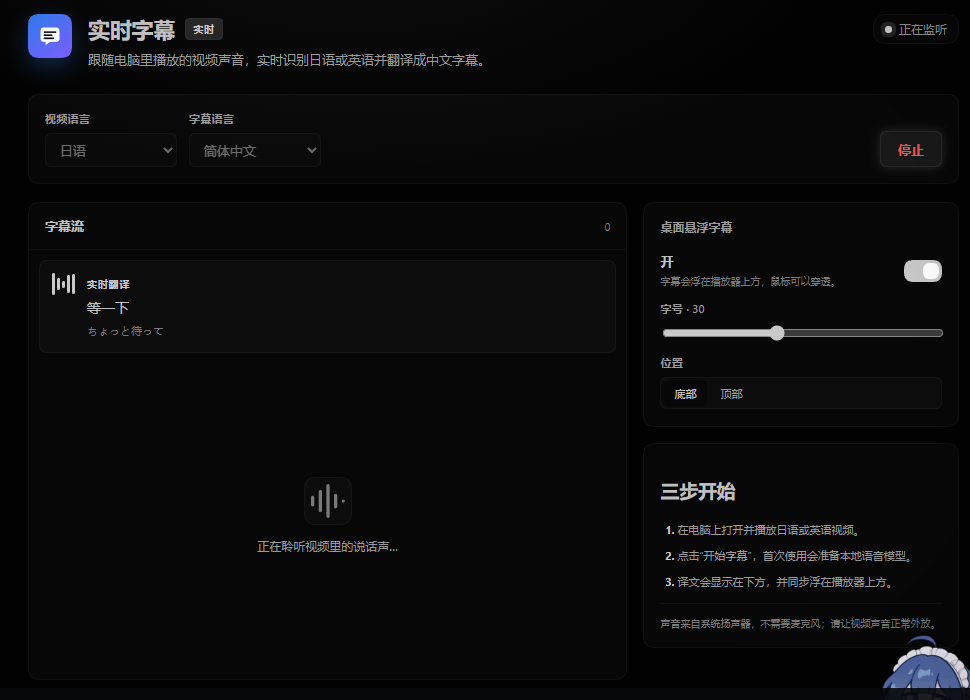
一个 DeepSeek Harness 插件:在电脑本地播放日语或英语视频时,从系统扬声器捕获声音,边说话边识别、边翻译并显示中文字幕,同时提供可穿透点击的桌面悬浮层。
安装
要求:Windows 10/11、DeepSeek Harness(含 speech-to-text 实验性语音识别与翻译能力)、Python 3.10+,以及已安装 Git(插件安装过程会通过 git 解析 GitHub 依赖)。
方式一:插件市场(推荐)
在 DeepSeek Harness 中打开「插件市场」,添加 GitHub 仓库来源:
Oreo0614/dsh-realtime-subtitles
然后点击安装并重启 Harness。
方式二:命令行
dsh plugin add github:Oreo0614/dsh-realtime-subtitles
安装完成后重启 DeepSeek Harness,左侧栏会出现「实时字幕」入口。
升级:用同样的命令重新安装一次即可;插件市场里也会提示更新。
使用
- 在电脑上打开并播放日语或英语视频,保持声音外放。
- 点击左侧栏的「实时字幕」,选择视频语言,然后点击「开始字幕」。
- 首次启动会准备本地 Whisper 模型(tiny + base,约 220 MB),之后复用缓存。
- 正在说话时先用 tiny 模型生成滚动草稿并立即翻译;停顿约 270 ms 后用 base 模型给出一句完整、准确的字幕。
- 桌面悬浮字幕默认开启,可在右侧面板关闭、调整字号和位置;悬浮层鼠标穿透,不挡播放器操作。
依赖
- Python 3.10+,以及
soundcard、numpy、faster-whisper==1.2.1、ctranslate2==4.5.0;首次启动会尝试自动安装缺失组件。 - 本地识别模型来自
Systran/faster-whisper-tiny与Systran/faster-whisper-base,通过 HF-Mirror 下载到$DSH_HOME/realtime-subtitles/faster-whisper/。 - Windows 上会为子进程设置
KMP_DUPLICATE_LIB_OK=TRUE,以兼容 Anaconda 的 MKL 与 ctranslate2 的 OpenMP 运行时。 - 翻译使用 Harness 自带的翻译服务(
@deepseek-ai/dsh-experimental-translator,默认 Bing)。
低延迟设计
- 边说边出字:每约 360 ms 提交一次短音频草稿,tiny 模型单次识别约 0.2 秒。
- 草稿即时翻译:识别到草稿就请求翻译,悬浮层用同一行不断替换/补全,不等整句结束。
- 最终结果优先:检测到语音结束时,丢弃排队中的旧草稿,final 请求插队,避免「上一句占着队列」。
- 双模型分工:草稿用 tiny,最终句用 base;兼顾即时性和准确性。
- 短停顿切句:静音约 270 ms 即结束当前句;连续讲话最长约 3.5 秒强制切分一次。
- 译文防抖:草稿译文只增长不缩短,避免在多个不完整识别结果之间闪烁;最终译文会覆盖草稿。
实现
engine/engine.py:WASAPI loopback 采集(soundcard)、WebRTC VAD 分段、faster-whisper tiny/base 识别、Tk 置顶穿透字幕层。index.js:Host 插件。启动/停止 Python 引擎,调用 Harnesstranslator翻译草稿和最终稿,通过同源 HTTP + SSE 向 Web 面板推送状态。client.js:左侧栏图标、主面板页面、实时字幕流和悬浮层设置。cordis.patch.yml:挂载匿名翻译服务,以及插件兼容的本地语音识别运行时。
说明与限制
- 目前针对日语和英语优化,目标是简体中文字幕;也支持「自动检测」。
- 草稿可能包含少量识别误差,停顿后的最终句会纠正;快速对白中请以最终句为准。
- 如果播放器使用 WASAPI 独占模式,系统回环可能采集不到声音,请改为共享模式输出。
- 仅支持 Windows(依赖 WASAPI loopback 与 Tk 悬浮窗);识别在 CPU 上运行,低配机器上延迟会上升。
English
A DeepSeek Harness plugin for live Chinese subtitles while playing Japanese or English videos locally: it captures system audio (WASAPI loopback), transcribes with a local faster-whisper tiny/base pipeline, translates through the Harness translator service, and renders both an in-app panel and a click-through desktop overlay.
Install:
dsh plugin add github:Oreo0614/dsh-realtime-subtitles
or add Oreo0614/dsh-realtime-subtitles as a GitHub source in the DSH plugin market. Requires Windows, Python 3.10+, and a DeepSeek Harness build that ships the speech-to-text and translator capabilities.
License
Comments
Loading…
Similar plugins
by jinchezuo
Local English-Chinese live interpretation for DeepSeek Harness: mic/system audio, terminology-aware captions, handout reader. macOS/Windows.
★ 4
MIT
JavaScript
Nov 16, 2026
dsh plugin --profile web add dsh-interpretby Dee3526
Minimal Chinese voice input plugin for the DeepSeek Harness Web UI
★ 0
MIT
JavaScript
Sep 3, 2026
dsh plugin --profile web add dsh-plugin-voice-input-demoby drliuhuan
DeepSeek Harness meeting assistant plugin: system audio capture, local SenseVoice transcription, domain-aware LLM correction, agenda and speaker turns, live minutes and Q&A.
★ 0
MIT
JavaScript
Nov 13, 2026
dsh plugin --profile web add dsh-plugin-live-meetingby mohith-das
Minimal, English-only voice input plugin for DeepSeek Harness Web UI — a mic button in the composer using the browser's native SpeechRecognition API. Zero dependencies, no subprocess, no tracking.
★ 0
MIT
JavaScript
Sep 1, 2026
dsh plugin --profile web add dsh-voice-input-enby wencharmwang
plugin of voice input for DeepSeek Harness
★ 0
MIT
TypeScript
Aug 18, 2026
dsh plugin --profile web add dsh-voiceby x01Jin
Translates Chinese interface text from installed DeepSeek Harness plugins into English
★ 0
MIT
JavaScript
Nov 7, 2026
dsh plugin --profile web add dsh-auto-i18n