
dsh-session-alerts
IdentifiedDSH 会话提醒:逐会话未读角标与原生侧栏已完成会话筛选,帮助快速找回已结束的主会话。
DSH Session Alerts
DSH Session Alerts / DSH会话提醒 adds a native unread-main-session workspace filter and quiet per-session unread / pending-interaction Windows taskbar badges to DeepSeek Harness Desktop. The bell filters unread sessions, not completed tasks.
The technical npm package, settings namespace and contribution IDs remain dsh-native-taskbar-badge; this product rename does not migrate or reset settings/unread state.
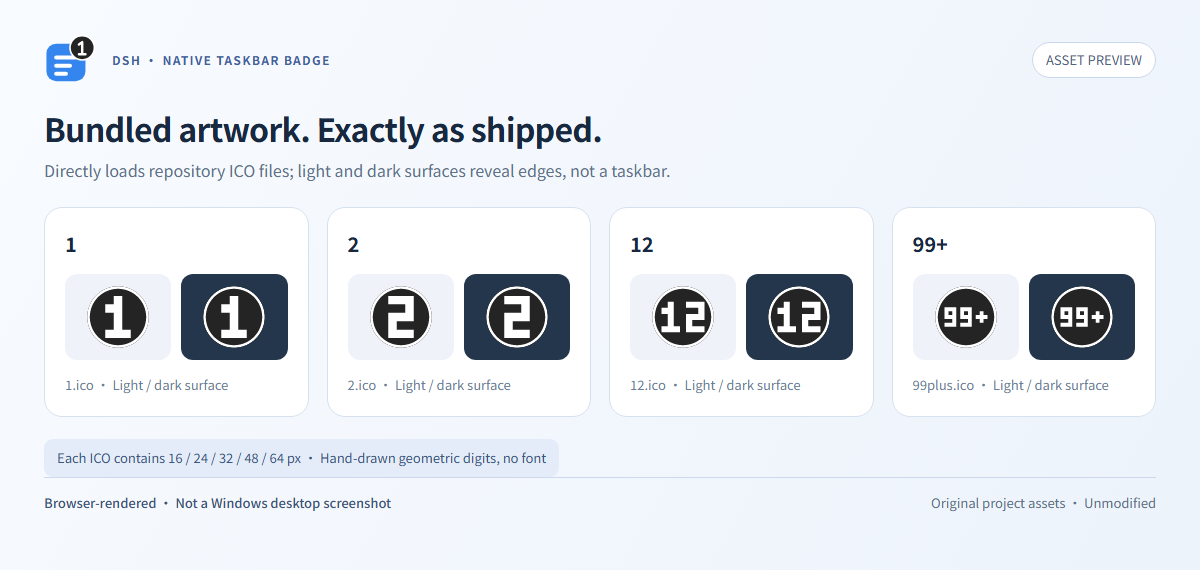
Badge artwork: original rounded Bezier numerals, dark circular/capsule backgrounds and transparent antialiased edges, introduced in 0.2.2. Each ICO includes 16/24/32/48/64 px artwork; no system or bundled font is used.
One session, one count — read one, subtract one
- Quiet: no toast, sound, focus stealing, ASAR patch or application-identity changes.
- Deduplicated: each main session counts once, even with repeated completion/error events or several input requests. Subagents are excluded.
- Two scoped read paths: an official Chat result footer can acknowledge its exact visible result. The client also synchronizes a currently selected, ready, main-view-retained main session that native DSH explicitly marks read (
completionUnread === false), only while the page is visible and focused. This does not require scrolling back to an old footer. - Revision-safe: both paths obtain the exact session, turn, turn-end event sequence and Host-issued revision and acknowledge by CAS. A delayed read cannot clear a newer result. The Chat
turnTailmarker supports both currentTimelineTurnobject props and legacy numeric turns. - Foreground counts too: while you view A, a result in B still adds one. With five unread sessions, reading one changes 5 → 4, never a blanket 5 → 0. Pending interactions may keep that session counted.
There is no window-wide clear or bulk acknowledgement of every false unread flag. Hidden/unfocused pages, inactive or unretained sessions, and unknown/not-ready native states do not authorize the current-session synchronization. Reconnecting or refreshing does not invent a global acknowledgement; neither read path resolves waiting requests.
Real Windows taskbar captures — controlled native probes
| Native probe value: 5 | Native probe value: 4 |
|---|---|
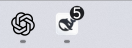 | 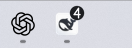 |
Actual 132 × 48-pixel taskbar-region captures with DSH in the foreground. The native helper received controlled probe values 5 and 4 on the same DSH window; both COM calls returned success (HRESULT 0). These prove native shell rendering, not five real model tasks or an end-to-end client read-acknowledgement transition. The 5 → 4 unread-state behavior is verified separately by isolated integration tests.
Historical 0.2.1 block-digit comparison — not the current 0.2.2 artwork or a desktop screenshot
What the number means
Eligible live main-session results: completion, error, blocked and output-limit endings. With notifyOnWaiting, unresolved approval/question requests also keep their session counted until answered or decided; view-only acknowledgement of pending questions is not implemented. Reading an older result never resolves a pending request, and resolving a request never discards an unread result. Display is 1–99, then 99+.
Cancellation and restored history do not create badge notifications. Intermediate successful rounds of an active goal are filtered by default. Badge unread state lives in Host memory: it survives browser/window disconnect, page refresh and helper restart, not Host restart or plugin disable/re-enable. The sidebar's native unread marker instead follows DSH's browser-side lifecycle; it is not reconstructed from historical completion logs. There is no history-replay or persistent-unread claim. See behavior and limitations.
The badge number is not the sidebar unread-row count. It also counts unresolved interactions, and a previous unread terminal can remain counted while newer work runs. Native sidebar unread is browser-memory state; background running sessions and lifecycle differences can produce different totals. Current-main-session synchronization narrows a specific read-state mismatch, not every difference.
Unread-session workspace filter
Click the bell in the workspace section's right-hand header actions, beside the native search/view/add controls. It keeps only main sessions whose native ctx.uiSession.sessionStatus entry has completionUnread === true. Success/completion, waiting, running, goals or badge totals do not infer unread; a running session can match when its native unread bit is true. Subagents and missing/unknown unread flags do not match.
The button exposes a pressed state and localized accessible name/tooltip: “Unread filter” when off, “Reset filter” when on (Chinese: “未读过滤” / “重置条件”). Its page-local toggle composes by intersection with search, archive visibility and other filters, and updates live as native session/status snapshots change. It does not archive/delete sessions, write metadata, acknowledge unread, clear search, alter grouping/order, or reset other filters.
An empty result explicitly says “No unread sessions match the current filters.” (Chinese: “当前条件下没有未读会话。”). Reset disables only this bell filter, preserving the search query and other conditions. Leaving it enabled allows newly unread matches to appear without another toggle. Filtering out the current row does not close its conversation.
This feature requires workspace extension API v1, not supplied by stock rc.3. The isolated, user-authorized workspace SDK compatibility project provides genuine header/status slots and composable set filters on a SHA-256-pinned local rc.3 baseline. It is not an upstream official API/release and is deliberately excluded from the main npm archive. No DOM hiding, title-based inference, ASAR editing or replacement application server is used. Missing API fails closed with an unavailable diagnostic and no fake header toggle.
For a durable compatibility upgrade, generate a repaired package archive, pin its manifest and lockfile resolution/integrity, then stage and atomically replace the package. Do not overwrite pnpm-store-backed hardlinks in place or treat a one-off edit to node_modules/.../client.js as an upgrade. Machine-local backup archives are not release artifacts and must not be published.
The bell does not consume the completed projection. That projection and old completed helpers remain for compatibility only; legacy completion semantics are not the current filter contract. The standalone sidebar package uses the same unread filter without adding a badge read marker; do not enable it alongside the full client, because they provide the same filter ID. The sidebar needs no Python/Windows. See unread filter semantics and composition.
Verification boundary: fake regressions cover live unread changes, query/archive composition, reset, current-view revision races and waiting preservation. Personal-machine live checks are not public multi-environment release visual evidence; the historical completed-toggle captures are not evidence for this bell UI.
Requirements
Native badge: Windows 10/11, Explorer and a visible DSH taskbar button; trusted Windows Python 3.10+. Sidebar: locally provided workspace extension API v1 and native uiSession.sessionStatus; no completion-projection or Python/Windows requirement. Node 22+; DSH >=0.2.1-rc.2 <0.3.0 with official subprocess, sessionProjections, connection, webServer and the client Chat/Session/Conversation/Slot services. The package includes its browser contribution through the official plugin mechanism. Footer-based acknowledgement is Chat-only; current-main-session native-read synchronization is separate and uses the guards above. See compatibility.
Install from source
Use the official CLI from your current Desktop installation. This is a manual installation step; repository tests do not change your live profile.
$DshCli = Read-Host 'Full path to resources\runtime\cli\bin\dsh.cmd in your DSH installation'
$Project = (Resolve-Path .).Path
& $DshCli plugin --profile desktop add --ignore-scripts $Project
Keep the checkout if the CLI creates a local link. Disable any other badge provider before enabling this one. After installing/updating the browser contribution, refresh your existing DSH page if it has not loaded the new contribution. Operations and rollback.
Settings and development
Simplified Chinese is the default and fallback. Use language: en for English; only explicit auto follows environment language. Set exact desktopExecutable and trusted pythonPath if discovery cannot find them. Configuration.
npm run build
npm test
npm run test:python
npm run test:pack
The installed plugin has no Pillow/font dependency. Artwork regeneration and the Python asset tests need the development-only dependency provisioned with python -m pip install -r tools/requirements-assets.txt; after provisioning they run offline. No paid model calls, live profile edits or native taskbar access are used by tests. Test evidence and limitations · Images · Alternatives · Contributing · Security · Asset provenance.
License
Comments
Loading…