

dsh-restart-button
Manifest valid★ 1Draggable floating restart button for the DeepSeek Harness(dsh) Web GUI:confirm, then restart the app and host.
dsh-restart-button
A draggable floating restart button for the DeepSeek Harness (dsh) Web GUI.
Drag it where you want it, click it, confirm — the desktop app and its host process close and come back by themselves. If the restart cannot happen — a security suite blocks it, or the app simply refuses to close — the button says so, cleans up after itself, and never leaves you with a spinner.

Features
- Draggable — the button sits in the corner you drag it to; the position is stored in
~/.dsh/restart-button.jsonand survives a restart. - Confirm, then watch — a click opens a dialog. In the waiting state you can still cancel with 取消重启; after 45 seconds without the app closing, the plugin cancels the job itself and tells you why.
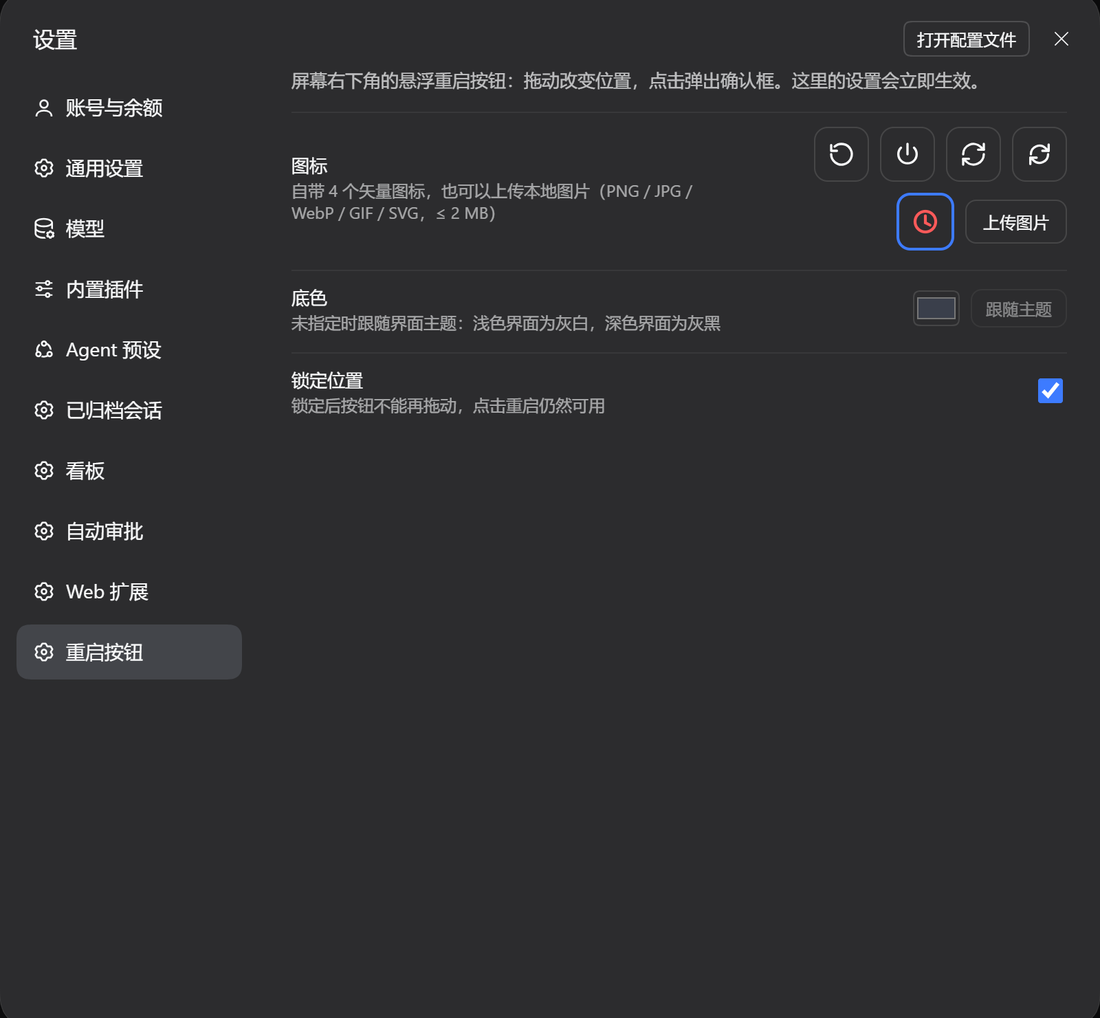
- Custom icon — four built-in vector glyphs, or upload your own image (PNG / JPG / WebP / GIF / SVG, ≤ 2 MB).
- Custom background colour — pick any colour; the glyph switches between dark and light ink automatically. Unset, it follows the UI theme.
- Lockable position — freeze the button in place so a stray drag cannot move it.
- Everything is editable in Settings → Restart button and applies immediately.

Install
Through the plugin manager: open 插件 / Plugins → 安装插件 and paste the package URL below. From a terminal, in the profile you use:
dsh plugin --profile desktop add https://codeload.github.com/NYSM803/dsh-restart-button/tar.gz/refs/heads/main
That URL form needs nothing but pnpm. The
github:NYSM803/dsh-restart-buttonshorthand also works, but only whengitis installed — pnpm resolves it withgit ls-remote, and without git the install stops withERR_PNPM_GIT_RESOLVE_FAILED.
The host half mounts on the next app start; the browser half after the page reloads.
How the restart works
POST /api/restart-button/restart starts lib/relauncher.mjs as a detached process on the app's
own executable (ELECTRON_RUN_AS_NODE), so no PowerShell and no scheduled task is involved —
those are exactly what Windows security suites block. The launcher:
- waits 0.3 s, and gives up harmlessly if the UI cancelled in the meantime;
- asks the app to close once (
taskkill /im), then escalates to a forced kill every 150 ms until no app process is left — and refuses to start a second instance if they survive; - starts the app again, retrying through
cmd startand PowerShell when the direct spawn is refused, and reportsrelaunchedas soon as the new process exists. The whole cycle is a few seconds; the app's own window then takes a moment to appear.
The host verifies the launcher really started (its first log line) within 1.8 s, so a blocked script becomes an error dialog instead of a silent no-op. Cancel and status are separate endpoints, and a 45-second watchdog ends a restart that never takes effect.
Logs land in %LOCALAPPDATA%\dsh-restart-button\relaunch.log; the last lines are also served by
GET /api/restart-button/log.
An in-flight answer is interrupted by the restart; the saved session transcript is not.
Troubleshooting
| What you see | What it means |
|---|---|
| 启动器没有跑起来(多半被 360 / 火绒 之类的安全软件拦下了) | The launcher process could not start or died immediately. Add the DeepSeek Harness folder to the security software's allowlist and retry. |
| 重启超过 45 秒没有生效,已自动终止 | Nothing closed within the watchdog. The app is untouched; check the log for the launcher's exit codes. |
| 已经发出关闭指令,这次重启无法取消 | The close request is already out; the launcher finishes the cycle so the app cannot be left closed. |
| the app survived the forced close — not starting a second instance | The force close was blocked. Nothing was started twice; quit the app by hand and reopen it. |
If the app closes but does not come back
The launcher only closes the app after it has proven it can run, and it retries the start three ways
(app binary → cmd start → PowerShell Start-Process). If all three are refused, the log names each
failure and the app stays closed — on those machines Windows security software is blocking process
creation by an unsigned script host.
Add both executables to the allowlist of every security suite you run, then try again:
| Suite | Where |
|---|---|
| 360 安全卫士 | 安全防护中心 → 信任区 → 添加目录,加入 D:\deep seek(至少 DeepSeek Harness.exe 与 node.exe) |
| 火绒安全软件 | 防护中心 → 信任区 → 添加文件/目录,加入 DeepSeek Harness.exe 和 …\.dsh\dsh-runtimes\…\dependencies\node\bin\node.exe |
| Windows Defender | 病毒和威胁防护 → 管理设置 → 排除项 → 添加文件夹 D:\deep seek |
Quitting 360 / 火绒 for the duration of a restart also works, but the allowlist is what makes the button dependable.
The log is %LOCALAPPDATA%\dsh-restart-button\relaunch.log; it is rewritten on every attempt, so read
it before clicking again. GET /api/restart-button/log returns the same lines.
Settings
| Field | Effect |
|---|---|
| Icon | four built-in glyphs, or an uploaded image stored in ~/.dsh/restart-button/icon.* |
| Background | any colour, or follow theme (the default) |
| Lock position | stops dragging, keeps the click |
API
| Method | Path | Purpose |
|---|---|---|
| GET / POST | /api/restart-button/config | read / merge the configuration |
| GET / POST | /api/restart-button/icon | the uploaded icon / upload it as {"dataUrl":"data:image/png;base64,…"} |
| POST | /api/restart-button/restart | start a restart; {"dryRun":true} only resolves the paths |
| GET | /api/restart-button/status | job phase: starting, launched, done, cancelled, timeout, blocked, failed, irreversible |
| POST | /api/restart-button/cancel | cancel, unless the close request is already out |
| GET | /api/restart-button/log | the last launcher log lines |
Package layout
package.json        declares dsh.bundle (the cordis patch) and dsh.client (the browser half)
cordis.patch.yml    inserts the restart-button row
lib/index.js        host half: config, icon upload, restart job, status/cancel routes
lib/relauncher.mjs  the detached relauncher started on the app's own binary
lib/client.js       browser half: floating button, confirm/cancel dialog, settings page
Requirements
- dsh >= 0.2.2-rc.1, Windows (the relauncher uses
taskkilland the app's own binary). - React 18 is provided by the host.
License
MIT
Comments
Loading…
Similar plugins
by IHS470
DeepSeek Harness restart button in the DSH desktop window title bar
★ 3
↓ 167/wk
MIT
JavaScript
Oct 3, 2026
dsh plugin --profile web add dsh-plugin-restartby Neptune810
A draggable one-press stop button for the DeepSeek Harness Web GUI. / DSH 一键结束服务按钮。
★ 0
MIT
JavaScript
Sep 23, 2026
dsh plugin --profile web add dsh-power-buttonFloating restart button for the DSH web GUI: restarts the dsh process in place with a full-screen overlay and auto-reloads the page; no launcher script required, works on Windows/macOS/Linux.
★ 0
dsh plugin --profile web add dsh-restart-fabby StarMoon-win
Sidebar restart button for DeepSeek Harness Desktop: one click fully quits and reopens the app.
★ 0
MIT
JavaScript
Oct 20, 2026
dsh plugin --profile web add dsh-restartby 13520rygvv
DSH desktop plugin: a one-click restart button in Settings, plus a customizable shortcut.
★ 1
JavaScript
Oct 27, 2026
dsh plugin --profile web add @local/dsh-restart-buttonby BaoBao1996121
One-click, cross-platform restart button for the DSH web GUI. The loopback-only host route relaunches the exact current DSH invocation; the browser half injects the button.
★ 0
MIT
JavaScript
Aug 28, 2026
dsh plugin --profile web add dsh-restart-ui