

dsh-llm-commandcode
Manifest valid★ 3Command Code Provider API chat for DSH with a Host-held API key, discovered model catalog, effort defaults, an optional zero-data-retention header, quota meters, and per-model OpenAI or Anthropic prot
dsh-llm-commandcode
English | 中文
Command Code Provider API chat for DeepSeek Harness. This plugin is a separate provider route (commandcode) and settings namespace (llm-commandcode). Chat uses the documented Provider API through DSH PiAiAdapter. Account quota is a Host-only, best-effort extra and never blocks chat.
The package root exposes the Cordis plugin contract. The same artifact exports ./client, which contributes the Command Code card under Settings → LLM Providers.
Compatibility
Host @deepseek-ai/dsh-* packages are not version-locked: peers are * and optional. devDependencies pin the compile target (0.1.5-rc.1). Cordis stays >=4.0.2 <5.0.0.
Verified Hosts in package.json#dsh.compatibility.dshReleases are evidence, not an allowlist. Unknown newer Hosts warn once and keep the normal mount path. Only a reproduced failure is blocklisted.
catalogId and the unresolved unknown account state are attached at runtime. Published dsh-llm-providers-ui 0.2.8 omits those fields and treats unknown as unconnected; they only take effect on a newer Owner.
LLM Providers UI ownership
The LLM Providers Settings page (settings.section id: providers with child settings.provider.item) and the shared llm-providers order store are owned solely by dsh-llm-providers-ui.
- This plugin contributes only its keyed card (
key: llm-commandcode) and its Hostllmroute; it does not install the page or the sharedllm-providersnamespace. Load order with the owner does not matter. - Without the owner (Headless or Web without
dsh-llm-providers-ui): the Host model routecommandcodestill works; in Web the Providers page and this card are omitted and the browser console warns that the owner is missing. A Web release composition test rejects a bundle graph that ships provider cards without the owner. - The nav globe glyph is a temporary Alpha.4 DOM adapter owned only by
dsh-llm-providers-ui(src/client/nav-icon.ts); this plugin does not ship that adapter.
Install dsh-llm-providers-ui explicitly in the profile alongside provider plugins (see that package's cordis.patch.yml).
Installation
Verified on DeepSeek Harness 0.1.2-alpha.4, 0.1.2-rc.1, 0.1.5-rc.1, and 0.1.5-rc.2. Install directly from GitHub:
dsh plugin --profile web add --force \
  https://github.com/NOirBRight/dsh-llm-providers-ui/releases/download/v0.2.9/dsh-llm-providers-ui-0.2.9.tgz
dsh plugin --profile web add --force \
  https://github.com/NOirBRight/dsh-llm-commandcode/releases/download/v0.1.31/dsh-llm-commandcode-0.1.31.tgz
dsh web
The repository tracks release-ready lib artifacts, so GitHub installation needs no build-script allowlist. A source checkout can use a link installation after running pnpm run build.
Connection trust and authentication
The settings, credential, discovery, and quota RPCs are registered through DSH Connection. Connection applies its Host/Origin trust policy and browser authentication before dispatching an RPC; this plugin has no provider-specific switch that can weaken those checks.
For non-loopback access, start DSH Web with every required browser host explicitly trusted, complete the Connection browser-authentication flow, and use the authenticated session:
dsh web --trusted-host 192.168.50.75 --trusted-host dsh.noirbright.top
The trusted-host list only establishes the Host/Origin policy; it does not grant unauthenticated access. If remote exposure is not desired, use an SSH tunnel and open the loopback address:
ssh -L 3080:127.0.0.1:3080 user@host
Web configuration
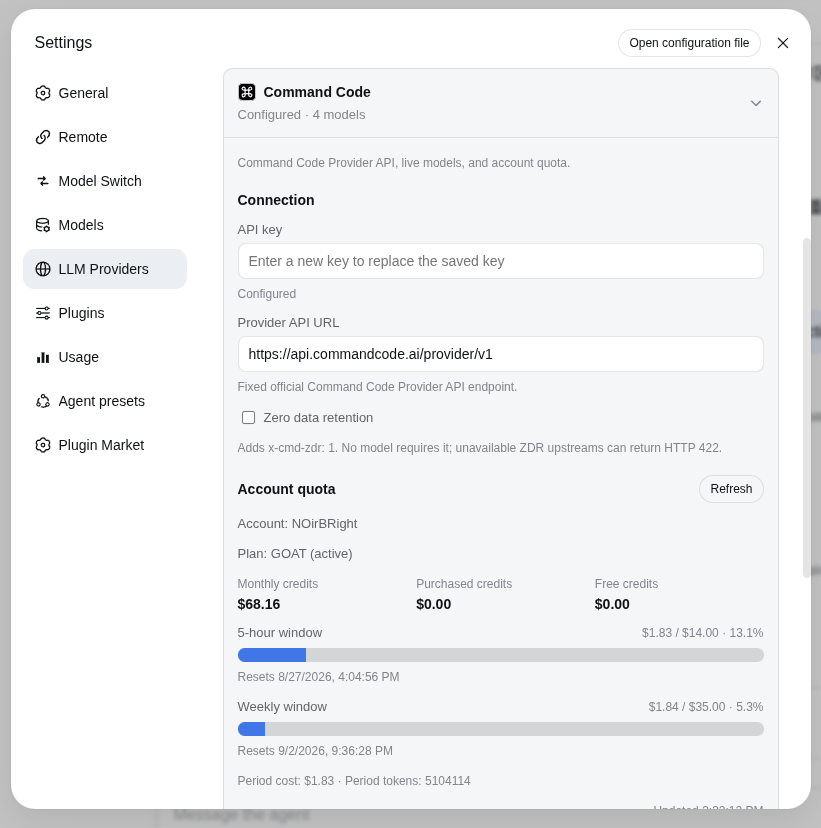
Install dsh-llm-providers-ui alongside this plugin, then open Settings → LLM Providers → Command Code. This plugin contributes the keyed card; the owner supplies the page, navigation, and shared order store. Without the owner, the Host route still works but the Web page and card are absent, with a console diagnostic. The card stores the API key through the DSH credentials service under COMMANDCODE_API_KEY (set apiKeyEnv to CMD_API_KEY if needed). The Host never returns the stored literal.
The only visible Provider API URL is the fixed, read-only official https://api.commandcode.ai/provider/v1. Discovery is a public GET and carries neither an endpoint nor a key. Quota uses the same official origin on the Host; the custom browser RPC never carries the secret.
Zero data retention is a request-level switch. When checked, chat requests add x-cmd-zdr: 1. No model requires it; an unavailable ZDR upstream can return HTTP 422.
The catalog starts collapsed. Fetch models opens an overlay grouped by Go / Pro / Provider+ access, then adds the selection. Each row can expand for context, max output, and official effort options; drag reorders, trash removes. The capability overlay is sourced from the live Provider API plus the official CLI model table (command-code@1.53.0 for DeepSeek V4.1 Flash). Ids that table does not describe are filled from models.dev same-id rows, preferring OpenRouter; an id neither source describes stays unknown rather than guessed. Saved defaults: GLM-5.3 Flash and all DeepSeek models use max; Fable 5.1 uses high; the new Qwen, Hy4, and Gemini entries use their highest listed level; Muse Spark 1.3 uses the forward max level; GPT follows the local Codex policy (Sol high, Terra xhigh, Luna max, other GPT prefer xhigh with a valid-level fallback). A saved valid override wins. Models without selectable efforts, such as LongCat 2.0, keep provider-native reasoning without a fabricated selector.
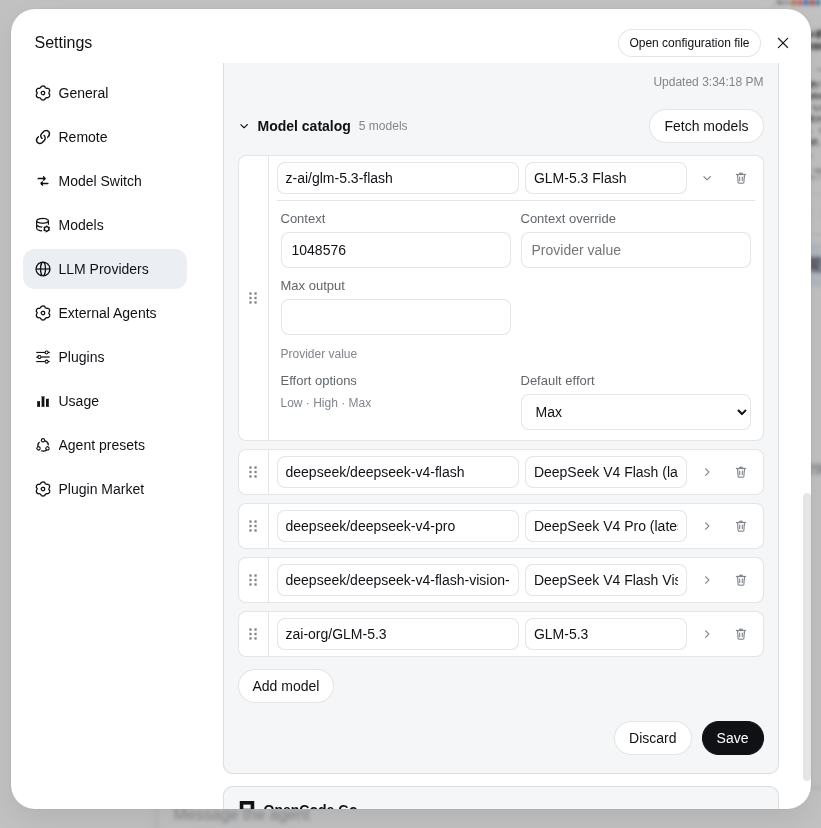
The default catalog is empty. Press Fetch models before selecting a model; the plugin does not invent startup capacities. contextWindowOverride wins over the live context_length; the default context is only a fallback for hand-added rows.
Cordis config (the card writes the same fields):
- id: llm-commandcode
  name: dsh-llm-commandcode
  config:
    apiKeyEnv: COMMANDCODE_API_KEY
    usageEnabled: true
    zeroDataRetention: false
Chat protocol
The protocol is fixed by model id, not a user toggle:
claude-*→POST /provider/v1/messages(Anthropic Messages)- every other id →
POST /provider/v1/chat/completions(OpenAI Chat Completions)
Serialization, SSE, tools, attachments, and reasoning go through DSH PiAiAdapter. There is no vision toggle on the card; image-capable models keep the modalities they advertised.
Credential handling
API keys are entered in the browser but stored only by the Host credentials service; the provider RPC exposes only { configured, writable }, never the value. Settings reads, saves, model discovery, usage, and credential writes use the provider management RPC.
The authenticated Connection session protects these management operations. Settings revision fencing and credential storage are separate operations and are not falsely presented as one atomic transaction.
Account quota
Quota is separate from chat. The Host best-effort-calls the unofficial account routes used by the official CLI (/alpha/whoami, /alpha/billing/credits, /alpha/billing/subscriptions, /alpha/usage/summary) on https://api.commandcode.ai. Failures never block chat. Set usageEnabled: false to hide the panel.
The collapsed header falls back to the last successful quota from the shared browser cache while its credential is configured; storing a new key purges the cache in every bundle copy, even without providerDirectory; so does a usage read the Host answers as INVALID_CREDENTIAL.
The card shows the account name, plan, monthly / purchased / free credits, 5-hour and weekly windows, and optional period cost/tokens plus a refresh time.
Verification
pnpm test
pnpm run typecheck
pnpm run build
pnpm run pack:check
pnpm run lab:check   # existing lab GUI on 127.0.0.1:3082
Provider API documentation: https://commandcode.ai/docs/provider
Release installation
Command Code Provider API chat, model discovery, credentials, and quota reporting. The release artifact targets DeepSeek Harness 0.1.2-alpha.4 through 0.1.5-rc.2 and contains built Host/Client files only; it has no sibling-repository source, workstation path, link:, or workspace: dependency.
The dsh-llm-providers-ui package owns the LLM Providers page, navigation, and shared order store. This package owns only its provider card, models, credentials, and Host route. Install the Owner first for Web; headless Host routing works without the Owner.
Latest (Owner + this plugin; required together on Web):
dsh plugin --profile web add --force \
  https://github.com/NOirBRight/dsh-llm-providers-ui/releases/latest/download/dsh-llm-providers-ui-0.2.9.tgz
dsh plugin --profile web add --force \
  https://github.com/NOirBRight/dsh-llm-commandcode/releases/latest/download/dsh-llm-commandcode-0.1.31.tgz
Fixed versions (reproducible):
dsh plugin --profile web add --force \
  https://github.com/NOirBRight/dsh-llm-providers-ui/releases/download/v0.2.9/dsh-llm-providers-ui-0.2.9.tgz
dsh plugin --profile web add --force \
  https://github.com/NOirBRight/dsh-llm-commandcode/releases/download/v0.1.31/dsh-llm-commandcode-0.1.31.tgz
Update, uninstall, and verify:
# Reinstall Owner + this plugin (fixed tags)
dsh plugin --profile web add --force \
  https://github.com/NOirBRight/dsh-llm-providers-ui/releases/latest/download/dsh-llm-providers-ui-0.2.9.tgz
dsh plugin --profile web add --force \
  https://github.com/NOirBRight/dsh-llm-commandcode/releases/download/v0.1.31/dsh-llm-commandcode-0.1.31.tgz
# Verify the loaded version
dsh plugin --profile web list
dsh plugin --profile web doctor
# Uninstall only this plugin
dsh plugin --profile web remove dsh-llm-commandcode
Configuration: use the plugin section in Settings for Web UI plugins, or the profile dsh.profile.bundles entry for Host-only plugins. Start with this README's minimal YAML/JSON example and provide credentials/backend addresses explicitly.
Rollback: rerun the fixed v0.1.31 command, verify the profile list, then restart the Web service once. Inspect journalctl --user -u dsh-web.service and dsh plugin --profile web doctor; never put a source checkout in the production profile.
Release and integrity: v0.1.31 · SHA256SUMS.
Comments
Loading…
Similar plugins
by Plocr
Command Code for DSH|订阅接入:将 Go / GOAT / Pro / Max 订阅接入 DeepSeek Harness,支持模型同步、推理预设、用量提醒和联网搜索。
★ 4
MIT
JavaScript
Oct 20, 2026
dsh plugin --profile web add dsh-commandcode-goatby vit-cerny
Import the models, providers, API keys and OAuth logins that other agent harnesses keep on your machine (opencode, Codex/ChatGPT, Claude Code, Gemini, Qwen, .env) into DeepSeek Harness, with a clean S
★ 0
MIT
JavaScript
Oct 23, 2026
dsh plugin --profile web add dsh-import-modelsCommand Code LLM provider plugin adapted for DSH-Desktop 0.7.1: registers a commandcode route, with a live model catalog, reasoning-effort support, and real-time plan usage display.
★ 1
MIT
TypeScript
dsh plugin --profile web add dsh-commandcodeby KouzakiUmi
DSH 插件:从 pi-ai 上游目录发现和管理模型,支持人工确认、按 provider 开关、安全写入与回滚;models.dev 可作可选备用数据源。
★ 0
MIT
JavaScript
Oct 22, 2026
dsh plugin --profile web add dsh-model-refreshby Saretheya
Expose every model already configured in your local DeepSeek Harness to the LAN over OpenAI- and Anthropic-compatible endpoints, with API keys, per-key rate limits, a circuit breaker, model filters an
★ 0
MIT
JavaScript
Oct 3, 2026
dsh plugin --profile web add dsh-lanternby 66wjz
DSH 提供商与模型高级管理台 · Provider & model management console for DeepSeek Harness (dsh)
★ 4
↓ 56/wk
MIT
JavaScript
Oct 24, 2026
dsh plugin --profile web add dsh-model-cap