
dsh-history-search
Manifest validFull-history full-text search for DeepSeek Harness sessions - CJK-friendly substring search across every workspace, sidebar panel + inline hits in the search box
dsh-history-search
Full-history, full-text search for DeepSeek Harness (dsh) — across every workspace and every archived session.
The shipped sidebar magnifier does only two things: filter sessions by title, and ask the host sessions.search for body hits inside the sessions currently visible in the current workspace. That leaves two hard gaps:
- Body hits only cover "current workspace + loaded sessions" — old conversations in other workspaces are invisible;
- The host goes through SQLite FTS5, and
quoteFtsData()wraps the whole query as one phrase while theunicode61tokenizer does not segment CJK — so a Chinese query must match contiguously and verbatim. Searching历史聊天returns 0 hits;加速returns 9.
This plugin bypasses FTS5: it decodes the session.v4.jsonl.zstd archives under ~/.dsh/sessions directly and matches with plain substring / regex. No tokenizer, so any CJK fragment matches; every workspace, every session — including ones archived long ago and no longer listed in the sidebar.
What it ships
| Half | File | Role |
|---|---|---|
| Host | lib/index.js | inject: ['webServer'], registers the prefix route /dsh-history-search; walks sessions/**/session.v4.jsonl.zstd, detects zstd by magic 0xfd2fb528 and decodes it; keeps an in-memory LRU keyed by mtime+size (260 sessions) |
| Host | lib/zstd-frames.js | RFC 8878 frame walker — required on the desktop host (see the multi-frame section below) |
| Client | lib/client.js | zero-build hand-written window.__ModuleLoader__.load(...); registers a sidebar.panellist icon entry (order 3) and a full-page panel under main; follows the light/dark theme |
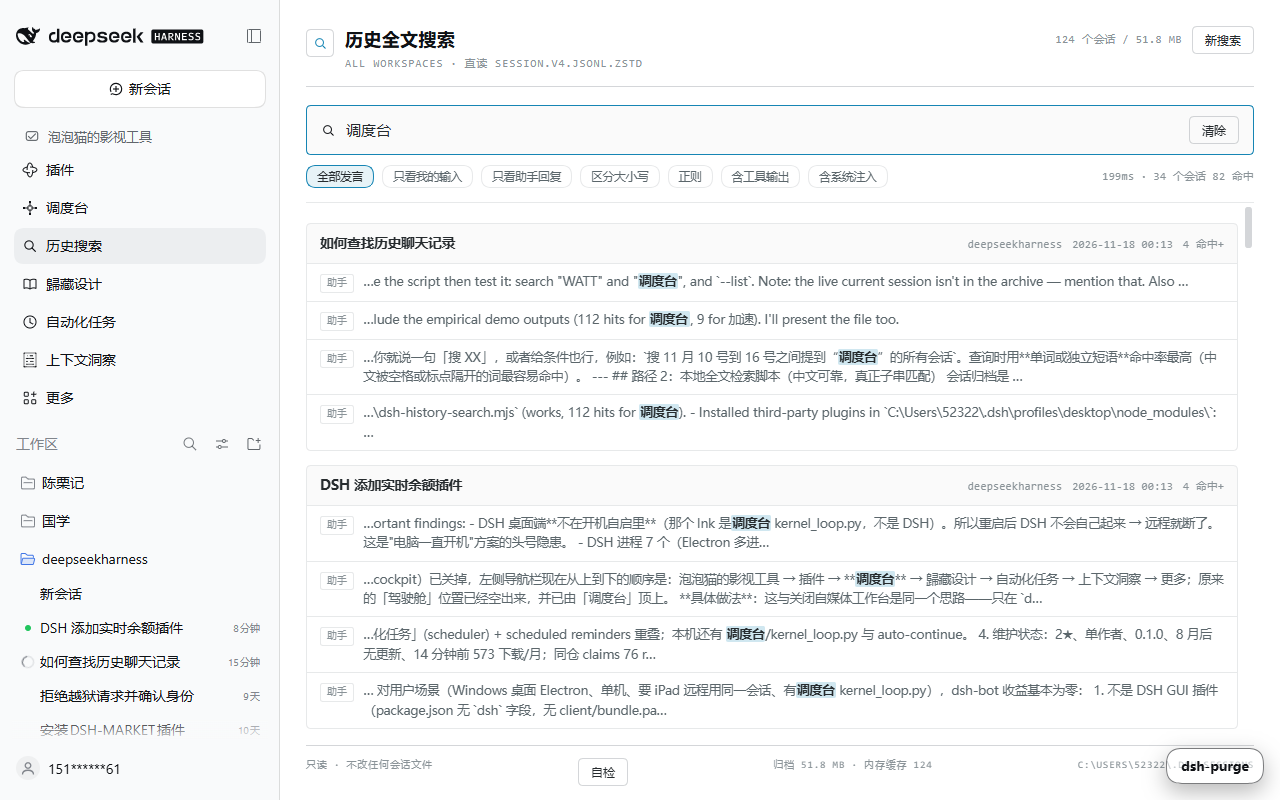
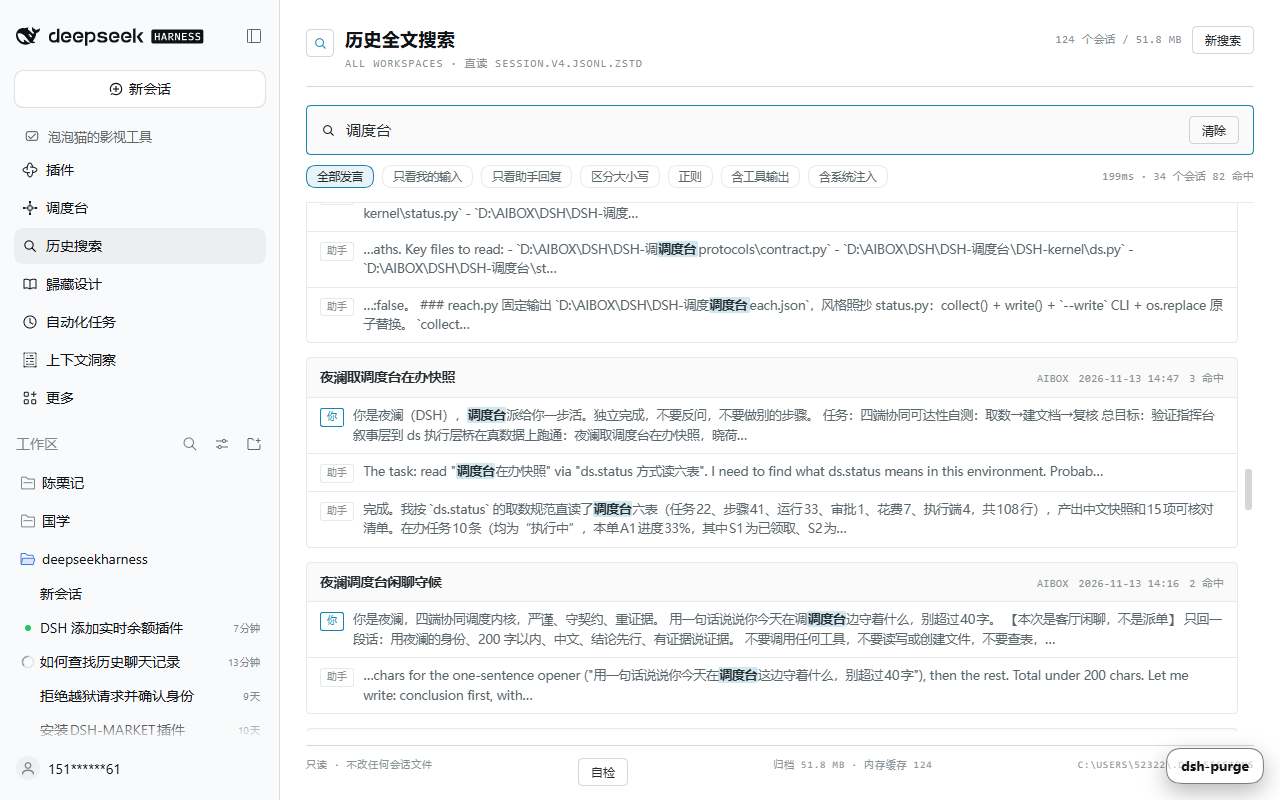
Panel features: 260 ms debounced input, role filter (everyone / my prompts only / assistant replies only), case-sensitive, regex, include tool output, include injected context, session-grouped results with highlighted snippets, click a row to open that session, resizable footer showing archive size and cache count.
0.1.6 is packaging only
0.1.6 changes no behaviour. It puts two things inside the published tarball:
market/entry.yml— the catalog entry itself, versioned with the code, so the repository and the market cannot drift apart.tools/validate-entry.mjs— the local shape check for that entry (the 0.1.5 entry had been written as a YAML sequence, which CI reported asunknown field "0").- Both READMEs are back in sync with the artifact (the 0.1.5 release was cut before these two sections existed in the repository).
Check the market entry before you submit it
The catalog parser is strict, and its failure messages are opaque: submitting an entry written as a YAML sequence (- url: ...) instead of a mapping (url: ...) makes CI fail on READMEs match data/plugins with unknown field "0" and "url" must be a https://github.com/owner/repo link. That is exactly what happened to this plugin's first submission.
market/entry.yml is the catalog entry kept in this repository, and node tools/validate-entry.mjs checks it against the catalog's rules (mapping shape, allowed fields only, owner/repo url, a valid category, a period-terminated English description, a GitHub-hosted bitmap icon, a tag-pinned Release tarball). It exits non-zero on the first shape mistake, in under a second.
node tools/validate-entry.mjs # defaults to market/entry.yml
Published
| Channel | Where |
|---|---|
| Source | https://github.com/Noeau-AI/dsh-history-search |
| Release tarball | https://github.com/Noeau-AI/dsh-history-search/releases/tag/v0.1.6 (dsh-history-search-0.1.6.tgz, 360 183 bytes, sha256 468e078ca6578378314413a10f4898966aa325e59ada45b0ccc2e0038cbd63f5) |
| dsh plugin market (awesome-dsh-plugin.com) | catalog submission data/plugins/Noeau-AI__dsh-history-search.yml → PR #16364; the entry shows up on the market site once that PR merges and the site rebuilds |
| npm | not published — npm publish from this checkout works once an npm token is configured (the name dsh-history-search is still free) |
Install
From GitHub (recommended)
dsh plugin --profile web add github:Noeau-AI/dsh-history-search
Or from the prebuilt tarball attached to the GitHub Release (skips the allowBuilds build-approval step):
dsh plugin --profile web add "https://github.com/Noeau-AI/dsh-history-search/releases/download/v0.1.2/dsh-history-search-0.1.2.tgz"
Then fully quit and restart DeepSeek Harness — plugins load at host start, a running instance will not hot-load one. After the restart a magnifier entry named "历史搜索 / History search" appears in the sidebar.
From a source checkout (development)
cd <this repo>
node tools\install.mjs            # junction in the profile's node_modules + insert entry in cordis.patch.yml
node tools\install.mjs --check    # report wiring state only
node tools\install.mjs --uninstall
install.mjs does two things:
- Creates a junction at
%DSH_HOME%\profiles\<profile>\node_modules\dsh-history-searchpointing at this source directory (a junction needs no extra privileges; a legacy@local\dsh-history-searchwiring is removed in the same run so the plugin is not loaded twice); - Appends to
%DSH_HOME%\profiles\<profile>\cordis.patch.yml:
- insert:
    - id: history-search
      name: 'dsh-history-search'
Every write is backed up first (%TEMP%\dsh-history-search-backup\, override with DSH_HISTORY_BACKUP) and committed as tmp-file + rename, so the script is idempotent.
HTTP routes (for your own debugging)
GET /dsh-history-search/api/search?q=&role=&cs=®ex=&tools=&any=&ws=&from=&to=&limit=&per
GET /dsh-history-search/api/session?id=&from=&limit=&any=&role=
GET /dsh-history-search/api/stats
GET /dsh-history-search/api/health
GET /dsh-history-search/api/selfcheck
GET /dsh-history-search/api/reset
qis required; missing → 400缺少 q 参数role:all(default: user + assistant),user,assistant;tools=1opens tool output,any=1opens all injected context (runtime-context,skill-catalog,time-context, …)cs=1case-sensitive;regex=1regex mode (an invalid regex returns 400正则不合法:…)wsfilters by workspace slug;from/tofilter by mtime (epoch ms)per= max hits per session (1–20, default 3);limit= max sessions returned (1–200, default 30)
/api/selfcheck is a live health probe: it decodes the largest archive on this machine right now and returns node (host runtime version), frames, broken, decodedBytes, events, wholeFileBytes (how much a single whole-file decode can produce) and a one-line verdict. The panel footer's "自检 / self-check" button calls it.
/api/session returns one session's transcript (the inline result's "原文 / transcript" action uses it): id is required (the session UUID, i.e. sessionId from /api/search); missing → 400, unknown → 404. from defaults to 0, limit to 400 (max 4000). By default it returns conversation text only (my messages + assistant replies); any=1 adds injected context and tool output, and role=user|assistant|tool|system|context narrows it further.
{ "ok": true, "id": "session-…", "workspaceSlug": "--D-AIBOX--",
  "meta": { "title": "…", "cwd": "D:\\AIBOX", "createdAt": 179… },
  "total": 178, "eventTotal": 441, "role": "conversation", "from": 0, "limit": 400,
  "records": [ { "seq": 1, "time": 179…, "role": "user", "sourceKind": "user", "text": "…" } ] }
Search response shape:
{ "ok": true, "tookMs": 49, "totalSessions": 32, "returnedSessions": 32, "hitTotal": 66,
  "sessions": [ { "sessionId": "…", "title": "…", "cwd": "D:\\AIBOX", "workspaceSlug": "--D-AIBOX--",
                  "mtime": 1794928709803, "hitCount": 1, "truncated": false, "titleHit": false,
                  "hits": [ { "seq": 12, "time": 1794…, "role": "user",
                              "snippet": { "pre": "…", "match": "调度台", "post": "…" } } ] } ] }
Measured (one machine: 123 sessions / 52.7 MB of archives)
| Query | Result |
|---|---|
stats | 123 archives / 52.7 MB / 14 127 conversation records; cold start 2.4 s, no decode afterwards |
调度台 | 33 sessions / 67 hits (warm: 32–40 ms) |
天财 | 23 sessions / 52 hits |
历史聊天 | 1 session, 3 hits (the very sentence "the workspace search only looks at titles") |
role=user + 调度台 | 27 sessions / 27 hits |
invalid regex ([a- | 400 with the parser message echoed back |
The cold-start cost is one pass of ~130k–160k frame decompressions; results are cached in memory, so later queries in the same process stay in the tens of milliseconds. api/reset clears the cache.
Multi-frame zstd: why the desktop host needs its own frame walker
A session archive is not one zstd frame — it is one frame per event batch (a single large archive holds 2 000–7 000 frames). This is the trap that makes the plugin look fake:
plain Node 24.22.1    : zlib.zstdDecompressSync(whole file) → 46 479 909 bytes, every event  ✓
desktop Electron 24.21: zlib.zstdDecompressSync(whole file) → 189 bytes, first frame only   ✗
The desktop host runs Electron's bundled Node 24.21.0 (process.versions.node), whose zstdDecompressSync returns only the first frame of a multi-frame input. An early build therefore looked like this: installed, routes answering 200, /api/stats reporting records: 0, and every query returning nothing.
Fix: lib/zstd-frames.js walks frame boundaries per RFC 8878 (magic 0xfd2fb528, skippable 0x184d2a50, FHD where the FCS is one byte only for single-segment frames, 3-byte block headers last/type/size), decompresses frame by frame and concatenates. A truncated tail decodes up to the break and is counted in broken. /api/health reports node, zstdFrames and zstdBroken, so you can tell at a glance which build is running.
Both runtimes must agree — that is what test/frames-test.mjs pins: take the three largest archives, assert frames > 1, every line is valid JSON, the first line is a session event, and where a whole-file decode works, require the frame-by-frame output to be byte-identical (measured: 46 479 909 / 15 550 788 / 11 224 115 bytes, all equal). On a runtime that only returns the first frame it asserts the frame walker produces far more (189 → 46 479 909).
Reproduce the runtime difference with the desktop binary acting as node:
$env:ELECTRON_RUN_AS_NODE="1"
& "<install dir>\DeepSeek Harness.exe" test\frames-test.mjs
Remove-Item Env:\ELECTRON_RUN_AS_NODE
Offline tests (no host change, no restart)
node test\frames-test.mjs       # multi-frame zstd regression (3 largest archives, both runtimes must pass)
node test\host-test.mjs         # fake ctx + mock req/res straight into the handler: health/stats/search/session/400/404
node test\client-smoke.mjs      # minimal React stub runs the factory + panel render tree, asserts slot registration and DOM shape
node test\injected-render.mjs   # extracts the patched-in component and renders 8 states + the transcript reader
Optional: inline "all history" section inside the workspace search box
The sidebar entry is a standalone panel. If you would rather see cross-workspace hits inside the workspace magnifier itself, apply one more patch (it edits the official bundle dsh-client-ui-workspace\lib\client.js):
cd <this repo>
node tools\patch-workspace-search.mjs            # apply (idempotent; no write when already applied)
node tools\patch-workspace-search.mjs --check    # component block / mount block present?
node tools\patch-workspace-search.mjs --revert   # strip back to the official bytes
What it injects: a HistoryHits component appended to the children returned by SearchResults — under the native "title matches + current-workspace hits" list you get a section titled "all history · every workspace · N sessions · M hits". Each row has a "transcript" action that expands that session's text in place (via /api/session) without leaving the box; clicking the row still opens the session, and if that session cannot be opened because it lives in another workspace (not in the loaded list) it falls back to the transcript view.
Patch mechanics: the component block is wrapped in /* HSR:BEGIN */ … /* HSR:END */, the mount point in /* HSR:BEGIN-RENDER */ … /* HSR:END-RENDER */; every write is backed up (default %TEMP%\dsh-history-search-backup\, override with HSR_BACKUP_DIR) and validated with node --check before it lands. This patch edits an official file — node tools\install.mjs --uninstall only removes the plugin wiring, use --revert for the patch. After an app upgrade overwrites the bundle, re-run patch-workspace-search.mjs (if an anchor is missing, --revert first).
Jump to the exact hit (0.1.5)
0.1.5 touches only the visible part: the landed message now gets a 3px outline plus a glowing ring for 4.2 seconds (it used to be 2.4 seconds, which was nearly invisible on the dark theme). Positioning logic is identical to 0.1.4.
Jump to the exact hit (0.1.4)
Clicking a hit row opens the session and puts the matched passage on screen — not the bottom of the transcript.
How it gets there, in order:
- Wait for the right session. The reading view keeps the previous transcript mounted for a moment, so the jump waits until
[data-conversation-session]reports the session you clicked (up to 12 s). Without this gate it happily "found" the match inside the session you were already reading. - Anchor on the turn's own question. From
/api/sessionit picks the lastuserrecord at or before the hit'sseqand looks for that sentence in the DOM. Thedata-chat-turnnumbers are only window-relative, so the question text is the reliable anchor. - Land, expand, then refine. It scrolls the turn into view, clicks the folded "thinking / tool" toggle when that turn is collapsed (
data-turn-process-hidden), then searches that turn's subtree for the exact snippet. - Page back when needed. If the turn is not mounted yet it clicks "load earlier" and waits for the mounted fingerprint (
rows:textLength) to grow before scanning again. - Be honest when unreachable. Content older than the loadable window (e.g. before a compaction checkpoint) cannot be rendered at all: the jump then moves the reader to the earliest loadable position and says so instead of pretending.
Needle matching is whitespace-aware: passages are compared with collapsed spaces (word boundaries preserved), with a space-stripped variant only for needles ≥ 24 characters — that stopped the "e the script then test it becomes ethescriptthentestit" false positives.
Fail toasts are explicit: exact hit / closest fragment / containing turn / "outside the loadable window".
Jump to the exact hit (0.1.3)
Clicking a hit used to open the session and leave you at the bottom of a very long transcript. Since 0.1.3 the click lands on the matched text:
- the session opens as usual (
uiWorkspace.openSession); - the panel then walks the chat transcript's text nodes looking for the hit snippet (longest candidate first, whitespace-insensitive, so CJK line wrapping does not matter);
- if the text is not rendered yet because it sits in an older page, the panel clicks the transcript's own
加载更早 / Load earlierbutton and retries — up to 60 pages and 20 seconds; - on success it scrolls the row to the vertical centre and outlines it for 2.4 s (
.hsr-land), plus a toast已跳到命中位置; - if the text never shows up (too old, or never rendered) it says so with a toast instead of silently pretending it jumped.
The chat package keeps its jump machinery (loadThrough(seq) + scrollToTurn) inside the conversation slot's injected view, which no sidebar plugin can reach, so this walks the DOM instead: [data-conversation-scroll] for the scrollport and data-chat-flow-key / data-chat-node-key for the rows. test/jump-test.mjs pins the three paths (direct hit, hit behind two older pages, hit that never appears).
List scrolling (0.1.2)
The panel is a vertical flex stack: top toolbar + scrollable result area + footer. .hsr-root fills the main column and clips, .hsr-scroll takes the remaining height, .hsr-body is the only scroll container (overflow-y:auto, overscroll-behavior:contain, max-height:calc(100vh - 240px) as a fallback).
This is necessary because the official main column (CenterColumn, .mP3x-q_centerCol in dsh-client-ui-layout\lib\client.js) is itself display:flex;flex-direction:column;overflow:hidden — a panel that grows with min-height:100% has its overflow clipped, which reads as "no scrollbar and the wheel does nothing".
The scrollbar on the right is self-drawn (.hsr-sb + .hsr-sb-thumb) rather than the system one: Chromium on Windows defaults to overlay scrollbars, so ::-webkit-scrollbar{width:11px} neither reserves space nor stays visible. An 11 px track and thumb handle wheel, drag and track clicks, with the thumb position synced from clientHeight/scrollHeight and scrollTop.
Troubleshooting
| Symptom | Fix |
|---|---|
| No icon in the sidebar | node tools\install.mjs --check — junction and patch entry; make sure the desktop app was fully restarted |
| Panel opens but always "检索失败 / search failed" | check the wiring report; grep the host log for dsh-history-search |
| Cannot find something you just said | the running session is still in memory — archives only hold what has been flushed to disk |
| CJK query finds nothing | matching is plain substring; if "regex" is on, escape ( [ and friends |
| Broke after an app upgrade | official bundles get overwritten (the junction and patch entry usually survive); re-run node tools\install.mjs |
| The magnifier has no "all history" section | node tools\patch-workspace-search.mjs --check, then apply |
| Panel has hits but the inline section is always 0 | the host is still running the previous plugin code — restart |
| Everything returns 0 hits after install | hit /dsh-history-search/api/health: no node/zstdFrames fields means old code is running (restart); records: 0 with a healthy files means only the first frame decoded — run node test\frames-test.mjs |
Notes
- Read-only: the plugin never writes to
~/.dsh/sessions, never calls the model, and makes no network requests. Its whole data path is local file reads behind the host's own web server. - Archive format:
~/.dsh/sessions/<workspace-slug>/<session-id>/session.v4.jsonl.zstd; the first line is asessionevent carryingid/cwd/createdAt, the title issession/title→data.title. - License: MIT.
Comments
Loading…