

dsh-lark-agent
Manifest valid★ 1Reach your DeepSeek Harness assistant from Feishu / Lark · 离开电脑,也能在飞书里找到你的 DeepSeek Harness 助手

dsh-lark-agent

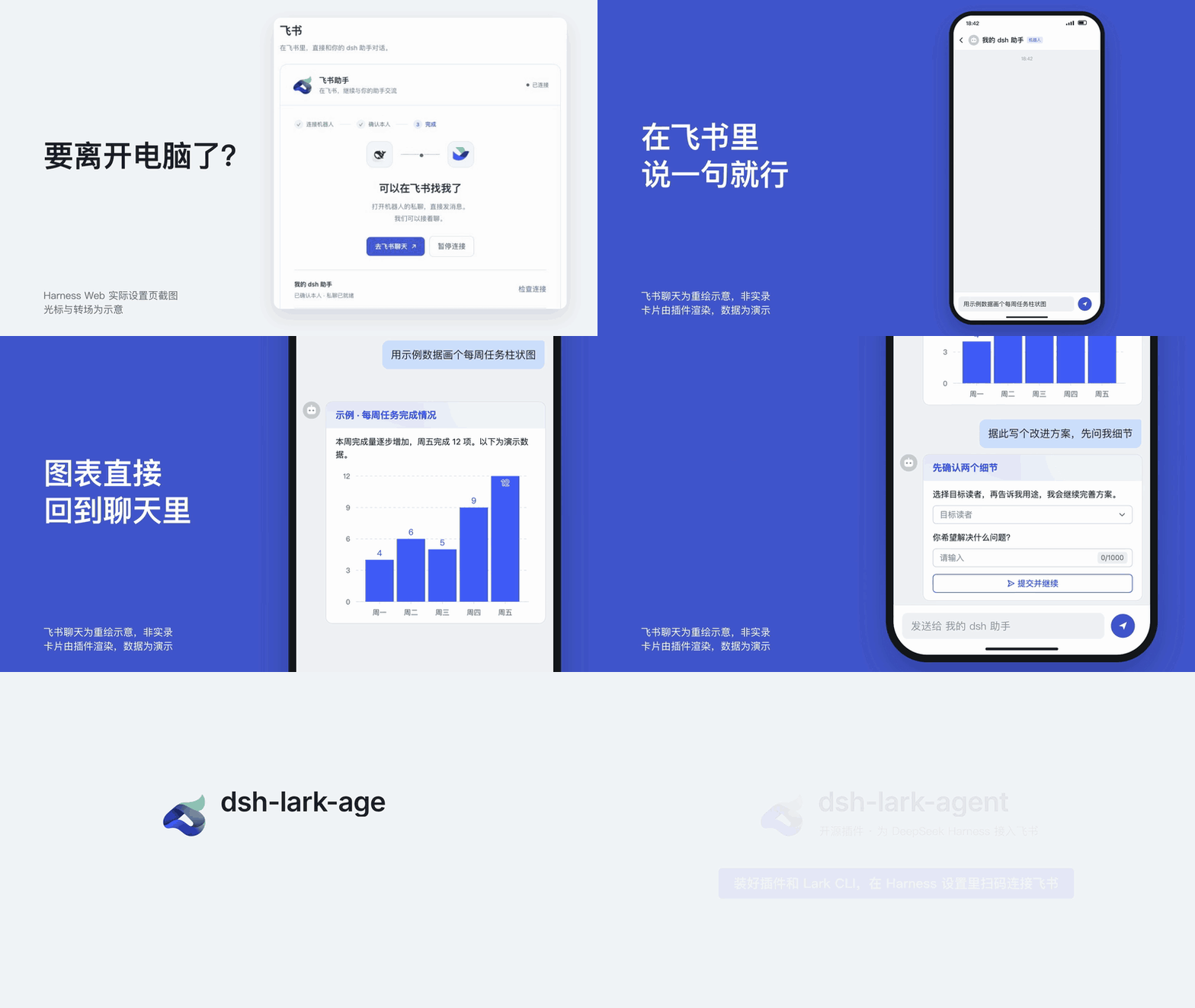
Reach your DeepSeek Harness assistant from Feishu / Lark when you're away from your computer.
dsh-lark-agent adds a Feishu / Lark private chat to a running DeepSeek Harness: hand off tasks, talk through plans, and pick up earlier topics from your phone. Feishu gets its own sessions and never takes over chats already open in the desktop app or on the web.
Install / Update
Before you start:
-
DeepSeek Harness is running, can chat, and has a default model selected: PC App
0.2.1-rc.2, or Web /dshCLI0.1.1-rc.2. -
The official Lark CLI is installed on the same machine before you enable the plugin (needs Node.js / npm):
npm install -g @larksuite/cli@1.0.98
lark-cli --version
Don't run
lark-cli config initorlark-cli auth login: the plugin creates its own dedicated CLI profile when you scan, andconfig initcan overwrite existing profiles.
Install on the DeepSeek Harness desktop app
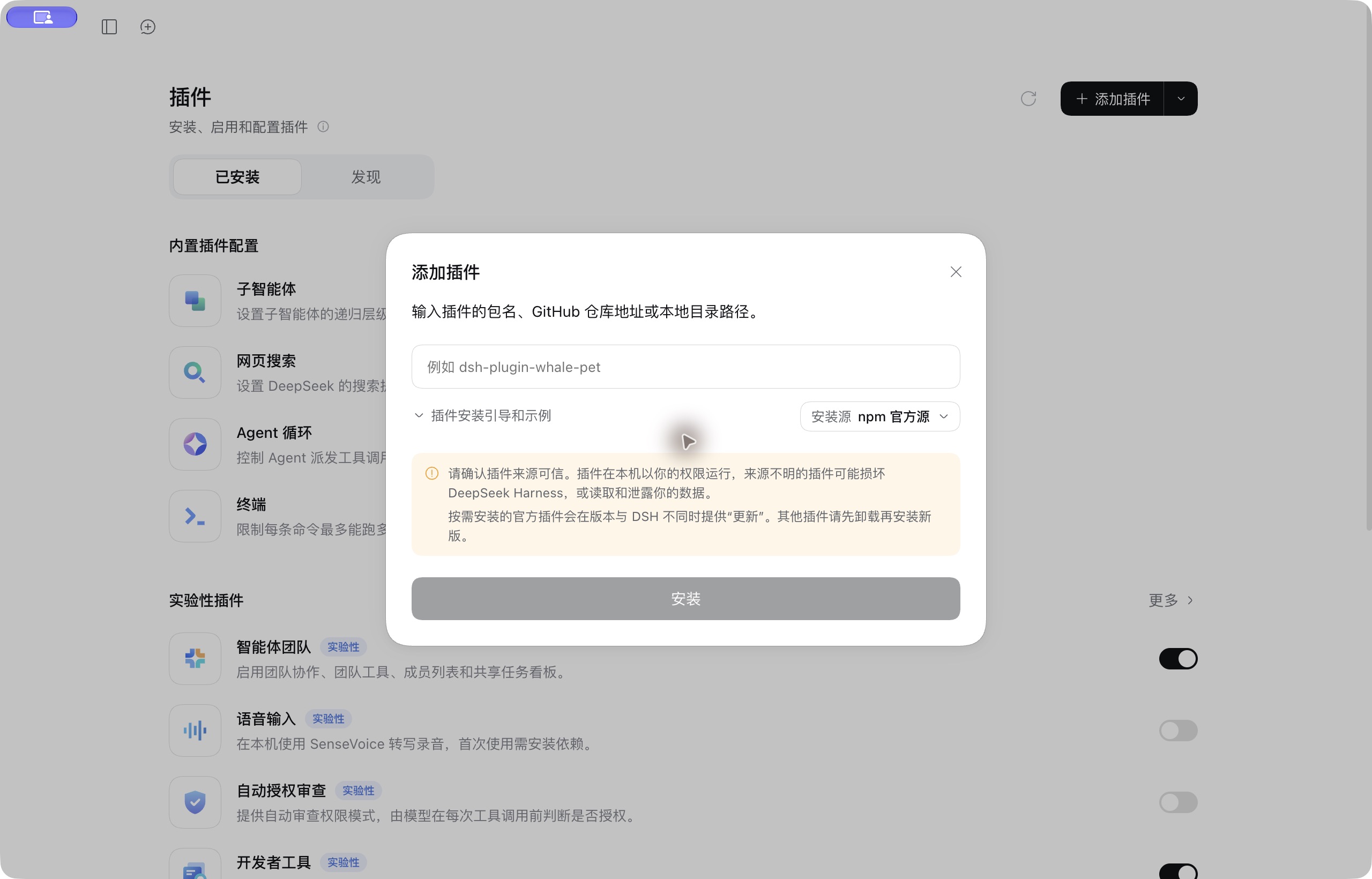
In the sidebar, open 插件 → 添加插件 (Plugins → Add plugin), enter dsh-lark-agent, click 安装 (Install), then 立即启用 (Enable now). Restart if the app asks.
Install with the dsh CLI
dsh plugin runs pnpm, so pnpm must be on your PATH:
dsh plugin --profile web add dsh-lark-agent --allow-build=protobufjs
Then restart dsh web.
[!NOTE]
--allow-build=protobufjslets a dependency of the Lark SDK run its install script. Without it, pnpm 11 stops withERR_PNPM_IGNORED_BUILDSand dsh does not enable the plugin. If that already happened, run:dsh plugin --profile web approve-builds '!protobufjs'The
!skips that optional script (it only prints a version hint) and lets dsh finish enabling the plugin. Then restartdsh web.
Update
- On the Feishu settings page, click 暂停连接 (pause) and back up as described in Upgrade.
- Desktop app: the Add plugin dialog says third-party plugins must be uninstalled before a new version is installed, so uninstall
dsh-lark-agenton the Plugins page and add it again (this in-app upgrade hasn't been tested end to end yet; an earlier source build is listed asdsh-larkbot). CLI: rundsh plugin --profile web update dsh-lark-agent@latest, then restartdsh web. - Click 恢复连接 (resume) and check that the bot replies.
Connect Feishu
Button labels are quoted in Chinese, as they appear, with an English gloss.
- Open the Feishu settings page — desktop app: 设置 → 内置插件 → 飞书 (Settings → Built-in plugins → Feishu); web: 设置 → 插件 → 飞书 (Settings → Plugins → Feishu) — and click 扫码创建并连接 (scan to create and connect).
- Scan the QR code with your own Feishu account and approve. If your organization requires admin approval, click 重新检查 (check again) once it is approved.
- Click 打开飞书私聊 (open private chat) and, from the account that scanned, send the pairing word (
DSH-…, valid for 10 minutes) as a plain-text message on its own, exactly as shown. If asked, confirm with 这是我,完成连接 (this is me). - When the page shows 已连接 (connected), send the bot a message.
The Feishu entry works only while the host is online: not when the app is closed, the web host is stopped, or the computer sleeps.
What it can do
| In Feishu, you… | The assistant… |
|---|---|
| Send a request | Shows a Typing reaction while it works (on by default for new bots), then replies in segments |
| Say "lead with the conclusion from now on" | Remembers the preference |
Keep chatting, or use /sessions, /new | Continues the topic, returns to an earlier one, or starts fresh |
| Ask for a bar chart of some numbers | Replies with a native Feishu chart card |
| Ask it to let you pick between options first | Sends a form card and continues once you submit |
| Ask for an architecture diagram or a report | Creates a Feishu doc (with a whiteboard for diagrams) shared read-only with you alone; in App 0.2.1-rc.2, opening that Feishu session in the app also shows a local preview |
Use /model, /thinking | Switches between the host's configured models and thinking depth |
By default it answers only your own private chat. Sessions and memory stay on the computer running Harness; messages pass through Feishu and your model provider.
Good to know
- More docs: commands, privacy, upgrades, the chat bottom menu, team deployment and troubleshooting are in DEVELOPMENT.md (Chinese).
- Compatibility: verified with PC App
0.2.1-rc.2anddshCLI / Web0.1.1-rc.2; other versions, platforms and tenants are not yet verified. - Language: the settings page, the bot's built-in messages (
/help, status text, card buttons, bottom menu) and the intro video are in Chinese.
License
MIT. DeepSeek and Feishu / Lark brand assets belong to their owners and are not covered by the MIT license; this is an independent open-source plugin, not an official product.
Comments
Loading…
From the same category
DeepSeek Harness plugin for Reactive Resume: bridges your resumes and job applications into a Harness session over MCP.
★ 41.7k
↓ 121/wk
MIT
Aug 24, 2026
dsh plugin --profile web add dsh-plugin-reactive-resumeby Tencent
Let AI agents use your real, logged-in browser without interrupting your work. CLI + extension for browser automation across any shell-capable AI agent.
★ 9.5k
↓ 8.7k/wk
MIT
TypeScript
Oct 23, 2026
dsh plugin --profile terminal add @wxg-prc-cpg/browser-skill-dsh-pluginby dsh-market
The plugin market inside DeepSeek Harness — browse, search, one-click install · DSH 可视化插件市场
★ 8.5k
↓ 163.6k/wk
MIT
TypeScript
Oct 23, 2026
dsh plugin --profile web add dshmarketby yjh051108
dsh-routing-suite — injector + router-standard kit: install the runtime injector first, then the task-aware reasoning-mode router preset (measured P1-P23).
★ 7k
MIT
JavaScript
Sep 18, 2026
dsh plugin --profile web add @dsh-external/dsh-super-injectorby Q00
Agent OS: the agent gets smarter on its own. We just hold the line: Interview-gated, staged evaluation, budgeted evolution loop. MCP server, 14 runtimes: Claude Code, Codex CLI, Gemini CLI, OpenCode,
★ 6.3k
MIT
Python
Oct 23, 2026
by superdesigndev
OpenRouter for agent tools. Join community here: https://discord.gg/6mQYYfFMAn
★ 6k
NOASSERTION
Python
Oct 23, 2026
dsh plugin --profile web add treg-dsh