

dsh-litnotes
DiscoveredLocal-first AI literature desk for DeepSeek Harness: parsing, bilingual reading, in-page AI answers, knowledge graphs, and agent library tools.
dsh-litnotes · The Margin Desk
Put the AI in the margin, not in another window.
A local-first AI literature desk that plugs into the DeepSeek Harness Web UI: a paper library, bilingual reading, annotations and AI conversation that sit on the page, and a knowledge graph grown out of your papers.





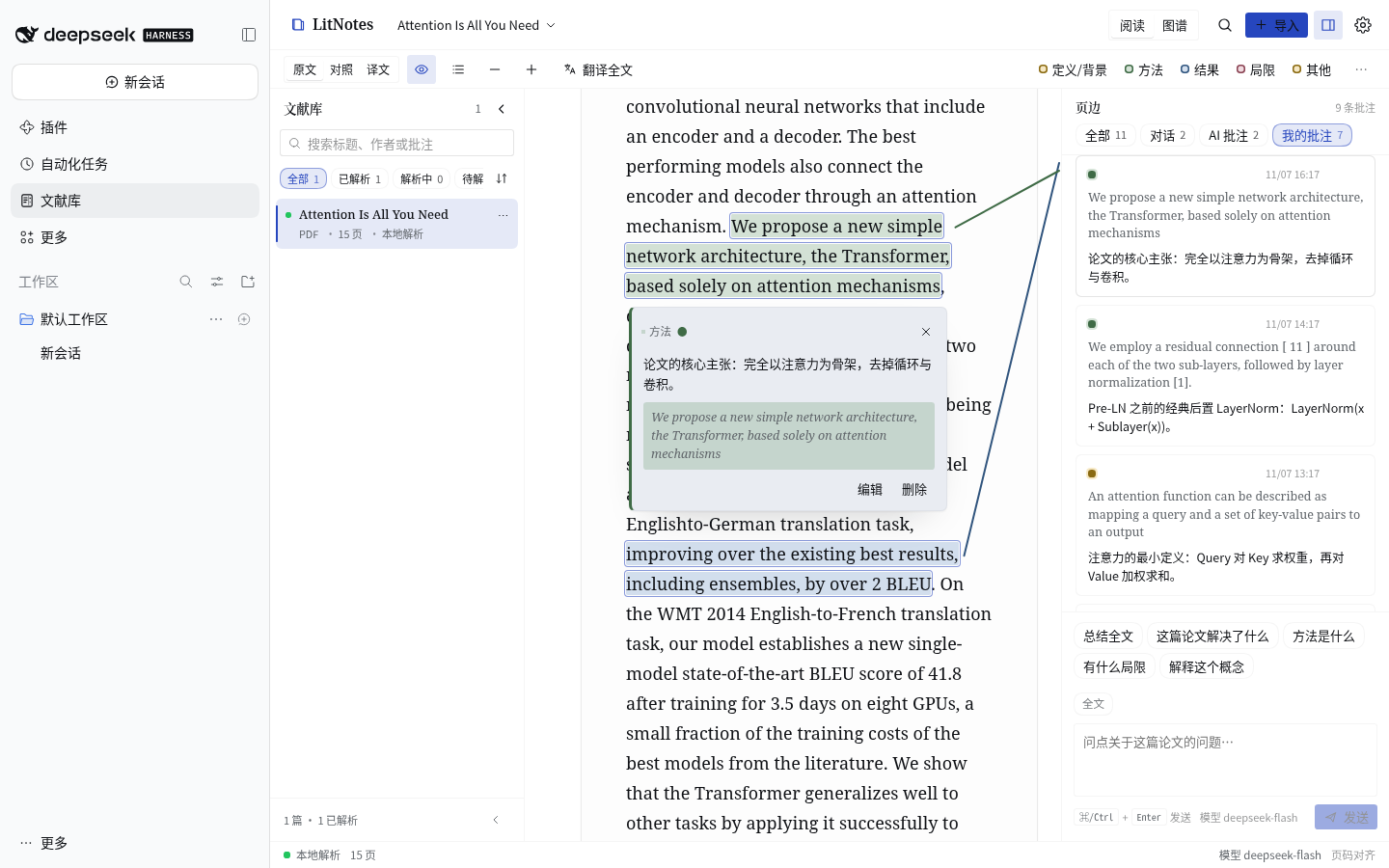
Every screenshot was captured from the plugin running for real; the sample paper is Attention Is All You Need, parsed by the local engine with no upload.
Why the margin
Most AI reading tools put the conversation in a floating window: ask a question, switch back to the text, hunt for the quote — attention split in two. dsh-litnotes answers differently: AI belongs in the margin, just as annotations always have.
- Your eyes never leave the page. The paper and the margin are two independent reading surfaces — scrolling one never drags the other. Annotations and AI answers are pinned to their place in the text, and a 1px tether ties each margin entry back to its sentence. Hover either end and the other lights up.
- Evidence before conclusions. Every answer carries
[n]citations: hover to preview the quoted sentence, click to jump back to it. Quotes are validated verbatim, then checked again for whether they actually support the claim; unverified citations never become annotations. - Order is position. Margin entries are ordered by where they sit in the text. Read the margin top to bottom, and you read the paper front to back.
At a glance
Library — parse status, progress, filters and full-text search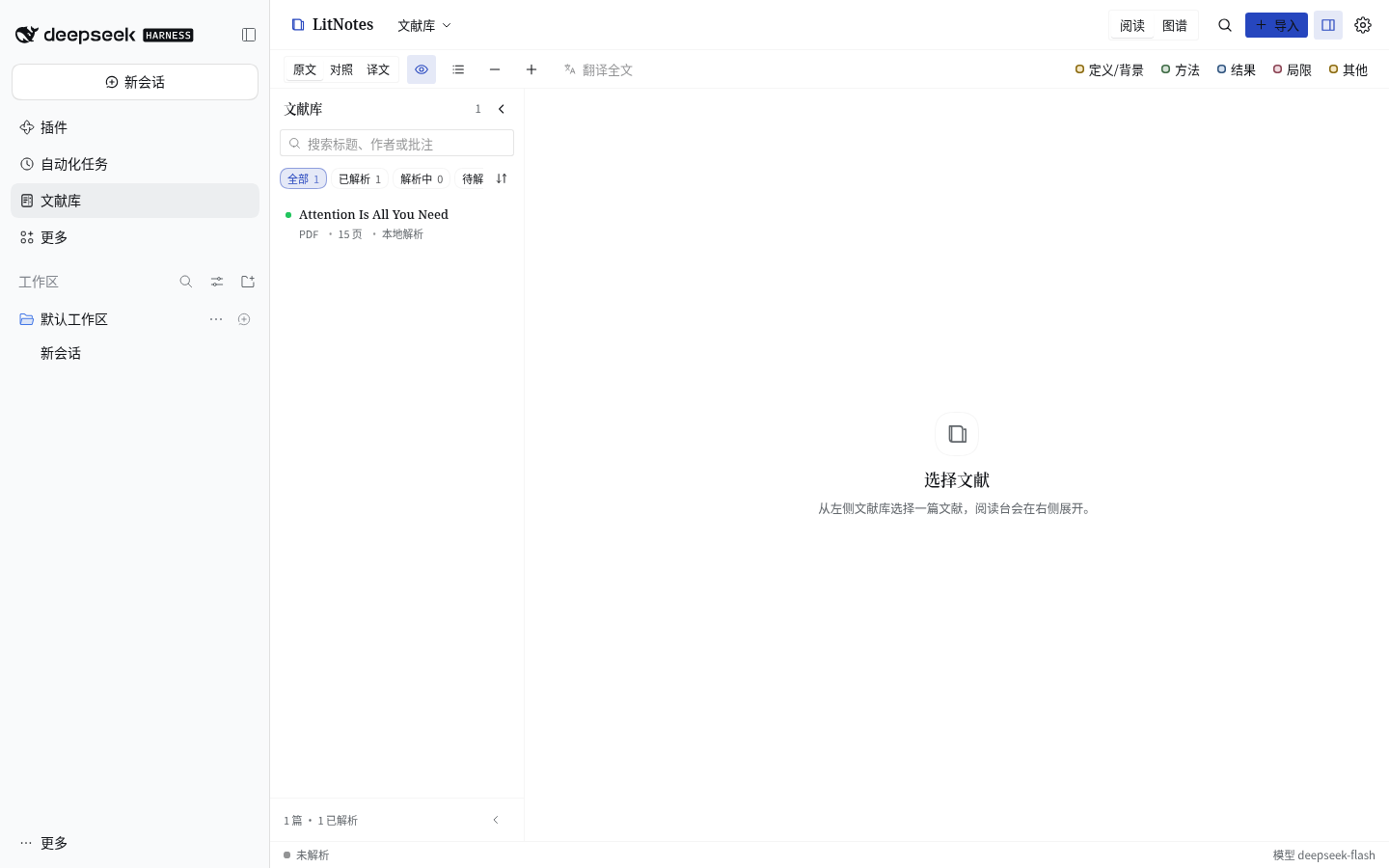 | Import and parse — drop, pick a file or paste a link; three parse engines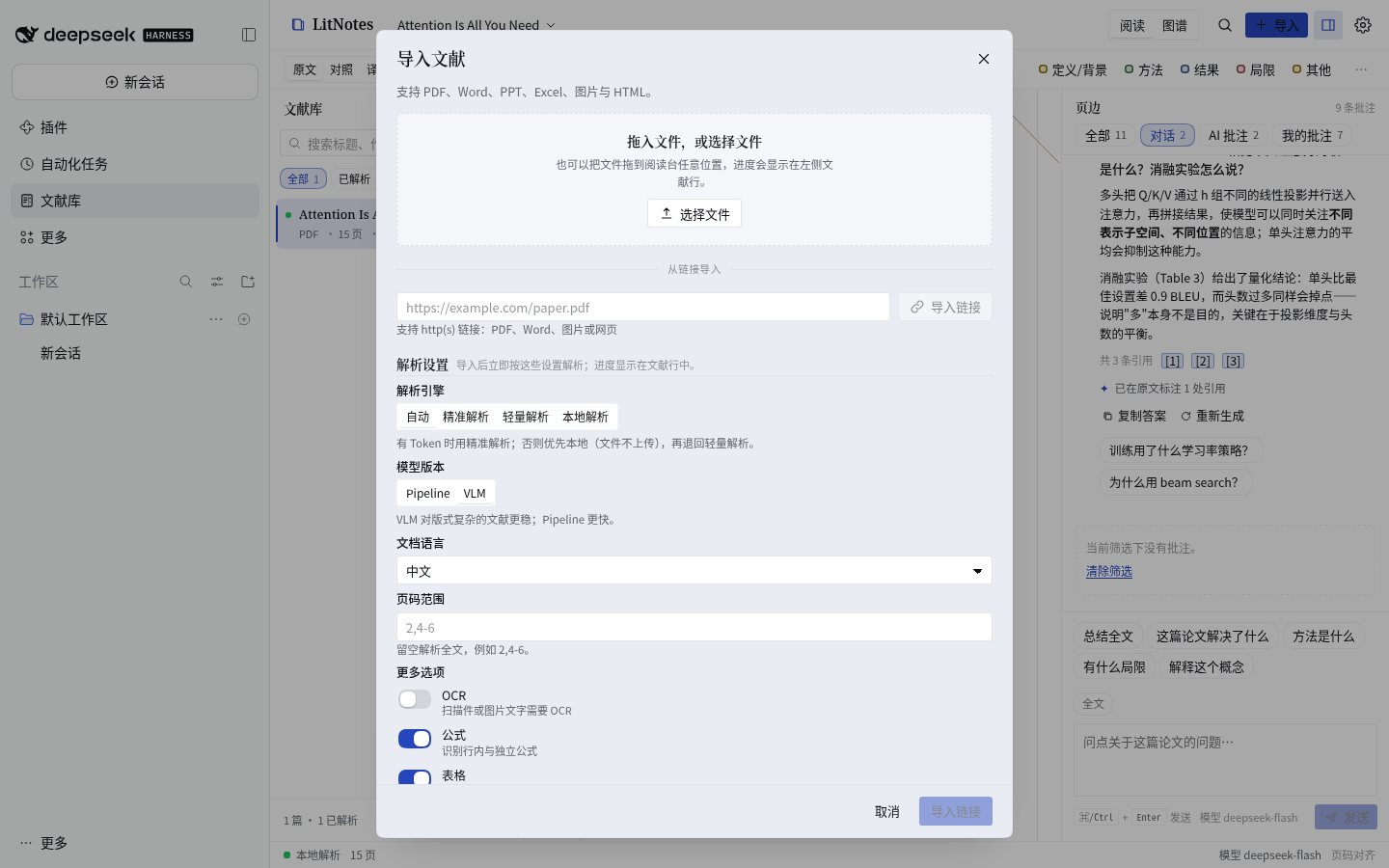 |
| Reading desk — four aspect inks, margin notes, click a highlight for its annotation card | Bilingual reading — original and translation, paragraph by paragraph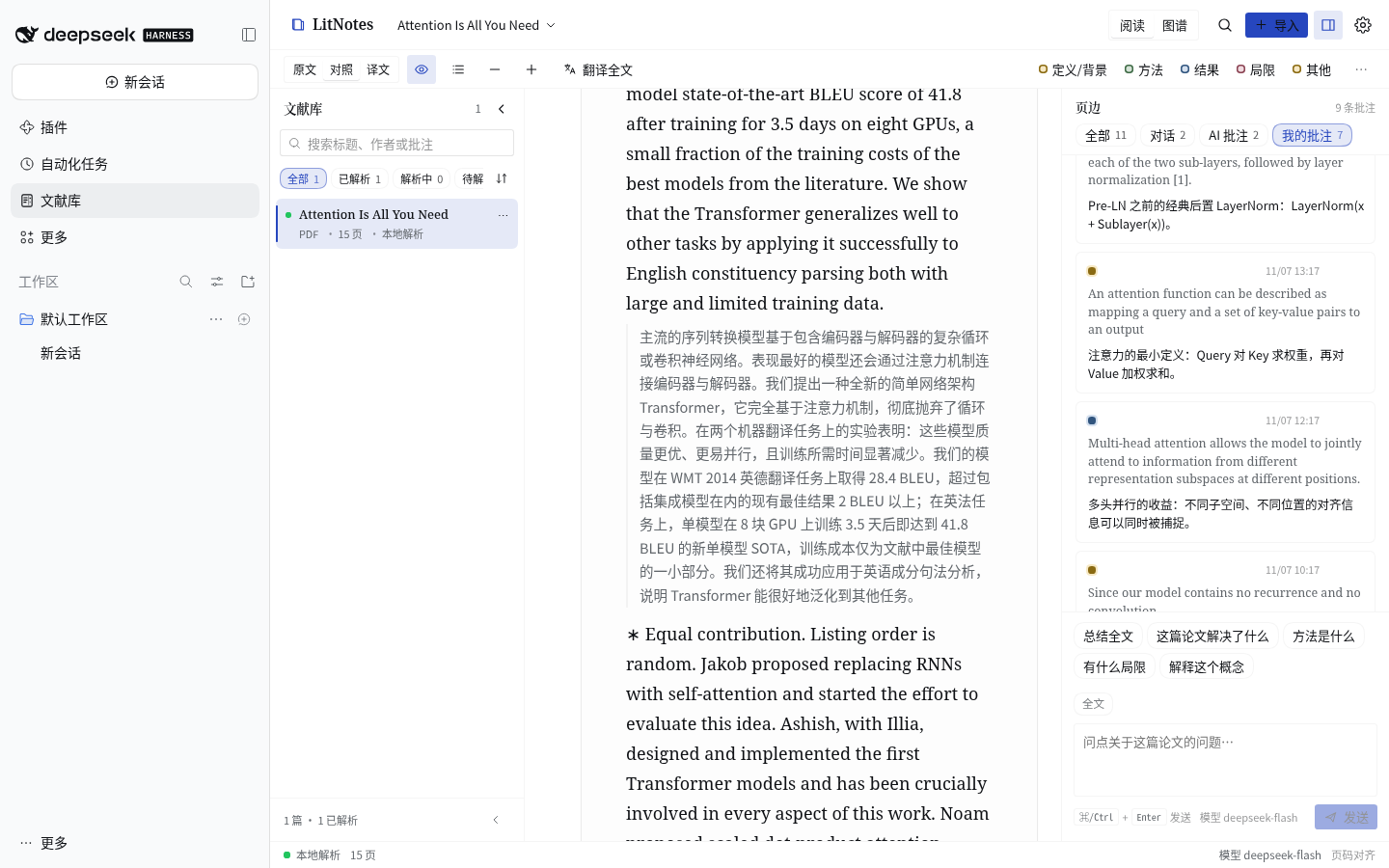 |
Select to act — highlight, annotate, ask AI, translate, copy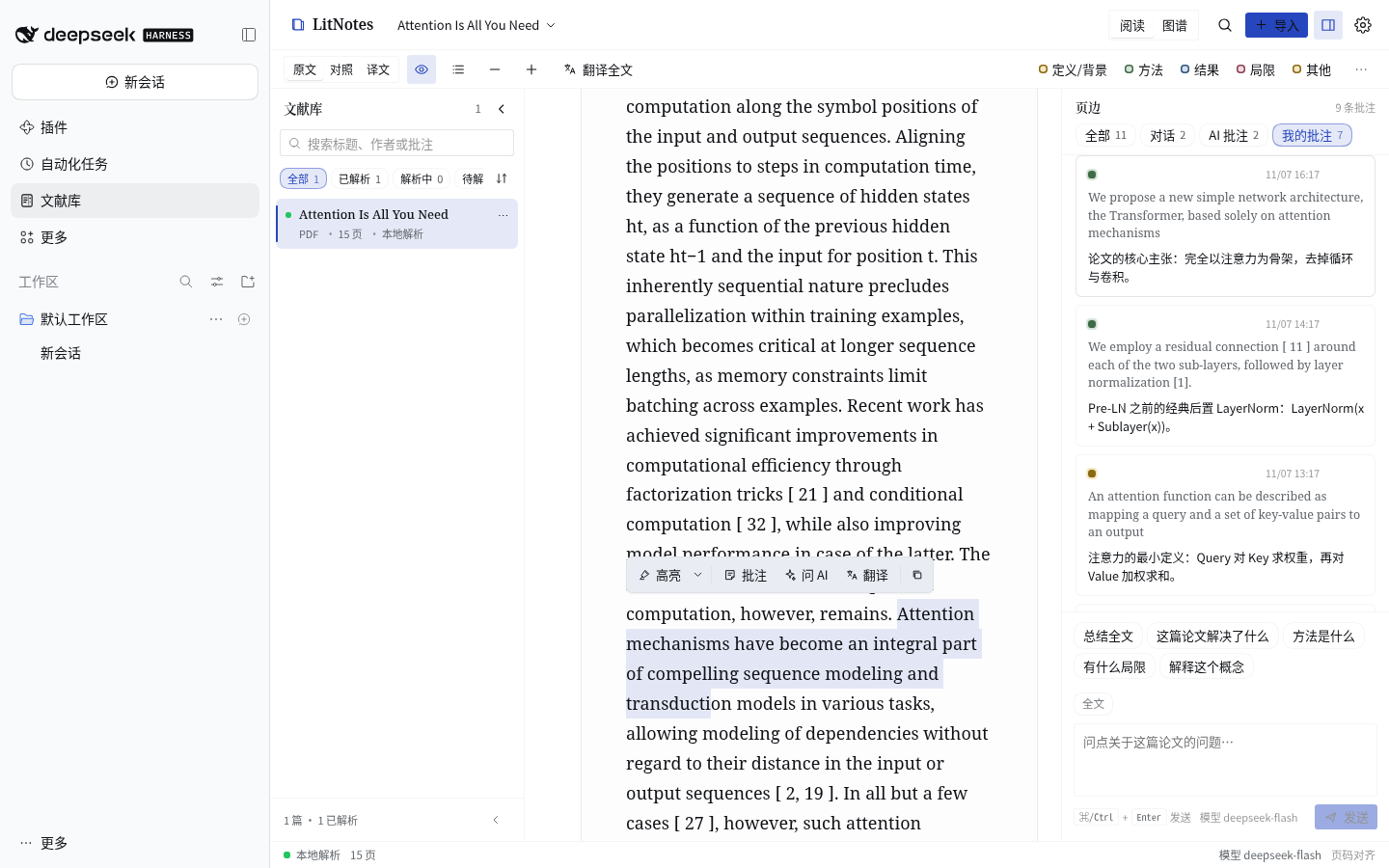 | AI in the margin — citations jump to the source, follow-ups, export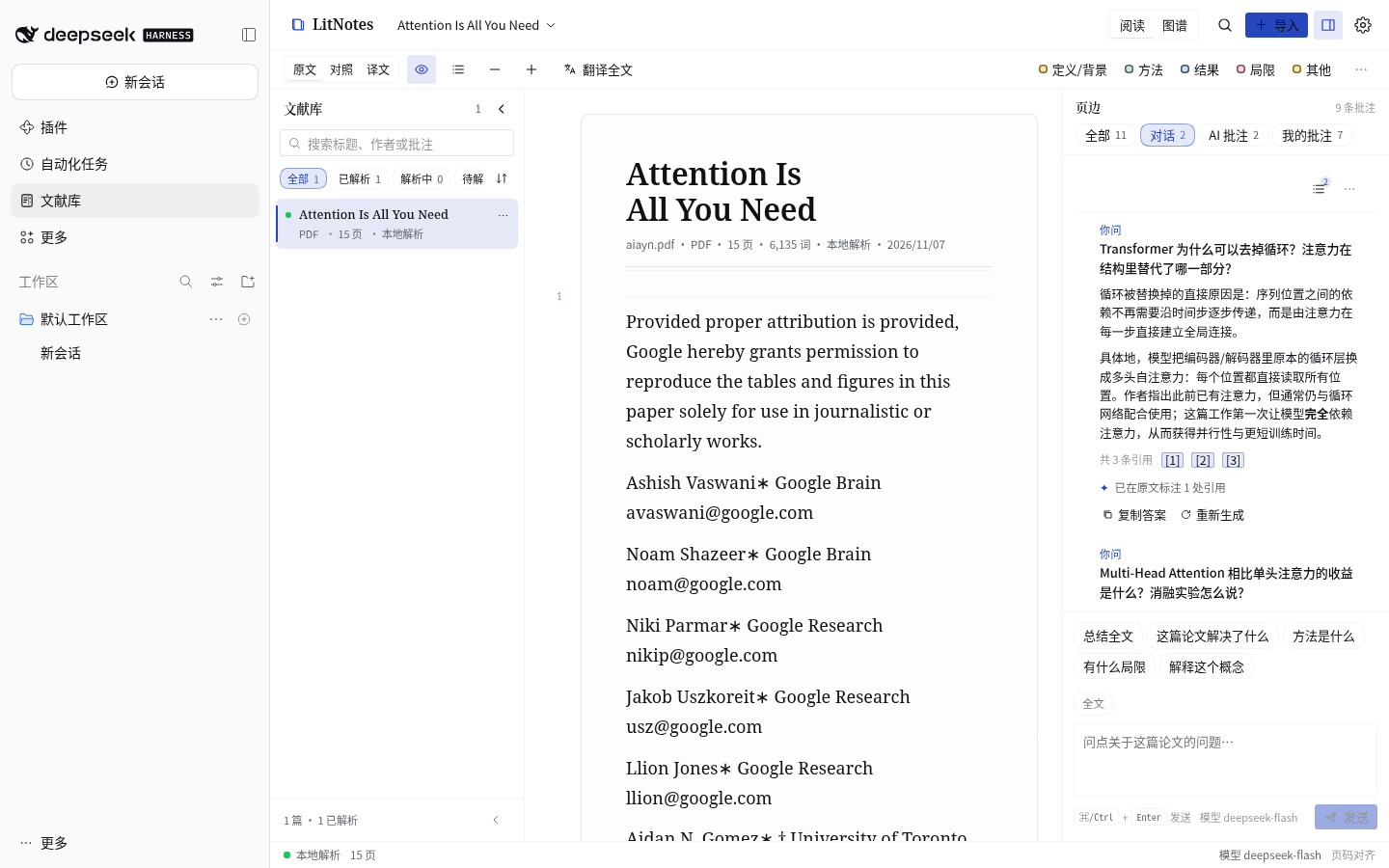 |
Per-paper knowledge graph — the concepts, methods and findings inside one paper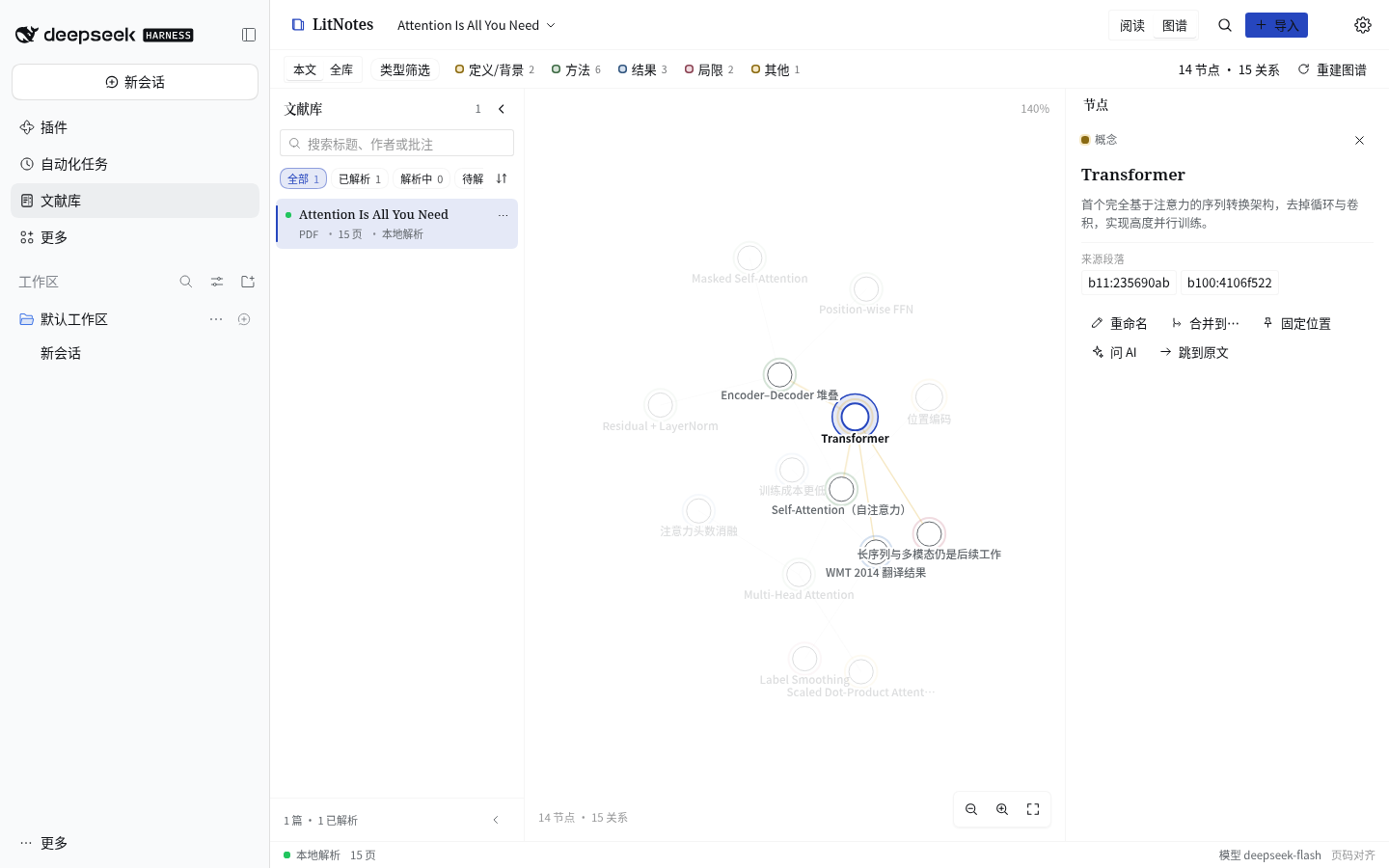 | Library graph — every paper aggregated into topics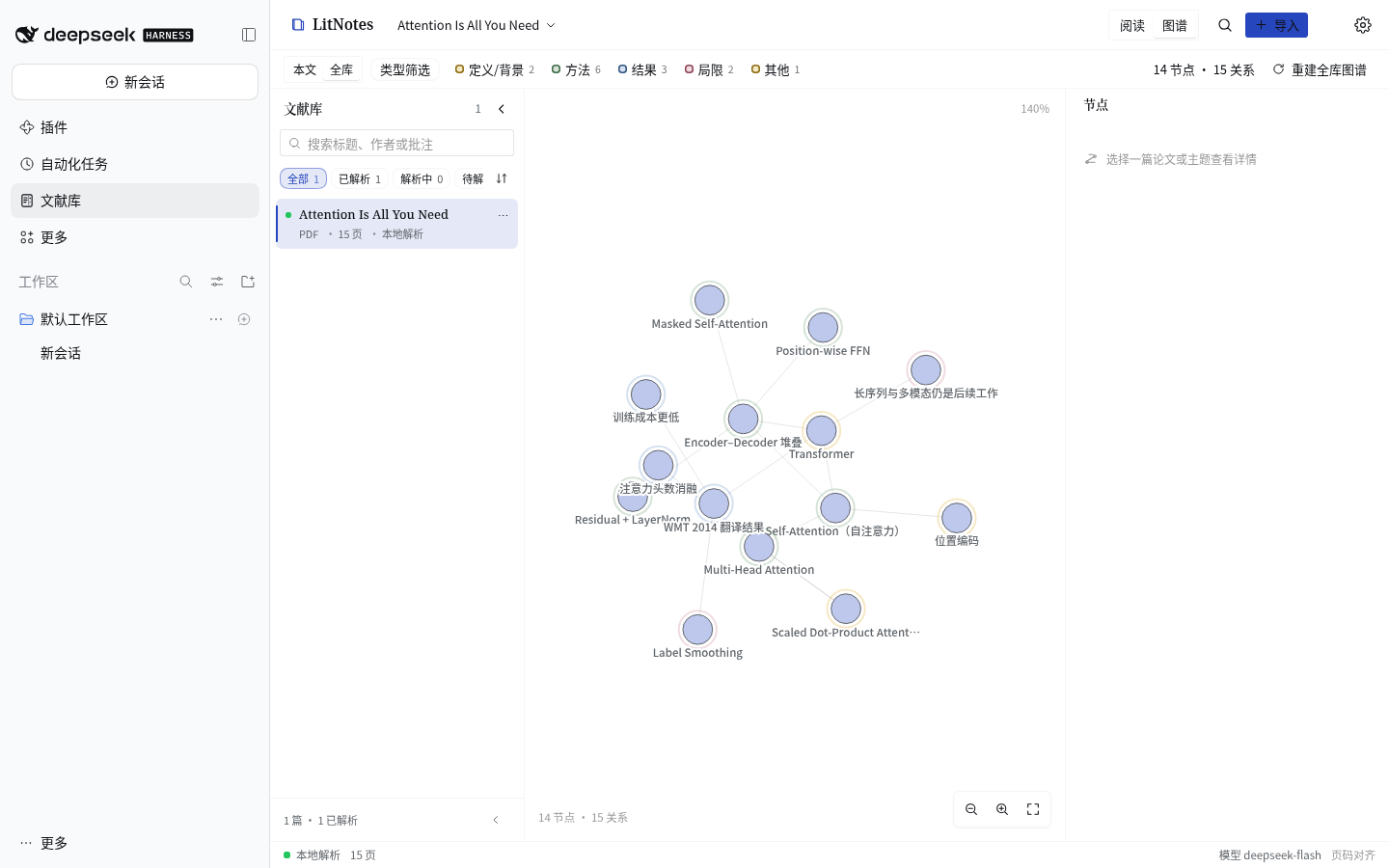 |
AI 精读 — whole-paper close reading with a page-anchored report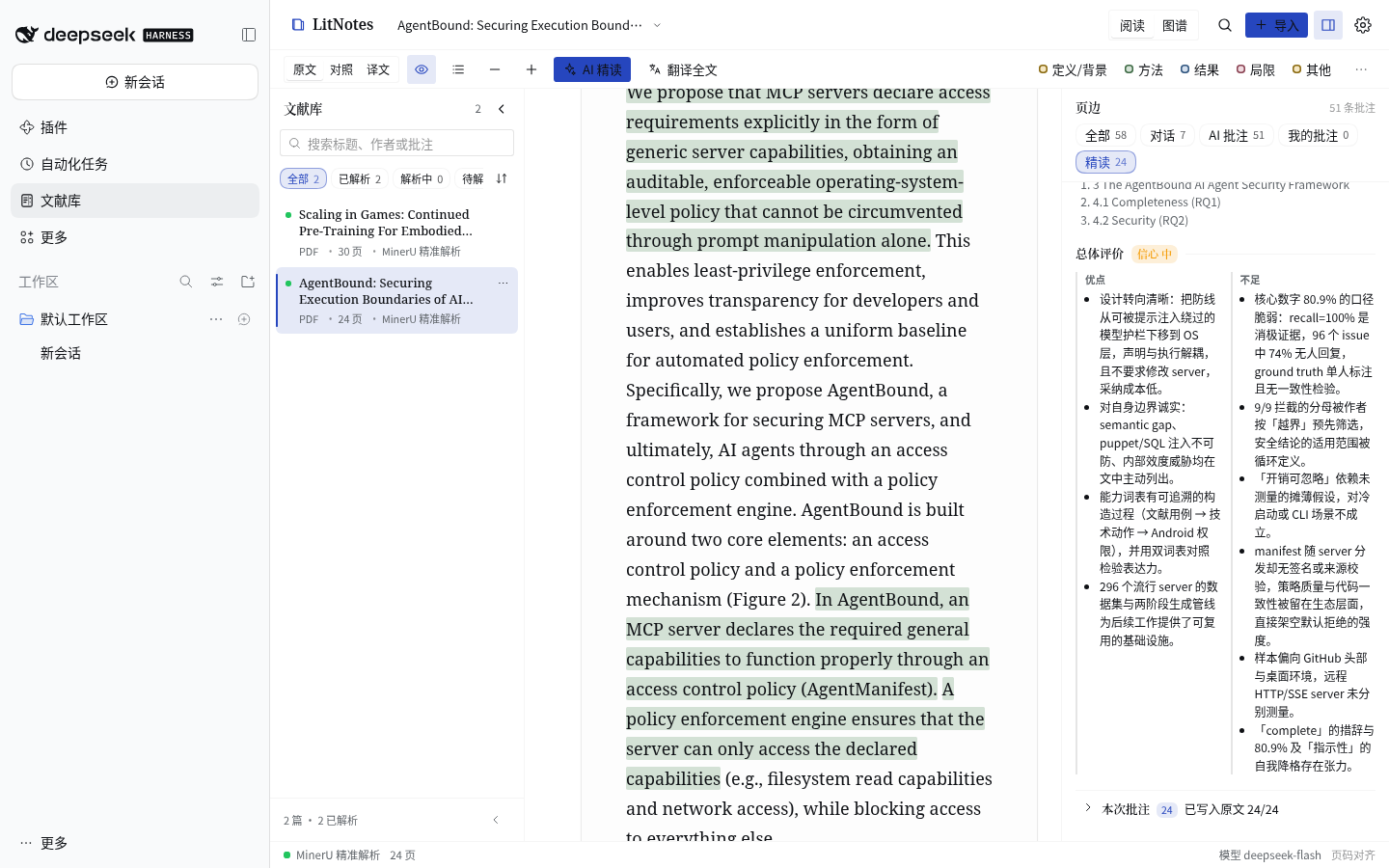 | Annotated by close reading — interpretive notes across the paper, not title/author metadata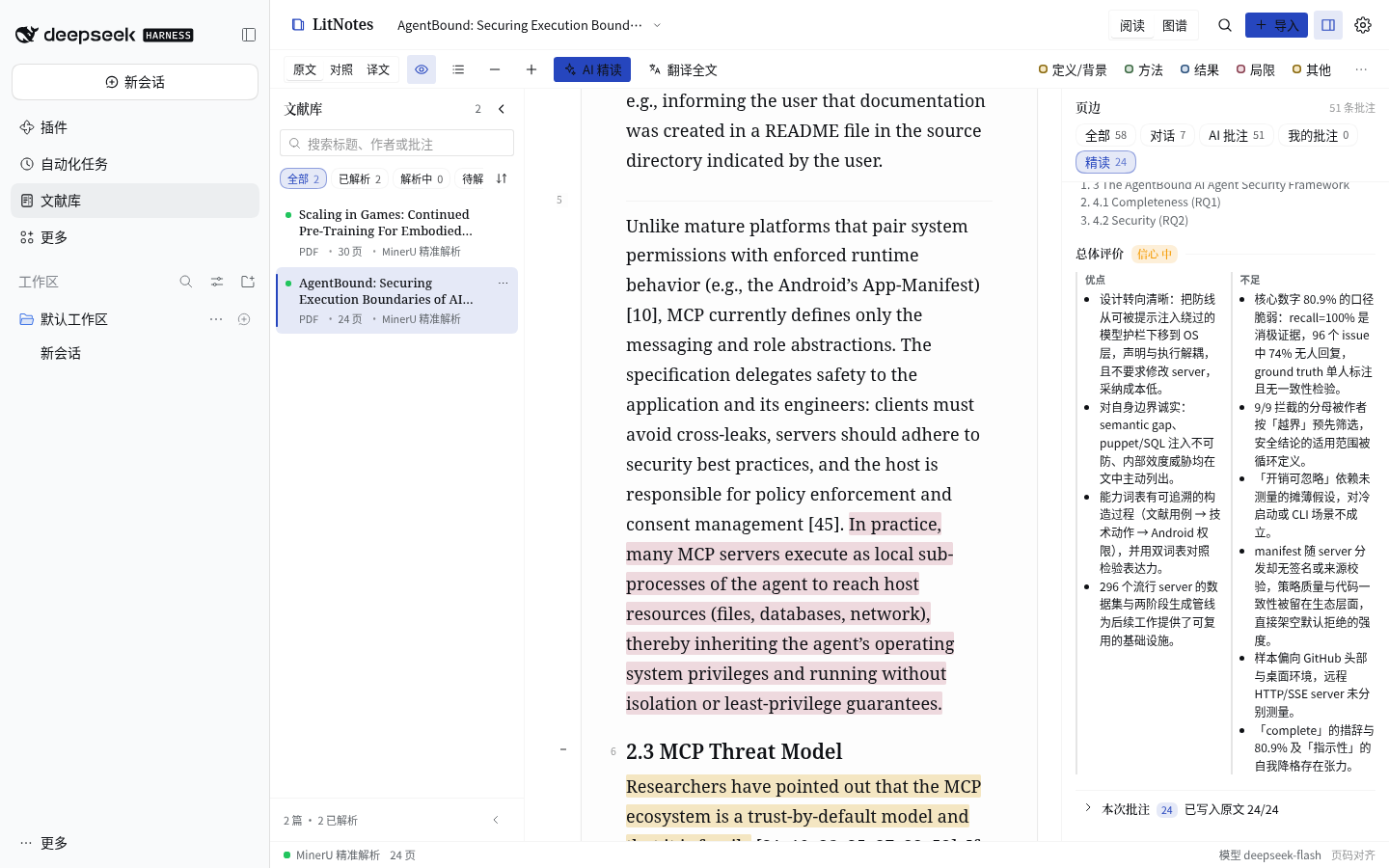 |
Dark mode · reading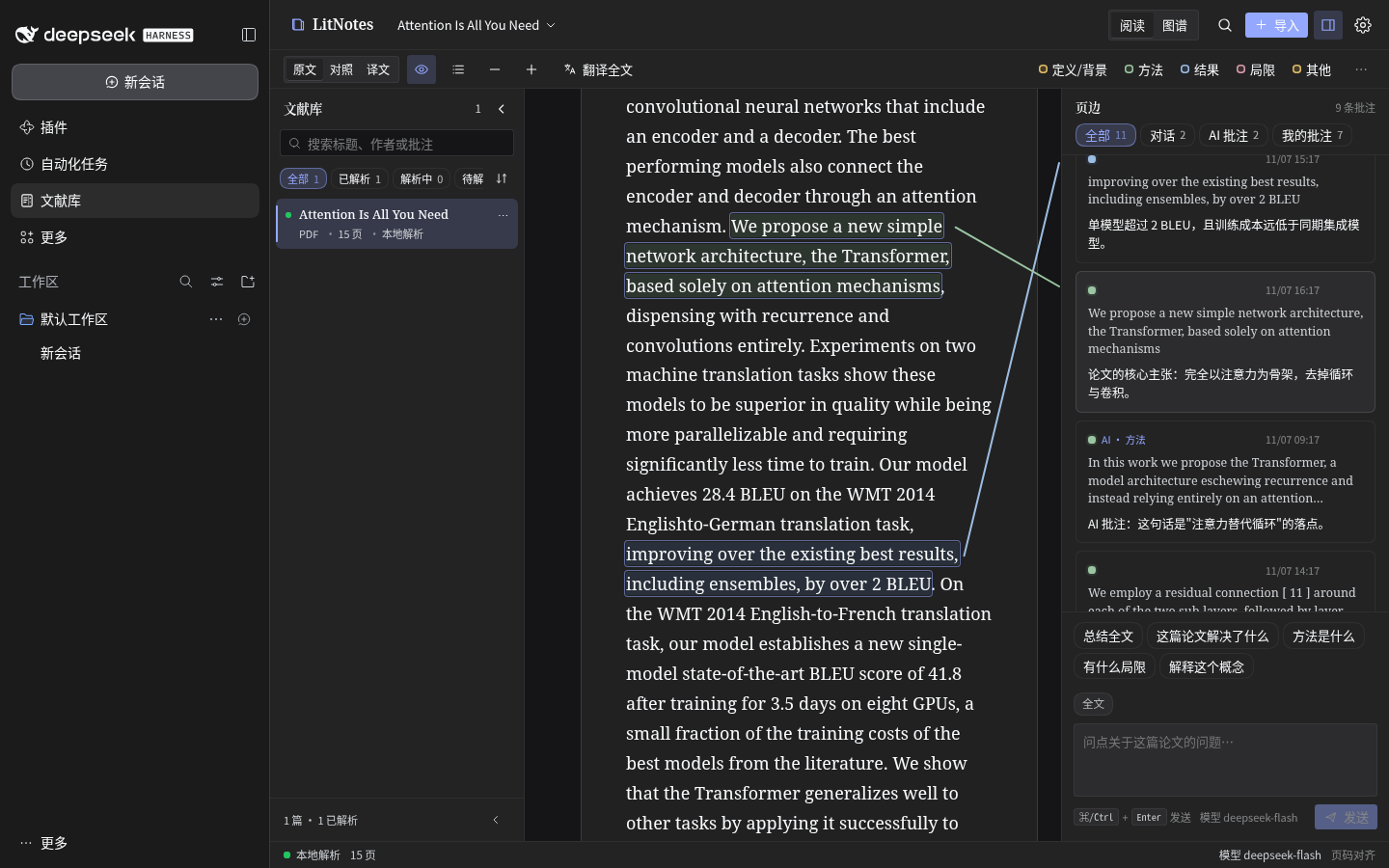 | Dark mode · graph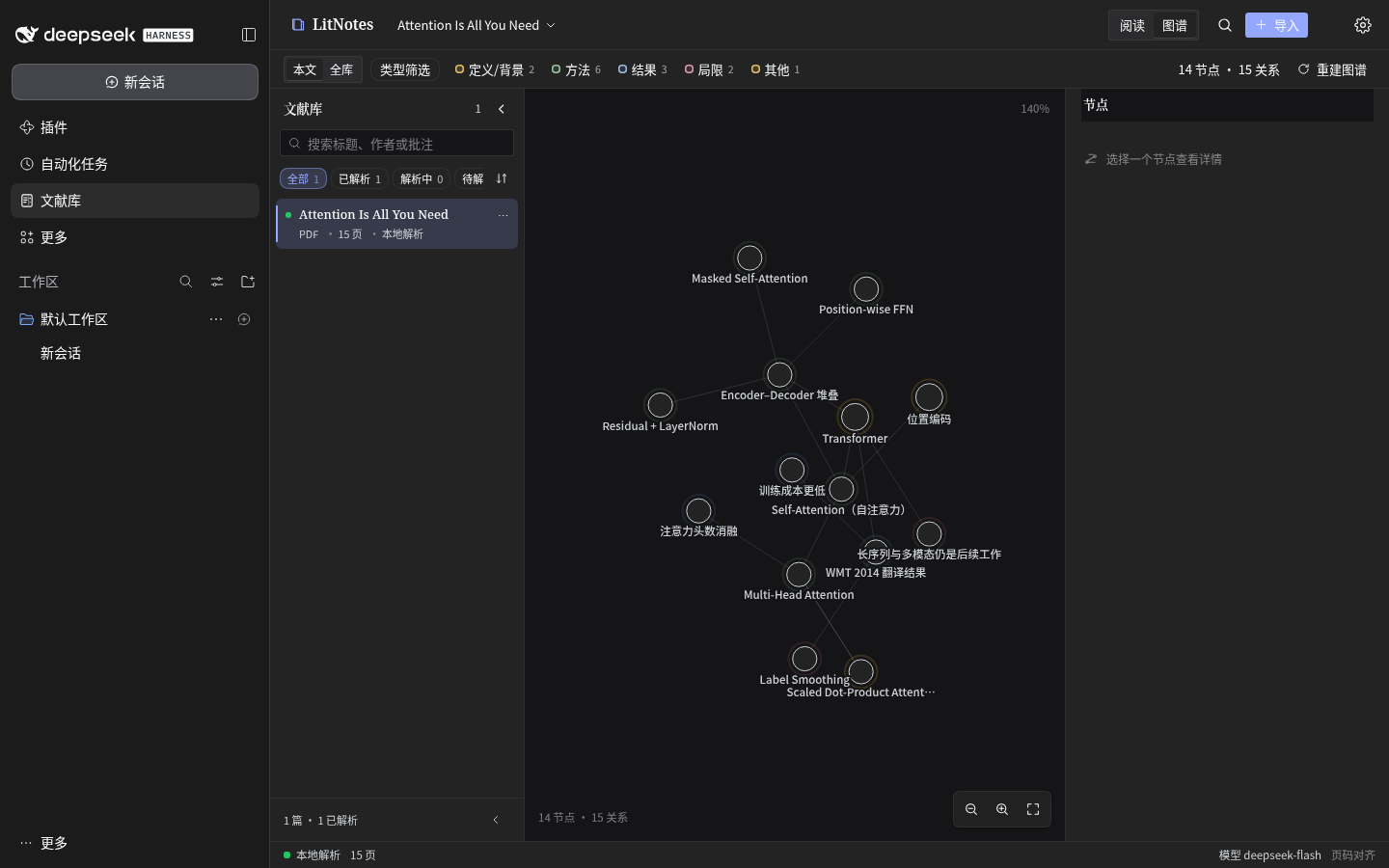 |
Features
Reading
- Original, bilingual and translation-only modes; the text column uses the full paper width by default, with adjustable scale, page marks and outline; formulas rendered locally with KaTeX, figures and tables kept in page order.
- Reading position, mode and panel widths are persisted locally — reopening a paper returns to where you left off.
- The margin can show only your notes or only AI annotations, and can be filtered by aspect.
Annotations and the margin
- Four aspects — definition/background, method, result, limitation/context — each with its own ink. Highlights, margin notes and AI annotations live in the same column.
- Click a highlight to open its annotation card: the note, the quoted source, and edit / delete actions.
- After a re-parse, annotations are re-anchored by their verbatim quote; ones that cannot be re-anchored are flagged as stale instead of being silently dropped.
Grounded AI conversation
- Answers are generated only from the current paper's parsed text and streamed; stop, regenerate and follow-up questions are supported.
- Citations are validated before they are shown; unverified citations are dimmed and never become annotations. A citation in an answer jumps straight back to its sentence.
- Verified citations become AI annotations in their aspect color, carrying model and conversation provenance.
- Preset questions sit right above the composer in every scope, and the composer can be answered by typing, by a preset, or by a follow-up.
- Questions default to the whole paper (no paragraph is attached for you); the per-paragraph Ask AI about this paragraph button next to translate/annotate narrows the focus to one paragraph, and a text selection narrows it to the selection — the composer chip always shows which scope is active.
- Conversation history is stored per paper locally, can be cleared and exported as Markdown.
Close reading (AI 精读)
- One action reads the whole paper, section by section, with a rolling reading memory — not a sampled head plus retrieval hits.
- It writes many interpretive, evidence-anchored annotations (24 by default, coverage-checked) and explicitly rejects title/author/venue metadata and notes that merely restate their quote.
- It produces a structured close-reading report — problem, gap, contributions with evidence
strength, method, evaluation, findings, limitations, open questions, argument map, glossary,
reading path and verdict — and every point jumps back to its page (
原文 p.N). - Transparent about what it read: sections read, annotations, coverage, model calls, duration and tokens are shown. The run is cancellable, cached and re-runnable; cancelling never loses the previous report or annotations.
- Configurable through the
ai.deepRead*keys (call cap, source cap, annotation cap, per-call output budget, synthesis digest, coverage pass, adjudication).
Knowledge graphs
- Per-paper graph: one action reads the paper and extracts concepts, methods, findings, definitions, limitations and sections plus their relations. Nodes keep their source location and jump into the text, and Q&A keeps adding new nodes over time.
- Library graph: all papers are aggregated deterministically into topic clusters and shared-concept relations, and can be rebuilt at any time.
- The canvas supports panning, cursor-anchored zoom and drag-to-pin; nodes can be renamed, merged and pinned, and manual edits survive a rebuild.
Library and parsing
- The library keeps parse status and progress, with search, type filters and sorting; import by drag and drop or by URL.
- Three parse engines: MinerU precise parsing (configured token), MinerU lightweight cloud parsing (no token), and a local engine (no upload, pdf.js text extraction).
- An async parse queue with cancel, failure reasons, restart resume and page-scoped repair — only the broken pages are re-parsed and spliced back, leaving other pages and annotations untouched.
Agent-native
dsh-litnotes is a DSH plugin, and it gives the same library to agents: eight tools, one coordinate system, plus a static system-prompt section that tells the agent when to use them.
| tool | purpose |
|---|---|
library_search | search passages across the library or one paper; returns documentId/blockKey/page/snippet |
library_read | metadata and outline, bounded markdown slices, exact block text, or a whole page |
library_ask | grounded answer with citation coordinates (and auto-created AI annotations) |
library_deepread | read the persisted close-reading report, or run the whole-paper close reading (slow, costs tokens) |
library_annotate | list / create / update / delete highlights and margin notes |
library_translate | translate arbitrary text, or up to 10 cited blocks |
library_graph | read/search/build/update a paper graph; read/rebuild the library graph |
library_manage | list/status/URL import/parse/page repair/cancel/rename/delete |
Getting started
Install
From npm (recommended):
dsh plugin --profile web add dsh-litnotes
Pin a version with dsh plugin --profile web add dsh-litnotes@1.1.0-alpha.1.
Until the alpha is published to npm, install it from the GitHub release tarball below.
From GitHub:
dsh plugin --profile web add https://github.com/NIRVANA-APOC/dsh-litnotes
Or install the prebuilt release tarball (no local build):
dsh plugin --profile web add https://github.com/NIRVANA-APOC/dsh-litnotes/releases/download/v1.1.0-alpha.1/dsh-litnotes-1.1.0-alpha.1.tgz
For local development, point link: at a source checkout:
dsh plugin --profile web add link:/path/to/dsh-litnotes
# or via the plugin manager: plugin_manager install_bundle link:/path/to/dsh-litnotes
Reload the Web UI afterwards. Prerequisites: a DSH Web profile that mounts webServer and connection. Optional services light up the matching features: llm (AI), credentials (persistent MinerU token), translator (translation), officeToPdf (local Office conversion), tokenMeter (context budgeting), systemPrompt (agent hint) and tools (agent tools).
First run
- Open the LitNotes library panel in the sidebar, then drop or pick a PDF, or paste a link.
- Choose how to parse. The default
autoengine uses precise parsing when a MinerU token is configured; otherwise it prefers the local engine (the file is never uploaded) and falls back to the token-free lightweight cloud parser for formats local parsing cannot handle. - Open the parsed paper: read it, compare translations, highlight and annotate — or ask the AI from the margin composer.
- Switch between Read and Graph at the top; within the graph, switch between This paper and Library.
- Ask an agent in DSH chat to "search / read / annotate the library" — it uses the same data and the same coordinates.
Data and privacy
~/.dsh/litnotes/                        (or $DSH_HOME/litnotes)
  documents/<id>/source.<ext>           original file
  documents/<id>/parsed/                full.md, content_list.json, images
  documents/<id>/annotations.json       highlights and margin notes (with AI provenance)
  documents/<id>/translations.json      paragraph translation cache
  documents/<id>/chat.json              grounded conversation history
  documents/<id>/graph.json             per-paper knowledge graph
  library-graph.json                    library-wide knowledge graph
  preferences.json                      reading and AI preferences
- Files, parse results, annotations, conversations and graphs stay on this machine. Only an explicit cloud parse uploads the source file to MinerU.
- AI questions send only the bounded retrieved context (the relevant passages), never the whole library.
- The MinerU token lives in the DSH credential store and is never returned to the browser or written to logs.
Compatibility
- On-disk JSON uses stable version-1 envelopes and is compatible with the pre-refactor 0.3.0 format: an existing library loads without migration.
- The plugin package has zero runtime npm dependencies; the only external requests the client bundle makes are for the platform-provided React modules.
- The source is strict TypeScript (
strict,noUncheckedIndexedAccess,verbatimModuleSyntax, noany); the host and client halves speak one typed wire contract.
Development
pnpm install                      # dev dependencies only
node scripts/build.ts             # build Host index.js and Client lib/client.js
pnpm typecheck                    # strict type-check
pnpm test                         # vitest (790 tests)
node scripts/check.ts             # 17-check release gate
node scripts/check.ts --final     # release gate (warnings are failures)
Requires Node ≥ 20.16. Source lives in src/shared/** (both halves), src/host/** and src/client/**; index.js and lib/client.js are build artifacts.
Docs
| document | contents |
|---|---|
docs/ARCH.md | architecture, data formats, HTTP wire contract, build and gate |
docs/PARSING.md | parse engines, page-scoped repair, annotation re-anchoring |
docs/AGENT.md | the eight agent tools with a worked flow |
docs/AI-SPEC.md | grounded chat, citation validation, entailment, knowledge graphs, AI 精读 (close reading) |
docs/UI-SPEC.md | reading-desk design system and interaction contract |
CHANGELOG.md | release history |
Built as a DeepSeek Harness plugin.

Comments
Loading…
Similar plugins
by Suxeca
DSH literature library: persistent, authenticated literature bookmarks and a local research knowledge base for academic review workflows.
★ 0
MIT
Oct 14, 2026
dsh plugin --profile web add @suxeca/dsh-literature-libraryby xiehuan123
Evidence-first reading for AI agents — turn articles, books and PDFs into traceable claims, evidence, source locations and knowledge maps.
★ 67
↓ 838/wk
MIT
JavaScript
Sep 11, 2026
dsh plugin --profile web add dsh-deepreadby Gaochenyuen
Deep literature research agent as a Deepseek-Harness preset powered by Scopus API.
★ 0
↓ 46/wk
MIT
JavaScript
Sep 11, 2026
dsh plugin --profile web add dsh-scopus-searcherby shiyan688
DSH paper workbench: arXiv search → local library (metadata/PDF/full text) → L1/L2/L3 three-layer reading notes. Host + browser halves in one package, no build step.
★ 0
MIT
JavaScript
Sep 30, 2026
dsh plugin --profile web add dsh-paperdeskby PerryLink
Local document knowledge base for DeepSeek Harness: library_add/remove/list, hybrid semantic+keyword library_search with diversity re-ranking, relevance filtering and lost-in-the-middle avoidance, cit
★ 26
↓ 1.5k/wk
Apache-2.0
TypeScript
Nov 6, 2026
dsh plugin --profile agent add dsh-libraryby Aik358
DSH Literature 文献侧窗插件:在 DeepSeek Harness 侧边栏识别 DOI/arXiv/标题、抓取元数据与全文、写入本地文献库或导出目录,内置 PDF 阅读器。
★ 8
↓ 480/wk
MIT
JavaScript
Sep 16, 2026
dsh plugin --profile web add @a9i5k4/dsh-literature