

dsh-chat-image
Manifest validRenders chat Markdown image references as a gallery in the DSH web GUI
dsh-chat-image


English | 中文
Renders chat Markdown image references () as a gallery under each closing assistant message in the DeepSeek Harness web GUI.
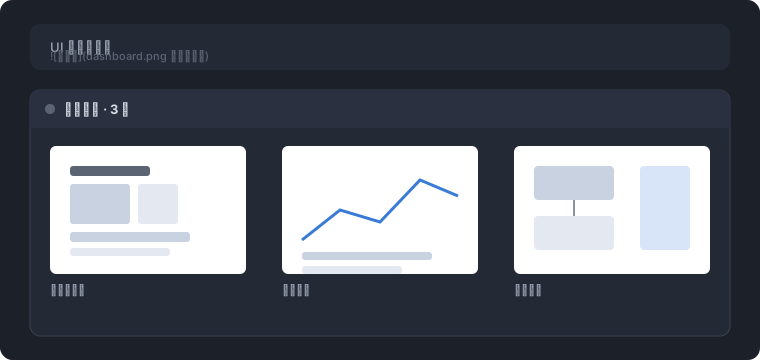
- Local workspace paths load through a validated host route (
/dsh-chat-image): the path must resolve inside a registered workspace and be a regular file of at most 32 MiB; the file is served with an extension-derived content type. - http(s) references are skipped — the built-in markdown renderer already shows them inline.
data:URLs render directly.- The optional title renders as the caption below the image and as the hover hint; a local file without a title shows its absolute path as the hover hint.
- A reference whose image fails to load (missing file, out of workspace, over the byte cap) falls back to its alt text; an empty alt renders nothing for that item.
- Clicking a local image opens the file through the same host opener the tool rows use.
Install
As a standalone bundle, from a dsh installation:
# from npm
dsh plugin --profile web add dsh-chat-image

# from the git repository
dsh plugin --profile web add github:Niobium-41-nb/dsh-chat-image

# from a tarball
dsh plugin --profile web add ./dsh-chat-image-0.1.0.tgz
A git install fetches sources and runs the package's prepare build; pnpm ≥ 10 requires an explicit build allowance for that script (the add output prints the exact pnpm-workspace.yaml entry to add). The web profile's browser roster (clientModules) picks the browser half up automatically through the dsh.client manifest; the Loader mounts the host half through the bundle patch.
Usage
The model writes ordinary Markdown image references in its reply:

 <!-- paths with spaces need angle brackets -->

Relative paths resolve against the session working directory; absolute paths (drive-letter, /, or \\) pass through. Assistant closing turns only: the tail hole does not exist under user messages, and a turn with produced files keeps that row (the gallery shows only when it declines).
Develop
pnpm install
pnpm test      # vitest: route status matrix + reference extraction
pnpm build     # tsc types (lib/types) + tsdown bundles (lib/index.js, lib/client.js)
The browser bundle is CJS wrapped for the dsh loader (window.__ModuleLoader__.load) with only the frozen platform-module table external; the node half has no runtime imports. Both halves consume harness services structurally, so the package carries no runtime or type dependency on @deepseek-ai/* beyond the platform modules.
Known Limitations
- Assistant closing turns only. The turn-tail hole exists only under closing assistant messages.
- Chain exclusivity with the produced-files row. A turn that has both produced files and image references shows only the produced-files row (higher priority).
- CommonMark destination rules. A path containing spaces must be written in angle brackets (
<my image.png>); an unquoted multi-word destination is parsed as path + title. - Workspace containment. Only files inside a registered workspace are served; the route answers
403for anything else, so it cannot read arbitrary host files.
Compatibility
Versions
| Latest version | Published | Size |
|---|---|---|
| 0.1.0 | — | — |
| 0.1.1 | — | — |
Comments
Loading…
Similar plugins
控制已登录的网页版 ChatGPT 生成图片并下载到本地 — DSH bundle 插件。
★ 0
dsh plugin --profile web add dsh-gpt-imageby condaThinker
DSH plugin: show_image tool that renders an image inline into the web chat flow (QQ/WeChat style) — path text in the message, image bytes never enter model context.
★ 2
JavaScript
Aug 30, 2026
dsh plugin --profile web add dsh-image-inlineby loyalchiiina
DSH plugin: display images inline in chat with lightbox zoom, download (save-as), and prev/next navigation
★ 2
↓ 33/wk
MIT
JavaScript
Oct 24, 2026
dsh plugin --profile web add @loyalchiiina/dsh-chat-image-lightbox
No screenshots
Dockable Markdown preview for the DSH Web UI: side-by-side with the conversation, a per-session recently-read .md list, local relative-path images render in place, and clicking an in-chat .md referenc
★ 0
dsh plugin --profile web add dsh-md-previewRender LaTeX in the DSH web chat: formulas inside your own message bubble and a live preview of the composer draft.
★ 1
MIT
JavaScript
dsh plugin --profile web add dsh-math-renderby fancyui
DSH plugin v2: a standalone image-generation workspace (sidebar entry + its own main view) for the OpenRouter Image API — chat-style prompt column, picture area with history, draggable parameters.
★ 0
MIT
JavaScript
Oct 17, 2026
dsh plugin --profile web add dsh-openrouter-imagen-v2