

deepseek-harness-desktop
Manifest valid★ 876Open-source Windows desktop client and GUI for DeepSeek Harness — zero-setup installer with Codex, plugins, skills, SSH, mobile remote access, and 11 skins.
DeepSeek Harness Desktop
Chinese | English
Maintained by ningbai牛逼: If DeepSeek Harness Desktop helps you, please consider supporting ningbai牛逼 on Afdian. Your support goes toward servers, testing environments, and ongoing maintenance.
Scan the QR code to support:

DeepSeek Harness Desktop User Community
QQ Group: 1105158177
Click to join the QQ group with one click

Join our community:
- Usage and configuration
- Plugin and Skills sharing
- Model configuration and usage experience
- Automation workflows
- Themes and desktop pets
- New version experience and feature suggestions
Slow GitHub download speed?
The latest installers will also be shared in the group, where you can also discuss installation and usage issues directly.
DeepSeek Harness Desktop is a community-maintained open-source AI coding desktop client.
DeepSeek has not yet officially released a standalone Desktop product; this project has merged the publicly available official DSH Runtime, Web UI, and the Desktop capability boundaries from the official repository into an installable Windows application, and filled in plugins, Skills, task automation, Git, remote development, and desktop experience in a standalone community host. It is not the official DeepSeek client, and it does not use or override the app identity, data directories, or update sources of any future official Desktop.
Supports Windows 10 / 11 x64; also provides macOS Apple Silicon arm64 Preview and Linux x64 Preview. The project is licensed under BSD-3-Clause.
The installer includes the main runtime components, so there is no need to separately configure Node.js or Git or install DSH.
Product introduction · Download the latest version · User documentation · Changelog
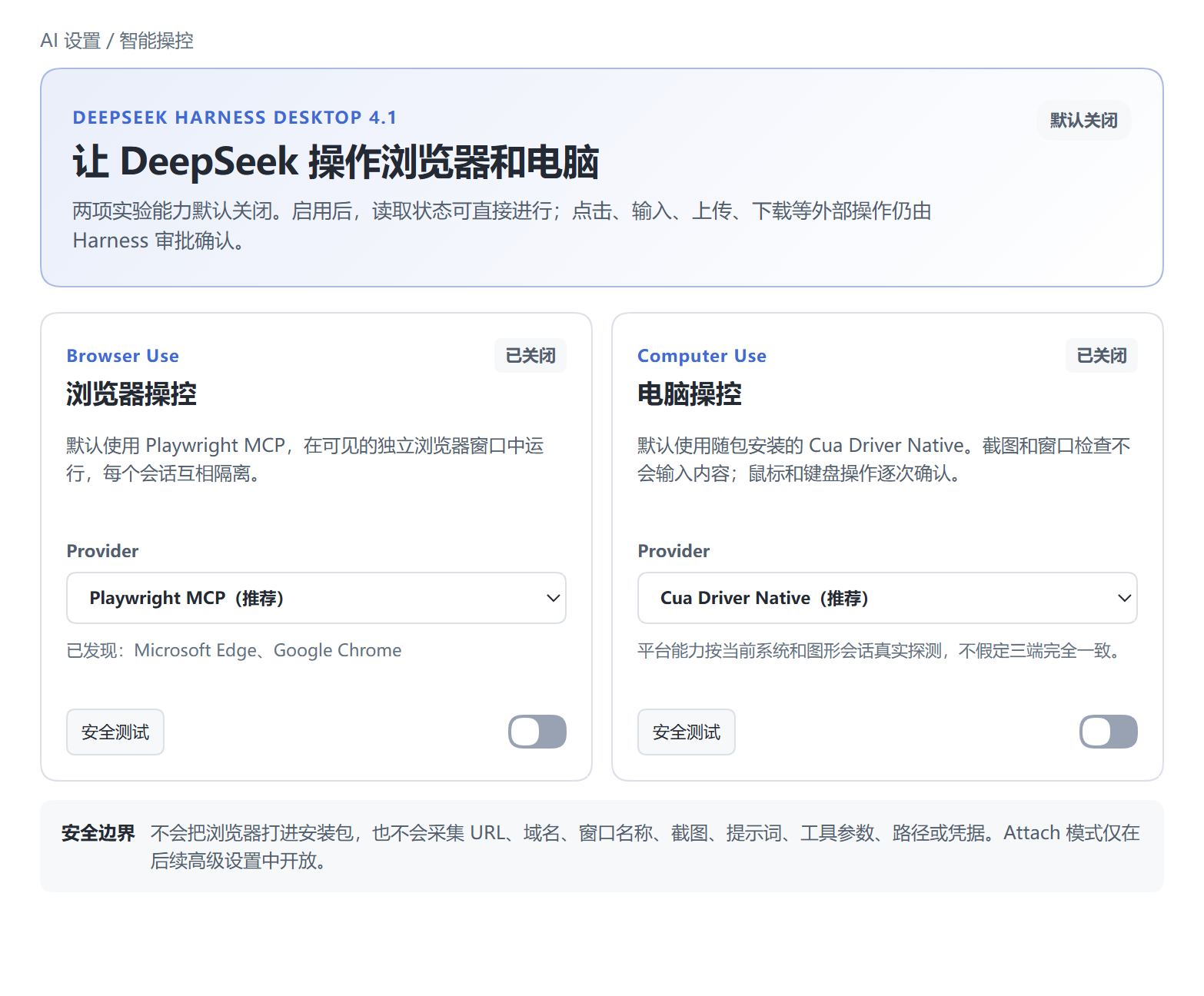
4.1.0: Let DeepSeek control the browser and your computer
The current public stable release is 4.1.0. Windows x64 is the official version; macOS arm64 and Linux x64 are Previews. A release only enters the same GitHub Release after passing on all three platforms.
- Browser Use: Uses the official Playwright MCP by default, running in a visible, isolated system browser session; automatically detects Chrome, Edge, or Chromium, but clicking, typing, uploading, and downloading still require approval.
- Computer Use: Uses the bundled Cua Driver Native by default, with external MCP available as an isolated fallback; screenshots and window enumeration are observable, mouse and keyboard operations are confirmed one by one, and consecutive startup failures automatically enter safe mode.
- DSH 0.1.6 breaking-change adaptation: Strictly pinned to
@deepseek-ai/dsh@0.1.6-alpha.1, completing the migration to the new contracts for Agent, Session, PTC, Workflow, Sandbox, and Agent Team. - 3.5/4.0 data transaction inheritance: Sessions and long context, Workspaces, models, credential references, Skills, plugins, skins, desktop pets, and collaboration settings are backed up before modification and rolled back on failure; original Session logs are never rewritten without a backup.
- Restrained telemetry: Newly added control events use only a fixed result vocabulary and do not collect URLs, domains, window names, screenshots, Prompts, tool parameters, paths, or credentials; see the Privacy Policy for details.
Smart Control User Guide · Full 4.1.0 release notes
Core Capabilities
- Cost-Perf Mode V2: Lead model handles understanding, decomposition, dispatch, review and summarization; sub-models / sub-agents only process dispatched sub-tasks; first selection auto-guides config.
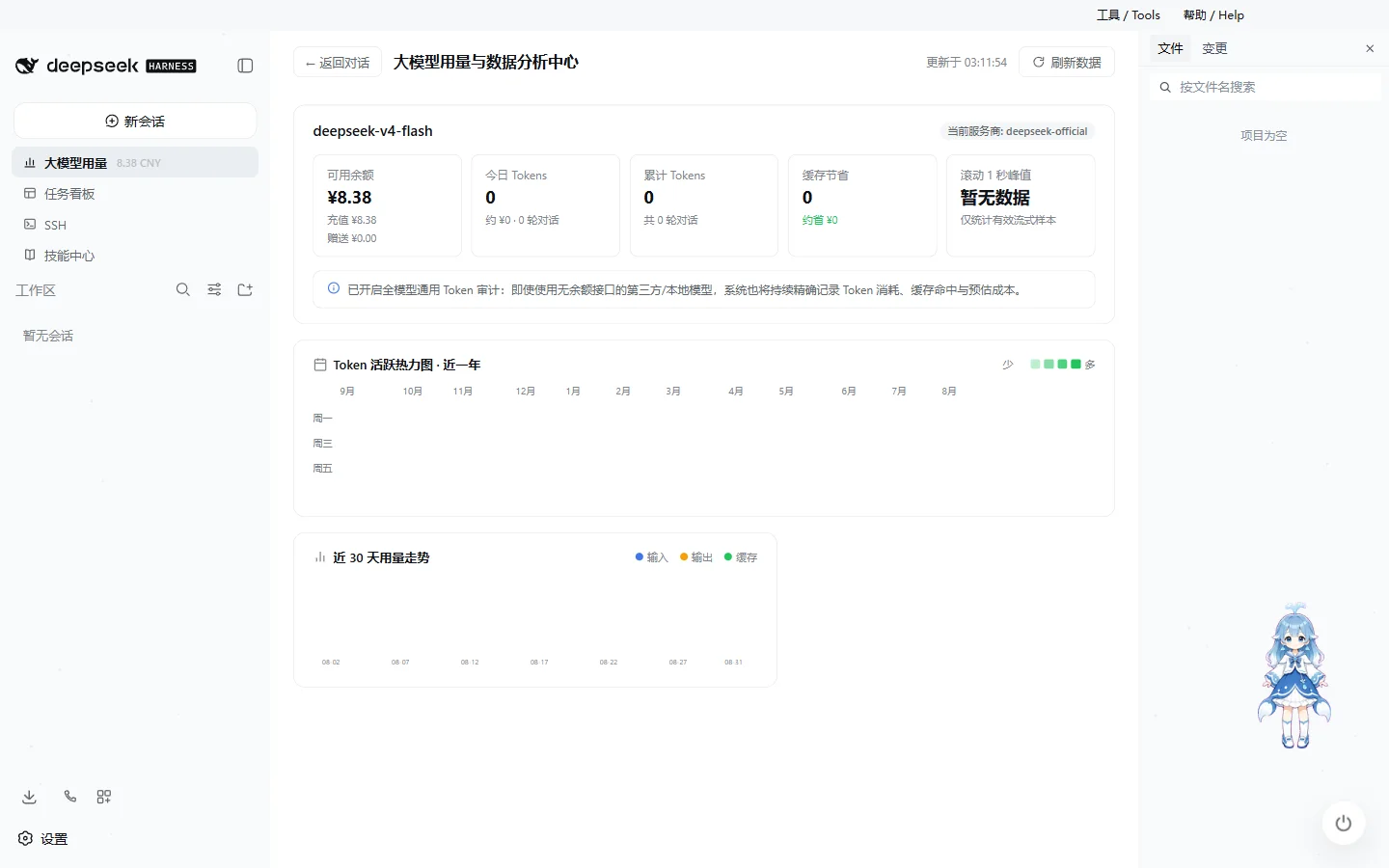
- LLM Usage Dashboard: Real-time balance, input/output tokens, context, cache, request latency and cost; peaks use a strict rolling 1s algorithm, so a usage summary event is no longer mistaken for an instant rate.
- Claude Code / Codex Import: Read-only project and session discovery, preview then import into Harness workspace; sensitive data masked, historical tool calls not re-executed.
- Startup & Plugin Stability Hardened: Startup phases visible, transaction repairs rollback-safe, third-party plugin errors isolated; original DSH Home and plugins carry over directly.
View full release notes · View historical changelog · Upgrade and rollback guide
Model Collaboration, Skills, and Model Access
Screenshots below show 4.1 Smart Control, plus ongoing model collaboration, Skills and model connectivity.
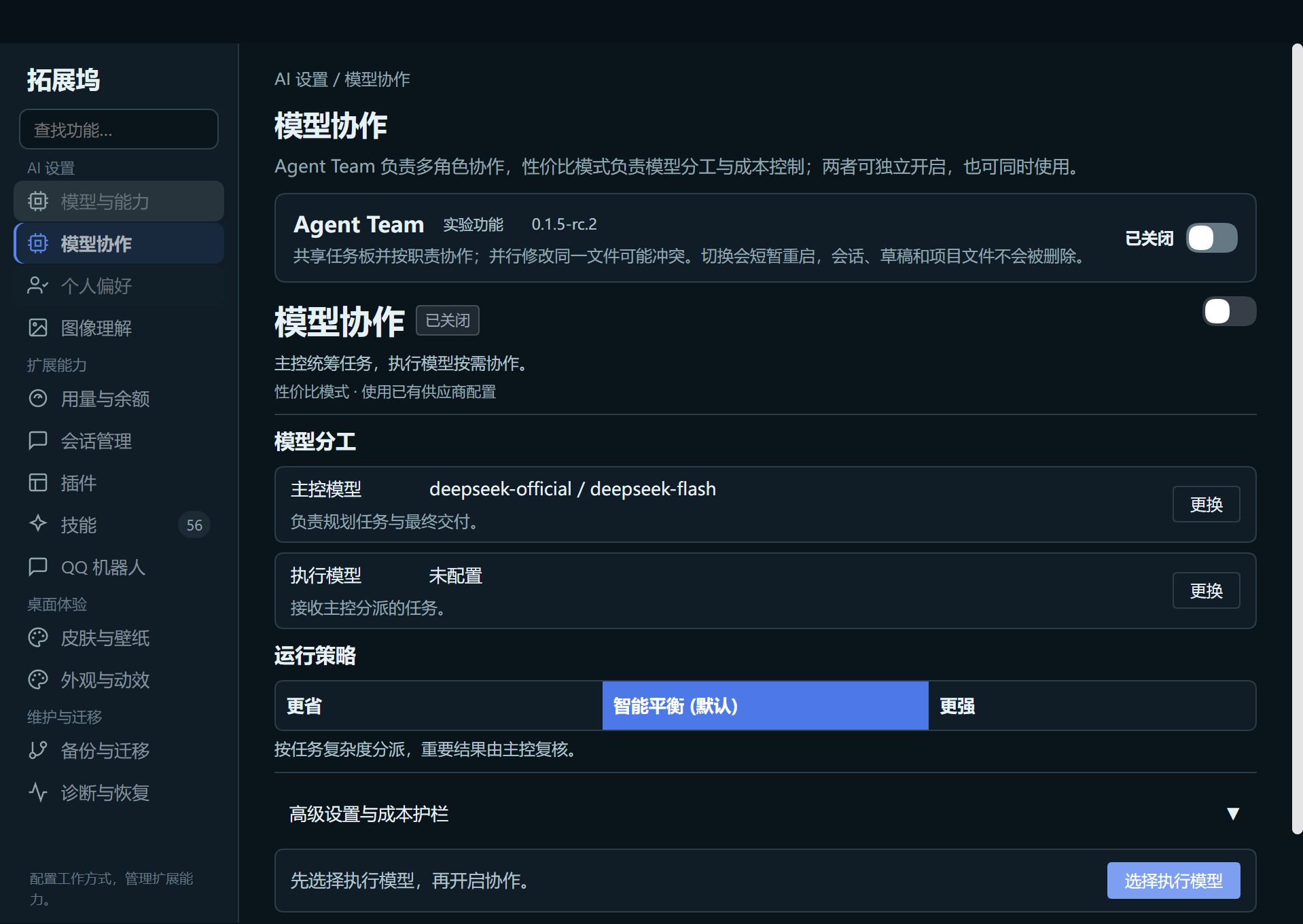
Model Collaboration: Agent Team and Cost-Performance Mode in One Place
The "Model Collaboration" in the session sidebar opens the single dock window to the collaboration page. Agent Team handles multi-role collaboration; Cost-Perf Mode handles lead/execution split. They can be used independently or together.
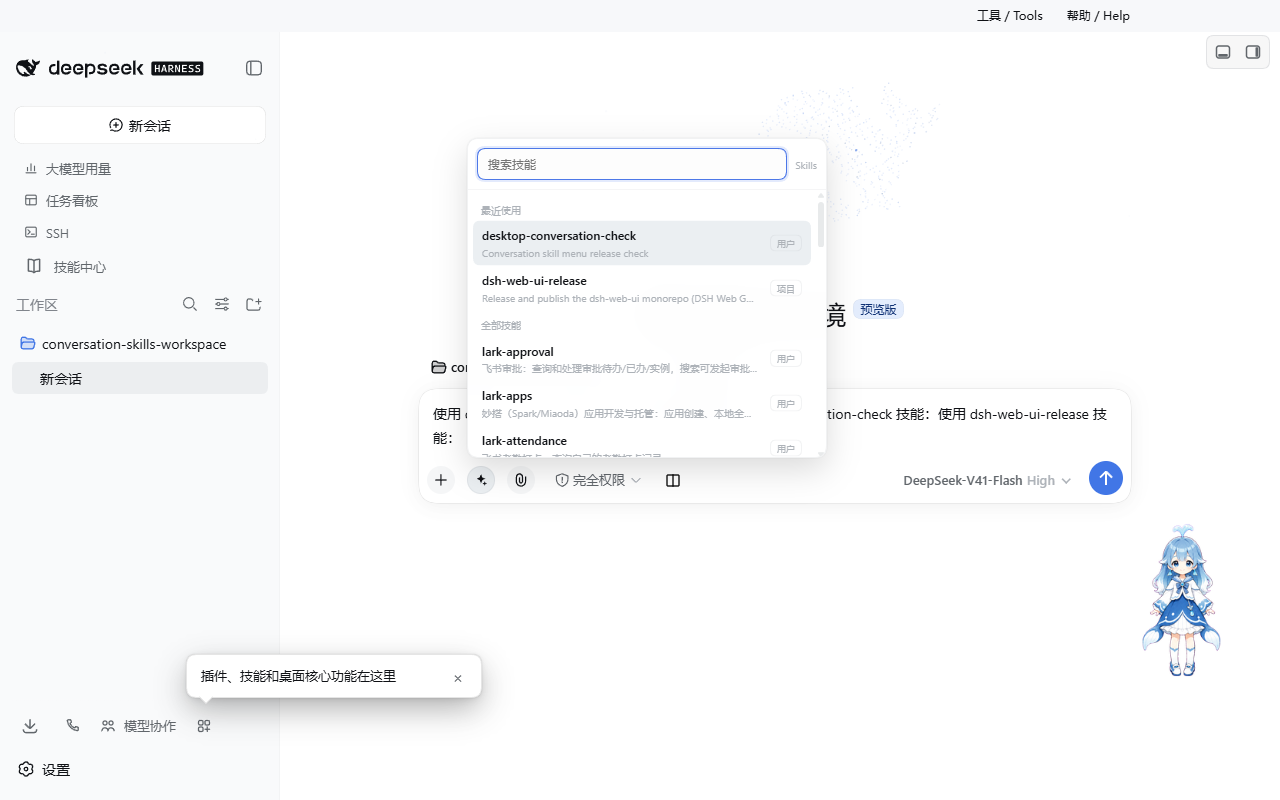
Skills: The Conversation Menu and Skills Center Share the Same Directory
4.0 uniformly scans the project's .dsh/skills, user DSH Skills, and user Agents Skills. The conversation input box can search for and insert skills, and the Skills Center shows the same sources and scopes, eliminating the previous "visible in the sidebar but not in the Skills Center" path split.
bai Provider: Shown with Unified Priority at the Model Entry Point
Chat model, model settings, and the lead/execution model selectors on the collaboration page share sorting rules: user-pinned first, then bai provider, then remaining providers in existing order.
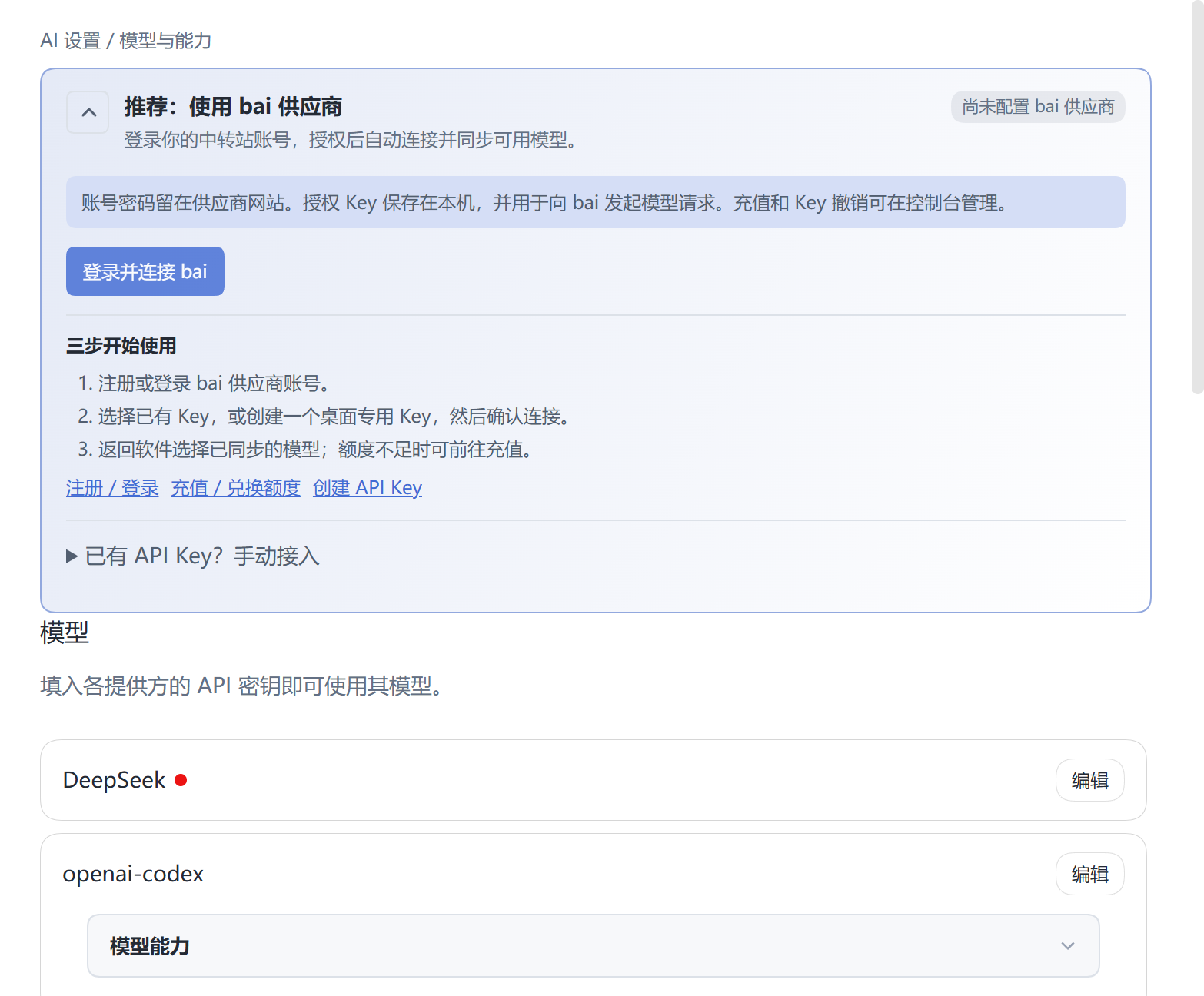
For detailed boundaries, see Desktop Architecture and Capabilities, the Upgrade and Rollback Guide, and the 4.1 release notes.
Why Choose DeepSeek Harness Desktop
Out of the Box
Download and install the EXE, and the full Harness environment starts immediately.
There is no need to manually set up Node.js, Git, pnpm, or DSH Runtime — the desktop app manages all required components and the runtime environment for you.
Complete AI Coding Workbench
All in one desktop application:
- AI chat and code modification
- Project file browsing and editing
- Git / SCM operations
- File previews for Markdown, HTML, code, Diff, PDF, Office, and more
- Model switching and reasoning intensity adjustment
- Skills and plugin invocation
- Agent task execution
- Token and performance statistics
- Multi-project development workflows
Skills and Plugin Ecosystem
Multiple extensions:
- DSH Skills
- Agents Skills
- Project Skills
- Community DSH Bundle
- Plugin marketplace
- Desktop extensions
You can directly search for, install, and use extensions within Harness, progressively assembling your development tools into a complete workflow.
Task Board and Automation
Built-in task board to manage:
To Plan → To Do → In Progress → Done / Failed
Tasks can be handed off to real DSH Agent Sessions for execution, with Task Runs and Evidence recorded for easy result review and follow-up.
Scheduled tasks & background scheduling, ideal for periodic dev & automation.
Remote Development
Local & remote projects:
- Mobile remote control
- SSH
- Web Terminal
- SFTP
- Port forwarding
- Multi-host cluster execution
- QQ Bot integration
Connect to your Harness work environment from a computer, phone, or chat app.
Personalized Desktop
Beyond dev capabilities, Desktop also offers a full desktop experience:
- Multiple theme skins
- Full-page particle themes
- Whale girl desktop pet
- Independent windows
- Window state persistence
- Desktop notifications
- Tray features
- Stable / Beta update channels
Harness AI Coding Workbench
The desktop version runs the DeepSeek Harness Web Surface directly, while the desktop host manages the local DSH Runtime.
All within a single window: AI chat, code modification, file management, Git operations, task execution, model switching, and plugin extensions.
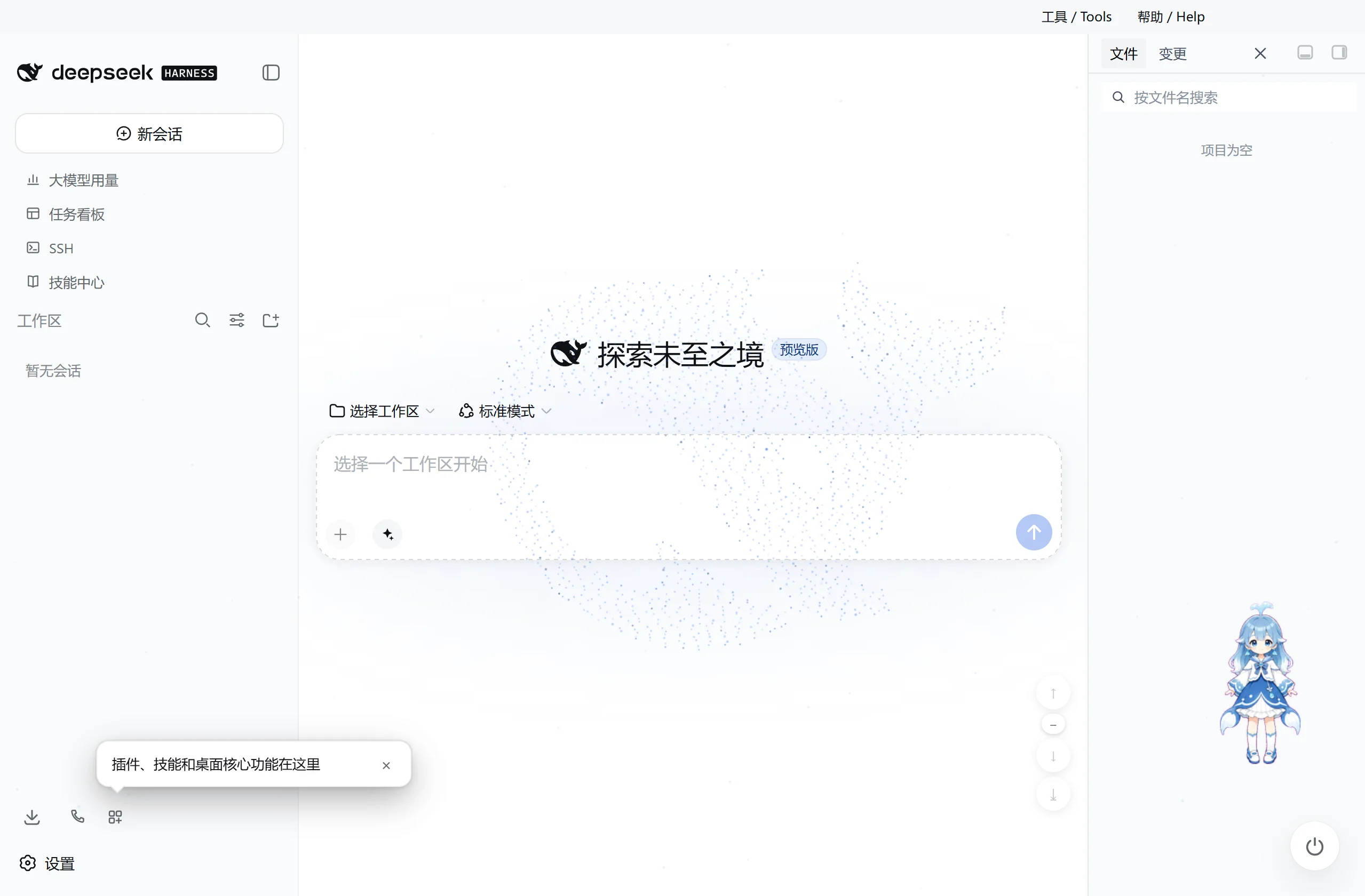
Skills and Plugins
The input box can directly search and insert installed Skills.
The dock supports:
- Community DSH Bundle
- Plugin marketplace
- Project Skills
- DSH Skills
- Agents Skills
The desktop version uses a dedicated desktop profile and does not override existing DSH configuration.
Plugin install, update and runtime lifecycle are all managed by the desktop host.
Codex Model and Reasoning Intensity
3.0.9 uses the llm-pi-ai/openai-codex official authorization flow built into DSH RC.1 to complete ChatGPT OAuth, and uses supported OpenAI Codex models in Harness; the old dsh-codex-connect plugin that would conflict with the native Provider is no longer loaded. The "ChatGPT Login" button on the settings page starts OAuth with one click, continuing in the system browser; the authorization grant is only read/written by the official credential service and stored locally in DSH Home, while the frontend only reads "logged in or not" and never receives an access token or refresh token. It does not replace the current model by default, take over global search, or enable the remote image tool.
On model switch, shows reasoning-intensity levels per model capability and auto-configures.
Task Board and Automation
Manage Agent work centrally through the task board.
| Multi-column Task Board | Task Details and Scheduled Execution |
|---|---|
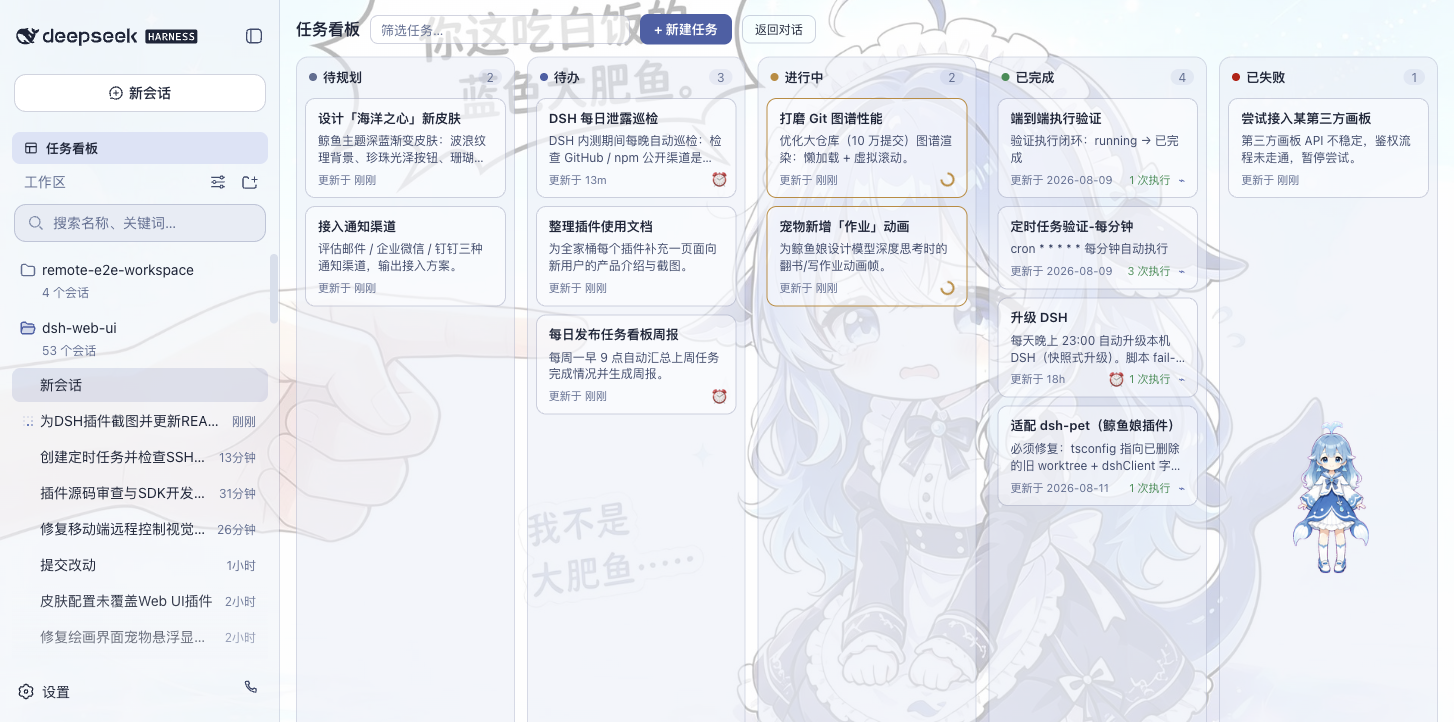 | 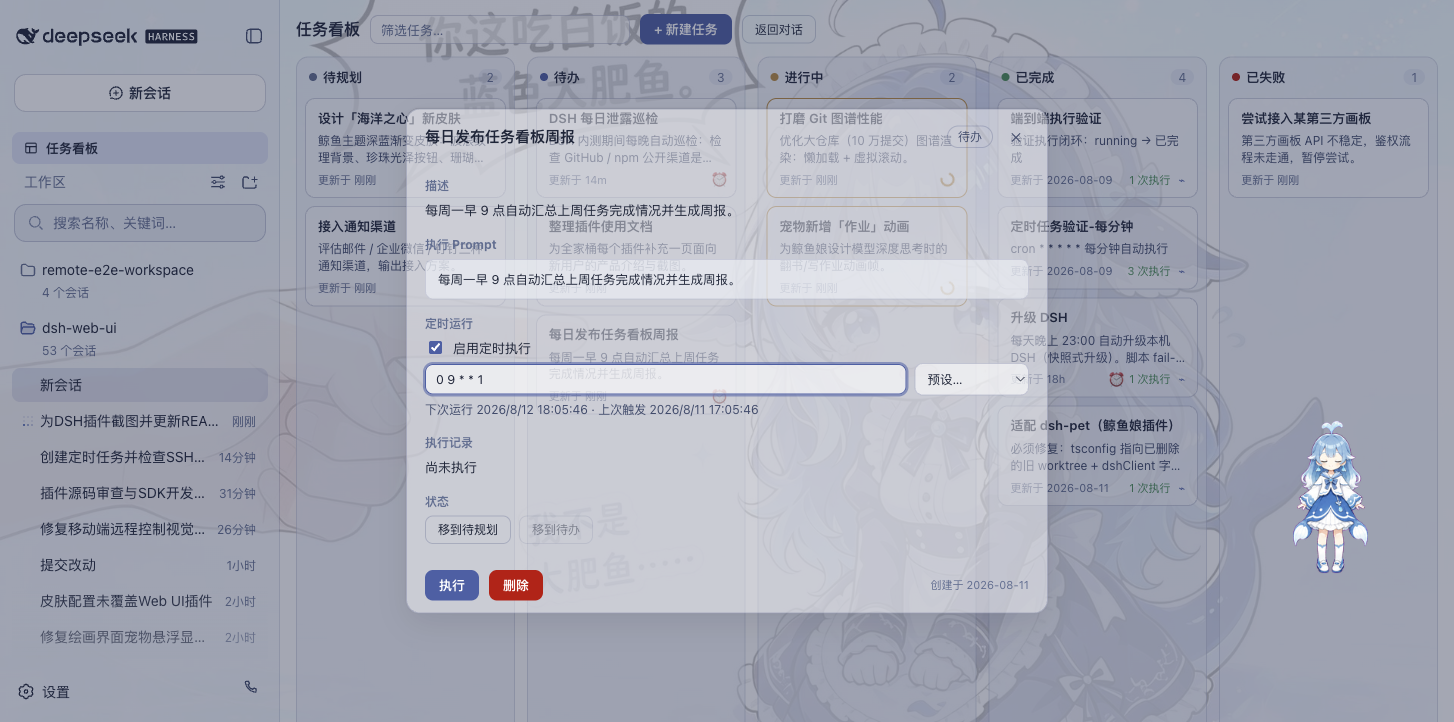 |
Tasks can be handed off directly to DSH Agent Sessions for execution, saving Task Runs and Evidence.
Also supports scheduled tasks and background scheduling, suitable for periodic dev, info processing, and maintenance.
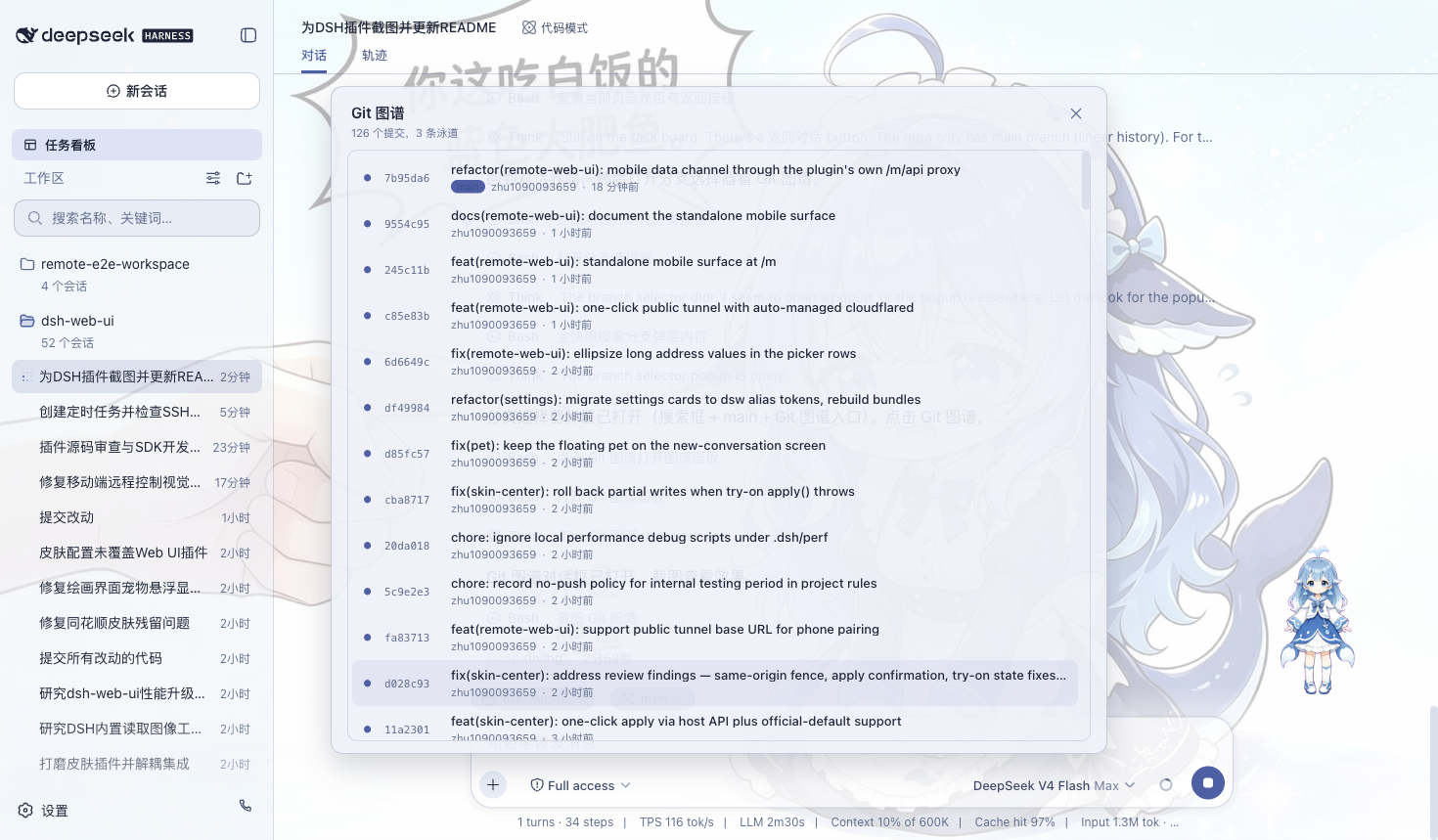
Git Graph
Use the branch selector and Git graph to view branch relationships, commit history, repo status and branch lanes for quick project and code history insight.
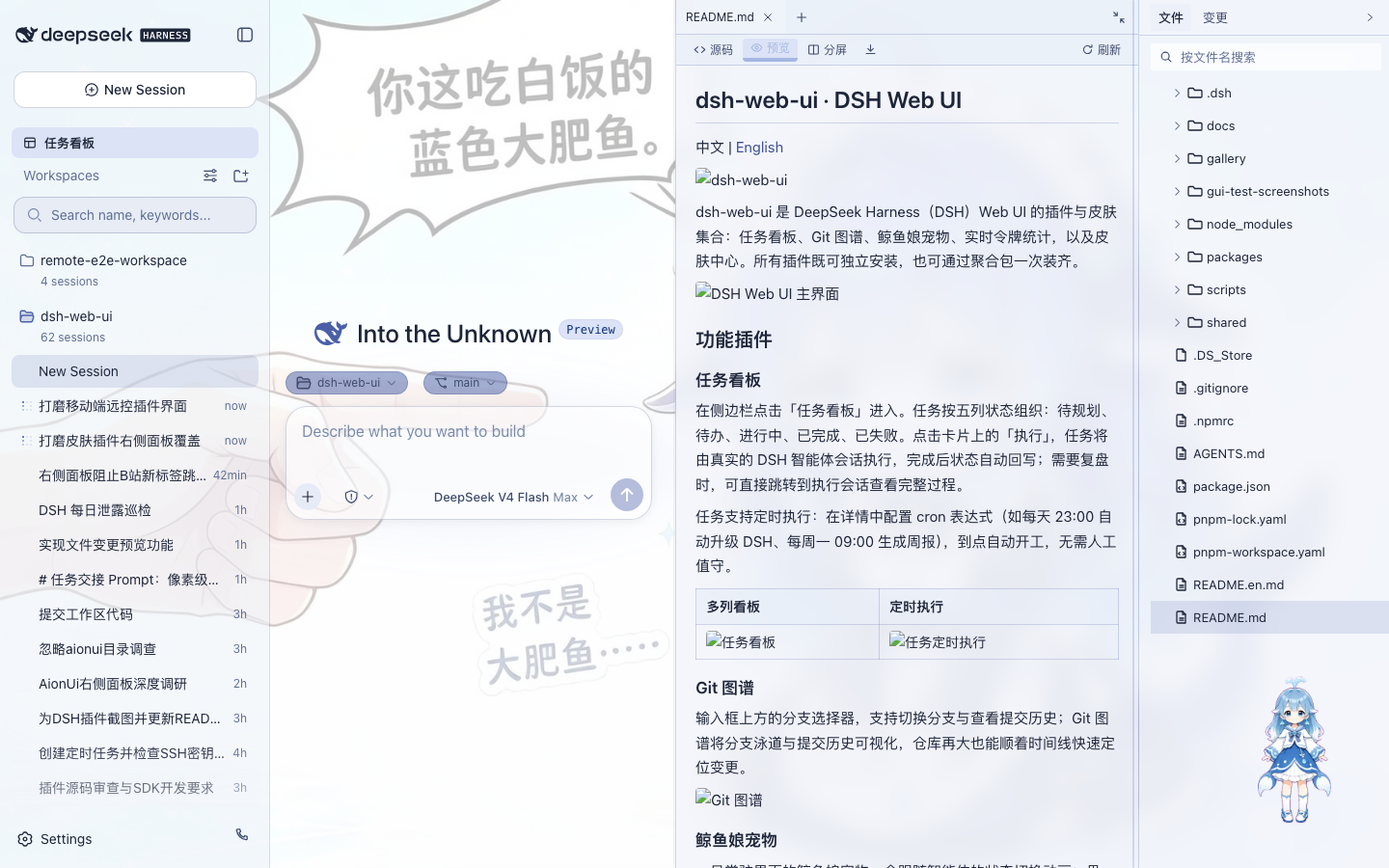
Files, Previews, and SCM
项目会话右侧提供完整工作面板:
- 文件树:浏览和搜索工作区文件
- 文件预览:Markdown、HTML、代码、Diff、CSV、PDF、Office、图片和文本
- 编辑与保存:源码 / 预览切换以及分屏操作
- Git 变更:查看真实 SCM 状态并执行 Stage / Unstage / Discard
- 可调布局:记录不同项目的面板宽度和折叠状态
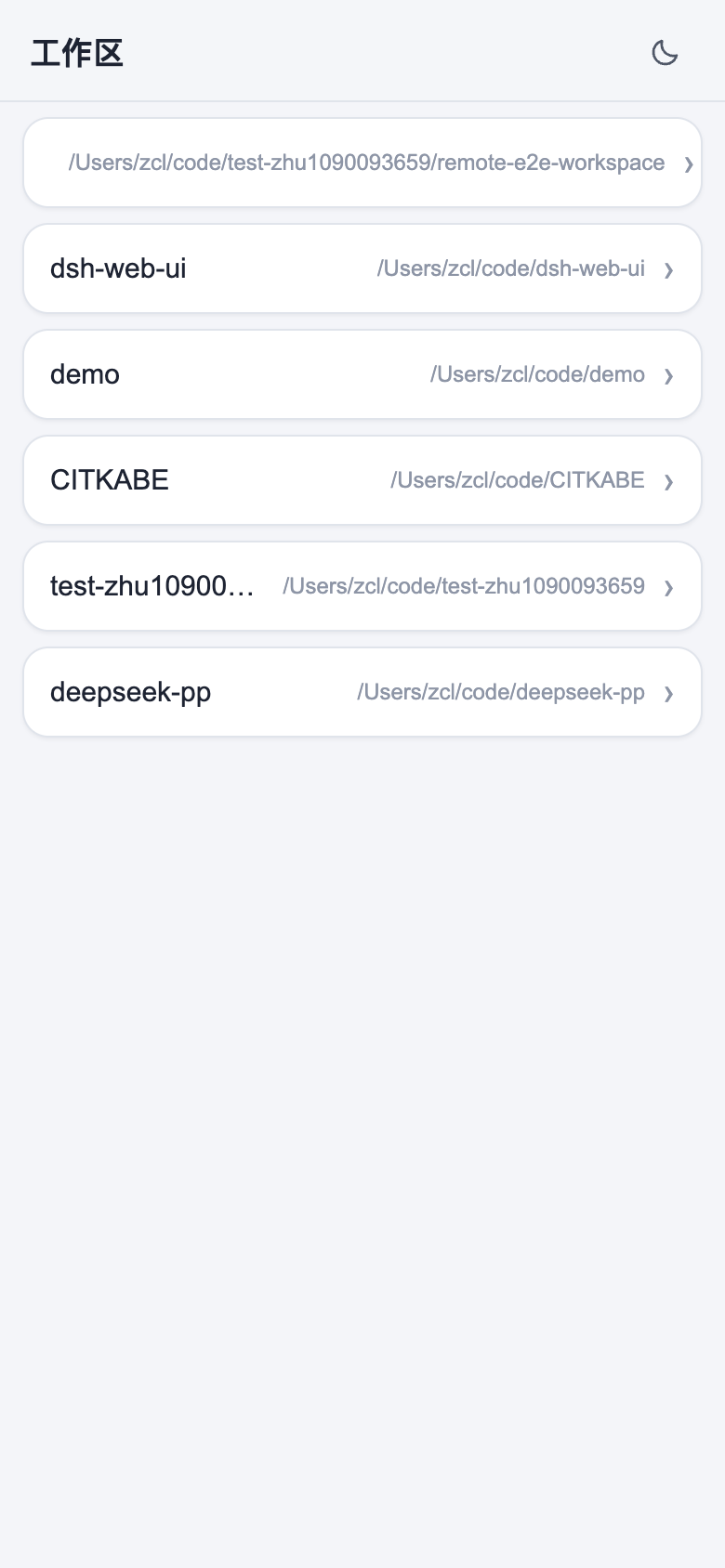
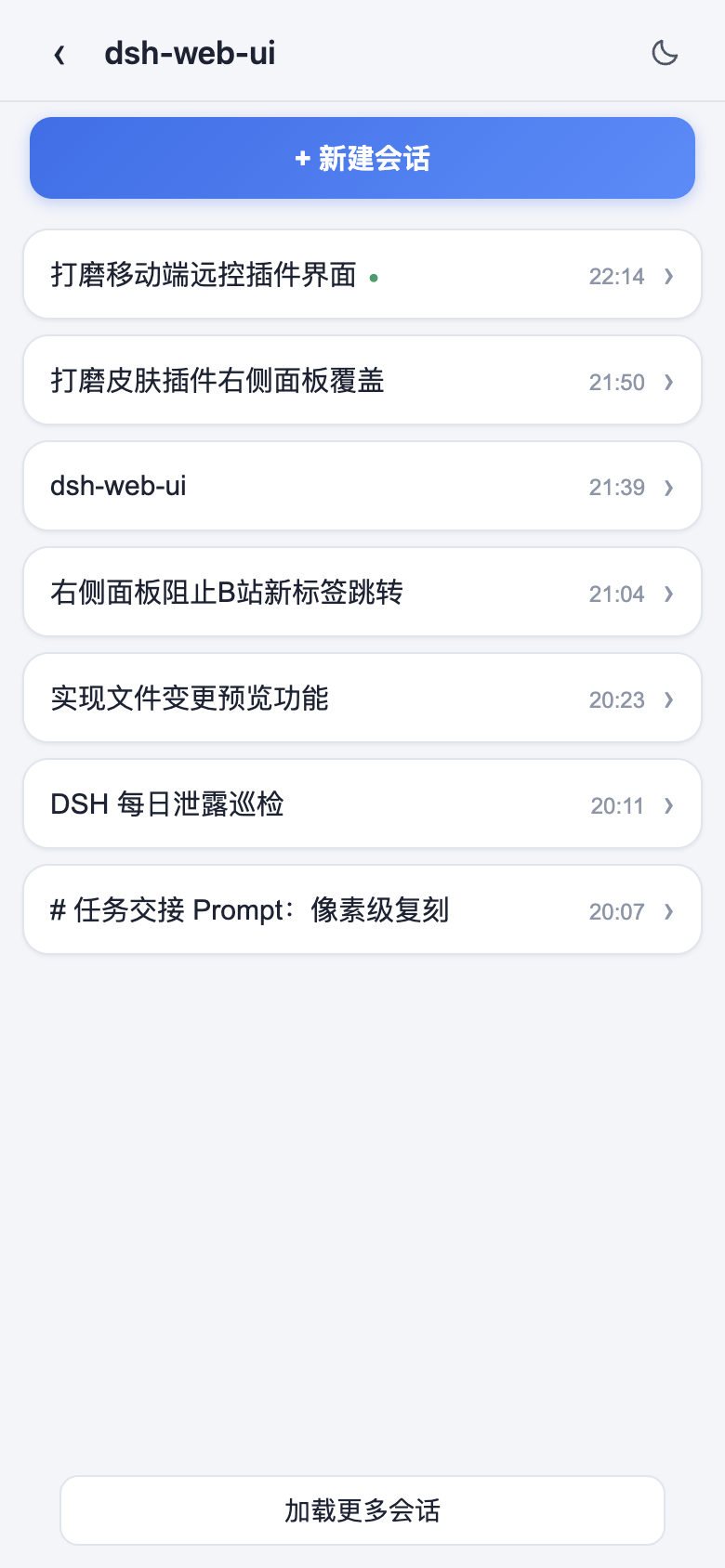
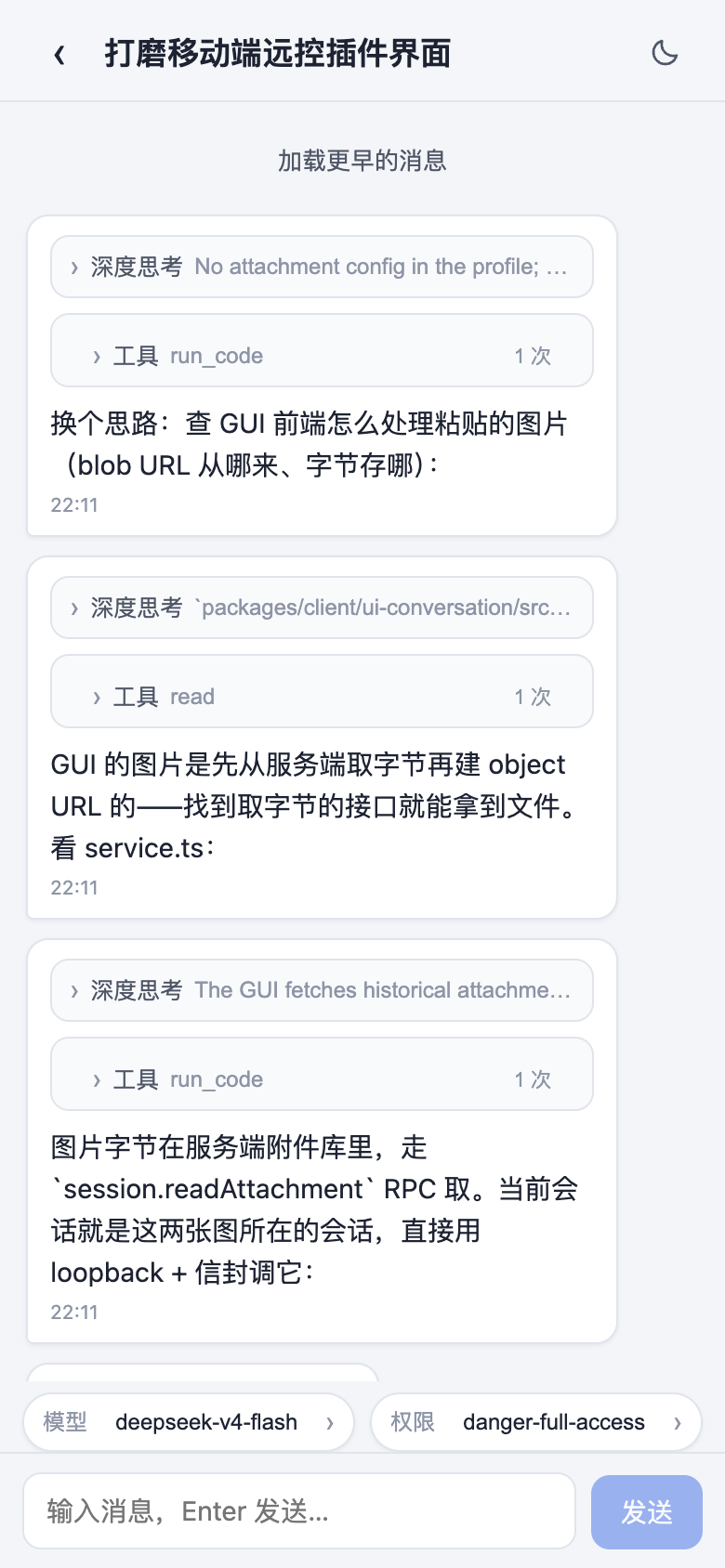
手机远程控制
通过桌面端二维码即可连接当前 Harness 工作区。
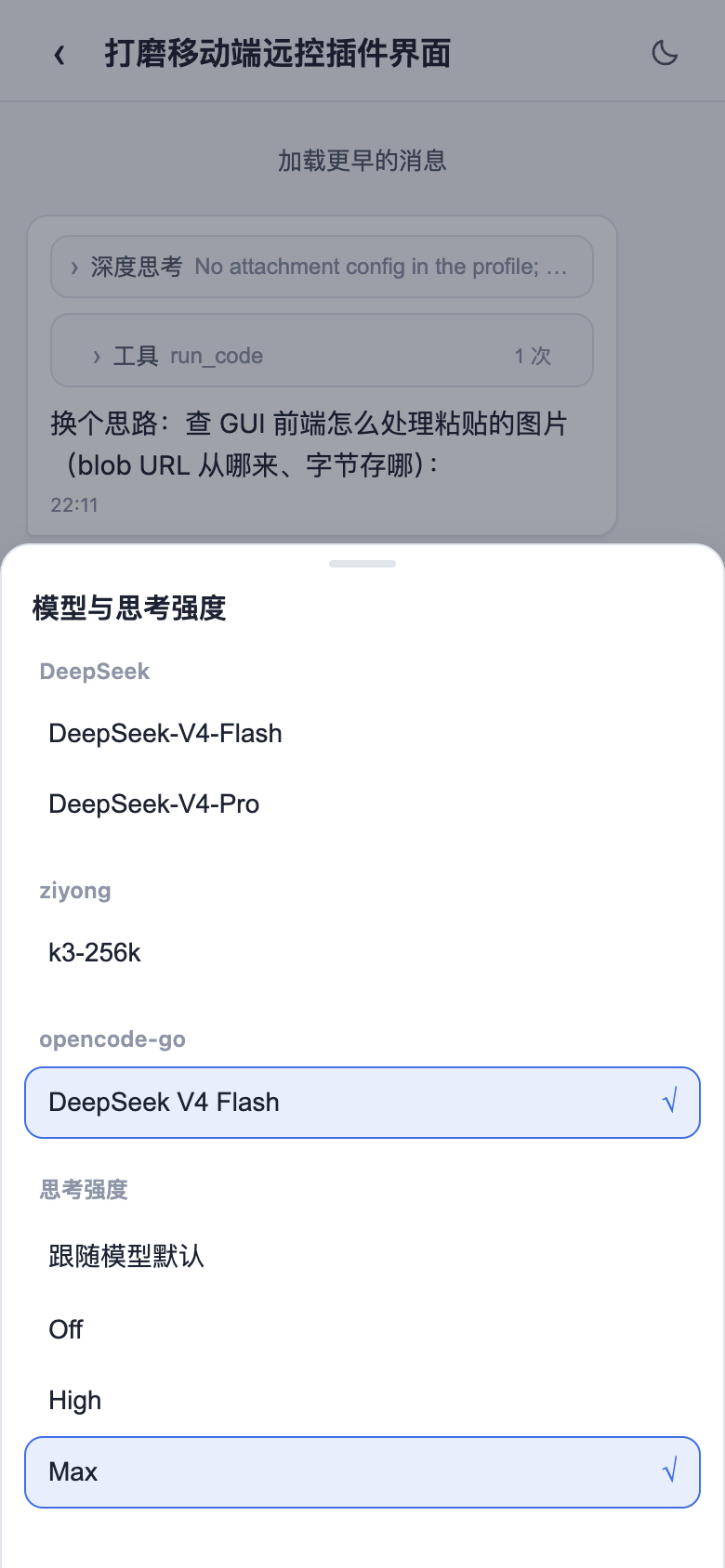
手机端可以查看工作区、新建和查看会话、收发消息、切换模型、调整思考强度,并与桌面端保持同步。
默认可以在局域网环境使用,也可以根据需要启用公网隧道。
| 工作区列表 | 会话列表 |
|---|---|
 |  |
| 移动端聊天 | 模型与思考强度 |
 |  |
SSH 远程开发
侧边栏内置 SSH 面板,可以直接管理远程服务器,并与 Agent 共用连接配置。
支持:
- Web Terminal
- SFTP 上传 / 下载
- 本地端口转发
- 多主机集群执行
- 从
~/.ssh/config导入主机 - 在 Agent 对话中直接调用已配置的远程主机
让 Harness 不仅能操作本机项目,也可以直接参与服务器和远程开发环境中的工作。
QQ Bot 接入
桌面版集成腾讯 QQ Bot Connector。
可以通过扩展坞扫码完成连接,让 QQ 私聊和群聊与本机 Harness 联动。
连接信息由桌面宿主管理,无需手动修改复杂配置文件。
大模型用量看板与性能统计
输入区域下方可以实时查看:
- 滚动 1 秒生成速度与步骤内峰值
- LLM 请求耗时
- 上下文占用
- Cache 命中率
- Input Token
- Output Token
主题与皮肤
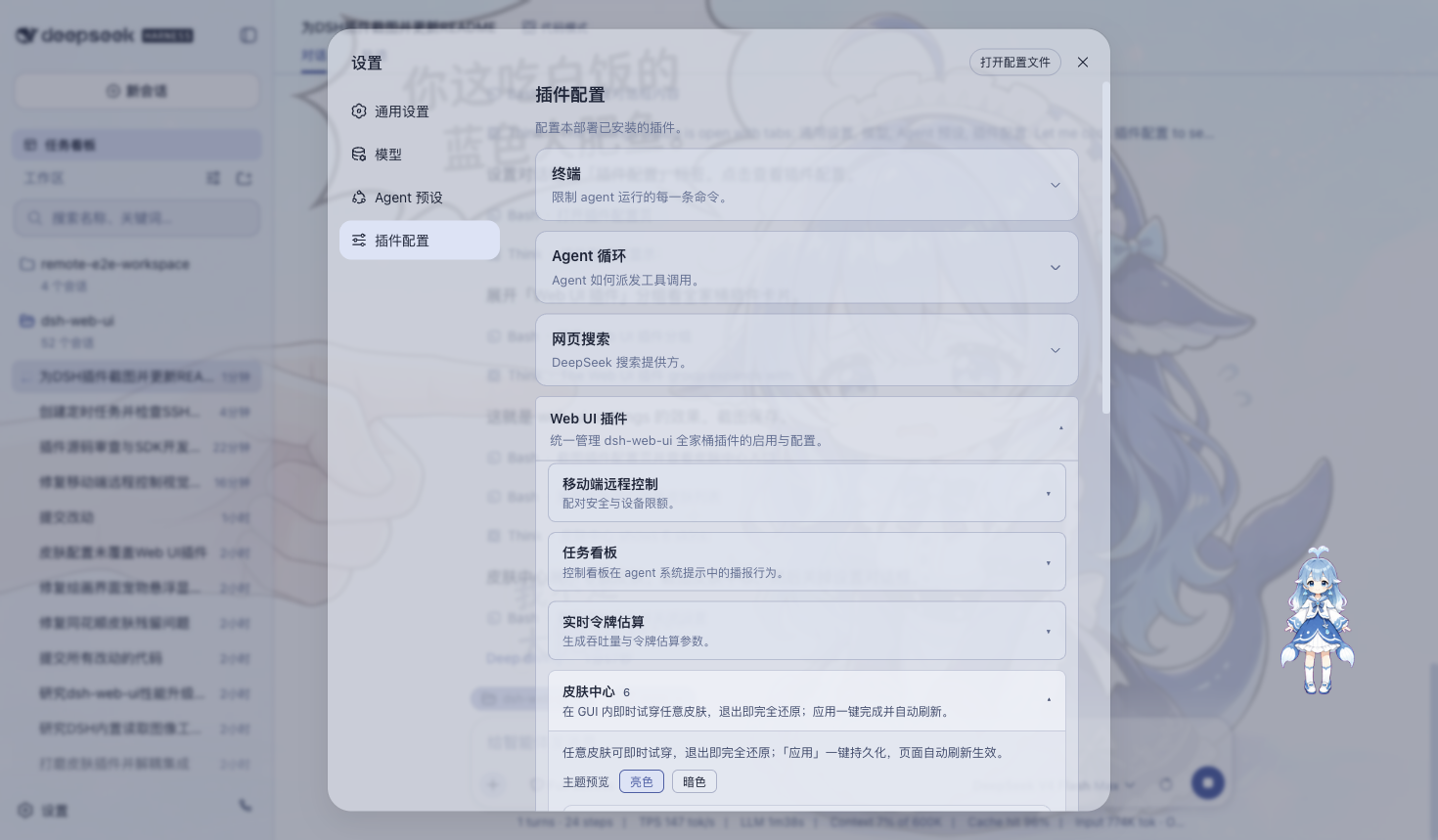
桌面版内置多套主题,并支持先预览、再应用。
当前包括 Harbor、Windows XP / Luna、Minecraft 方块世界、Blue Fantasy、鲸吟、初音未来、Trading Terminal、QQ 怀旧主题等风格。
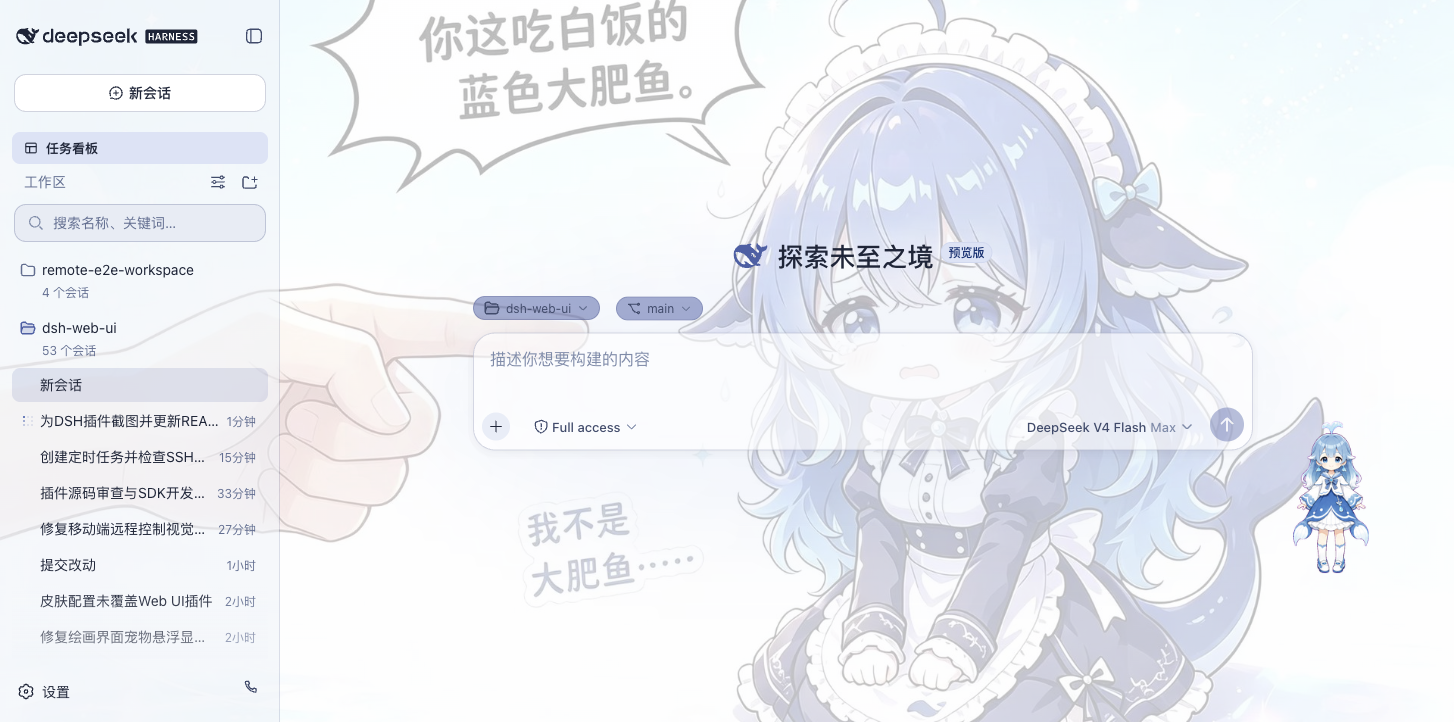
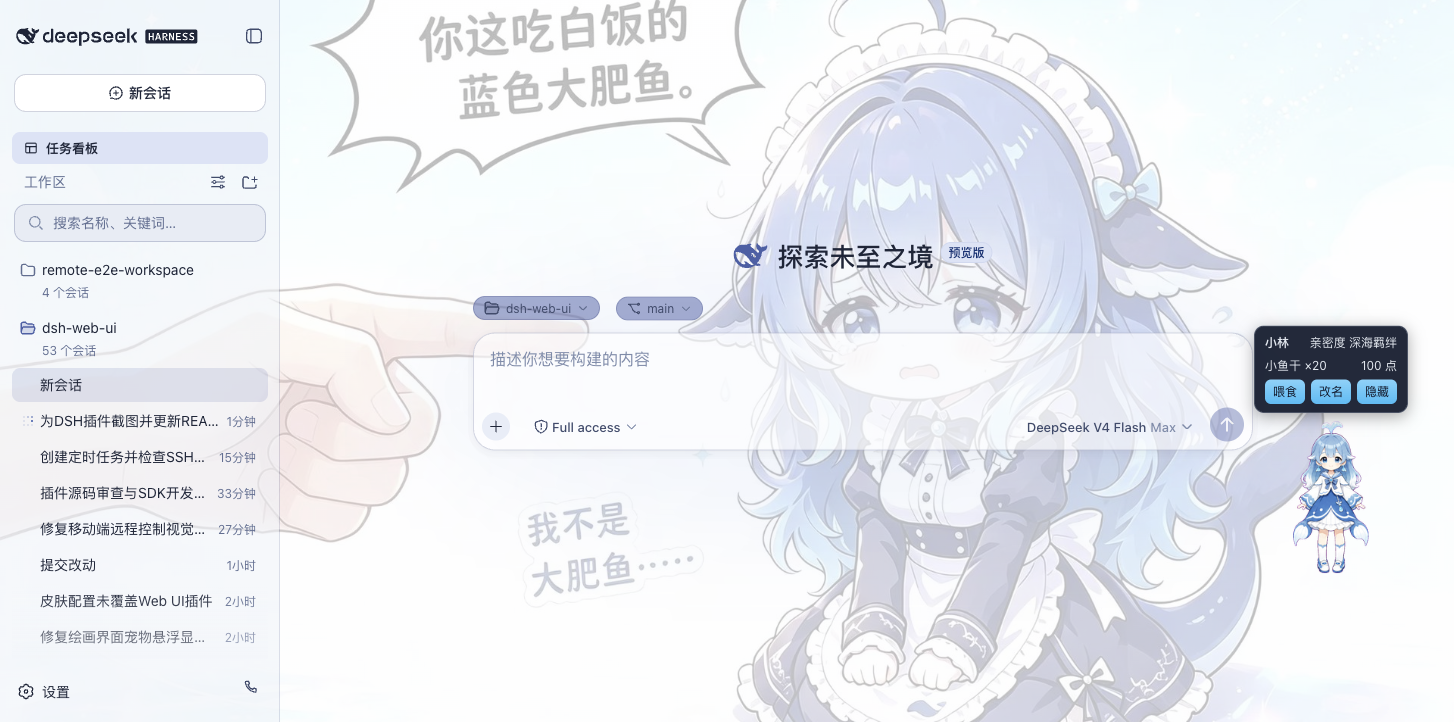
鲸鱼娘桌宠
内置鲸鱼娘桌宠。
桌宠会根据 Agent 的思考、工作、等待和完成状态自动切换不同动画,同时支持互动、命名、拖拽和隐藏。
| 陪伴工作 | 互动面板 |
|---|---|
 |  |
全页粒子主题
粒子鲸鱼主题不仅可以显示在启动页面,也可以直接应用到 Harness 主界面,并根据输入、弹窗、后台状态和系统「减少动态效果」设置自动调整视觉效果。
下载与安装
Windows
- 打开 GitHub Releases。
- 下载
DeepSeek-Harness-Desktop-Setup-<版本号>-x64.exe。 - 运行安装程序完成安装。
- 启动 DeepSeek Harness Desktop。
Windows 安装包已经包含 DSH、桌面插件、皮肤、pnpm、MinGit 与所需原生依赖,不需要额外安装 Node.js 或 Git。
macOS 未签名预览(Apple Silicon)
只提供 arm64。下载 .dmg 或 .zip 后把应用放到 /Applications,用 xattr 去掉隔离属性;macOS 15 起没有「右键打开」。预览版没有自动更新,mac 端使用系统 Git。完整步骤见 macOS 未签名预览版安装说明。
如果 GitHub 下载速度较慢,也可以加入页面顶部的用户交流群获取同步提供的安装包。
更新
DeepSeek Harness Desktop 支持应用内版本检查,发现新版本后可以查看更新内容并选择升级。
提供两个更新频道:
- Stable:默认频道,适合绝大多数用户。
- Beta:用于体验较新的功能,需要用户主动切换。
升级过程中会尽可能保留已有 DSH_HOME、Desktop Profile、社区 Bundle、Skills、皮肤配置与桌宠状态。
更多信息:
安全与隐私
DeepSeek Harness Desktop 默认尽可能将用户数据和运行环境保留在本机。
主要设计包括:
- DSH Runtime 默认监听本机回环地址
- 桌面主界面与扩展能力采用独立权限边界
- 外部链接通过系统浏览器打开
- OAuth、QQ Bot 等凭据保存在本机
- 遥测默认关闭
- 诊断信息只有在用户主动操作时才会导出
- 导出的诊断信息会对 Token、Secret、Cookie、路径、Prompt、Session 和 Tool Result 等内容进行脱敏
文档
开源与版权
本项目采用 BSD-3-Clause 许可证开源。
- 本项目代码及内置功能插件、主题皮肤与桌面端均遵循 BSD-3-Clause 开源协议。
- 迁入与引用的第三方代码及环境依赖均保留其原始开源许可证与作者署名。
Star History
友情链接
本项目积极参与并认可 LINUX DO 社区。
让 DeepSeek Harness 在 Windows 上真正成为一个可以每天使用的 AI 编程桌面工作台。
如果你喜欢这个项目,欢迎点一个 Star。
Comments
Loading…
Similar plugins
by gezi-wen
Windows desktop-control tools for DeepSeek Harness (DSH): screen layout, annotated screenshots, click / type / key / scroll, window management, and UI Automation structured queries. Zero dependencies,
★ 0
MIT
JavaScript
Sep 24, 2026
dsh plugin --profile web add sage-guikitby ice-ai-lab
Codex-style sidebar skin for the DeepSeek Harness Web GUI: a Projects + Recents browser, a New chat row that starts a session without picking a project and allocates its own working directory, and a d
★ 0
MIT
JavaScript
Sep 12, 2026
dsh plugin --profile web add dsh-plugin-codex-uiby CaT-Hode
Windows desktop plugin for DeepSeek Harness — shared Web sessions and plugins, startup logs and update recovery. DSH 桌面插件:共用 Web 对话与插件。
★ 0
MIT
JavaScript
Oct 21, 2026
dsh plugin --profile web add dsh-appby ahikl
DeepSeek Harness 桌面端插件:基于 Electron 的 dsh Web UI 桌面外壳。| An Electron desktop shell for the DeepSeek Harness Web UI, with a system tray and a custom title bar.
★ 0
↓ 199/wk
MIT
TypeScript
Aug 16, 2026
dsh plugin --profile web add @ahikl/dsh-desktopby 988hj7tczd-oss
Cross-platform Computer Use plugin for DeepSeek Harness: observable desktop automation with an isolated virtual cursor, AX/UIA observation, screenshot vision, and 12 guarded tools.
★ 62
↓ 657/wk
MIT
JavaScript
Oct 5, 2026
dsh plugin --profile web add dsh-computer-useby MARIOMLY
Open the DeepSeek Harness Web UI as a standalone desktop app window (Chromium --app mode) — a DSH host plugin. / 把 DSH Web 界面变成独立桌面应用窗口的 DSH 插件。
★ 0
MIT
JavaScript
Sep 14, 2026
dsh plugin --profile web add dsh-desktop-app