

dsh_desktop
Discovered★ 735DeepSeek Harness (dsh) Windows desktop client - bundled Node.js + dsh CLI, one-click launch
An out-of-the-box desktop client (Windows / macOS) that brings DeepSeek Harness to your desktop
Built-in full dsh runtime and all official plugins, no Node.js needed, double-click to run
[!IMPORTANT] 🎉 v0.5.0 — Full Architecture Migration & Refactor: Desktop shell fully migrated from Electron to Tauri 2 (Rust) — more stable, better to use: Smaller installer, lower memory, faster startup; the "Guardian Waterfall" ensures bad plugins / bad configs never cause a white screen. User data is fully compatible with previous versions — an in-place install completes the painless upgrade (see the Migration Guide and Architecture). Electron versions before v0.5.0 are still available for download at Releases; only the Tauri architecture is maintained going forward.





[!TIP] 🧩 Recommended: dsh-hotplug-hub — our recommended dsh launch manager.
✨ Features
Out of the Box
- Zero Dependencies — Bundled standalone Node runtime and npm CLI; the target machine needs no environment installation
- Full dsh — Ships
@deepseek-ai/dshand all official plugins, works offline - One-Click Start — Double-click launches
dsh web, reuses the last port, and opens the native window once ready - Two Forms — Portable (no install, USB-friendly) + Installer (Desktop / Start menu shortcuts)
Enhanced Experience
- Dark glass borderless window — custom title bar, Win11 rounded corners, closing hides to system tray by default
- Desktop pet — a small whale companion lives on your desktop while you work (Settings → Plugins to toggle)
- Side session popover — summon an independent session window anytime without disturbing the main one
- Session management — archive / restore / delete conversations so history doesn't pile up
- Balance widget — real-time "round cost · balance" at the bottom of chat, supports OpenCode Go credits, click through to top up
- Completion notification — system notification when a task finishes; returning to the main window within a minute auto-jumps to that session (Windows notifications have no click callback, so focus auto-jumps)
Resilience
- Guardian Waterfall — The kernel boot chain self-heals step by step: broken plugins are auto-repaired, broken configs are auto-rebuilt, and a crashed kernel restarts in place; no incompatible state ever terminates the app (core feature of the v0.5.0 Tauri architecture)
- Crash Self-Healing — Heartbeat detection in the render layer auto-reloads on hangs; the kernel is probed and relaunched by the supervisor with exponential backoff
- History Compatibility — Auto-patches the session event vocabulary so events written by third-party plugins don't break session history
- Auto-Update — One click in the top-right ⋯ menu to check and install client updates (dual-source GitHub/Gitee Releases with automatic failover, sha256 verification fail-closed, silent when offline); upgrades reinstall to the previous location with zero config loss; the kernel ships as part of the client (no separate update chain)
- Shortcut Self-Healing — Desktop and Start menu shortcuts are automatically recreated if missing
📸 UI Overview
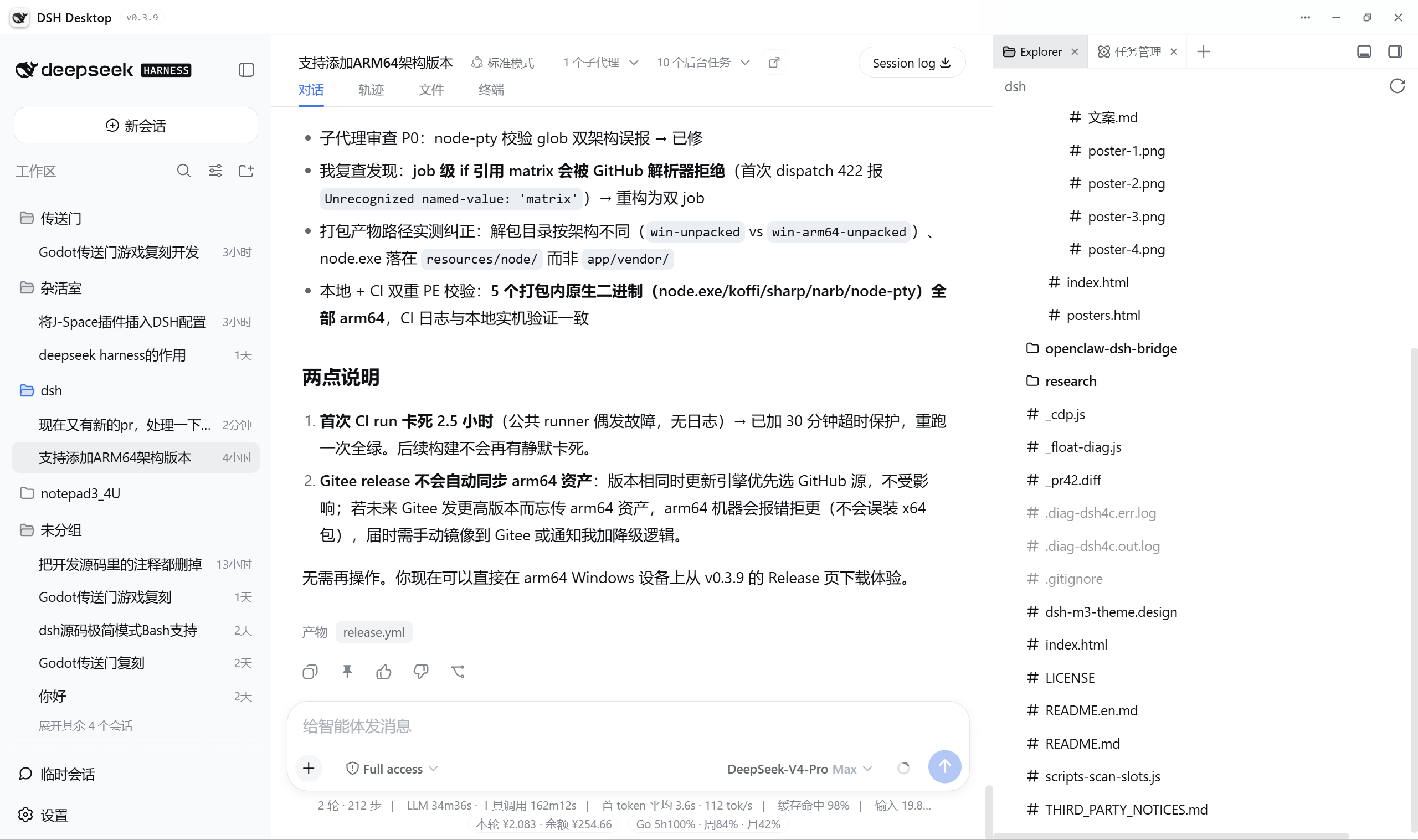
Out of the box (native dsh web) vs DSH Desktop:
| Capability | Native dsh web | DSH Desktop |
|---|---|---|
| Startup | Manually install Node.js, type commands | Double-click to run, bundled standalone runtime |
| UI | Browser tab | Native desktop window · dark glass frameless |
| Session management | Archive only | Archive / restore / delete |
| Balance | None | Real-time "Cost this round · Balance" + OpenCode Go |
| Desktop features | None | Resident tray / completion notifications / desktop pet / side floating window |
| Updates | Manual | Client dual-source update chain (GitHub/Gitee + sha256 verification, fail-closed) |
🚀 Quick Start
System requirements: Windows 10 / 11 (x64), no pre-installed Node.js required.
Download (Tauri architecture)
Get the latest version from the GitHub Releases page (v0.5.x preview line)—v0.5.2 (2026-08-22) fixes issues such as "frequent restarts + white screen" reported by v0.5.1 users in real-world use. The table below retains the direct link to v0.5.0 (the first public test release, published 2026-08-21):
| Platform | Download |
|---|---|
| 💻 Windows x64 | DSH.Desktop_0.5.0_x64-setup.exe (NSIS installer, ~87 MB, currentUser mode requires no admin, embedded WebView2 bootstrapper) |
- v0.5.0 was built and released in the cloud by the Tauri release pipeline (this round shipped Windows x64); from v0.5.1 on, three-platform artifacts (Linux AppImage/deb, macOS dmg) and the Windows portable build are all produced by the pipeline (six-asset verification, see 发布).
- Overwrite-install from any older version (Electron 0.1.x–0.4.x): automatically locates the old directory, silently uninstalls while preserving data, and reinstalls to the original location, with zero user data migration (see 迁移指南).
Users in China (Gitee)
[!NOTE] The latest Gitee mirror is currently Electron v0.4.1—the v0.5.0 (Tauri) installer has not yet been synced, so please download it from GitHub Releases first.
Gitee's single-file limit is 100 MB, so Electron installers are split into parts (.part1/.part2/...). After downloading all parts, double-click merge.bat in that version's attachments to merge them automatically, then verify with SHA256SUMS. Go to Gitee Releases to pick a version to download.
Legacy downloads (Electron 0.4.x and earlier)
GitHub Releases keeps every historical version. Legacy naming convention: win- = Windows, macos- = macOS (.exe is always Windows, .dmg / .zip is always macOS); x64 = Intel/AMD, arm64 = ARM chips (choose arm64 for Windows ARM devices such as Surface Pro X, or Apple Silicon Macs). Formats include portable (no-install portable build) and setup (installer).
The macOS build is not yet signed; on Apple Silicon, the first launch will show a "can't verify the developer" warning—please right-click the App → Open, or run in the terminal:
xattr -dr com.apple.quarantine "/Applications/DSH Desktop.app"
Data location: Windows portable builds use data\ next to the exe; installed builds use %APPDATA%\DSH Desktop\. On macOS it's ~/Library/Application Support/DSH Desktop/. You can force a custom dsh config directory by setting the environment variable DSH_HOME.
💬 Community
Hit a problem, want to share feedback, or chat with other users? Join our QQ group (group ID 926561802):

🛠 Build from source
v0.5.0 (Tauri architecture)—prerequisites: Rust toolchain + dsh-desktop/ with npm install done (kernel payload source):
# 测试(Rust 全量 + sidecar + 共享脚本)
cd dsh-tauri
cargo test --manifest-path src-tauri/Cargo.toml   # Rust 177 例(CI 跳集成例)
node --test sidecar/cli.test.js                    # sidecar 16 例
cd ../dsh-desktop && node --test scripts/test/unit-*.test.js  # 共享脚本回归

# 开发运行
cd src-tauri/src/app && cargo run

# 打包 win-x64 NSIS 安装包 + 安装态冒烟
bash dsh-tauri/scripts/stage-payload.sh
npx --yes @tauri-apps/cli build --config src-tauri/src/app/tauri.conf.json \
  --target x86_64-pc-windows-msvc
bash dsh-tauri/scripts/smoke-installed.sh
For the full process (including debug switches such as DSH_TAURI_DIAG / DSH_TAURI_DEVTOOLS), see Developer's Manual §6.
🤖 Releases
Since v0.5.0, releases go through the Tauri GitHub Actions cloud pipeline (tauri-release.yml): push a v* tag → build on three platforms (unified vendor node v24.15.0 + full stage-payload.sh + compat build fail-fast) → automatically aggregate artifacts and publish the Release. v0.5.0 was published via this pipeline (2026-08-21, this round shipped the Windows x64 NSIS installer); from v0.5.1 on, the six-asset set across three platforms (Windows installer/portable, Linux AppImage/deb, macOS dmg) passed verification, and 0.5.x is published as a preview line (prerelease); v0.5.2 (2026-08-22) is the fix release for issues found by v0.5.1 users in real-world testing. The Electron-era release.yml pipeline was retired along with the architecture. For the manual local packaging path outside CI, see 从源码构建 above (stage-payload → tauri build → installed-state smoke test, three steps).
📦 Installer formats exportable by the Tauri architecture
Determined by bundle.targets in tauri.conf.json; add or remove entries as needed to expand the artifact formats:
| Platform | Installer format | Status |
|---|---|---|
| Windows x64 | NSIS installer (DSH.Desktop_<版本>_x64-setup.exe)—LZMA compression measured at ~87 MB; currentUser mode installs without admin; WebView2 bootstrapper embedded, so it installs even on offline machines; the upgrade chain automatically reinstalls to the old directory, preserving data | ✅ Released in v0.5.0 (CI-produced, passed installed-state smoke test); plus a portable zip (from v0.5.1) |
| Windows arm64 | NSIS installer (cross-build with --target aarch64-pc-windows-msvc) | 🔜 Natively supported by Tauri, pending real-world testing (pipeline experimental line from v0.5.1) |
| Windows | MSI (WiX toolchain, add "msi" to targets) | 🔜 Natively supported by Tauri, not yet enabled |
| Linux x64 | .AppImage / .deb | ✅ Produced by CI (six-asset verification from v0.5.1, preview line) |
| macOS (Apple Silicon) | .app / .dmg disk image | ✅ Produced by CI (from v0.5.1, ad-hoc signature verification, preview line) |
The portable build (no install, can live on a USB drive) is not a built-in Tauri target—the Tauri version defaults to NSIS
currentUserinstallation, and a standalone portable package is planned for a later release.
🧩 Built-in plugin ecosystem
Shipped with the installer (for the full list of third-party components, see THIRD_PARTY_NOTICES.md):
| Plugin | Description | Source |
|---|---|---|
dsh-session-manager | Session archive / restore / delete management | Built-in |
dsh-better-sidebar | Sidebar enhancements | omdsh-dev/DSH-better-sidebar |
dsh-super-injector | Dev injection / hot-reload toolchain | @dsh-external community |
dsh-vision | OpenAI-compatible image recognition (OCR / image reading / chart reading) | @dsh-external community |
dsh-side-session | Side session floating window, three context tiers | hzhz314159/dsh-side-session |
billion-context-dsh | Context compression (compaction) enhancements | Tyan66666/billion-context-dsh |
dsh-navbar | Navigation bar replacement | vlln/dsh-navbar |
dsh-hub | Plugin hub: update engine / global memory / graph and marketplace mounting | ARFCON/dsh-hub-DSH |
harness-pet | Desktop pet | cakeni/harness-pet |
🧠 Community presets
In addition to the official kernel's built-in standard / ptc / minimal / cordis, the installer ships with 8 Agent presets in total—7 from the community repositories in the table below (directly selectable in new-session settings), plus our own minimal-win. For the per-preset inventory, upstream sync, and license details, see dsh-desktop/docs/agent-presets.md. Model/connection-based selection guidance:
| Preset (built-in id) | Use case | Upstream repo | Upstream author | License |
|---|---|---|---|---|
router-standard | Official API · flash model (task-aware routing) | dsh-routing-suite | @yjh051108 | MIT |
anchored-standard (incl. zero-anchored-standard / whoami-standard variants) | Official API · pro model (two-stage: Minimal bootstrapping → full Standard) | dsh-anchored-standard | @xiaobright | MIT |
v4-flash-godmode-opencode-go | OpenCode Go · flash model (build/fix internal routing) | v4-flash-godmode-opencode-go | @SheberDavid | ⚠️ No LICENSE file upstream (author states it's a modification of MIT-licensed dsh-routing-suite; confirm with the author before distribution) |
warmupbetter / warmupbetter-replay | OpenCode Go · pro model (long first-round COT warmup / replay) | myDshPresets | @0liveiraaa | Upstream README states modifications are MIT (ships LICENSE.deepseek-harness with MIT) |
Thanks to the community authors above; for adaptation and compatibility details of each preset, see the
NOTICE/READMEin each preset directory. The runtime injector thatrouter-standarddepends on ships built-in as the dsh-super-injector plugin (see the plugin ecosystem table above).
🏗 Architecture
From v0.5.0 on, the architecture is Tauri 2 (Rust)—the Electron shell has been retired, with all of its responsibilities (windows / IPC / updates / packaging) re-implemented on the Rust side crate by crate, contracts first (the five hard contracts in dsh-tauri/contracts/ are the single source of truth for interfaces):
┌──────────────────────────────────────────────────────────┐
│  Tauri 2 壳(Rust · 7 个单向依赖 crate + 装配根)          │
│  · supervisor:boot 守护瀑布 → spawn 内核 → 就绪换页       │
│    → 探活 → 崩溃环原地重启(任何不兼容形态都不白屏)        │
│  · shell-core        路径 / 设置(损坏自愈)/ 单实例        │
│  · kernel-process    spawn 规格 / 就绪行 / Job Object 杀树  │
│  · bridge            Electron IPC 43 通道 → Tauri command  │
│                     全量映射 + 垫片 JS(window.dshDesktop) │
│  · fence / preview-server / session-watcher /              │
│    sidecar-orchestrator(boot 时序 + Node sidecar 复用     │
│    dsh-desktop/scripts 内核侧逻辑,零重写)                 │
└──────────────────────┬───────────────────────────────────┘
                       │  dsh web --host 127.0.0.1 --port <复用端口>
                       ▼
            内置 node + @deepseek-ai/dsh
            路径解析:用户目录 overlay > 内置包
                       │  就绪行检测
                       ▼
            原生窗口加载 Web UI(仅本机回环访问)
Layering rule: crates do not depend on the Tauri runtime and can be unit-tested independently (Rust: all 177 cases green; sidecar Node: 16 cases + shared script unit: 71 files). The assembly root only wires things together without implementing logic; all kernel-side Node logic lives in dsh-desktop/scripts/. See the development handbook: dsh-tauri/docs/development.md.
📄 License
MIT. Based on @deepseek-ai/dsh (MIT).
⭐ If DSH Desktop has been helpful to you, feel free to give it a Star to support us. If you run into any issues, please report them via Issues.
Comments
Loading…
Similar plugins
by MARIOMLY
Open the DeepSeek Harness Web UI as a standalone desktop app window (Chromium --app mode) — a DSH host plugin. / 把 DSH Web 界面变成独立桌面应用窗口的 DSH 插件。
★ 0
MIT
JavaScript
Sep 14, 2026
dsh plugin --profile web add dsh-desktop-appby duanjiangDJ
DeepSeek Harness desktop GUI shell: a lightweight native window that attaches to the running dsh web session.
★ 0
MIT
JavaScript
Aug 15, 2026
dsh plugin --profile web add dsh-guiby kkaktus463
Opens the DeepSeek Harness Web UI in a native window instead of a browser tab.
★ 0
MIT
JavaScript
Aug 23, 2026
dsh plugin --profile web add dsh-plugin-desktopby ayingQAQ
Windows 上的 DeepSeek Harness Web 一键启动器|One-click launcher with background restart and browser refresh.
★ 4
↓ 195/wk
MIT
JavaScript
Aug 18, 2026
dsh plugin --profile web add dsh-web-launcherby cheng-wj
DSH plugin: restart / update / inspect the DeepSeek Harness desktop app from the model side (Windows)
★ 0
MIT
JavaScript
Oct 21, 2026
dsh plugin --profile web add dsh-app-controlby EricXu20266
DeepSeek Harness (DHS) Electron GUI client — webui to gui, kernel untouched
★ 8
↓ 11/wk
MIT
TypeScript
Aug 18, 2026
dsh plugin --profile web add dsh-discovery