

dsh-lead-panel
Manifest valid★ 1DSH Leader Panel: Chat with the "Leader", switch its model, view token usage/amount/estimated remaining time in real-time, and have it delegate tasks to worker AIs (Agent Teams)
dsh-lead-panel
DSH 网页版的「领导面板」插件:在输入框的**「完全权限」右边**加一个 领导 按钮。
按下去弹出对话框,你和「领导」聊需求 —— 聊完让它总结并派活,运行期间实时显示
token、估算金额、用时和预计剩余时间。
当前版本 0.5.0 | 更新说明 | 自检 30 项 + Host 冒烟 29 项全过
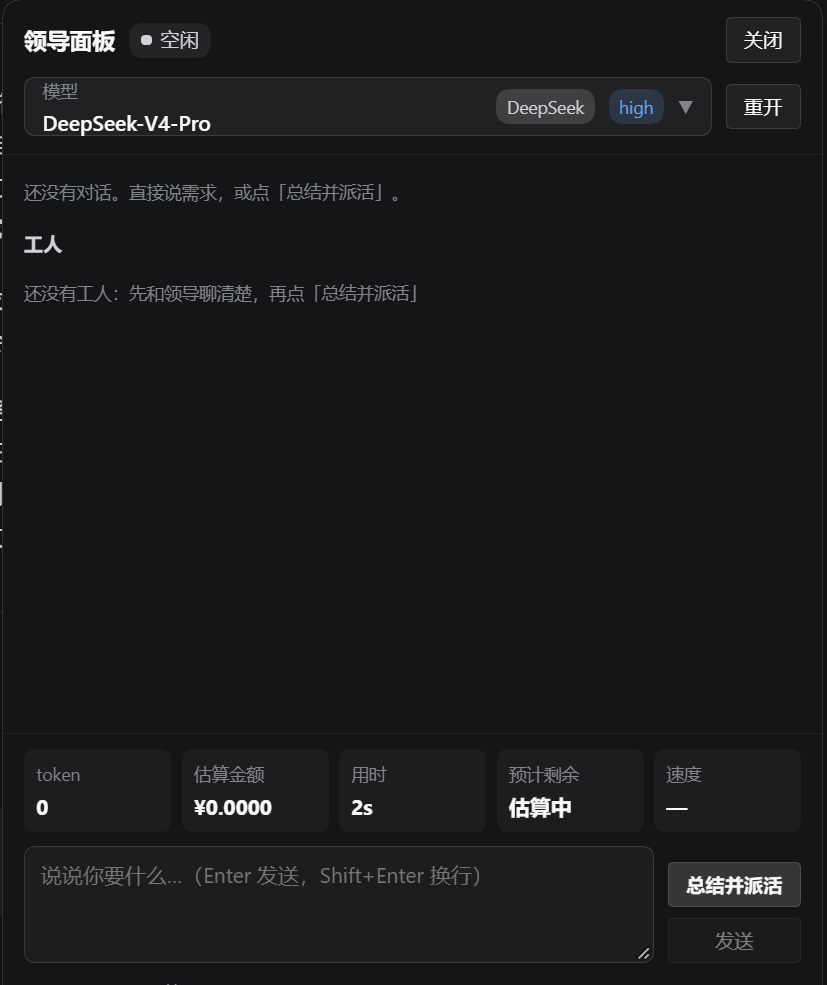
面板长这样:顶部是状态与模型选择(当前模型名 + provider 胶囊 + 推理强度), 中间是计划卡片、对话与工人区,底部是 token / 估算金额 / 用时 / 预计剩余 / 速度 五个指标块,以及「总结并派活」「发送」两个按钮。
它做什么
| 面板区域 | 内容 |
|---|---|
| 顶部 | 领导当前状态(运行中 / 空闲)、模型下拉框(列出本机所有 provider/模型,按 provider 分组、模型全名、当前项打勾,选一下即切换),并常显当前模型 + provider 胶囊 + 推理强度;另有打断、重开 |
| 计划卡 | 领导总结的四段:【需求】【效果】【分工】【预计时间】,自动抽成卡片 |
| 中部 | 与领导的对话;助手消息下面挂它调用的工具名(spawn_teammate 等) |
| 工人区 | 领导派出去的工人 AI:名字、状态(running/inactive/provisioning/failed)、负责什么、各自的 token 与金额、最后一句结论 |
| 底部 | 实时指标块:token / 估算金额 / 用时 / 预计剩余 / tok/s,下面是输入框、「总结并派活」、「发送」 |
「总结并派活」会给领导一条固定指令:让它按四段回答,并立刻用 Agent Teams 的
spawn_teammate 把活派给工人 AI。
和 Agent Teams 一起用
这个面板本质上是 Agent Teams 的「驾驶舱」:你只跟「领导」说话,造队友、派活、 收结果都由它自己完成,而你在旁边看得见全过程。
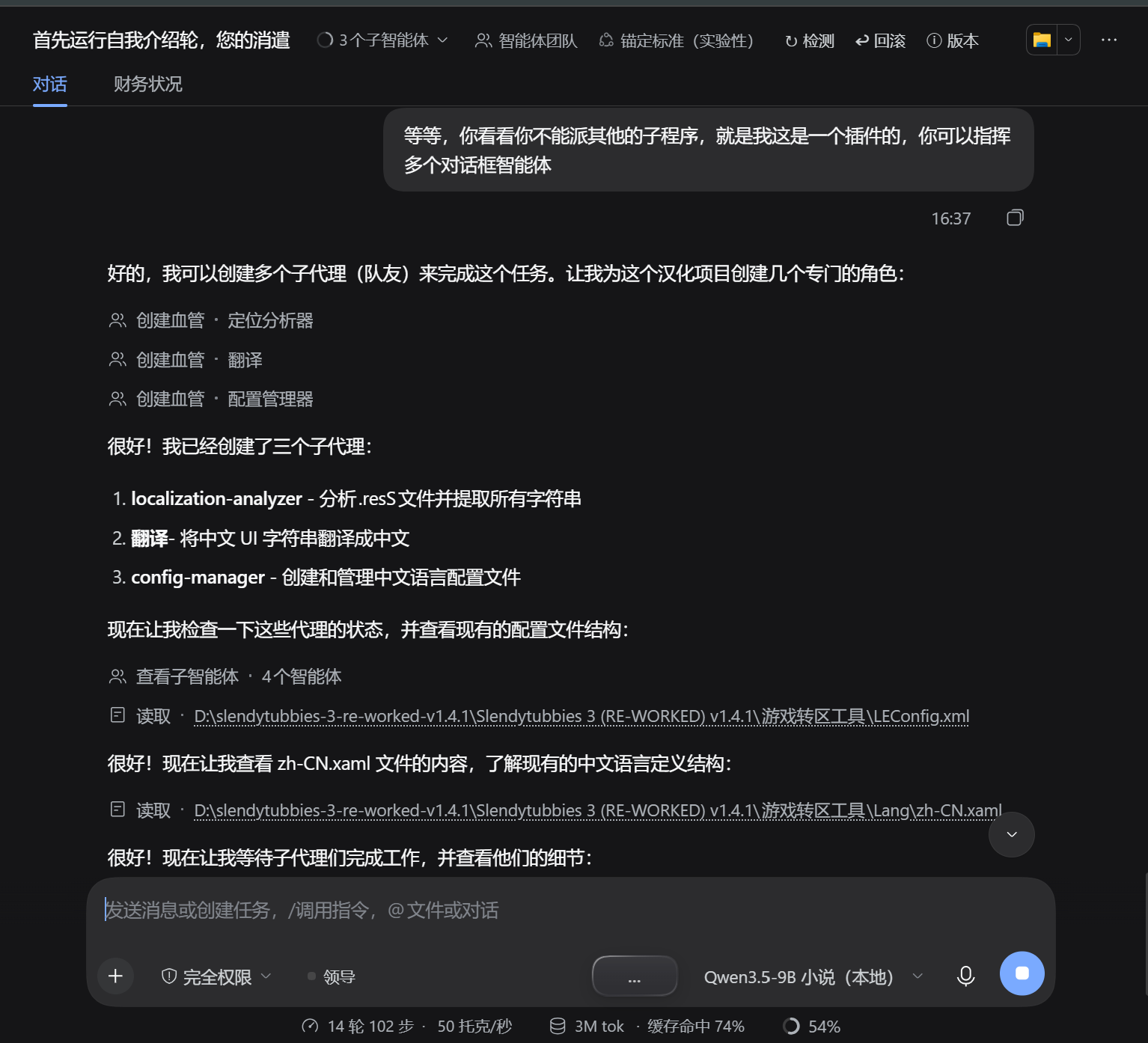
1. 本地 AI 现场给你造队友
一句「你派几个子智能体来做」就够了 —— 领导自己起名字、定职责,用 spawn_teammate
把队友拉起来(下图里它自己造了「定位分析器 / 翻译 / 配置管理器」三个):
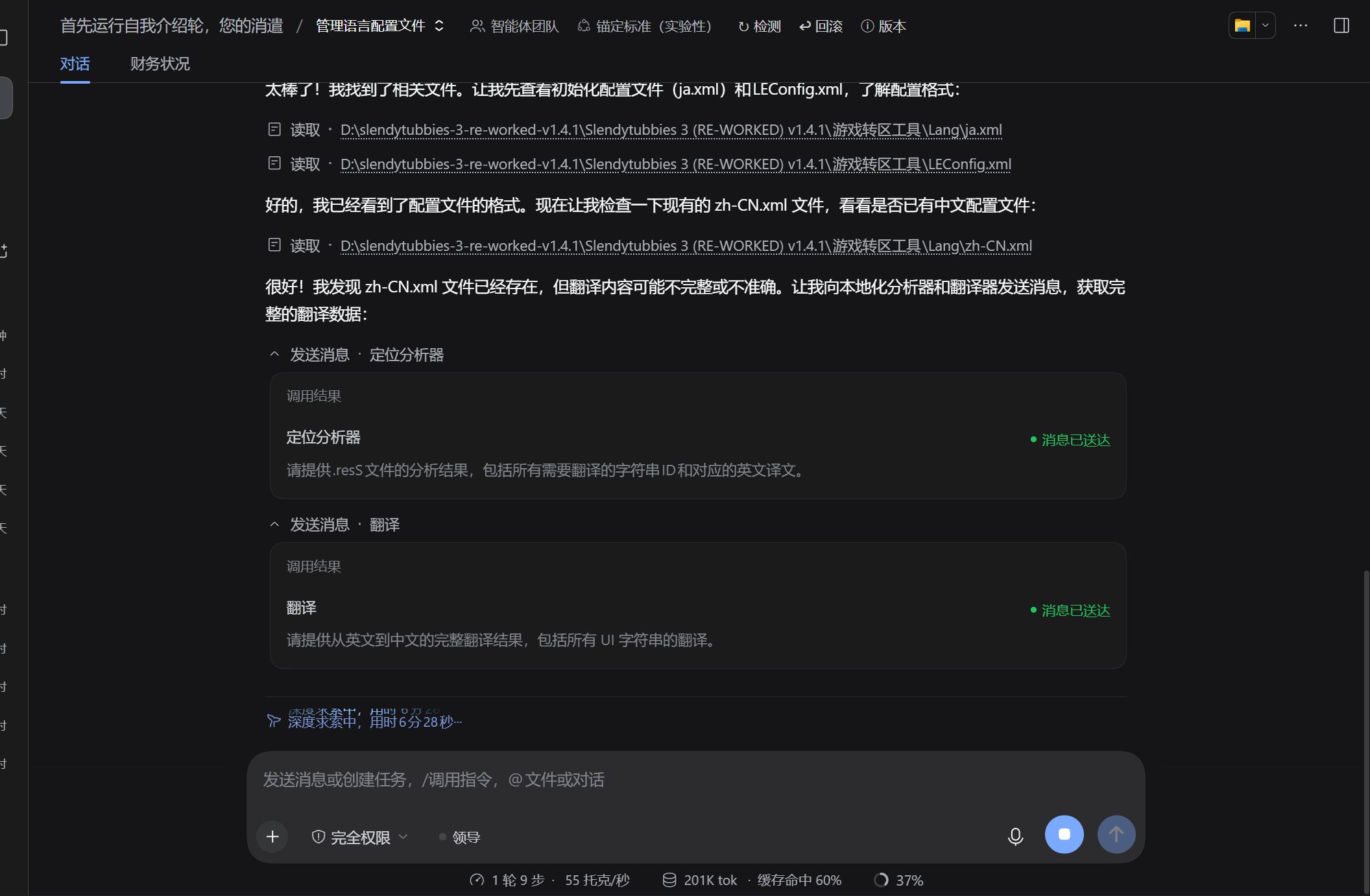
2. 队友之间互相汇报、统一推进
队友不是各干各的:它们能用 send_message 互发上下文与结论,领导再用
wait_agent 收口、team_task_* 协调分工,最后汇总成一份结果:
3. 全队状态一目了然
DSH 自带的「智能体团队」面板列出每个成员与状态(谁是当前会话、谁在跑):

面板里的「工人」区块读的就是同一份名册(ctx.agentTeams.listMembers),
额外补上每个队友花掉的 token 与估算金额 —— 即使队友干完活被卸载了,
数字仍然从它的持久日志里折叠出来。
安装
# 从 GitHub 安装(推荐)
dsh plugin --profile web add github:mutoharohfiqhiabcd-source/dsh-lead-panel

# 从本地目录安装
dsh plugin --profile web add D:\1231\dsh-lead-panel

# 或者手工:把本目录复制到 <DSH_HOME>\profiles\web\node_modules\dsh-lead-panel,
# 再往 <DSH_HOME>\profiles\web\cordis.patch.yml 追加:
#
#    - insert:
#        - id: dsh-lead-panel
#          name: dsh-lead-panel
patchReload: live 的 profile 会在 patch 变化时热重载;否则重启 DSH。
(注意:改 Host 代码后 DSH 会复用已缓存的模块,见文末「改代码时的两个坑」。)
配置(profile 的 cordis.patch.yml 里覆盖该行 config)
- id: dsh-lead-panel
  config:
    title: 领导                 # 领导会话标题
    cwd: D:\1231                # 领导会话的工作目录
    leadPreset: standard        # 领导会话用哪个 agent preset
    leadModel: { provider: deepseek-official, model: deepseek-flash }
    currency: '¥'
    prices:                     # 元 / 百万 token,覆盖内置牌价
      deepseek-flash: { input: 2, cacheRead: 0.2, output: 3 }
接口(Host 半边,只允许本机访问)
| 方法 | 路径 | 说明 |
|---|---|---|
| GET | /lead-panel/api/state | 面板轮询:消息 / 计划 / 工人 / 用量 / 模型清单 |
| GET | /lead-panel/api/health | 自检:Host 服务可用性、状态文件位置、build 标记 |
| GET | /lead-panel/api/debug-session?id=<会话id> | 排查:直接读某个会话的持久日志,看能不能算出用量 |
| POST | /lead-panel/api/ensure | 确保领导会话存在({reset:true} 重开) |
| POST | /lead-panel/api/send | {text} 给领导发消息 |
| POST | /lead-panel/api/dispatch | {text} 总结并派活 |
| POST | /lead-panel/api/model | {provider, model} 切换领导模型 |
| POST | /lead-panel/api/cancel | 打断领导当前回合 |
领导会话的 id 存在 <DSH_HOME>\lead-panel\state.json,重启 DSH 后复用同一个会话。
自检
npm test                  # 两个套件一起跑
node test/self-check.mjs  # 25 项:纯逻辑 + 浏览器半边
node test/host-smoke.mjs  # 29 项:假 ctx 把 Host 的 HTTP 链路整条跑一遍
self-check:用量折叠、金额折算、计划抽取、消息过滤、价目表覆盖;以及在假window.__ModuleLoader__+ 假react下求值lib/client.js,确认它注册到conversation.input.left、组件可构造、防翻译标记在位。host-smoke:用假 ctx / 假服务驱动真实处理器,验证POST /send、/dispatch会给sessionController.prompt传AbortSignal(曾经漏传,面板点了报throwIfAborted)、/state能抽出计划卡片与工人用量(含已卸载工人读持久日志)、 金额按牌价折算、异常以 JSON 返回。
两套都不依赖 DSH,改完先跑。
说明与边界
- 金额是估算:DSH 本身只有 token 计数、没有金额模型,所以插件内置一张 DeepSeek
牌价表(元/百万 token),按
未命中输入 / 命中输入 / 输出三个桶折算;牌价变了改配置即可。 - 预计剩余时间也是估算:没有历史时长库,用「已完成工人数 × 已用时长」外推; 工人还没跑完一个时显示「估算中…」。领导在计划里自己给的预计时间会出现在对话正文里。
- 面板依赖 Host 服务
sessionController(建会话/发消息/切模型)、sessionProjections(实时用量)与agentTeams(工人名册);缺哪个就在面板上显示对应的错误,不会影响 DSH 其它功能。工人干完活会被卸载,插件改读它的持久日志折叠 token,所以 settle 之后仍然能看到它花了多少。
改代码时的两个坑(实测)
- Host 模块按 package.json 的
name缓存。 改了index.js后,即使把 profile 的cordis.patch.yml里那一行删掉再加回来,DSH 仍然跑旧代码。要么换一个没用过的包名 (目录名 +package.json的name一起改),要么重启 DSH。 - 不要用脚本(PowerShell 等)去改写 profile 的
cordis.patch.yml。 实测一次Get-Content -Raw | Set-Content往返会把中文注释行拼成一行,把后面的- id:/- insert:吞进注释里,于是整段配置静默失效;更糟的是,反复替换这个文件 会让 DSH 的文件监听器失效,之后任何 patch 改动(连最小 canary 插件)都不再热加载, 只能重启 DSH。改这个文件请用编辑器逐行改。
Comments
Loading…
From the same category
by awesome-dsh-plugin
A curated list of plugins for DeepSeek Harness (dsh) · DeepSeek Harness 插件精选列表
★ 18.3k
CC0-1.0
Python
Oct 10, 2026
by 0xsline
DeepSeek Harness (DSH) ecosystem: curated plugins, tools, and infrastructure from dsh-external/hub and the public dsh-plugin topic.
★ 1.2k
CC0-1.0
Python
Oct 10, 2026
by pax-beehive
Open-source CLI, schemas, resolver, and DSH agent tools for DSH Plugin Hub
★ 450
MIT
TypeScript
Oct 6, 2026
by xiajiajun516
DeepSeek Harness (DSH) backup & restore plugin — export, import, migrate and sync your complete DSH configuration, plugins, MCP servers, skills and workspace. One-click migration to another machine.
★ 176
MIT
TypeScript
Oct 8, 2026
dsh plugin --profile web add dsh-config-managerby yjh051108
推荐组件(非必须):DeepSeek Harness 运行时注入器;已随 dsh-routing-suite 单仓库化保留,本仓库继续维护/发布。
★ 164
TypeScript
Sep 18, 2026
dsh plugin --profile web add @dsh-external/dsh-super-injectorby jigjoy-ai
A CLI that turns a goal into a pull request - and a sandbox for testing concurrent AI coding agents on the Mozaik runtime.
★ 124
MIT
TypeScript
Oct 2, 2026