

dsh-hmos-emulator
Manifest valid★ 3DSH better-sidebar Sidebar Tab: one-click launch the HarmonyOS emulator, build and deploy HarmonyOS applications to the emulator.
鸿蒙模拟器 · dsh-hmos-emulator
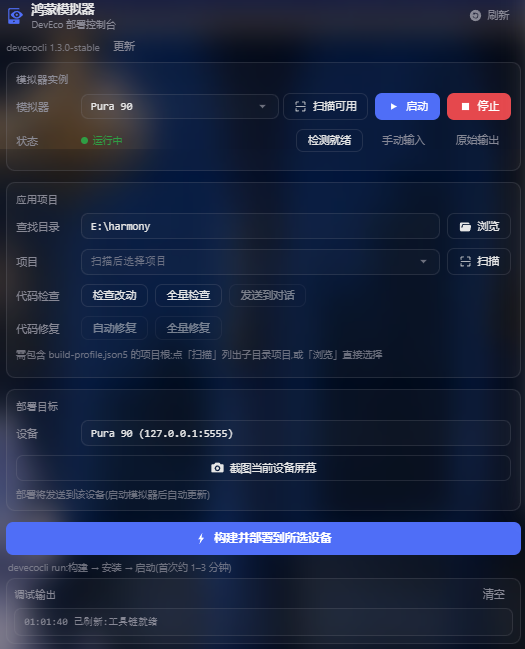
DeepSeek Harness 侧边栏插件:在面板中启动鸿蒙模拟器,并把选定的 HarmonyOS 应用构建、部署到模拟器。
能做什么
- 启动 / 停止模拟器:启动或停止鸿蒙模拟器,列出可用实例与在线设备。
- 选择应用项目:文件浏览或扫描,识别鸿蒙工程。
- 构建并部署:将选定工程构建、安装并启动到目标设备,自动识别多入口模块。
- 部署实时输出:构建 / 安装 / 启动过程实时输出。
- 就绪检测:模拟器冷启动后检测设备是否上线。
依赖说明
本插件以「鸿蒙模拟器」标签页显示在侧边栏,依赖 dsh-better-sidebar;未安装时,请参考其说明安装。
安装
前置条件:
- 已安装 dsh 并正常运行(
dsh web);Node.js ≥ 22(LTS 或更新)、pnpm ≥ 10。 - 已安装 DevEco Studio(提供模拟器、hdc 与 SDK);Linux 上改用 Command Line Tools(见「平台支持」)。
- 已安装
devecocli命令行工具;如未安装,执行npm i -g @deveco/deveco-cli,或装好插件后在面板点击「一键安装 devecocli」。
方式一:npm 安装(推荐)
dsh plugin --profile web add dsh-hmos-emulator
方式二:从 GitHub 安装(免 npm)
dsh plugin --profile web add github:momo20012002/dsh-hmos-emulator
方式三:本地挂载(开发)
git clone https://github.com/momo20012002/dsh-hmos-emulator.git
cd dsh-hmos-emulator && pnpm install && pnpm build
dsh plugin --profile web add .
安装完成后,重启 dsh web(加载宿主端),再刷新浏览器页面(加载客户端),即可生效。
卸载:
dsh plugin --profile web remove dsh-hmos-emulator
使用
- 打开侧边栏的
+菜单 →「鸿蒙模拟器」。 - 点击「扫描可用」列出模拟器与在线设备,再点击「启动」启动模拟器。
- 在「应用项目」中浏览或扫描,选择鸿蒙工程。
- 点击「构建并部署」,等待完成。
模型工具
除面板外,插件向 AI 提供六个工具,均经 devecocli 执行,可在对话中直接触发模拟器、部署、日志、代码检查等操作。
| 工具 | 职责 |
|---|---|
emu | 模拟器实例的查看 / 启动 / 停止 |
emu_ui | 屏幕结构读取与交互(点击 / 输入 / 滑动 / 截图) |
hmos_deploy | 构建 → 安装 → 启动 |
hmos_lint | 代码检查;结果含文件与行号 |
hmos_log | 设备日志,按级别与关键字筛选 |
hmos_docs | 官方鸿蒙文档检索 |
- 界面状态默认以节点结构读取,不作截图:结构信息精度高于图像,且开销更低。截图仅用于白屏、崩溃、视觉问题等结构无法描述的场景。
- 出现异常时,插件会自动把截图留存到工作区
screenshots/目录。 - 截图支持基线比对:以既有截图为基线判断画面是否变化,无变化时不写入新图。
平台支持
- Windows / macOS:模拟器启动与停止由 DevEco Studio 提供。
- Linux:DevEco Studio 没有 Linux 版,模拟器来自 Command Line Tools(需 26.0.0 Release 及以上)。需要:
- Ubuntu 18.04 及以上;
- 把
DEVECO_CLI_CLT_PATH指向 Command Line Tools 安装目录(或把其emulator目录加入PATH); - 需要桌面环境:无图形界面(
DISPLAY/WAYLAND_DISPLAY均未设置)时,本插件不提供启动支持。
- 选择工程、连接设备、构建并部署在所有系统上均可用。
常见问题
| 现象 | 处理 |
|---|---|
| 启动时提示授权 / 协议未接受 | 在终端执行 devecocli emulator license accept 后重试 |
| 扫描不到模拟器实例 | 使用 DevEco Studio 的 Device Manager 确认实例存在,或在终端执行 devecocli emulator list 查看实际报错 |
| Linux 上启动模拟器报错 | 需 Command Line Tools 26.0.0 Release 及以上(DevEco Studio is not available on Linux 即未设置 DEVECO_CLI_CLT_PATH) |
| 部署失败但无具体报错 | 在工程中配置签名后重试;多入口模块已自动选择入口模块(可在面板切换) |
| 提示找不到 hdc | 设置环境变量 DEVECO_SDK_HOME 指向 DevEco Studio 的 SDK 目录,然后重启 dsh web |
License
Compatibility
Versions
| Latest version | Published | Size |
|---|---|---|
| 0.1.2 | — | — |
| 0.1.3 | — | — |
| 0.1.4 | — | — |
| 0.1.5 | — | — |
| 0.1.6 | — | — |
| 0.1.7 | — | — |
| 0.1.8 | — | — |
Comments
Loading…
Similar plugins
by 1na-ko
DSH 原生鸿蒙开发助手:hdc 设备闭环调试 + 设备面板(官方 client 插件形态)+ 离线官方知识层(Tier-1 随包)+ DevEco CLI 构建/签名/模拟器控制 / DSH-native HarmonyOS dev assistant: hdc device loop, live device panel, offline official knowledge, DevEco
★ 20
↓ 351/wk
MIT
JavaScript
Nov 3, 2026
dsh plugin --profile web add dsh-hdc-bridgeHarmonyOS device workbench for DSH NEXT Desktop on Windows x64 (tested with DSH NEXT 2.0.21-next and Better Sidebar 0.28.2); the floating mirror reuses DSH's Electron or downloads one (~140 MB) on fir
★ 0
dsh plugin --profile web add dsh-plugin-harmonyby omdsh-dev
开放的侧边栏底座,支持三方拓展注册新侧边栏页面。内置文件渲染编辑/终端/侧边对话/Git/子代理页面 | Open sidebar foundation, supports third-party extensions to register new sidebar pages. Built-in file rendering/editing, terminal, side chat, Git,
★ 4.9k
↓ 88.7k/wk
MIT
TypeScript
Nov 5, 2026
dsh plugin --profile web add dsh-better-sidebarby g1998815
DSH(DeepSeek Harness) 右侧原生工具侧边栏插件:文件系统浏览器 / Git 变更与 diff / 会话变更 采用·撤回 / PTY 控制台。Windows 直连 node-pty,跟随 DSH 主题,RPC fail-closed。
★ 3
JavaScript
Aug 16, 2026
dsh plugin --profile web add dsh-workspace-toolsby eighteentang
DSH 开发工具箱:按 Alt 悬浮查看界面元素归属、把踩过的坑记进随插件分发的经验库、开发模式下自动注入动手前的自检清单。
★ 0
MIT
JavaScript
Oct 13, 2026
dsh plugin --profile web add dsh-plugin-dev-toolsA developer toolkit for the DeepSeek Harness (DSH) web console: a real multi-tab PTY terminal docked under the composer plus an AI-output file browser sidebar with syntax highlighting, Markdown render
★ 0
↓ 138/wk
dsh plugin --profile web add dsh-devpanel