

dsh-better-ux
Manifest valid★ 2Web UX kit for DeepSeek Harness: session row actions and a large model picker

dsh-better-ux
A focused DeepSeek Harness web UX kit for faster sessions, model selection, mobile navigation, photo attach, and readable scaling.
🇺🇸 English | 🇨🇳 简体中文


A web UX kit for DeepSeek Harness, with four independently configurable interface improvements:
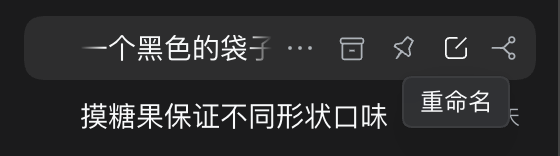
- Session row actions — hover idle, running, or newly activated sessions to show Rename / Fork / Archive; keep
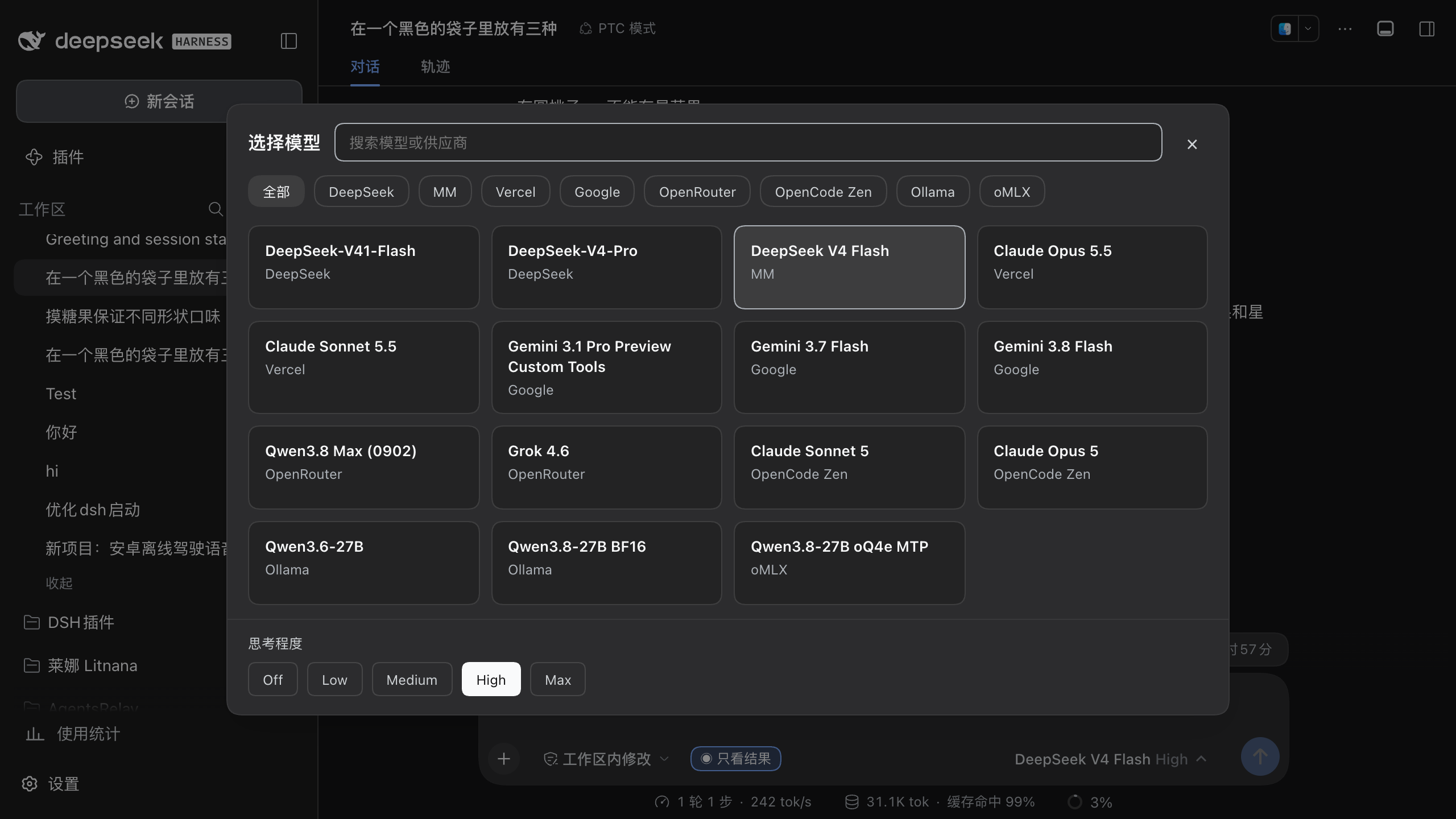
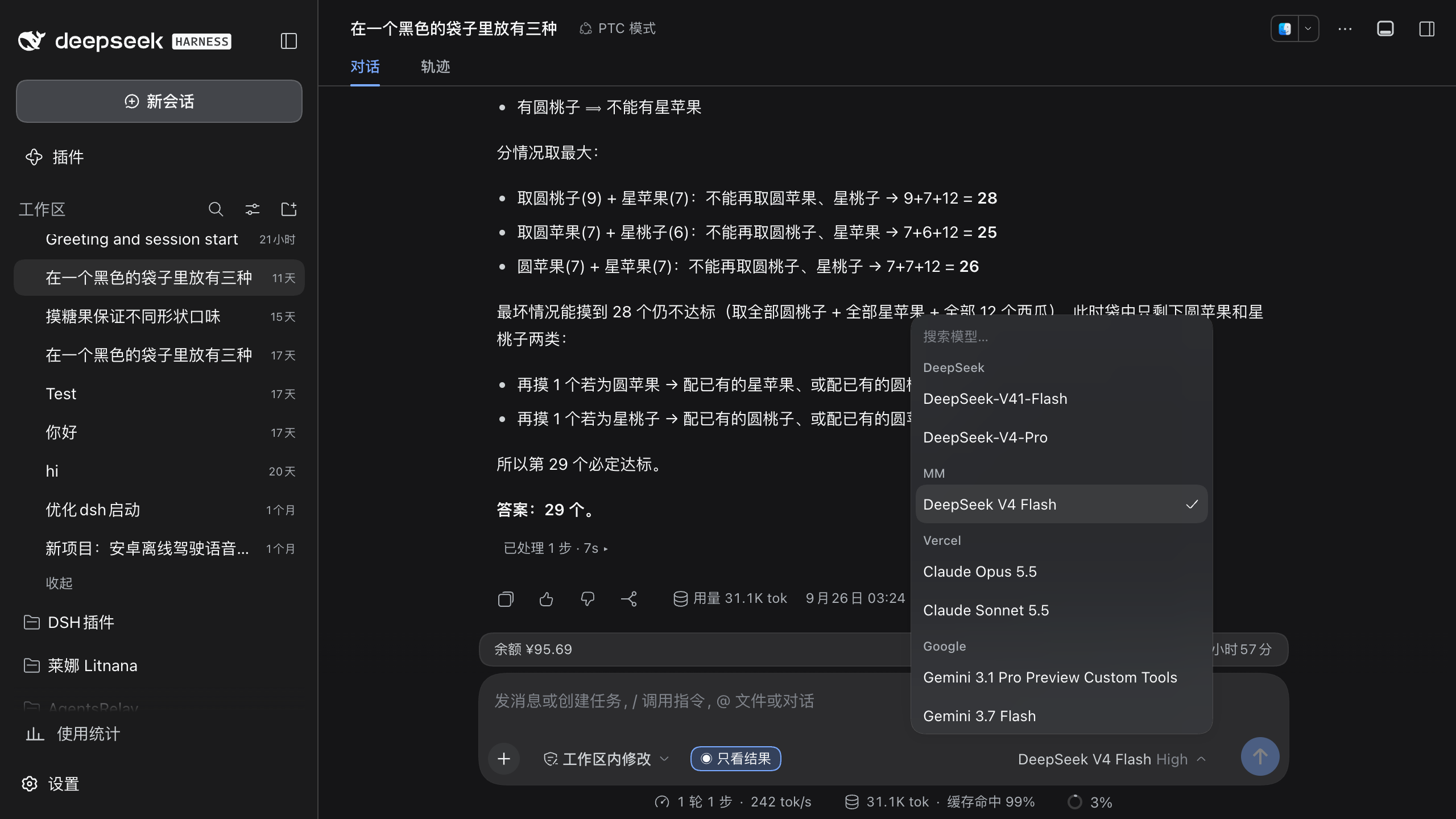
⋯when another plugin adds menu actions - Model picker — replace the cramped two-level menu with one overlay containing search, providers, reasoning levels, and Auto Vision twin actions on their original model cards
- Mobile optimization — hide the host sidebar on phones and tablets and render a custom horizontal bar; workspaces, sessions, status, overflow menus, view options, and sorting remain mapped to the host. The stock mobile composer has no photo control, so the plugin adds an image button next to
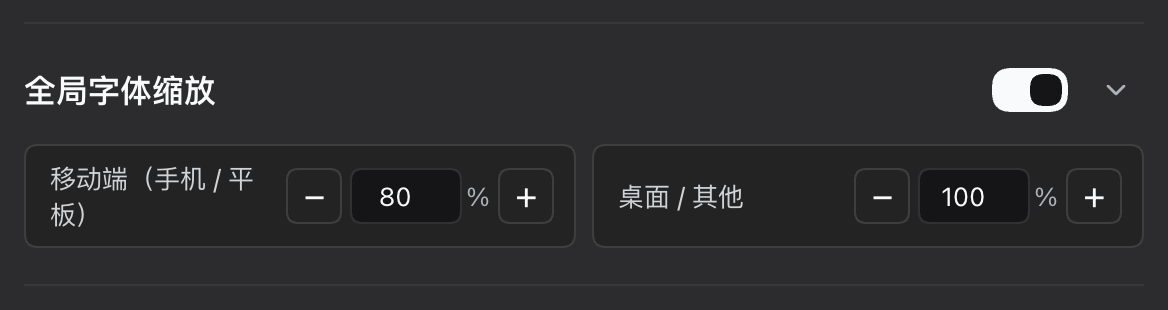
+ - Global font scale — set independent 10%–200% ratios for font size, line height, and padding on mobile (phone/tablet) and desktop/other viewports; mobile defaults to 80%, and step buttons change the value by 5%
All plugin-owned labels follow the current DSH language (Chinese or English) and update immediately when it changes. Mapped host actions reuse the host's localized labels where available. This release targets DSH builds with the built-in locale service.
Model picker
One click opens a full overlay: search, provider chips, model cards, and reasoning levels on the bottom row. No nested “Model → list / Effort → list” menu. Providers stay on one horizontal rail; a normal mouse wheel or Shift + wheel scrolls it sideways, while independent 8px fades indicate hidden content at either edge. If dsh-vision-router && dsh-vision-router-inline are installed, Auto Vision twin providers are not shown as duplicate groups; they fold into the matching original model cards:
the card selects the original model, and the picture button on the right selects the vision route.
| Enabled (top) · Disabled, original menu (bottom) |
|---|
 |
 |
Session row actions
Idle, running, and blank sessions that finish activation all receive Rename, Fork, and Archive shortcuts; hover an icon for its name. The plugin hides the native ⋯ only when all three shortcuts are enabled and the native menu contains exactly those three actions. Disabling any shortcut, an unrecognized menu, or extra actions contributed by another plugin keeps ⋯ available. This hiding rule is desktop-only and does not affect the mobile overflow menu.
| Enabled (top) · Disabled, original row (bottom) |
|---|
 |
 |
Mobile optimization
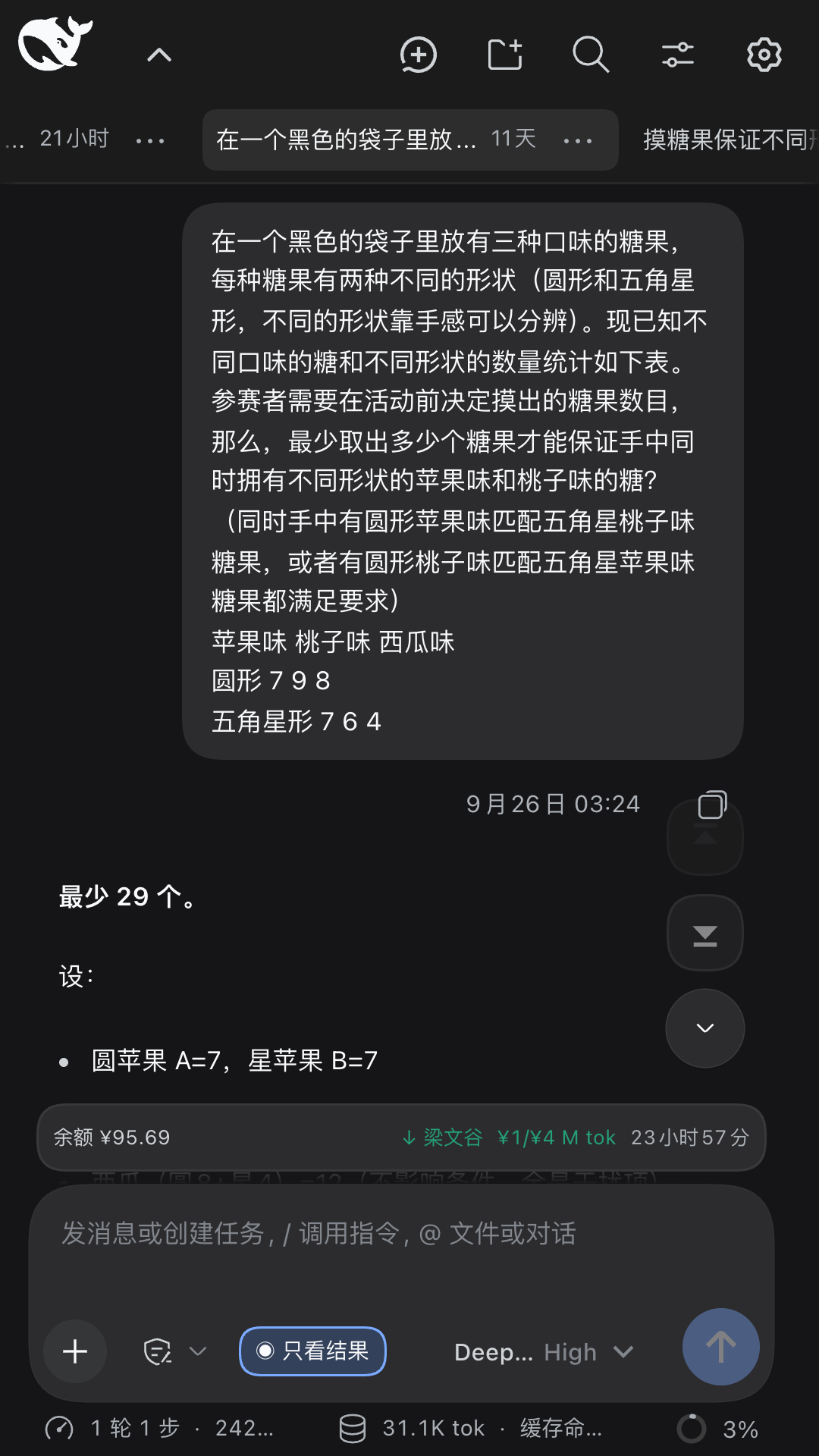
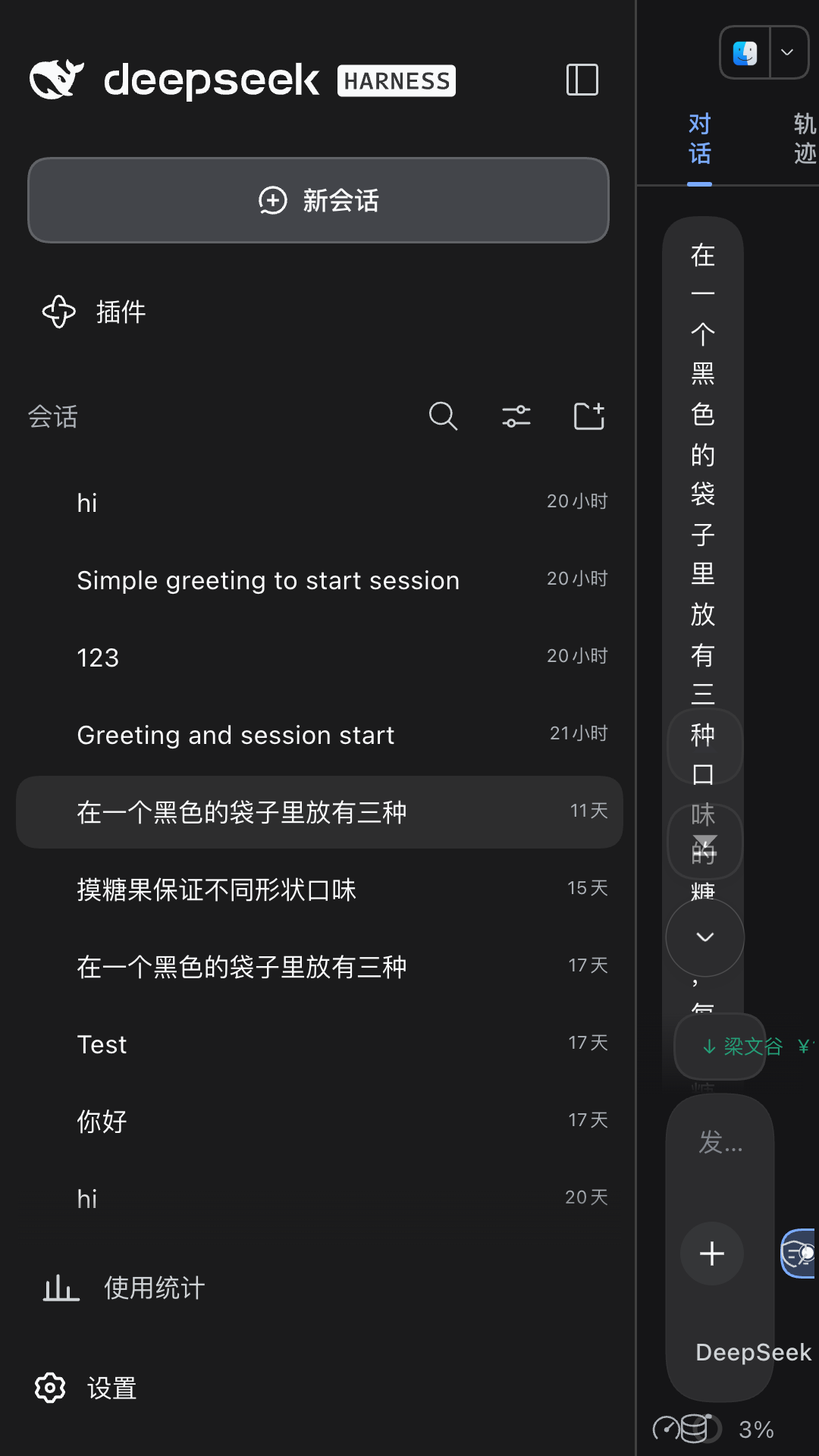
Under Settings → Better UX, phones and tablets hide the host sidebar and use the plugin's own top bar. The first row contains the logo, a conversation-header toggle, and native DSH actions for New session, New workspace, Search, View options, and Settings; the horizontal rows below show workspaces and sessions for the selected workspace.
If you customized the original left sidebar heavily, consider turning this option off.
- Host mapping — workspace/session selection, creation, search, Workspace/Flat grouping, Manual/Recently updated sorting, and overflow menus call host data and callbacks; selecting a workspace collapsed on desktop expands it without offering a mobile collapse action
- Status and time — each session uses one row ordered as status, title, time, and overflow action; approvals, plan reviews, and questions use a yellow dot, running keeps the host animated icon, completed-unread uses a green dot, and completed-read has no prefix
- Adaptive title rows — Chinese titles show up to
12characters and English receives twice that budget before...; short titles shrink to their content, while workspace and session capsules stay at260%of the current text size - Conversation header — a mobile-only button beside the logo smoothly collapses or expands the host conversation header; top action icons are
18pxwhile their touch targets remain larger - Long-press reorder — long-press a workspace or session tab to pop up a small capsule beneath it with
‹›buttons that nudge it one slot per tap; works in both Manual and Recently updated ordering (Recently updated still auto-bubbles recently updated sessions to the front) - No auto-focus on session switch — on by default; switching sessions does not focus the composer input, so the touch keyboard does not jump up and cover the content you opened the conversation to check (such as a freshly generated code block); tap the field whenever you want to type
- Horizontal overflow — workspace and session rows support touch scrolling with independent
8pxfades on each edge of each row - Disable page pinch-zoom — on by default, blocks two-finger pinch zooming so a stray second finger on mobile no longer warps the page into an odd zoom or broken layout; if you rely on system zoom, turn the option off and the gesture comes back
- Flat list — removes the workspace row and reduces both bar height and content offset
- Add image — the stock mobile web composer only exposes
+and does not offer a photo picker; the plugin adds an image button beside it, supports multiple selection, and reuses the host paste-image validation, draft preview, removal, and send flow; ordinary file attachments are not currently supported by the host - Compatibility and restore — the host conversation header and right-sidebar controls remain positioned below the dynamic bar; disabling the feature restores the original host sidebar and composer
| Enabled | Disabled, original layout |
|---|---|
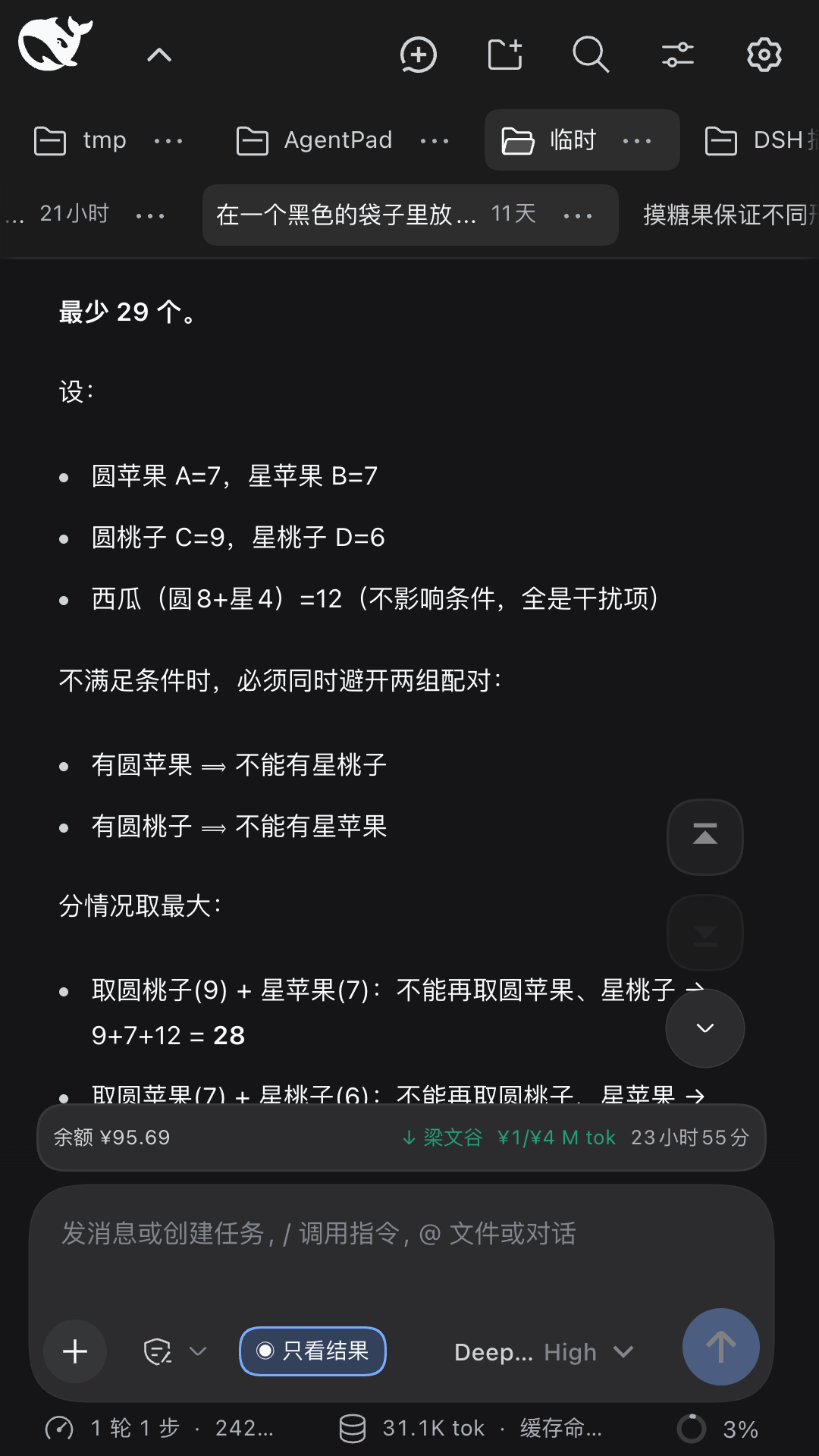 | 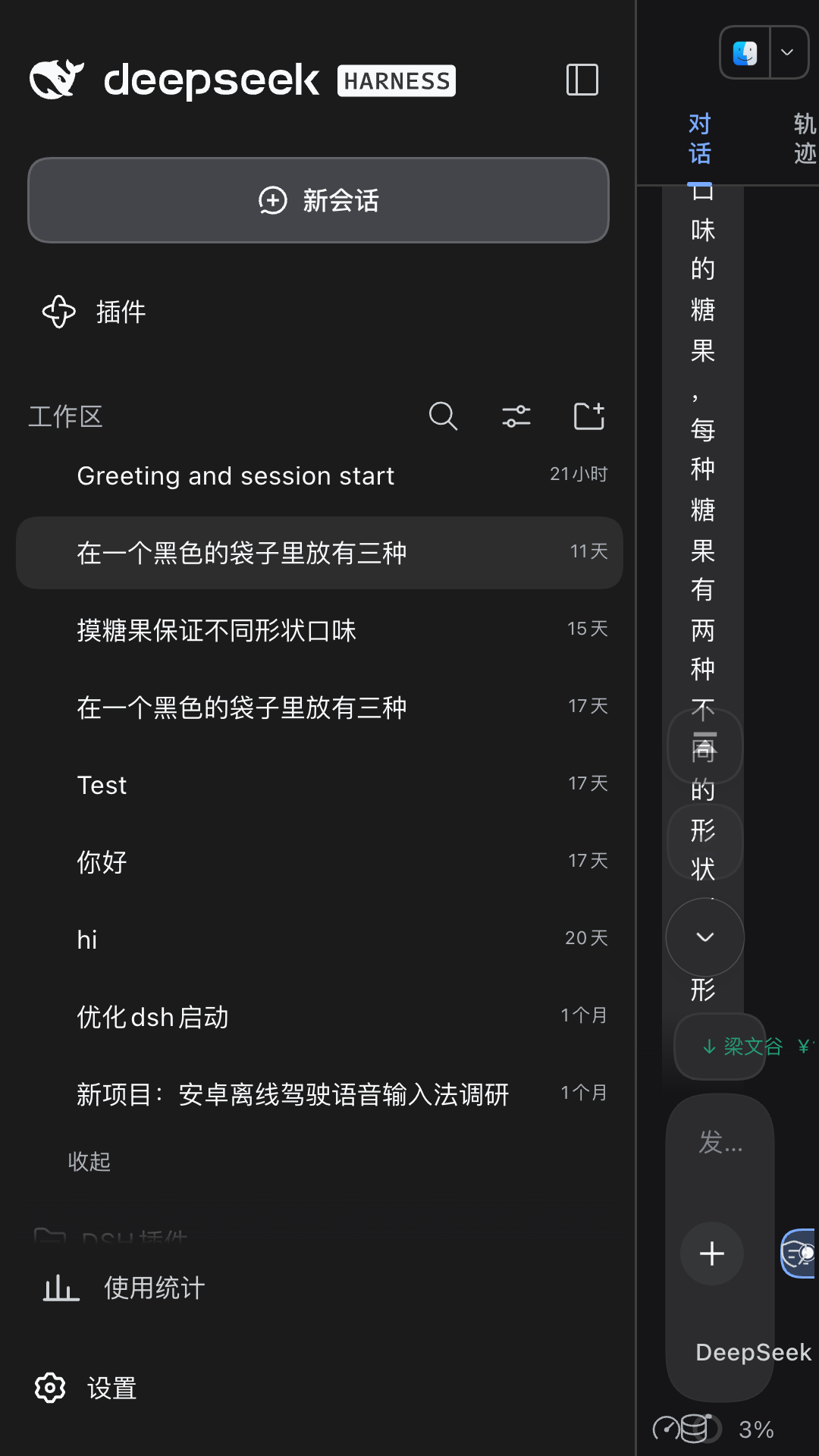 |
Grouping follows the host view options: By workspace keeps the workspace rail above sessions, Flat list removes it and shortens the bar.
| Enabled | Disabled, original layout |
|---|---|
 |  |
The host mobile composer has no dedicated photo control. With mobile optimization on, an image button sits beside +:
| Enabled | Disabled, original composer |
|---|---|
 |  |
Global font scale
Mobile (phone/tablet) and desktop/other ratios are stored separately. Enter any integer from 10 to 200, or use the buttons for 5% steps. Mobile defaults to 80% and desktop to 100%. Scaling follows each element's original font size and also adjusts explicit line height and padding; disabling the category or unloading the plugin restores the original inline styles.
Settings
Open Settings → Better UX.
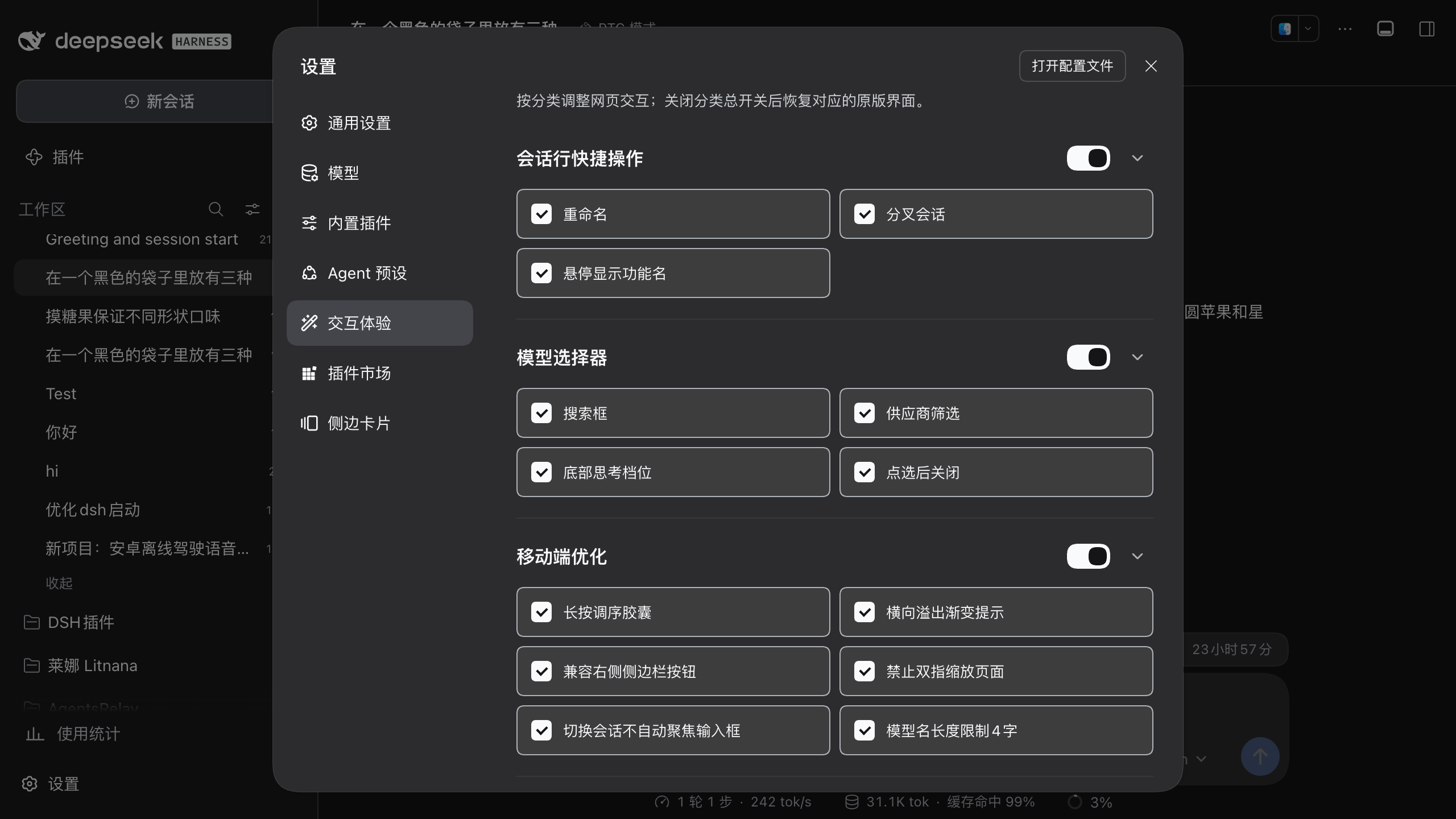
| Category | Configurable options |
|---|---|
| Session row actions | Master switch, Rename, Fork, Archive, hover tooltips |
| Model picker | Master switch, search, provider filter, reasoning levels, close on pick |
| Mobile optimization | Master switch, long-press reorder capsule, no auto-focus on session switch, horizontal overflow hints, right-sidebar compatibility, disable page pinch-zoom |
| Global font scale | Master switch, mobile ratio, desktop/other ratio |
Disabling a category restores the corresponding original DSH interface.
Install
npm
dsh plugin --profile web add dsh-better-ux@latest
GitHub
dsh plugin --profile web add github:MitsukiJoe/dsh-better-ux
Ask DSH
Send this message to DSH:
Install this plugin https://github.com/MitsukiJoe/dsh-better-ux
Restart DSH after installation.
Update
dsh plugin --profile web update dsh-better-ux
Or send this message to DSH:
Update this plugin https://github.com/MitsukiJoe/dsh-better-ux
Uninstall
Remove dsh-better-ux from ~/.dsh/profiles/web/package.json (dependencies and dsh.profile.bundles), delete node_modules/dsh-better-ux, restart DSH.
Settings stay in localStorage under dsh-better-ux:v1.
Notes
This is a dual-face plugin: host apply() is a no-op; the browser half is served at /plugins/dsh-better-ux/client.js.
Versions
| Latest version | Published | Size |
|---|---|---|
| 0.2.0 | — | — |
| 0.2.1 | — | — |
| 0.3.0 | — | — |
Comments
Loading…
Similar plugins
by huahai0202
DeepSeek Harness (DSH) web-GUI plugin: archived-session panel with unarchive & delete
★ 8
MIT
JavaScript
Aug 18, 2026
dsh plugin --profile web add dsh-better-archiveby pixellover1433
a simple plugin to improve web UX/UI for "Deepseek Harness (dsh)"
★ 7
↓ 30/wk
TypeScript
Aug 30, 2026
dsh plugin --profile web add dsh-better-sidebar-liteby 2275803244-cpu
In-session full-text search for the DeepSeek Harness web GUI: kind filters, multi-term AND matching, keyboard navigation, copy-to-clipboard, and jump-to-message.
★ 0
MIT
JavaScript
Oct 1, 2026
dsh plugin --profile web add dsh-client-ui-session-searchby ice-ai-lab
Codex-style sidebar skin for the DeepSeek Harness Web GUI: a Projects + Recents browser, a New chat row that starts a session without picking a project and allocates its own working directory, and a d
★ 0
MIT
JavaScript
Sep 12, 2026
dsh plugin --profile web add dsh-plugin-codex-uiby orriduck
A small, session-aware terminal UI for DeepSeek Harness
★ 3
↓ 323/wk
MIT
TypeScript
Aug 13, 2026
dsh plugin --profile web add dsh-tuiby adrianleb
A persistent, responsive tmux control-mode cockpit for DeepSeek Harness Web.
★ 0
MIT
TypeScript
Sep 29, 2026
dsh plugin --profile web add dsh-tmux-cc