
dsh-prompt-optimize
Manifest validRewrites the composer draft in place: the panel streams a structured rewrite above the input, a line diff confirms the replacement, and a nine-second undo takes it back. Local-only history, version co
提示词优化器 · Prompt Optimizer


中文 · English · Español · Français · Deutsch · Русский · 日本語
一个 DeepSeek Harness 插件:把输入框里的草稿改写成可直接使用的提示词。替换前先看逐行 diff,替换后 9 秒内可撤销;带本地历史、版本对比和一套可复用的模板。
模板怎么选、每个模板适合什么场景:见 模板说明。
它解决什么问题
大多数“效果不好”的提示词,问题不在模型,而在草稿本身:只说了要做什么,没给材料、交付物和边界。这个插件在不离开输入框的前提下,把一句口语化草稿补成结构化提示词,并且把“会不会毁掉我原来的字”这件事交给 diff 和撤销来决定。
- 不打断:一个按钮开在输入框上方,不用切窗口、不用复制粘贴。
- 可审阅:替换前逐行标出增删,确认后才写回草稿。
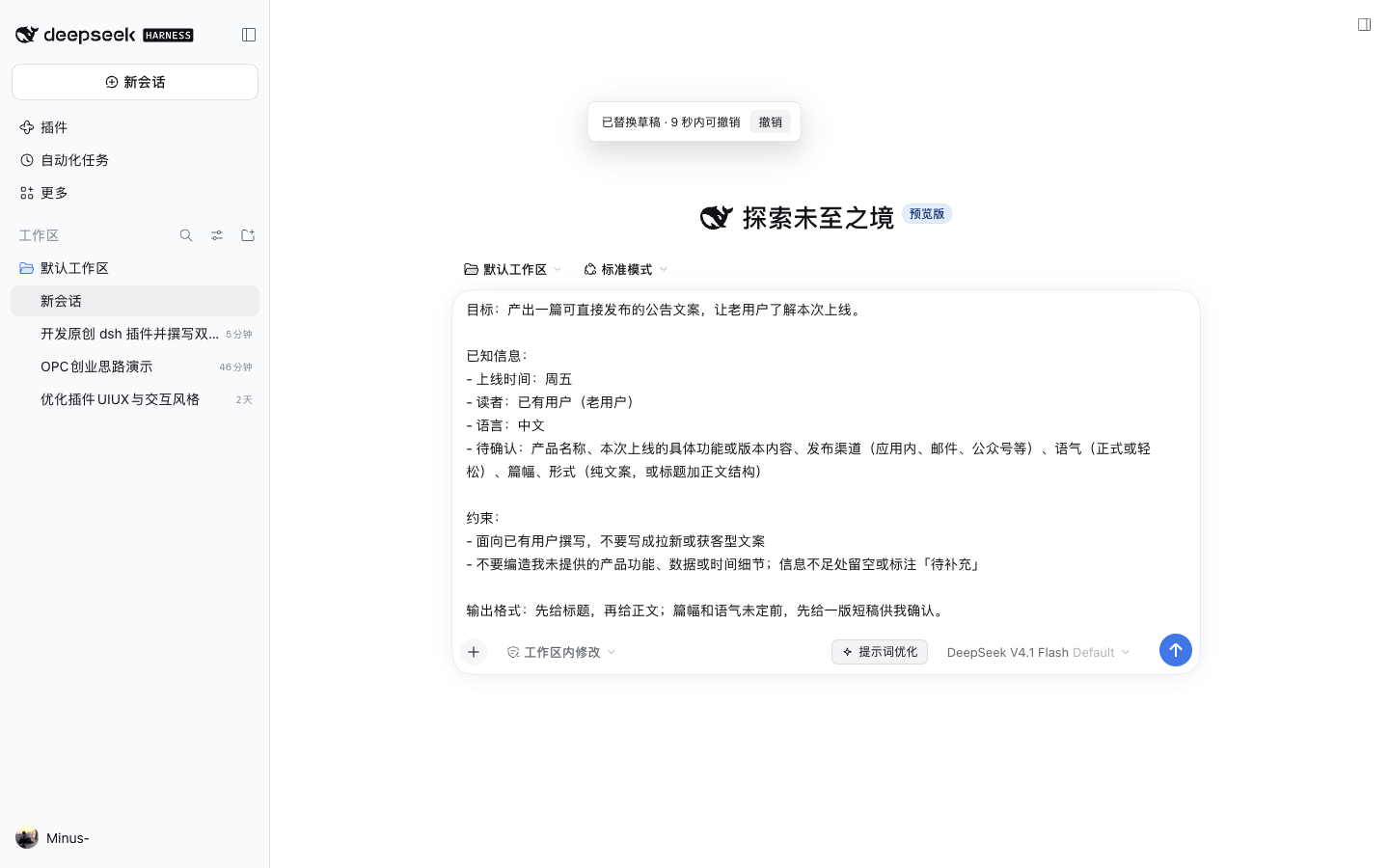
- 可回退:写回后 9 秒内一键撤销。
- 可迭代:对结果继续提修改意见,只改你指出的地方。
- 可留存:历史留在这台电脑,可对比版本、随时写回。
功能
| 能力 | 说明 |
|---|---|
| 自动改写 | 打开面板即按当前草稿自动跑一次,草稿变化后可重跑 |
| 流式输出 | 文本逐段出现,可随时停止,不阻塞输入框 |
| 逐行 diff | 替换前展示 - / + 行,长文自动折叠未改动段落 |
| 9 秒撤销 | 写回草稿后底部出现撤销入口,过期自动消失 |
| 版本历史 | 本机保存最近 50 条,按版本链组织,可回写、对比、删除 |
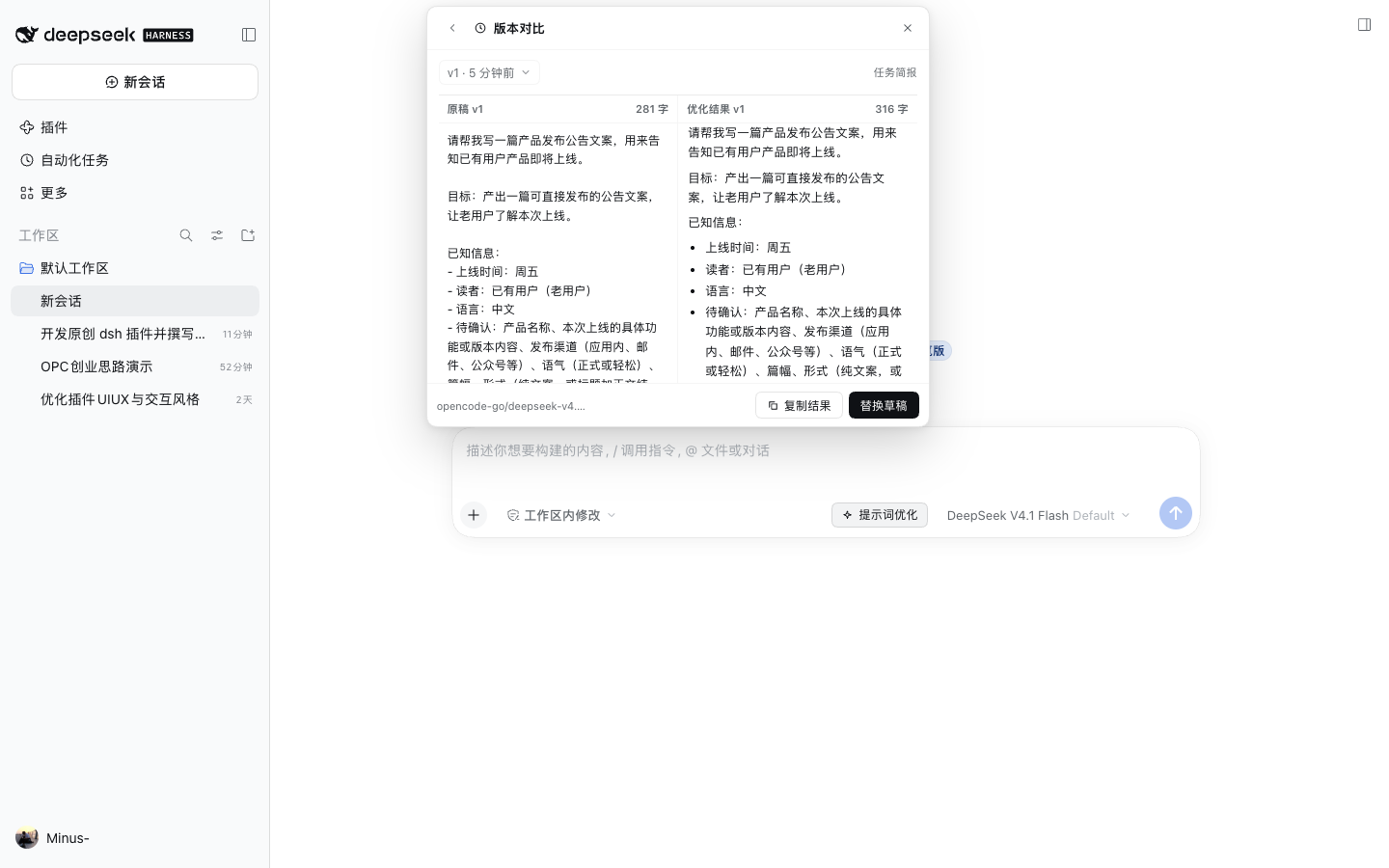
| 版本对比 | 两栏对照原稿与结果,并给出行级结构变化统计 |
| 参数化 | 从结果中抽取可替换片段(最多 5 个),一键写成 {{变量}} |
| 模板库 | 7 个内置模板,按“基础 / 结构 / 示范 / 推理 / 迭代”分组 |
| 模型固定 | 默认跟随当前模型,也可在面板里指定某个模型 |
| 中英双语界面 | 跟随界面语言自动切换(当前内置中文与英文),无需单独设置 |
| 隐私优先 | 历史默认不开启,开启后只写本机 localStorage |
安装
要求:DeepSeek Harness >= 0.1.7-0,Node.js >= 18。
1. 从 npm 安装(推荐)
dsh plugin --profile web add @minus77/dsh-prompt-optimize
装的是 registry 上已发布的版本(npm / Release),装完直接跳到第 2 步。
离线安装:从源码或 Release 里的 tgz
git clone https://github.com/Minus77/dsh-prompt-optimize.git
cd dsh-prompt-optimize
npm pack          # 生成 minus77-dsh-prompt-optimize-0.1.0.tgz
dsh plugin --profile web add file:$PWD/minus77-dsh-prompt-optimize-0.1.0.tgz
2. 让 profile 加载它
编辑 ~/.dsh/profiles/<profile>/package.json,把包名追加到 dsh.profile.bundles:
{
  "dsh": {
    "profile": {
      "bundles": [
        "@deepseek-ai/dsh-base",
        "@deepseek-ai/dsh-web-app",
        "@minus77/dsh-prompt-optimize"
      ]
    }
  }
}
重启该 profile 的 Harness(dsh --profile <profile>),输入框右侧就会出现“提示词优化”。
用
plugin_manager的install_bundle安装时,第 1、2 步会一次完成,无需手改 JSON。
本地开发
npm test                                   # 21 个单元测试,无需网络
dsh plugin --profile dev add file:$PWD     # 软链当前目录,改完重启即可
使用
打开
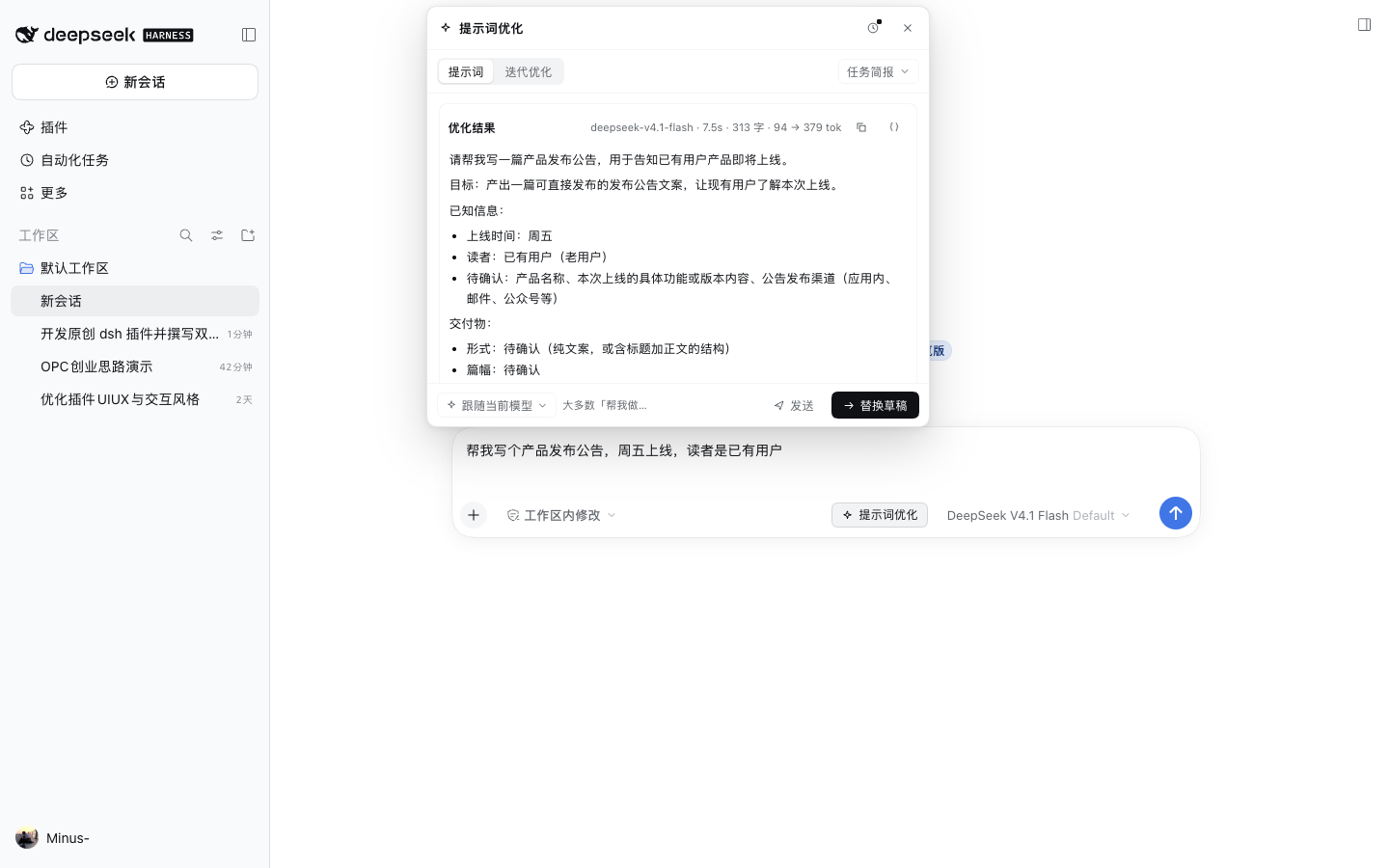
在输入框写好草稿,点输入框右下角的“提示词优化”。
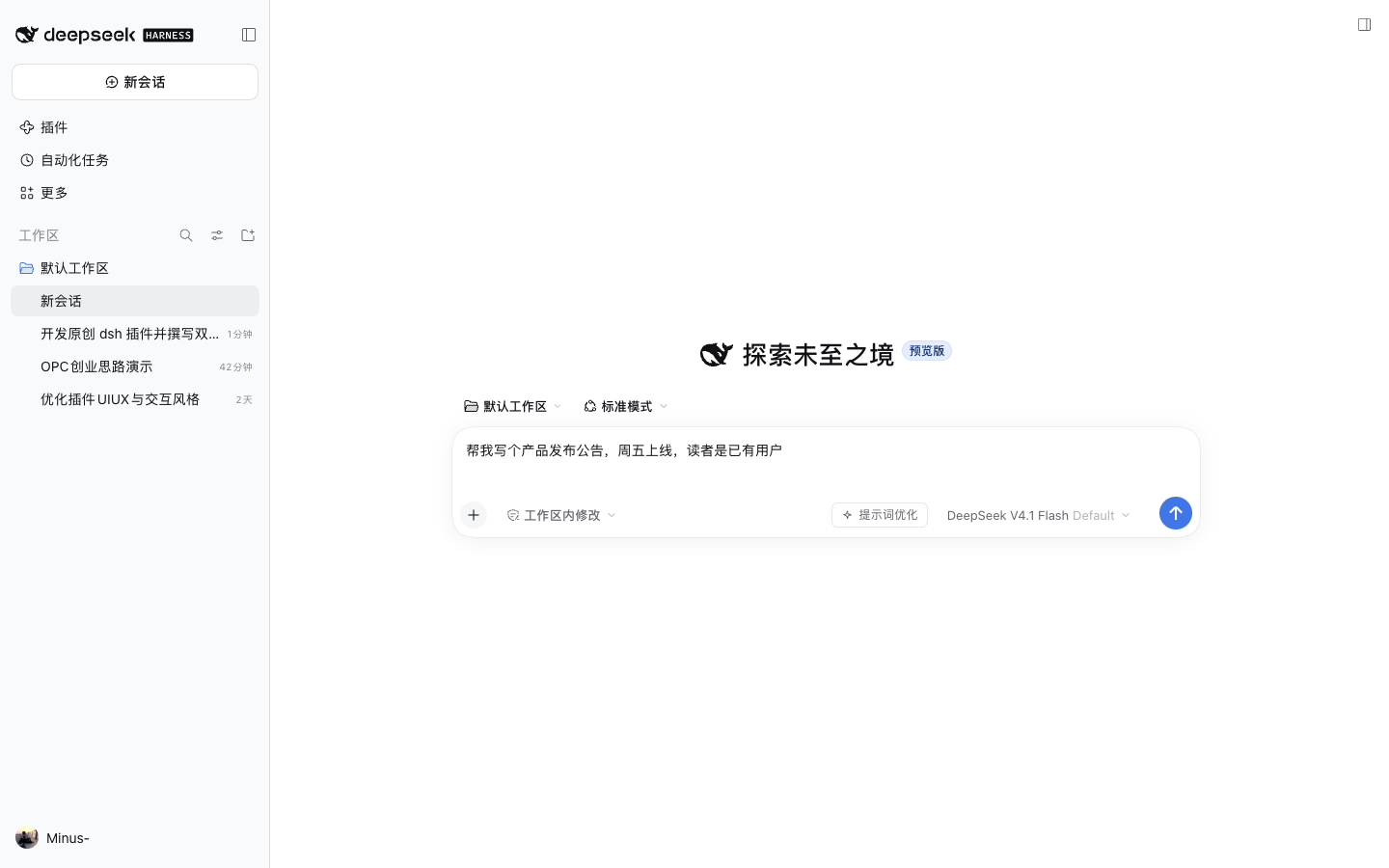
面板会在输入框上方展开并自动改写。第一次使用时可以选择是否保留历史,选择结果会记住。
审阅与替换
结果读完后点“替换草稿”,先进入 diff 确认页:
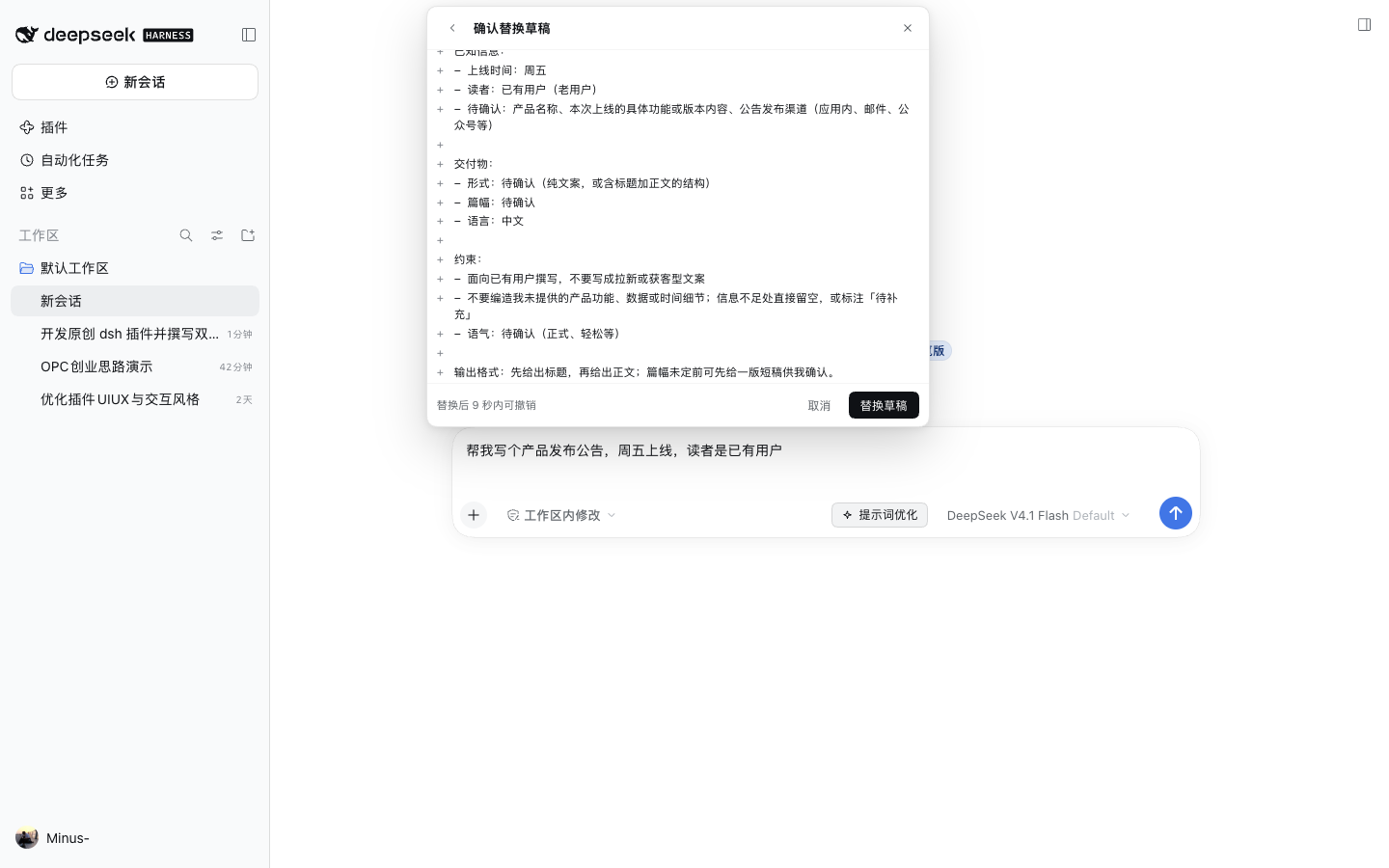
确认后草稿被替换,底部出现 9 秒撤销条:
参数化片段
点结果右上角的变量按钮,模型会从结果里找出最多 5 个值得复用的片段,写成 {{中文或英文名}}:
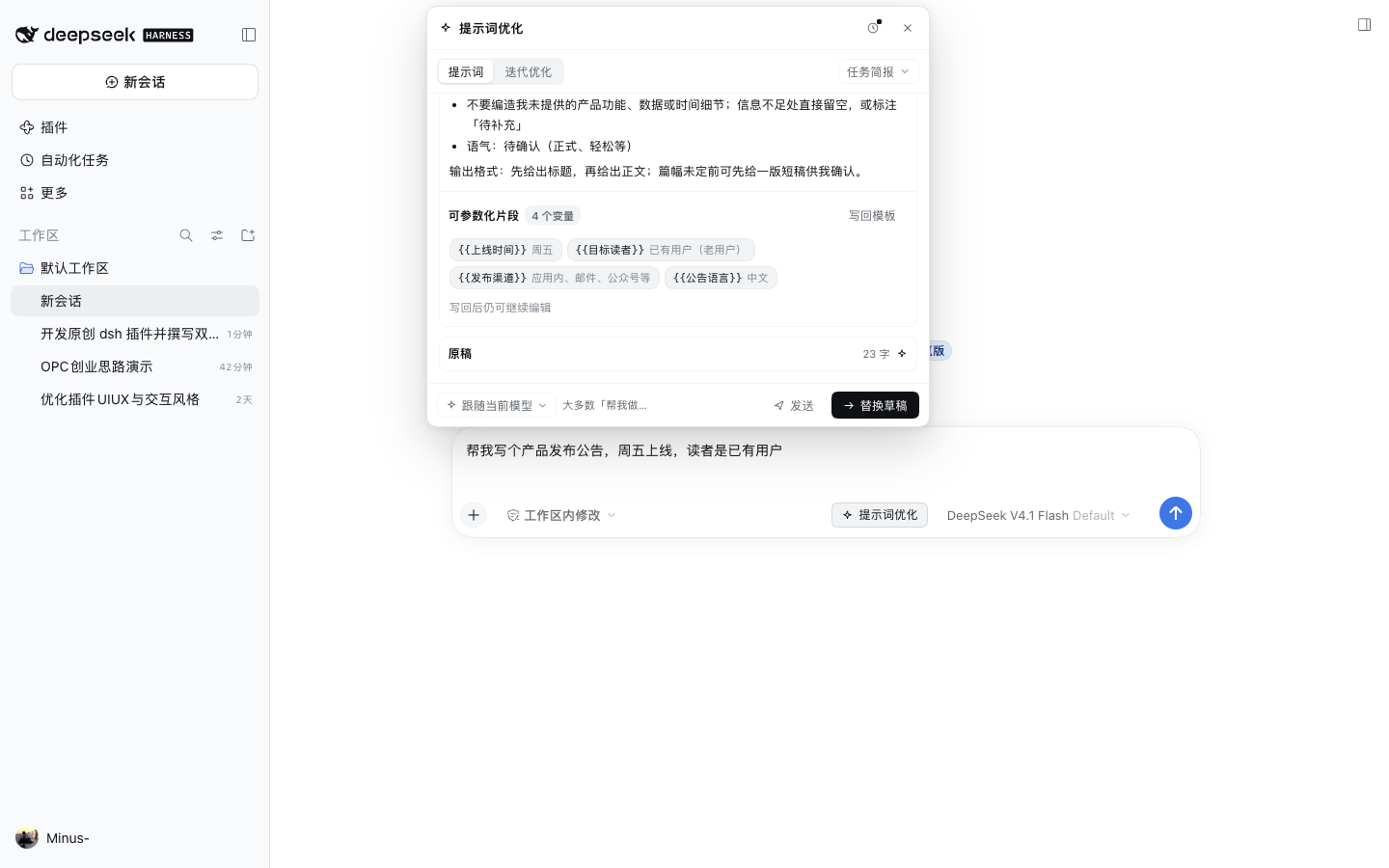
点“写回模板”把带变量的版本写回草稿,之后每次复用只改变量值即可。
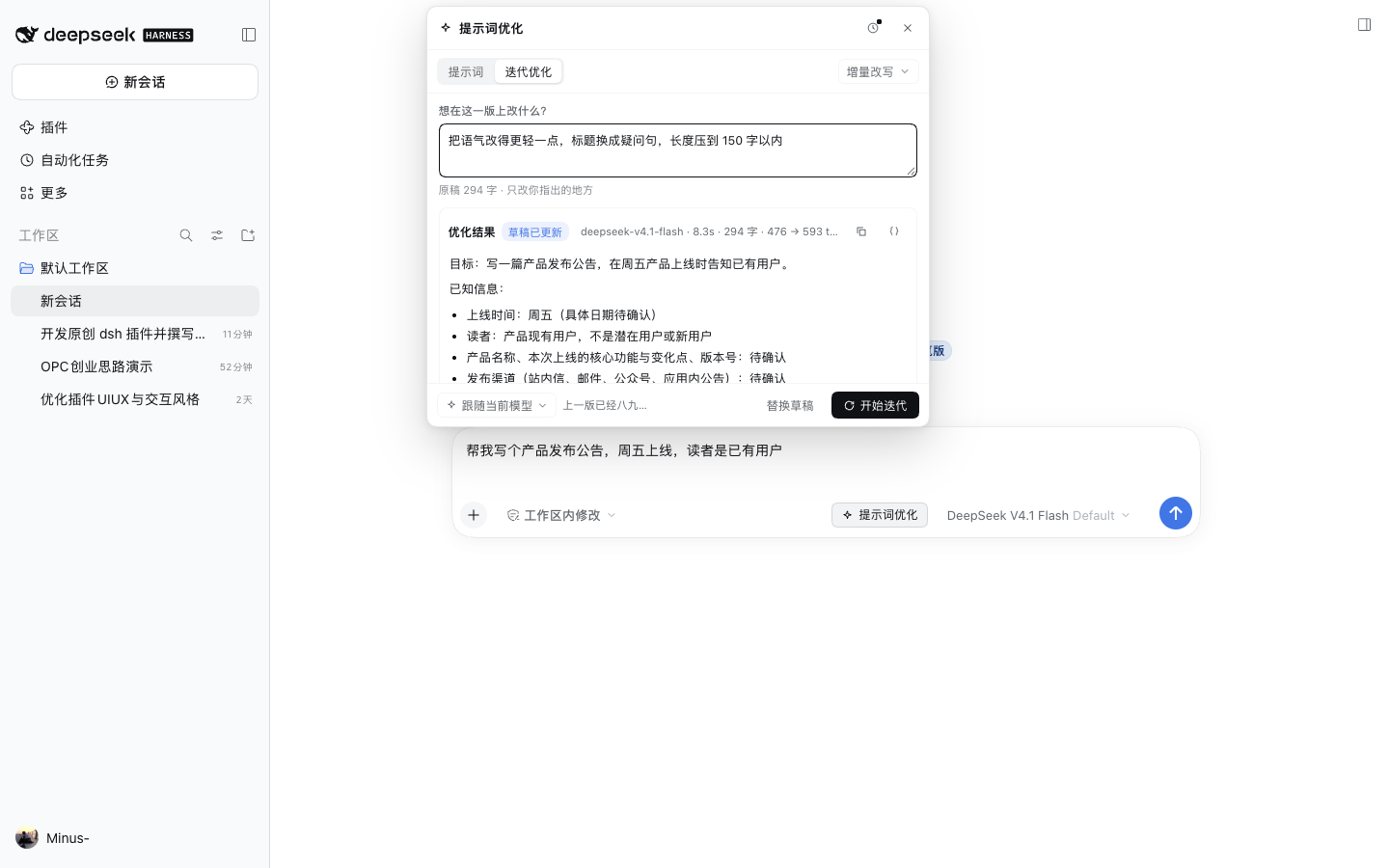
迭代
切到“迭代优化”,用一句话说明想改什么,例如“语气更轻松一点,把待确认的长列表收成三行”。模型只改相关段落:
历史与对比
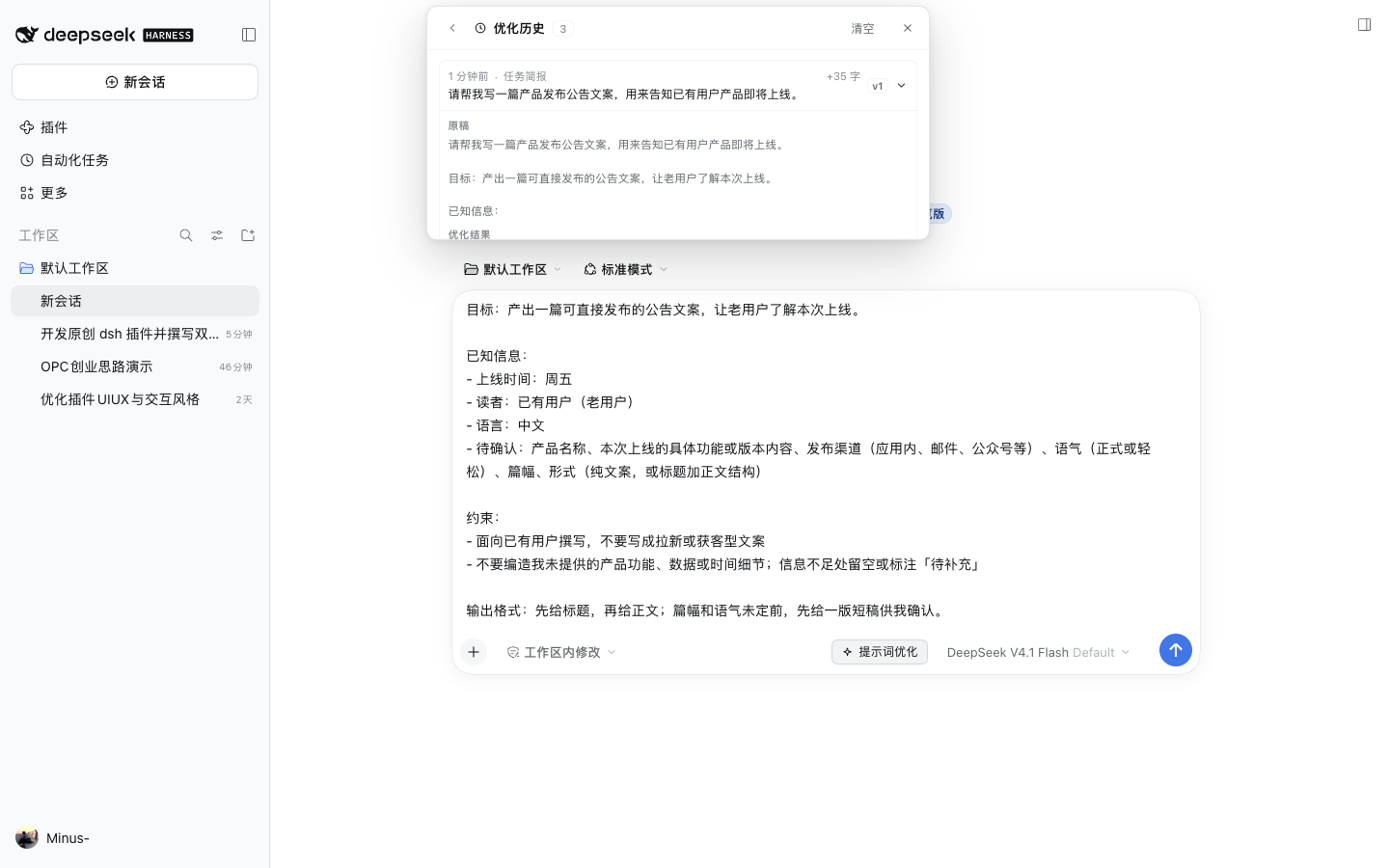
顶部时钟按钮进入历史。每条记录带版本号、模板、字数变化,可展开复看、复制、写回、对比或删除:
English UI
界面语言为英文时,插件文案、模板名和按钮全部切换:
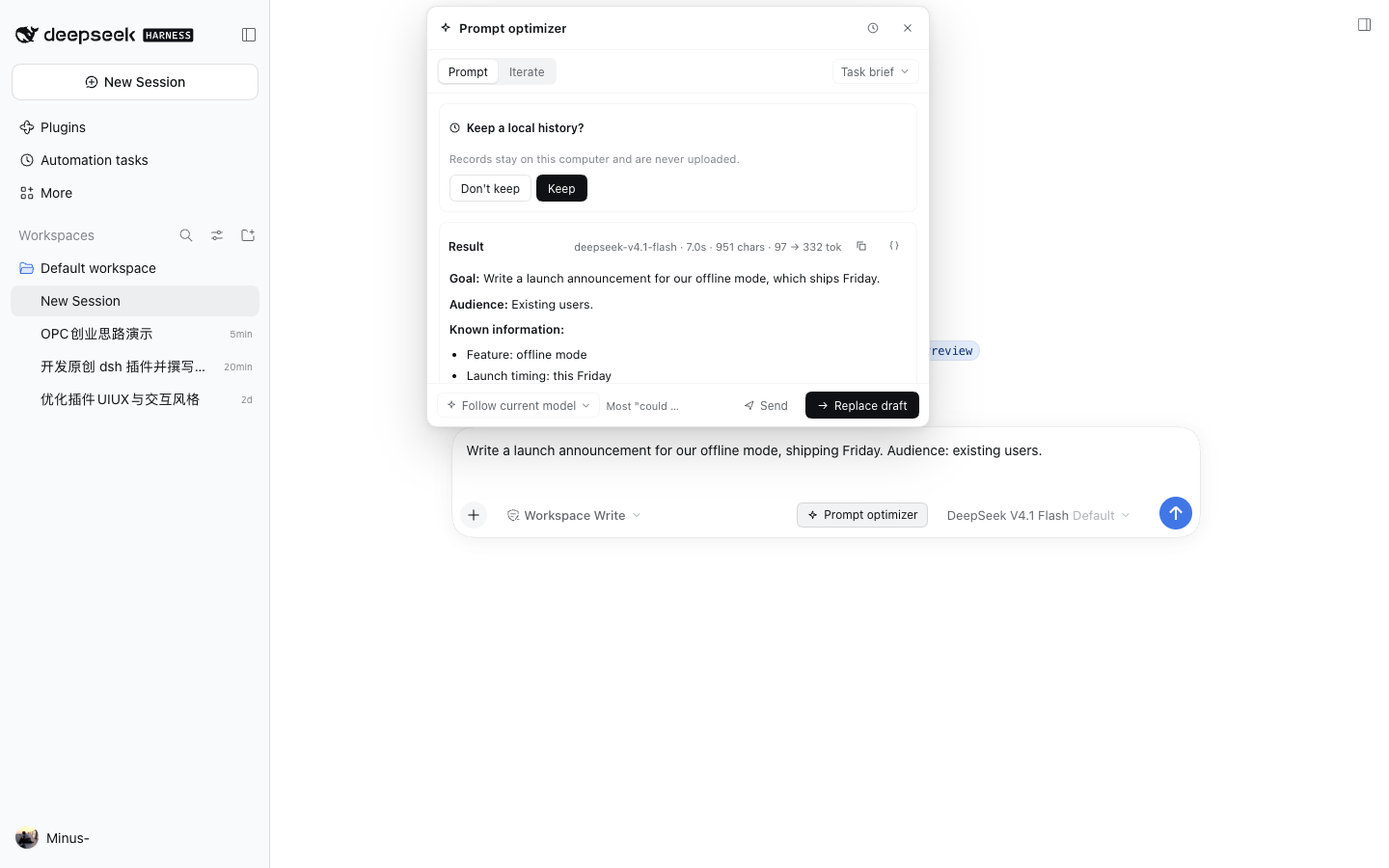
模板
内置 7 个模板,按用途分组。完整说明(适用场景、结构、示例)见 docs/TEMPLATES.md。
| 模板 | 模式 | 分组 | 适合 |
|---|---|---|---|
| 任务简报 Task brief | 提示词 | 基础 | 大多数“帮我做点什么” |
| 交付契约 Delivery contract | 提示词 | 结构 | 有明确验收标准的任务 |
| 示例引导 Worked examples | 提示词 | 示范 | 风格或格式需要靠样例锁定 |
| 推理步骤 Reasoning steps | 提示词 | 推理 | 多步分析、需要中间检查 |
| 角色设定 Role contract | 系统提示词 | 基础 | 长期使用的角色约束 |
| Agent 人设 Agent persona | 系统提示词 | 基础 | 说话方式与判断习惯 |
| 增量改写 Incremental edit | 迭代 | 迭代 | 在上一版上小改 |
面板内可直接切换模板;切换后底部会出现“用新模板重跑”,不会悄悄覆盖当前结果。
快捷键
| 操作 | 快捷键 |
|---|---|
| 运行 / 重新运行 | ⌘ Enter(Windows / Linux 为 Ctrl Enter) |
| 关闭面板 | Esc(先关菜单,再关确认页,最后关面板) |
| 停止生成 | 面板内“停止”按钮 |
隐私
- 历史默认关闭;开启时只写浏览器
localStorage,不经过网络。 - 插件只把当前草稿、迭代意见和模板内容发给当前模型,不额外上传历史。
- 关闭历史不会删除已有记录;可在历史页“清空”彻底删除。
- 面板里固定的模型只影响本插件的请求,不改变会话默认模型。
已知边界
- 只处理文字:暂不支持把图片附件作为改写输入。
- 单次草稿上限 60,000 字符,抽取变量最多 5 个。
- 系统提示词类模板目前只能通过内置 API 使用,界面只暴露“提示词 / 迭代”两档。
- 需要一个可用的默认模型;没有可用模型时面板会给出明确提示,而不是静默失败。
开发
src/spec.js          模板元数据与查询
src/prompts.js       各模板的提示词构造
src/placeholders.js  变量解析、定位与套用
src/catalog.js       模型与模板目录
src/index.js         宿主端路由(models / optimize / variables)
src/web.js           客户端面板(React + 主题 token)
test/                node:test 单元测试
- 测试:
npm test - 代码风格:ESM、无构建步骤、客户端不使用 JSX,全部走主题变量。
- 宿主路由:
GET /prompt-optimize/models、POST /prompt-optimize/optimize(NDJSON 流)、POST /prompt-optimize/variables。
许可证
MIT。界面截图来自本机真实运行的实例。
Comments
Loading…
Similar plugins
One-button prompt optimizer: rewrites the composer draft via a configurable strategy, with an editable template, few-shot examples, pinned models and reasoning effort.
★ 0
dsh plugin --profile web add @panando/dsh-prompt-optimizerOptimize Prompt button under the composer: one click rewrites your draft into a clearer, more executable prompt, with a before-and-after dialog and one-click replacement.
★ 0
↓ 185/wk
dsh plugin --profile web add dsh-prompt-optimizerA DSH composer control that reforges a rough draft into a precise prompt, with one-click revert.
★ 0
MIT
JavaScript
dsh plugin --profile web add dsh-prompt-reforgeby winditer
Polishes the draft in the composer into a clearer, better-structured prompt from the ✨ button or Alt+O; streams the result live over SSE with reasoning shown first, and follows the session's default m
★ 4
↓ 441/wk
MIT
TypeScript
Sep 7, 2026
dsh plugin --profile web add dsh-prompt-optimizerby GraptK
Rewrites the composer draft, or only the selected text, with one model call that uses the recent conversation as context, with cancel, revert, fidelity and length checks, and an optional preview.
★ 0
MIT
JavaScript
Oct 31, 2026
dsh plugin --profile web add dsh-composer-enhanceby huaguoxingkong
One-click prompt enhancement beside the DeepSeek Harness composer: rewrites a draft in place without sending it.
★ 285
↓ 1.6k/wk
MIT
JavaScript
Nov 13, 2026
dsh plugin --profile web add dsh-prompt-rewriter