

dsh-notify
DiscoveredCross-device notifications for DeepSeek Harness.
dsh-notify
English | 中文
Cross-device notifications for DeepSeek Harness. No attendance is required while a long task runs: when the turn ends, or waits for your approval or answer, a notification goes out through the channels you enabled — a desktop toast, a browser tab, an ntfy push to your phone, a Feishu bot message, in any combination.
- Settings → Notifications: pick channels, paste the credentials, press Send test
- Four channels: the OS notification centre (macOS / Windows / Linux), your own browser tab, ntfy, and a Feishu bot
- Only when you have stepped away: every message waits for an idle window (60 s by default) and is dropped if you act inside it — reply, approve, answer — or if you are already reading the reply: once the turn ends, a scroll, a click or a keystroke in that conversation is a read receipt, and the message stays unsent
- Secrets stay in the Host credential seam, never in the configuration file

Screenshots
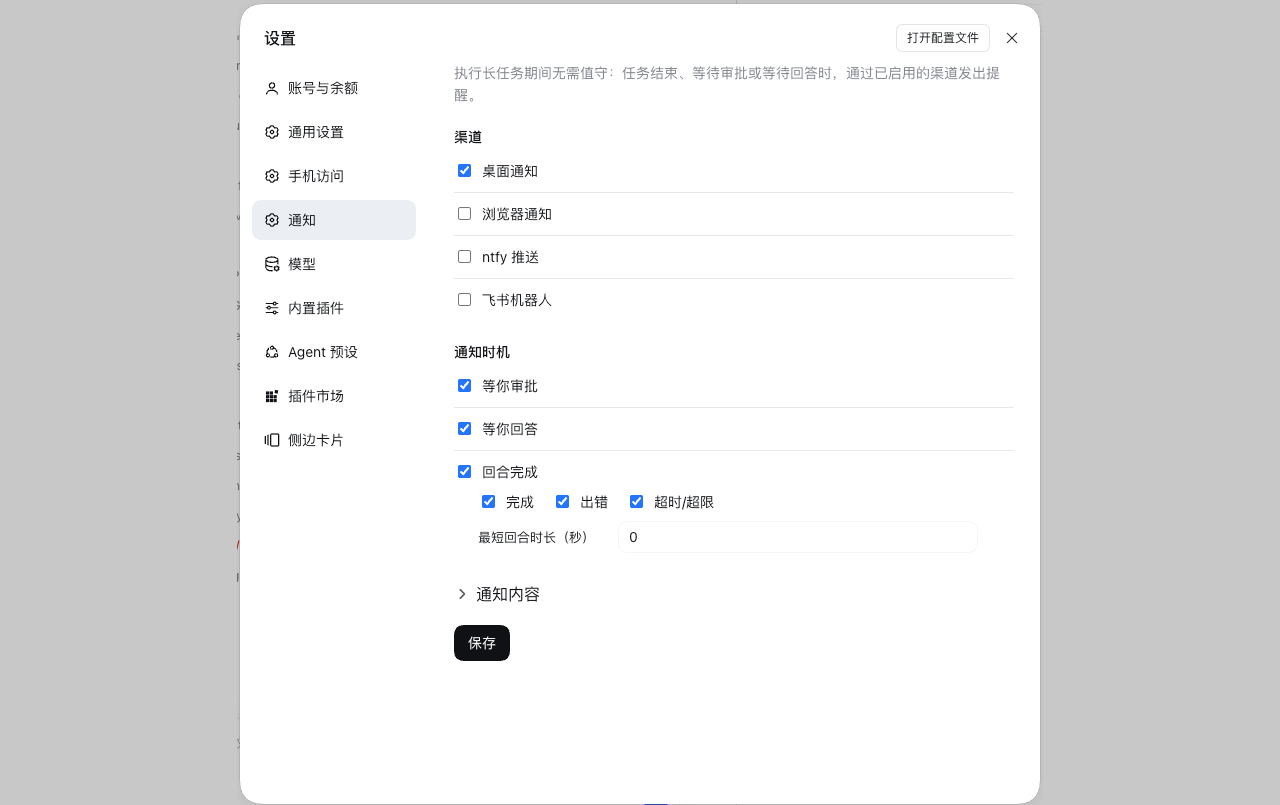
Channels
| Channel | Delivery | Credential |
|---|---|---|
local | Notification Center on macOS, a toast on Windows, notify-send on Linux | none |
browser | a system notification from the open GUI tab | browser permission |
ntfy | ntfy publish API | topic + optional token |
feishu | Feishu/Lark custom-bot webhook | webhook prefix + token, optional sign secret |
Install
1. Through the Host's installBundle (installs and enables)
Ask the agent in a conversation:
install the plugin
github:miiy/dsh-notify
or paste the same spec into the install field on Settings → Plugins.
Both call the Host's installBundle, which installs the package, adds it to
dsh.profile.bundles, and hot-applies it — one step.
2. From the CLI (dsh plugin, installs only)
dsh plugin --profile <profile> add github:miiy/dsh-notify
dsh plugin forwards its arguments to pnpm inside the profile directory, so this step
installs the package but does not compose it. The row then shows up on
Settings → Plugins as installed and switched off; turn it on to add it to
dsh.profile.bundles. If the switch does not take effect live, restart dsh web.
A plain-JavaScript bundle has no build script, so a git install needs no allowBuilds
approval.
Accepted spec forms: github:user/repo, git+https://…, a hosted repository URL, an
absolute local path, or an npm package name.
3. From a local checkout (development)
See MAINTENANCE.md → Run from a checkout.
Configure
Open Settings → Notifications.
| Field | Meaning |
|---|---|
| Channels | Desktop, Browser, ntfy, Feishu, any combination. A save is refused while an enabled channel's credential is missing. |
| Feishu bot | The prefix https://open.feishu.cn/open-apis/bot/v2/hook/ is prefilled and editable; paste only the token that follows it. |
| Browser permission | One click on Allow notifications; the page reports the state. |
| Turn completes | Notify on completed / error / max-tokens; aborted (your own stop) is never offered. |
| Waiting for approval | Notify when a tool call asks for a decision. |
| Waiting for an answer | Notify when the agent asks you a question. |
| Wait before sending | Seconds without input before a message leaves; 0 sends at once. |
| Message text | One template per event, prefilled with the default text. First line is the title, the rest is the body; Restore puts the default back. |
| Send test | Send one real message through that channel, using the saved values. |
Placeholders per event: {title} {outcome} {project} {duration} {preview}
{error} for a finished turn, {title} {project} {tool} {reason} for an approval,
{title} {project} {question} {count} for a question. An unknown name stays in the
text.
Configuration is stored in ~/.dsh/dsh-notify/config.json (mode 0600). Credentials go
through the Host credential seam, so the page is told whether a key is set, never its
value.
Test
node --check index.js && node --check client.js
node tests/harness.mjs   # host half
node tests/client.mjs    # settings page
Layout
index.js          Host half: session events and the question waterfall in, notifications out
client.js         Client half: the settings page, the browser channel and read receipts
browser.js        The browser channel: one SSE stream per page
seen.js           Read receipts: who touched which conversation, and when
config.js         Config file, validation, credential keys and the live settings
rpc.js            The settings page's POST route and envelope
channels.js       local / ntfy / feishu senders
cordis.patch.yml  Bundle patch: one host row
locale/           Plugin card title and description (en, zh)
tests/            Offline checks for both halves
MAINTENANCE.md    What depends on upstream, and what to check after a DSH upgrade
License
MIT
Comments
Loading…
Similar plugins
by SingleOne
Native desktop and webhook notifications for DeepSeek Harness.
★ 6
MIT
TypeScript
Aug 20, 2026
dsh plugin --profile web add dsh-notify-centerby pedesdestiny
Browser desktop notifications for DeepSeek Harness (dsh) — get notified when a turn completes or an approval is needed
★ 3
↓ 241/wk
JavaScript
Aug 18, 2026
dsh plugin --profile web add dsh-notifyby mill413
Desktop notifications and custom HTTP pushes for DeepSeek Harness
★ 0
MIT
TypeScript
Oct 27, 2026
dsh plugin --profile web add @mill413/dsh-notifyby dshiq04
面向deepseek harness的消息通知插件
★ 0
JavaScript
Aug 14, 2026
dsh plugin --profile web add dsh-notifyby TARS-snail
Desktop notifications for DeepSeek Harness sessions, only while you are away
★ 0
MIT
TypeScript
Oct 1, 2026
dsh plugin --profile web add dsh-notifyby omdsh-dev
Desktop notifications for DeepSeek Harness turn completions, with per-outcome controls and include/exclude keyword rules.
★ 91
↓ 461/wk
MIT
JavaScript
Sep 1, 2026
dsh plugin --profile web add dsh-notification