
dsh-prompt-spark
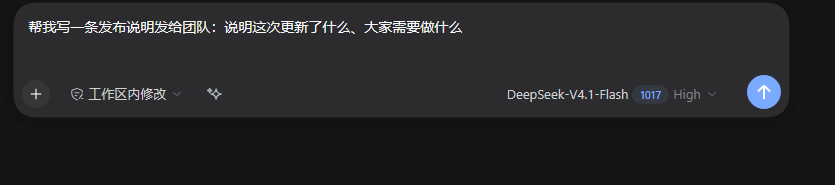
Manifest validComposer button that rewrites the current draft with four style presets, selection-only rewriting, a keyboard shortcut and instant undo; no settings page.
dsh-prompt-spark


One-click draft rewriting inside the DeepSeek Harness composer: a sparkle button next to the input toolbar turns a rough draft into a clear message, with instant undo. No settings page, no config file — the useful choices are gestures.
What it does
- Rewrite — click the sparkle to rewrite the draft more clearly with the modeling route the current session already uses. The rewritten text replaces the draft.
- Undo — after a rewrite the button becomes undo. It is offered only while the draft is still exactly the rewritten text; edit the draft and the button returns to the sparkle.
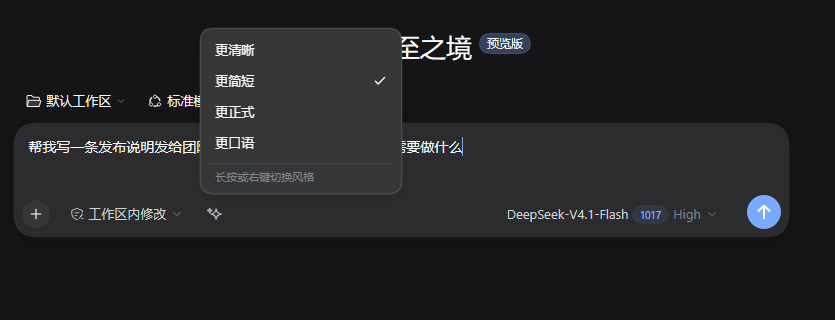
- Styles — long-press or right-click the button for four fixed presets: Clearer, Shorter, More formal, More casual. The chosen style is remembered for the next click.
- Selection rewrite — select part of the draft before clicking and only that fragment is rewritten; the surrounding text is sent as context so the result keeps its flow.
- Keyboard —
Ctrl+Shift+O(Cmd+Shift+Oon macOS) in DSH Desktop, orCtrl+Alt+Shift+Oon the Web build; both are remappable in the built-in Keyboard shortcuts panel. (Web reserves Ctrl+Shift+O for the official "open in app" command, so the Web default adds Alt.)
The control hides itself when the draft is empty/whitespace or the composer is
busy (adjudicating / submitting), and failures leave the draft untouched
while the button tooltip reports the reason code.
Install
In DSH Desktop open Plugins, choose Add plugin, enter the package name or this repository's absolute path, then enable it:
dsh-prompt-spark
Or from a terminal for a named profile:
dsh plugin --profile <profile> add dsh-prompt-spark
Editing client.js only needs a page refresh; editing index.js (the host
half) needs an app restart.
How it works
| File | Role |
|---|---|
package.json | npm bundle: dsh.bundle.patch → cordis.patch.yml, dsh.client.platform: web → client.js |
cordis.patch.yml | one insert row whose name is this package |
index.js | host half: inject = ['webServer','connection'], exact POST /dsh-prompt-spark/rewrite behind the Connection trust fence, bounded body, llm.stream call |
client.js | browser half: window.__ModuleLoader__.load({ id, factory }) returning { inject: ['slots','locale'], apply(ctx) } |
locale/*.json | plugin-page display metadata |
The browser resolves the route relative to the document
(new URL('dsh-prompt-spark/rewrite', document.baseURI)), so a mounted prefix
works. The host never touches provider keys or endpoints: it streams through the
composition's llm service with the session's own provider/model (falling back
to the configured default). Styles are fixed instruction suffixes; there is no
configuration surface at all.
Development
npm test          # node test/host.test.mjs && node test/client.test.mjs
npm run check     # syntax check both halves
npm run pack:check
test/host.test.mjs exercises the route fence, method/body limits, style and
selection request shaping, and the LLM stream outcomes.
test/client.test.mjs drives the component through a small React harness:
visibility rules, rewrite/undo lifecycle, style menu, long-press, selection
replacement, failure tooltips and registration shape.
License
MIT
Comments
Loading…
Similar plugins
A DSH composer control that reforges a rough draft into a precise prompt, with one-click revert.
★ 0
MIT
JavaScript
dsh plugin --profile web add dsh-prompt-reforgeby xindady
Adds a prompt enhancement button to the composer toolbar that rewrites the draft through a model call, keeps @file references verbatim, and offers one-click undo.
★ 0
MIT
JavaScript
Oct 17, 2026
dsh plugin --profile web add dsh-prompt-enhancerOptimize Prompt button under the composer: one click rewrites your draft into a clearer, more executable prompt, with a before-and-after dialog and one-click replacement.
★ 0
↓ 185/wk
dsh plugin --profile web add dsh-prompt-optimizerComposer prompt refinement: rewrite the draft through the harness LLM, preview the result, then apply or send it, with style presets, model-aware reasoning effort, cost estimate and a settings page.
★ 0
dsh plugin --profile web add dsh-prompt-forgeby Nihao7-L
One-click prompt rewriting in the DSH composer — keep going for up to 5 rounds, diff every change, and jump back to any version.
★ 1
MIT
JavaScript
Oct 20, 2026
dsh plugin --profile web add dsh-prompt-chainOne-button prompt optimizer: rewrites the composer draft via a configurable strategy, with an editable template, few-shot examples, pinned models and reasoning effort.
★ 0
dsh plugin --profile web add @panando/dsh-prompt-optimizer