

dsh-prompt-library
Manifest valid★ 15DSH (DeepSeek Harness) Web Plugin: Injects a "Prompt Library" button into the composer toolbar, managing reusable prompt snippets that can be inserted into the current input field with a single click. Supports automatic learning: when you enter complex prompt text, the plugin automatically recognizes it and saves it to the Prompt Library.
🇨🇳 中文 | 🌐 English
dsh-prompt-library
DSH (DeepSeek Harness) prompt library plugin: provides prompt management, AI polish and persona customization in the chat bar, helping you accumulate, reuse and continuously improve prompts.
The plugin treats conversation-level prompts as its core. Every feature is designed around this capability, while other auxiliary features are just a bonus. We warmly welcome users to share ideas and suggestions, and will keep iterating based on them.
Key Features
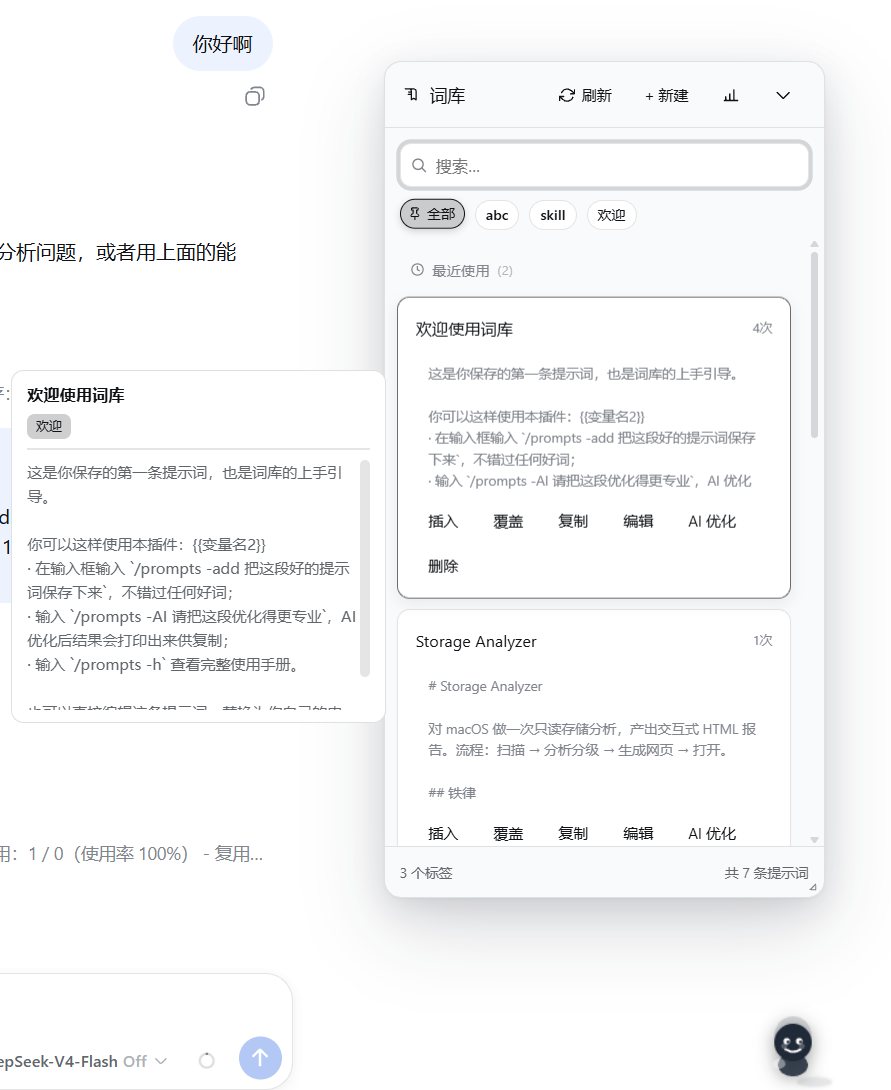
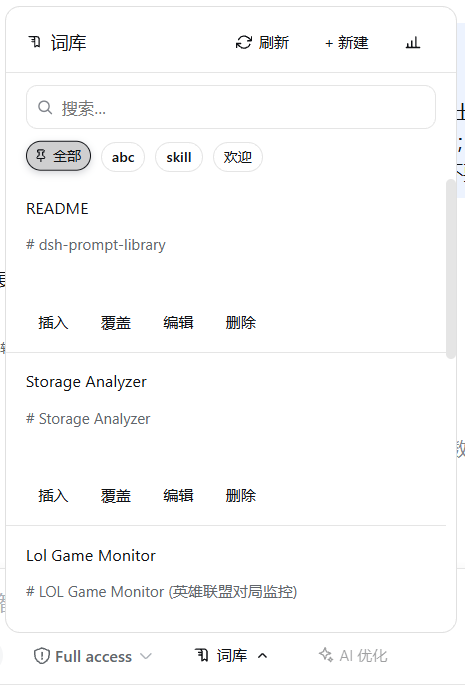
Prompt Library
- Manage frequently-used prompts (title + body + tags), with search, sorting, tag grouping and usage-count statistics
- The right panel shares the same style as the host's left sidebar, automatically squeezing and shrinking the chat area, freely toggling between expand/collapse
- Insert: appends to the existing content in the input box
- Overwrite: directly replaces the whole draft with this prompt
- Insert & Send: fills in template variables and sends with one click (uses the variable dialog when it contains
{{}}); outside#scenarios it is only available when the draft is empty, avoiding accidentally carrying existing content; when triggered by#, the trigger word is filtered out while the preceding text is kept and sent along - Type
#to quickly trigger selection with real-time filtering - The bottom shows the total number of tags and prompts in real time
Generate Skills
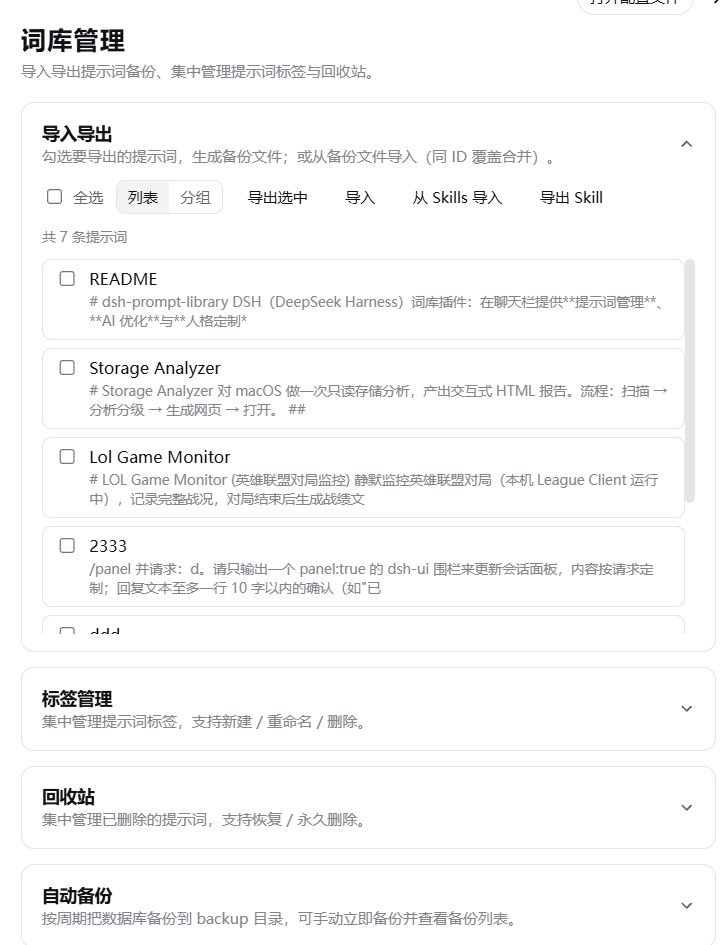
- Select prompts under "Prompt Library → Import/Export" to generate DSH Skills in batch
- AI generates an English skill name and description from the prompt content; the skill is written to
~/.dsh/skills/<name>/SKILL.md, and can be triggered by typing/skill-namein the chat box, or auto-matched by the model from the description - A link between the prompt and the skill is created automatically; regenerating the same prompt overwrites the original skill directory instead of adding endlessly
- If the body contains
{{variables}}, the "placeholder auto-fill" capability is marked at generation time — when using the skill, AI infers and fills them automatically from the current semantic context, no manual input needed
AI Polish
- The "AI Polish" button in the chat bar optimizes text with one click, then replaces it back into the input box with one click
- The polishing process follows the constraints of the persona file
Persona (AI read-only reference)
Each AI call and the whole chat session are constrained by a single SOUL.md persona file to form a stable assistant persona. The file is generated from a default template and rebuilt automatically if deleted; its content is manually maintained by the user, and AI only reads it without modifying it on its own.
| File | Meaning | Purpose |
|---|---|---|
SOUL.md | Persona | Identity, tone/personality, working rules |
- Automatically learn input content into the prompt library, with AI smart-refining titles, tags, summaries and bodies
- The persona file is the user's explicit configuration (including the default template), and AI follows its personality, tone and working rules accordingly
Settings
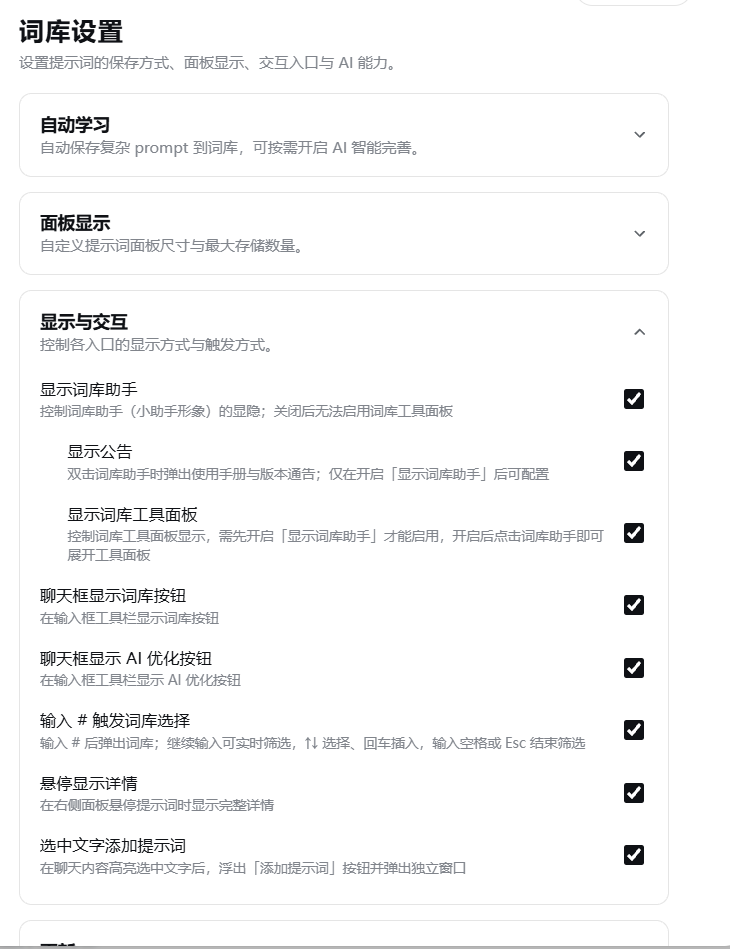
Under DSH Settings → Prompt Library, adjust: auto learning, manual confirmation, AI smart polish, panel size, sidebar, button visibility, # triggering, etc. Changes take effect immediately.
Data Storage
The library uses SQLite (node:sqlite); all other configs and logs are stored under ~/.dsh/prompt-library/:
~/.dsh/prompt-library/
├── db/prompts.db      # prompt library (SQLite)
├── log/
│   └── ai-YYYY-MM-DD.log   # AI diagnostic logs (per-day files)
└── character/         # persona file
    └── SOUL.md
Installation
dsh plugin --profile web add @sunjuntao/dsh-prompt-library
Usage
Start dsh web, click the "Prompt Library" button in the chat bar to open the panel, or type # to trigger it quickly; click "AI Polish" to polish your input with one click.
Development / Build
npm install
npm run deploy   # type check + build + sync to DSH (restart dsh web to take effect)
Screenshots
Author
master1Sun
Compatibility
Versions
| Latest version | Published | Size |
|---|---|---|
| 0.3.9 | — | — |
| 0.4.0 | — | — |
| 0.5.0 | — | — |
| 0.5.1 | — | — |
| 0.5.2 | — | — |
| 0.5.3 | — | — |
| 0.6.0 | — | — |
| 0.7.0 | — | — |
| 0.7.1 | — | — |
| 0.7.2 | — | — |
| 0.7.3 | — | — |
| 0.8.0 | — | — |
| 0.8.1 | — | — |
| 0.8.2 | — | — |
| 0.8.3 | — | — |
| 0.8.4 | — | — |
| 0.8.5 | — | — |
| 0.8.6 | — | — |
| 0.8.7 | — | — |
| 0.8.8 | — | — |
Comments
Loading…
Similar plugins
by yi-yezhiqiu
DeepSeek Harness 提示词市场插件:对话框内一键浏览、搜索、收藏提示词,选中即写入输入框。零后端、免构建、数据只存本机。 | A prompt marketplace for DSH: browse, search and insert prompts straight into the composer.
★ 107
↓ 220/wk
MIT
JavaScript
Oct 11, 2026
dsh plugin --profile web add dsh-prompt-marketby JoukoPuro
一个 DeepSeek Harness(DSH)插件: 在 Web 输入框的工具行中添加一个 ✨ 图标按钮。点击后选择打磨风格,已接入的大模型 会把你草稿中的提示词改写得更专业、更易被 AI 理解 。A DeepSeek Harness plugin: icon-only composer button that rewrites your prompt via the connected LLM
★ 8
↓ 101/wk
MIT
JavaScript
Oct 17, 2026
dsh plugin --profile web add dsh-prompt-polishby Frog755
Prompt Vault: 输入框上方的提示词库(DSH 插件)— 📚 按钮展开面板,点条目一键填入 prompt。DeepSeek Harness prompt library plugin.
★ 5
↓ 109/wk
MIT
JavaScript
Sep 10, 2026
dsh plugin --profile web add @frog755/dsh-prompt-vaultby konglong87
dsh 常用内容插件:保存、编辑提示词,点击回填输入框,不自动发送。deepseek harness 插件
★ 2
MIT
JavaScript
Sep 23, 2026
dsh plugin --profile web add dsh-input-listby ruiyukirin
DSH 输入框一键提示词增强按钮 | One-click prompt enhancement for the DeepSeek Harness composer: rewrite the unsent draft into a clearer, more specific prompt, restore the original with one click. Ported from Tencent WorkBuddy's EnhancePrompt design; independent model call that never touches the session log.
★ 1
MIT
JavaScript
Oct 25, 2026
dsh plugin --profile web add dsh-prompt-optimization-masterby xyavid
DeepSeek Harness Web 插件:输入框模型名旁的小星星按钮,一键把草稿改写成结构化的可执行提示词并写回
★ 4
↓ 120/wk
MIT
TypeScript
Oct 15, 2026
dsh plugin --profile web add @xyavid/dsh-prompt-polish