
dsh-agent-team-workflow
Manifest validDSH plugin: user-defined, resumable agent-team workflows with model-lane failover, gates and a local kanban board.
dsh-agent-team-workflow
A node-graph workflow runtime for DeepSeek Harness: agent, command, HTTP, human, fan-out/join and sub-workflow nodes, with artifacts, permissions and a live web board.
dsh-agent-team-workflow is a DSH plugin. A workflow is a graph of typed nodes;
edges choose the next node from an outcome. The runtime owns scheduling and
permissions; nodes do the work.
Status: 1.0.0. The v2 node runtime replaces the old stage/kanban engine entirely. There is no v1 compatibility layer, state migration or dual tool set.
Concepts
| Term | Meaning |
|---|---|
| Definition | apiVersion: 2 JSON: providers, nodes, edges, entry. |
| Node | One typed unit: agent, command, http, human, fanout, join, subworkflow. |
| Edge | {from, to, on}; on is an outcome, default complete. |
| Token | One execution of a node. A run has many tokens. |
| Run | One workflow execution with input, context and tokens. |
| Artifact / context | Node outputs stored under context.nodes.<id>; mapped into later nodes. |
| Permission grant | User-approved command/HTTP capability, stored with the workflow. |
| Lane | A provider route: adapter, model, reasoningEffort, maxTokens. |
State is per DSH session under <dataDir>/sessions/<sessionId>:
workflow.json— definition + permission grant;runs/<runId>.json— token state, context, status.
Writes are atomic JSON. A host restart resumes the same run document.
Install
# from GitHub
dsh plugin --profile desktop add github:lyingloong/dsh-agent-team-workflow

# or from a local checkout
dsh plugin --profile desktop add /absolute/path/to/dsh-agent-team-workflow

# restart the Harness process, then refresh the Web GUI
Package: dsh-agent-team-workflow. Requires Node.js >= 22.5.
Use from a session
Describe the workflow in natural language. The model composes a definition and calls the tools:
创建一个自动开发的工作流:一个实现者、一个测试命令、一个审查者;审查不通过回到实现,通过后我批准才合并。
The model will ask before granting command/HTTP access. Typical sequence:
team_workflow_define— validate and store the definition and the permission grant.team_workflow_start— create a run with an input object.team_workflow_run— execute ready nodes until the run waits or finishes.team_workflow_decide— resolve a waiting human node.team_workflow_status— inspect the definition and latest run.
Tools
| Tool | Purpose |
|---|---|
team_workflow_define | Validate and store a definition plus permission grant. |
team_workflow_start | Create a run from an input object. |
team_workflow_run | Execute ready nodes; human waits and joins pause it. |
team_workflow_decide | Resolve a waiting human token. |
team_workflow_status | Show definition summary and latest run. |
Permissions
Permissions are never part of the definition. The session must ask the user
before creating a workflow that uses command or http nodes.
{
  "command": { "mode": "allowlist", "allow": ["pnpm", "node"] },
  "http": { "mode": "allowlist", "allow": ["api.github.com"] }
}
Modes: deny (default), allowlist, full. The runtime checks each command
string or HTTP host before the executor runs. A denied node fails with
permission_denied; it is not retried. If the user does not grant access, design
a restricted workflow (agent/human/fanout/join only) or use an allowlist.
Definition
{
  "apiVersion": 2,
  "name": "dev-team",
  "entry": "seed",
  "providers": [
    { "id": "default", "adapter": "deepseek", "model": "host-default" }
  ],
  "nodes": [
    { "id": "seed", "type": "human", "config": { "outcomes": ["approve", "reject"] } },
    {
      "id": "implement",
      "type": "agent",
      "role": "engineer",
      "inputs": { "request": "$input.request" },
      "config": { "lane": "default", "prompt": "Implement the request." }
    },
    {
      "id": "test",
      "type": "command",
      "config": { "command": "pnpm test", "timeoutMs": 300000 }
    },
    {
      "id": "review",
      "type": "agent",
      "role": "reviewer",
      "inputs": { "implementation": "$nodes.implement.output", "tests": "$nodes.test.output" },
      "config": { "outcomes": ["pass", "needs_revision"], "prompt": "Review the change." }
    },
    { "id": "merge", "type": "human", "config": { "outcomes": ["approve", "reject"] } }
  ],
  "edges": [
    { "from": "seed", "to": "implement", "on": "approve" },
    { "from": "implement", "to": "test", "on": "complete" },
    { "from": "test", "to": "review", "on": "complete" },
    { "from": "review", "to": "merge", "on": "pass" },
    { "from": "review", "to": "implement", "on": "needs_revision" }
  ]
}
Node types
| Type | Config | Behavior |
|---|---|---|
agent | role?, prompt?, lane?, provider?, model?, models?, cwd?, outcomes?, outcome? | Spawns a DSH subagent. The child returns JSON {outcome, output}; plain text becomes {text}. |
command | command, cwd?, timeoutMs? | Runs a shell command in the session cwd. Exit 0 → complete; non-zero → fail. |
http | url, method?, headers?, body?, timeoutMs? | fetch; 2xx → complete, otherwise fail. |
human | title?, outcomes? | Waits for team_workflow_decide or the web board. Default outcomes: approve, reject. |
fanout | items, target, join | Resolves items to an array and creates one branch token at target; each branch receives $item and $index. |
join | mode: all|any|quorum, count? | Aggregates branch outputs; all waits for every branch. |
gate | none | Continuous-run switch. Passes when the session control is enabled; otherwise waits for the queue to accumulate. |
subworkflow | definition | Runs an inline nested definition and exposes its context as the node output. |
Agent nodes use the lane's adapter/model/reasoningEffort/maxTokens as subagent
agentOptions. model: "host-default" inherits the host model. An explicit
provider/model on the node overrides the lane and selects the executor;
cwd is forwarded to the subagent as its starting directory; relative paths
resolve against the session working directory.
An agent node can instead carry an ordered models fallback list:
"models": [
  { "provider": "provider-a", "model": "model-1" },
  { "provider": "provider-b", "model": "model-2" }
]
The executor tries them in order on a subagent/provider error; a task fail
outcome is not a provider error and is returned as the node outcome. The board
shows the ordered list; definitions are edited by the session model through the
tools.
A command exits 0 for complete and non-zero for fail. A fail outcome must
have an outgoing on: "fail" edge; otherwise the run itself fails with
unhandled_failure instead of silently reporting done.
Inputs and outputs
Values in inputs are resolved from:
$input— the run input object;$nodes.<id>.output— a previous node's output;$item,$index— fan-out branch values;$context— the whole run context.
A completed node's output is stored at context.nodes.<id> and is available to
later nodes. The join node's output is an array of branch records:
[{branch, outcome, output}, ...].
Edges
An edge is taken when the node outcome equals on. No matching edge makes the
token terminal. Several edges with the same outcome create parallel branches.
Agent nodes can return one of their configured outcomes, which makes review
pass/fail loops ordinary graph edges.
Fan-out / join
{
  "id": "split",
  "type": "fanout",
  "config": { "items": "$input.items", "target": "work", "join": "join" }
}
Start with {"items": [1, 2, 3]}. The fanout node creates three tokens at
work; each sees $item and $index. join waits according to its mode, then
its output is the aggregated branch array.
A join waits internally for its branches; that wait is not a human decision. The
waiting list from team_workflow_run, team_workflow_status, the web board and the
Web API contains only human node tokens, and team_workflow_decide rejects a
join token with not_decidable.
Sub-workflow
{
  "id": "child",
  "type": "subworkflow",
  "inputs": { "value": "$input.value" },
  "config": { "definition": { "apiVersion": 2, "name": "child", "entry": "work", "nodes": [], "edges": [] } }
}
The nested run shares the parent's permission grant and executors. A nested
human wait is currently not supported: the child must reach done before the
subworkflow node completes.
Auto-dev reference
examples/auto-dev-full.json is the complete continuous two-source development loop:
Continuous switch (gate)
  → Intake requirement
      ├─ user  ─────────────────────────→ Record requirement
      └─ mined → Requirement analyst → risk
           ├─ low  ────────────────────→ Record requirement
           └─ mid/high → Approve mined requirement (human)
                 ├─ approve ───────────→ Record requirement
                 └─ reject → Requirement analyst (note)
Record requirement
  → Plan → branch → Implement → npm test → Review
      ├─ needs_revision / test fail → Implement
      └─ pass → Open PR → Human review pool (human/AI)
            ├─ approve → Merge → Complete requirement → Continuous switch
            └─ reject → Implement (with note)
The gate owns the continuous switch. When it is off, a token waits at the gate
and the loop stops; new user requirements and mined seeds can still be appended
to the repository queue. When it is on, team_workflow_run wakes the gate and
the next queued requirement runs. The engine is serial, so processing is one
requirement at a time.
requirements/requirements.json is the queue and requirement registry. Entries
with status: queued are pending; the intake agent prefers source=user,
priority=0, then queue order. A completed item is marked status: done by the
Complete requirement node. The requirement analyst writes the mined seed pool to
requirements/seeds.json.
Requirement rules:
- User-provided requirements have
source=user,priority=0, are recorded inrequirements/requirements.json, and bypass requirement approval.addToSeedPoolcan optionally add related seed entries. - Mined requirements come from the analyst's seed pool. The analyst reads
poolPathorrequirements/seeds.json, chooses onereadyseed and may only mark itclaimed. - A separate risk agent emits
low,midorhigh. Low risk records directly; mid/high wait at the humanApprove mined requirementnode. Rejecting it, or asking for adjustments, sends it back to the analyst with the note. - Requirements and seeds carry tags; the analyst/register prompts own the pool files. Pools are repository data plus prompt policy, not runtime queues. Sample data: docs/requirements.json and docs/requirements-seeds.json.
The reviewer agent either sends the change back to implementation or opens the
PR. The PR then waits in the Human review pool node. A human or an external AI
with access to team_workflow_decide can approve/reject; the board also offers a
note field, and the note is passed to implementation. GitHub PR comments remain
the place for threaded PR feedback.
The switch can be toggled on the board. Turning it on immediately calls the run endpoint to wake a paused gate; turning it off lets the current item finish and then waits at the gate. The board also shows the queued requirements and ready seed count.
It requires a command grant for git, npm and gh (the workflow is defined
with that allowlist), a configured gh login, and a session whose cwd is the
target repository. The PR step is idempotent: it commits when there are staged
changes, creates the PR only when needed, and resolves the existing PR URL.
team_workflow_run executes until a human node; the web board or another run
call continues after the decision.
examples/auto-dev.json is the smaller discovery → branch → implement → test → review → PR → human decision → merge variant.
Each run selects one seed; the pools are not persistent queues, and one PR is reviewed at a time.
Web board
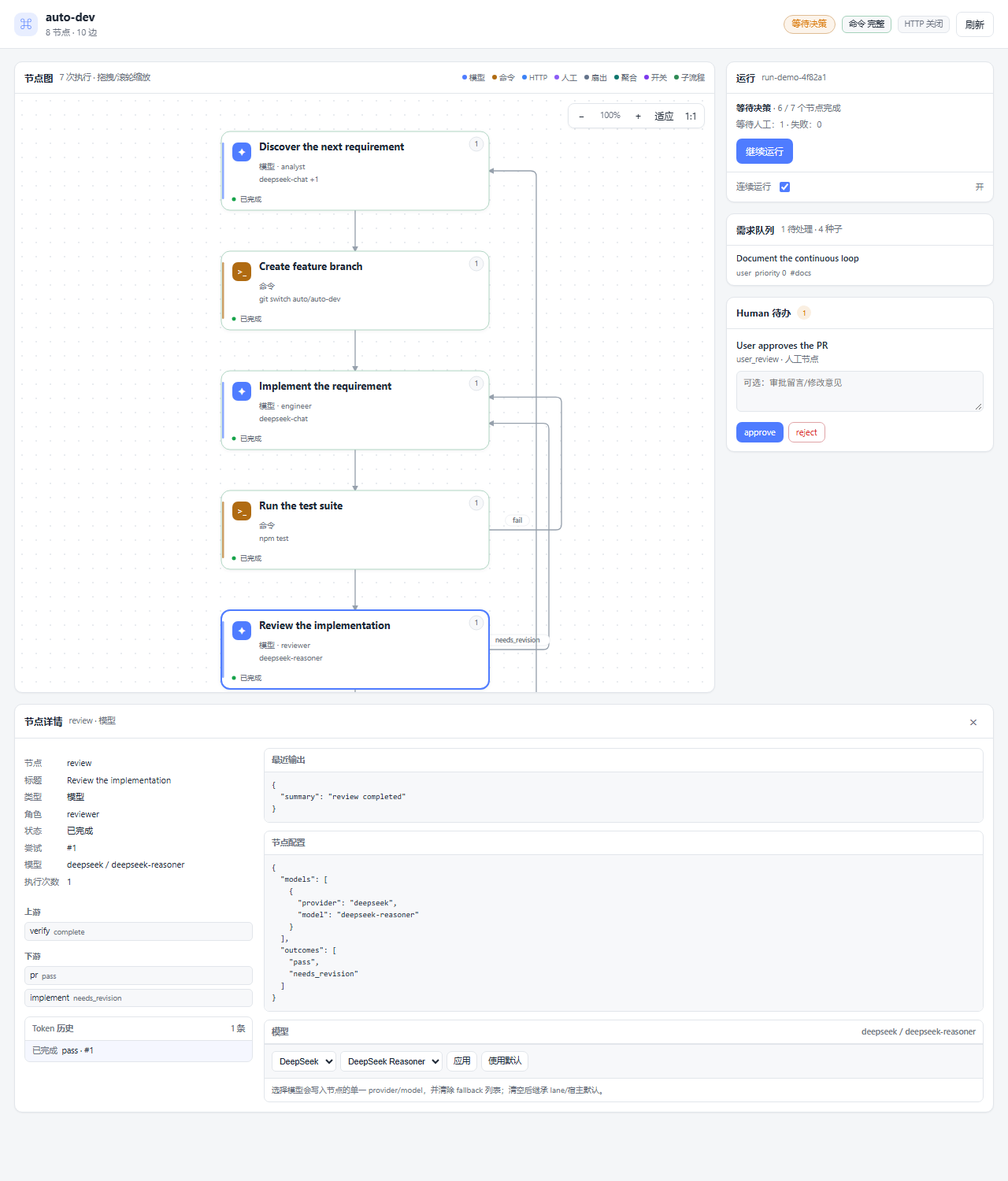
The conversation header has one 工作流 action. It opens the standalone board in DSH's native Browser tab; the previous right-sidebar panel has been removed.
The board is graph-first:
- a compact header with workflow name, run status, node/edge count and permission state;
- a node graph with a word-aware two-line title, role/model or command/HTTP detail, status dot and run count; node types keep their own glyph and accent;
- drag the graph to pan, use the wheel to zoom around the pointer, and use the graph controls for fit/actual-size; layered channel routing keeps forward edges in the gaps between ranks and gives feedback edges their own side lanes, so edges do not cut through cards; outcome labels sit beside their lines;
- clicking a node opens its detail card below the graph, with latest output, token input, run context, node config, errors, token history, attempt/model metadata and clickable upstream/downstream links; agent nodes include a model picker backed by the host model catalog and the node-model API;
- the 运行 card shows progress, the continue action and the continuous-run switch; turning it on wakes a paused gate, turning it off waits at the gate;
- a 需求队列 card shows queued user requirements and ready seed count;
- a separate Human 待办 card lists every waiting human token with a count, outcome buttons, a freeform note field and recent human decisions. Notes are sent as the decision output and flow to the analyst or implementation node;
- the board does not start or replace runs: the assistant starts one; the board observes it and continues it after a decision.
The board deliberately stays an observer/light controller, not a workflow builder: the session model authors definitions through the tools. It can only run a session whose Agent has been observed by a tool call; after a host restart, run once from the assistant or call a tool first.
Board URL and native Browser tab
The board is served by a dedicated token-protected loopback HTTP server bound to
127.0.0.1 on an ephemeral port. The single 工作流 header action opens it
through DSH's native Browser tab:
ctx.sidebarRight.openTab('browser', { params: { url } })
The separate origin is required twice: the Browser tab refuses URLs on the DSH application origin, and serving from the application web server lets its framing middleware block the page inside the Browser tab. A standalone server avoids both. The URL is:
http://127.0.0.1:<board-port>/plugins/dsh-agent-team-workflow/public/board?session=<session-id>&token=<token>
team_workflow_status returns this as boardUrl. The server is loopback-only,
token-protected and has no DSH Connection fence; it is a second loopback port,
not the Harness web server. Do not share the URL: the token grants board access.
The page observes a run and continues it after a human decision (the latter uses
the last Agent observed for the session). It does not start runs; the assistant
starts them with team_workflow_start. Node details open below the graph. If the
native Browser tab is unavailable, the action falls back to navigating the
current page to the board.
Development
npm test                         # v2 tests in one process
node --test "tests/*.test.mjs"   # standard runner
Coverage: definition/runtime/store, DSH tools, web API and client bundle. No v1 tests or code remain; see AGENTS.md.
Security
commandandhttpare privileged. Default deny; grant only what the user approved.commandruns in the session working directory with a timeout and a bounded output buffer. It is not a sandbox; afullgrant is real host execution.- The private
/plugins/dsh-agent-team-workflow/apiroutes are same-origin and require the DSH Connection authentication fence. The board's own loopback server is token-protected and only reads/writes the session data directory. subworkflowinherits the parent's grant; it cannot widen permissions.
License
MIT
Comments
Loading…