

dsh-kicad
Discovered★ 4A DeepSeek Harness plugin for AI-driven PCB design in KiCad. A plugin that lets DeepSeek Harness design PCBs with KiCad.
dsh-kicad
English | 中文
KiCad for DeepSeek Harness (dsh): a native dsh plugin bundle that lets the agent read, edit and check KiCad schematics, with KiCad itself (kicad-cli) deciding whether the design is correct.
Developer preview. Built and tested against dsh
0.2.1-rc.2and KiCad10.0.7. dsh's plugin APIs are pre-stable, so every package pinsengines.dshto>=0.2.1-rc.2 <0.3.0-0.
What you get
| Surface | What it does |
|---|---|
Tools (kicad_*) | doctor (is this machine ready: kicad-cli and KiCad 8+, libraries, Python, with fixes and install commands), read_schematic, list_components, get_symbol_pins, list_nets (KiCad netlist), search_symbols (installed libraries), erc, drc, render (SVG, PNG attached as an image for image-capable models; for boards KiCad's 3D view from any side or angle), export (netlist/BOM), simulate (SPICE verification with ngspice: operating point, transient and AC runs, with requirement assertions judged on the numbers, see Simulation), sim_model (find the SPICE models in a model file or folder, with their pins), check_mcu (static check of how a microcontroller is wired, see MCU wiring check), simulate_firmware (run an ATtiny or ESP32 firmware against the board, see Firmware against the board), export_fab (Gerber/drill/position/BOM zip with 3D previews, refused until KiCad finds the board ready, see Fab output), fab_preset (JLCPCB/PCBWay design rules), create_schematic, and edit_schematic — an atomic batch of edits (add/move/remove symbols, set values/footprints/properties, wires, labels, power symbols, junctions, no-connects, pin-to-pin wires routed around parts and other nets, pin-to-net connections, plus layout by function: titled block frames, moving a part or a whole block together with its wiring, page size and title block); for boards read_pcb (outline, layers, rules and net classes, footprints with courtyards and pad nets, zones, DRC's unrouted count) and edit_pcb — an atomic batch (board outline and mounting holes, moving, flipping and locking footprints, design rules and net classes in the .kicad_pro, tracks with pad-to-pad endpoints, vias, zones, keepouts, silkscreen text and reference designators, removal by uuid); and update_pcb — Update PCB from Schematic, headless: a new board gets KiCad's empty board, a default stackup and a placeholder outline; on an existing board placed footprints stay put, new ones are staged beside the outline, and nets, values and fields follow the schematic; it refuses with the REF:PINs to fix, and KiCad's schematic parity check judges the result; and autoroute — routes the board with Freerouting, keeping hand-routed (locked) and existing tracks, refilling copper pours, with KiCad's DRC as the verdict (see Routing). Untouched file text stays byte-identical. |
| Policy | Design edits go through dsh approval (ask); writes are confined to the session's working directory (a monotonic guard); after every successful edit KiCad ERC (schematic) or DRC (board edit or fab preset, zones refilled; with the schematic parity count after update_pcb) runs and its verdict is appended to the tool result; the system prompt gets stable KiCad working rules and a dynamic "KiCad project in this directory + last ERC/DRC" context. |
| Skills | kicad-agent-workflow, kicad-erc-triage, kicad-drc-triage, kicad-schematic-design, kicad-simulate, kicad-mcu-check. |
| Commands | /erc, /drc, /bom, /simulate, /mcu-check and /mcu-sim (model-free, run on the project's root design), /kicad-fab (fab zip), /kicad-render, /kicad-doctor (environment check), /kicad-install (install KiCad, the Freerouting autorouter or Espressif's QEMU for ESP32 firmware simulation, see below). |
| Agent preset | eda — a standard-like tool set with an electronics-design persona. The KiCad tools are global, so every preset can use them. |
| Web UI | Right-sidebar viewer for *.kicad_sch / *.kicad_pcb with two modes: Interactive — the embedded KiCanvas viewer (hierarchical sheets, symbol/footprint/net inspection, layer toggles, KiCad or Witch Hazel theme, reloads when the file changes) — and SVG (kicad-cli render, pan/zoom, multi-sheet, Render button, re-renders a board by itself when it changes; also the automatic fallback); boards also get 3D, modelled on KiCad's 3D Viewer (see 3D view); conversation cards for ERC/DRC, schematic edits and the environment check; settings pages for the sidecar (kicad-cli path, Python, plus the KiCad environment check and Install KiCad) and the policy (approval, auto-ERC, auto-render). The viewer and failed tool cards show a notice with Install KiCad when KiCad is missing or too old. |
| Standalone MCP server | The Python sidecar speaks MCP over stdio, so Claude Code or an RL environment can use the same tools without dsh. |
| KiCad side (optional) | An IPC plugin with an "Open in DSH" toolbar action. |
Architecture
dsh-kicad-bundle  (cordis.patch.yml: global rows + presets/eda.patch.yml)
├─ dsh-kicad-bridge     Host  ctx.kicad service; runs the Python sidecar through ctx.subprocess, speaks MCP to it
│    └─ sidecar/        Python ≥3.10, stdlib-only core: lossless .kicad_sch S-expression editing, symbol libraries,
│                       pin geometry, kicad-cli (ERC/DRC/netlist/BOM/SVG), fab output; optional extras: png (cairosvg), ipc (kicad-python)
├─ dsh-tool-kicad       Host  kicad_* tools (defineTool), paths resolved against the session working directory
├─ dsh-kicad-policy     Host  tools.guard + tools/pre-execute (ask/deny) + tools/post-execute (auto ERC/DRC) + prompt section/context
├─ dsh-kicad-skills     Host  skill provider + /erc /drc /bom /kicad-fab /kicad-render
└─ dsh-client-ui-kicad  Client sidebarRightTabs type + tool.call.toolview rows + plugins.row.config pages
kicad-plugin/           KiCad IPC plugin ("Open in DSH")
market/                 plugin-market index example
Design decisions:
- Files first, headless. Schematics are edited as files (
.kicad_schS-expressions) and judged withkicad-cli; no KiCad GUI is needed. The IPC API (kipy) is only an optional live channel (ipc_status), because it needs a running GUI and admits one client at a time. - Python sidecar, not Node → IPC: KiCad's IPC is NNG + protobuf with an official binding only for Python.
- KiCad decides. ERC/DRC verdicts come from
kicad-cli, never from the model. - Narrow dsh coupling. Each package touches dsh only through one adapter module (
src/dsh.ts,src/client/dsh.ts); the Client uses public seams only (sidebarRightTabs, keyed slots,remote.workspaceFiles,remote.commands, config forms) and imports no dsh Client package, as dsh asks of third-party UI plugins.
Requirements
- dsh
>=0.2.1-rc.2 <0.3(npm i -g @deepseek-ai/dsh), Node>=22.19, pnpm 11 (for building from source) - Python
>=3.10onPATH(python3;pythonon Windows) — no Python packages needed for the core - KiCad 8+ with
kicad-cli(tested with 10.0.7). Found via the setting,$KICAD_CLI,PATH, macOS/Windows install dirs, or Flatpakorg.kicad.KiCad - Optional:
rsvg-convert, ImageMagick or thepngextra for PNG renders; theipcextra for the IPC channel; ngspice (ngspiceonPATH, or$NGSPICE) forkicad_simulate
Check your setup and install KiCad
Plugins → KiCad → KiCad bridge shows the environment check: each item (kicad-cli, KiCad version ≥ 8, symbol and footprint libraries, Python ≥ 3.10, optional KiCad 3D models, PNG rasterizer and kicad-python) with its status and how to fix it. /kicad-doctor prints the same in a conversation, and the model has kicad_doctor; a tool that fails because KiCad is missing names the install command.
When KiCad is missing or too old, the page (and the viewer's notice) lists the ways to install it on this machine:
| Platform | Option | Runs from dsh? |
|---|---|---|
| Fedora | sudo dnf install -y kicad | no: needs root, shown with Copy command |
| Ubuntu and derivatives | KiCad PPA: sudo add-apt-repository -y ppa:kicad/kicad-10.0-releases && sudo apt-get update && sudo apt-get install -y kicad | no (root) |
| Debian | sudo apt-get install -y kicad | no (root) |
| Arch | sudo pacman -S --needed kicad kicad-library | no (root) |
| openSUSE | sudo zypper install kicad | no (root) |
| any Linux with flatpak | flatpak remote-add --user … flathub + flatpak install --user flathub org.kicad.KiCad | yes, per user, no root (about 1.5 GB) |
| macOS | brew install --cask kicad | yes, if Homebrew is installed |
| Windows | winget install --id KiCad.KiCad -e | yes, if winget is available (Windows may ask for permission) |
| everywhere | installer from kicad.org | link |
Nothing runs until you click Install… and confirm the exact command. dsh never runs sudo: root-only options are shown for you to run in a terminal, then Check again. A running install shows its log and can be stopped; when it finishes the bridge restarts its sidecar and checks again, so the new kicad-cli (including the Flatpak one, via flatpak run --command=kicad-cli org.kicad.KiCad) is used without restarting dsh. From a conversation: /kicad-install lists the options, /kicad-install flatpak --yes runs one, /kicad-install status follows it.
The settings page has no session of its own: it runs these checks through your most recent session, so open or start one first.
Install
From source (works today)
git clone https://github.com/LuYanFCP/dsh-kicad && cd dsh-kicad
pnpm install && pnpm run build
dsh plugin --profile web add "$PWD/packages/kicad-bundle"
dsh web
dsh plugin … add <dir> links the directory; leaf packages resolve through this checkout's node_modules, and dsh maps @deepseek-ai/* imports to the running installation. Rebuild and restart dsh after code changes. In the Web UI you can also use Plugins → Install with the same absolute path.
Paste the repository URL (simplest)
In dsh, Plugins → Add plugin, enter https://github.com/LuYanFCP/dsh-kicad and install (or dsh plugin --profile web add https://github.com/LuYanFCP/dsh-kicad). The repository root is itself the dsh-kicad bundle; it loads the prebuilt dist/dsh-kicad. Append #<tag-or-commit> to pin a version.
From the plugin market (search inside dsh)
dsh finds plugins through plugin markets: JSON indexes you add once. This repository publishes one.
- Plugins → Experimental plugins → More → Custom plugin markets: switch it on. A Discover tab appears.
- Discover → Add index source:
https://raw.githubusercontent.com/LuYanFCP/dsh-kicad/main/market/index.json - Search, e.g.
kicad,原理图,电路板,circuit board, then Install → Enable now. No restart needed.
The market entry installs dist/dsh-kicad, a single self-contained package built by pnpm run dist (scripts/pack-dist.mjs), from a pinned Git commit. The same package installs directly:
dsh plugin --profile web add "git+https://github.com/LuYanFCP/dsh-kicad.git#<commit>&path:/dist/dsh-kicad"
To publish a new version: pnpm run dist, commit, then add a version to market/index.json with that commit and check it with node market/validate.mjs <dsh>/node_modules/@deepseek-ai/dsh-plugin-market-index.
Use
- Open a session whose workspace contains a KiCad project (sidebar Add workspace). Optionally pick the EDA agent preset.
- Ask, e.g. "Add a 100 nF decoupling capacitor between +3V3 and GND next to U1 and make ERC pass." The agent reads the design, sends one
kicad_edit_schematicbatch (you approve it), and reads the ERC verdict that the policy appends. - Open the
.kicad_schfrom Workspace files: the KiCad tab shows the render, refreshed after each agent edit; Render re-renders on demand. /erc,/drc,/bomwork without the model.- Plugins → KiCad → KiCad bridge / KiCad policy hold the settings.
Board placement
After kicad_update_pcb creates a board, one kicad_edit_pcb operation, auto_place, lays it out from the schematic's functional blocks (the add_block frames; without them its sheets, else net connectivity): each block stays together, connectors sit on the board edge facing out (a footprint's "PCB Edge" mark lands on the edge), decoupling capacitors go next to their IC's power pins and crystals next to their IC, power parts get extra room, and the outline is sized to fit (a drawn outline is kept and filled instead). place_block lays out one block in a given spot or rectangle. kicad_read_pcb then reports courtyard overlaps, footprints outside the outline and the total ratsnest length, and kicad_render with view: "3d" shows the result. On the usb-attiny85 board it gives no courtyard overlap, everything inside the outline, the USB-C on the edge, and a ratsnest of 214 mm against 345 mm for random placement (details).
Routing
kicad_autoroute {pcb, nets?, exclude_nets?, passes?, timeout?} writes the board as a Specctra design, runs Freerouting headless, and adds only the new tracks and vias; footprints never move. Every track and via already on the board is fixed wiring, so the agent routes critical nets by hand first (power, USB or differential pairs, a crystal: kicad_edit_pcb add_track / add_via with locked: true) and the router completes the rest. Copper zones (a GND pour on both layers) are refilled and saved afterwards by kicad-cli pcb drc --refill-zones --save-board, whose verdict (unrouted count, DRC errors, schematic parity) is the result. The run can be cancelled from dsh and stops at timeout (default 300 s), keeping what it routed; the design, session and log stay in <project>/.dsh-kicad/autoroute/. When connections stay open, the result suggests routing them by hand or, on an auto_placed board, clearing the routes (remove_tracks) and placing again with more room (gap: 2, group_gap: 4): that routes the usb-attiny85 example completely.
Freerouting (GPL-3.0) is a separate Java program and is not bundled. /kicad-doctor checks for Java and Freerouting; /kicad-install freerouting --yes downloads the pinned release jar (2.5.0, about 65 MB, SHA-256 checked) into your data directory (~/.local/share/dsh-kicad/freerouting on Linux), never with sudo. Freerouting 2.5.0 needs Java 25+: the doctor lists the package-manager command or the Temurin JRE. The bridge's java and freerouting settings point at an existing Java or jar.
Simulation
kicad_simulate {path, analyses?, assertions?, probes?, timeout?} checks what a schematic does, not only how it is wired. KiCad exports the SPICE netlist (kicad-cli sch export netlist --format spice, which reads the symbols' Sim.* properties, so a design simulated here also simulates in KiCad's own Simulator), ngspice runs it headless, and each requirement is an assertion the tool judges on the numbers, as ERC and DRC are judged by KiCad: the model never decides.
- Analyses:
op(DC operating point, the default),tran {stop, step?},ac {start, stop, points?}; one of each per call. - Probes:
V(net),V(a,b),I(R1|C1|L1|D1|V1). Assertions:{probe, min?, max?, equals? + tol | tol_pct, abs?, measure?, at?, from?, to?, ref?}with SPICE-style numbers (10k,100n,3.3,20m). Measures:final,initial,max,min,mean,rms,pp,at(transient);gain_db,phase_deg,peak_gain_db,lowpass_cutoff_hz,highpass_cutoff_hz(AC,reffor gain relative to the input). - Example: a 3.3 V rail
{probe: "V(3V3)", min: 3.2, max: 3.4}, an LED{probe: "I(D1)", min: "5m", max: "15m", abs: true}, a low-pass{probe: "V(OUT)", analysis: "ac", measure: "lowpass_cutoff_hz", equals: 1000, tol_pct: 5}. - The circuit needs a ground net, sources from
Simulation_SPICE(VDC,VSIN,VPULSE,IDC) and a model for every part that matters: R, C and L simulate from their value; a diode or LED needsset_sim_model {reference, device: "D", params}(hiddenSim.Device) (the tool refuses otherwise, because without it KiCad wires the diode backwards); ICs, regulators and transistors need a vendor model (below). Parts without a model are left out and listed in the result. - Vendor models.
kicad_sim_model {path, name?}lists the.subckt(with their pins and the comment above them) and.modeldefinitions in a model file, or in every model file below a folder.kicad_edit_schematicset_sim_model {reference, library, name, pins?}binds one to a symbol: it writes the hiddenSim.Library(relative to the project),Sim.Name,Sim.DeviceandSim.Pins, matches symbol pins to model pins by name, and refuses with both pin lists when it cannot (givepins: {"1": "GND", "2": "OUT", "3": "IN"}), because KiCad trusts a wrongSim.Pinsand simulates the wrong circuit.{reference, device: "D", params}sets a built-in device without a file. Models come from files you provide; none are bundled, and the agent is told not to invent any. Subcircuit internals stay out of the result. - Tolerances.
monte_carlo: {runs?, seed?, tolerances?, distribution?, min_pass_rate?}repeats the run with R, C and L values (defaults ±5 %, ±10 %, ±10 %;tolerances: {R: 1, C1: "20%", V1: 2}in percent by part letter or reference, V and I sources by DC level) drawn at random, uniform within the tolerance or gaussian with 3σ at the tolerance, and reports per assertion how many runs held, the min, mean, max and the first failing draw. Seeded, so repeatable;min_pass_rate(default every run) accepts a share below 100 %. Only plain R, C, L values and source levels vary, not the parameters inside vendor models. - Requirements stay with the project.
save_spec: truewrites the analyses, assertions andmonte_carloof a call to<schematic name>.sim.json(plain JSON:analyses,assertions,probes,monte_carlo,timeout;specnames another file). Laterkicad_simulatecalls and/simulateuse that file when it exists, so a change is re-verified against every saved requirement without retyping them; arguments named in a call replace the same key of the file. - ngspice is a separate install:
/kicad-doctorchecks for it and lists the command for this machine (sudo dnf install ngspice,sudo apt-get install ngspice,brew install ngspice, ...). The netlist, deck, rawfiles and log are kept in<project>/.dsh-kicad/sim/<name>/./simulateruns the project's saved requirements (an operating point when there are none) without the model; thekicad-simulateskill teaches the agent to turn requirements into assertions and iterate. - What it cannot say: anything about firmware or a part without a SPICE model, signal integrity, EMC or heat.
MCU wiring check
kicad_check_mcu {path, reference?, requirements?} checks how each microcontroller is wired, from KiCad's netlist and a per-family pin table (an MCU provider), and judges the result itself. It is a static check, not a firmware simulation: it cannot know what the firmware does with a pin.
- Findings (error / warning / info, each with the pin, the net and a fix). For the classic ESP32: a strapping pin held at the wrong level at reset (GPIO0 tied to ground, GPIO12 high or strongly pulled up, which selects 1.8 V flash and stops the chip booting, GPIO2 pulled up), reserved flash or PSRAM pins in use (GPIO6-11, and 16/17 on PICO, WROVER and the -R2 modules), an input-only GPIO (34-39) that nothing can drive or that floats behind a button, an unconnected or unpulled EN, less than 10 µF on the supply. For the ATtiny85: RESET unconnected or relying on the weak internal pull-up, less than 100 nF on VCC; its peripherals sit on fixed pins, so requirements like
i2c_sda,i2c_scl,spi_*,pwm,adcare judged against them (an I²C SDA on PB4 fails). - Requirements say what the firmware needs from the board:
[{net: "VBAT_SENSE", needs: "adc1"}, {pin: "U1:IO25", needs: ["output", "dac"]}];needsisoutput(not input-only),input,adc/adc1(usable with WiFi) /adc2,dac,touchorboot_free(not a strapping pin). Each is judged against the GPIO the signal is on; the agent is told to choose GPIOs for them before wiring. - Cannot verify, never passing. An MCU no provider covers (ESP32-S3, STM32, ATtiny, a custom symbol whose pins the table cannot read, ...) is reported as
cannot_verifywith the reason; the verdict is then neither passed nor failed, and the requirements on it are?. - Providers are data.
mcu_data/esp32.json(classic ESP32 modules and PICO, andattiny85.jsonfor the 8-pin ATtiny25/45/85; the tables were transcribed from Espressif's datasheet and hardware design guidelines, so check it against your part's datasheet) says which symbols it covers and, per GPIO, what matters. A project adds its own family as<family>.mcu.jsonnext to the schematic (id,name,match,gpio_pin_pattern,gpios; same structure, same rules); the project's file wins for the sameid./mcu-checkruns the check on the project schematic without the model; thekicad-mcu-checkskill teaches the agent to set requirements first and fix the findings.
Firmware against the board
kicad_simulate_firmware {path, firmware?, stimuli?, assertions?, duration?, clock_hz?, ...} runs a firmware image on a simulated ATtiny25/45/85 or classic ESP32 wired as the schematic says and judges what the board does, so "pressing the button lights the LED within 20 ms" is checked rather than assumed. The firmware is one you built: for the ATtiny a .hex or .elf (avr-gcc, PlatformIO, Arduino; an ELF also carries the initial EEPROM), for the ESP32 a merged flash image (see below); the plugin never builds, writes or invents one.
- The chip is a pure-Python AVR simulator (no dependencies) that follows the datasheet (Atmel 2586Q, read in full for this): the ATtiny25/45/85 instruction set and memory sizes; GPIO; the external, pin-change and every peripheral interrupt in vector order; Timer0 and Timer1 (normal, CTC, phase-correct and fast PWM, toggle outputs; compare values latched at TOP/BOTTOM as the hardware does; Timer1 with the 64 MHz PLL clock, OCR1C as TOP and the complementary outputs); the ADC (single-ended and differential channels with gain, unipolar and bipolar, the bandgap, the temperature sensor, Vcc / 1.1 V / 2.56 V / AREF references, free running, the 13/25-clock conversion time); the analog comparator; EEPROM (3.4 ms writes, erase-only and write-only modes, persisting across resets, loaded from an ELF's
.eeprom); the watchdog (reset and interrupt mode, the timed-sequence rules, wake-up from power-down); resets (the RESET pin, the watchdog, the 64 ms start-up delay, MCUSR flags); the USI in three-wire mode (SPI as master or slave, software strobe or external clock); idle and power-down sleep. It is checked against programs compiled by avr-gcc at four optimisation levels (148 result bytes of arithmetic, sorting, CRC, soft-float compared with Python) and against known timings. - The board is a DC network: resistors, switches, the pin drivers (40 Ω) and internal pull-ups (35 kΩ), the RESET pin's own pull-up (45 kΩ), rails and ground. A button the scenario presses closes its switch (a switch from the RESET net to ground resets the chip); the chip reads whatever the network makes of the pin; an LED reports whether it would light (1.8 V forward); a PWM pin is high for its duty cycle and the network is solved for each combination. Transistors, ICs and other parts on those nets are treated as open circuits and listed in the result.
- Scenarios.
stimuli:{at: "30ms", press: "SW1", name: "press"},release,toggle,{at, drive: "NET", level: high|low|release|<volts>}(an ideal source that also overrides a rail, e.g. a battery that sags),{at, temperature: 85}.assertions: a subject ({led: "D2", is: "on"},{pin: "PB4", level: "high"},{net, level},{net, min, max}in volts,{pin, duty, tol}/{pin, freq, tol_pct}for a PWM pin,{led, min, max}for the fraction of time an LED is lit) and a moment (at,{after: "press", within: "20ms"},{from, to}throughout), or logged events:{reset: "watchdog", after, within},{resets: 0, at},{eeprom: 0, is: 42, at},{usi: "tx", nth: 1, is: 165, by}. Other inputs:eeprom(initial bytes),usi_input(what a slave shifts in),startup_ms,rstdisbl(PB5 as a GPIO),vcc,led_vf. - Keep it with the project.
save_scenario: truewrites the arguments to<schematic name>.fw.json; later calls and/mcu-simuse that file when it exists, so every saved requirement is re-checked after a change (arguments named in a call replace the same key of the file). - Hazards, unasked. A floating input the firmware reads (a button without a pull-up), an output fighting a switch (overcurrent: a driver into a closed switch to ground is 125 mA), an input stuck between the logic levels, and every reset.
- What it will not pretend. The USI in two-wire mode (I²C), the dead-time generators, forced output compares, a Timer0-clocked USI, Timer0 mode 5 and brown-out are not simulated. A firmware that uses one stops the run with the reason and the time; assertions about later times are
cannot verify, never passed, and so is the verdict. Other MCUs (STM32, ESP32-S2/S3/C3, other AVRs) are refused;kicad_check_mcustill checks their wiring. - Speed: a sleeping chip costs nothing; a busy loop runs at a few million instructions per second, with a wall-clock
timeout.clock_hzdefaults to 1 MHz (the factory 8 MHz RC with the divide-by-8 fuse): set it to the clock the firmware was built for.
The classic ESP32 (WROOM/WROVER modules and PICO) runs on Espressif's QEMU (qemu-system-xtensa -machine esp32): the ROM, the second-stage bootloader, your application and FreeRTOS on both cores, so an ESP-IDF or Arduino-ESP32 build runs as it is. QEMU is a separate install: kicad_doctor reports it, /kicad-install qemu-esp32 downloads Espressif's release (checked against its SHA-256, no root), and the one ESP-IDF installs (idf_tools.py install qemu-xtensa) is found too; the qemu setting or $QEMU_XTENSA points to another.
- Firmware: the merged flash image (bootloader at 0x1000, partition table, application: ESP-IDF's
esptool.py --chip esp32 merge_bin -o flash.bin @flash_argsin the build folder, or Arduino's.merged.bin), or the build folder'sflasher_args.json, which is merged for you. It is padded to a flash size QEMU accepts; the file itself is never written. - The pins. QEMU's ESP32 GPIO peripheral is a stub and IO_MUX and RTC_IO are not modelled, so the sidecar watches the chip through QEMU's gdb stub and does every load and store of those registers itself: outputs, open drain, the internal pull-ups and pull-downs, input enables and the GPIO matrix follow the firmware, a read-modify-write (ESP-IDF's way of setting a pad up) starts from what the chip holds, and a load of
GPIO_INgets the levels the board gives the pins. Pins areGPIO2,IO2orU1:IO2in assertions. The board side is the same DC network (pin drivers by drive strength, about 33 Ω at the default; 45 kΩ pulls; ESP32 thresholds). - Boot and reset. The strapping pins (GPIO0, 2, 4, 5, 12, 15) are solved at power-on and handed to QEMU: holding GPIO0 low really starts the serial bootloader, GPIO12 high is an error (1.8 V flash). EN low holds the chip in reset until it rises; resets are logged with their cause (
{reset: "watchdog"}, alsopower-on,software,external,deep-sleep,brownout). The UART0 output is captured:{uart: "ready", by: "2s"}or{uart: "Guru Meditation", is: "absent"}. - GPIO interrupts. QEMU's GPIO stub raises none, so the sidecar keeps the interrupt status itself: an edge or level the board gives a pin latches it as the pin's
GPIO_PINnsays (rising, falling, any edge, low or high level),PCPU_INT/ACPU_INTshow it per CPU, and the GPIO source of QEMU's interrupt matrix is raised through QEMU's qtest socket. The CPU takes the interrupt the firmware mapped, soattachInterrupt,gpio_isr_handler_addand MicroPython'sPin.irqrun their handlers, about 2 ms after the stimulus (the time the simulator needs to stop next to it). The result lists every interrupt. - PWM (LEDC). QEMU keeps few of the LED PWM controller's registers (no duty readback, no fades, no interrupts), so the sidecar keeps it too: a pad the GPIO matrix routes to a channel carries the PWM wave its registers give (the timer's clock and fractional divider, the resolution,
HPOINT, the dithering bits,IDLE_LVwhen the output is off), including hardware fades and their end interrupt.{pin, duty},{pin, freq}and LED brightness ({led, min, max}) then work as on the ATtiny: MicroPython'sPWM(Pin(2), freq=1000, duty_u16=16384)reports 998 Hz, and so does the simulation. A fade shows in the timeline by its first and last step. A timer that is paused or held in reset while it drives a board pad, and the timers' overflow interrupts (one every period), stop the run. - ADC. QEMU does not model the SENS block the two SAR ADCs sit in, so the sidecar keeps it too: a one-shot conversion through the RTC controller (what ESP-IDF's
adc_oneshot_read, Arduino'sanalogReadand MicroPython'sADCdo) reads the voltage the board puts on the channel's pad (a divider, a net youdrive), with the channel's attenuation and bit width. The reading is a typical chip's: the inverse of ESP-IDF's own calibration (its line fitting, and its lookup table at the top of the 12 dB range) for the 1100 mV reference the simulated chip carries in eFuse.analogReadMilliVolts,adc_cali_raw_to_voltageand MicroPython'sread_uv()therefore give the board's voltage back to within a millivolt: MicroPython'sADC(Pin(34), atten=ADC.ATTN_11DB)on a 1.65 V divider reads 1872 and reports 1650 mV. The result lists each channel's first conversion and every change (the pad's voltage, the reading, its calibrated value). Noise, the spread between chips and ADC2's arbitration with WiFi are not simulated. A pad that floats reads 0 and is a hazard; a PWM wave on the pad reads as its average only through an RC filter (a capacitor on the net), otherwise the run stops, as it does for the hall sensor. - Time is QEMU's virtual clock (
-icount): every instruction advances it by 8 ns, so busy code takes the same simulated time on any host, while idle time (the CPU waiting in WAITI, as the FreeRTOS idle task does) passes in real time. A run therefore takes at least its simulated duration of wall-clock time. Timings inside the application repeat to well under a millisecond from run to run; the boot of a dual-core firmware varies by some tens of milliseconds (QEMU runs the two cores in turns). The simulated time includes the boot: about 0.2 s for a small program, about 2 s for MicroPython, so put stimuli after the firmware has set its pins up (the timeline shows when). A firmware that sleeps with no timer pending (FreeRTOS's tick always is) stops QEMU's clock: the time until the next stimulus then passes for the board only (the result says so), and with no stimulus left the run ends there as a stall.durationdefaults to 2 s (at most 30 s). - What it will not pretend. A pad on the board driven by another peripheral (I2C, SPI, RMT) has a level this simulator does not know, so the run stops there; so does a crash (
Guru Meditation,abort()) and a firmware waiting for hardware that never answers. Assertions after that point arecannot verify. Hardware the simulation does not emulate (WiFi, Bluetooth, the touch pads, the temperature sensor, ...) that the firmware touched while it ran is listed undernot_emulated.
3D view
Open a .kicad_pcb and pick 3D next to Interactive / SVG, much like KiCad's View → 3D Viewer. The Host exports the board as a binary glTF scene (kicad-cli pcb export glb with copper, pads, zones, mask, silkscreen and the footprints' 3D models) into <project>/.dsh-kicad/render/<board>/, cached by board content, so reopening is instant. The view reads it through remote.workspaceFiles (raw bytes; 2 MiB windows beyond dsh's 32 MiB whole-file limit) and shows it with three.js: drag to rotate, right- or Shift-drag to pan, scroll to zoom; Top / Bottom / Front / Back / Left / Right / Iso, Perspective / Orthographic, Components and Reset view. When the board changes (an agent edit, KiCad saving) it is exported again after a quiet second and the camera stays where it was; a failed export keeps the last good model and says why.
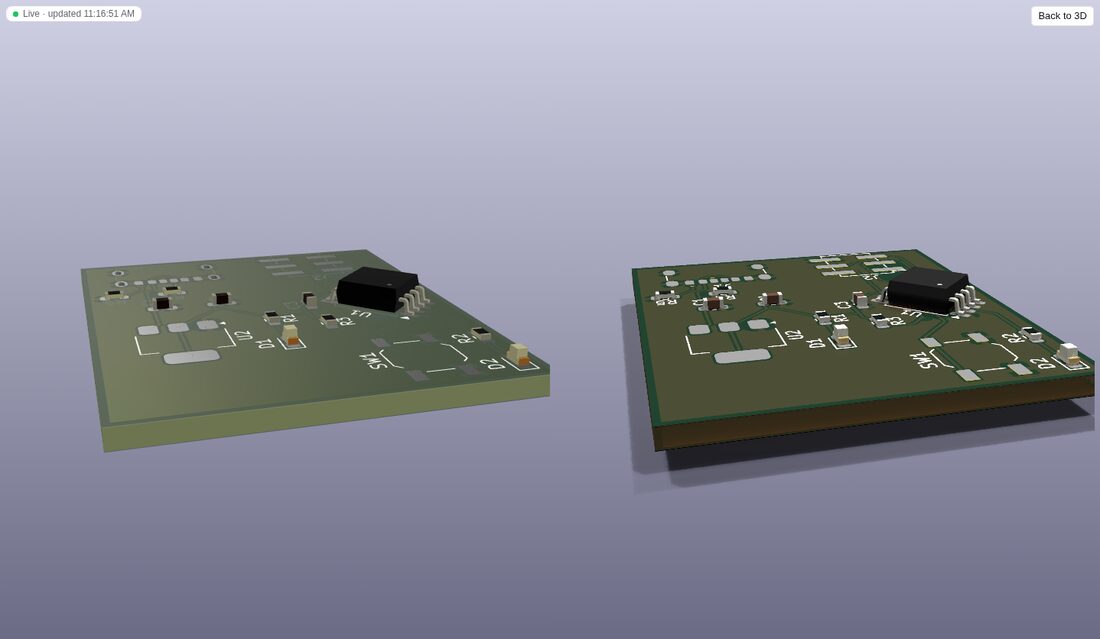
KiCad render renders the current camera with KiCad's own renderer (kicad-cli pcb render --quality high, a few seconds), mapping the orbit camera to --rotate / --zoom / --pivot / --perspective, for KiCad's exact look. Without WebGL the 3D mode shows such renders, with the same view buttons.
three.js (about 645 KB, 163 KB gzipped) is a separate client chunk, lib/client.three.js, that dsh loads the first time a board opens in 3D; the main client module grew by about 28 KB.
The model gets the same angles: kicad_render {view: "3d", side?, rotate?: "-45,0,45", zoom?, pivot?, perspective?, quality?: "basic" | "high"} (the defaults and results are unchanged; /kicad-render <board> --3d --rotate=-45,0,45 does it from a conversation).
KiCad's 3D model library. Component bodies come from KiCad's 3D models (${KICAD10_3DMODEL_DIR}), which most Linux distributions package separately. /kicad-doctor checks for them (the variable is resolved like KiCad: environment, then Preferences → Configure Paths, then the built-in default), and the 3D view shows a notice with the fix when footprints reference models that cannot be found:
| Platform | 3D models | Runs from dsh? |
|---|---|---|
| Fedora | sudo dnf install -y kicad-packages3d | no: needs root, shown with Copy command |
| Debian, Ubuntu (incl. the KiCad PPA) | sudo apt-get install -y kicad-packages3d | no (root) |
| Arch | sudo pacman -S --needed kicad-library-3d | no (root) |
| openSUSE | sudo zypper install kicad-packages3D | no (root) |
| Flatpak KiCad | flatpak install --user flathub org.kicad.KiCad.Library.Packages3D//stable | yes, per user (about 640 MB download) |
| macOS | included in KiCad.app (DMG and Homebrew cask); brew reinstall --cask kicad restores them | yes, with Homebrew |
| Windows | included in the full installer (and winget install KiCad.KiCad); keep the "3D models" component | link |
| everywhere | the kicad-packages3D archive for your KiCad version, then set KICAD10_3DMODEL_DIR | link |
The distribution packages are about 270 MB to download and 3.1 GB installed. Without them the 3D view and renders show the bare board with pads, copper and silkscreen.
Fab output
/kicad-fab [board.kicad_pcb] [--preset jlcpcb|pcbway] [--force] [--step] [--ipc2581] [--odb] (the agent's kicad_export_fab) lets KiCad judge the board first. DRC errors, unrouted connections, schematic parity issues (when the schematic sits next to the board) and, with a preset, errors against that fab's limits refuse the export, and nothing is written. --force exports anyway; the result and fab-manifest.json say so.
Output goes to <project>/fab/<preset or kicad>/: Gerbers for copper, mask, paste, silkscreen and Edge.Cuts with the Gerber job file; Excellon drill files with a Gerber X2 drill map; assembly/ with the position CSV and BOM (plus JLC BOM/CPL with --preset jlcpcb); preview/ with front and back 3D PNGs; and <board>-<preset or fab>.zip with everything except the previews.
kicad_fab_preset makes a fab's limits (minimum track, clearance, drill, annular ring, hole spacing, copper to edge) the project's design rules, so kicad_drc checks what the fab can make: board setup minimums go into the .kicad_pro, custom rules into a managed block of the .kicad_dru (your own rules stay). The values come from each fab's published capabilities (presets/); the fab's own review has the last word.
Standalone MCP server (Claude Code, RL environments)
claude mcp add kicad -- uvx --from "git+https://github.com/LuYanFCP/dsh-kicad#subdirectory=packages/kicad-bridge/sidecar" dsh-kicad-sidecar --root .
# or from a checkout, without uv:
PYTHONPATH=packages/kicad-bridge/sidecar/src python3 -m dsh_kicad_sidecar --root /path/to/project
--root (repeatable) confines file access. --call <tool> --args '<json>' runs one tool and prints its result.
KiCad "Open in DSH" (optional)
Copy kicad-plugin/ into KiCad's IPC plugin directory (KiCad 9/10: the plugins folder under your KiCad documents directory, e.g. ~/Documents/KiCad/10.0/plugins/dsh-kicad), enable Preferences → Plugins → Enable KiCad API, and restart KiCad. The toolbar button copies the project path to the clipboard and starts dsh web from the project directory (dsh web has no workspace flag, so use Add workspace and paste).
Configuration
Row (cordis.patch.yml id) | Field | Default | |
|---|---|---|---|
kicad-bridge | launcher | python | python runs the sidecar from source; uv runs it in a uv venv with uvExtras (png, ipc) |
python (live) | python3 | interpreter | |
kicadCli (live) | auto | kicad-cli path | |
java (live) | auto | Java 25+ for Freerouting ($JAVA_HOME, then PATH) | |
freerouting (live) | auto | freerouting.jar ($FREEROUTING_JAR, then the jar /kicad-install freerouting downloaded) | |
ngspice (live) | auto | ngspice for kicad_simulate ($NGSPICE, then PATH) | |
qemu (live) | auto | Espressif's qemu-system-xtensa for ESP32 firmware simulation ($QEMU_XTENSA, PATH, ESP-IDF's tools, then the one /kicad-install qemu-esp32 downloaded) | |
requestTimeoutMs | 300000 | ||
kicad-policy | approval (live) | ask | ask / allow for design edits |
autoErc (live) | true | ERC after each schematic edit | |
autoDrc (live) | true | DRC after each board edit (with --refill-zones when the board has zones) | |
autoRender (live) | true | refresh the sidebar SVG after each edit | |
restrictToWorkspace, extraRoots | true, [] | write confinement | |
guidance, projectContext | true | prompt section / dynamic context | |
kicad-tools | attachRenders | true | attach PNG renders for image-capable models |
(live) fields are editable in the Plugins page without restart.
Develop
pnpm install && pnpm run build
pnpm test            # vitest: host packages against dsh's real ToolRuntime/SkillRegistry + real sidecar; client in jsdom
pnpm run test:py     # pytest: S-expression round trip (KiCad demo files), schematic and board editing judged by kicad-cli, MCP server
python packages/kicad-bridge/sidecar/tests/make_fixtures.py   # regenerate fixtures with the editor itself
Real-dsh smoke test without an API key: install the bundle, then from a directory with a KiCad project run dsh --profile web --patch scripts/dsh-smoke/smoke.patch.yml --no-open and read dsh-kicad-smoke.json.
The Client is compiled by scripts/build-client.mjs, which reproduces dsh's module-loader artifact (window.__ModuleLoader__.load({ id, factory(require) })) with only the shell's platform modules external. docs/spike-third-party-bundle.md records how third-party Host + Client loading was verified.
Known limitations
- Boards are created and kept in sync from the schematic (
kicad_update_pcb), placed (auto_place), edited, routed (kicad_autoroute), checked and exported (kicad_export_fab). Autorouting needs Java 25+ and Freerouting, which are installed separately (see Routing); dense boards may keep a few unrouted connections for the agent to finish by hand. - Simulation covers analog behaviour with ngspice; parts without a SPICE model are left out, and firmware, signal integrity, EMC and thermal behaviour are not simulated. Plain Device:LED / Device:D symbols need
Sim.Deviceset (see Simulation). - Firmware simulation covers the ATtiny25/45/85 and the classic ESP32 (on Espressif's QEMU, a separate install); it refuses what it does not model (see Firmware against the board; on the ESP32 among others deep sleep, pads driven by I2C, SPI or RMT, WiFi and Bluetooth). MCU checks are otherwise static and only cover families with a provider (classic ESP32 and the 8-pin ATtiny25/45/85 today); other MCUs are tracked in #31. An ESP32 pin table is only as good as its transcription: verify it against the datasheet of the exact module.
- Fab presets were read from JLCPCB's and PCBWay's capability pages on 2026-10-21 and may drift. The JLC CPL keeps KiCad's rotations; JLCPCB's preview may need per-part rotation fixes.
- Edits cover symbols, properties, wires, labels, power symbols, junctions and no-connects; hierarchical sheet creation, buses and graphic items are not edited.
- New sub-sheet symbols get their instance path from the root sheet one level up; deeper hierarchies may need KiCad's annotation.
- Images reach the model only when the model route declares image input and an attachment store is mounted; otherwise the render tool returns SVG paths.
- Approval needs an interactive approval channel; headless runs without one deny design edits unless
approval: allow. - The 3D view needs WebGL (otherwise it shows KiCad renders). Its colours follow KiCad's GLB export, which writes sRGB colours as glTF's linear colour factors; the view reads them as sRGB to match KiCad, so other glTF viewers show the same file lighter.
- The interactive viewer is KiCanvas, vendored at a pinned commit by
scripts/vendor-kicanvas.mjs(seepackages/client-ui-kicad/vendor/kicanvas/README.mdfor the offline/icon/theme patches). It parses KiCad 10 files but ignores tokens it does not know yet; the SVG mode is the kicad-cli ground truth. It needs WebGL2. - The IPC channel is a status probe plus the KiCad-side launcher; live editing through IPC is not implemented (KiCad's IPC API is PCB-centric).
- The Flatpak path runs kicad-cli as
flatpak run --filesystem=host --filesystem=/tmp --command=kicad-cli org.kicad.KiCad; this was tested with a stand-inflatpak, not a real Flatpak KiCad. The install commands for apt/pacman/zypper/brew/winget are documented but were only exercised on Fedora. - Checks started from the settings page append
/kicad-doctorentries to the log of the session they borrow (dsh logs every command).
License
MIT
Comments
Loading…
Similar plugins
by 0lidaxiang
DeepSeek Harness is a plugin-based system for building AI agents. Everything, from tools and models to the web UI, can be added or replaced as a plugin.
★ 4
MIT
JavaScript
Oct 7, 2026
dsh plugin --profile web add dsh-plugin-greetby haveanote06
Plugin advisor for DeepSeek Harness: senses a need, checks installed plugins first, searches the dsh-plugin ecosystem with multi-signal quality scoring, and installs the best pick after confirmation.
★ 0
MIT
TypeScript
Aug 17, 2026
dsh plugin --profile web add dsh-plugin-advisorby LAU-MARS
deepseek harness 2D and 3D CAD plugin
★ 27
↓ 790/wk
Apache-2.0
TypeScript
Oct 27, 2026
dsh plugin --profile web add dsh-cadby xiangnan0811
DeepSeek Harness plugin for ClinePass: models, API key, and usage limits.
★ 0
MIT
JavaScript
Oct 19, 2026
dsh plugin --profile web add dsh-clinepassby cyberlieflife
DSH (DeepSeek Harness) web plugin: thinking intensity / reasoning effort settings for custom OpenAI-compatible (pi-ai) models
★ 3
TypeScript
Aug 14, 2026
dsh plugin --profile web add dsh-model-thinkingby openma-ai
Bridge your pi extension, codex plugin or claude code plugin to dsh (DeepSeek Harness)
★ 4
↓ 43/wk
MIT
TypeScript
Aug 25, 2026
dsh plugin --profile web add @openma/dsh-agents-plugins-bridge