

deepseek-harness-jev
Manifest valid★ 8Native DeepSeek Harness (DSH) plugin integrating TypeSafe Jev as a System One decision layer for agent selection, supervision, corrections, and approvals.
deepseek-harness-jev
Native DeepSeek Harness (DSH) plugin integrating TypeSafe Jev as a System One decision layer.
deepseek-harness-jev connects DeepSeek Harness (DSH) to Jev by TypeSafe AI for agent skill and file selection, task supervision, shared-finding corrections, tool-output filtering, and single-operation approval assistance. Its 11 features are individually configurable from one Jev settings page and are all disabled by default.
The main model continues to plan, generate answers, and call native tools. The plugin automatically invokes enabled Jev judgments at DSH extension points for skill catalogs, agent lifecycle, tool results, and approvals, then applies results according to each feature. DSH configures the main model; Jev has a separate connection. Integration uses public Cordis / DSH plugin APIs without modifying the host source.
This is an independent community project, not an official DeepSeek or Jev release. It is an early-stage plugin tested with DSH 0.1.7-rc.2; its APIs and model judgments are not a correctness guarantee.
The Chinese feature website explains each DSH integration point, the information sent to Jev, and the observed test cases and limits.
What is included?
The following features are in main. Every feature is independently disabled by default. Installing the package does not enable them.
| Feature | What it does |
|---|---|
| Skill selection | Ranks skill names and summaries before catalog publication. The main agent still loads the original skill. |
| File ranking | Ranks the original glob path results without another filesystem scan or file-content read. |
| Drift reminders | Checks progress between model steps and can deliver one nonblocking reminder. |
| Completion checks | Reviews the visible final answer against recorded evidence and can request at most one supplemental attempt. |
| Goal supervision | Checks native goal completion and pauses after a configurable run of rounds without progress. |
| Instruction guidance | Reads current user instructions and applicable agent rules, then supplies a nonblocking reminder when needed. |
| Interjection routing | Routes a running user's correction to the next step; queues other messages for a later turn. |
| Shared-finding corrections | Compares reports and messages already shared, then sends corrections to affected recipients. |
| Long-log admission | Can remove clearly unneeded progress or repeated notices after a command returns, with an original-output recovery reference. |
| Test-log admission | Protects failures, summaries, named and slow tests while judging whether ordinary passing details are needed. |
| Workspace approval | In workspace-write, can answer eligible native single-operation escalation requests; non-affirmative answers return to human approval. |
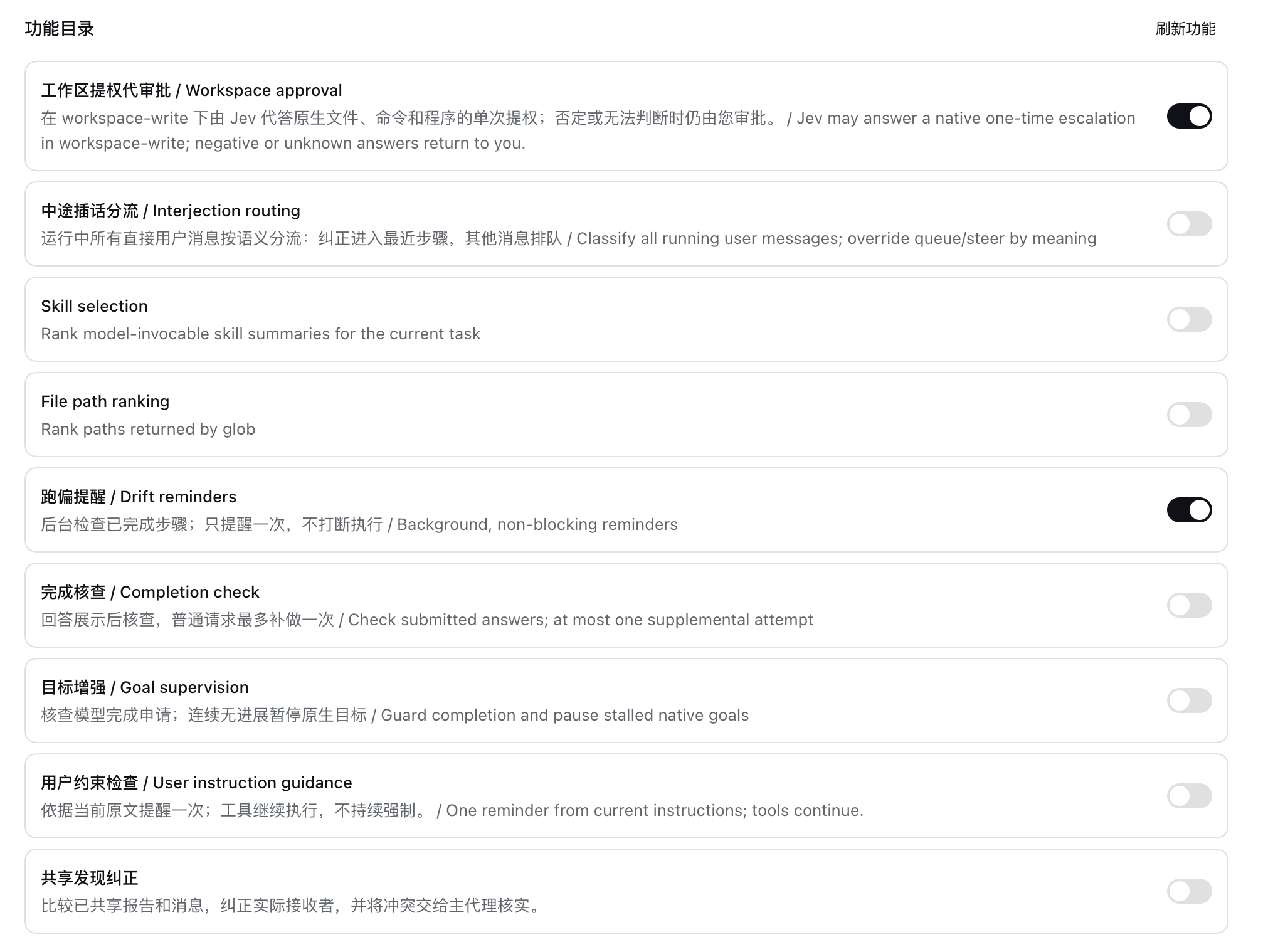
Example feature settings from an earlier build. The screenshot shows nine switches and user-selected states; current main includes the eleven features listed above, all disabled on a fresh installation.
All features share a connection, profile-scoped settings, decision records, and operation receipts. Most agent-facing features target live Web root sessions; correcting a child agent does not enable every feature inside that child.
Feature branches are not all included in main. Tool-output filtering is included in main; codex/jev-tool-output-admission preserves its development snapshot. Native web execution is on codex/jev-native-web-execution and is paused; ordinary-site effectiveness has not passed acceptance. Historical split branches preserve earlier work. See branch status before switching branches; this table always describes main.
Install through the Web UI (recommended)
If you already use DSH 0.1.7-rc.2 Web, install directly from the GitHub repository URL. No source checkout, manual packaging, or npm login is required.
- Open Plugins in the sidebar → Add plugin.
- Paste the GitHub URL below into Package name or address, then click Install.
- Click Enable now after installation. Restart the current profile only if DSH says it will load on the next start.
- Open Jev, configure the endpoint, model, and API key, then enable the individual features you need.
https://github.com/luobosibing2/deepseek-harness-jev
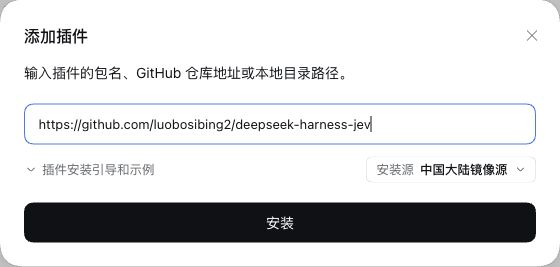
Paste the repository URL into “Package name or address”, then click Install.
Enabling the package does not enable its 11 Jev features; they remain off by default. Installation applies to the Host profile serving the current Web UI. The Host needs pnpm and access to GitHub. The repository includes the plugin entry and prebuilt files, so installation does not compile source on the user's machine or require an npm registry publication.
The GitHub entry provides the main features, not experimental branches. The older v0.1.0 release does not include the newly integrated log filters. Build from source below only when changing or building the code yourself.
Install from source (developers)
Use the following steps when modifying or building the plugin yourself. Existing DSH Web users can install using the GitHub URL above.
Build requirements
- Node.js 24.11 or later is recommended; the publication build is checked on Node 24.14.1.
- pnpm 11.7.0 available on
PATH. - DeepSeek Harness CLI 0.1.7-rc.2. The plugin pins the corresponding DSH peers and Cordis 4.0.4; newer versions are not automatically supported.
- A configured main-model provider in DSH, plus your own Jev-compatible System One endpoint and credentials.
If needed, install the tools:
npm install --global pnpm@11.7.0 @deepseek-ai/dsh@0.1.7-rc.2
Build the package
Build a .tgz from source, then install it through the Web UI or official CLI.
git clone https://github.com/luobosibing2/deepseek-harness-jev.git
cd deepseek-harness-jev
pnpm install --frozen-lockfile --ignore-scripts
pnpm run build
mkdir -p dist
pnpm -C packages/jev pack --pack-destination "$PWD/dist"
Create a separate trial profile with the CLI
You can also paste the built tarball's absolute path into an existing Web plugin manager. The CLI method below creates a separate trial environment.
Use a new, unused profile name for a first trial; the example uses jev. Initialize it from the Web template before adding the plugin:
dsh --profile jev --from-default-profile web --dump-default-config > /dev/null
dsh plugin --profile jev add ./dist/dsh-jev-plugin-0.1.0.tgz
dsh --profile jev
The first command creates the Web profile without launching it. Adding a plugin to a brand-new profile without this step initializes only the base configuration, not the Web application. The plugin's bundle patch is applied by the official installer; no manual host-source changes are needed.
Open the authenticated Web address printed by DSH. Configure your main model through DSH, then open the plugin's Jev page.
Configure Jev
- Set the full System One endpoint, for example
https://api.typesafe.ai/v1/systemone. - Set the model, for example
jev-latest. - Choose a DSH credential reference, save the connection, and save your API key using the page's credential control. Do not put a key in source files or a repository URL.
- Review the timeout, then enable only the features you need.
- Inspect Decision records for input, answers, attempts, and actual adoption or execution receipts.
The main agent's provider and the Jev judgment connection are separate. A credential marked “configured” is not a successful connectivity test. Connection tests and enabled judgments make requests to your provider.
Selection defaults are 5 skill summaries, at most 40 glob matches eligible for ranking, and 12 displayed ranked paths. A larger glob skips Jev rather than silently judging only the first 40. Supervision defaults are a drift check every 6 completed model steps and a pause after 3 native goal rounds without progress. These values can be changed without enabling the features.
Long-log and test-log admission have independent switches, both off by default. Generic command logs start at 6,000 Unicode code points and recognized test logs at 4,000. The default omit-probability threshold is 0.8 and the judgment wait limit is 4 seconds. The settings page exposes these and the other admission budgets without enabling either feature.
Behavior and limitations
- Reminders are advisory. Drift and instruction guidance do not block or cancel tools, and do not force the main model to comply.
- Completion is evidence review. It does not run independent verification. A real test accepted an unsupported “no new files” claim; do not use it as a proof of completion.
- Approvals remain single-operation. Workspace approval neither changes the session's sandbox mode nor overrides fixed host checks.
approvecan supplyallowed-once;unauthorizedorunknownreturns to the original human approval flow. Technical failures retain manual Retry/Cancel. - Shared corrections have a limited scope. They process already-shared reports and messages, not every agent's private exploration. Automatic delivery targets the live root agent and its active, continuable direct children. Duplicate corrections can still arise when the same finding appears in different report forms.
- Judgment success is not action success. The ledger distinguishes an answer, its adoption, permission issuance, and execution results.
- Log admission keeps an original reference. It changes only eligible model-visible tool text after execution; DSH's immediate spill, tool output limits, and later context compaction still apply. An isolated real-profile build reduced one 8,510-character log by 75.7%. A neutral 180-test run reached the test-log judge but stayed complete because its omit probabilities were below 0.8; that run does not establish test-log reduction effectiveness. See the tool-output admission report.
- Validation is scoped. Deterministic tests establish integration. Limited real-service examples do not establish general semantic accuracy. See validation notes.
Enabled features send the relevant task context or operation data to the configured judgment endpoint. Exact judgment inputs and answers are stored in the profile's local plugin records; model-visible effects use normal DSH session records. Keep runtime records and credentials private. Public source history excludes personal QA screenshots and raw session captures.
Updating or removing the plugin
For an existing profile, rebuild and pack, then install the new tarball with dsh plugin --profile jev add <new-tarball-path> and restart that profile. Do not rerun --from-default-profile on an existing profile. Use a new tarball filename for a changed build of the same package version and check the installed contents when validating an update.
Disable individual features in the Jev page. For package removal, consult dsh plugin --help for the CLI version you have installed. Removing or switching the package can remove branch-specific features; keep a profile backup before replacing an experimental branch build.
Development
The project is named deepseek-harness-jev; its internal package and import identifier remains @dsh-jev/plugin, matching existing profile plugin configurations.
The repository root is the GitHub install entry; packages/jev retains development sources. pnpm run build also regenerates runtime/; commit these generated files when releasing source changes.
pnpm run typecheck
pnpm run build
pnpm exec vitest run packages/jev/tests/host.test.ts packages/jev/tests/wire.test.ts
Run the focused tests for the feature you change. Do not enable real-provider experiments or use someone else's credentials without explicit authorization. Development fixtures and tests are excluded from the installable tarball.
- Package reference and consumer API
- Workspace-approval integration tests
- Workspace-approval QA cases
- Tool-output admission report
- Branch status
- Validation notes
DSH integration points
| Module | DSH extension points | Source |
|---|---|---|
| Skill and file selection | agent/pre-step, tools/execute, tools/post-execute | selection.ts |
| Supervision and instruction guidance | session/event, agent/pre-step, agent/turn-stopping, tools/pre-execute | supervision.ts, instructions.ts |
| Message routing and shared corrections | Native Agent inbox, agent/pre-step, tools/result, subagent messaging | interjection.ts, shared-findings.ts |
| Tool-output and test-log filtering | tools/post-execute | output-admission.ts |
| Single-operation approval | tools/execute, approval/request | workspace-approval.ts |
License and acknowledgements
MIT; see LICENSE. Package-level third-party licenses are included in THIRD_PARTY_NOTICES.md.
The feature research was inspired by Mu. This project implements DSH plugins against public extension points; it does not ship a modified DeepSeek Harness, Mu, or Cua runtime. DeepSeek Harness, its Typert tooling, and Zod retain their respective notices.
Comments
Loading…
Similar plugins
by nanami-0713
DSH plugin: register TypeSafe Jev (System One decision model) as an agent tool — jev_decide returns calibrated probabilities (noul/choice/score) for routing/triage/guardrail judgments, no text generation. 把 TypeSafe Jev 决策模型注册为 DSH agent 工具
★ 3
↓ 313/wk
MIT
JavaScript
Sep 24, 2026
dsh plugin --profile web add dsh-jev-decideby kaijia323
TypeSafe Jev (System One decision model) as a native jev_decide tool plugin for DeepSeek Harness
★ 0
MIT
JavaScript
Sep 20, 2026
dsh plugin --profile web add dsh-plugin-jevby jackie-cqz
DeepSeek Harness plugin for TypeSafe Jev: typed decisions, configurable guardrails, and Web UI result cards.
★ 8
MIT
TypeScript
Sep 26, 2026
dsh plugin --profile web add dsh-jev-pluginby Devin-AXIS
Jev DSH 决策引擎|面向 Agent Harness 的结构化决策插件。原生支持 DeepSeek Harness,通过 iPolloWork 支持 OpenCode、Codex Harness。
★ 255
JavaScript
Sep 20, 2026
dsh plugin --profile web add dsh-jev-decision-modelby 0lidaxiang
DeepSeek Harness is a plugin-based system for building AI agents. Everything, from tools and models to the web UI, can be added or replaced as a plugin.
★ 4
↓ 79/wk
MIT
JavaScript
Sep 9, 2026
dsh plugin --profile web add dsh-plugin-greetby AskTheWay
⚡ Millisecond System-1 judgement for every tool call in DeepSeek Harness — Jev-powered risk classification & evidence-gated auto-approval. Fail-closed by construction. dsh 生态第一个 System-1 决策插件
★ 21
↓ 236/wk
MIT
TypeScript
Sep 25, 2026
dsh plugin --profile web add dsh-jev-interceptor