

dsh-remote-wecom
Manifest valid★ 1DeepSeek Harness plugin: control Desktop sessions from WeCom (企业微信) on your phone
dsh-remote-wecom


Control DeepSeek Harness Desktop sessions from WeCom (企业微信) on your phone: send prompts, get results and files back, approve tool calls, switch sessions and models. Docs and commands are in Chinese.
在手机企业微信里遥控 DeepSeek Harness Desktop:发消息、收结果、切会话和模型、审批与回答提问、取回产物。插件跑在 Desktop 里,自己持有企微智能机器人的长连接。
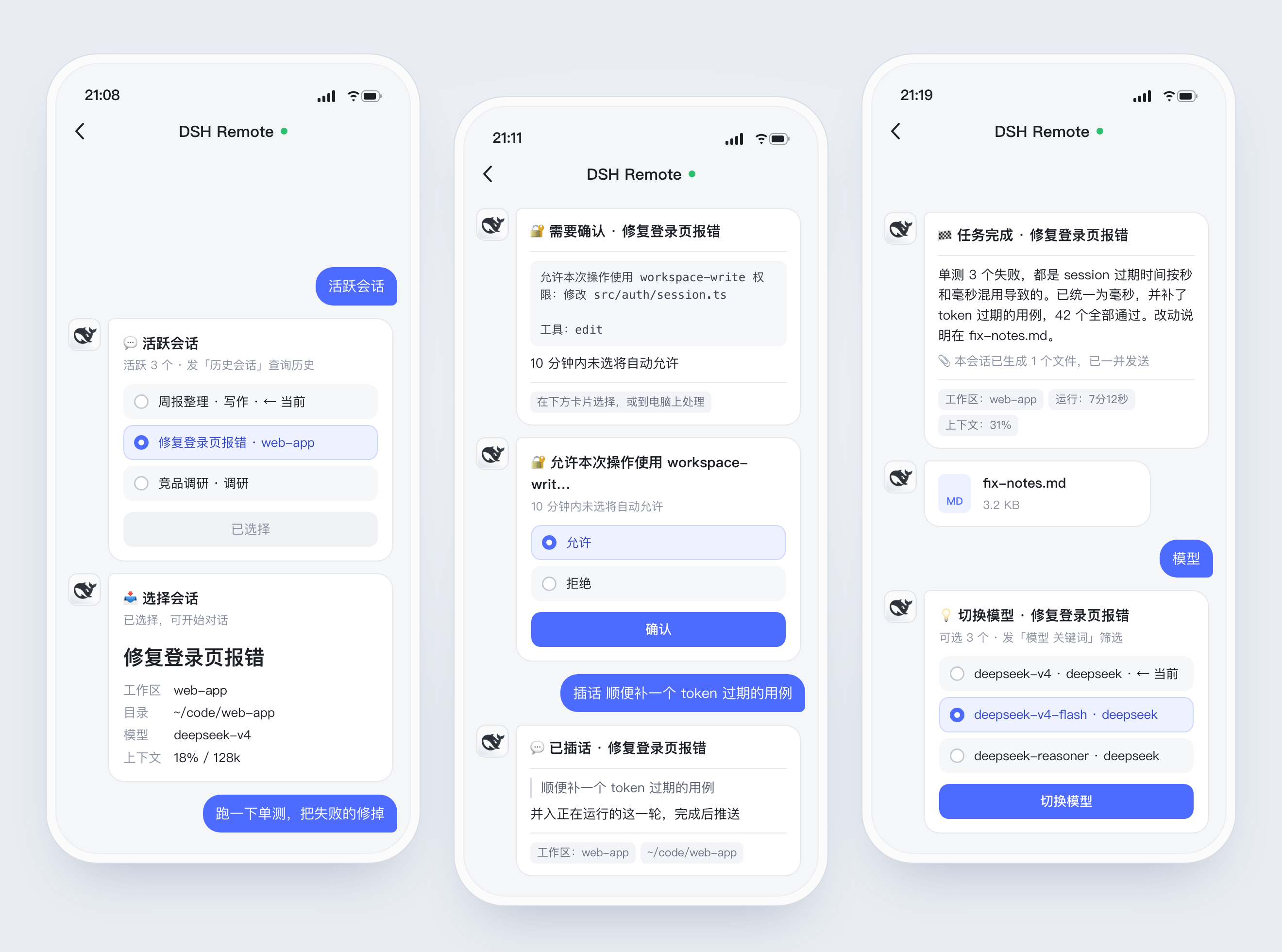
- 任务跑完自动推结果,生成的文件一并发到手机
- 审批和提问同时发到手机和 Desktop,哪边先答用哪边
- 运行中可以插话、停止,也能设长期目标让它自己续跑
- 引用某条推送回复,消息就发回那个会话,多个任务并行不串
- Desktop 没开也能发:消息先暂存,后台拉起 Desktop 后自动处理(macOS)
要求
- DeepSeek Harness Desktop(DSH
>=0.2.0-rc.2) - Node.js
>=22.19.0(命令行用) - 一个专用的企业微信智能机器人。同一个机器人只能有一条长连接,不要与其他程序共用
安装
Desktop 运行时会锁住 desktop profile,dsh plugin add 用不了,需要手动加:
-
退出 Desktop。
-
在
~/.dsh/profiles/desktop/package.json里追加(保留已有条目):{ "dependencies": { "dsh-remote-wecom": "^0.1.2" }, "dsh": { "profile": { "bundles": ["…", "dsh-remote-wecom"] } } } -
安装并启动:
cd ~/.dsh/profiles/desktop
node "/Applications/DeepSeek Harness.app/Contents/Resources/runtime/primary-runtime/dependencies/pnpm/bin/pnpm.mjs" install
open -a "DeepSeek Harness"
升级时改版本号,再重复第 3 步。
也可以把下面这段发给 Agent(Claude Code、Cursor、pi 等)代装:
按 https://github.com/lukeinx/dsh-remote-wecom 的 README 给我的 DeepSeek Harness Desktop 安装 dsh-remote-wecom,
遵守「让 Agent 代装」一节的规则;装好后提醒我到「设置 → 企微远程」扫码绑定。
绑定
打开 Desktop「设置 → 企微远程」:

- 用企业微信扫码,自动创建机器人并连接。
- 10 分钟内给机器人发一条单聊消息,发送人即成为主人;过了窗口就发页面上的 6 位绑定码。之后只接主人的单聊。
同一页可以换机器人、解绑、选新会话位置、设置手机审批超时。扫不了码时可以手动填 BotID / Secret。
打开「桌面端退出后仍可拉起」(macOS):Desktop 没开时,手机发来的消息先暂存,并在后台启动 Desktop,启动后自动处理。移除插件前先关掉它。
手机上用
选中会话后直接发消息;引用某条推送回复,消息会发给该推送所属的会话。图片和文件可以先发,5 分钟内再补说明。任务完成后自动推送结果;审批和提问同时出现在手机和 Desktop,谁先答用谁的。
| 命令 | 作用 |
|---|---|
活跃会话 / ls | 切换到运行中、置顶或最近活跃的会话 |
历史会话 [关键词] / h | 查找并继续历史会话 |
创建会话 [工作区] [消息] / n | 新建会话并发送首条消息 |
工作区 [名称] / cd | 选择新会话的默认位置 |
插话 内容 / steer | 插进正在运行的这一轮 |
目标 [描述] / goal | 设置长期目标,自动续跑到完成 |
模型 [关键词] / model | 切换模型 |
思考强度 [强度] / think | 切换思考强度 |
权限模式 [模式] / perm | 切换当前会话的权限模式 |
压缩 / compact | 压缩当前会话上下文 |
产物 / art | 取回当前会话生成的文件 |
关注 / 取关 | 电脑上发起的任务也推到手机 / 只推手机发起的 |
状态 / 停止 / 重启 / 帮助 | 查看状态、中断任务、重连、查看全部命令 |
中文命令和参数之间要有空格:模型 high 是命令,模型high 会当普通消息发出。
命令行
设置页之外的备用入口:
alias dsh-remote-wecom='node ~/.dsh/profiles/desktop/node_modules/dsh-remote-wecom/bin/dsh-remote.mjs'
| 命令 | 作用 |
|---|---|
setup [--bot-id ID --secret S] | 写入机器人凭证并生成绑定码 |
bind | 解除当前主人,生成新绑定码 |
status | 查看配置、绑定状态和最近日志 |
alias [名称 目录 | rm 名称] | 管理目录别名,供「创建会话」「工作区」使用 |
watchdog install|uninstall|status | 「桌面端退出后仍可拉起」的开关与状态 |
数据在 ~/.dsh/integrations/dsh-remote-wecom/,config.json 权限为 600。可选配置和实现细节见 docs/DESIGN.md。
让 Agent 代装
- 改 profile 前先退出 Desktop,只追加条目,不动已有的
dependencies和bundles。 - 扫码和绑定由用户在手机上完成;不读取、不打印 Secret。
- 用
dsh-remote-wecom status验证:出现Secret:已配置和主人:已绑定即完成。 - 改本仓库代码前先读 AGENTS.md。
开发
git clone https://github.com/lukeinx/dsh-remote-wecom.git && cd dsh-remote-wecom
npm install
npm run check      # 打包设置页 + 语法检查 + 单元测试
npm run test:e2e   # 隔离的 DSH + 假企微,约 30 秒
本地调试时把 profile 里的依赖改成 "dsh-remote-wecom": "link:<仓库绝对路径>",改完代码重启 Desktop。
许可
Comments
Loading…
From the same category
by awesome-dsh-plugin
A curated list of plugins for DeepSeek Harness (dsh) · DeepSeek Harness 插件精选列表
★ 20.5k
CC0-1.0
Python
Oct 25, 2026
by 0xsline
DeepSeek Harness (DSH) ecosystem: curated plugins, tools, and infrastructure from dsh-external/hub and the public dsh-plugin topic.
★ 1.3k
CC0-1.0
Python
Oct 16, 2026
by pax-beehive
Open-source CLI, schemas, resolver, and DSH agent tools for DSH Plugin Hub
★ 277
MIT
TypeScript
Oct 20, 2026
by xiajiajun516
DeepSeek Harness (DSH) backup & restore plugin — export, import, migrate and sync your complete DSH configuration, plugins, MCP servers, skills and workspace. One-click migration to another machine.
★ 240
MIT
TypeScript
Oct 24, 2026
dsh plugin --profile web add dsh-config-managerby yjh051108
推荐组件(非必须):DeepSeek Harness 运行时注入器;已随 dsh-routing-suite 单仓库化保留,本仓库继续维护/发布。
★ 167
TypeScript
Oct 16, 2026
dsh plugin --profile web add @dsh-external/dsh-super-injectorby Yuuyuko-uu
DSH 鱼的记忆:给会话一份会淡忘的长期记忆,每条都带时间
★ 132
MIT
JavaScript
Oct 24, 2026
dsh plugin --profile web add dsh-fish-memory