

dsh-global-todo
Manifest valid★ 3Global todo list plugin for DeepSeek Harness — one JSON list a person and an agent both write to
dsh-global-todo
One todo list for the whole DeepSeek Harness, owned by you and written by your agent too.
Every entry records when it was added, carries a description, can attach any number of documents and addresses, and can be handed to an agent session with one click — so "continue this" is a button, not a paragraph of context you retype.
Why another todo plugin
DSH's built-in todo_write belongs to one agent session: whole-list replacement, three
states, and a plan that disappears when the session does. The community plugins that fix
that split into two camps — the ones that dispatch work to agents (auto-resume, bound
sessions) and the ones that accept real document attachments. This plugin does both, on
one record:
built-in todo_write | dsh-global-todo | |
|---|---|---|
| Owner | one agent session | you — across sessions and workspaces |
| Writing | whole-list replacement | per-field, human and agent |
| When it was added | not tracked | createdAt, immutable, shown everywhere |
| Context | title + state | description + documents and addresses |
| Hand-off | — | one click: reuse the bound conversation or open a session |
| Storage | session event log | one JSON file you can cat, edit, diff and back up |
Screenshots
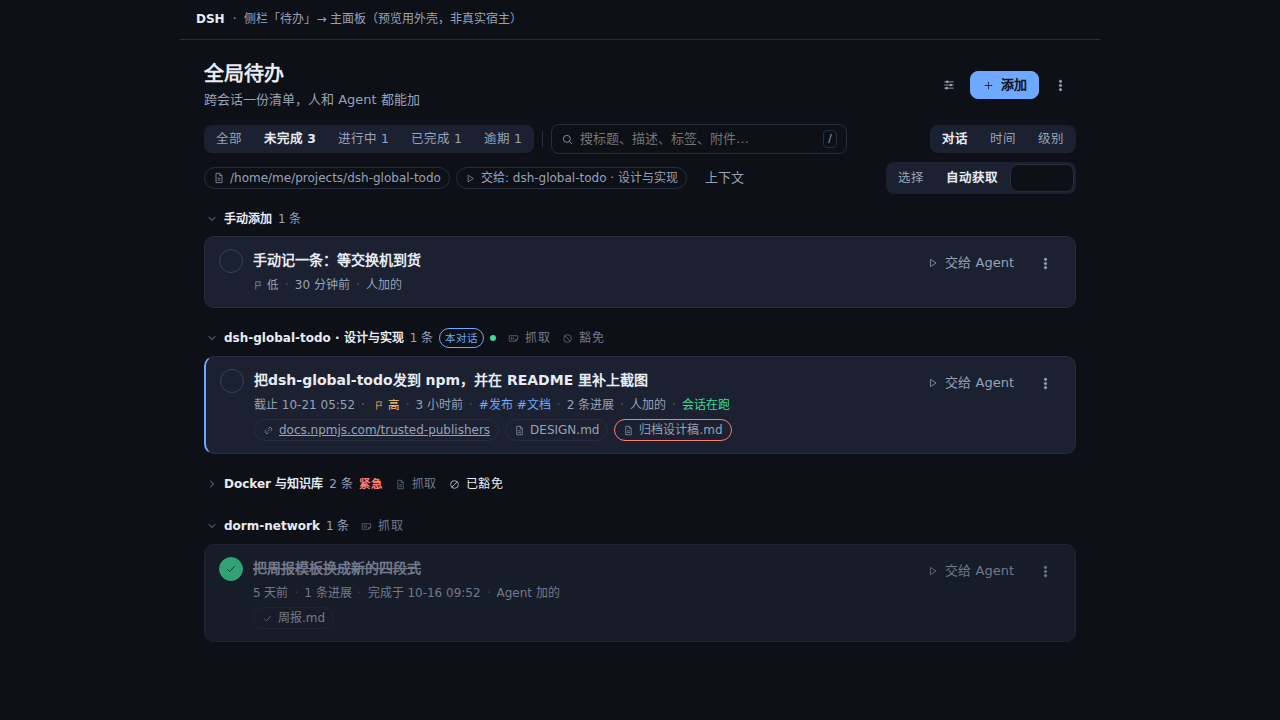
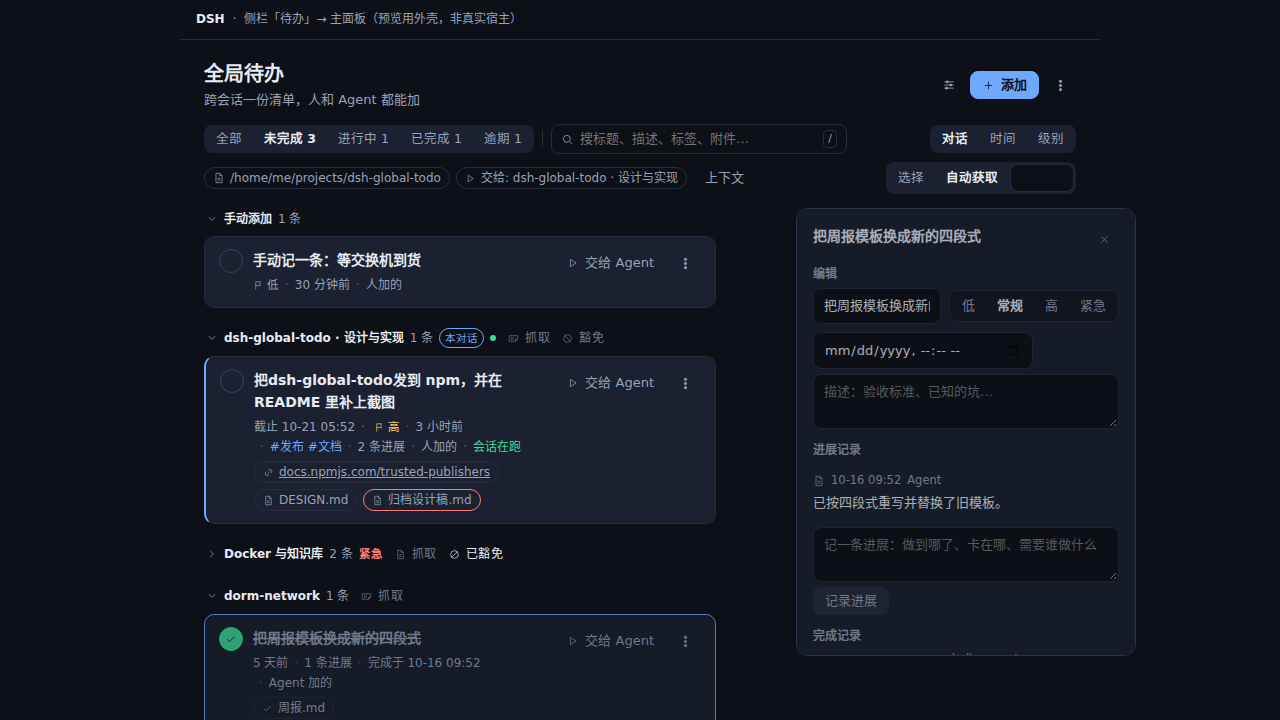
These are produced by npm run screenshots (which chains npm run preview): the real client
half is rendered to static HTML with no Host and no dependencies, then photographed at 1280×720
into docs/screenshots/. Playwright is not a dependency — the tool borrows the copy a DSH
profile already installed, or whatever DSH_PLAYWRIGHT points at.
Requirements
- DeepSeek Harness
0.2.x(developed and verified against0.2.1-rc.2;engines.dshis>=0.2.0-rc.1 <0.3.0, and a Host outside it skips the bundle instead of warning) - Node.js
>= 22.19.0(the Web profile's own requirement) - A Web client: the panel is served by the Host's web server. Headless / ACP / SDK keep the agent tools but have no panel; an Electron-style desktop client (file:// + IPC) is not supported yet
- After a Host upgrade, refresh the page — the client module graph belongs to the release the page booted with
- No runtime dependencies. Nothing is imported from
@deepseek-ai/*.
Install
# from npm
dsh plugin --profile web add dsh-global-todo

# or from a checkout, which is also the development path
dsh plugin --profile web add /absolute/path/to/dsh-global-todo
The plugin is a Loader row, not a hot-loaded script: restart the host (dsh web)
after installing, then refresh the page. A "待办 / Todos" entry appears in the sidebar.
The npm package is the source of truth. A community catalog can lag behind it or point at an
older release; pin the version you want (dsh plugin --profile web add dsh-global-todo@0.4.0)
when it matters.
To roll back:
dsh plugin --profile web remove dsh-global-todo
Your list is not touched by install or uninstall: it lives outside the plugin, at
$DSH_HOME/global-todo/todos.json.
Using it
The panel
- Add — type a title and press Enter. "More fields" reveals the description, the attachment box (one document path or URL per line), tags, priority and a due time.
- Filters — all / open / doing / done / overdue, plus a text search across titles, descriptions, tags and attachments. The count chips in the header are filters too.
- Grouped by urgency — overdue / today / next up / later / no due date / done, each collapsible, because "what is late" is the first question a list has to answer.
- Rows — show
added <time> (<age>)with the exact timestamp on hover, the priority, the due time, the tags, the attachment count, and which side created the entry. - Details — edit title, description, priority and due time inline; attach or detach documents and addresses (with 打开 / 复制路径 on each); read the activity trail.
- Undo a delete — deleting keeps the record for eight seconds and offers 撤销, which restores it verbatim: same id, same creation time, same attachments.
- Keyboard —
/focuses search,nfocuses the new-todo field,Esccollapses the open detail. Row actions appear on hover or keyboard focus. - Reachable from the LAN and from a tunnel — the routes defer to the Host's connection fence
(which honours
--trusted-host); the plugin's own loopback check is only the fallback for a Host without that service./healthreportsfenceso you can see which one is in force. - Auto-collect (off by default) — a panel switch. When on, a conversation you are in that
finishes a clean turn is asked once whether anything needs following up, but only once it has
been quiet for 30 minutes, and only if you are actually in that conversation (never a dispatch
target, a subagent or a background run). Aborted and failed turns are skipped. The question is
itself a message in the conversation, so it restarts the quiet clock — which is why only a
message you wrote arms it again: one question per turn from you, and it can never chase its own
answer. The switch is Host state, so it survives the panel being closed and is reported by
/health. Each conversation's group also carries anExemptbutton: it takes that conversation's whole working directory out of automatic collect (click again to undo). That is for conversations a machine drives — a chat companion's room — whose session is recreated with a new id when it restarts, so the exemption is keyed on the directory rather than on one conversation and cannot quietly stop applying. - Collect per conversation — the
Collectaction sits on each conversation's group header in the list, asks that conversation to record what needs following up, and the items land under it. The toolbar keeps a "collect from this chat" fallback, shown only when the current conversation has no group yet. A conversation that is not running is resumed first, like a hand-off. - Batch assignment — switch on
选择, tick a few todos, and one click sends each one to the conversation that wrote it, else to a same-workspace conversation, else to a target you pick. That is an attempt order: an unloadable target means the next one is tried. Anything with nowhere to go comes back with a picker rather than being sent somewhere unchosen, and one failure does not abort the batch. - Search syntax —
tag:release(or#ops),is:overdue,is:active,has:link,has:note,level:p0, plus free words combined with AND (which also match note text). A search without a colon behaves exactly as it always did. - Progress notes — an append-only trail per todo (count on the row, full text and an add box in the detail). An agent reporting a blocker writes here instead of rewriting your description, and writing one makes automatic completion stand down.
- Dead attachments are flagged — a file link whose target is gone is marked on the row and labelled in the detail. Computed on read, never stored.
- Where a new conversation goes — a hand-off that opens one joins the workspace owning
the conversation that wrote the todo (and starts in that workspace's directory), so
"continue this work" does not land beside unrelated sessions. The picker also lists the
workspaces (
+ new conversation · <workspace>), and a named workspace wins over the inherited one. The working directory only decides when neither is known. - The picker lists what you actually use, newest first, without archived conversations. The
order is the sidebar's recency key (
updatedAt). Conversations sharing a title get a short id suffix, and a target that is no longer listed (archived since it was chosen) is shown as(archived)instead of appearing as a different conversation. - You pick the target — the toolbar shows
交给:[ conversation ▾ ], listing your conversations: whichever you choose is sent withauthoritative: trueand the Host honours it verbatim, with no inference on top. The list marks the conversation the Host would have chosen on its own,自动restores that behaviour, and+ a new conversationstarts a fresh context. A choice is remembered, and changing it is one click in the same control — what you see is what happens. - A receipt for every hand-off — the panel says which conversation received the work and offers to open it. A dispatch starts work elsewhere, so staying silent looked exactly like "nothing happened".
- Hand to agent — the panel says where it will go before you press it, and the
default is
current: the conversation you last wrote in (read from the session log, keeping onlysource.kind === 'user'messages — the plugin's own injected hand-off messages are excluded, or each dispatch would drag the next one to its own target; the id is also kept next to the data so a restart does not forget it).autoprefers the conversation this todo already owns, then the current one, and only then opens a fresh session;newalways opens one;boundinsists on the bound conversation and says why if it is gone. When nothing usable can be resolved the hand-off fails with a reason instead of quietly opening another conversation. - Grouping — the toolbar offers
conversation / time / leveland defaults to conversation: everything one agent conversation submitted collapses into a single entry that says how many it holds, so a few 「抓一下待办」 runs do not turn the list into a wall of rows. A conversation with one item shows that row directly; items with no source conversation (added in the panel) sit under 手动添加.timeis the original overdue / today / soon / later / no-due buckets,levelgroups by priority. - Levels P0–P3 —
P0 urgent / P1 high / P2 normal (default) / P3 low, with a badge on the row. Records written before levels existed keep theirhigh/normal/low, so nothing needed a migration. A conversation group shows the highest level it holds, and a green dot marks a group with a conversation still running. - Collect from this chat — one button injects "record what this conversation needs to
follow up, with
global_todo_capture" into the conversation you are in, so a chat turns into todos without typing them out. The prompt states what not to record as well (session plans, small talk, finished work) — a capture instruction without that ceiling only produces noise. - Automatic completion — when a handed-off session closes its turn cleanly, the Host
finishes the todo itself: the agent's closing message becomes the summary and the files
that turn touched become the artifacts. No waiting for the model to remember a tool call.
A finished row shows 完成于 … plus artifact chips, and its detail carries a completion
section you can open or copy paths from. Two guards matter: only a session this plugin
just dispatched to can complete itself (idle chatter in a bound conversation must not
finish work), and a turn that failed or was interrupted is never marked done — an open
todo is far better than a failed job wearing a "done" label.
global_todo_donewithsummaryandartifactsremains the primary path; the watcher is the safety net. - Working directory — the toolbar says where a new session will start. It follows the conversation you are in by default; 选择 picks one explicitly and remembers it, and 跟随当前会话 clears that choice. A todo also remembers the directory it was written from (taken from the tool call's own context), and that is inherited too. With none of the three available, the hand-off is refused with a reason — a session without a working directory is a session where the agent can do nothing.
Agent tools
| Tool | Purpose |
|---|---|
global_todo_add | Record an item — description, attachments, tags, priority, due time |
global_todo_note | Append a progress note — where you are, what blocks you, who must decide |
global_todo_capture | Record a batch: for 「抓一下待办」 or a turn that produced several follow-ups; each entry is validated on its own |
global_todo_list | Query by state, tag or text; every row carries its creation time |
global_todo_get | Read one item in full, including attachments and the last hand-off |
global_todo_update | Change any field of one item, including status (archived archives without deleting); "" clears, [] empties |
global_todo_link | Attach or detach documents and addresses |
global_todo_done | Mark done, back to open, or in progress |
global_todo_reopen | Put a wrongly finished item back (done / cancelled → open); refuses anything else, and the trail records it as the agent |
global_todo_remove | Delete permanently (done items should be marked, not deleted) |
Live check
The test suite uses doubles; npm run check:live checks the wired Host instead —
the routes the panel actually calls, the list it actually reads, and a record that survives
delete-then-undo. It creates a temporary record, compares every field after the round trip
(id, creation time, attachments, tags, level, due time, description), asserts that bound
records carry sessionAlive/sessionDir, and removes its temporary record even when it
fails. It needs a running Host, so it is not part of verify.
Proactive capture
A guidance section is injected into the system prompt (turn it off with guidance: false).
It states both sides of the policy, because a prompt that only says "remember things"
produces noise, and a noisy list is worse than an empty one:
- record on your own initiative when the user mentions something that needs following up across sessions (waiting on a reply, due next week, a decision pending, a promise), when a turn ends with a step that should not continue in that session, or when the user says 「记一下 / 别忘了 / 回头办」;
- do not record what you can finish in this step, the session's own plan, or small talk;
- say in one line what you recorded — do not restate the description;
- say 「抓一下待办」 and the agent scans the recent conversation, records the batch with
global_todo_captureand answers with a summary.
The boundary: it records, it never starts work. The list belongs to the human, and starting a task stays a human decision (see the non-goals in ROADMAP).
Capture is not allowed to become noise. Before an item is written, the same normalized title
(full-width, case, spacing and punctuation folded away), a close paraphrase within the last 72
hours (Dice similarity over character bigrams, 0.8), and the same errand finished in the last 7
days are all refused with a reason on the record; archived and cancelled rows do not block a
new one. The rules live in lib/capture.js and are tested on their own.
HTTP API
The panel talks to the host over these routes. They are fenced by the host connection fence when that service is present, and by a strict loopback check otherwise.
| Method | Path | Body / query |
|---|---|---|
| GET | /api/global-todo/list | status, query, tag, sort, limit — the reply carries matched and truncated when the page was cut |
| GET | /api/global-todo/dirs | path? — list subdirectories for the panel's built-in folder picker (the shell's own picker is preferred when mounted) |
| GET | /api/global-todo/get | id |
| GET | /api/global-todo/export | — (the store's own JSON document, for backup or migration) |
| POST | /api/global-todo/import | { doc, mode?: replace|merge, dryRun? } — replace is an exact round trip, merge updates by id and appends (what the panel sends); dryRun returns wouldCreate / wouldUpdate and writes nothing |
| POST | /api/global-todo/reminders/ack | { ids } — stop listing these passed deadlines as due |
| POST | /api/global-todo/capture | { sessionId? } — ask the current conversation to collect its follow-ups |
| POST | /api/global-todo/bulk | { ids, status?, addTags?, removeTags? } — one change across a selection; a stale id lands in unmatched instead of failing the batch |
| POST | /api/global-todo/ingest | { items: [{ title, source: { kind }, confidence }], dryRun? } with Authorization: Bearer <settings.ingestToken> — external items; below ingestConfirmBelow they wait in the inbox |
| GET | /api/global-todo/health | — (store location, counts, dispatch capabilities, plus tool registration and whether the completion watcher attached — both fail quietly, so both are reported — and metrics: dispatch success rate, agent tool calls, list growth; autoCollect: why each waiting conversation was or was not asked, counters, and how the settings file loaded) |
| POST | /api/global-todo/create | { title, description?, links?, tags?, priority?, dueAt? } |
| POST | /api/global-todo/update | { id, ...fields, by?: human|agent } |
| POST | /api/global-todo/status | { id, status, by?: human|agent } |
| POST | /api/global-todo/remove | { id } |
| POST | /api/global-todo/restore | { todo } — put a removed record back verbatim (undo) |
| POST | /api/global-todo/link | { id, add?: [...], remove?: [value | index] } |
| POST | /api/global-todo/dispatch | { id, mode?: auto|bound|new|current, sessionId?, dir? } |
| POST | /api/global-todo/assign | { ids, items?, target?, dir? } — hand several todos over in one call; an id that matches nothing comes back instead of being sent elsewhere |
| POST | /api/global-todo/settings | { autoCollect?, idleMinutes?, cooldownMinutes?, exemptWorkspaces? } — the Host-side switches behind automatic collect |
| POST | /api/global-todo/diagnostics | { scope, status?, reason?, message?, url? } — the panel's own error report |
by on /update and /status says whose write this is: omitted (what the panel sends) it is
the person at the keyboard, and a script acting for the agent says by: 'agent' rather than
being filed as a human. Anything else is a 400 — a provenance field that silently absorbs a
typo is worse than no field at all.
Errors are typed: 400 for a rejected value, 404 for an unknown id, 413 for an
oversized body, 403 for a request that fails the fence, 502 when a hand-off cannot
reach the agents service. The body is always { ok, ... } with a machine reason.
Where the data lives
$DSH_HOME/global-todo/todos.json, or any absolute path you set:
# the profile's cordis.patch.yml
- id: global-todo
  config:
    storePath: /home/me/notes/global-todos.json   # a synced or versioned folder
    dispatchDir: /home/me/projects/thing          # default cwd for a new session
    requireExistingFiles: true                    # refuse a document that is not there yet
The file is the artifact: plain JSON, one record per todo, written through a temp file and
rename(), with a write lock that serializes the human's and the agent's edits. A damaged
file is reported (store-corrupt) rather than silently reset, and a single mangled record
is skipped instead of taking the list down. Back it up by copying it.
Design decisions
Attachments are references, not uploads. A document is an absolute path that stays where it is; an address is a URL. Nothing is copied into plugin storage, so a document stays editable and diffable, the list stays small, and a dispatched agent opens the very same path with its own tools. URLs carrying credentials are refused, because the list, the audit trail and every prompt would otherwise keep a copy of the secret.
Creation time is first-class. createdAt is set once and never rewritten. The panel
shows it, the tools return it as both epoch and ISO, and the dispatch prompt includes it,
because "when did this land on my plate" is half of what a global todo is for.
One write path. The panel and the tools both call the same service functions, so a validation rule, an audit entry or the write lock cannot exist on one side only.
A failed hand-off is louder than a successful one. Success and failure are both recorded on the todo, and the panel shows the failure with its reason. A dispatch that silently did nothing is worse than one that never happened.
Optional services degrade, they do not crash. webServer, tools, agents,
agentPresets, workspaceRegistry and agentDefaultModel are all reached through
ctx.inject or a guarded ctx.get. A lean composition loses exactly that surface.
See docs/DESIGN.md for the data model and the rejected alternatives, and docs/ROADMAP.md for what could come next.
Development
npm run check     # parse every file, assert the shipping shape, and — when a DSH
                  # profile is present — validate every tool schema against the
                  # Host's own validator
npm test          # 100+ unit, contract and bundle tests, zero dependencies
npm run verify    # both
npm run check:matrix  # the running dsh against engines.dsh, then the manifest,
                      # bundle and tool-schema contracts (no preview writes)
engines.dsh is the one version fact that matters: a Host outside it skips the whole bundle
instead of warning, so check:matrix is the smoke to run before widening the range.
There is no build step. The host half is plain ESM under lib/; the client half is a
classic script that registers itself with window.__ModuleLoader__, so no bundler,
TypeScript toolchain or CI artifact is involved. lib/client.js edits take effect on a
page refresh; host-half edits need a host restart.
npm run preview       # render the panel to preview/panel.html (+ detail and selection variants)
npm run screenshots   # re-photograph those previews into docs/screenshots/, 1280×720
The three PNGs under docs/screenshots/ ship with the package and are embedded in both
READMEs, so re-run npm run screenshots whenever the panel UI changes.
lib/
  index.js     host entry: store + service + dispatcher + the three surfaces
  store.js     one JSON file: atomic writes, serialized updates, tolerant loads
  model.js     the todo entity: validation, patches, status, attachments, activity
  links.js     attachment rules (pure: no filesystem access)
  service.js   the single write path, filters and sorting
  routes.js    the HTTP surface for the panel
  tools.js     the ten agent tools
  dispatch.js  handing a todo to an agent session
  errors.js    typed failures with stable machine codes
  client.js    the browser half (panel + sidebar entry)
test/          unit, service, tool, route, dispatch, bundle and manifest tests
tools/         preview.mjs — render the panel to static HTML without a Host
               screenshot.mjs — photograph those previews (borrows the profile's Playwright)
docs/          DESIGN.md (data model and rejected alternatives), ROADMAP.md
Contributions are welcome — read CONTRIBUTING.md first.
Feedback
Questions, bug reports and ideas go to Discussions. When reporting a bug, include the DSH version, the plugin version from the panel footer, your OS and the steps that reproduce it; a screenshot of the notice is worth more than a paragraph. Security issues go through SECURITY.md instead, not the discussion board.
Security
The HTTP surface is local-only, the list is a local file, and no credential is ever stored. Please report vulnerabilities as described in SECURITY.md.
License
MIT © 2026 LUgABeEEE
A community plugin, not a DeepSeek project: the dsh prefix marks the ecosystem it plugs into, not
an endorsement. "DeepSeek" and "DeepSeek Harness" remain their owners' marks.
Comments
Loading…
From the same category
by awesome-dsh-plugin
A curated list of plugins for DeepSeek Harness (dsh) · DeepSeek Harness 插件精选列表
★ 19.6k
CC0-1.0
Python
Oct 19, 2026
by 0xsline
DeepSeek Harness (DSH) ecosystem: curated plugins, tools, and infrastructure from dsh-external/hub and the public dsh-plugin topic.
★ 1.2k
CC0-1.0
Python
Oct 16, 2026
by pax-beehive
Open-source CLI, schemas, resolver, and DSH agent tools for DSH Plugin Hub
★ 388
MIT
TypeScript
Oct 6, 2026
by xiajiajun516
DeepSeek Harness (DSH) backup & restore plugin — export, import, migrate and sync your complete DSH configuration, plugins, MCP servers, skills and workspace. One-click migration to another machine.
★ 215
MIT
TypeScript
Oct 18, 2026
dsh plugin --profile web add dsh-config-managerby yjh051108
推荐组件(非必须):DeepSeek Harness 运行时注入器;已随 dsh-routing-suite 单仓库化保留,本仓库继续维护/发布。
★ 166
TypeScript
Oct 16, 2026
dsh plugin --profile web add @dsh-external/dsh-super-injectorby jigjoy-ai
A CLI that turns a goal into a pull request - and a sandbox for testing concurrent AI coding agents on the Mozaik runtime.
★ 124
MIT
TypeScript
Oct 13, 2026