
dsh-workbench-agent-studio
Manifest validAgent Studio for DSH Web: configure models, prompts, per-plugin tool bindings and Skills; trial-run with editable tool results and run history; preserve session capability snapshots; export standalone
DSH Agent Studio
Build and test Agents visually in DeepSeek Harness Web: bind tools by plugin, edit tool results during trials, preserve session capability snapshots, and export standalone presets. A guided Agent Creator preset helps draft new Agents in conversation.
简体中文 · Install · Downloads · Changelog
Install
Requires Node.js 24+ and DSH Web 0.1.7-rc.2 or 0.2.0-rc.2. Stop the target Web profile, then run:
dsh plugin --profile web add https://github.com/lucky01222/dsh-workbench-agent-studio/releases/download/v1.13.3/dsh-workbench-agent-studio-1.13.3.tgz
dsh web
The command above installs the prebuilt GitHub Release. When this version is available on npm, you can also install dsh-workbench-agent-studio@1.13.3 by package name.
Use the same DSH_HOME for installation and startup. The application archive includes its service, UI and runtime components; navigation, themes and Library are optional and are not installed by Studio.
You can also download the prebuilt .tgz from GitHub Releases and pass its path to dsh plugin --profile web add. Installing a GitHub source checkout is not equivalent: compiled dist/ files are intentionally not committed.
Version scope: Studio 1.13.3, portable runtime 1.10.5. Only the two exact DSH versions above are declared compatible. 0.2.1-alpha.5 removes the both tool mode and changes PTC behavior; it is not supported by this release. Official macOS Apple Silicon Desktop 0.2.0-rc.2 has also passed the additional desktop checks; other desktop builds remain unverified. Desktop installation uses its bundled CLI and --profile desktop, not the Web profile.
Configure, try, revise
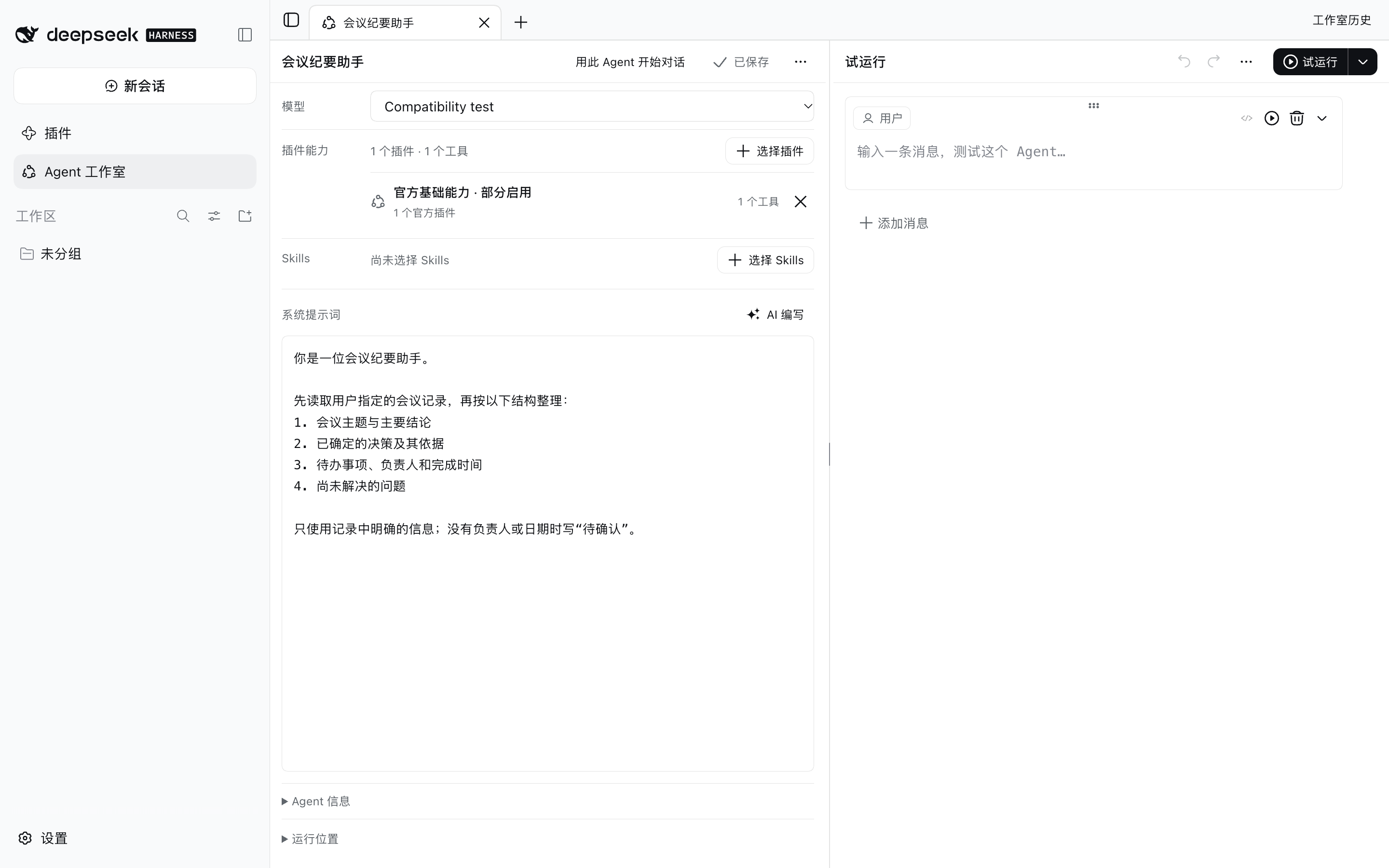
- Open Agent Studio in the sidebar. Create an Agent or copy a built-in preset.
- Choose a chat model, instructions, plugin tools and Skills. Choose all current tools from a plugin or an explicit subset.
- Trial-run a message. Run tools manually or automatically, edit their results, then continue or rerun. Previous runs remain available in history.
- Start a normal conversation with the saved Agent, or export its preset for another installation.
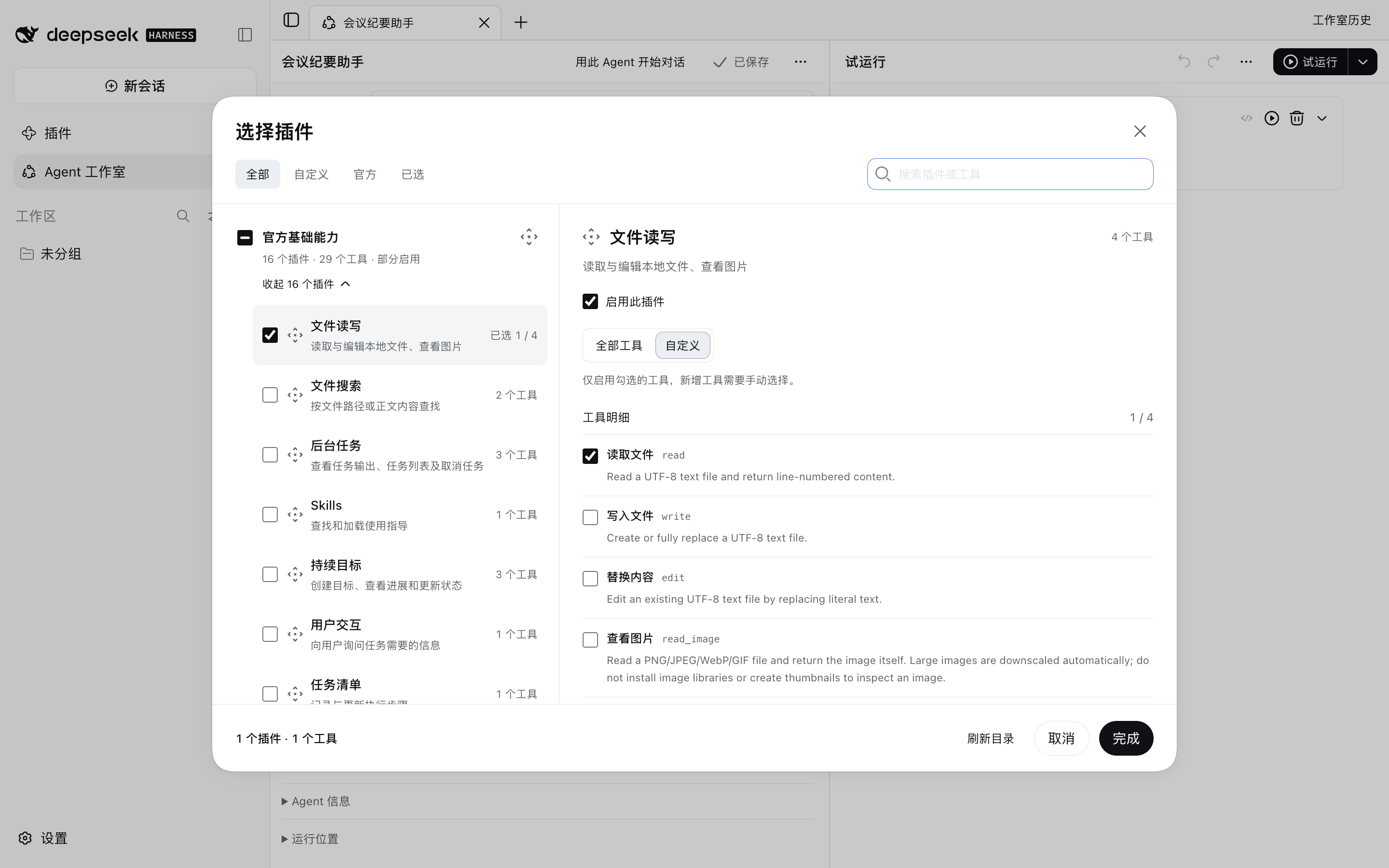
Tool ownership follows the actual host registrations. At session start, Studio stores the effective tool set and plugin identities. Existing sessions and historical retries keep their recorded scope; plugin removal or changed ownership is reported rather than silently granting a replacement tool.
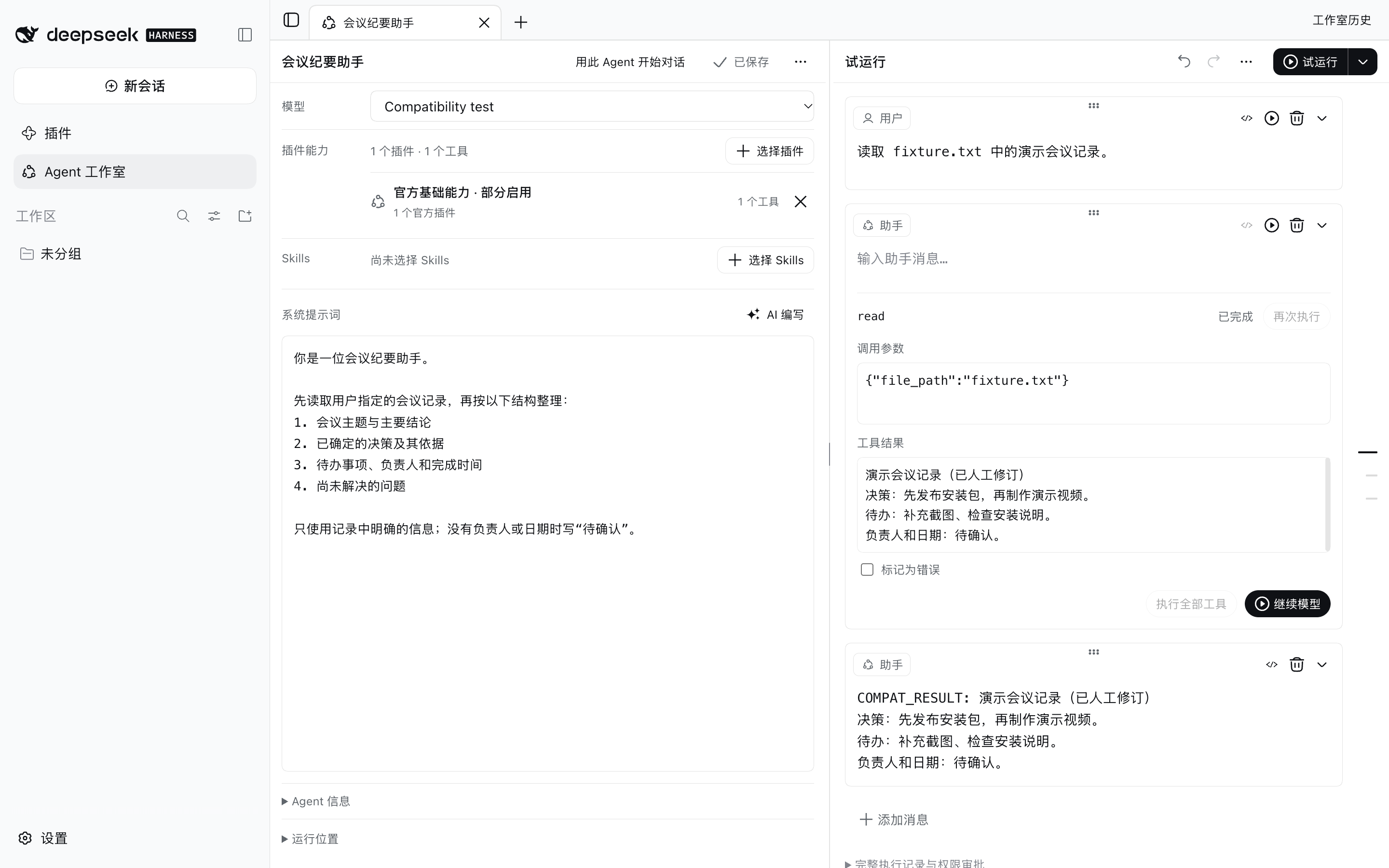
Screenshots use an isolated DSH 0.2.0-rc.2 instance, synthetic data and a local scripted model. They illustrate the interface, not the quality of an external model's answers.
Guided Agent Creator
Choose Agent 创建助手 / Agent Creator before starting a conversation. It collects requirements, selects available capabilities, drafts instructions, checks the draft, offers a trial, and saves only after confirmation. Creator tools are scoped to this preset; they are not added to standard mode or unrelated Agents. Creator trials execute read-only tools and record other calls without executing them. Unsaved drafts do not appear in the Studio Agent list.
What this plugin changes
Studio disables the official tools configuration row and installs a ToolRuntime subclass that records plugin ownership. Tool execution, schema validation, permissions and scope enforcement remain in the official superclass. The original row's configuration is inherited. It also mounts a capability snapshot service and registers saved Agents as presets.
Other plugins that replace the tool provider or rewrite the same tool layer can conflict. Check the combined configuration before using them together. Restart the profile after installation, removal or tool-provider configuration changes. Removing the Studio bundle restores the official provider unless another user patch disables it.
Data and removal
Studio uses official storage domains under the host's configured storage backend (by default $DSH_HOME/storages):
| Domain | Stored data |
|---|---|
workbench_agent_studio | Agents, revisions, trials, evaluations, tool receipts and prompt drafts |
workbench_agent_studio_capabilities | Session capability snapshots |
workbench_agent_studio_library_migrations | Explicit compatibility-migration receipts; Library is optional |
The default working directory is $DSH_HOME/workbench-agent-studio/workspace. Models, credentials and tool providers come from your host. Trial content is sent to the model you select; selected tools act with their host permissions.
dsh plugin --profile web remove dsh-workbench-agent-studio
Restart the profile after removal. The Studio UI/API are removed; saved data are retained and become available after reinstallation. Removing Studio does not delete user files or sessions. Exported presets still need the standalone runtime below.
Run an exported preset elsewhere
Install the portable runtime, the exported Agent's actual tool plugins, and configure its model in the destination host:
dsh plugin --profile web add https://github.com/lucky01222/dsh-workbench-agent-studio/releases/download/v1.13.3/dsh-workbench-agent-studio-runtime-1.10.5.tgz
dsh web --patch /path/to/exported-agent.yml
The export includes the host-level tool registry and snapshot service plus the preset declaration. Do not mount another snapshot service inside every Agent. The destination does not need Studio Service or UI. Remove exported preset patches before removing their runtime.
Development and verification
npm ci --ignore-scripts --legacy-peer-deps
npm run build
npm run check
npm test
npm run test:client
DSH_RUNTIME_ROOT=/path/to/official-runtime npm run test:host
npm run pack:release -- ./release
check checks JavaScript syntax, not full TypeScript types. The host suites were run against official 0.1.7-rc.2 and 0.2.0-rc.2. Clean Web validation covered plugin binding, a real file-tool call, edited tool results, history, runtime-only preset import, removal and reinstall with data preserved. Scripted-model and in-memory-DOM tests do not establish external-model quality or every desktop/browser configuration.
Code is MIT licensed. Bundled and adapted third-party code is attributed in THIRD_PARTY_NOTICES.md.
Versions
| Latest version | Published | Size |
|---|---|---|
| 1.13.3 | — | — |
Comments
Loading…
Similar plugins
by kiligzzz
User-defined agents with automatic routing, model failover, and squad orchestration: six model tools (agent_dispatch / agent_followup / agent_list / agent_squad / agent_import_skill / agent_upsert), n
★ 1
MIT
JavaScript
Aug 31, 2026
dsh plugin --profile web add @kiligzzz/dsh-agent-dispatchby ishuowang
Native DSH rooms for connecting independent Sessions and provider-backed AI members—without bundled roles or scenarios.
★ 4
MIT
TypeScript
Sep 4, 2026
dsh plugin --profile web add dsh-agent-team-roomby titanwings
DSH 自动化插件:让 Coding 任务按计划在全新 Agent Session 中运行,并由用户或 Agent 创建和管理定时任务。 / Run coding tasks in fresh Agent sessions and manage schedules from DSH Web or an Agent.
★ 101
MIT
TypeScript
Sep 8, 2026
dsh plugin --profile web add @dsh-external/dsh-automationGroup-chat multi-agent orchestration console for DSH: autonomous decision-making, task dispatch, verification and iterative optimization for long tasks; bundles its own backend, installs with `dsh plu
★ 0
dsh plugin --profile web add dsh-agent-hubSettings page for agent modes (presets): switch up to 15 capabilities per mode (commands, files or read-only files, web, subagents, and more) or individual plugin rows; edit each mode's system prompt
★ 0
dsh plugin --profile web add dsh-modesby LouisHaoL
DSH plugin: host-resident scheduled-jobs × AI-agent engine (hermes-agent cron inspired) — 60s ticker fires real agent sessions via cron; pinned-session / project-workdir / default-workspace targeting;
★ 13
MIT
TypeScript
Oct 9, 2026
dsh plugin --profile web add dsh-timer-agent