

zadloop-ultimate-toolkit
Manifest validOne-install ZadLoop toolkit: Context Surgery, Undo, mode switching, full session transfer, and 70 modern themes.

ZadLoop Ultimate Toolkit
One tarball. Seven integrated tools. No plugin hunting.




ZadLoop Ultimate Toolkit packages authenticated Remote Control, Computer Use, Context Surgery, same-session Undo, live session mode switching, full chat transfer, and Theme Studio into one self-contained plugin file. Its dependencies are bundled inside the release, so your friends install a single .tgz rather than finding separate packages.
Community project. Not affiliated with or endorsed by DeepSeek or ZadLoop.
What is included
| Feature | What it does | Included version |
|---|---|---|
| Remote Control | Open the complete ZadLoop interface from another browser over local-only, LAN/IP, Cloudflare Quick Tunnel, or a custom Cloudflare domain | 2.0.0 |
| Computer Use | Let a vision-capable agent manage its own access and operate the visible Windows desktop with screenshots, mouse, keyboard, scrolling, and an expiring timer | 1.1.1 |
| Context Surgery | Edit reply text, edit reasoning separately, remove messages from future model context, and use /context commands | 0.1.2 fixed-v4 |
| Same-session Undo | Remove one user/assistant exchange from the transcript and future context without creating a new session | 1.5.1 |
| Mode Switcher | Change the current session between Standard and Delegate mode | 2.0.3 |
| Session Transfer | Export/import a complete chat with title, events, settings, subagents, files, and images | 1.0.2 |
| Theme Studio | 50 dark + 20 light mode-exclusive themes, gradients, detailed controls, and a live preview | 5.0.3 |
| Offline dependencies | Bundled runtime packages, including fflate; no npm lookup is required during tarball installation | bundled |
Install
ZadLoop interface
- Download
dsh-zadloop-ultimate-toolkit-1.3.0.tgzfrom the latest GitHub release. - If standalone copies are installed, disable or uninstall these first to avoid duplicate buttons:
@wasd258/dsh-context-surgerydsh-zadloop-undodsh-zadloop-mode-switcherdsh-zadloop-computer-usedsh-zadloop-remote-controldsh-zadloop-theme-studiodsh-zadloop-session-transfer
- Open Plugins → Add plugin → Tarball.
- Select the downloaded toolkit
.tgz. - Let ZadLoop hot-load it. Restart only if your ZadLoop build explicitly asks you to.
Command line
cd "$env:APPDATA\ZadLoop\harness\profiles\web"
pnpm add "C:\path\to\dsh-zadloop-ultimate-toolkit-1.3.0.tgz"
Add dsh-zadloop-ultimate-toolkit once to dsh.profile.bundles if your package manager does not do that automatically.
Feature guide
Remote Control
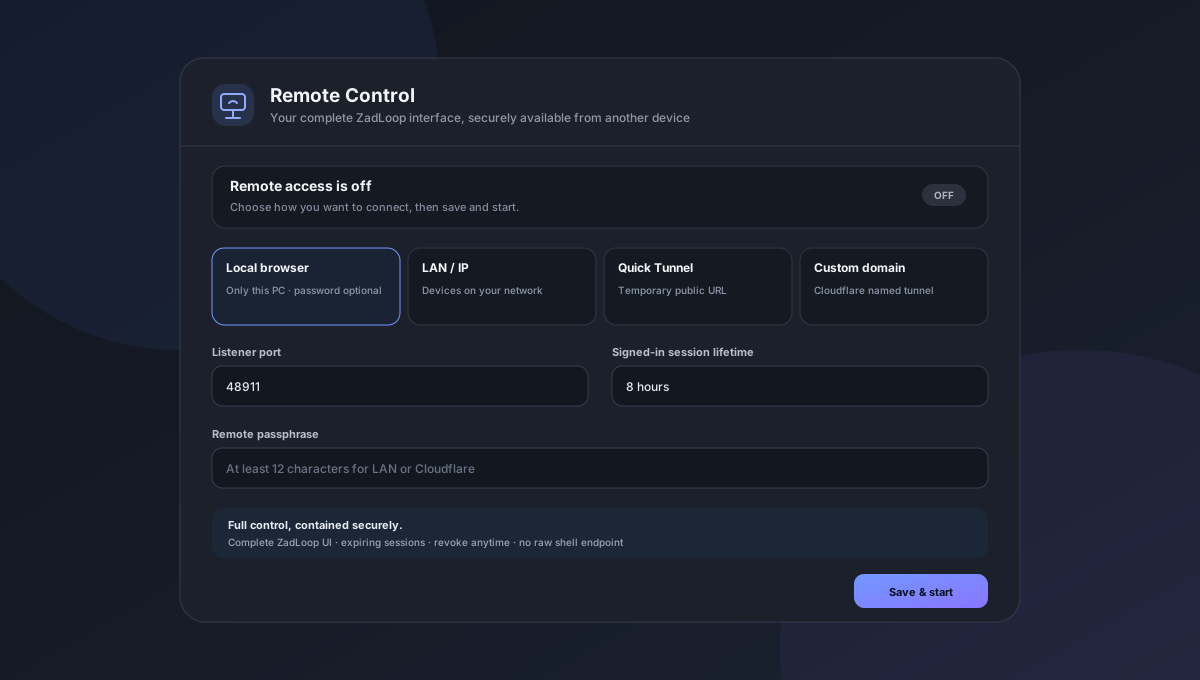
Open Remote in the bottom dock and choose one connection mode:
- Local browser listens only on
127.0.0.1; a password is optional. - LAN / IP makes ZadLoop available to devices on the same network and requires a passphrase.
- Quick Tunnel creates a temporary
trycloudflare.comaddress and requires a passphrase. - Custom domain runs an existing Cloudflare named tunnel using its UUID, hostname, and credentials file.
Click Save & start, then copy the live URL. A signed-in remote browser receives the complete ZadLoop interface: chats, settings, plugins, Theme Studio, transfer, mode switching, and agent tools. The toolbar shows active sessions; Revoke sessions disconnects them immediately and Stop remote access closes the listener and tunnel.
Remote access is off after first installation. Passphrases are stored only as salted scrypt hashes. Network modes cannot be started without one, login attempts are rate-limited, and the private local ZadLoop browser credential is never sent to a visitor. Quick/custom tunnel modes bind only to loopback; LAN mode does not create a firewall rule automatically.
Computer Use
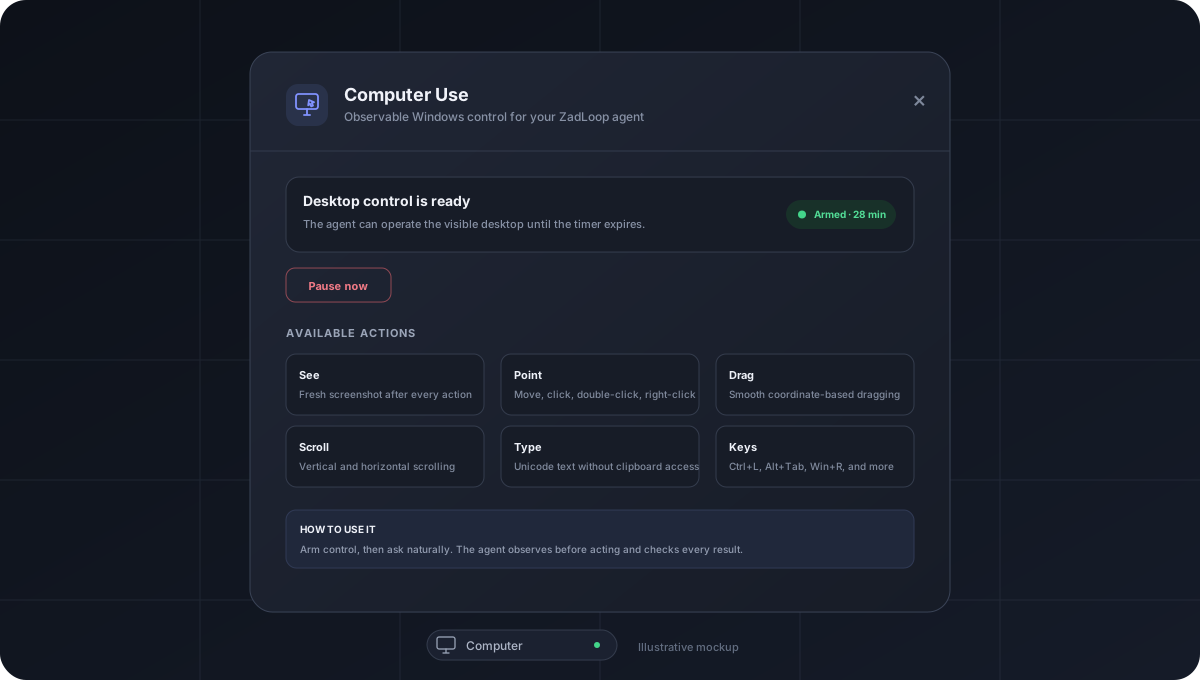
Ask for a desktop task naturally. The agent uses computer_access to enable control when needed, operates through screenshots, then can pause access when finished. Computer in the bottom dock still provides live status, manual 15–120 minute controls, and Pause now for terminating an in-flight action.
Then ask naturally, for example:
- “Open Settings and enable Night light.”
- “Use the browser to download my latest invoice.”
- “Open this spreadsheet and sort the table by date.”
The model receives a new screenshot after every action and can move, click, double-click, right-click, drag, scroll, type Unicode text, and press shortcuts such as CTRL+L or ALT+TAB. Coordinates remain accurate on scaled and multi-monitor desktops.
Use a vision-capable model. Supervise consequential work and pause before passwords, payments, account changes, or other sensitive actions.
Context Surgery
Use the actions under an assistant message:
- Edit reply changes visible reply text while preserving reasoning and tool calls.
- Edit reasoning changes only the reasoning stream.
- Remove shadows that message from the model-visible context through an append-only surface replacement.
/context list,/context edit,/context think,/context clear-think,/context rewrite,/context delete, and/context replaceprovide command-level control.
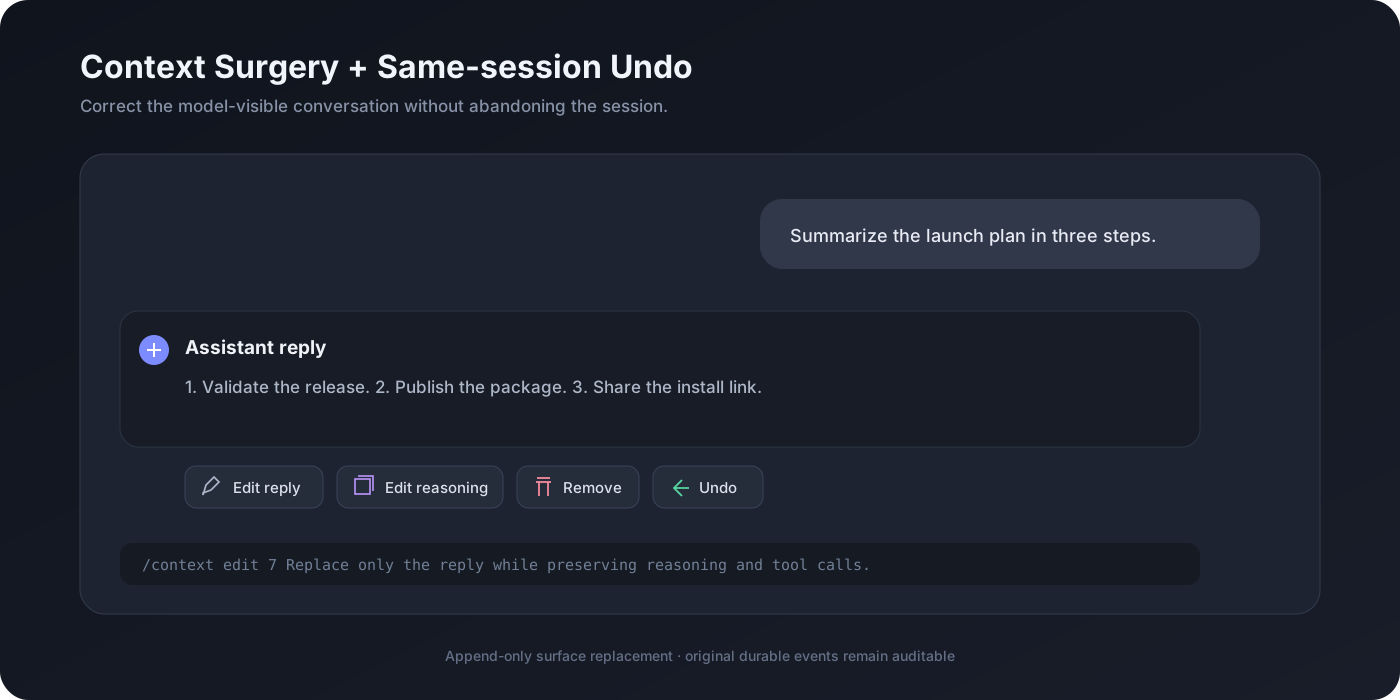
Context Surgery is powerful: it changes what the model sees on its next request. The original durable log is retained for auditability.
Same-session Undo
Click Undo beside an exchange. The selected user message and its reply are removed from the visible transcript and future model context while the session ID stays unchanged.
Undo does not reverse file edits, commands, deployments, or other external side effects.
Standard ↔ Delegate mode
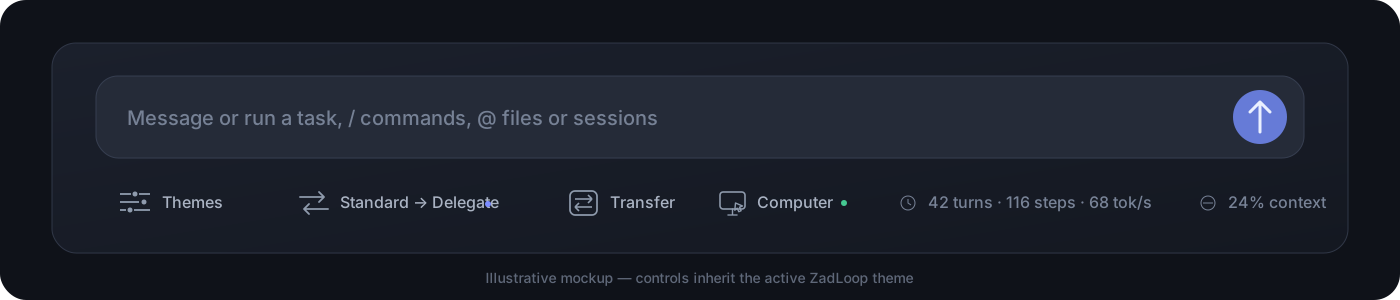
The compact dock control shows the current and target mode, for example Standard → Delegate. Clicking it recomposes the existing live agent and records agent-preset/selected; it does not start a new session.
Theme Studio
Open Themes from the bottom dock. Choose from 70 mode-aware presets or tune typography, surfaces, accents, radii, density, shadows, gradients, and chat colors with an always-live preview.
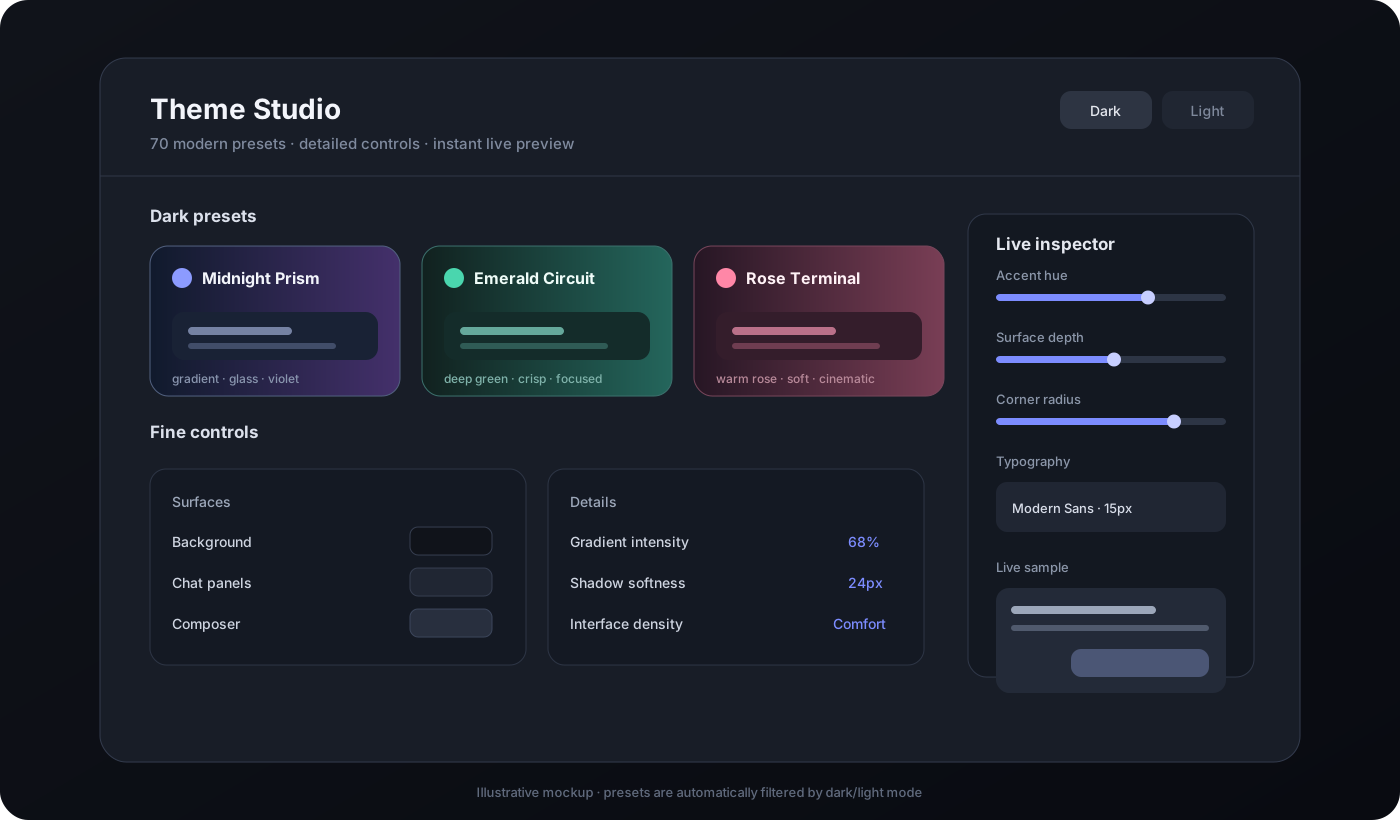
- Dark presets appear only in dark mode.
- Light presets appear only in light mode.
- Every preset recolors the background, panels, composer, messages, text, borders, and interactive states—not just the wallpaper.
Transfer a complete chat
- Open the chat you want to move.
- Click Transfer → Export complete chat.
- Copy the resulting
.zadloop-session.zipto the other PC or RDP. - Install this toolkit there.
- Click Transfer → Choose transfer file and select the ZIP.
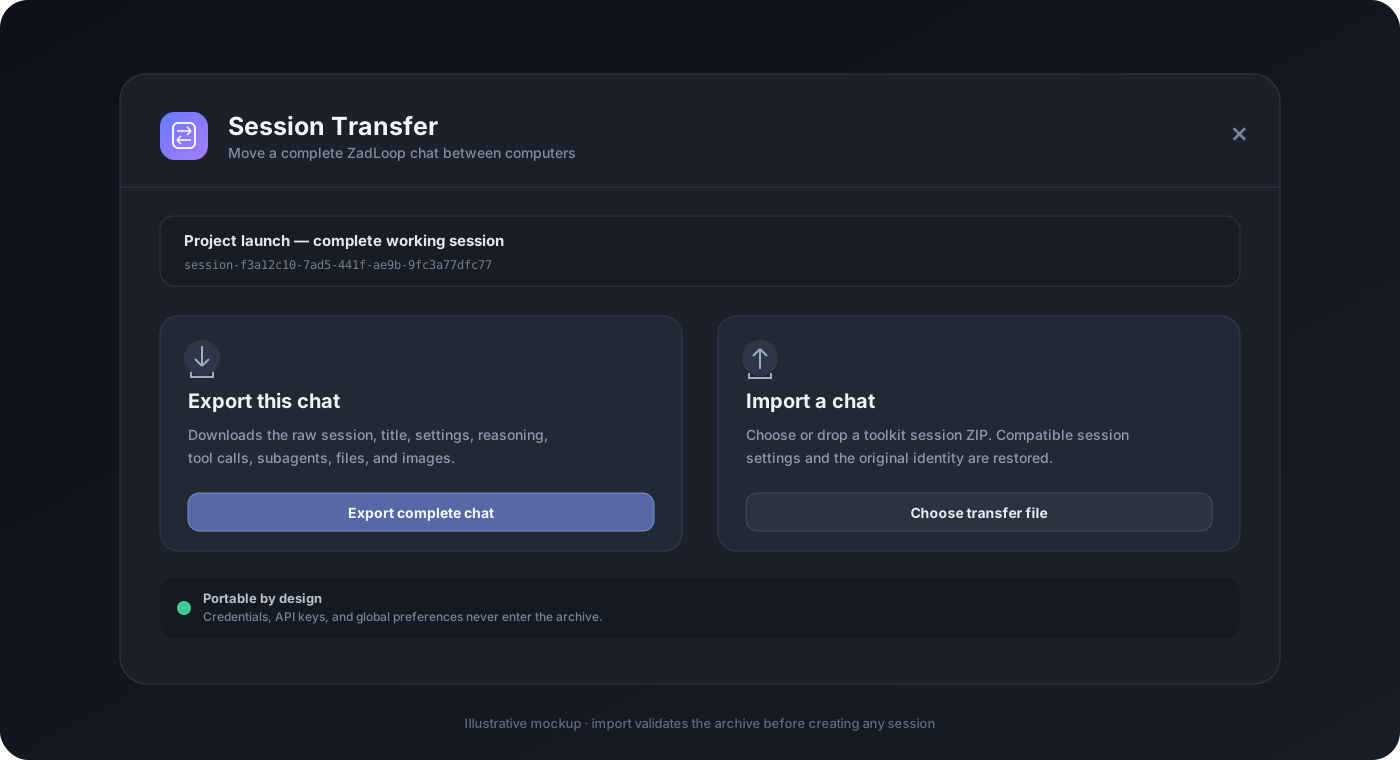
The archive preserves the session title and identity, model/mode/access events, full conversation, reasoning, tool calls/results, subagent sessions, files, and images. Import refuses to overwrite an existing session ID.
Machine-wide credentials, API keys, provider logins, and global preferences are intentionally excluded. Configure those separately on the destination computer.
Practical examples
See examples/WORKFLOWS.md for complete workflows:
- Correct a bad assistant answer without losing tool calls.
- Undo a mistaken exchange and resend a corrected prompt.
- Switch a long-running session between Standard and Delegate.
- Move a session from a PC to an RDP.
- Build matching dark and light visual profiles.
Safety and privacy
- No telemetry is added by this toolkit.
- Remote Control is disabled by default, requires authentication for every network/tunnel mode, supports expiring/revocable sessions, and never exposes ZadLoop's private upstream cookie.
- Session Transfer writes only to local ZadLoop session/attachment storage.
- Imported archives are checked for traversal paths, encryption, ZIP64, entry count, compressed size, expanded size, valid JSONL, contiguous event sequences, duplicate session IDs, and attachment integrity.
- Context edits and Undo are append-only. They change the model-visible surface rather than erasing the durable log.
- Context Surgery exposes loopback-only local API routes. Any trusted local process can reach loopback, so use ZadLoop on a trusted machine.
- Computer Use is Windows-only, starts paused after every host start or plugin reload, never persists an access grant, and exposes fixed desktop actions rather than arbitrary command execution.
- The agent may enable or pause Computer Use through
computer_access. Manual Pause now terminates an in-flight desktop action, while screenshots are stored by ZadLoop as normal session attachments for inspection.
Compatibility
Validated with:
- ZadLoop 0.5.1
- DSH 0.2.0-rc.2
- Node.js 22.19 or newer
- Windows desktop web profile
The clean-profile smoke test installs only this tarball, resolves every bundled feature through DSH's runtime package router, and boots a separate web host on an OS-assigned port. Computer Use additionally requires Windows and a model route that accepts image input.
Development
npm ci --ignore-scripts
npm test
npm run check
npm pack
The release package uses npm bundledDependencies. The vendor/ archives make builds deterministic and keep installation offline. The complete Computer Use and Remote Control sources, client panels, and tests live in packages/computer-use and packages/remote-control.
See docs/ARCHITECTURE.md, CONTRIBUTING.md, and SECURITY.md.
Credits
- Context Surgery is based on WASD258-jpg/dsh-context-surgery, licensed under MIT.
- Context surface replacement follows the same append-only mechanism used by DeepSeek Harness compaction.
- Full attribution is in THIRD_PARTY_NOTICES.md.
License
MIT. See LICENSE.
Comments
Loading…