

dsh-skillswitch
Identified★ 2DeepSeek Harness(DSH)插件:在客户端左侧边栏新增 「技能开关」 页面,给每个已安装技能一个共享的开关。
dsh-skillswitch


English | 中文
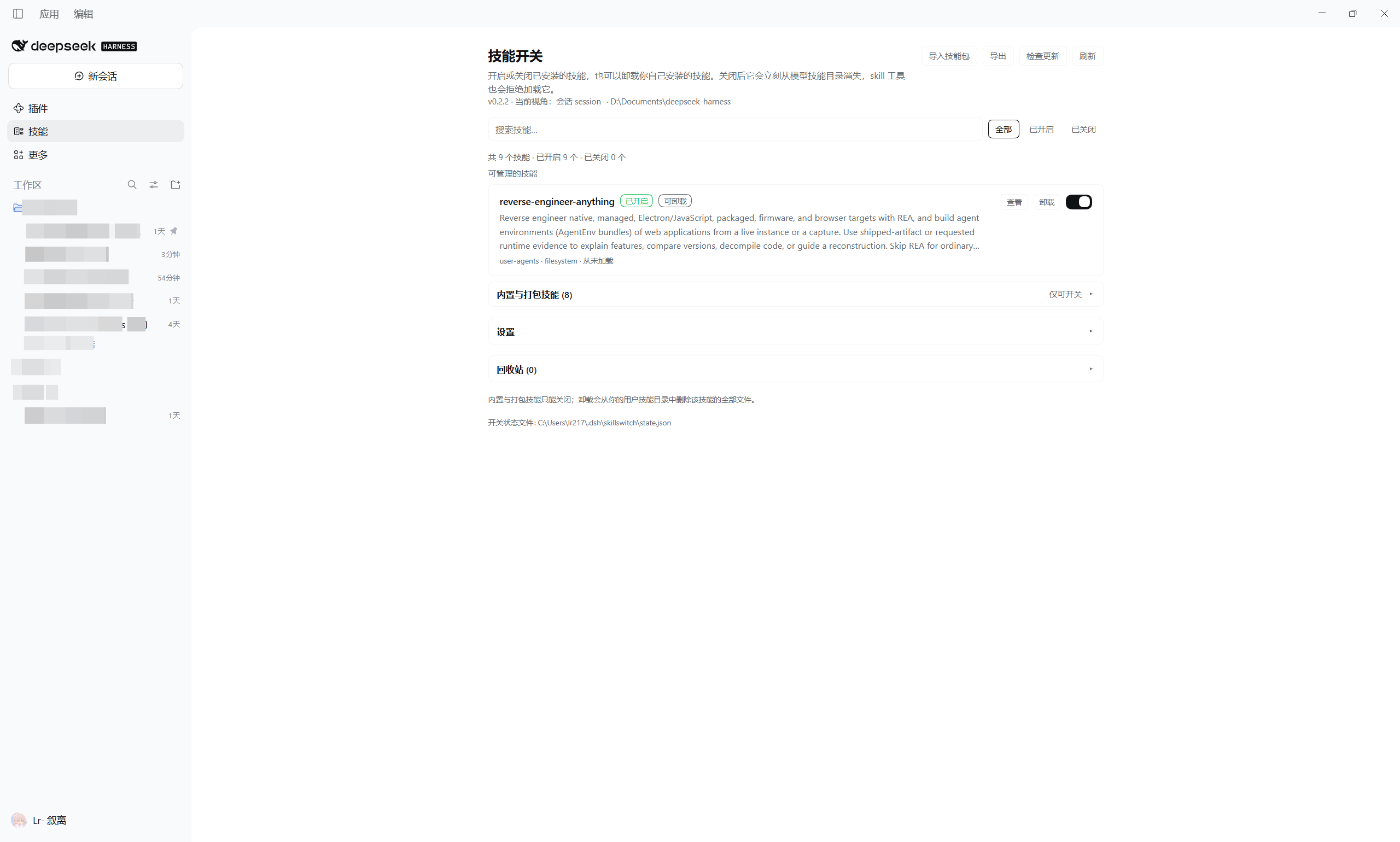
A DeepSeek Harness (DSH) plugin that adds a Skills page to the left sidebar of the Web client and gives every installed skill one shared on/off switch.
What it does
- Lists every skill the current session can see: name, source (
user-agents,bundled, packaged provider, …), description, and whether it can be uninstalled. - Turns a skill on or off. A disabled skill is served by a shadow skill provider
whose invocation flags are both false, so it disappears from the session skill
catalog at the next model request, the
skilltool refuses to load it, and/namegestures no longer inject it. The skill's own files are left untouched. - Answers a stale call. When the model calls
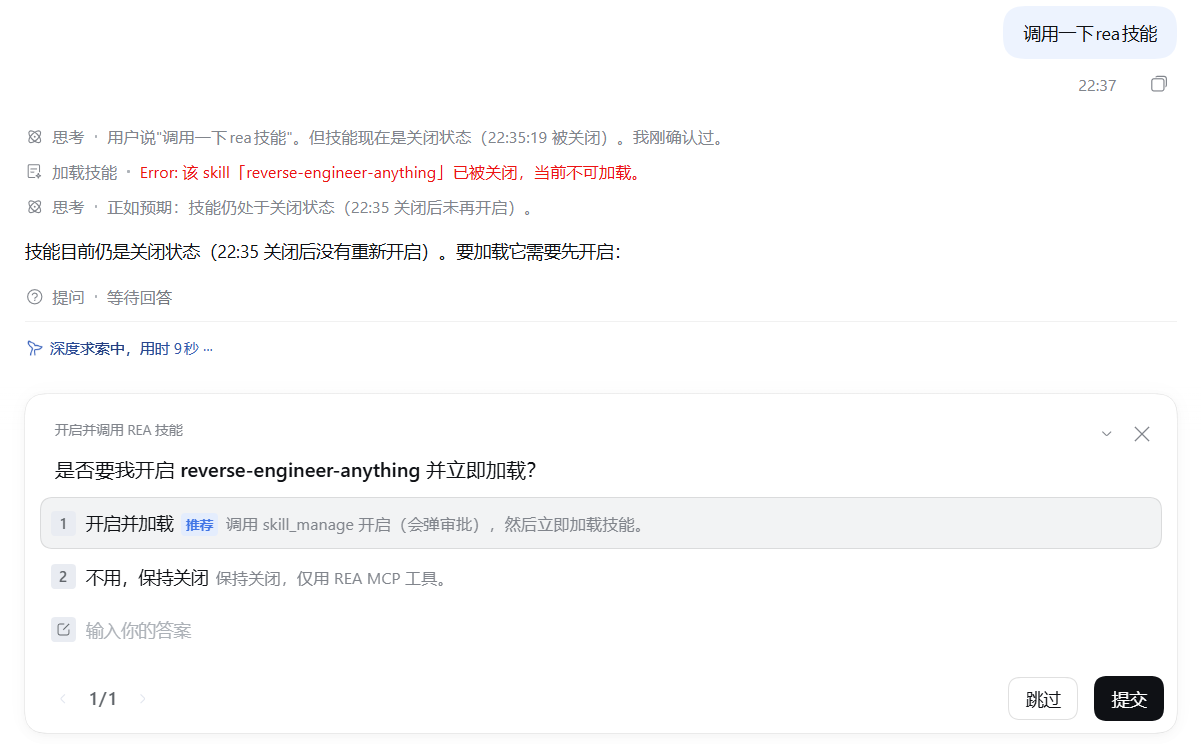
skillfor a disabled skill, atools/pre-executegate answers with the local “该 skill 已被关闭 …” reason. The message tells the model to ask the user first and then callskill_manage(action="enable"); the page reflects the same state immediately. - Uninstalls user-installed skills. Only skill folders under writable roots
(
$DSH_HOME/skills,$DSH_AGENTS_HOME/skills,<project>/.dsh/skills,<project>/.agents/skills) are deleted — the whole bundle directory or the flat.mdfile, plus any same-name entry in those roots. Shipped and packaged skills cannot be deleted from the application; they can only be turned off. - Groups shipped skills. Your own skills stay at the top; shipped and packaged skills live in a collapsible section that is folded by default.
- Checks for updates from the page. A Check for updates button compares the running version with the published npm version and links to the Plugins page when a newer one exists.
- Searches and filters. Filter by name/description/source, and by switched-on or switched-off state.
- Previews skill bodies. View shows the instruction file without loading the skill into the session; usage counters show how often each skill was loaded (never loaded marks unused ones).
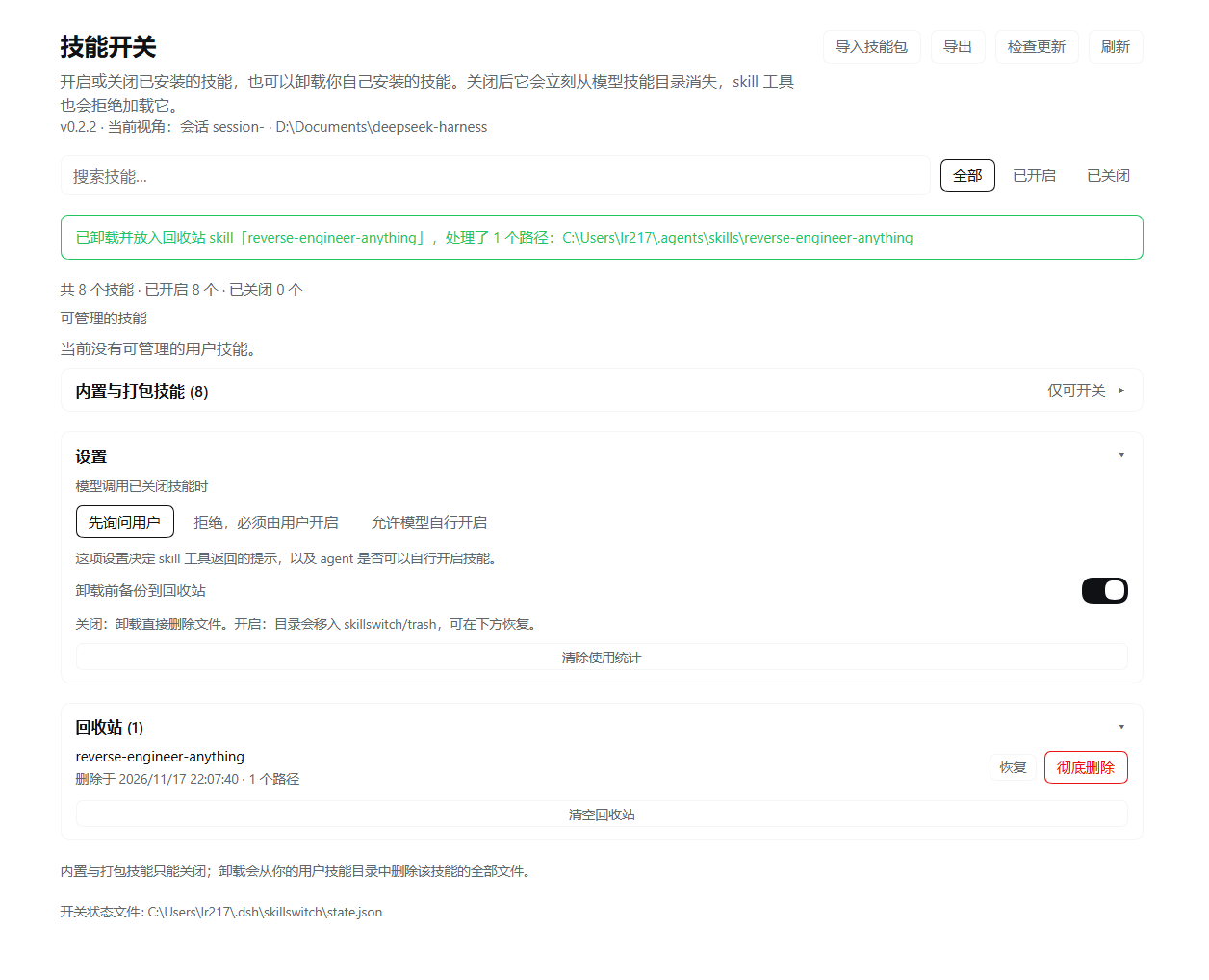
- Optional trash. With Back up uninstalled skills enabled, uninstall moves the
skill folder to
skillswitch/trashwhere it can be restored or deleted for good. - Policy for disabled skills. Settings choose what the
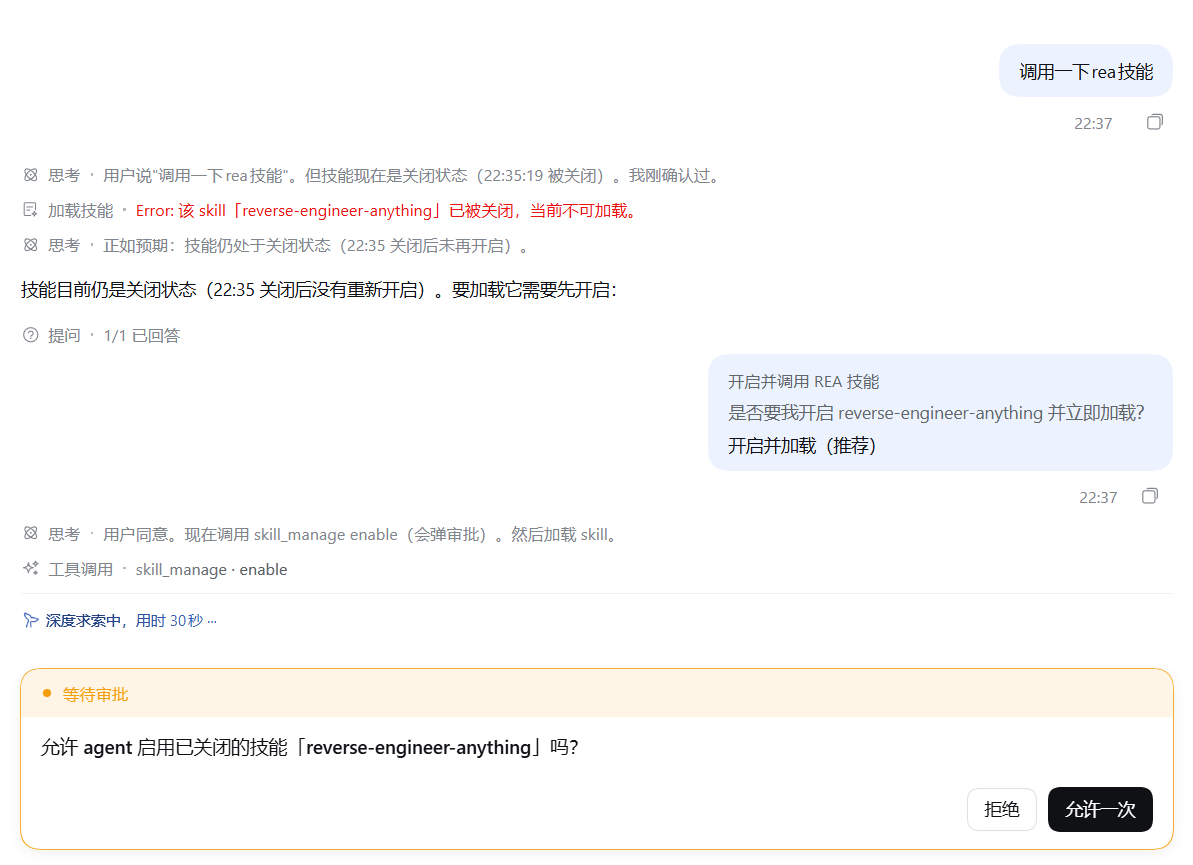
skilltool answers when a disabled skill is called. Require your approval makes the agent's enable attempt show an approval prompt (the call runs only if you allow it once); refuse blocks model enable entirely; allow lets the agent enable it by itself. When the session disables approval prompts (approval policy = never), require your approval cannot show a prompt, so the model receives an explicit refusal asking the user to enable the skill from the page or switch the policy to allow. - Approval and skill switching. DSH bundles the sandbox mode and the approval policy
into permission presets:
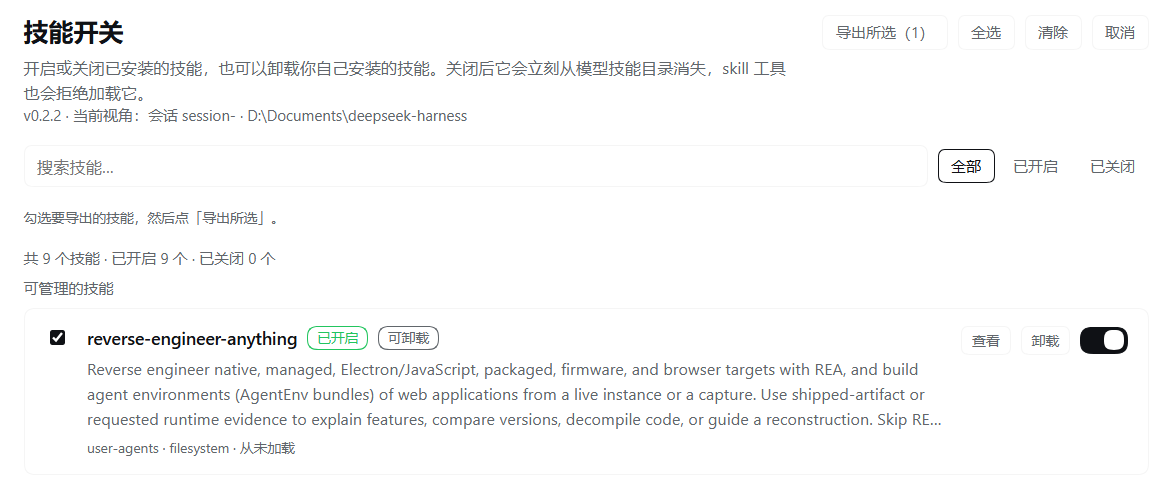
workspace-writepairs withask(approval prompts appear), whiledanger-full-accesspairs withnever(approval prompts are off, so actions that require approval are rejected automatically). Switch presets from the composer with/permission. To keep full disk access and still get the approval prompt, add a custom preset to@deepseek-ai/dsh-permission-presets(sandbox: danger-full-access,approval: ask), or set this plugin's policy to allow. - Multi-select export and import, with tool dependencies. The header Export button
switches the list into selection mode: every exportable skill gets a checkbox (select all
/ clear / cancel), and Export selected downloads one JSON pack for all of them
(
skillswitch-pack-N.skillpack.json, files base64-encoded). Packs are version 3: besides the skill files they carry generated MCP bundles and plugin requirements declared in the skill'sskillswitch.json, and import shows a Tool dependencies panel with one-click install. Import skill pack adds one or many skills under$DSH_HOME/skillsand never overwrites an existing skill. - Shows the session view. The header states which session and working directory the list is read from, or that the global view is shown.
Screenshots
| Multi-select export | Settings and trash |
|---|---|
 |  |
Why another skill plugin
Most skill managers only hide a skill from the picker. This one changes what the model sees:
- The shadow provider is registered once in the global registry layer and once in
every live agent scope, so it also wins against packaged or preset-scoped
providers. Disabling a built-in skill such as
officereally removes it from the model catalog. - The switch state is shared by the page and the model: the agent can ask you to turn a skill back on, and the page shows the result of that decision.
A disabled skill stays disabled
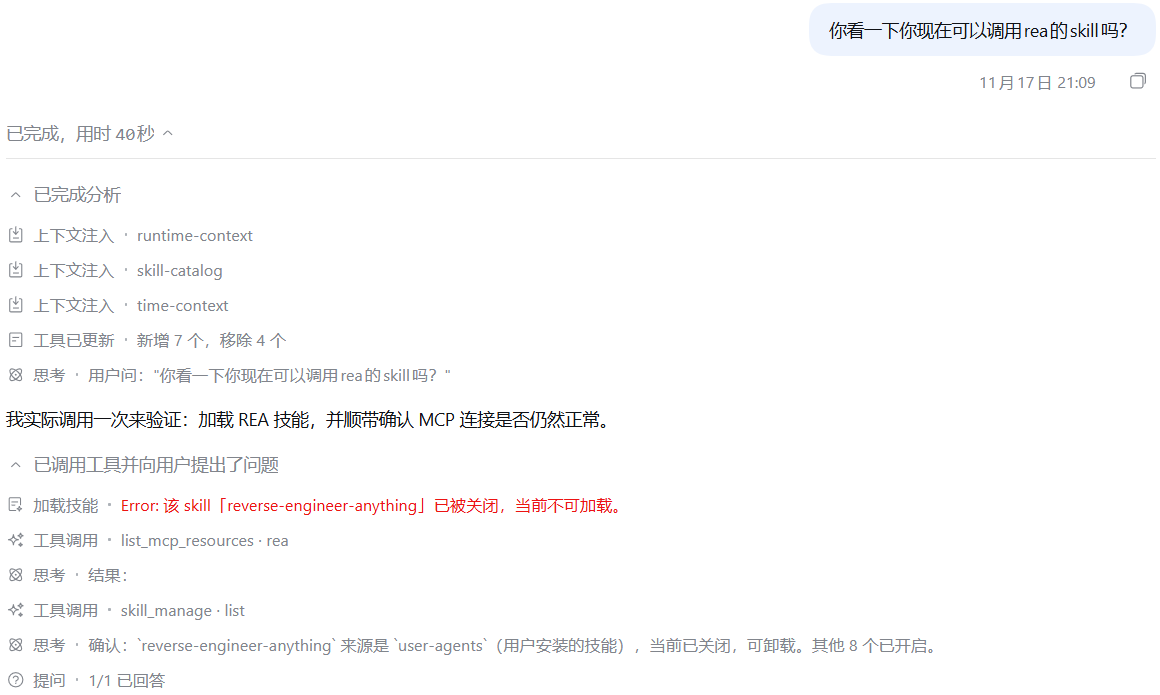
When the agent tries to load a skill that is switched off, the skill tool answers with the
local "该 skill 已被关闭 …" error instead of quietly loading it. With the default Require your
approval policy, the agent's attempt to enable it waits for your approval as well.
Tool dependencies
Skills are instructions; the tools they need (MCP servers, plugins) live in the DSH
profile, not in the skill folder. To travel with its tools, a skill can declare them in a
skillswitch.json next to its SKILL.md:
{
  "requires": {
    "mcp": [
      { "serverName": "rea", "transport": "streamable-http", "url": "https://example.invalid/mcp" }
    ],
    "plugins": ["rea-agents"]
  }
}
Export then writes a version 3 pack that also contains one configuration-only MCP bundle per
declared server (a package.json plus a cordis.patch.yml inserting
@deepseek-ai/dsh-mcp-client). Sensitive env/headers values never leave the machine as
plain text: they become !!js String(process.env.KEY ?? '') references, and the pack lists
the credential keys to configure on the target machine.
Import writes the skills plus the dependency bundles under
$DSH_HOME/skillswitch/bundles/, then shows a Tool dependencies panel: each MCP server
or plugin gets an Install button that asks DSH's plugin manager to install it. Installation
is never silent, and a DSH restart may be needed before MCP tools appear.
When a dependency is no longer needed, the same panel offers Uninstall for installed
bundle-managed dependencies: it removes the profile bundle (and its MCP configuration) and
leaves the skill files alone. Dependencies configured by hand (a raw
~/.dsh/cordis.patch.yml entry) and global npm CLIs are outside this control.
Limits: credentials must be set on the target machine, MCP servers must be reachable from it, plugin packages must exist in its registry, and an existing same-named dependency is skipped rather than overwritten.
Permission approval prompt demo
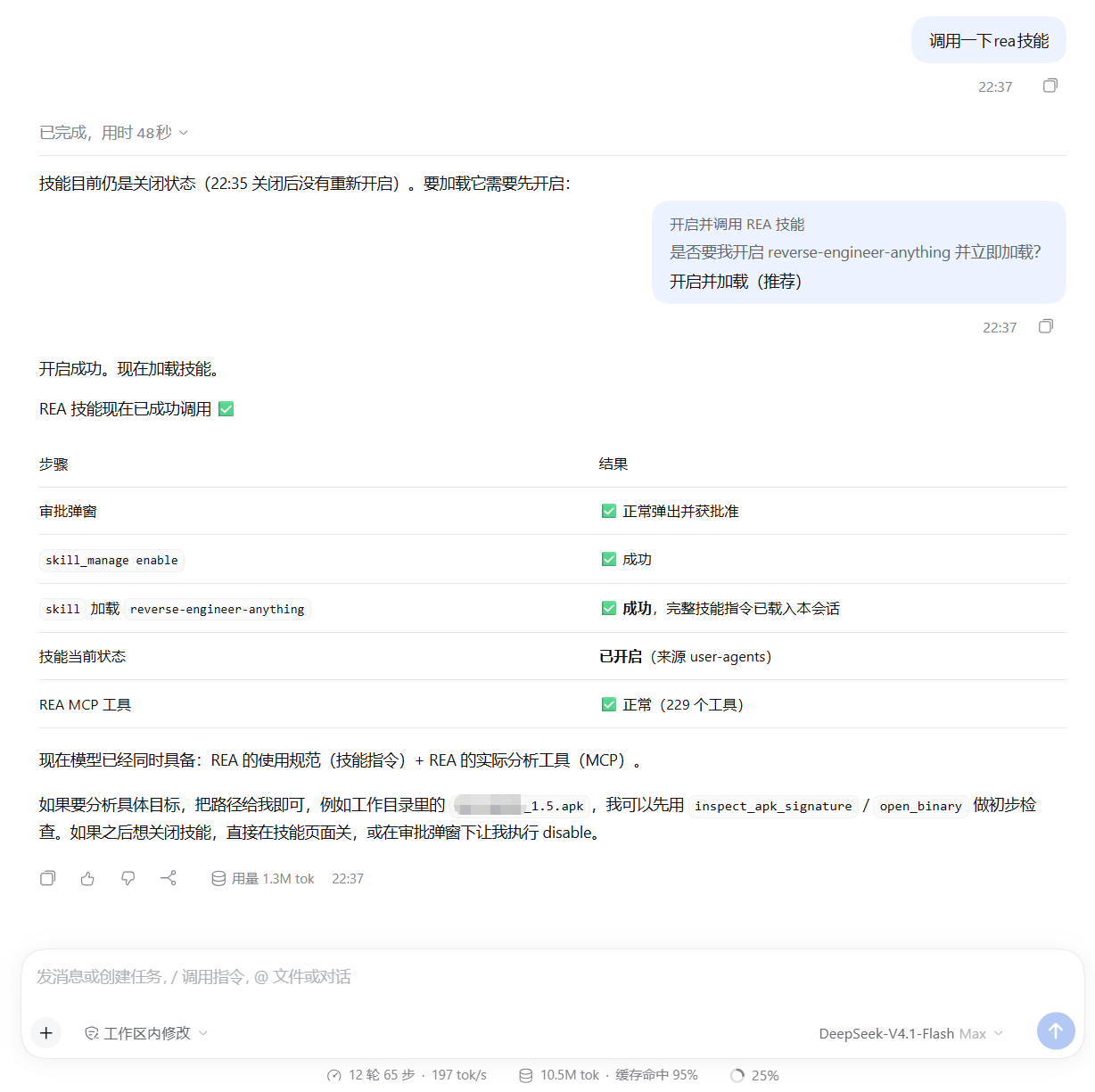
With Require your approval (the default), the agent cannot quietly re-enable a skill: it asks you first, then DSH shows the approval prompt for the exact tool call. After you allow it once, the skill is enabled, loaded, and usable again.
Install
Requires DSH >= 0.2.2-rc.3. Published on npm as
dsh-skillswitch.
-
From npm (recommended) — ask the agent to run:
plugin_manager install_bundle target="dsh-skillswitch"Installed this way, the Plugins page can check for and apply updates.
-
From GitHub — ask the agent to run:
plugin_manager install_bundle target=https://github.com/Lrht-llw/dsh-skillswitch.git -
From a local checkout — open Plugins in the left sidebar, choose Add plugin, and point it at this directory; or run:
plugin_manager install_bundle target=<absolute path to this directory>
A page entry named Skills appears in the left sidebar between Plugins and Automation tasks. If the page does not appear right away, refresh the Web client.
Use it
- Page: toggle a skill on or off with the switch on its row; press Uninstall twice to confirm deletion. Shipped skills show “shipped — disable only”.
- Model tool:
skill_managewithaction: "list" | "enable" | "disable" | "uninstall"and the exact skill name.
Switch state lives in $DSH_HOME/skillswitch/state.json. Removing the plugin does not
delete that file; delete the folder when you no longer need the saved switches.
How it works
| Piece | Mechanism |
|---|---|
| Hide a skill | A shadow SkillProvider (rank -1, both invocation flags false) registered in the global layer and in each agent scope |
| Block a call | tools/pre-execute denial with the localized “disabled” reason |
| Page data | An authenticated exact Fetch route on /api/skillswitch, owner-only through the DSH connection fence |
| Agent operations | skill_manage tool sharing the same Host implementation as the page |
| Persistence | JSON state file under $DSH_HOME/skillswitch |
Limitations
- The switch is profile-wide and takes effect from the next model request in every session. Content a session already loaded stays in that session's history; the engine appends a replacement catalog that retires the old list.
- Shipped and packaged skills cannot be uninstalled through the plugin (their files live inside the application), only switched off.
- Uninstalling a user skill deletes files and cannot be undone.
License
Apache-2.0. See LICENSE.
Comments
Loading…
From the same category
by awesome-dsh-plugin
A curated list of plugins for DeepSeek Harness (dsh) · DeepSeek Harness 插件精选列表
★ 25.4k
CC0-1.0
Python
Nov 22, 2026
by woniuniuniu
DeepSeek Harness 自媒体工作台插件:一句话记灵感,一键生成脚本、封面、配图和分镜
★ 1.7k
↓ 5.8k/wk
MIT
JavaScript
Nov 18, 2026
dsh plugin --profile web add dsh-media-deskby 0xsline
DeepSeek Harness (DSH) ecosystem: curated plugins, tools, and infrastructure from dsh-external/hub and the public dsh-plugin topic.
★ 1.4k
CC0-1.0
Python
Nov 6, 2026
by keli-wen
Hire Google's Antigravity CLI (agy) as a fast Gemini staffer for Claude Code, OpenAI Codex, and DeepSeek Harness.
★ 910
MIT
JavaScript
Nov 19, 2026
dsh plugin --profile agent add agy-staffby SAOS-3624
Scene-aware storyboard for DeepSeek Harness: 9-16 numbered cells with timestamps + transcript + an audio envelope, packed into ONE image (384 tokens). Two tools: video_storyboard and video_zoom.
★ 589
↓ 17k/wk
MIT
JavaScript
Nov 21, 2026
dsh plugin --profile web add dsh-video-storyboardby omdsh-dev
DSH(DeepSeek Harness)插件:把 ego-lite 浏览器(给 AI Agent 用的 Chromium)接入 HARNESS——13 个结构化 ego_* 工具(文本语义快照、语义定位点击、表单填充、截图、CDP 控制、任务空间隔离),内置 ego 运行时,Linux + Chrome 开箱即用,无需克隆官方仓库或手动构建。
★ 563
↓ 13.7k/wk
NOASSERTION
TypeScript
Nov 21, 2026
dsh plugin --profile web add dsh-ego-browser