

dsh-file-download
Manifest valid★ 1Download files and recursive folder ZIP archives from DeepSeek Harness file rows and preview mode.
File Download for DeepSeek Harness


Save any regular file from Harness's Files tree or document preview with a Download button. Download an entire folder as a ZIP archive, including nested files and empty folders. PDF, DOCX, XLSX, text, and binary files retain their original bytes, filename, and extension.
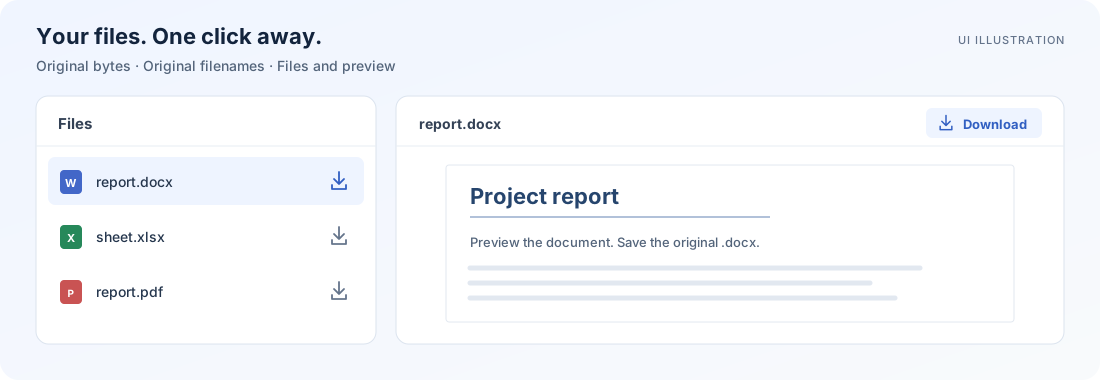
An independent community plugin for DeepSeek Harness. Tested with Harness 0.2.0-rc.2; maintained separately from DeepSeek.
Install
Requirements: an existing Harness web installation, its dsh CLI, and pnpm for plugin management. Run the command on the machine hosting Harness, using the same Harness home and profile as your web server.
-
Download
dsh-file-download-0.2.0.tgzfrom v0.2.0. -
From the directory containing that file, install the bundle:
dsh plugin --profile web add ./dsh-file-download-0.2.0.tgz -
Restart your Harness web server and refresh the browser. For a standard CLI installation, start it with
dsh --profile web.
Replace web with the profile you actually use. Custom container deployments must install the bundle in their persistent profile or image; installing it on your laptop does not change a remote server.
The archive includes prebuilt modules. It requires no compiler, document converter, or install-time build permission. SHA256SUMS is available alongside every release.
Verify registration:
dsh --profile web --dump-config
The composed configuration should contain the dsh-file-download bundle layer. The package is distributed through GitHub releases; it is not published to npm.
Use
- Files: select the Download icon beside a regular file. Selecting the filename still opens its native preview.
- Folders: select the Download icon beside a folder to save
folder-name.zip. The folder's expand button still works normally. Use Download ZIP in the Files toolbar to archive the current root. - Preview: select Download in the preview toolbar. A DOCX preview downloads the original
.docx; the rendered preview remains available. - During a transfer: select the same button to cancel. Its tooltip shows progress; status messages report completion or errors.
Files up to 32 MiB use the browser's normal download behavior. Larger files stream to a destination chosen through Chrome or Edge's save dialog. If an initial metadata request expires the browser's click permission, the plugin asks you to click Download once more.
Folder downloads open a save dialog immediately in browsers supporting showSaveFilePicker, then stream the ZIP to that destination. Other browsers can download ZIPs up to 32 MiB, including archive overhead. ZIPs retain the selected folder as their top-level directory and include hidden files. They store original contents without recompression.
Archives must stay below 4 GiB, 10,000 entries, 64 nesting levels, and an 8 MiB ZIP metadata budget. An incomplete host listing, unreadable file, symlink, unsupported special entry, or source change produces an error instead of a silently incomplete ZIP. See archive limits.
Document creation and Markdown-to-PDF conversion require other tools.
Compatibility
| Environment | Files up to 32 MiB | Files over 32 MiB |
|---|---|---|
| Chrome / Edge, secure web context | Normal browser download | Stream to a selected file |
Browsers without showSaveFilePicker | Normal browser download | Clear unsupported-browser message |
Actual qualification used Chrome. Other browsers with standard Blob downloads are expected to support the smaller-file path, but have not been manually qualified. See compatibility and troubleshooting.
The table describes individual files. Folder ZIPs use the save picker whenever available; their fallback follows the same 32 MiB bound.
Preview and Files-toolbar integration use Harness's official action slots. File and folder rows use a small adapter to the native row attributes. Changes to those attributes may require a plugin update.
Remove
dsh plugin --profile web remove dsh-file-download
Restart the web server and refresh the browser after removing the bundle.
Develop
Node.js 22.22.2 or newer and npm are required for development. React comes from Harness at runtime; development dependencies are used only for building and testing.
git clone https://github.com/lorsabyan/dsh-file-download.git
cd dsh-file-download
npm ci
npm run build
npm run check
npm run release:pack
Release archives and checksums are written to dist/. Generated lib/ modules are committed and checked against source in CI. See contributing, architecture, and validation.
Security and support
Downloads use Harness's existing authenticated file Remote. The plugin introduces no server endpoint, telemetry, external file upload, or additional file-access policy. It inherits the permissions of the Harness installation.
Report ordinary bugs through issues. Follow SECURITY.md for sensitive reports. Please omit credentials, private documents, and server addresses from public reports.
MIT licensed. DeepSeek Harness and its trademarks belong to their respective owners. The README illustration is a schematic of the integration, not a screenshot.
Comments
Loading…
From the same category
by awesome-dsh-plugin
A curated list of plugins for DeepSeek Harness (dsh) · DeepSeek Harness 插件精选列表
★ 18.3k
CC0-1.0
Python
Oct 10, 2026
by 0xsline
DeepSeek Harness (DSH) ecosystem: curated plugins, tools, and infrastructure from dsh-external/hub and the public dsh-plugin topic.
★ 1.2k
CC0-1.0
Python
Oct 10, 2026
by pax-beehive
Open-source CLI, schemas, resolver, and DSH agent tools for DSH Plugin Hub
★ 450
MIT
TypeScript
Oct 6, 2026
by xiajiajun516
DeepSeek Harness (DSH) backup & restore plugin — export, import, migrate and sync your complete DSH configuration, plugins, MCP servers, skills and workspace. One-click migration to another machine.
★ 176
MIT
TypeScript
Oct 8, 2026
dsh plugin --profile web add dsh-config-managerby yjh051108
推荐组件(非必须):DeepSeek Harness 运行时注入器;已随 dsh-routing-suite 单仓库化保留,本仓库继续维护/发布。
★ 164
TypeScript
Sep 18, 2026
dsh plugin --profile web add @dsh-external/dsh-super-injectorby jigjoy-ai
A CLI that turns a goal into a pull request - and a sandbox for testing concurrent AI coding agents on the Mozaik runtime.
★ 124
MIT
TypeScript
Oct 2, 2026