

dsh-mcp-status
Discovered★ 3DeepSeek Harness plugin: an MCP status button in the chat header showing which MCP servers answer right now
dsh-mcp-status
English · Русский




A DeepSeek Harness plugin that puts an MCP button in the chat header. One click and you see which MCP servers are connected — and which of them answer right now, with the number of tools each one actually exposes.
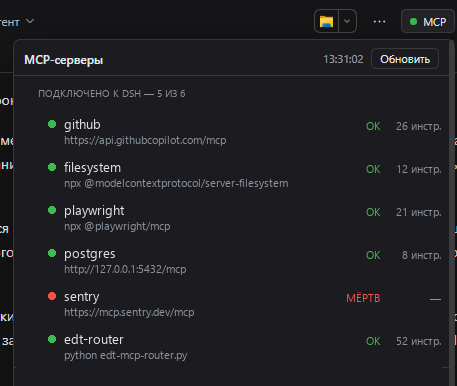
Example servers, addresses and names in the screenshot are placeholders.
Contents
- Why this exists
- What you get
- How it works
- Wire format
- States
- Configuration
- Installation
- Standalone probe
- Troubleshooting
- Limitations
- License
Why this exists
DSH connects MCP servers once, at startup. When one of them is down, the symptoms are indirect: a tool that used to be in the model's toolset is simply not there, or a call fails with a transport error. The configuration file only tells you what should be connected, not what is.
An endpoint that holds a TCP port but never completes the MCP handshake looks
"up" to any port checker. This plugin answers a stricter question: does the
server complete initialize + tools/list right now, and how many tools does
it return? That is the same thing the Harness itself needs in order to give
the model those tools.
What you get
| Element | Where | What it shows |
|---|---|---|
| Status pill | chat header, conversation.session.header.utilities | a dot: green when everything answers, red when something is dead |
| Server list | inside the popover | name, endpoint, state, response time, tool count |
| EDT block | inside the popover | which 1C:EDT projects are currently serving MCP, discovered from each project's .mcp.json |
| Refresh button | popover header | forces a probe; the timestamp changes when the new result lands |
The answer is cached, so opening the panel is instant even though a full probe takes ~15 seconds.
How it works
Two halves in one package — the usual shape for a DSH plugin with a UI.
flowchart LR
    subgraph host["Host · Node"]
        A["apply(ctx)"] --> B["webServer.register<br/>GET /plugin/mcp-status"]
        A --> C["refresh()<br/>startup + every 5 min"]
        C --> D["spawn python<br/>mcp_status.py --json --out file"]
        D --> E[("cache<br/>data · fetchedAt")]
        E --> B
    end
    subgraph client["Client · browser"]
        F["McpStatusButton"] -->|"fetch, every 20 s"| B
        F --> G["popover<br/>servers + EDT"]
    end
Host half — index.js
Declares export const inject = ['webServer'], registers the route inside
ctx.effect, and runs the probe at startup and then every five minutes. The
probe is a child process: it writes JSON to a file, the plugin reads that file,
caches it and serves it.
Client half — client.js
A classic script that registers itself through window.__ModuleLoader__.load
and exports { inject: ['slots'], apply(ctx) }. It places a React component
into the conversation.session.header.utilities slot — the same band as the
locale and Markdown controls. The component polls the route on mount, then
every 20 seconds; while the host reports refreshing: true it polls every
1.5 seconds, so the timestamp changes the moment the result is ready instead of
half a minute later.
A handshake and not a port check
For every configured server the probe performs a real MCP handshake:
POST initializewithAccept: application/json, text/event-stream, following the307redirect some servers answer on/mcpbefore/mcp/.- Capture
Mcp-Session-Idand sendnotifications/initialized— several FastMCP-based servers rejecttools/listwith "Invalid request parameters" without it. POST tools/listwith that session header; parse either a plain JSON body or an SSE stream (data: {...}blocks).- For
stdioservers: spawn the configured command, speak newline-delimited JSON-RPC over stdin/stdout, with separate timeouts per stage — a router can take 12 seconds ontools/listbecause it rescans its port range first.
Why a Python child process
That logic already exists as a tested Python script (scripts/mcp_status.py,
standard library only). Re-implementing the transport edge cases in JavaScript
would create a second source of truth, so the host half simply runs the script
and caches its JSON. The script ships inside the package — no external
dependency.
One consequence worth knowing: the child's stdout is not captured through a
pipe. The script writes its result to a file (--out), the plugin reads and
deletes it. Pipes are fragile under sandboxed shells; a file handoff works
everywhere.
Wire format
GET /plugin/mcp-status returns the cache envelope:
{
  "ok": true,
  "fetchedAt": 1793269934399,
  "durationMs": 14984,
  "refreshing": false,
  "error": null,
  "data": {
    "generatedAt": "2026-10-29T13:32:14",
    "config": "C:\\Users\\me\\.dsh\\profiles\\desktop\\cordis.patch.yml",
    "servers": [
      {
        "name": "edt-router",
        "transport": "stdio",
        "endpoint": "python edt-mcp-router.py",
        "state": "ok",
        "ms": 12293,
        "tools": 52,
        "detail": ""
      },
      {
        "name": "postgres",
        "transport": "http",
        "endpoint": "http://10.20.30.40:8000/mcp",
        "state": "dead",
        "ms": 2041,
        "tools": null,
        "detail": "порт закрыт (connection refused)"
      }
    ],
    "commentedOut": ["mcp-metadata"],
    "edt": [
      {
        "project": "My project",
        "url": "http://10.20.30.41:8765/mcp",
        "state": "ok",
        "tools": 50,
        "detail": ""
      }
    ],
    "orphanPorts": []
  }
}
Addresses above are examples and do not belong to any real network.
?refresh=1 starts a background probe and immediately returns the previous
cache with refreshing: true. The UI keeps polling until refreshing flips
back.
States
| State | Meaning |
|---|---|
ok | Handshake succeeded; tools is what the server returned. |
warn | initialize succeeded, tools/list failed: alive but broken. detail carries the reason. |
dead | Connection refused, timeout, HTTP error, or a non-MCP response. |
off | The config row has disabled: true. |
skipped | Not probed (for example an EDT project without a URL). |
Configuration
All keys are optional and live in the loader row:
| Key | Default | Meaning |
|---|---|---|
pythonPath | the DSH runtime Python | Interpreter for the probe script. |
scriptPath | scripts/mcp_status.py in the package | Your own copy if you change the probe. |
intervalMs | 300000 (5 min) | Background refresh period; minimum 15 s. |
- insert:
    - id: mcp-status
      name: '@local/dsh-mcp-status'
      config:
        intervalMs: 60000
Installation
The package is a bundle: it ships a dsh.bundle.patch that inserts its own
loader row.
-
Link it into the profile:
cd ~\.dsh\profiles\desktop pnpm add "link:<absolute path to this package>" -
Add the name to the bundle list in
~/.dsh/profiles/desktop/package.json:"dsh": { "profile": { "bundles": ["@deepseek-ai/dsh-base", "@deepseek-ai/dsh-web-app", "@local/dsh-mcp-status"] } } -
Restart DSH. The host half activates with the profile; the client half appears on the next page load.
To remove it, drop the name from bundles and run pnpm install again.
[!NOTE] The name
@local/dsh-mcp-statusis arbitrary: a private package that is never published to npm. Rename it inpackage.jsonand incordis.patch.yml, plus the profile's dependency key and bundle list.
Standalone probe
scripts/mcp_status.py runs without the UI:
python scripts/mcp_status.py                            # human-readable table
python scripts/mcp_status.py --json                     # machine-readable
python scripts/mcp_status.py --json --out result.json   # write to a file
python scripts/mcp_status.py --no-edt                   # skip the 1C:EDT block
python scripts/mcp_status.py --edt-roots 'D:\projects'  # EDT roots, when the router row carries none
Exit code 1 means at least one server is dead, 0 means all answered — handy
for cron.
Troubleshooting
| Symptom | Cause / fix |
|---|---|
| No button after install | The client half is registered on page load. Reload the page (F5), not just the app. |
| Route answers 404 | The host half did not activate. Look for [mcp-status] warnings in the DSH stderr; check the loader row and that the package resolves from the profile. |
cannot get property "webServer" without inject | Cordis forbids reading a service without declaring it. The plugin declares inject = ['webServer']. |
| "Checking…" for ~15 s | Expected: the stdio router rescans its port range on every tools/list. HTTP servers alone answer in ~200 ms. |
dead for EDT projects | That EDT instance is not running. .mcp.json keeps the port from its last run — not an error. |
Everything is dead | Nothing is reachable: check the MCP processes/containers, then press Refresh. |
The package appends .activation.log next to itself when the module is imported
and when apply throws. It is git-ignored.
Limitations
- The route is a plain
webServerroute, not an authenticated/apiroute. It exposes only names, endpoints and states on loopback, but if you bind DSH to a non-loopback address, this route is reachable too. - The EDT block is 1C-specific; elsewhere it simply finds no projects.
- The client half receives no configuration (DSH creates client entries without it), so all tuning lives in the host row.
License
Comments
Loading…
Similar plugins
by bobleer
MCP server that lets any agent discover, install, and run DeepSeek Harness plugins (topic: dsh-plugin).
★ 3
MIT
TypeScript
Aug 13, 2026
dsh plugin --profile web add deepseek-harness-plugin-mcpby JD579g
DeepSeek Harness (DSH) plugin: one-click MCP deployment + built-in MCP toolkit + doctor. Windows-first, connects without restarting.
★ 0
MIT
JavaScript
Sep 28, 2026
dsh plugin --profile web add dsh-mcp-hubby xxxyz
DSH durable MCP server manager plugin — Settings UI + HTTP API + mcp_manager_* model tools, cross-platform installers
★ 23
↓ 214/wk
MIT
JavaScript
Oct 20, 2026
dsh plugin --profile web add @xxxyz/dsh-mcp-managerby sduwall
A plugin for managing MCP servers in DeepSeek Harness.
★ 0
MIT
JavaScript
Sep 20, 2026
dsh plugin --profile web add @sduwall/dsh-wall-mcp-managerby kairoz9
dsh plugin for MCP status inspection and server management | dsh 的 MCP状态查看与服务管理插件
★ 4
MIT
TypeScript
Aug 15, 2026
dsh plugin --profile web add dsh-mcp-adminby openma-ai
mcp apps support plugin for dsh (DeepSeek Harness)
★ 3
↓ 85/wk
MIT
TypeScript
Aug 22, 2026
dsh plugin --profile web add @openma/dsh-mcp-apps