

deepseek-harness-media
Discovered★ 4use glm/minimax/openai/claude api in your deepseek harness
Provider Quick Config — a dsh dynamic plugin
中文版 | English
Plugin source lives in this repo:
plugin/holds the dynamic-plugin form (host.js= Host half,client.js= Client half,manifest.json= restorable definition);dsh-provider-quick-config/is the formally installable npm package (Host viadsh.bundle, Web UI viadsh.client) — zero changes to deepseek-harness source (the repo's tracked files show no modifications; it is byte-identical to the cloudorigin/master).
Screenshot
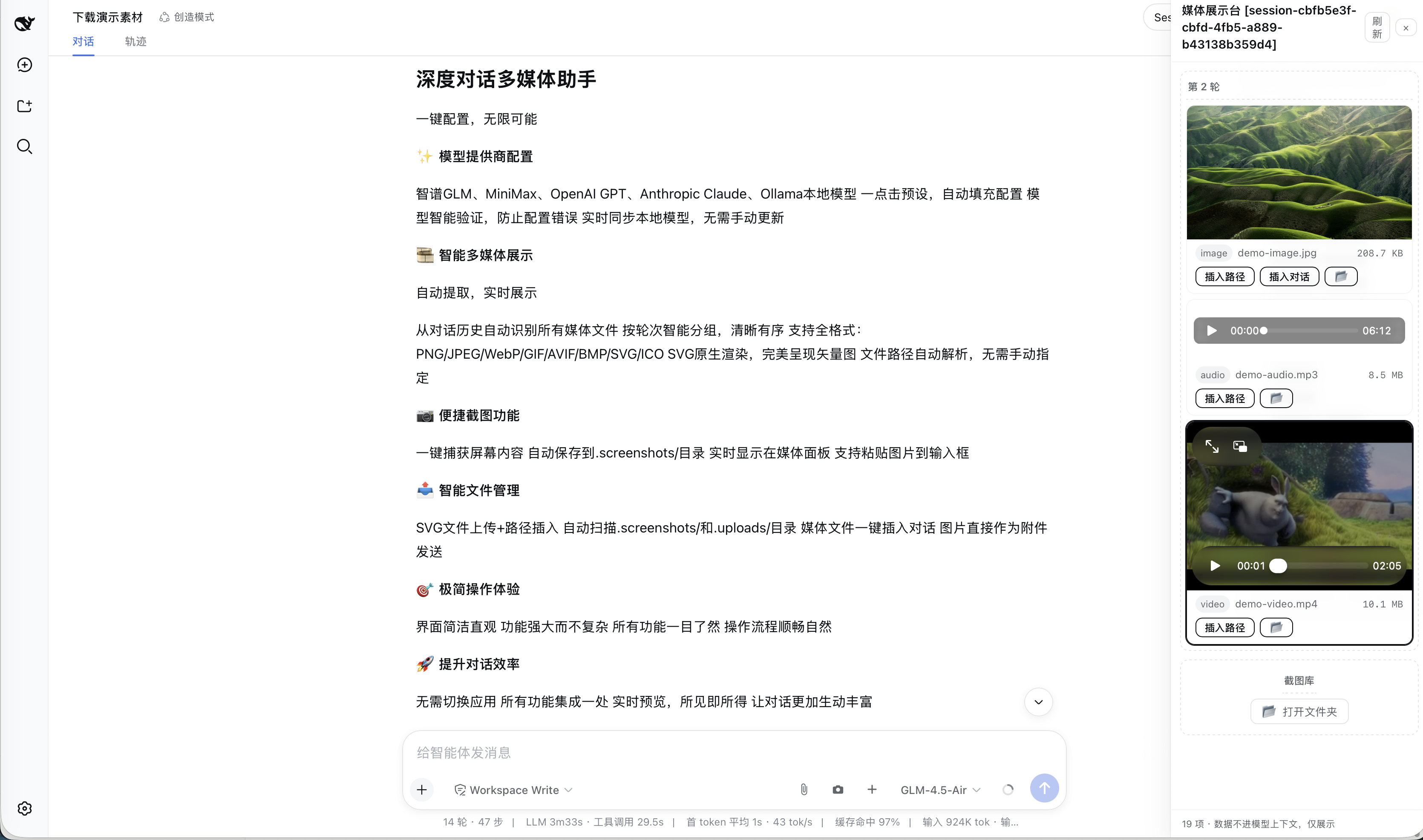
Two ways to use this plugin
| Dynamic plugin (quick/dev) | Formal install (recommended, permanent) | |
|---|---|---|
| Install | cordis_define in a session + approve the Run card | npm package installed into the web profile |
| Lifetime | current harness process only — lost on restart | survives restarts, permanent |
| Communication | harness.handle / host.call (sandbox RPC) | standard wire (connection.api: settings / credentials / llm) |
| Source | plugin/ | dsh-provider-quick-config/ |
Formal install (already done on this machine)
The package was built, packed (dsh-provider-quick-config-0.5.4.tgz) and installed into the web profile:
cd /path/to/deepseek-harness
# pack the package (in dsh-provider-quick-config/): npm pack
node --import tsx/esm apps/cli/src/bin.ts plugin --profile web add \
  file:/path/to/dsh-provider-quick-config/dsh-provider-quick-config-0.5.4.tgz
cd ~/.dsh/profiles/web && pnpm install   # only needed when the tarball path changed
dsh plugin add runs pnpm add in the profile and appends the package to dsh.profile.bundles when it declares dsh.bundle.patch. Verify:
cat ~/.dsh/profiles/web/package.json
# dsh.profile.bundles should include "dsh-provider-quick-config"
Then restart dsh web (e.g. deepseek.sh restart) — the Host half mounts from the profile bundle, and dsh-client-modules serves the Web half at /plugins/dsh-provider-quick-config/client.js. After restart: the + button appears next to Send (no per-session approval needed anymore).
Update after code changes: bump the version, re-pack, dsh plugin --profile web add file:…<new>.tgz (or update the dependency spec + pnpm install), restart.
Uninstall: dsh plugin --profile web remove dsh-provider-quick-config, restart.
A + button next to the Send button in the DeepSeek Harness Web GUI. Click it to configure model providers without touching config files by hand:
- List every configured provider route (
llm-pi-ai.providers.*) with credential status and the models each one serves. - One-click vendor presets: 智谱 GLM, MiniMax, OpenAI GPT, Anthropic Claude, Local models (Ollama) — endpoint / protocol / thinkingFormat / model list are pre-filled.
- Model picker: per-vendor quick-model chips (click to select/deselect) plus free-form rows (id / ctx / max) — e.g. switch MiniMax to M3 by clicking the
MiniMax-M3chip, no JSON editing. - Auto-validate model names on save (ping): before saving, the plugin queries the endpoint's
GET /modelsand compares (case/dash-insensitive). A model that does not exist (e.g. typingglm4.6vinstead ofGLM-4.6) fails with a red error and blocks the save. Endpoints that do not support listing are skipped and saved normally. - Auto-load local models: picking the Ollama preset immediately fetches
GET /modelsand fills the form (a "Fetch models" button exists on every custom route too). - Auto-sync local models (syncModels): routes marked
syncModels: true(Ollama preset on by default, toggle in the form, badge in the list) are compared against their endpoint'sGET /modelsevery 60s in the background; when the endpoint list changes (e.g. youollama pulla new model) the plugin writes the new list back to settings.yaml automatically and the dropdown follows — no manual editing. Endpoint order wins, capacities of already-configured models are preserved. Verified end-to-end. - Multiple API keys per vendor: add the same vendor again and the route key auto-numbers (
glm→glm2→glm3…), display name gets· 号N. - Media showcase (🎞): a persistent right-side panel that scans the current session's history and shows every media file the conversation mentioned — images (PNG/JPEG/WebP/GIF/AVIF/BMP/SVG/ICO), videos, recordings. SVG renders natively in
<img>. Files are resolved from the session's working directory, with a filename search fallback (a file whose text reference is missing a path prefix, e.g.tiile-20260815/x.mp4actually underoutputs/tiile-20260815/, is still found). Items are grouped by conversation turn ("第 1 轮", "第 2 轮"…). Media data never enters the model context — display only. Each item can insert its path into the composer (inputActions.setDraft), and raster images can additionally be inserted as an attachment. The panel also auto-scans<cwd>/.uploads/(SVG/通用上传) and<cwd>/.screenshots/(截图库) so files written there appear automatically, grouped into separate "upload library" and "screenshot library" turns.

-
SVG upload + insert path: the upload button accepts
.svg(PNG/JPEG/WebP/GIF still go through as image attachments). SVG files are saved to<session cwd>/.uploads/<name>via the newsave-mediaendpoint, and the path is appended to the composer as— visible inline once sent, and the SVG appears in the media showcase (it can also be dragged or pasted from the file system into<cwd>/.uploads/to land in the showcase). -
Screenshot 📷: captures the screen via
getDisplayMedia, saves the PNG into<session cwd>/.screenshots/(the media-showcase library folder, gitignored) and writes the returned path into the composer — you decide whether to send it. The saved screenshot automatically appears in the showcase. -
Custom OpenAI-compatible providers (any gateway / self-hosted server) with hand-written
api,baseURL,thinkingFormat, and model list. -
Edit / delete existing routes; set or update API keys.
How it works (no harness code changes — pure config files, hot-reload)
The plugin does not invent its own config store; it drives the two seams the harness already ships:
| Action | Written to | Effect |
|---|---|---|
| Add / edit / delete routes | llm-pi-ai.providers in $DSH_HOME/settings.yaml | settings mutate → file persisted → the llm-pi-ai adapter's watcher re-registers — live on the next request |
| Save / update API keys | $DSH_HOME/.credentials.yaml (0600) | credentials set → file is watched, hot-reloads |
Only credential references (environment-variable names) are stored by the plugin; key values go straight into .credentials.yaml and never come back to the GUI.
Route writes go through settings.mutate, which validates against the llm-pi-ai namespace schema + assertServiceable: a wrong protocol, empty baseURL, or invalid model is rejected at write time — a broken route can never be stored.
Install / run
- Approve the Run card in this session (single check is enough; double check auto-runs future versions).
- Refresh the page — the + appears in the composer's tool row, next to the model selector / send button.
- Click + → Add Provider → pick a preset or custom → fill the form → Save.
The official Settings → Models page still works alongside; this plugin is the quick entry point beside the input box.
Restoring the plugin after a process restart
Dynamic plugins live only in process memory: restarting dsh web removes pprov-1. Restore from this repo (the source never goes away):
code.host← full content ofplugin/host.jscode.client← full content ofplugin/client.js- Re-define with
cordis_define(kind: "new",idPrefix: "pprov"; copyname/purposefromplugin/manifest.json), thencordis_run.
Your configuration (~/.dsh/settings.yaml + .credentials.yaml) is untouched, so routes reappear immediately.
Form fields
| Field | Notes |
|---|---|
| Route key | Unique id (the providers dict key); arbitrary, immutable after save. Multiple keys per vendor (glm1 / glm2 …) |
| Display name | Shown in the model picker; defaults to the key |
| Credential ref | Environment-variable name, e.g. GLM_API_KEY; resolved per request through credentials |
| API key | Optional. Filled → written to .credentials.yaml; empty → keep existing / rely on env |
| API protocol | Custom routes pick one: openai-completions / openai-responses / anthropic-messages |
| BaseURL | Required for custom routes |
| thinkingFormat | Reasoning-field dialect for openai-completions: openai / deepseek / openrouter / together / zai / qwen / string-thinking / ant-ling. Hand-write when the endpoint URL is unrecognized (MiniMax → deepseek, Zhipu → zai) |
| Models | Custom routes need ≥1: [{ "id": "…", "contextWindow": 131072, "maxTokens": 32768 }] |
Pitfalls (learned the hard way)
- Ollama still wants a key: the OpenAI-compatible implementation always sends an
Authorizationheader, so give it any non-empty placeholder (e.g.local). - Catalog routes don't need a model list: key + credential only; endpoint/protocol/models are inherited from the pi-ai catalog. Hand-written routes declare models explicitly.
.credentials.yamlis strict: a flatname: valuemap; the root must be a mapping, values must be non-empty strings, and duplicate keys fail the whole file at startup.- ⚠️ Do NOT use YAML anchors (
&anchor/*anchor) in settings.yaml: the settings service saves with node-preserving merges; once a save replaces the anchor's owner (e.g.glm'smodels: &glm_models), remaining*glm_modelsaliases dangle and the whole document fails to serialize withUnresolved alias (the anchor must be set before the alias)— both this plugin and the official Settings → Models page hit it. Write shared model lists explicitly (or ask the plugin/me to flatten the file first). - Environment variables are a startup snapshot:
exportafter launch does nothing until restart; use this plugin's key field (writes.credentials.yaml) instead. apiKeyEnvset but unresolvable →MISSING_CREDENTIAL; it will not fall back to some other key that happens to be in the environment.- Safari screen-capture permission (📷 button does nothing / picker never opens): Safari's screen-share permission lives inside Safari itself, not System Settings. Fix: Safari → menu bar Safari → Settings… (⌘,) → Websites tab → Screen Sharing (or "Screen Recording") in the left list → find your host (
127.0.0.1:<port>or the domain you use) → change it from Deny to Ask (or Allow) → completely quit Safari (⌘Q) and reopen (a plain refresh is not enough — WebKit bug 253024 keeps the failure sticky across reloads). Also confirm System Settings → Privacy & Security → Screen Recording has Safari checked. If you once clicked "Don't Allow" and it never asks again: that decision is remembered per-site — go back to Safari → Settings → Websites → Screen Sharing, find the site, and delete the row entirely (remove, don't just switch the state), or set it to Ask; then quit Safari (⌘Q) and reopen — the picker prompt comes back. If it still fails, use the system screenshot instead:⌘⇧4then paste (⌘V) into the input box (the composer natively accepts pasted images). - Sessions that already sent requests keep the model recorded in their log; if the default model points to a deleted provider, the picker asks you to choose again.
Technical notes (for plugin maintainers)
- Host half (
harness.handleRPC, all throughctx.settings/ctx.credentials/ctx.llm):providers.list→ configured routes + credential state + pi-ai directory + protocol/dialect enumsproviders.save/providers.remove→ ops are built Client-side and arrive over the wire; the Host only forwards them tosettings.mutate('llm-pi-ai', ops, revision)providers.discover→ctx.llm.discoverModels('llm-pi-ai', { baseURL, api, apiKey })providers.ping→ same discovery, then validates each model id (normalized) against the listingcredentials.set/credentials.unset
- ⚠️ vm-sandbox realm trap: dynamic Host code runs in a
node:vmrealm, so any object literal is not a host-realm plain object — passing one to a service that checksisPlainObject(likesettings.mutate/settings.update) throwsops must be {op:'set'|'unset', path}. Any structured data for such services must be constructed Client-side and passed through thehost.callJSON wire (wire-decoded values are host-realm); the Host only forwards. Return values are fine — the guard re-materializes them. - Client half: the
+button registers inconversation.input.right(tool row before the send button); the panel registers inconversation.input.overlay(the composer's floating anchor); all colors use--dsw-*theme variables. - Writes carry
expectedRevision; a concurrent edit raisesSETTINGS_CONFLICTand the client re-reads and retries once.
Repository layout
DeepSeek-Harness-provider/
├── README.md          # this file (English)
├── README.zh.md       # 中文版
├── plugin/
│   ├── host.js        # Host half source (code.host body)
│   ├── client.js      # Client half source (code.client body)
│   └── manifest.json  # restorable definition (name/purpose/code)
└── .gitignore
Comments
Loading…
Similar plugins
by ziyou979
DeepSeek Harness plugin: OAuth / subscription-plan LLM providers (Grok, GitHub Copilot, OpenAI Codex, Anthropic, OpenRouter)
★ 7
MIT
TypeScript
Oct 18, 2026
dsh plugin --profile web add dsh-llm-oauthby wertyBSd
Local LLM integration plugin for DeepSeek Harness
★ 0
MIT
TypeScript
Aug 26, 2026
dsh plugin --profile web add dsh-local-llmby ddowbnac
LLM provider plugin for the DeepSeek Harness (dsh): streams Claude through your Claude Code subscription (claude.ai OAuth credentials), no Anthropic API key required.
★ 0
TypeScript
Oct 31, 2026
dsh plugin --profile web add @djdowbnac/dsh-claude-authby snowshadow
Community DSH plugin: OpenAI-compatible gateway adapter and dialect fixes (not an official DeepSeek package)
★ 0
MIT
TypeScript
Oct 11, 2026
dsh plugin --profile web add dsh-llm-gateway-compatby Fast-Editor
DeepSeek Harness (dsh) plugin: registers Lynkr as a custom OpenAI-compatible provider
★ 0
MIT
TypeScript
Aug 28, 2026
dsh plugin --profile web add lynkr-dsh-pluginby Tazio7
Web search plugin for DeepSeek Harness powered by ZAI GLM MCP — auto-injects API key from ~/.dsh/.credentials.yaml or environment variables
★ 0
JavaScript
Sep 1, 2026
dsh plugin --profile web add web-search-glm