

dsh-kun-like-pet
Identified★ 112Kun Like Desktop Pet —— DeepSeek Harness Desktop Pet Plugin: The little Kun pet in the bottom-right corner switches between 9 actions based on the Agent's work status, playing "What are you doing~ Ouch" when the task is completed
🐤 Kun Like Desktop Pet
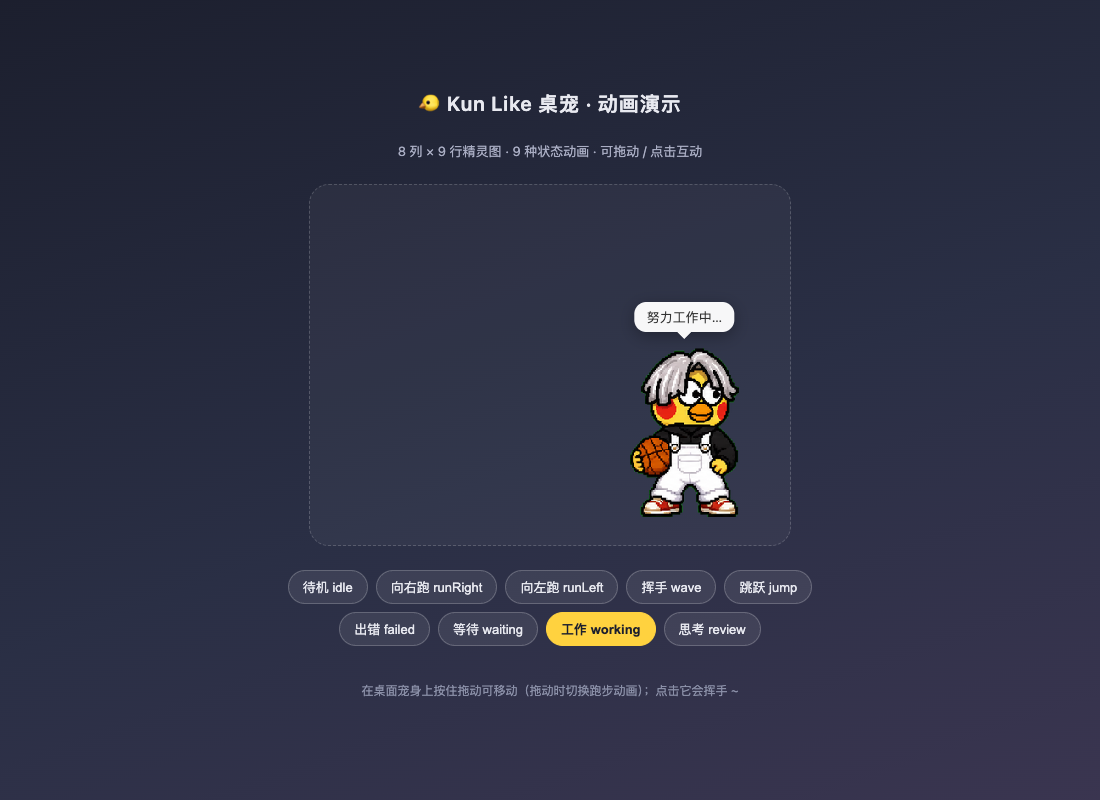
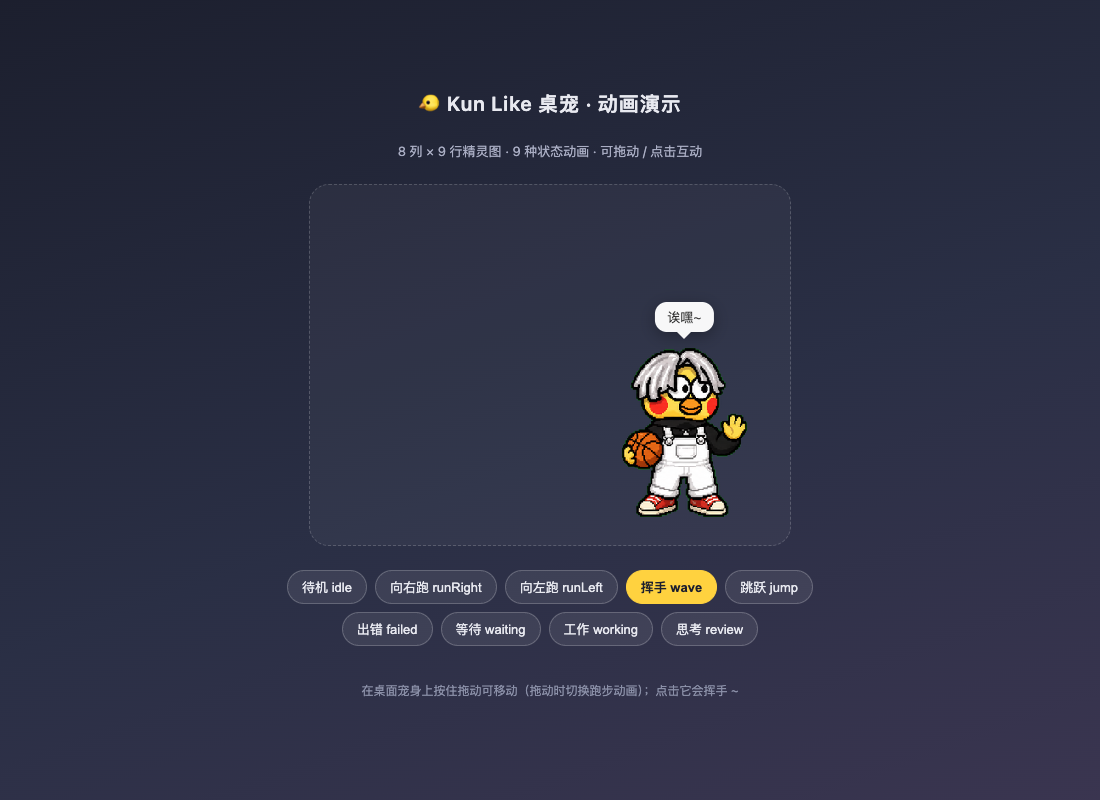
DeepSeek Harness (DSH) Desktop Pet plugin — a little Kun pet that lives in the bottom-right corner of the Web UI. It watches the Agent at work: it hauls bricks while you code, rests its chin on its hand while you think, eagerly waits when it's your turn to reply, and when a task is done it waves, jumps, and shouts 「What are you doing~ oops」 🏀
✨ Features
- 9 state animations: fully reuses the Codex desktop pet sprite sheet contract (8 columns × 9 rows, each cell 192×208), zero re-drawing of assets
- Real-time Agent status awareness: polls the
agentsservice to detect each Agent's running/idle state, and combinestools/execute,approval/request, andagent/request-errorevents to derive five modes — working / thinking / waiting / error / idle - Machine-wide audible task completion: the host process plays "What are you doing~ oops" via a system command, so any window and any session that completes a task will ring out, regardless of browser mute settings
- Interactive: drag the pet around (running animation direction follows the drag), click it to make it wave hello
- Built-in debug tools:
kun_pet_debuglets you inspect the state machine's internal counters and polling health at any time
🎮 Status → Action Mapping
| Agent Work State | Pet Action | Bubble Text |
|---|---|---|
| Working (a tool is executing) | Focused on the job (row 7) | Working hard… |
| Mid-turn but idle | Thinking loop (row 8) | Thinking… |
| Waiting for user reply / approval | Expected waiting (row 6) | Waiting for your reply~ |
| Error | Sad and down (row 5) | Ugh… something went wrong (._.) |
| Idle | Breathing standby (row 0) | Resting~ call me if you need anything |
| Task completed | Wave + jump celebration (alternating rows 3/4) + system voice "What are you doing~ oops" | Done! What are you doing~ oops |
| Dragging | Running (rows 1/2, direction follows) | Whoa~ stop tugging me! |
| Click | Wave (2.4s reaction) | Heh~ |
🚀 Installation
Option 1: DSH Dynamic Plugin (recommended, tested & verified)
The pet is developed and run-verified as a DSH dynamic plugin (cordis_define). In a DSH session, let the Agent execute it, or call the cordis_define tool manually:
-
Clone this repository:
git clone https://github.com/liyupi/dsh-kun-like-pet.git -
Modify the asset paths in
CONFIGat the top ofsrc/host.js:const CONFIG = { spritePath: '/your/path/dsh-kun-like-pet/assets/spritesheet.webp', voicePath: '/your/path/dsh-kun-like-pet/assets/voice.mp3', // macOS defaults to afplay; on Windows / Linux change to the corresponding playback command playCommand: (path) => "afplay '\" + path.replace(/'/g, \"'\\\\''\") + \"'", } -
Generate the one-click install payload and paste it into the
cordis_definetool:node scripts/build-kunpet-package.mjs - # outputs the JSON payloadPayload structure (
kind: "new"creates a new plugin; usekind: "existing"+pluginIdfor later updates):{ "plugin": { "kind": "new", "idPrefix": "kunpet" }, "name": "Kun Like 桌宠", "purpose": "Displays the Kun Like desktop pet in the bottom-right of the Web UI, switching actions based on the Agent's work state, and playing the 'What are you doing~ oops' voice on task completion.", "code": { "host": "<contents of src/host.js>", "client": "<contents of src/client.js>" } } -
Activate it with
cordis_run, and the pet will appear in the bottom-right of the Web UI.
Option 2: Direct Animation Preview (no DSH needed)
Open demo/index.html (a static server is recommended, e.g. npx serve . or python3 -m http.server) to browse all 9 animations and interact by dragging.
⚙️ Configuration
All tunable options are centralized in CONFIG at the top of src/host.js:
| Setting | Default | Description |
|---|---|---|
spritePath | ~/.codex/pets/kun-like/spritesheet.webp | Sprite sheet path |
voicePath | ~/Downloads/你干嘛哎呦.mp3 | Completion sound path |
playCommand | afplay '…' | System-level playback command (Windows: powershell -c (New-Object Media.SoundPlayer '…').PlaySync(); Linux: ffplay -nodisp -autoexit '…') |
pollMs | 500 | Agent status polling interval |
celebrateMs | 4800 | Celebration animation duration |
failedMs | 2600 | Failure animation duration |
📁 Project Structure
dsh-kun-like-pet/
├── src/
│   ├── host.js        # 插件 Host 半:状态机、素材路由、系统音、pet-state RPC、kun_pet_debug 工具
│   └── client.js      # 插件 Client 半:shell.overlay 注入、9 种动画渲染、拖动/点击互动
├── assets/
│   ├── spritesheet.webp   # 8×9 精灵图(1536×1872,Codex 桌宠契约)
│   └── voice.mp3          # 「你干嘛~哎哟」完成音
├── demo/index.html    # 独立动画演示页(无需 DSH)
├── docs/
│   ├── SPRITESHEET-CONTRACT.md   # 精灵图契约与动画行速查
│   └── screenshots…
├── scripts/
│   ├── build-kunpet-package.mjs  # 生成 cordis_define 安装载荷
│   └── validate.mjs              # 仓库完整性校验
├── CHANGELOG.md       # v1 → v5 迭代记录(含事件隔离根因分析)
└── kunpet.package.json    # 由 build 脚本生成的一键安装载荷
Validation: node scripts/validate.mjs
❓ FAQ
Why is the pet only in one window? Dynamic plugins are session-bound: the pet UI injects only into the activating session. But since v5, the completion sound plays system-wide via the host process, so any finished task in any window/session rings on this machine. To show the pet in all windows, upgrade to a host-level composite package (PRs welcome).
Why use polling instead of event listeners?
During development, probes built with internal/dispatch revealed that in some deployments, agent status events such as agent/status and agent/turn-stopping do not flow through the bus that dynamic plugins live on (out of 831 observed events, status-related events were 0), so event listeners would never detect "task completed." Polling the agents service is the most reliable cross-deployment approach. See CHANGELOG v3/v4 for details.
⚠️ Asset Copyright Notice
assets/voice.mp3is a publicly available meme voice clip (featuring a public figure's voice); rights belong to the original owner, for personal learning/exchange only, no commercial use. Replace with royalty-free assets for commercial use.assets/spritesheet.webpis a fan-made pixel avatar, built per the Codex desktop pet asset contract.- If you are the rights holder and object to the content, contact us to have it removed.
📄 License
The code is released under the MIT License. Asset files (assets/) are for personal learning and exchange only, as noted in the statement above.
Comments
Loading…
Similar plugins
by Practice019
Kun Like 桌宠 - DSH 桌面宠物插件
★ 0
MIT
JavaScript
Aug 31, 2026
dsh plugin --profile web add dsh-kun-petby eric-song-dev
🐤 DeepSeek Harness(DSH)永久插件:Deep diving 回答期间用坤宠动图填满深潜状态行下方区块——进度条 0%→100%,每 20% 切换动作与文案,完成时系统级播放「你干嘛~哎哟」
★ 10
↓ 125/wk
NOASSERTION
JavaScript
Aug 15, 2026
dsh plugin --profile web add dsh-ikun-petby miku00039-01
🐋 DSH 桌宠:DeepSeek Harness 的 Windows 桌面宠物,一键启动/停止/监测服务,双击唤起 GUI,零依赖单文件 exe
★ 3
↓ 157/wk
MIT
C#
Oct 1, 2026
dsh plugin --profile web add @miku00039-01/dsh-whale-petby whitefirer
牛来桌宠:agent 任务完成它就蹦出来喊「妈~~妈~~」——dsh 纯客户端桌宠插件(6 皮肤/签名动作/合成叫声)
★ 17
↓ 320/wk
MIT
JavaScript
Oct 17, 2026
dsh plugin --profile web add dsh-niulai-petby nzl153
桌宠小鲸鱼:DSH(DeepSeek Harness)Web 桌宠插件,随 agent 状态切换动画,纯 DOM 零依赖
★ 13
MIT
JavaScript
Oct 2, 2026
dsh plugin --profile web add pet-whaleby c-ling
DeepSeek Harness 桌面电子宠物插件:跟随 agent 状态变换心情的内置/自定义/Codex 精灵图伙伴。
★ 4
↓ 33/wk
MIT
JavaScript
Oct 22, 2026
dsh plugin --profile web add dsh-plugin-pet