
dsh-phone-mirror
Manifest validMirror an Android phone or tablet into the DSH right sidebar over adb and control it with mouse and keyboard, with Opus audio forwarding (Android 11+ for audio); Windows only.
dsh-phone-mirror
English | 中文
用 agent 干活的时候,手机就在侧边栏:刷视频、回消息、看通知都不用离开电脑,省掉反复拿起放下的步骤。
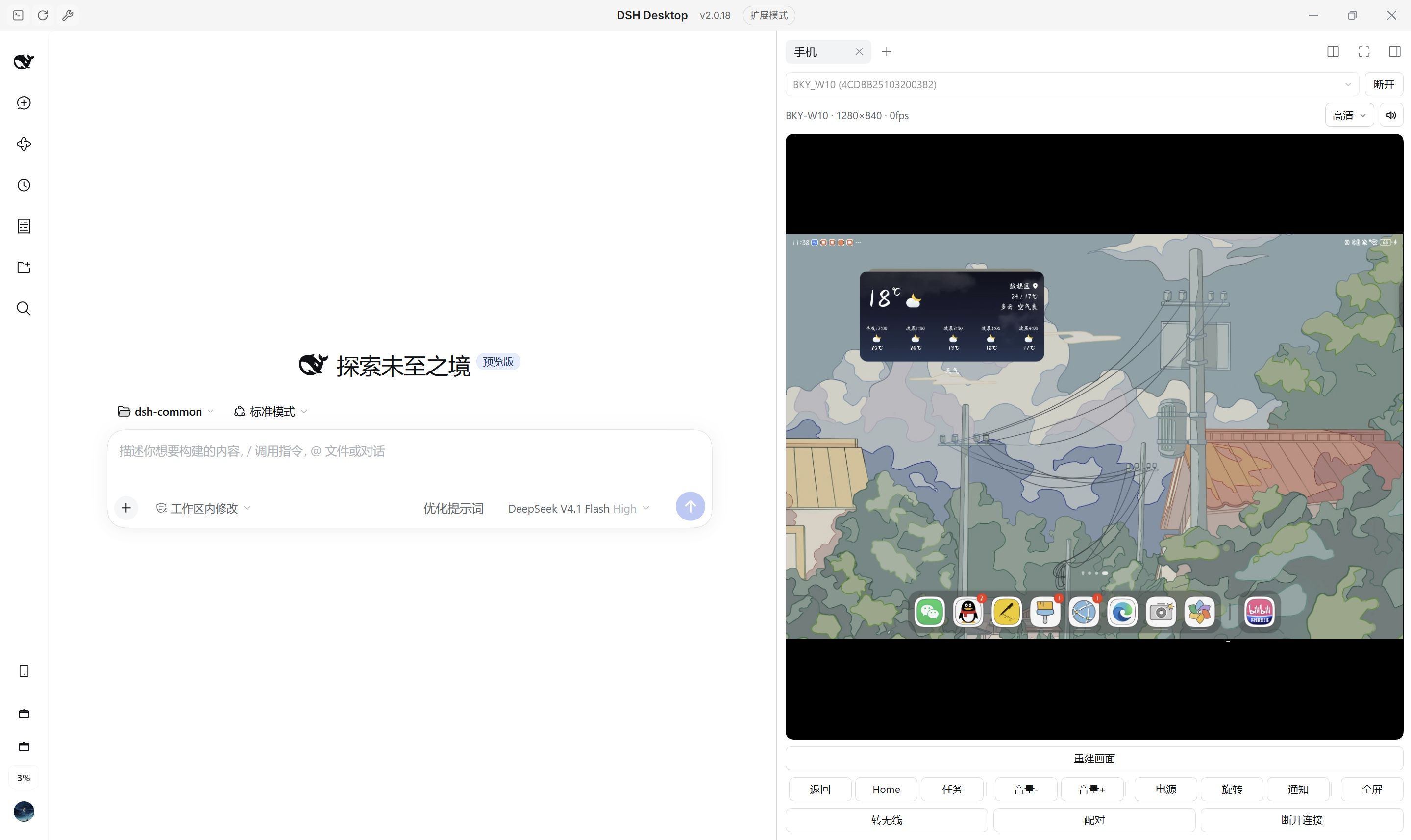
底层是 scrcpy 5.0.1 加浏览器端 WebCodecs:安卓设备的画面投到 DSH 右侧栏,鼠标键盘直接反控。


特性
- 页签常驻右侧栏:在「+」里添加「手机」页签即可投屏,画面按 contain 比例铺满;切换页签保留会话,关闭页签断开并释放设备端进程。
- 鼠标键盘反控:点按、拖拽、滚轮按 scrcpy 控制协议回传;ASCII 字符走按键注入,中文等非 ASCII 文本经设备剪贴板粘贴,组字时面板底部显示拼音。
- 声音一起转发:Opus 48 kHz 立体声,经 AudioWorklet 环形缓冲播放,起播缓冲 80 ms、欠载时自适应到 240 ms;设备不支持时自动改为无声会话。
- 解码在 Worker 线程:拉流、H.264 解码、绘制与音频解码都在 Worker 内完成,DSH 主线程渲染对话或写文件时面板不跟着卡;拿不到 Worker 时退回主线程。
- 起不来时自动降级:scrcpy 失败后用
adb screencap周期截图(默认 260 ms 一帧),帧率低但几乎任何能 adb 的设备都能出画面。 - 一根线到无线:面板底部「转无线」把 USB 调试切到 TCP 并自动连上,拔线后继续投屏;原生 Android 11+ 还能用「配对」走无线调试。
快速开始
环境要求
- Windows(内置 adb 路径固定为
tools/platform-tools/adb.exe) - DSH
>= 0.2.0-rc.1 < 0.3.0 - Node.js 20+(仅首次下载工具与构建时使用)
- 安卓设备已开启「开发者选项 → USB 调试」并完成授权
- 转发声音需要 Android 11+
各品牌开启 USB 调试的入口和额外开关见 docs/debugging.md。
安装
# npm 包,预构建安装
dsh plugin --profile <profile> add dsh-phone-mirror
# 或从仓库安装
dsh plugin --profile <profile> add "github:liyuhan7/dsh-phone-mirror"
adb
首次运行会自动下载 platform-tools(约 8 MB)到插件目录;也可以手动执行:
# 全局安装后位于 <profile 目录>/node_modules/dsh-phone-mirror
npm run fetch:tools
系统里已有 adb 时可在配置里指定 adbPath 跳过下载。
运行
- 重启 DSH,右侧栏点「+」添加「手机」页签
- 顶部下拉选中设备,点「连接」
- 设备弹出「允许 USB 调试吗?」时勾选「始终允许」
- 想摆脱数据线:点面板底部「转无线」,提示已切到无线后拔线
预期输出:面板出现设备画面,标题行显示 BKY-W10 · 1048×1600 · 30fps(设备名 · 分辨率 · 实时帧率)。
用法
点按 / 拖拽 / 滚轮    直接操作设备
键盘                 点击画面接管,Esc 交还焦点
全屏                 工具栏「全屏」
画质                 流畅 720 / 标准 1080 / 高清 1600
无线连接             底部「转无线」把 USB 调试切到 TCP 并自动连上
                     底部「配对」填无线调试页上的配对地址与 6 位配对码
断开连接             只断电脑与平板之间的无线通道,USB 不受影响
画面发花或全黑时点「重建画面」:丢弃解码器并重新拉流,由设备重发关键帧。
配置
在 profile 的 cordis.patch.yml 里覆盖:
- id: dsh-phone-mirror
  config:
    maxSize: 1600
    maxFps: 60
    videoBitRate: 8000000
| 字段 | 默认 | 说明 |
|---|---|---|
mode | auto | auto 先试 scrcpy(音频失败后改无声再试),仍失败才降级截图 |
maxSize | 1280 | 长边像素上限,可被面板的画质档位覆盖 |
maxFps | 60 | 编码帧率上限 |
videoBitRate | 8000000 | 编码码率(bps) |
screencapIntervalMs | 260 | 降级模式的截图间隔 |
audio | true | 转发设备声音;设备不支持时下次直接无声开场 |
adbPath | 空 | 自定义 adb 路径,留空用插件自带的 |
serverJar | 空 | 自定义 scrcpy-server.jar 路径 |
常见问题
adb devices 为空,但手机显示已连接
Windows 把该 USB 接口绑到了厂商驱动(例如华为 HDB)。在设备管理器里手动更新为「Android ADB Interface」,或安装 Google USB Driver 后指定。
dsh plugin 拒绝操作 desktop profile
desktop profile 由 Electron 应用独占托管。直接编辑该 profile 的 package.json,在 dependencies 里加 "dsh-phone-mirror": "link:D:/path/to/dsh-phone-mirror",并把插件名加进 dsh.profile.bundles,然后执行 pnpm install。
没有声音
先看面板上的喇叭按钮:灰色说明这个会话没拿到音频,查 /dsh-phone-mirror/api/status 里的 session.audio 与 session.audioCodec。按钮可用却听不到,检查电脑音量、设备是否静音,以及正在播的 App 是否禁止被捕获。
画面发黑,或帧率只有个位数
付费视频等 DRM 内容走 MediaCodec 的安全通路,只能出黑屏;设备静止时 scrcpy 不产生帧,帧率显示个位数属正常。
许可证
MIT,见 LICENSE;第三方组件见 THIRD-PARTY.md。
Comments
Loading…
From the same category
DeepSeek Harness plugin for Reactive Resume: bridges your resumes and job applications into a Harness session over MCP.
★ 41.7k
↓ 215/wk
MIT
Aug 24, 2026
dsh plugin --profile web add dsh-plugin-reactive-resumeby dsh-market
The plugin market inside DeepSeek Harness — browse, search, one-click install · DSH 可视化插件市场
★ 10.1k
↓ 361.7k/wk
MIT
TypeScript
Nov 1, 2026
dsh plugin --profile web add dshmarketby Tencent
Let AI agents use your real, logged-in browser without interrupting your work. CLI + extension for browser automation across any shell-capable AI agent.
★ 9.9k
↓ 12.3k/wk
MIT
TypeScript
Nov 1, 2026
dsh plugin --profile terminal add @wxg-prc-cpg/browser-skill-dsh-pluginby yjh051108
dsh-routing-suite — injector + router-standard kit: install the runtime injector first, then the task-aware reasoning-mode router preset (measured P1-P23).
★ 7k
MIT
JavaScript
Sep 18, 2026
dsh plugin --profile web add @dsh-external/dsh-super-injectorby superdesigndev
OpenRouter for agent tools. Join community here: https://discord.gg/6mQYYfFMAn
★ 7k
NOASSERTION
Python
Nov 1, 2026
dsh plugin --profile web add treg-dshby Q00
Agent OS: the agent gets smarter on its own. We just hold the line: Interview-gated, staged evaluation, budgeted evolution loop. MCP server, 14 runtimes: Claude Code, Codex CLI, Gemini CLI, OpenCode,
★ 6.3k
MIT
Python
Nov 1, 2026