
dsh-plugin-moss-tts
Manifest validReads Harness replies aloud with the MOSS-TTS-Nano-100M C++ CPU engine: fully offline with no API key, one-click engine download verified against the release sha256sums.txt, auto-read of settled repli
dsh-plugin-moss-tts
简体中文 · Version 0.2.3 · Apache-2.0 · Engine repo
Local text-to-speech for DeepSeek Harness, powered by the MOSS-TTS-Nano-100M C++ CPU engine. Everything is synthesized on this machine; text never leaves it, and the weights are installed once and shared with the CLI and the web playground.
Harness assistant reply ──► auto-read / per-message read button
                                 │
                     POST /moss-tts/stream (same origin, no CORS)
                                 │
        host plugin: engine lifecycle + verified download + paced proxy
                                 │  stdin/stdout JSON
                 moss_tts.exe --stdio (resident, weights loaded once)
                                 │
            browser AudioWorklet ring buffer ──► speakers

agent calls moss_tts_say ──► host writes one event (GET /moss-tts/events, SSE) ──► browser
                              the tool returns at once; the browser pulls /stream itself
Requirements
| Item | Requirement |
|---|---|
| DeepSeek Harness | 0.2.1-rc or newer (client slot contract) |
| OS | Windows x64 (the engine ships for that platform only) |
| Disk | ~170 MB (engine + weights), installed once |
Install
Desktop app: sidebar Plugins → Add plugin → paste
github:litterbit/dsh-plugin-moss-tts#main
CLI profile (a profile the desktop app does not own):
dsh plugin --profile <name> add github:litterbit/dsh-plugin-moss-tts#main
Restart DSH afterwards. You get a "Moss Speech" settings page, a speaker toggle at the left
of the composer, a read button on every assistant reply, and five moss_tts_* tools.
Installing from a local checkout:
dsh plugin --profile <name> add D:\path\to\dsh-plugin-moss-tts(an absolute path is required).
First run: install the engine
Open Settings → Moss Speech → Download engine. The plugin fetches
MossTTS-win-x64-full.zip (~160 MB) from the
engine releases, verifies it against the
release's sha256sums.txt, and extracts it into %LOCALAPPDATA%\MossTTS.
- Already installed via the CLI or the web playground? It is reused; nothing is downloaded twice.
- Downloads resume after an interruption; cancel removes only the partial file.
- Follows your system proxy:
HTTPS_PROXY/HTTP_PROXYfirst, then the Windows Internet settings (ProxyEnable+ProxyServer, via a CONNECT tunnel). A machine whose browser can open GitHub needs no extra configuration; setNO_PROXY=*to force direct connections. - Behind a blocked network, point
engineUrl+engineSha256at a mirror in the plugin config, or setautoDownload: falseand manage the install yourself.
Usage
| Entry point | What it does |
|---|---|
| 🔊 left of the composer | Auto-read. Reads each reply when it settles, using the selected mode; as soon as anything is audible it becomes ⏹ and stops it |
| 🔊 on a reply | Reads that reply only (whole text, ignores the auto-read limit) |
| Player bar above the composer | Appears while there is sound: pause/resume, ↻ replay, ⏹ stop, progress and elapsed time. Hides itself when playback ends |
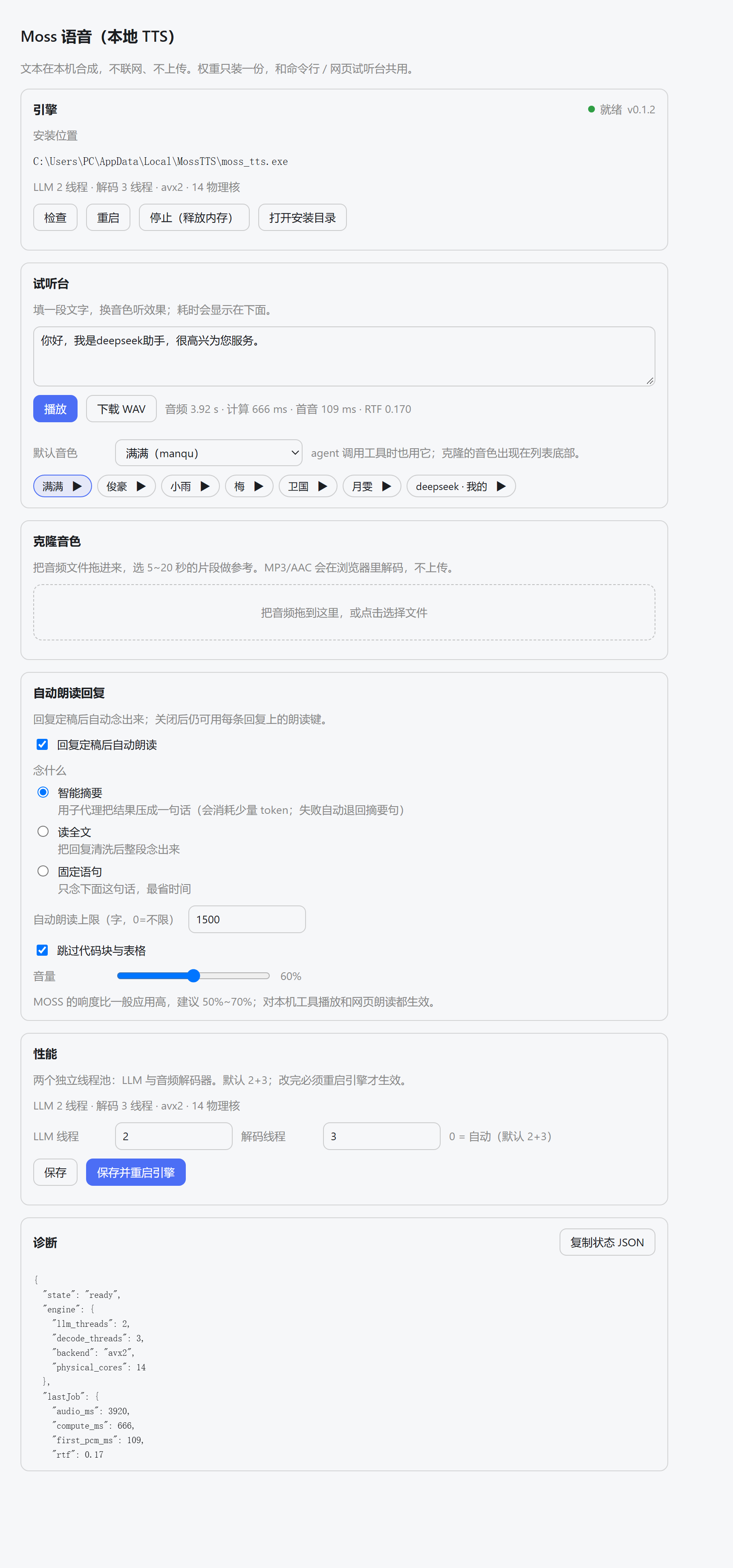
| Settings → Moss Speech | Engine state/threads/restart, default voice, voice lab (type text, preview any voice), drag-and-drop clone, three read modes, volume, diagnostics |
moss_tts_say | Agent-initiated speech: with a browser attached it just hands the text over and returns in milliseconds; the UI synthesizes as it plays (first audio in ~0.2–0.4 s). wait: true waits for the end; save_to only writes the WAV |
moss_tts_voices / moss_tts_stop / moss_tts_clone / moss_tts_engine | Voices (labels + default marker) / stop (including UI playback) / clone (trims >20 s) / status, install, restart, unload |
Markdown is cleaned before speaking: fenced code and tables are skipped, links keep their text, heading and list markers are stripped, and long replies are cut on a sentence boundary at the auto-read limit (default 1500 characters, 0 = unlimited).
Playback controls
Tools, auto-read and the per-reply button all share one player, so the controls are the same everywhere:
- Pause/resume stops the AudioWorklet from consuming the ring buffer (it does not mute), so the rest stays buffered. While paused the host stops reading the socket and the engine idles instead of burning CPU.
- Replay reuses the raw PCM the browser kept for the current clip (up to 5 minutes), so ↻ restarts instantly without synthesizing again; longer clips fall back to a fresh synthesis.
- Stop aborts the download and clears the buffer. The
moss_tts_stoptool also stops UI playback. - A new clip takes over from the previous one (the engine is a single worker anyway).
Three read modes
| Mode | What is spoken | Cost |
|---|---|---|
| Smart summary (default) | A DSH subagent condenses the turn into one sentence (≤60 chars); only 200 chars of the question and 600 chars of the answer are sent | A few k tokens per turn (the child's own system prompt); replies under 80 chars are read as-is |
| Full text | The whole reply after cleaning (v0.1 behaviour) | Local compute only |
| Fixed line | One editable sentence, e.g. "Task complete." | Almost free |
If the summary fails (no subagent service, parent offline, timeout, error) it falls back to a
local extract (first sentence, zero tokens) and then to the fixed line — so you always hear
something. The child shows up in the subagent list as moss-tts-summary.
Cloning without the CLI
The "Clone a voice" card is a drop zone: drop a WAV/MP3/M4A, the browser decodes it to 48 kHz with
OfflineAudioContext, draws the waveform, lets you drag a 1–20 second window, preview it, name it,
and create the voice. The file never leaves the machine — only the trimmed PCM WAV goes to the
local engine.
Engine lifecycle and memory
- Nothing is preloaded: DSH start-up only loads the host module and the settings script (tens of KB), no engine process.
moss_tts.exestarts on the first synthesis / voice list / clone (~1–2 s to load weights, ~250 MB resident afterwards).- After 10 idle minutes the engine is unloaded and the memory returned; the next synthesis
starts it again.
preload: truewarms it at start-up,idleUnloadMinutes: 0never unloads. - To not load the plugin at all, turn
dsh-plugin-moss-ttsoff on the sidebar Plugins page (writesdisabled: trueinto the profile patch); after a restart even the settings page is gone.
Threads
The "Performance" card edits the two thread pools (LLM and decoder; 0 = auto, default 2+3) and
applies them with Save and restart engine. Thread counts change speed and heat, never the
audio, and land in the engine's own %LOCALAPPDATA%\MossTTS\userdata\settings.json so the CLI and
the web playground see the same values.
Privacy
- Synthesis is fully local: no network, no uploaded text, no telemetry.
- The only outbound traffic is the engine download you trigger from the settings page.
- Cloned voices live under
%LOCALAPPDATA%\MossTTS\userdata\voices\user\.
How it relates to the CLI and the web playground
All three run the same moss_tts.exe, the same weights and the same data directory:
- CLI:
moss_tts.exe --text "hello" --out hello.wav - Web playground: double-click
moss_tts.exe→http://127.0.0.1:8759/ - This plugin: no port; it spawns the resident engine over
--stdio
Engine and plugin version independently: engine.json pins a release, falls back to the latest
one when that tag is gone, and always verifies the release's sha256sums.txt.
Uninstall
In the desktop app, remove it from the sidebar Plugins page. For a CLI-managed profile:
dsh plugin --profile <name> remove dsh-plugin-moss-tts.
The weights are left in place (the CLI and the web playground still use them). Delete
%LOCALAPPDATA%\MossTTS to remove them too.
Troubleshooting
| Symptom | Fix |
|---|---|
| Settings keeps showing "not installed" | Press "Re-check"; verify %LOCALAPPDATA%\MossTTS\moss_tts.exe and models\ exist |
| Download fails / hash mismatch | Usually a proxy rewriting the body. Retry once; if it persists, set engineUrl + engineSha256 in the plugin config |
| "Ready" but silent | The tab is muted, or the output device is wrong; click anywhere in the page once so the browser allows playback |
| Long replies are cut short | The auto-read limit (1500 chars) — raise it in settings, or use the reply's own read button |
| It keeps ~250 MB resident | The engine is a resident child; it unloads after 10 idle minutes, or press "Stop (free memory)", or lower idleUnloadMinutes |
| Smart summary is not used | Check the diagnostics JSON or [summary] in plugin.log; without the subagent service it degrades to extract |
| Louder than other apps | Lower the "Volume" slider to 50–70% (default 60%); it applies to browser playback and tool playback |
| A tool call never returns | 0.2.1 fixes the engine stdout stall after an aborted stream; update and restart DSH |
| Thread changes do nothing | Press "Save and restart engine"; a stale value in settings.json is read back into the page first |
| Plugin does not appear | DSH must be restarted; dsh --profile desktop --dump-config should contain a row id: moss-tts |
Development
node tools/build-client.mjs          # regenerate lib/client.js (committed; installs run no build)
node tools/build-client.mjs --check  # what CI uses to catch a stale bundle
node tools/ci.mjs                    # the same gate GitHub Actions runs
node --test tests/*.test.mjs         # no DSH required; engine tests skip without an engine
Host contract (verified against DSH 0.2.1-rc.2 on the development machine): dsh.bundle.patch
inserts one loader row for the host half; dsh.client.platform = "web" plus
exports["./client"] load the browser half; the host registers routes through
ctx.get('webServer').register and the client registers slots through ctx.slots.inject.
Nothing is imported from the host packages — tool definitions are plain objects with standard
JSON Schema.
License
Apache-2.0. Model weights come from MOSS-TTS-Nano-100M (Apache-2.0) and are converted to the engine's container format by the engine repo; this package ships no weights or binaries and downloads them at runtime. See NOTICE.
Comments
Loading…
Similar plugins
by WYR-233
Multi-provider TTS (read replies aloud) plugin for DeepSeek Harness - pick your own provider and voice
★ 2
JavaScript
Oct 11, 2026
dsh plugin --profile web add dsh-multi-ttsby liqiangai
Voice reading (TTS) for DeepSeek Harness Web: read assistant replies aloud through MiniMax Speech or Xiaomi MiMo TTS, with a sidebar panel for providers, voices and playback history.
★ 0
MIT
JavaScript
Nov 1, 2026
dsh plugin --profile web add dsh-tts-webMiMo voice for DeepSeek Harness: auto-read answers aloud, click-to-talk composer mic, voice cloning. 小米 MiMo 语音插件。
★ 0
MIT
JavaScript
dsh plugin --profile web add dsh-mimo-ttsby Hao0311
Xiaomi MiMo TTS for DeepSeek Harness: a mimo_tts tool, read-aloud on answers, auto-read, and a sidebar Speech panel (built-in voices, voice design, voice cloning).
★ 0
MIT
JavaScript
Nov 10, 2026
dsh plugin --profile web add dsh-mimo-ttsby xcw520
Local GPT-SoVITS TTS for DeepSeek Harness: reads assistant replies aloud with a draggable mascot and one-click installer.
★ 30
↓ 1k/wk
MIT
JavaScript
Oct 25, 2026
dsh plugin --profile web add dsh-dania-voiceby 2021Heei
给 DeepSeek Harness 的语音朗读插件:AI 回复流式 TTS 朗读,思考等待期还有趣味语音短语反馈。Edge TTS 开箱即用,支持任意 OpenAI 兼容云端引擎。
★ 0
MIT
TypeScript
Sep 10, 2026
dsh plugin --profile web add dsh-tts-flash