
dsh-plotfig
Manifest validCreate scientific illustrations through AI4Scholar, edit images and recognized text on conversation or standalone canvases, split layers, and export PNG, PDF or layered PSD, with SVG export for text-a
License change in 0.6.0: AGPL-3.0-only with separate commercial licensing. Earlier MIT grants remain valid. Details.

PlotFig (dsh-plotfig)
An AI illustration plugin for researchers using DeepSeek Harness. Choose an AI4Scholar drawing model for mechanism diagrams, method illustrations, graphical abstracts and presentation figures, then continue with layer editing, text changes and export. General image creation remains available. There are two kinds of canvas:
- Conversation canvas: one per conversation. Images generated in the conversation land on it, and it opens in the right Sidebar when a generation starts (Harness ≥ 0.2.2).
- Standalone canvas: created from the PlotFig panel with "新建画布". It belongs to no conversation.
What it does
Choose the model next to the send button. New canvases default to Seedream 5.5. The GPT Image and Nano Banana families offer additional models and resolutions. The canvas remembers the selection for new images and reference edits. Regenerating an existing image uses its original model. Transparent output, specialized AI edits and layer splitting use Seedream.
| You say or do | The plugin |
|---|---|
| "Draw a rainforest layering cross-section, textbook style" | Generates onto this conversation's canvas and opens it on the right |
| "Make 4 figures for this paper in one flat style: workflow, model, setup, results" | Plans four prompts and generates them one by one; a failed item does not stop the rest |
| Select an image, click 重新生成 | Generates again with the same settings in the same place; older versions stay switchable |
| Turn on 透明背景 and describe a device | A transparent PNG of just the subject, ready for figure assembly |
| 加入参考 on two images, then "put the device from 图2 into 图1" | Sends both images to the model |
| AI 处理 → 局部重绘, box a region, "add a measuring cylinder" | Redraws only inside the box; every outside pixel is kept |
| 分图层 | Splits into movable transparent layers with editable OCR text |
| Export | PNG, SVG, PDF and layered PSD with editable text |
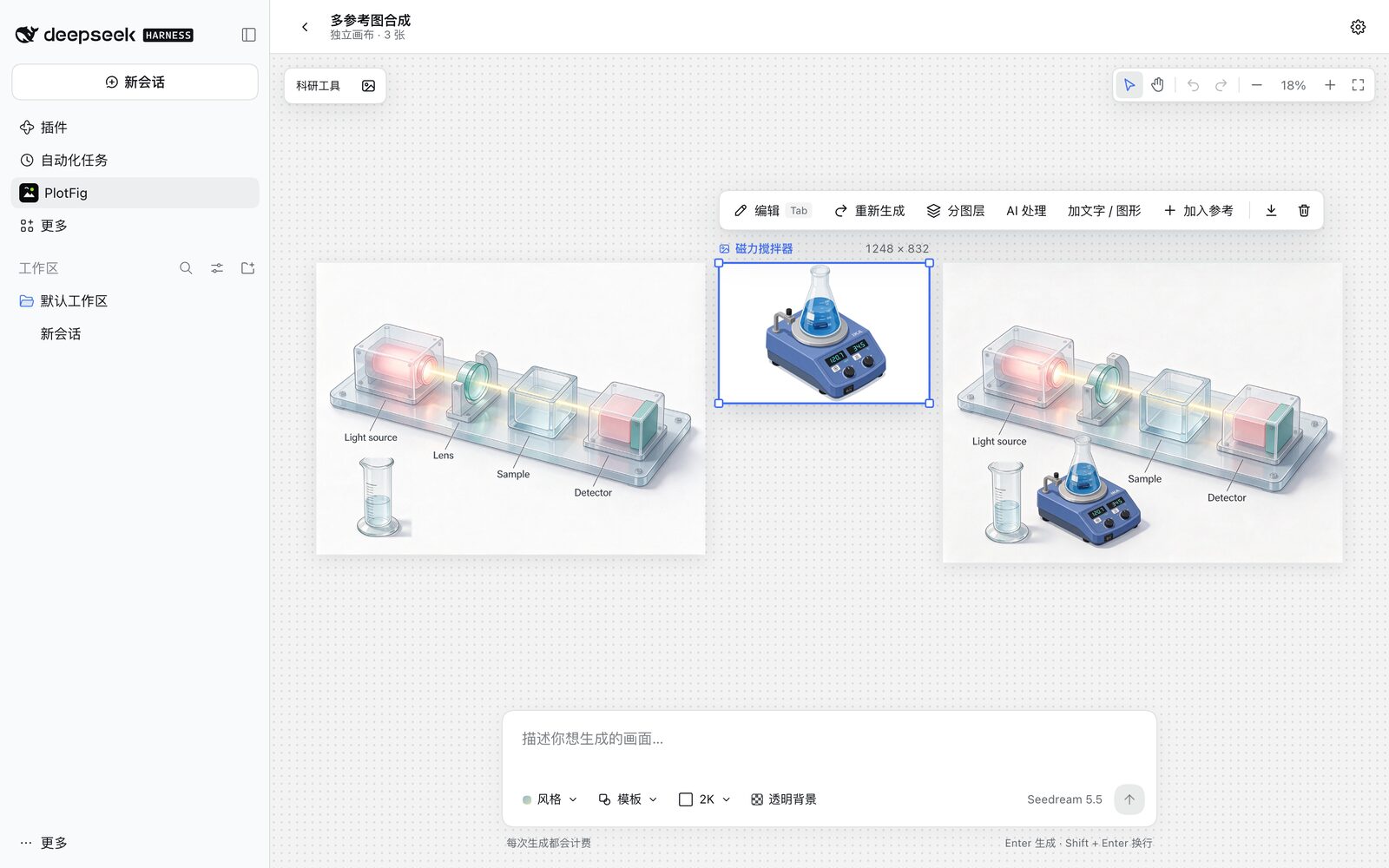
The layer service places transparent inputs on white paper for decomposition. Original images and returned foreground transparency are preserved.
Install
Open DeepSeek Harness Desktop once to initialize the profile, then fully quit it. Install PlotFig from npm with this command.
dsh plugin --profile desktop add dsh-plotfig@0.6.0
Reopen Desktop, go to Plugins → Installed plugins, and enable dsh-plotfig. Open PlotFig from the sidebar.
Choose 检查更新 in the top-right corner of the PlotFig gallery to compare your installed version with the latest stable npm release. For an npm installation on a supported Harness host, choose 更新到 v… to update in the dialog. It tells you if the host needs a restart. Older hosts offer a path to the plugin manager.
In PlotFig 0.3.0 through 0.5.1, choose 检查更新 → 更新到 v0.6.0. With 0.2.1 or earlier, open 精选科研插件 and choose 更新到 v0.6.0 on the PlotFig card.
PlotFig uses an AI4Scholar API key for generation, editing, and layer splitting. If dsh-ai4scholar already has a key under AI4SCHOLAR_API_KEY, PlotFig uses it automatically. To create one, select 获取密钥 in PlotFig settings, sign in, and open the Open Platform. Paste the key into the field and save it. 测试连接 checks your balance and Seedream availability for free. Visit the AI4Scholar homepage.
Use --profile web for the web host. You can open, edit, and export saved canvases locally without a key.
Generating
- On DSH hosts with a right-sidebar canvas, send
/plotfigin the chat composer to open the current conversation’s canvas for free. Add a request, such as/plotfig Draw a cross-section of a tropical rainforest, to generate on that canvas. The original/seedream <description>command also works. - You can also ask the assistant to draw or type into a standalone canvas prompt box. The size menu offers seven aspect ratios at 2K, or a 1K/1.5K/2K tier that lets the model choose the shape.
- Conversation canvases share the native DSH composer: examples, edits and references append to the same Session's draft without submitting it. Opening a conversation canvas from the gallery returns to its conversation with the canvas on the right.
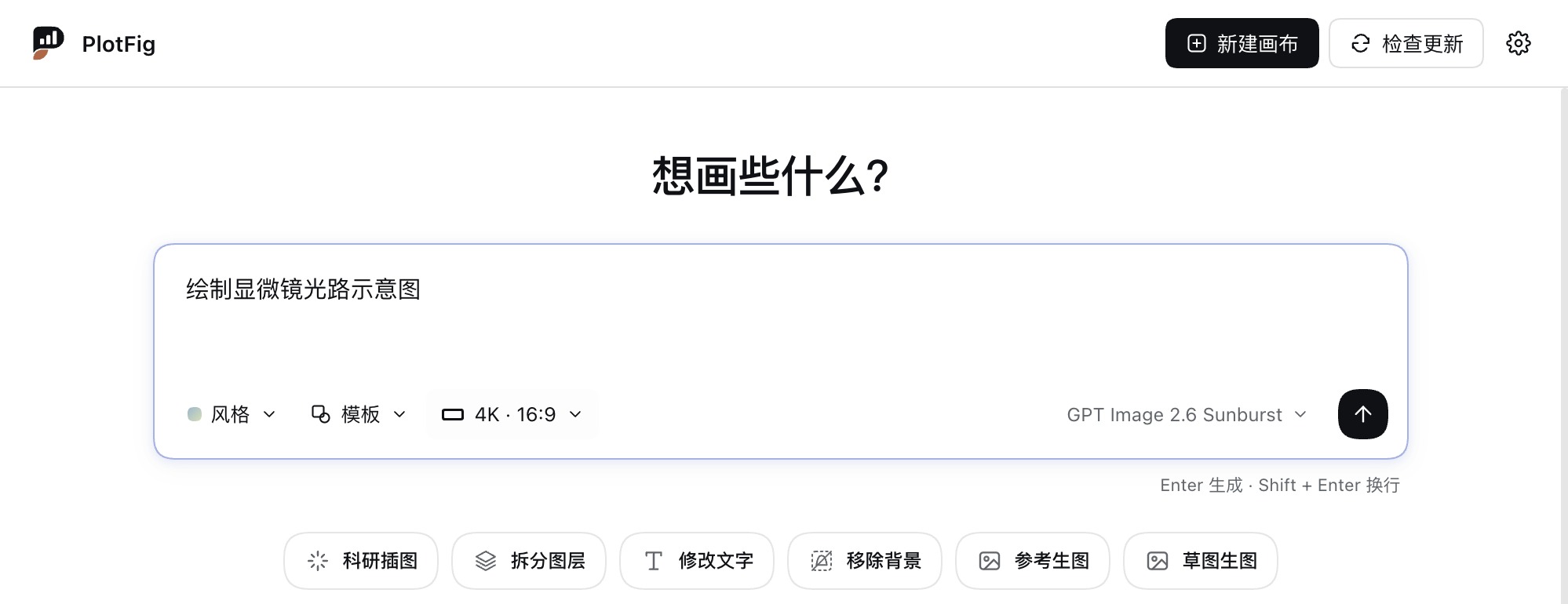
- The home page starts with a prompt box. A submission opens a new standalone canvas with the selected style and size. Six tool shortcuts and up to eight recent canvases sit below it; 全部画布 opens the full gallery.
- Use the trash icon on a card in Recent or All Canvases to delete one canvas. For a batch, open 全部画布 → 管理画布, select the canvases, click 删除所选, and confirm the names.
- 重新生成 redoes a generated image with its original prompt, references, size and style, in the same place. Older versions are kept and switchable from the toolbar without a model call.
- For a set of different images, the assistant uses
seedream_generate_batch(2–10 items, one billed image each, run in order; failures are reported, not retried). - 加入参考 adds the selected canvas image to the prompt, up to 10 references. The main image (the one being edited or used for reference generation) is 图1 and the rest follow in order, so prompts can say "put the device from 图2 into 图1".
- 透明背景 generates a PNG with a transparent background, for icons, devices and figure parts. A result without transparency is kept with a warning.
- Repeated edits use an opaque background for consistency. Turn on transparency to request a transparent image.
- 风格 offers six appearance presets: flat, soft 2.5D, line art, naturalistic illustration, 3D rendering and ink with light washes. A preset is saved per canvas and adds appearance rules to later requests; choosing one makes no model call. 跟随描述 or
style: "auto"leaves the prompt unchanged. Presets do not certify scientific accuracy or journal requirements. - Import a PNG or JPEG up to 30 MB, 16000 px per side and 32 million pixels. Importing makes no model call; PNG bytes and alpha are kept.
- 模板 opens six local templates for model architectures, cycles and timelines, each with three palettes. Templates need no key. Previously saved flowcharts can still be opened, edited and exported from the gallery.
Editing images (AI 处理)
Each operation saves its result as a new canvas image; the original stays intact. Requests are billed per output image and never retried automatically. Results that fail a check are marked for review and are not applied to a layer automatically.
- 去背景: transparent cutout of the main subject; detached titles and panels are removed unless requested.
- 消除: brush or rectangle masks with subtract, undo and redo. Every RGBA byte outside the mask is restored from the original; edges blend inward over 0–64 px (
feather). - 局部重绘 (inpaint): box 1–16 regions and describe what to draw. Regions are sent as
<bbox>tags and every pixel outside them is restored. The whole box is redrawn; drawing that crosses a box edge is cut off on restore and flagged. - 扩图: one side per pass, using a cropped edge reference and conservative alignment; the original rectangle is restored byte for byte. Several sides run in sequence (left, right, top, bottom), one billed image per side; if a later pass fails, completed passes are kept. Seams, mismatched edges, wrong aspect ratios, unfilled pixels and frame lines drawn beside the seam are flagged.
- 变清晰 (enhance): upscale and sharpen up to the ~4.62 MP model limit. The model can rewrite small text, so the result is compared with the source and changed areas are refilled from the upscaled original; those areas are slightly softer. Every enhanced result is marked for review.
seedream_edit exposes the same operations to the conversation agent. A repeated request id returns the saved result instead of billing again.
Layers and text
- 分图层 splits an image into a locked background and transparent layers (2–100 outputs including the background, default 30). You can box regions to separate; they are added to the prompt as
<bbox>tags.seedream_decomposeoffers the same operation. - Layers are edited on the main canvas: click, Shift/Cmd/Ctrl multi-select, marquee, drag, resize, rotate, merge and arrange. 详细编辑 adds text, shapes, alignment, stacking and OCR editing. 加文字 / 图形 creates an artboard without splitting. Edits autosave and support undo/redo.
- OCR text layers convert to locally editable rich text per line and style run. PlotFig maps all 228 supported OCR fonts to display fallbacks and PostScript names for PSD export.
Export
- 画板 PNG / 选中内容 PNG, with transparency and off-artboard content.
- SVG for text-and-shape artboards without images or OCR.
- PDF: one lossless page at the artboard size (72 ppi), transparency as a soft mask. Text is not selectable.
- 分层 PSD: named layers, order, opacity, hidden/locked state and a composite preview; added and OCR text stay editable. PSD(文字转图片) keeps text as pixels. Fonts are not embedded.
All exports are local and make no model calls.
Billing and data
AI4Scholar bills ordinary generation per image and reserves the quoted maximum for a split. The final cost is 2 credits for the input plus 3 per delivered image up to 2.61 MP or 6 above it. The background counts as an output and OCR is included. Unused credits are returned, with a full refund on failure. Reopening a canvas retrieves existing split tasks by ID. Stopping a wait does not cancel a submitted request, and the result still appears on the canvas. Images are downloaded at once to $DSH_HOME/seedream/canvases/<canvas id>/ (owner-only files). The Seedream “AI 生成” watermark is off by default. You can enable it in Settings.
Limitations
- 500 objects per artboard, 32 million pixels per PNG export; undo history lasts for the current run.
- AI results depend on the model. Pixel protection is exact; picture quality is not guaranteed. Expanding blank areas beside diagrams and tables is unreliable, cutouts lose glass-like translucency, combining several references can drop text labels, naturalistic and 3D presets look similar, and images in one batch are generated independently, so their look can differ even with the same style.
- PSD files have been checked in Photopea and Adobe Illustrator 2025, not in Photoshop. Fonts missing on the target machine are substituted.
- Seedream generation, editing, layer splitting and credit settlement have been verified with the live AI4Scholar service. For the eight other models, release checks covered request parameters and simulated responses. Full Chinese guide and shortcuts
License
Starting with 0.6.0, this plugin's AI4Scholar-authored code uses AGPL-3.0-only. Commercial use is allowed under AGPL; a separate written commercial license is available for other terms covering rights AI4Scholar owns.
Earlier releases through 0.5.1 keep their original MIT grants. Third-party licenses remain applicable. See licensing details, third-party notices and corresponding source.
Comments
Loading…
From the same category
by onehumanbeing
Let an AI model use a real iPhone with a $7 ESP32: AirPlay eyes, USB HID hands, any OpenAI-compatible vision model. No Mac, no developer account, no jailbreak.
★ 5.3k
MIT
Swift
Nov 23, 2026
by liustack
The first vision plugin for DeepSeek Harness, and the vision bridge for every text-only coding agent. Paste an image, get structured JSON evidence (OCR, layout, semantics). | 全网最强 DeepSeek Harness 外挂视
★ 5.1k
↓ 56.3k/wk
MIT
TypeScript
Nov 15, 2026
dsh plugin --profile web add @liustack/modlensby shanliuling
AI image studio for DeepSeek Harness — generate, edit & compare images in chat, with 500+ prompts, gallery, multi-model workflows and ComfyUI.
★ 1.7k
↓ 23.1k/wk
MIT
TypeScript
Nov 24, 2026
dsh plugin --profile web add dsh-image-genby ysr666
Eyes for text-only DeepSeek Harness agents: built-in free vision chain (no key) + pixel-level vision tools (Q&A, grounding, crop, pixel diff, colors, OCR, SVG trace, cutout, screenshots). One-command
★ 1.3k
↓ 16.8k/wk
MIT
JavaScript
Nov 24, 2026
dsh plugin --profile web add dsh-vision-routerby tong-io
Modality-First GenAI Platform
★ 1k
↓ 891/wk
AGPL-3.0
TypeScript
Nov 22, 2026
dsh plugin --profile agent add dsh-tongflowby PicGo
:zap:The ultimate image uploading engine. Both CLI & API supports.
★ 997
MIT
TypeScript
Oct 19, 2026