
dsh-undo-plugin
Manifest valid★ 165Snapshots and rollback for DSH configuration and plugin files.
dsh-undo-savepoint — DSH Safety Steward (Undo / Rollback / Crash Self-Healing)


A safety steward built for DeepSeek Harness (DSH): settings changes are auto-snapshotted, with one-click undo / restore / rollback to any version; proactive health checks, upgrade escort, and crash self-healing; even when DSH won't start, the out-of-band WebUI / GUI / CLI remains available.
Proactive checks: speaks up on anomalies, quiet when normal. First check completes 30 s after start; after a crash it offers the last good snapshot; on a DSH version change it takes an upgrade safety snapshot first, then proceeds.
Preview
| Session header: undo / restore / snapshot / conversation retract all iconified + auto-snapshot status badge (24 saved · 3 hours ago) |
|---|
 |
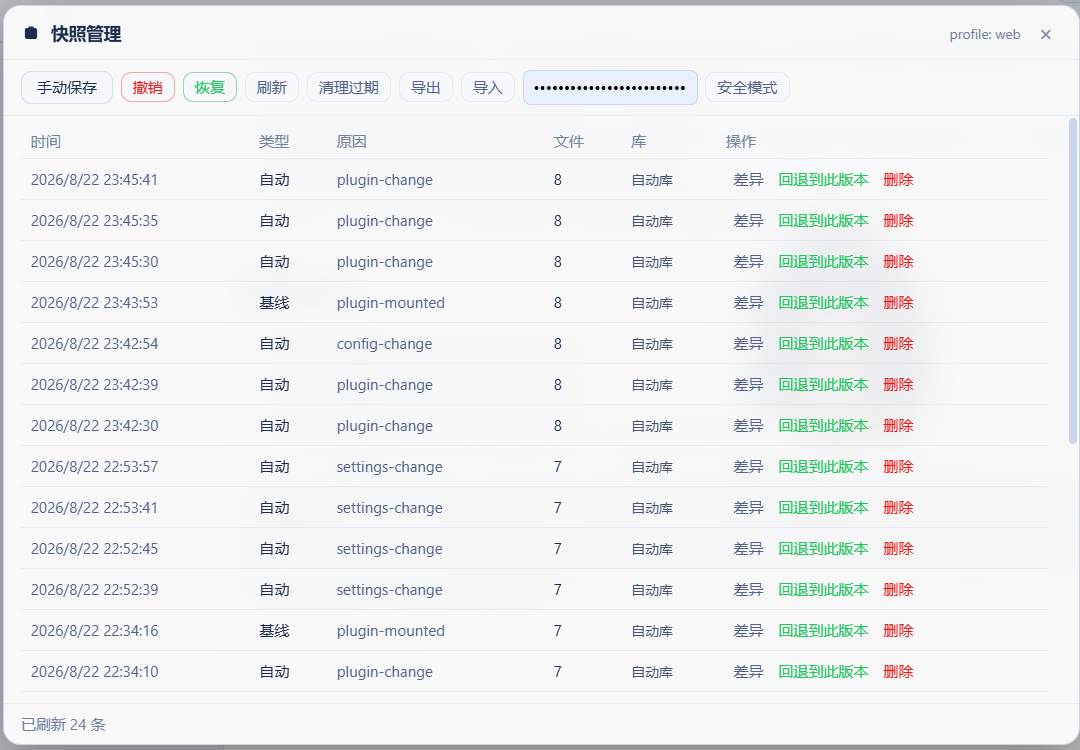
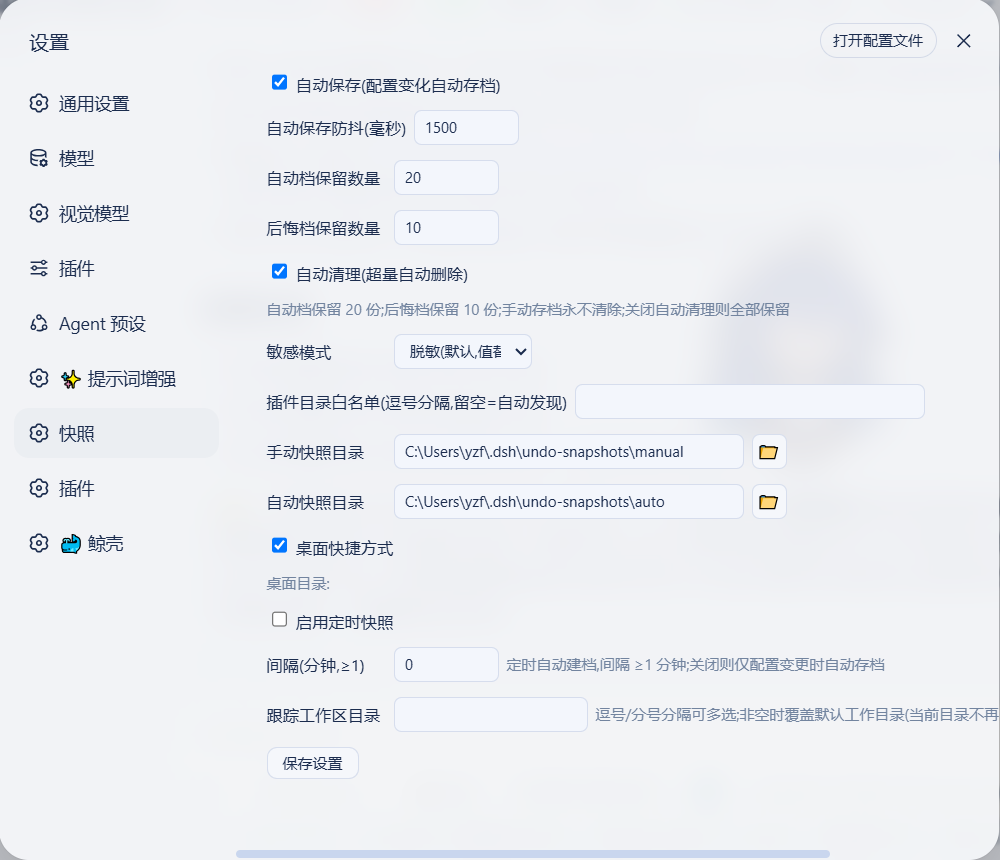
| WebUI snapshot panel: manual save / undo / restore / cleanup / export-import / safe mode, per-entry "diff / roll back to this version / delete" | DSH settings "Snapshots" dedicated section (auto save / retention count / sensitive mode / plugin whitelist / scheduled snapshots) |
|---|---|
 |  |
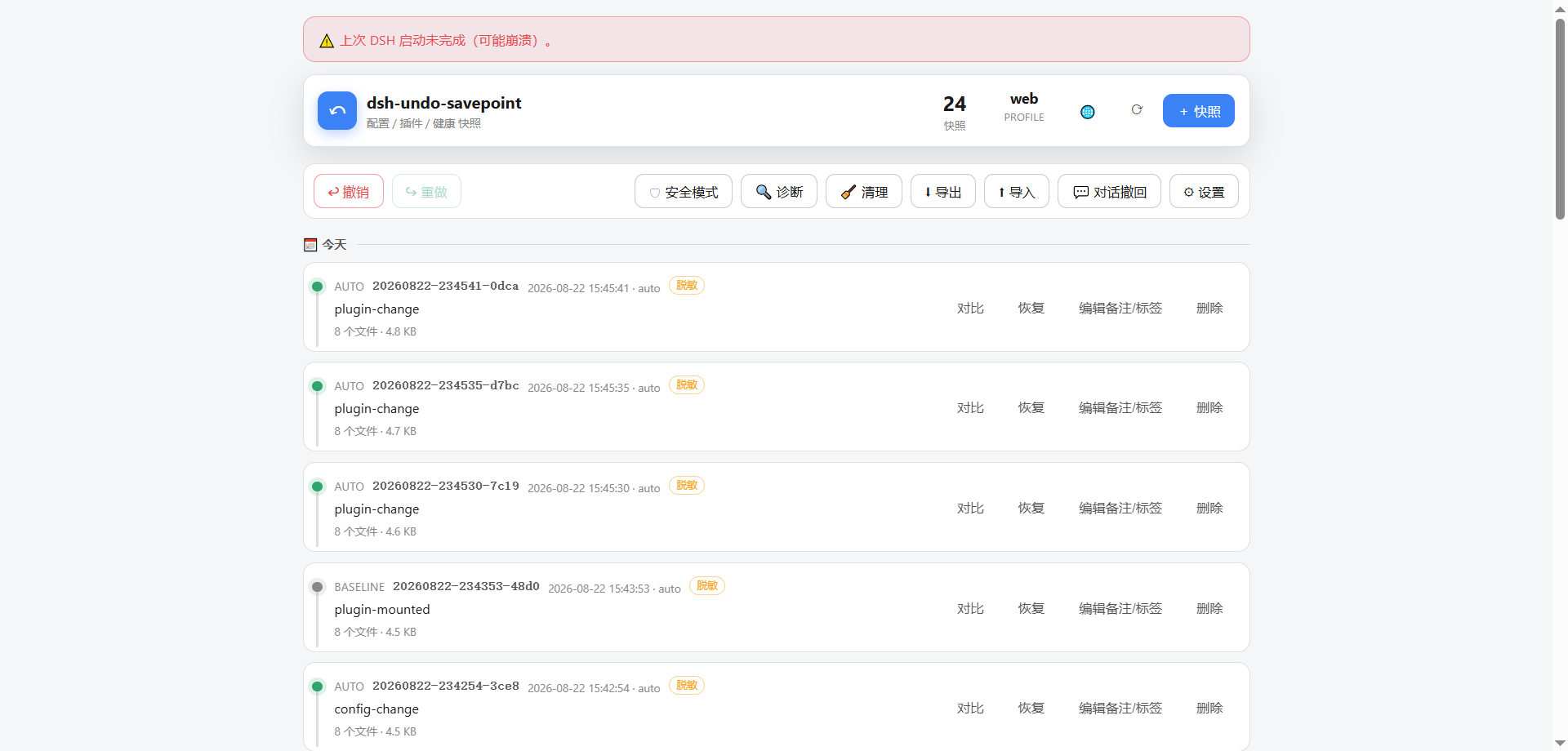
| Out-of-process WebUI: crash banner + undo / redo / safe mode / diagnostics / conversation rollback / settings, independent of DSH (snapshot comparison & settings see Out-of-process tools) |
|---|
 |
Safety Steward
| Duty | Capability |
|---|---|
| Startup health check | Checks session dir, fault-tolerance patches, snapshot coverage, disk usage 30s after startup; alerts only on issues |
| Crash self-repair | One-click safe mode when DSH won't start, keeping only this plugin; crash attribution gives last good snapshot, one-click rollback |
| Session doctor | undo_scan scans session files, fixes single-frame layout violations and seq overlaps; unfixable items quarantined, originals never touched |
| Upgrade escort | Auto upgrade insurance snapshot on DSH version change; first post-upgrade startup yields a compatibility check and session census report |
| No secret leaks | .env, credentials, home-level settings auto-masked in snapshots; real values only in local vault, zero leak on export |
| Fault-tolerance patches | Runtime fallbacks for known bugs in older DSH versions; patches become no-ops once officially fixed, no functional impact |
Core Capabilities
| Capability | Description |
|---|---|
| One-click rollback of config + plugin code | Snapshots cover both configuration and the user plugin code tree; undo any mistake (including yield* pure-code incidents); supports undo / redo / rollback to any version via WebUI / conversation / offline CLI — three entry points |
| Message-level undo | Records workspace file changes per AI message (or 60s batch); one sentence rolls back "what this message changed" (restore original content / delete newly created files); no git dependency, no session storage touched; "Tracked workspace directories" configurable in settings (comma / semicolon multi-select, overrides default working directory when non-empty) |
| In-band conversation retract | "Conversation retract" entry in the conversation header + message-level retract panel; retract file changes for a specific message batch directly in the DSH panel |
| Secret redaction + local vault | .env / credentials are auto-redacted in snapshots (structure preserved); exported ZIP has zero leakage; real values stored in local vault; local rollback fully restores them |
| One-click safe mode | When DSH completely fails to start, disables all plugins except the undo system to guarantee boot; auto-snapshot + config backup (profile / home dual-level patch backed up and restored together, and neutralizes dsh.profile.bundles entries that would cause launcher hard-check failures); one-click exit; when home directory is rebuilt / machine changed, residual state auto-degrades without activating |
| Crash attribution | On last abnormal exit, directly provides the "last known-good snapshot" id + one-click rollback button; classifies crash causes by log signature (session-corrupt / bundle-check / patch-tree), banner shows corresponding remediation advice |
| Session file scan & repair | undo_scan scans <home>/sessions/**/session.jsonl.zstd: single-frame layout violations (root cause of 8/18 crashes) and synthetic-closer seq overlap (interrupted recovery seq overlap after undo/snapshot restore) can be fixed with one click (original kept as .bak + quarantine copy); undecodable files are only quarantined, never modified; when DSH won't start, use dsh-undo.ps1 scan [--fix] offline (requires Node ≥22.15; degrades to hint on Node 20) |
| Snapshot timeline (Time Machine) | Snapshots grouped by date in cards (notes / tag chips, respects prefers-reduced-motion) + file-level diff (add/delete line highlighting, directory tree navigation, per-file browsing) + one-click rollback |
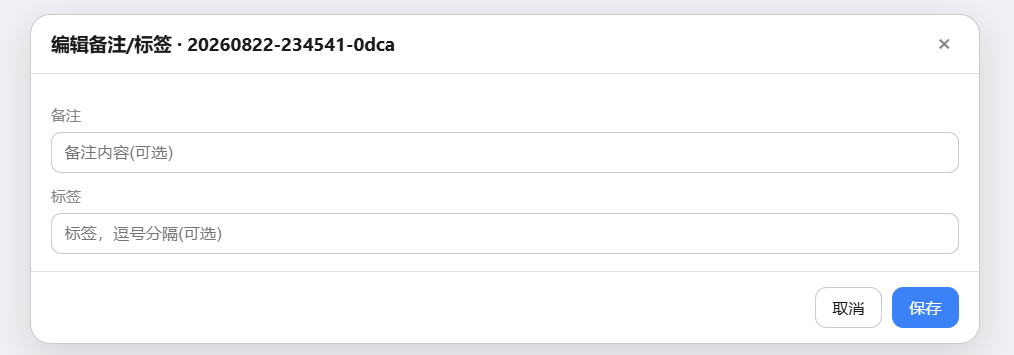
| Snapshot management | Notes / tags (undo_note, editable directly in timeline), scheduled snapshots (interval-based, auto-archive + retention cleanup), orphan blob GC (undo_compact, frees disk), ZIP export / import (optional AES-256-GCM encryption, compatible with PowerShell plaintext interop) |
One-click diagnostics & startup pre-check undo_doctor | Storage side: snapshot directory writability, blob integrity (missing / orphan), settings file health, snapshot size distribution. Startup side pre-checks the hard failures that would crash DSH before any plugin mounts: profile manifest BOM / JSON / structure, dsh.profile.bundles per-entry parseability, patchReload value, link: junction landing point, duplicate loader id in patch, incomplete last startup. Outputs ok / warn / err structured report; fixable items marked [fixable]; one-click fix via undo_doctor fix=true in conversation, offline dsh-undo.ps1 doctor -Fix, or the "Fix Fixable Items" button in out-of-band WebUI diagnostics panel (manual snapshot taken before fixing, auto-recheck after) |
| Cross-machine migration safety | Pre-checks missing plugins before restore with clear prompts; snapshots can be exported / imported as ZIP for migration with one click (see docs/migration.md) |
| Out-of-band first aid | Works even when DSH is down: WebUI + GUI window + CLI + desktop shortcut, with timeline / rollback / comparison / safe mode / diagnostics all available |
Basic capabilities (keyboard shortcuts, conversation commands, auto cleanup, dual-mode save, configurable parameters, etc.) are covered below and in the Changelog.
Platform Support
Since v0.4.0, the core has been extracted into pure Node zero-dependency modules (lib/core.mjs / lib/zip.mjs), with the periphery distributed per platform; available on Windows / macOS / Linux:
| Capability | Windows | macOS | Linux |
|---|---|---|---|
| Config / plugin snapshots, undo / redo | ✅ | ✅ | ✅ |
| Out-of-band CLI / GUI | ✅ (.bat / .ps1) | ✅ (.command) | ✅ (.sh) |
| Out-of-band WebUI (undo-server) | ✅ | ✅ | ✅ |
| File picker dialog | PowerShell native | osascript | zenity → kdialog (falls back to manual input if neither available) |
| CI regression | windows-latest | macos-latest | ubuntu-latest |
CI is a three-platform matrix (
windows/ubuntu/macos × node[20,22]). ZIP export / import is implemented by the pure Node zero-dependencylib/zip.mjs(deflate / store, CRC32, UTF-8), introducing no runtime dependencies; bidirectional interop with PowerShell has been verified.
Logo / icon: generation prompt in
docs/logo-prompt.md; WebUI favicon uses the built-intools/webui/logo.svg. Custom icon: save a transparent PNG astools/webui/logo.png, then runnode tools/make-ico.mjs tools/webui/logo.png tools/webui/logo.icoto generate.ico; it will be auto-enabled on next shortcut creation (fallback order:logo.ico→logo.png→ system default).
Crash first-aid cheat sheet
| Scenario | Action |
|---|---|
| Config / plugin got broken | Chat / WebUI / CLI: undo or restore -Id <id> |
| Plugin code got broken | Same as above (snapshots include the plugin code tree, one-click restore) |
| Last run exited abnormally, unsure where to roll back to | WebUI / GUI banner shows the last-good snapshot, one-click rollback |
| DSH won't start at all | Desktop "DSH Undo Manager" → Safe Mode button (or CLI safe-mode -Label on) → restart DSH to guarantee startup |
| Crash banner flags session corruption | Chat / CLI: undo_scan quarantine=true to repair (or offline dsh-undo.ps1 scan --fix) |
| Restore may miss plugins (cross-machine) | Restore report pre-check warns; install plugins first or enter safe mode |
| Config "suddenly changed" | CLI recent / chat undo_recent to check rollback log |
| Undo involves plugin / mount | Report notes "takes effect after restarting DSH" |
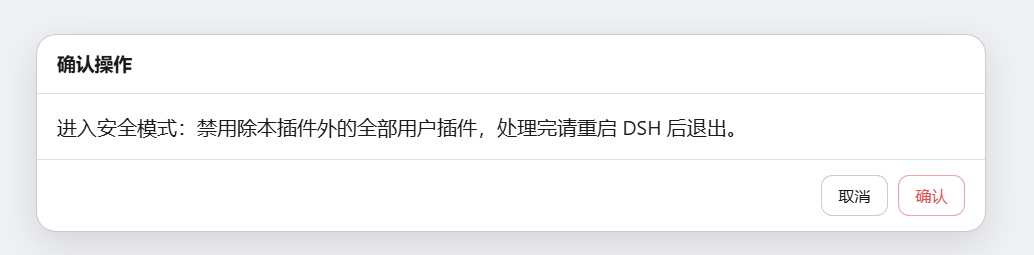
| Safe mode confirmation: one-click disable of all user plugins except this one, guaranteeing DSH can start; then troubleshoot one by one |
|---|
 |
Installation
Prerequisites: DSH (@deepseek-ai/dsh) and Node.js (≥20) are installed. Host-mode operation requires a profile that provides the tools / systemPrompt / webServer services (all Web-type profiles qualify); if DSH cannot start at all, use the out-of-process CLI / GUI instead, which does not depend on the host.
Method A: Install directly from GitHub (recommended)
Install the latest master commit:
dsh plugin --profile web add github:lire1131/dsh-undo-savepoint#master
After install, restart DSH to take effect (snapshot dir, params, etc. all editable in settings).
Method C: Install from the npm registry
dsh plugin --profile web add dsh-undo-savepoint
dsh plugin add delegates to pnpm to finish installation in the profile directory; this package's package.json declares dsh.bundle.patch, so it is automatically registered in the profile's bundle manifest after install, and takes effect after restarting DSH.
Method B: Local source / no-publish
- Place the repo in the local plugin directory (safer to avoid non-English paths), e.g.
D:\dsh\plugins\dsh-undo-savepoint:
git clone https://github.com/lire1131/dsh-undo-savepoint.git D:\dsh\plugins\dsh-undo-savepoint
- Create a junction (Windows) so DSH's module resolver can find the local source under the package name
dsh-undo-savepoint(both the host plugin and the WebUI client plugin rely on it):
mklink /J "<你的DSH安装>\node_modules\dsh-undo-savepoint" "D:\dsh\plugins\dsh-undo-savepoint"
DSH resolves the package name upward from its own
node_modules. The default install location isC:\Users\<用户名>\node_modules(when npm installs into the user directory); when running via the npx cache, create the junction under thenode_modulesin the npx cache directory. Runnpm root -gor check DSH's startup error path to confirm.
- Mount into the profile's patch layer: edit
<DSH_HOME>\profiles\web\cordis.patch.ymland append:
- insert:
    - id: dsh-undo-savepoint
      name: dsh-undo-savepoint
- Activate: saving hot-loads the host part; refresh the page to see the header button and settings; restart DSH to reach steady state (legacy flat snapshots auto-migrate).
Dependency note: the host plugin loads
@deepseek-ai/dsh-toolsviacreateRequire('<DSH安装根>/package.json'). If DSH is installed elsewhere, just set the env varDSH_ROOT=<DSH安装根>— no extra dependency installs needed.
Uninstall
Standard uninstall
Two commands; the second cleans up leftovers:
dsh plugin remove dsh-undo-savepoint
node tools\uninstall.mjs
uninstall.mjs defaults to gentle cleanup: removes mount declaration, deletes junction and desktop shortcut, keeps the snapshot library and settings (reinstall restores history). Add --purge when you no longer need historical snapshots:
node tools\uninstall.mjs --purge
Common options:
| Parameter | Effect |
|---|---|
--purge | Also delete undo\ (settings/state) and undo-snapshots\ (snapshot library) |
--yes | Skip confirmation (must be given explicitly in non-interactive environments, to prevent accidental script deletion) |
--home <dir> | Override the DSH home directory |
--profile <n> | Process only the given profile (default: all) |
--json | Output a machine-readable cleanup plan |
Without --yes, the command first lists every path that will be deleted before asking; in non-interactive environments (CI/pipes) it refuses to run — an explicit --yes is required.
Manual uninstall reference
For a manual cleanup, the six on-disk locations and how to delete each:
| # | On-disk location | Correct deletion |
|---|---|---|
| 1 | <DSH安装根>\node_modules\dsh-undo-savepoint (or under the profile's node_modules) | Delete the link itself, do not follow it. This is a junction — just delete it directly; if you open it in Explorer and delete the contents, you are deleting your plugin source code |
| 2 | The id: dsh-undo-savepoint entry in <DSH_HOME>\profiles\<profile>\cordis.patch.yml | Manually remove that insert entry (the whole line can be deleted); if the file becomes empty you may delete the file |
| 3 | The dsh.profile.bundles array in <DSH_HOME>\profiles\<profile>\package.json | Remove the dsh-undo-savepoint item from the array |
| 4 | <DSH_HOME>\undo\ | Settings and state (incl. settings.json). Only delete if you intend to reset settings |
| 5 | <DSH_HOME>\undo-snapshots\ | Snapshot library. Confirm you no longer need rollback before deleting |
| 6 | Desktop dsh-undo-savepoint.lnk (macOS .command / Linux .desktop) | Delete directly |
Windows long-path note
With deeply nested user directories or a non-English username, snapshot file paths may exceed Explorer's deletion limit (MAX_PATH 260); manual deletion will fail with "filename too long" or leave residue. Use uninstall.mjs above instead: it deletes each file by its fixed path, never traverses snapshot internals, and is not subject to that limit.
Usage (inside DSH)
- Undo: the "Undo" button in the header /
Ctrl+Alt+Z/ tell the AI "undo the last step". - Redo: the "Redo" button /
Ctrl+Alt+Y(only when there are no new operations after the undo). - Manual save: "Manual save" in the panel / tell the AI "save a snapshot" / CLI
snapshot. - Roll back to a specific version: click "Roll back to this version" on a snapshot row in the panel; or tell the AI "roll back to <id>"; or CLI
restore -Id <id>. - Delete a snapshot: click "Delete" in the panel; or CLI
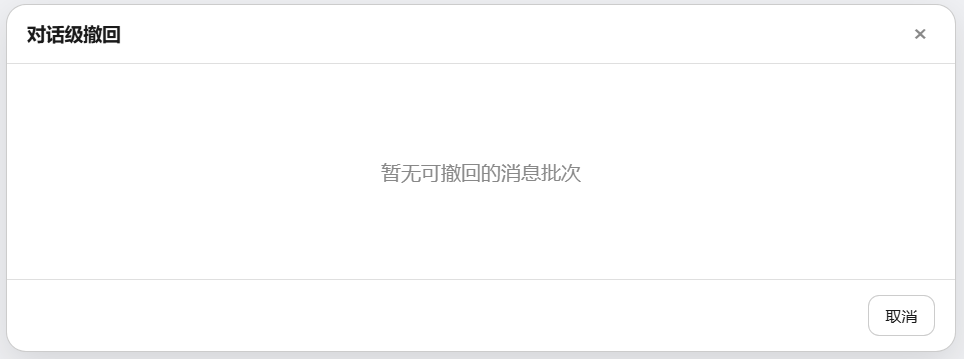
remove -Id <id>. - Message-level rollback: "Conversation rollback" in the chat header — pick a message batch to roll back its file changes.
- Custom hotkeys: Settings → General → Undo / Redo hotkeys (click the input box then press the combo; Backspace clears it).
- Save parameters: Settings → General → Snapshot settings (auto-save toggle, debounce, retention count, two directories, tracked workspace directory; the 📁 button next to a directory opens the system folder picker). "Tracked workspace directory" accepts comma/semicolon-separated multiple entries; when non-empty it overrides the default working directory.
| Conversation-level rollback: revert a batch of changes per message group (time can be traced back to any conversation round) |
|---|
 |
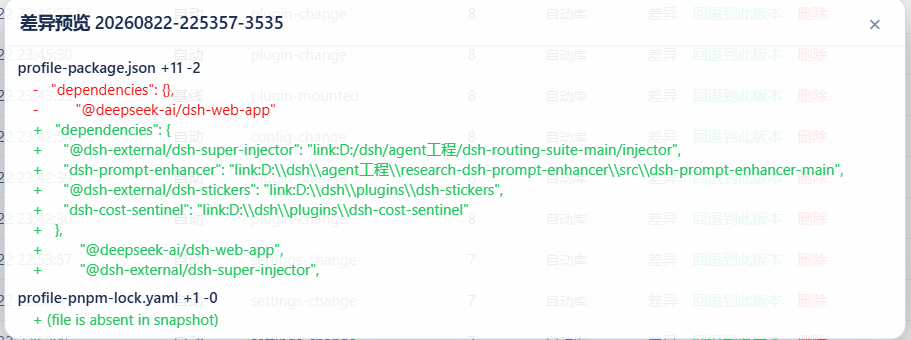
| Diff preview: file-level changes, red for deletions, green for additions; confirm before rolling back | Edit notes / tags: directly in the snapshot list |
|---|---|
 |  |
Out-of-process tools (works even when DSH is down)
Out-of-process WebUI (recommended, all platforms)
node tools/undo-server.mjs # 或双击 launch-undo.bat / .command / .sh / .desktop
Brings up a purely local 127.0.0.1 server + built-in web page: timeline / rollback / compare / safe mode / diagnostics — double-click to use, no DSH dependency. After the plugin loads it also auto-creates a "dsh-undo-savepoint" desktop shortcut; double-click to open directly. The diagnostics panel can both see and fix issues: fixable items are labeled "fixable"; click "Fix fixable items" to repair in place (a manual snapshot is taken automatically before fixing, and a re-check runs immediately after).
| Desktop shortcut: auto-created after the plugin loads; double-click to open the out-of-process WebUI |
|---|
 |
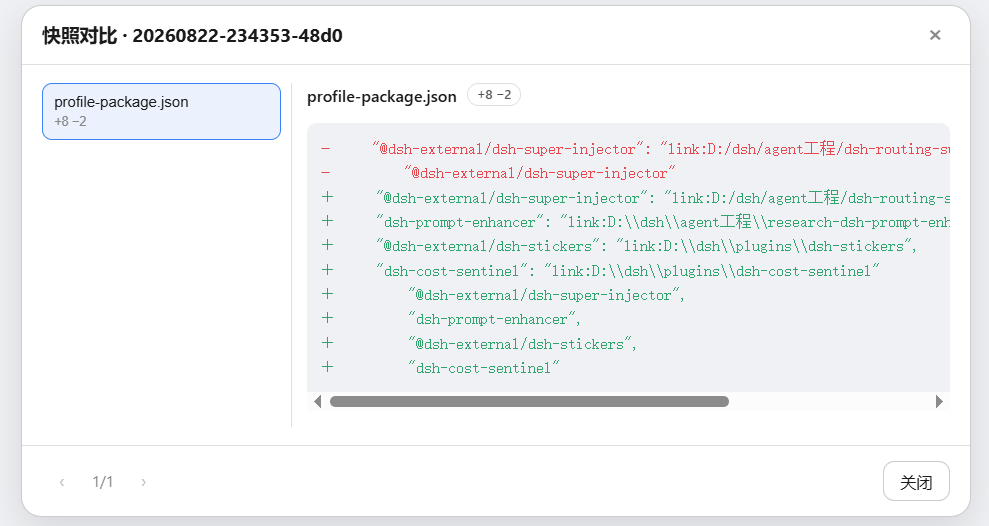
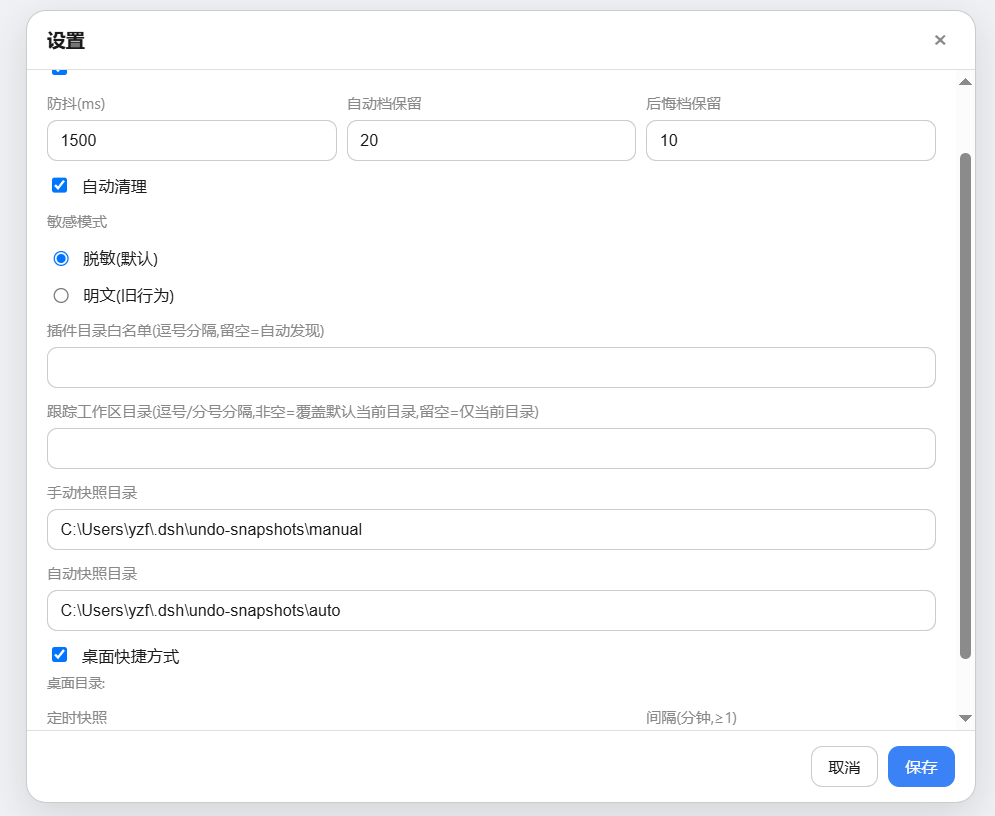
| Snapshot comparison: file list + change stats (+8 / -2) + line-level diff highlighting | Out-of-process settings: debounce / retention count / masking mode / directory picker / desktop shortcut |
|---|---|
 |  |
Tool locations
局外工具(GUI 窗口 + 命令行)不装到桌面,而是随插件装在安装目录里:
| Install method | Tool location |
|---|---|
Method A: dsh plugin add | $DSH_HOME\profiles\web\node_modules\dsh-undo-savepoint\tools\ (DSH_HOME defaults to %USERPROFILE%\.dsh) |
| Method B: clone + junction | Your cloned directory ...\dsh-undo-savepoint\tools\ |
一键创建桌面快捷方式(点开查看 PowerShell 命令)
Double-click tools\make-desktop-shortcut.bat (auto-locates the plugin directory) and a "DSH Undo Manager" icon appears on the desktop; or paste the entire block below into a PowerShell window and press Enter:
$dshHome = if ($env:DSH_HOME) { $env:DSH_HOME } else { "$env:USERPROFILE\.dsh" }
$d = @("$dshHome\profiles\web\node_modules\dsh-undo-savepoint", "$dshHome\profiles\node_modules\dsh-undo-savepoint", "$env:USERPROFILE\node_modules\dsh-undo-savepoint") | Where-Object { Test-Path (Join-Path $_ 'tools\dsh-undo-savepoint-gui.bat') } | Select-Object -First 1
if ($d) {
  $w = New-Object -ComObject WScript.Shell
  $s = $w.CreateShortcut((Join-Path ([Environment]::GetFolderPath('Desktop')) 'DSH撤销管理器.lnk'))
  $s.TargetPath = Join-Path $d 'tools\dsh-undo-savepoint-gui.bat'
  $s.WorkingDirectory = Join-Path $d 'tools'
  $s.Save()
  Write-Host "已创建桌面快捷方式:$($s.FullName)"
} else { Write-Host '未找到插件目录,请先安装:dsh plugin --profile web add github:lire1131/dsh-undo-savepoint#master' }
只想打开工具目录看一眼:
$dshHome = if ($env:DSH_HOME) { $env:DSH_HOME } else { "$env:USERPROFILE\.dsh" }
explorer "$dshHome\profiles\web\node_modules\dsh-undo-savepoint\tools"
Command line (Windows PowerShell)
From the repo dir:
# 程序窗口(推荐):双击 tools\dsh-undo-savepoint-gui.bat,或:
powershell -NoProfile -ExecutionPolicy Bypass -File "tools\dsh-undo-savepoint-gui.ps1"

# 命令行
powershell -NoProfile -ExecutionPolicy Bypass -File "tools\dsh-undo.ps1" list
powershell -NoProfile -ExecutionPolicy Bypass -File "tools\dsh-undo.ps1" snapshot -Label "原因"
powershell -NoProfile -ExecutionPolicy Bypass -File "tools\dsh-undo.ps1" undo
powershell -NoProfile -ExecutionPolicy Bypass -File "tools\dsh-undo.ps1" undo -SyncDeps
powershell -NoProfile -ExecutionPolicy Bypass -File "tools\dsh-undo.ps1" redo
powershell -NoProfile -ExecutionPolicy Bypass -File "tools\dsh-undo.ps1" restore -Id <id> -Force
powershell -NoProfile -ExecutionPolicy Bypass -File "tools\dsh-undo.ps1" restore -Id <id> -Force -SyncDeps
powershell -NoProfile -ExecutionPolicy Bypass -File "tools\dsh-undo.ps1" remove -Id <id>
powershell -NoProfile -ExecutionPolicy Bypass -File "tools\dsh-undo.ps1" prune -KeepAuto 20

# 启动预检(DSH 起不来时也能用);-Fix 修复可修项
powershell -NoProfile -ExecutionPolicy Bypass -File "tools\dsh-undo.ps1" doctor
powershell -NoProfile -ExecutionPolicy Bypass -File "tools\dsh-undo.ps1" doctor -Fix

# 安装插件(自动前后存档,失败自动回退)
powershell -NoProfile -ExecutionPolicy Bypass -File "tools\dsh-plugin.ps1" add <包名>
UI language
DSH_UNDO_LANG=zh|en forces the language; when unset, Chinese on Chinese systems, English otherwise. Applies to server output, offline CLI / GUI, and WebUI; dictionary source is unified at lib/i18n/{zh,en}.json.
Common incident: DSH startup reports errors like
duplicate loader entry id→ open "DSH Undo Manager", select the snapshot from before the problem → roll back → restart DSH. No reinstall, no lost sessions.
Snapshots & storage
Snapshot targets are DSH's critical startup configs: cordis.patch.yml, package.json, cordis.yml, pnpm-workspace.yaml, pnpm-lock.yaml (under the profile) + cordis.patch.yml, settings.yaml, .env, .credentials.yaml (under $DSH_HOME, default ~/.dsh).
When restore involves package.json / pnpm-lock.yaml, the default behavior is to merely report that node_modules may be out of sync; to actually rebuild dependencies, add -SyncDeps (offline CLI), sync_deps: true (conversation tool), or syncDeps: true (REST). The plugin then runs pnpm install --frozen-lockfile (plain pnpm install if there's no lockfile). A failed install does not affect the already-restored config files.
| Library | Default path (configurable) | Content |
|---|---|---|
| Manual | <快照根>\manual\ | Manually saved snapshots (never auto-pruned) |
| Auto | <快照根>\auto\ | Auto snapshots, boot baseline, undo slots (auto keeps last 20) |
| Legacy (compat) | <快照根>\ root | Old flat layout; read-compatible, auto-migrated on startup |
⚠️ Snapshots contain config copies such as
.envand may include secrets — do not share them.
Size discipline: a single snapshot's referenced size ≤5MB (the manifest records
totalBytes, shown byundo_list); when the plugin code tree exceeds the limit, only the manifest is recorded + a[truncated]warning is marked — no data is lost; manual snapshot / export can serve as a fallback. Without external plugins the snapshot is just config files (KB-level); the overall plugin size gate is 5MB (current build is ~0.6MB).
Multi-profile and custom home directory
Multi-profile (since v0.3.3): the plugin auto-detects the current profile from startup args (dsh --profile mine / --profile=mine; dsh web falls back to web) and operates per that profile:
- 配置目录:默认
$DSH_HOME/profiles/<当前 profile>(DSH_HOME 默认~/.dsh); - 快照仓库:默认
<快照根>/<当前 profile>/{auto,manual}(按 profile 隔离);作用域目录不存在而旧版平铺目录存在时自动回退平铺,旧快照不会「隐身」; - 归属标识:快照 manifest 记录
profile字段,undo_list显示当前 profile。
The offline CLI / GUI can't see startup args, so the profile is specified via the DSH_UNDO_PROFILE env var or profileName in settings (default web).
自定义家目录(v0.3.5 起,issue #6):与官方启动器(@deepseek-ai/dsh-home-paths)解析完全一致——DSH_HOME 环境变量优先(空白视为未设置,支持 ~ / ~/ / ~\ 前缀),否则回退 <用户家目录>\.dsh。设置文件($DSH_HOME\undo\settings.json)、默认快照根($DSH_HOME\undo-snapshots)、profile 目录、home 根、插件发现路径全部基于它——第三方客户端不再出现「两套家分裂」,重启后自定义目录稳定保留。
Explicit overrides always win: env vars DSH_UNDO_SETTINGS / DSH_UNDO_ROOT / DSH_UNDO_EXPORT, and homeDir / profileDir / manualDir / autoDir / profileName in config.
REST API (the WebUI backend)
| Endpoint | Description |
|---|---|
GET /api/undo/status | {canUndo, canRedo, total, bootAlert, safeModeActive, ...} |
GET /api/undo/list | Snapshot list (incl. location: manual/auto/legacy) |
GET /api/undo/diff | ?id=<id> file-level structured diff between the given snapshot and the current state |
GET /api/undo/tree | Directory-tree diff (aggregated per directory, with add / delete / modify coloring) |
GET /api/undo/doctor | One-click diagnostics (store writability / blob integrity / settings / size) + startup pre-checks (manifest BOM / bundles / junction / duplicate loader id / last startup incomplete) |
POST /api/undo/doctor/fix | Fix repairable items from the startup pre-checks (strip BOM from manifest and patch, dedupe loader entries by id, rebuild missing or dangling plugin junctions); a manual snapshot is taken before any change, returns a fix manifest + re-check report |
GET / POST /api/undo/settings | Read / write save parameters (auto-save, debounce, retention count, directories); POST takes effect immediately |
POST /api/undo/undo | Undo the last step; optional body {syncDeps: true} rebuilds node_modules per the restored lockfile |
POST /api/undo/redo | Redo; optional body {syncDeps: true} |
POST /api/undo/restore | body {id, syncDeps?} roll back to a given version |
POST /api/undo/remove | body {id} delete a snapshot |
POST /api/undo/snapshot | body {reason} manual save |
POST /api/undo/note | Snapshot notes / tags |
POST /api/undo/messages / message | Message-level rollback: list / roll back file changes for a given message batch |
POST /api/undo/prune | Run expired-snapshot cleanup immediately |
POST /api/undo/export / import | Export / import all snapshots as a ZIP (pure Node, PowerShell-compatible) |
POST /api/undo/safe-mode | body {on} enter / exit safe mode |
POST /api/undo/pick-dir / pick-file | Open the system directory / file picker (dispatched per platform), returns the selected path |
GET /api/undo/locale | Returns the current language (DSH_UNDO_LANG or auto) |
Design highlights
- Undo semantics: auto-snapshots are taken after a change, so "restore the latest save" is a no-op; a real undo = roll back to the latest snapshot whose content differs from the current state; if all are identical, it explicitly says "no undoable changes".
- Undo won't undo itself: after restoring
cordis.patch.yml, it auto-checks and re-writes the dsh-undo-savepoint mount entry. - Auto-save won't break undo: the watcher records the content hash of what the restore operation writes; the restore action's own file changes are not auto-saved (which would block redo); genuine changes are saved as normal.
- Format interop: the Node plugin and the PowerShell tools share the snapshot repository and manifest format; both Windows PowerShell 5.1 and PowerShell 7 are compatible.
开发与测试
- Dependency resolution: the host plugin loads
@deepseek-ai/dsh-toolsviacreateRequire(<DSH安装根>/package.json)(env varDSH_ROOTcan override), no in-repo dependency installation needed. - Tests (no DSH running required, run in the repo directory):
node tools\smoke-test.mjs     :: 189 项逻辑测试(快照/撤销/重做/存储分流/无变化提示/消息级撤销/孤儿GC/zip互操)
node tools\e2e-watch.mjs      :: 10 项真实时序回归(自动存档/撤销不误伤/重做)
node tools\check-size.mjs     :: 体积门禁(<5MB)
node tools\check-version.mjs  :: 版本号 semver 校验
License
MIT
Versions
| Latest version | Published | Size |
|---|---|---|
| 0.4.10 | — | — |
| 0.4.8 | — | — |
| 0.4.9 | — | — |
| 0.3.5 | — | — |
Comments
Loading…
From the same category
DeepSeek Harness plugin for Reactive Resume: bridges your resumes and job applications into a Harness session over MCP.
★ 41.7k
↓ 156/wk
MIT
Aug 24, 2026
dsh plugin --profile web add dsh-plugin-reactive-resumeby Tencent
Let AI agents use your real, logged-in browser without interrupting your work. CLI + extension for browser automation across any shell-capable AI agent.
★ 8.6k
↓ 6.1k/wk
MIT
TypeScript
Oct 10, 2026
dsh plugin --profile terminal add @wxg-prc-cpg/browser-skill-dsh-pluginby yjh051108
dsh-routing-suite — injector + router-standard kit: install the runtime injector first, then the task-aware reasoning-mode router preset (measured P1-P23).
★ 7k
MIT
JavaScript
Sep 18, 2026
dsh plugin --profile web add @dsh-external/dsh-super-injectorby Q00
Agent OS: the agent gets smarter on its own. We just hold the line: Interview-gated, staged evaluation, budgeted evolution loop. MCP server, 14 runtimes: Claude Code, Codex CLI, Gemini CLI, OpenCode,
★ 6.2k
MIT
Python
Oct 7, 2026
by dsh-market
The plugin market inside DeepSeek Harness — browse, search, one-click install · DSH 可视化插件市场
★ 6.1k
↓ 112.4k/wk
MIT
TypeScript
Oct 10, 2026
dsh plugin --profile web add dshmarketby superdesigndev
OpenRouter for agent tools. Join community here: https://discord.gg/6mQYYfFMAn
★ 5k
NOASSERTION
Python
Oct 11, 2026
dsh plugin --profile web add treg-dsh