

dsh-boot-compass
Manifest valid★ 1DSH boot splash: covers the loading card before the first paint, plays a seven-beat compass sequence, then hands off to the app. | DSH boot splash: catches the first frame before the loading card appears, plays the seven-beat compass sequence, then hands off to the main interface
dsh-boot-compass
开机那 3 秒,也值得设计一下。
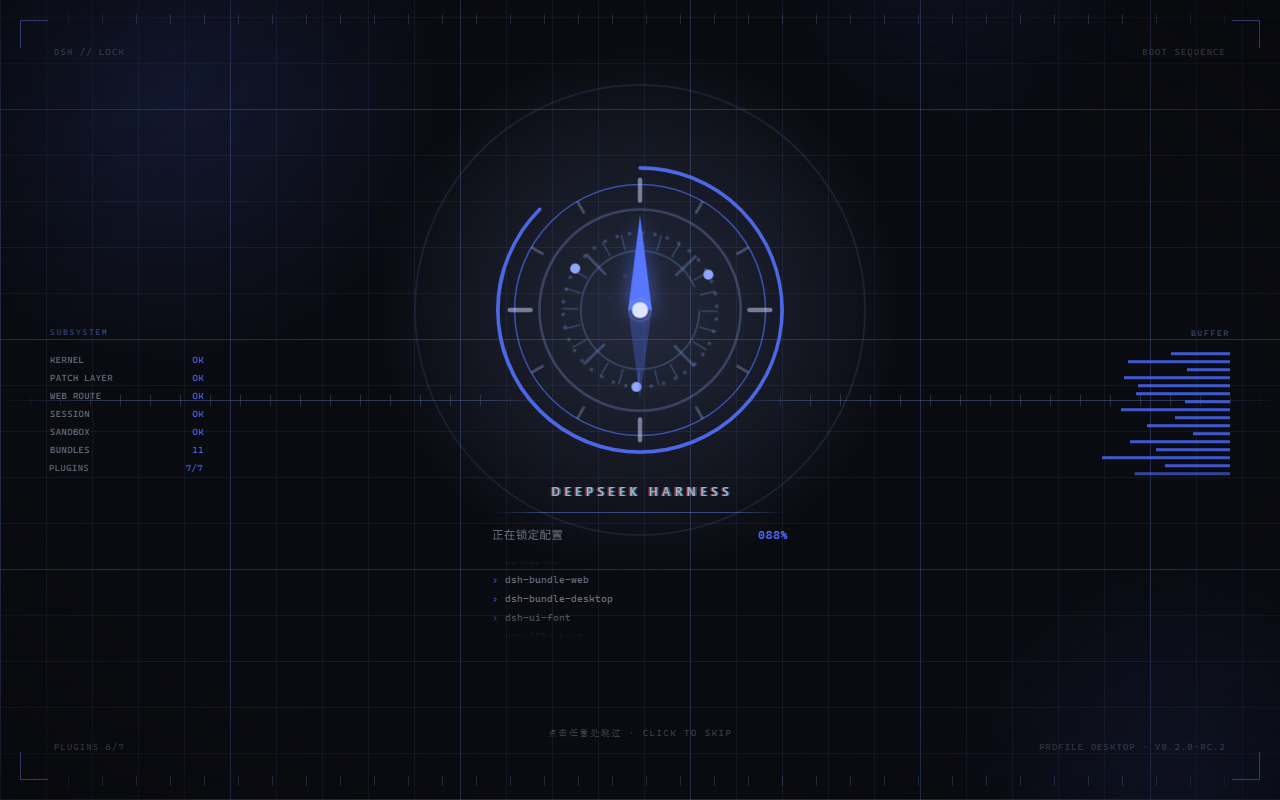
DSH 启动时会先画一张「HARNESS 正在加载插件…」的卡。这个插件在它出现之前就接住画面, 放一段七拍的罗盘序列,播完再交给主界面。纯代码,零视频资源。
从 0.2.0 起,关掉窗口再从托盘打开也会重播一遍;但 alt-tab 切回来不会 —— 下面说为什么。
A full-screen boot splash for DSH: a CSS cover lands before the loading card is painted, a seven-beat compass sequence plays, then the app fades up from inside it.
装
桌面客户端 —— 侧栏 → 插件 → 添加插件,粘贴这一行:
github:linshufan21/dsh-boot-compass
装完点立即启用,然后完全退出客户端再打开。 开机动画是在启动时注入页面的,刷新浏览器看不到。
其它 profile 用命令行:
dsh plugin --profile <name> add github:linshufan21/dsh-boot-compass
这条路会顺带把这个组合包写进 profile 的 dsh.profile.bundles(也就是启用),
重启那个 profile 即可看到。
为什么不能写
dsh plugin add dsh-boot-compass—— 这个包还没发到 npm。 包名要去 registry 查名字,查不到;GitHub 地址是直接去取,所以能用。
要求 DSH >= 0.2.0-rc.1。零运行时依赖,不依赖任何 @deepseek-ai/* 包。
七拍
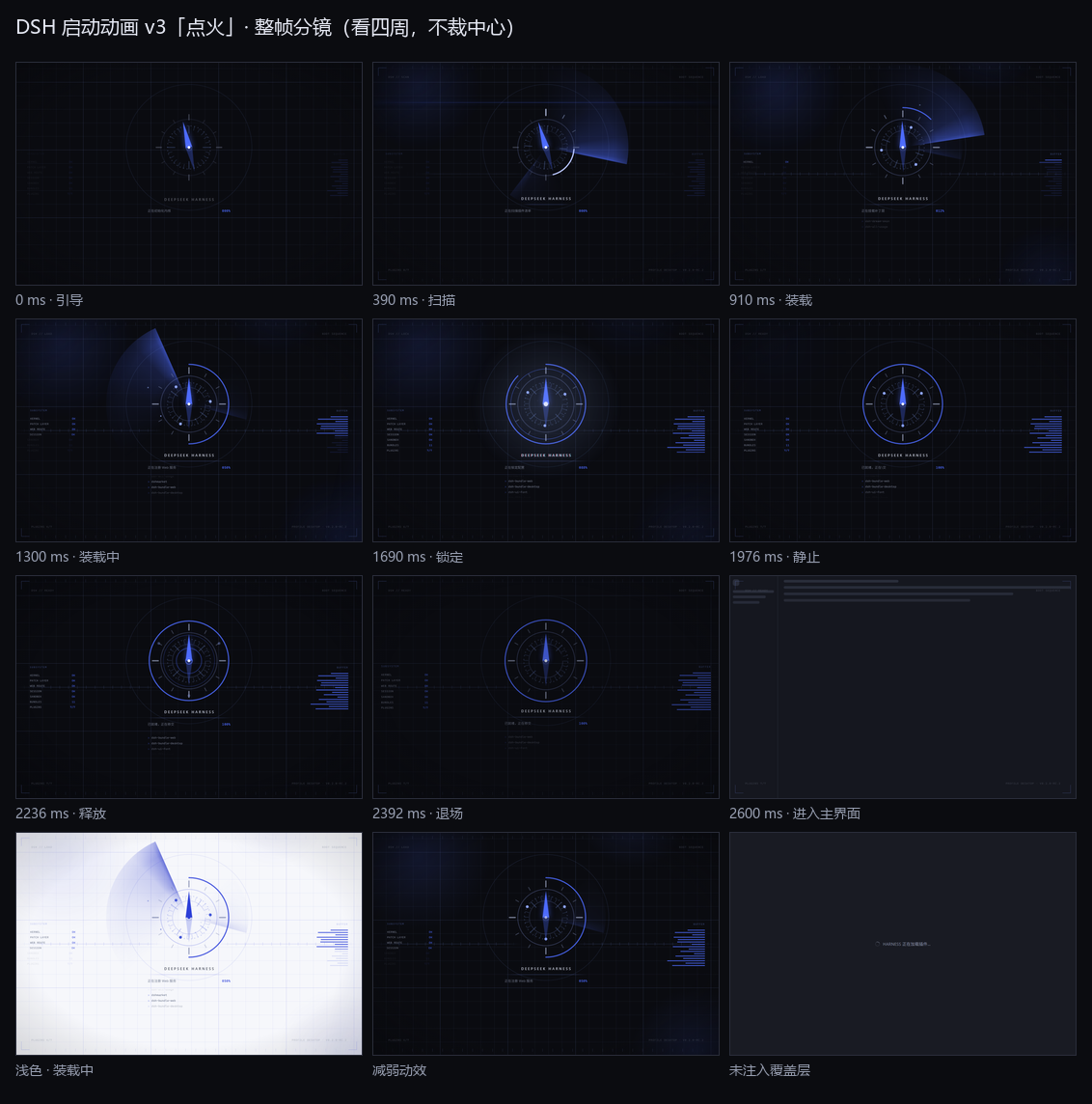
引导 ── 扫描 ── 装载 ── 锁定 ── 静止 ── 释放 ── 退场
一台罗盘从绷紧开始:指针被反向压住。
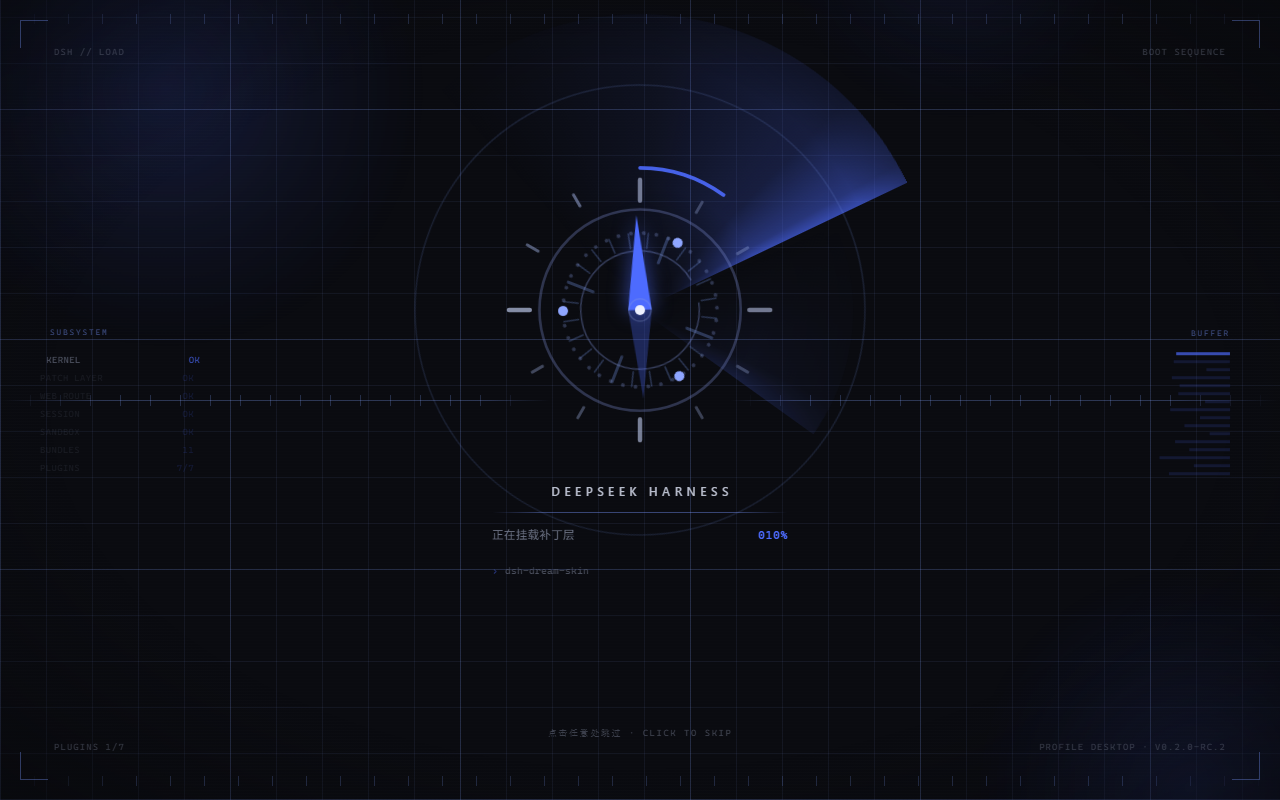
然后一段亮弧绕着盘面走完一周读刻度,像在扫什么。
接着指针被放开 —— 甩过正北、过冲、回摆、停住。 停住那一下是故意的:一直动的东西读起来是"还在忙",停一下才像"到位了"。
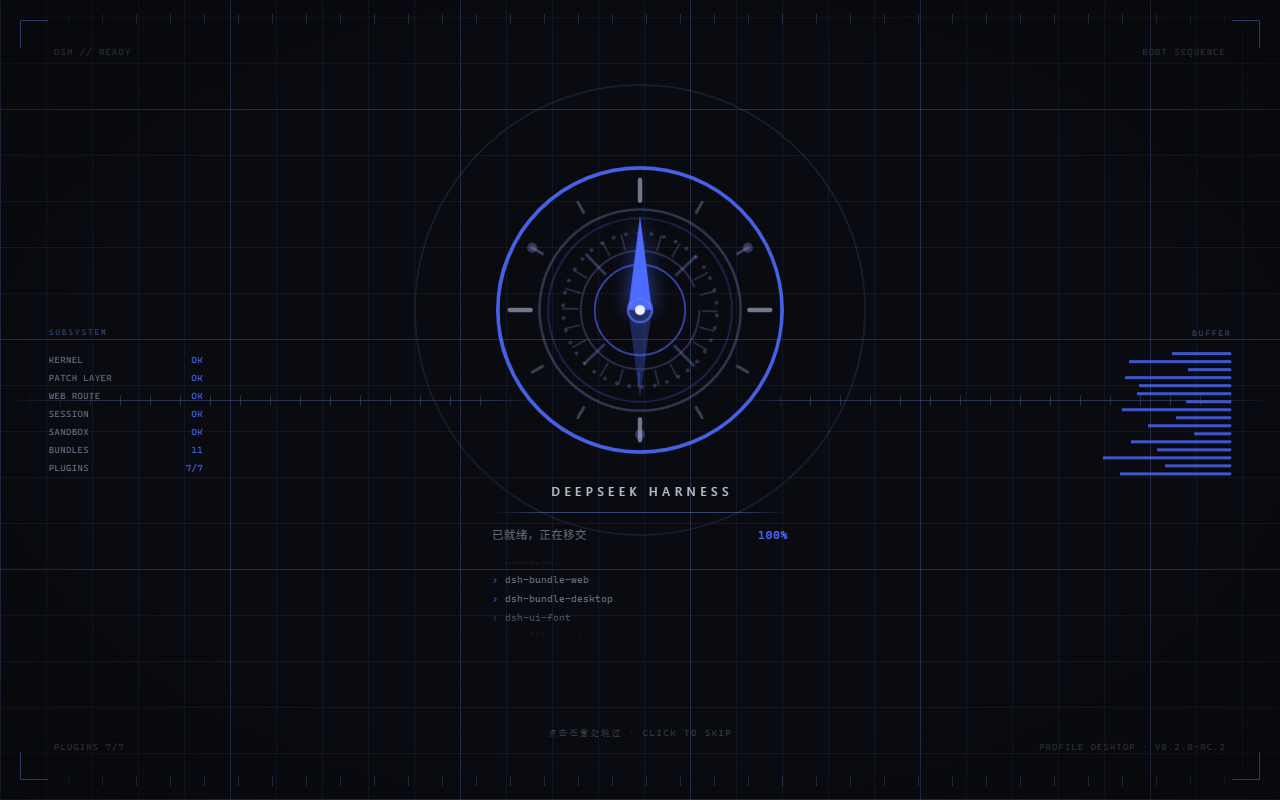
最后冲击波向外投出,整个画面穿过镜头离开,主界面从里面长出来。
| 装载:亮弧扫过刻度 | 释放:冲击波向外投出 |
|---|---|
 |  |
浅色主题下是同一套编排,只是底色换成 #F6F7FB(assets/screenshot-4.png,也在
screenshots.json 里)。整帧分镜十二格:
嫌 3 秒长?
点一下屏幕就直接进主界面,仍然走完释放和交接,约 0.6 秒。
Esc / 空格 / Enter 也行。
还有一层保险:主界面如果迟迟没就绪,动画会停在「静止」那一拍等你,最多 12 秒。 那一下是挑过的 —— 那一刻画面上没有东西在飞。
再打开也播一遍
DSH 点 X 是收进托盘,再从托盘打开时页面并没有重新加载,所以开机动画本来只播一次。 0.2.0 起这件事变了:真的重新打开窗口,就重播一遍。
麻烦的是「真的」这两个字。网页能看到的信号只有一个:document.hidden。而它是两件事:
| 你做的事 | 网页看到 | 实际 |
|---|---|---|
| 关掉窗口,再点托盘 | 隐藏了 | 窗口真的被隐藏 |
| 切到别的最大化窗口,再切回来 | 隐藏了 | 窗口只是被盖住 |
实测(Electron 44 / Chromium 152):托盘关窗 1 ms 后网页就报隐藏,被别的窗口完全盖住 23 ms 后也报隐藏 —— 在网页这边,这两件事一模一样。所以只看这个信号的话, 你每次 alt-tab 回来都会被糊一脸动画。
于是插件走了一条更硬的路:宿主侧用 DSH 自带的 FFI 直接问 Windows
(IsWindowVisible / IsIconic),它分得很清楚 —— 真被隐藏时它返回 0,
只是被盖住时它一个字节都不变。网页把「重新打开」这件事交给它判定,
自己只负责在窗口重新出现时叫一声,所以延迟大约就是一个本地请求。
判定结果也让 alt-tab 之外的情况各归各位:最小化再还原同样算「重新打开」,会重播; 被别的窗口盖住再切回来不算。
门槛:窗口得真的离开 0.6 秒以上才重播。这个数字是量出来的 —— 真实的「收进托盘再打开」 是 1020 ms,所以默认值压在它下面,而不是正好压在它身上;否则这个功能会在它本该服务的 那个动作上时灵时不灵。(宿主每 250 ms 采样一次,比这更短的离开它本来也看不见。)
Windows 专属。 其它系统上问不到窗口状态,这个功能就静静地不生效 —— 启动动画本身一切照旧。
五个开关
都在 localStorage 里,改完刷新即可:
localStorage.setItem('dsh-boot-compass:mode', 'off')       // 整个关掉,直接进 DSH
localStorage.setItem('dsh-boot-compass:theme', 'light')    // 强制浅色;默认跟随系统
localStorage.setItem('dsh-boot-compass:total', 2000)       // 全片时长,800–12000 毫秒
localStorage.setItem('dsh-boot-compass:replay', 'window')  // 重播策略:window(默认)/ any / off
localStorage.setItem('dsh-boot-compass:replaymin', 5000)   // 离开多久才算「重新打开」,默认 600
mode只认'off';设成别的值等于没设。theme只认'light'/'dark',其它值回退到跟随系统。total只认800–12000之间的数,超出范围会被忽略(退回默认 3000),不会报错。replay只认'window'/'any'/'off':'window'是默认的精确判定;'any'退回纯网页规则(被盖住也会重播,非 Windows 上想要这个效果就用它);'off'只播开机那一次。replaymin是重播门槛(毫秒),0–600000,默认600。
想立刻看效果,不用反复关窗:控制台里 __dshBoot.replay() 直接播一遍。
__dshBoot.stats() 会告诉你一共播了几次、上一次因为什么、宿主那边答了什么。
减弱动效
系统开了「减弱动效」(prefers-reduced-motion: reduce)时会自动降级:
不保留任何位移和旋转,只留一次交叉淡入。
但进度指示仍然保留 —— 那是功能,不是装饰。
关掉 / 卸载
临时关掉,用上面的 mode = 'off' 就行,插件还装着,随时改回来。
真不要了:
- 桌面客户端:插件页里卸载
- 命令行:
dsh plugin --profile <name> remove dsh-boot-compass
想先看看?
单文件、零依赖,里面就是宿主侧真实注入的那两行,一个字没改。
点一下就能试跳过。加 ?replay=1 还能用一个假的宿主把重播判定跑起来。
为什么非得做成宿主侧插件
因为那张加载卡画得比任何插件都早。只在客户端 JS 里画动画的话, 无论 z-index 堆多高,它都会在屏幕上待几百毫秒。
唯一比它更早的东西是被服务的文档本身。DSH 开放了 webserver/index-inject,
所以这个插件的首帧是一条纯 CSS 覆盖层 —— 样式行一被解析就已经在玻璃上了,
那张卡从头到尾没机会出现。
实现细节(就绪 gate 为什么卡在 0.76、为什么挂在 shadow root 里、 为什么资产要拼进同一个 script 行、性能与可合成属性清单) 都在 docs/internals.md。
License
MIT
Comments
Loading…
From the same category
DeepSeek Harness plugin for Reactive Resume: bridges your resumes and job applications into a Harness session over MCP.
★ 41.7k
↓ 242/wk
MIT
Aug 24, 2026
dsh plugin --profile web add dsh-plugin-reactive-resumeby Tencent
Let AI agents use your real, logged-in browser without interrupting your work. CLI + extension for browser automation across any shell-capable AI agent.
★ 8.9k
↓ 7.5k/wk
MIT
TypeScript
Oct 15, 2026
dsh plugin --profile terminal add @wxg-prc-cpg/browser-skill-dsh-pluginby yjh051108
dsh-routing-suite — injector + router-standard kit: install the runtime injector first, then the task-aware reasoning-mode router preset (measured P1-P23).
★ 7k
MIT
JavaScript
Sep 18, 2026
dsh plugin --profile web add @dsh-external/dsh-super-injectorby dsh-market
The plugin market inside DeepSeek Harness — browse, search, one-click install · DSH 可视化插件市场
★ 6.6k
↓ 160k/wk
MIT
TypeScript
Oct 14, 2026
dsh plugin --profile web add dshmarketby Q00
Agent OS: the agent gets smarter on its own. We just hold the line: Interview-gated, staged evaluation, budgeted evolution loop. MCP server, 14 runtimes: Claude Code, Codex CLI, Gemini CLI, OpenCode,
★ 6.2k
MIT
Python
Oct 14, 2026
by superdesigndev
OpenRouter for agent tools. Join community here: https://discord.gg/6mQYYfFMAn
★ 5.3k
NOASSERTION
Python
Oct 15, 2026
dsh plugin --profile web add treg-dsh