
dsh-audio-control
Manifest validFloating audio control panel in the Web GUI: play/pause/next/previous for Windows media sessions (SMTC) and the system master volume/mute, served by a Node route half that runs a PowerShell helper.
dsh-audio-control
在 DeepSeek Harness 的 Web 界面里直接控制电脑音频 —— 播放 / 暂停 / 上一首 / 下一首 / 音量 / 静音。
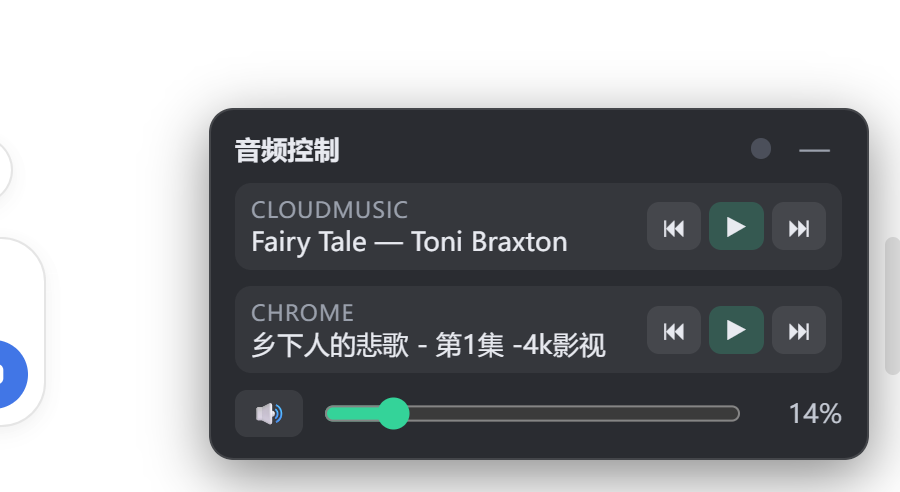
不用切窗口、不用摸媒体键:右下角悬浮一个控制面板,浏览器里就能遥控本机正在播放的音乐。




功能
- 🎵 多媒体会话控制:自动列出所有媒体会话(网易云音乐、Spotify、浏览器标签页……), 每个会话一行,带 ⏮ 播放/暂停 ⏭ 按钮和当前曲目
- 🔊 系统音量:音量滑条 + 一键静音,实时同步(改完立即生效、不卡界面)
- 🟢 出声指示:面板标题栏的小圆点提示当前是否有声音输出
- 🪟 悬浮面板:固定在右下角,可收起成 🎵 小圆钮,不挡聊天区
- ⚡ 改动即时热更新:前端改动由 DSH 的 client-hmr 自动热重载,无需重启
安装
这是一个 DSH profile bundle,安装后自动挂载(自带组合补丁,无需手改配置):
dsh plugin --profile web add git+https://github.com/Li-Mingshuang/dsh-audio-control.git
重启 Web GUI 后,右下角出现 🎵 面板。
前提:运行 Web GUI 的机器是 Windows,且有 PowerShell(
powershell.exe即可,不要求 pwsh)。
手动安装(本地开发 / 离线)
把仓库放到任意目录,然后在 $DSH_HOME/profiles/web/package.json 里加:
{
  "dependencies": {
    "dsh-audio-control": "link:C:/path/to/dsh-audio-control"
  },
  "dsh": {
    "profile": {
      "bundles": ["@deepseek-ai/dsh-base", "@deepseek-ai/dsh-web-app", "dsh-audio-control"]
    }
  }
}
然后 pnpm install --offline --dir $DSH_HOME/profiles/web 并重启 GUI。
使用
面板上每个媒体会话一行:
| 按钮 | 作用 |
|---|---|
| ⏮ | 上一首 |
| ▶ / ⏸ | 播放 / 暂停(显式指令,不会因状态不同步而误触发) |
| ⏭ | 下一首 |
| 🔊 / 🔇 | 静音开关 |
| 滑条 | 系统主音量(0–100%) |
| 标题栏 🎵 圆钮 | 收起 / 展开面板 |
工作原理
浏览器面板 (React,轮询 /audio-control/sessions)
   │  fetch(/audio-control/command | volume | mute)
   ▼
DSH 主机半 (Node,Cordis 插件注册 webserver 命名路由)
   │  spawn powershell.exe
   ▼
PowerShell 助手 → Windows SMTC(播放控制) + IAudioEndpointVolume(音量/静音)
- 主机半(
lib/index.js):在 Web GUI 的 webserver 上注册/audio-control/*路由, 每次调用跑一个动作驱动的 PowerShell 脚本,返回 JSON - 浏览器半(
lib/client.js):React 浮动面板,2.5 秒轮询一次状态 - 只依赖 Windows 自带能力,无需任何第三方二进制
路由一览:
| 方法 | 路径 | 请求体 | 作用 |
|---|---|---|---|
| GET | /audio-control/sessions | — | { ok, sessions[], volume, muted, active } |
| POST | /audio-control/command | { action, app? } | play / pause / toggle / next / prev |
| POST | /audio-control/volume | { value: 0..1 } | 设置主音量 |
| POST | /audio-control/mute | { muted? } | 设置 / 切换静音 |
关键词
中文:DSH 插件、DeepSeek Harness 插件、网页控制电脑音频、浏览器控制音量、音频控制面板、 多媒体播放控制、网易云音乐 远程控制、播放暂停 网页按钮、系统音量 网页滑条、Windows 音频控制、 SMTC 媒体会话控制、DSH 客户端插件示例、插件热更新示例
English: dsh plugin, deepseek harness plugin, control windows audio from browser, media session control, SMTC, system volume control web ui, play pause next track from web, netease cloud music remote control, floating audio control panel, cordis plugin example, hot reload client plugin, react web plugin for audio
开发
lib/ 是构建产物(已提交,安装即用);src/ 是源码参考。
重新构建需要 DeepSeek Harness 源码工作区(打包预设在其中),流程:
# 在 harness 工作区中(源码位于 packages/client/ui-audio-control)
tsc -b packages/client/ui-audio-control
tsdown --env.DSH_BUILD_FACE client
- 前端改动(
src/client/*)在开发链路下会被 DSH 的 client-hmr 自动热重载(浏览器无需刷新) - 主机半改动(路由 / PowerShell 脚本)需要重启 GUI
License
Comments
Loading…
Similar plugins
Speaker button beside the composer microphone — one click reads the newest agent reply aloud through dsh-tts (browser voice as fallback), the next click stops, and a press-then-drag-up opens a vertica
★ 0
dsh plugin --profile web add sh-volume-knobby yuanyiHY
Make DSH's turn-navigator rail react to system audio in real time (Windows). WASAPI loopback capture via koffi - no permission prompt, no microphone, no screen recording; the browser half injects one
★ 0
MIT
JavaScript
Sep 16, 2026
dsh plugin --profile web add dsh-rail-equalizerMic button in the composer tool row: Web Speech API speech-to-text (Chrome/Edge), language switching, and optional auto-send, zero dependencies.
★ 0
dsh plugin --profile web add dsh-voice-input-webPlay different configurable sounds for five conversation events in the DeepSeek Harness web GUI: normal completion, interrupt, error, approval wait, and auto-retry success; each event has its own audi
★ 0
dsh plugin --profile web add dsh-done-soundWeb Audio agent-heartbeat cues for the DSH web GUI: a low working hum while an agent is busy, ticks on streaming output, and a chime when a session awaits input or work finishes, with per-voice volume
★ 0
↓ 252/wk
dsh plugin --profile web add @xain_npm/dsh-client-ui-beepby AKS1st
Media player for the DSH dock: plays audio (music player) and video (fullscreen) files, streamed over HTTP Range.
★ 0
MIT
TypeScript
Sep 11, 2026
dsh plugin --profile web add dock-media