

dsh-agent-canvas
Manifest valid★ 3Interactive canvas for visualizing Agent, Subagent, Workflow, Phase, and tool relationships in DSH Web.

dsh-agent-canvas



把一个 DSH Web 会话里的 Agent、Subagent、Workflow、Phase 和工具调用,变成一张可交互、实时更新的关系画布。
它作为 conversation.view 插件注册在“对话”和“轨迹”之后:打开 Agent 画布 Tab,就能从全局视角观察一次运行如何拆分任务、调度子代理、执行工具,并在浅色 / 深色主题之间自动适配。
宣传图中的二次元角色依据项目提供的视觉参考重新创作,用作仓库的 GitHub Social Preview;界面截图为与当前组件行为一致的示例会话。
功能
- 力导向图布局
- 节点之间自动排斥,有连线的节点互相牵引。
- 支持拖动节点、拖动画布、滚轮缩放。
- 实时数据同步
- 与对话记录同源:
useSession/useSessions读取会话快照和会话列表。 - Subagent / Workflow / 工具调用状态变化时,画布自动更新。
- 与对话记录同源:
- Workflow 按 Phase 分组
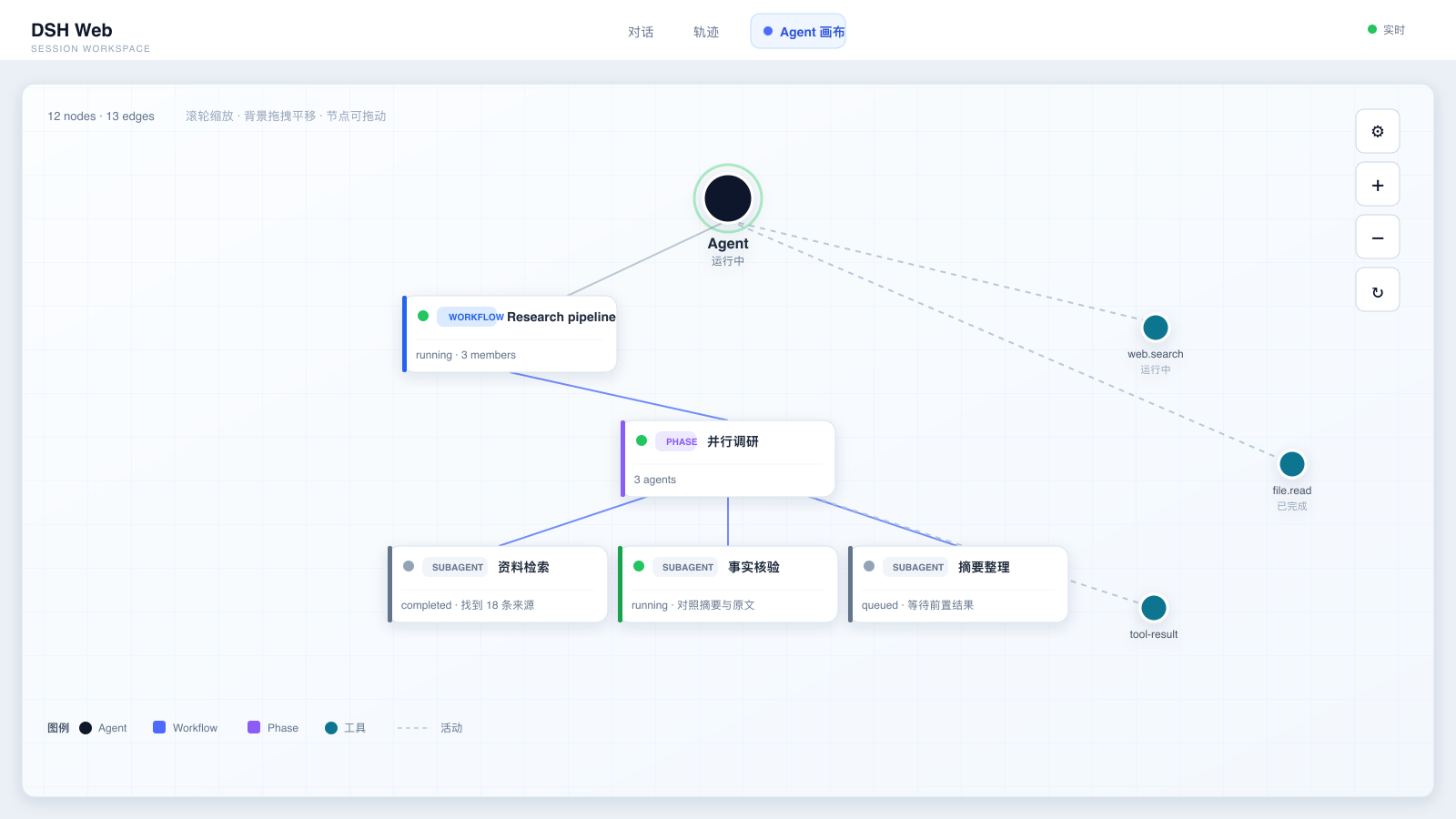
- 主 Agent → Workflow → Phase → Subagent,层级清晰。
- 卡片式节点
- Workflow / Phase / Subagent 使用白底圆角卡片。
- 左侧彩色条区分类型,顶部状态点 + 类型徽标 + 名字,下方内容可滚动。
- 工具和主 Agent 使用圆形节点。
- 力导向参数实时调节
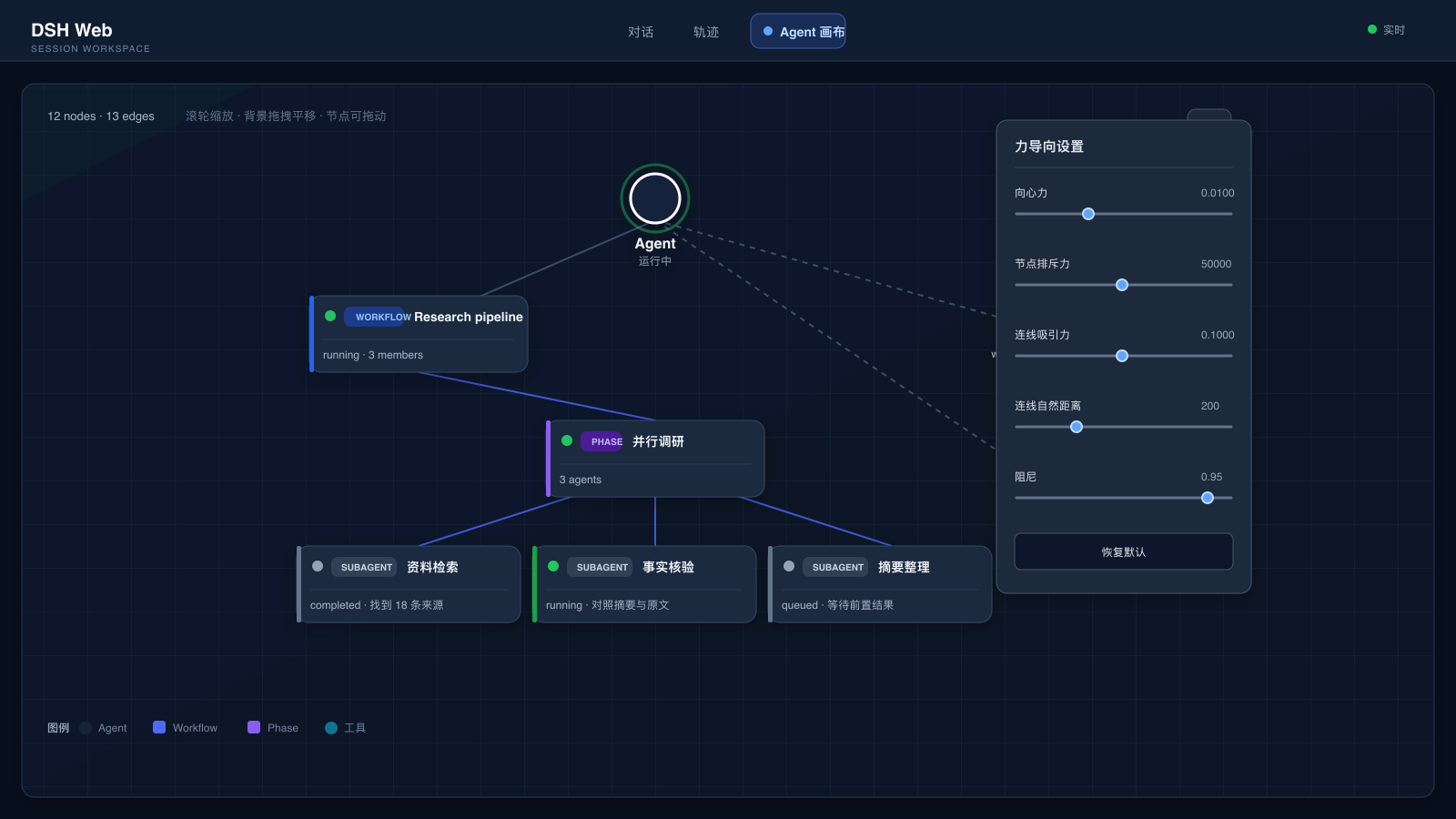
- 右上角 ⚙ 设置面板,可实时调整:
- 向心力
- 节点排斥力
- 连线吸引力
- 连线自然距离
- 阻尼
- 参数自动持久化到
localStorage,刷新后保留。
- 右上角 ⚙ 设置面板,可实时调整:
- 跟随 DSH 明暗模式
- 自动监听
data-ds-dark-theme,画布和卡片在浅色/深色模式下自动适配。
- 自动监听
功能速览
| 模块 | 你能看到什么 | 交互 / 行为 |
|---|---|---|
| Agent & Subagent | 根 Agent、直接子代理、运行状态和任务摘要 | 节点可拖动,状态变化会实时更新 |
| Workflow & Phase | Workflow → Phase → Subagent 的层级关系 | Workflow 成员不会重复连回根 Agent,图更清晰 |
| 工具调用 | 运行中的工具,以及最近完成的工具结果 | 活动连线使用虚线,最近最多保留 12 个结果节点 |
| 力导向布局 | 向心力、排斥力、吸引力、自然距离、阻尼 | 右上角 ⚙ 面板实时调整,并持久化到 localStorage |
| 画布操作 | 平移、缩放、视图重置 | 鼠标拖拽背景 / 节点,滚轮缩放或使用右侧按钮 |
| 主题适配 | DSH Web 的浅色和深色模式 | 自动监听 data-ds-dark-theme |
演示截图
浅色模式:从 Agent 看到完整协作树
深色模式:打开力导向参数面板
关系模型
画布使用和会话区相同的数据源,节点关系大致如下:
主 Agent
├── Workflow
│   └── Phase
│       └── Subagent
├── 直接 Subagent
└── Tool / Tool result
目录结构
dsh-agent-canvas/
├── package.json                         # dsh.bundle + dsh.client 声明
├── cordis.patch.yml                     # 作为 bundle 安装时的 loader 行
├── scripts/build.sh                     # host 半区 tsc 编译
├── tsdown.config.ts                     # client 半区 tsdown 打包配置
├── docs/assets/
│   ├── social-preview.png               # 1280 × 640 GitHub Social Preview
│   ├── social-preview.svg               # 宣传图排版源文件
│   ├── social-preview-base.png          # 生图底稿
│   ├── agent-canvas-overview.png        # 浅色模式演示图
│   ├── agent-canvas-dark-settings.png   # 深色模式 / 设置面板演示图
│   └── *.svg                            # 演示图源文件
└── src/
    ├── index.ts                         # host loader 入口(纯 UI 插件,空 apply)
    └── client/
        ├── index.ts                     # 注册 conversation.view 第三个 Tab
        └── AgentCanvasView.tsx           # 画布、布局和设置面板
构建与开发
npm install
npm run build          # tsc 编译 src → lib
npm run build:client   # tsdown 打包浏览器 bundle → lib/client.js
npm run typecheck      # 类型检查
scripts/build.sh 会自动从 DSH_CHECKOUT 或全局 @deepseek-ai/dsh 安装中链接 @deepseek-ai/* 类型包。
安装到 DSH web profile
从 npm 安装
npm install dsh-agent-canvas
dsh plugin --profile web add ./node_modules/dsh-agent-canvas
从 tarball 或本地源码安装
npm pack
dsh plugin --profile web add ./dsh-agent-canvas-0.1.0.tgz
# 或本地目录
dsh plugin --profile web add .
连线逻辑
- 主 Agent → Workflow:发起 workflow
- Workflow → Phase:workflow 的阶段分组
- Phase → Subagent:该阶段派生的 subagent
- 主 Agent → Subagent:不属于任何 workflow 的直接子代理
- 主 Agent → 工具节点:工具调用 / 工具结果
Workflow 成员不会重复连回主节点,避免图变得稠密。
使用 Subagent / Workflow 的配置提示
标准 DSH base + web-app 已包含相关服务,但模型侧工具由 agent preset 控制。
如果模型没有 subagent / workflow 工具,可以在 profile patch 中启用:
# ~/.dsh/profiles/web/cordis.patch.yml
- id: tool-subagent
  disabled: false

- id: tool-subagent-control
  disabled: false

- id: tool-subagent-list-agents
  disabled: false

- id: tool-subagent-fork
  disabled: false

- id: workflow-worker-thread
  disabled: false

- id: tool-workflow
  disabled: false
Compatibility
Versions
| Latest version | Published | Size |
|---|---|---|
| 0.1.0 | — | — |
Comments
Loading…
Similar plugins
by xindong
A persistent shared canvas for DSH Web and its agent, with a browser UI and tools to organize media, nodes, and connections.
★ 0
MIT
JavaScript
Oct 21, 2026
dsh plugin --profile web add @xindong/dsh-client-canvasby PiedPiper911
Visual drag-and-drop workflow builder for DSH — orchestrate tool calls, sub-agents, and conditional branches on a React Flow canvas.
★ 4
TypeScript
Aug 17, 2026
dsh plugin --profile web add @piedpiper911/dsh-workflow-canvasby Meteor-system
Indexes the current workspace into a relation graph and exposes one agent tool, codegraph_explore, for reachability, callers, and impact, plus a Web sidebar graph pane.
★ 0
MIT
TypeScript
Sep 20, 2026
dsh plugin --profile web add @meteor-system/dsh-codegraphby SMOKTEA
Let the agent turn your data into an interactive chart. | 一句话:让 Agent 帮你把数据变成一张可交互的图表。
★ 0
MIT
TypeScript
Aug 29, 2026
dsh plugin --profile web add dsh-chartlabby hanxuanliang
Durable multi-agent collaboration for DeepSeek Harness: channels, threads, tasks, and resumable agent sessions.
★ 5
↓ 220/wk
MIT
TypeScript
Aug 24, 2026
dsh plugin --profile web add @hanxuanliang/dsh-chaosby GM-HZ
Host-neutral durable DAG workflows for Agents: CLI-native access, fixed MCP gateway, on-demand Skills, triggers, replay, and visual Canvas.
★ 7
↓ 188/wk
MIT
TypeScript
Oct 7, 2026
dsh plugin --profile web add @gm-hz/agent-dag-workflow