
dsh-lifeboard
Identified★ 1Life Kanban · Folds markdown logs into five cards (Health/Tasks/Assets/Mood/Bookshelf). Local-only life dashboard for DeepSeek Harness.
dsh-lifeboard
Fold the everyday traces you already keep in markdown — health · tasks · assets · mood · bookshelf — into one read-only dashboard. No new database, no cloud, and the finance card stays unread until you ask for it.



English · 中文
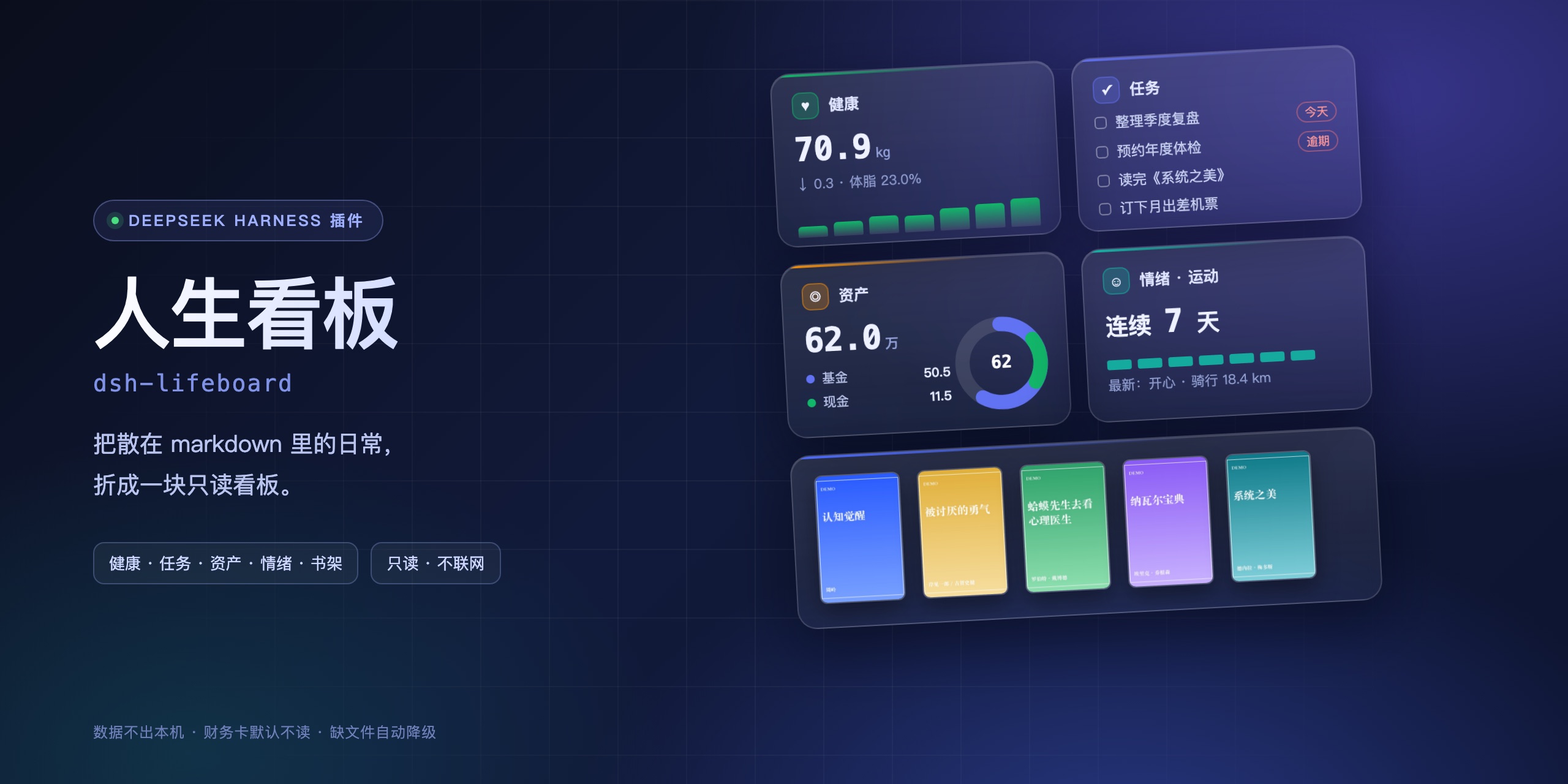
The banner above is an interface illustration rendered from the built-in demo data. The screenshot below is the real plugin in the DSH sidebar.
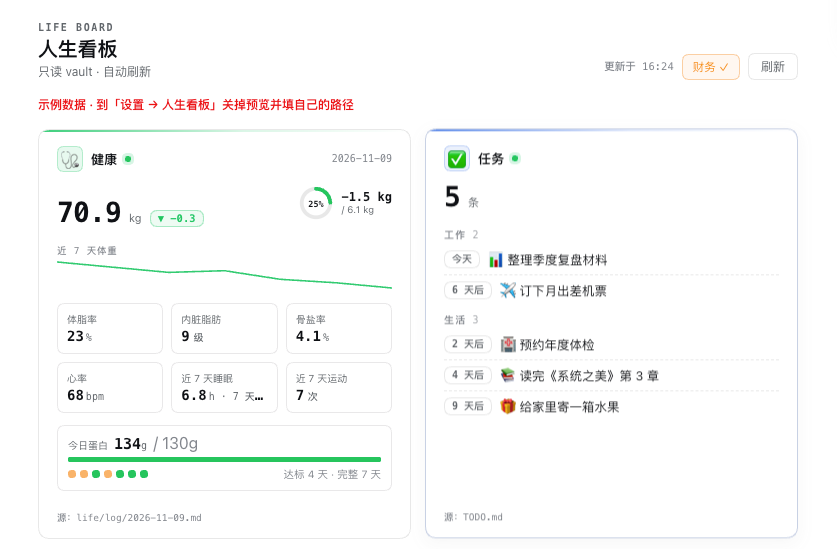
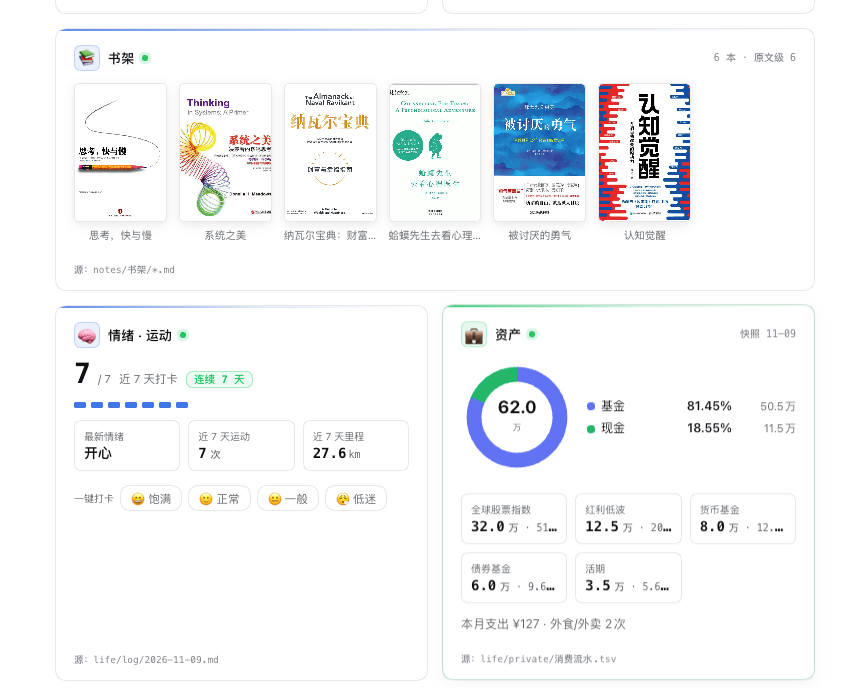
Screenshot uses built-in demo data (a fictional person), not real records.
What it does
You log your weight in a daily note, your todos in a TODO file, your assets in a spreadsheet — and none of it ever becomes something you can read at a glance.
This plugin adds nothing new. It reads the markdown and TSV you already write, folds them into five cards, and docks them in the DSH sidebar. It does not modify your files; the only two write actions are "tick a task" and "check in a mood", and both require a click from you.
How it differs
| Typical plugins | This one | |
|---|---|---|
| Data source | You migrate data into their store | Reads the markdown you already write |
| Scope | One domain (tasks / usage / health) | Five domains in one panel |
| Privacy | Everything read by default | Assets and spending stay unread until you click 👁 |
| Onboarding | Configure first, see later | Ships with demo data — install and look |
The five cards
| Card | Reads | Shows |
|---|---|---|
| 🩺 Health | The health table plus sleep/exercise sections of each daily note | Weight with delta, 7-day sparkline, body fat / visceral fat / bone mineral / heart rate / sleep / exercise, protein progress ring |
| 📋 Tasks | - [ ] lines in your TODO file | Sorted by due date, overdue in red, #tag split into work/life; tick or postpone inline |
| 💼 Assets | Asset snapshot TSV | SVG donut by category, top-5 holdings, this month's spending |
| 🧠 Mood · Exercise | Mood and exercise sections of the log | 7-day dots, streak, latest mood; four one-click check-in buttons |
| 📚 Bookshelf | .md files under the bookshelf folder | Covers; click a book to pull a random excerpt |
Example vaults
Three ready-to-copy note styles live in examples/: Chinese daily diary (health tables), Obsidian template flow (frontmatter + - 体重:: 69.5), and an English journal (weight: 69.5kg). All three parse with the same plugin — point Auto-detect at one and the board fills up.
Quick start
dsh plugin --profile <your-profile> add dsh-lifeboard
Or use Plugins → Add plugin and enter dsh-lifeboard. Restart DSH; a "Lifeboard" entry appears in the sidebar.
No data yet? Open Settings → Lifeboard and enable Demo preview. The plugin generates a fictional local dataset (7 days of weight/meals/mood/exercise, 5 todos, 5 assets, 6 books) under ~/.dsh/storages/dsh-lifeboard/demo-vault/, fully isolated from your real folders.
Configuration
You don't need this folder structure.
_assistant/...below is just an example — any folder works. Open Settings → Lifeboard and hit Auto-detect: it scans your notes folder and fills the paths in.
All optional. Edit in Settings → Lifeboard, or set defaults in your profile's cordis.patch.yml:
- id: lifeboard
  name: dsh-lifeboard
  config:
    vaultRoot: ""                              # empty = auto-detect
    logDir: "_assistant/life/log"              # daily notes, YYYY-MM-DD.md
    todoFile: "_assistant/TODO.md"
    assetsFile: "_assistant/life/private/资产快照.tsv"
    financeFile: "_assistant/life/private/消费流水.tsv"
    shelfDir: "_assistant/notes/书架"
    coverDir: "_assistant/life/private/书/封面"
    excerptDir: "_assistant/life/private/书/抽取"
    windowDays: 7                              # stats window (days)
    proteinTarget: 130                         # protein goal, g/day
    cards:                                     # set false to hide a card
      health: true
      tasks: true
      assets: true
      mood: true
      shelf: true
    demoMode: false                            # demo data preview
    demoCoverDir: ""                           # local covers, never bundled
    einkEnable: false                          # read-only Kindle task page
    einkPort: 8788
    einkKindleDir: ""                          # Kindle mount point
Paths are relative to vaultRoot. A missing file shows "no data" on that card — it never errors or blanks the panel.
Format compatibility
You don't have to rewrite your notes. The parser tries several shapes, from strongest to weakest:
| Shape | Example |
|---|---|
| Table | | 体重 | 69.5 kg | |
| Header table | | 体重(kg) | 体脂率(%) | then a value row (Excel/Notion exports) |
| Key-value | 体重:69.5kg / - **体重**:69.5 / - 体重:: 69.5 (Obsidian) |
| List | - 体重 69.5 公斤 / - 睡了 7.5 小时 |
| English | weight: 69.5 / sleep 7.5h |
| YAML frontmatter | read when the health section is empty |
| Inline sentence | 今天体重 69.5 公斤 — off by default, so stray numbers are never mistaken for weight |
Units are converted for you: 斤→kg (÷2), lb→kg, 分钟→小时, m→公里.
Verified against 10 differently-formatted sample logs: 100% recognised, 0 misreads (node test/samples.mjs).
Field aliases
If your notes use your own wording, add it in Settings → Lifeboard → Field aliases:
体重:我的体重, wt
睡眠:睡眠时间
One line per field, comma-separated. Applies immediately after saving.
Auto-detect
Settings → Lifeboard → Auto-detect walks your notes folder (depth ≤4, ≤5000 entries, 3 s budget) and scores candidates:
- a folder with ≥3
YYYY-MM-DD.mdfiles → daily log TODO.md→ todos- a
.tsvwhose header has 日期/类别/名称/金额万 → assets - many non-dated
.mdfiles → bookshelf - a
封面subfolder → covers
Each hit shows its evidence and a Use button; Use all fills everything at once. Check these paths then verifies each one.
No structure yet? Create samples generates a lifeboard-示例/ folder you can copy — it never touches your existing files.
Mining data from your notes
Settings → Lifeboard → Mine data from my notes scans the last 30 daily logs and pulls out anything the dashboard can use:
- health: weight, body fat, visceral fat, bone salt, heart rate
- protein: distinguishes day total / per-meal total / per-item estimate (the dashboard only takes the day total)
- exercise:
ran 5.2 kmetc., units converted - mood: from the mood section
- todos:
- [ ]/- [x], with done state - weight goals, and inline mentions ("weighed 69.9 kg this morning") marked low confidence
Every item carries its source (file:line). Nothing is written until you accept: accepted rows go to _assistant/life/derived/YYYY-MM.md, deduplicated by source, and your original notes are never modified. Delete that folder and it's all rolled back.
Data formats
The parser expects fixed formats. A mismatch shows "no data" — that is a formatting issue, not a crash.
Daily note logDir/YYYY-MM-DD.md
## 健康

| 指标 | 数值 |
|:--|:--|
| 体重 | **70.0 kg** |
| 体脂率 | **22.0%** |
| 内脏脂肪 | **9 级** |
| 骨盐率 | **4.0%** |
| 心率 | **70** |

## 睡眠

- 睡了 7.5 小时

## 情绪

- **正常**

## 运动

- 户外步行 2.0 km

## 饮食

- 早餐合计:蛋白 ~26g · 热量 ~330 kcal
- 今日累计(日终):蛋白 **~130g**
Protein accepts three shapes: 今日累计:蛋白 ~130g, 全天蛋白 ~130g, or a per-meal 合计:蛋白 ~30g line (summed).
Todos todoFile
- [ ] 整理季度复盘 | 截止:2026-11-20 | #工作
- [x] 续费服务器 | 完成:2026-11-09
Assets assetsFile (TSV, amounts in 10k CNY)
日期	类别	名称	金额万
2026-11-09	基金	全球股票指数	32.0
2026-11-09	现金	货币基金	8.0
Bookshelf shelfDir/<title>.md, metadata on the second line, cover at coverDir/<title>.jpg:
# 系统之美

> 作者:德内拉·梅多斯 · 分类:思维类 · 级别:原文级 · 加入:2026-10-20

## 核心框架
- 系统的三个要件:要素、连接、目标。
(The Chinese field labels above are literal — the parser matches them as-is.)
About the two scanner warnings
dsh.so reports two warnings. Both are intentional, not vulnerabilities:
| Warning | What it is | Boundary |
|---|---|---|
Child process module usage (spawn('open', [abs])) | Clicking "source" on a card opens that file with the system default app | Path must resolve inside the configured vault (no traversal); only .md/.markdown/.tsv/.json/.txt/.csv; files only, never directories; ≤5 MB; argument array, never a shell |
Writing under _assistant/.backup/ | Backs up the TODO file before ticking or postponing a task | Writes only .bak files next to the TODO file, keeps the last 5, never deletes |
The plugin makes no network requests. It writes in exactly three places, and each needs a click from you (tick, postpone, mood check-in).
Privacy
- Nothing leaves the machine: the plugin only registers local HTTP routes (
/api/lifeboard/*) and contacts no third-party service - Sensitive cards are opt-in: assets and spending are requested from the host only after you click 👁, and rendered locally
private/is never scanned: nothing is read unless you configure the path- No data in the package: the tarball contains code, generated demo covers, and text only
FAQ
The cards don't show up after installing. Check the paths in Settings → Lifeboard, then toggle Demo preview once. If the demo renders, the plugin works and the issue is your paths.
The health numbers look wrong.
Make sure the health section is a markdown table and the row labels are exactly 体重 / 体脂率 / 内脏脂肪 / 骨盐率 / 心率. For protein, check the 今日累计 line or the per-meal 合计 lines.
The Kindle page won't open.
It is off by default. Set einkEnable: true plus a mount point and restart. Then open http://<lan-ip>:8788/; if ~/.dsh/eink-token exists, append ?k=<token>.
Do settings need a restart? Paths and card toggles apply immediately. The Kindle service toggle and port require a restart (the server binds on startup only).
Does it upload my data? No. There are no outbound requests, and file reads stay inside the folders you configured.
Development
git clone https://github.com/leotier196/dsh-lifeboard.git
cd dsh-lifeboard
node test/smoke.mjs     # no DSH runtime needed: fake ctx + fake vault, 23 assertions
Coverage: route registration, health/protein parsing, task counts, bookshelf, sensitive cards unread by default, include:finance gating, asset proportions, settings read/write, apply-on-save, missing-path degradation, empty vault, demo mode.
Compatibility
- Tested on
dsh 0.2.1-rc.2–0.2.2-rc.1 - Depends on two host capabilities:
connection.fetch.register(local routes) and clientslots(sidebar, main panel, settings section) - If cards disappear after a kernel upgrade, check the DSH log for
lifeboard: ... route unavailable
License
MIT. Demo covers are programmatically generated graphics and contain no third-party cover art.
中文
把散落在 markdown 里的日常,折成一块只读看板:健康 · 任务 · 资产 · 情绪 · 书架。 只读你已有的文件,不建数据库、不联云,财务卡默认不读。
上图是用内置示例数据渲染的界面示意图;下面是插件在 DSH 侧边栏的真实截图。
截图为内置示例数据(虚构人物),不是真实记录。
它解决什么
你每天在日志里记体重、在 TODO 里记待办、在表格里记资产——这些数据从来不会自己变成「一眼能看懂」的东西。
这个插件不做新东西:只读你已有的 markdown / tsv,按固定格式折叠成五张卡,挂在 DSH 侧边栏。它不改你的文件,唯一两个写入动作是「任务卡手动勾选」和「情绪一键打卡」,都要你自己点。
和同类插件的区别
| 常见做法 | 这个插件 | |
|---|---|---|
| 数据来源 | 让你把数据搬进它的库 | 读你已经在写的 markdown |
| 覆盖范围 | 单个领域(任务 / 用量 / 健康) | 五域合一 |
| 隐私 | 默认全读 | 资产与支出默认不读,点 👁 才请求 |
| 上手 | 先配置才能看 | 内置示例数据,装完直接看效果 |
五张卡
| 卡 | 读什么 | 展示 |
|---|---|---|
| 🩺 健康 | 每日日志的「健康」表格 + 睡眠/运动段 | 体重(含较上次差值)、7 天趋势线、体脂 / 内脏脂肪 / 骨盐率 / 心率 / 睡眠 / 运动六格、蛋白达标环 |
| 📋 任务 | TODO 文件的 - [ ] 行 | 按日期排序、逾期标红、#标签 分工作/生活;可点选完成或延期 |
| 💼 资产 | 资产快照 TSV | SVG 环形饼图(按类别占比)+ top5 持仓 + 当月支出 |
| 🧠 情绪·运动 | 日志的「情绪」「运动」段 | 7 天打卡点、连续天数、最新情绪;四个按钮一键打卡 |
| 📚 书架 | 书架目录下的 .md | 书封、点开随机摘一句 |
示例 vault
examples/ 里放了三套可直接照抄的写法:中文日记流(健康表格)、Obsidian 模板流(frontmatter + - 体重:: 69.5)、英文 journal(weight: 69.5kg)。同一份插件三套都读得出来——把「自动扫描」指过去,看板立刻就有数据。
快速开始
dsh plugin --profile <你的 profile> add dsh-lifeboard
或在 插件 → 添加插件 填 dsh-lifeboard。装完重启 DSH,侧边栏出现「人生看板」。
还没配数据? 打开 设置 → 人生看板,勾上「示例数据预览」——插件会在本地生成一份虚构人物的示例数据(7 天体重/三餐/情绪/运动、5 条待办、5 笔资产、6 本书),先看效果再配自己的路径。示例数据落在 ~/.dsh/storages/dsh-lifeboard/demo-vault/,与真实目录完全隔离。
配置
不必照抄下面这套目录结构。
_assistant/...只是示例,任何文件夹都行。 打开 设置 → 人生看板,点 自动扫描,它会自己找好并填上。
全部可选,在 设置 → 人生看板 里改,或写进 profile 的 cordis.patch.yml:
- id: lifeboard
  name: dsh-lifeboard
  config:
    vaultRoot: ""                              # 空 = 自动探测会话工作目录
    logDir: "_assistant/life/log"              # 每日日志目录,文件名 YYYY-MM-DD.md
    todoFile: "_assistant/TODO.md"
    assetsFile: "_assistant/life/private/资产快照.tsv"
    financeFile: "_assistant/life/private/消费流水.tsv"
    shelfDir: "_assistant/notes/书架"
    coverDir: "_assistant/life/private/书/封面"
    excerptDir: "_assistant/life/private/书/抽取"
    windowDays: 7                              # 统计窗口(天)
    proteinTarget: 130                         # 蛋白目标 g/天
    cards:                                     # 想关掉哪张就写 false
      health: true
      tasks: true
      assets: true
      mood: true
      shelf: true
    demoMode: false                            # 示例数据预览
    demoCoverDir: ""                           # 示例封面目录(本机图片,不随包分发)
    einkEnable: false                          # Kindle 只读任务页
    einkPort: 8788
    einkKindleDir: ""                          # Kindle 挂载点
路径都相对 vaultRoot;文件不存在时对应卡片显示「暂无数据」,不会报错、不会白屏。
格式兼容
不用改你的笔记写法。插件按从强到弱依次尝试:
| 写法 | 例子 |
|---|---|
| 表格 | | 体重 | 69.5 kg | |
| 表头式表格 | | 体重(kg) | 体脂率(%) | 下一行给值(Excel/Notion 导出) |
| 键值 | 体重:69.5kg / - **体重**:69.5 / - 体重:: 69.5(Obsidian) |
| 列表 | - 体重 69.5 公斤 / - 睡了 7.5 小时 |
| 英文 | weight: 69.5 / sleep 7.5h |
| YAML frontmatter | 健康段为空时回退读取 |
| 正文里飘的句子 | 今天体重 69.5 公斤 —— 默认不采用,避免把无关数字当体重 |
单位自动换算:斤→kg(÷2)、磅→kg、分钟→小时、米→公里。
拿 10 份不同写法的日志验证过:识别率 100%,误读 0 条(node test/samples.mjs)。
字段映射
你自己的叫法可以在 设置 → 人生看板 → 字段映射 里加:
体重:我的体重, wt
睡眠:睡眠时间
一行一个字段,逗号分隔,保存即生效。
自动扫描
设置 → 人生看板 → 自动扫描:在资料目录里限量遍历(深度 ≤4、≤5000 项、3 秒上限),按特征打分——
- 有 ≥3 个
YYYY-MM-DD.md的目录 → 日志 TODO.md→ 待办- TSV 表头含「日期/类别/名称/金额万」→ 资产
- 一堆非日期命名的
.md→ 书架 - 名为「封面」的子目录 → 封面
每条都会说明依据,给「用这个」;「全部采用」一次填完,再用「检查这些路径」复核。
还没有结构?点 生成示例目录,会在 lifeboard-示例/ 里建一份可照抄的样例,不动你现有文件。
从笔记里发现数据
设置 → 人生看板 → 从笔记里发现数据:扫最近 30 天的日志,把看板能用的东西捞出来——
- 健康:体重 / 体脂 / 内脏脂肪 / 骨盐率 / 心率
- 蛋白:区分「日终累计 / 每餐合计 / 分项估算」(看板只取日终)
- 运动:
慢跑 5.2 km这类,单位自动换算 - 情绪:从情绪段读
- 待办:
- [ ]/- [x],带完成状态 - 体重目标;正文里「今早称了 69.9 公斤」这类会标成低可信,需你确认
每条都带来源(文件:行)。不点采纳就不写盘:采纳后落到 _assistant/life/derived/YYYY-MM.md,按来源去重,原文一个字不改;删掉那个目录等于全部撤销。
数据格式
插件按固定格式解析,写歪了就是「暂无数据」——不是坏了,是格式没对上。
每日日志 logDir/YYYY-MM-DD.md
## 健康

| 指标 | 数值 |
|:--|:--|
| 体重 | **70.0 kg** |
| 体脂率 | **22.0%** |
| 内脏脂肪 | **9 级** |
| 骨盐率 | **4.0%** |
| 心率 | **70** |

## 睡眠

- 睡了 7.5 小时

## 情绪

- **正常**

## 运动

- 户外步行 2.0 km

## 饮食

- 早餐合计:蛋白 ~26g · 热量 ~330 kcal
- 今日累计(日终):蛋白 **~130g**
蛋白支持三种写法:今日累计:蛋白 ~130g / 全天蛋白 ~130g / 每餐 合计:蛋白 ~30g(逐餐相加)。
待办 todoFile
- [ ] 整理季度复盘 | 截止:2026-11-20 | #工作
- [x] 续费服务器 | 完成:2026-11-09
资产 assetsFile(TSV,金额单位万元)
日期	类别	名称	金额万
2026-11-09	基金	全球股票指数	32.0
2026-11-09	现金	货币基金	8.0
书架 shelfDir/<书名>.md,第二行写元信息,封面放 coverDir/<书名>.jpg:
# 系统之美

> 作者:德内拉·梅多斯 · 分类:思维类 · 级别:原文级 · 加入:2026-10-20

## 核心框架
- 系统的三个要件:要素、连接、目标。
关于安全扫描的两个 Warning
dsh.so 的扫描器会报两条 Warning,都是设计如此,不是漏洞:
| Warning | 是什么 | 边界 |
|---|---|---|
Child process module usage(spawn('open', [abs])) | 点卡片上的「源」跳转时,用系统默认程序打开对应文件 | 路径必须落在配置的 vault 内(防穿越);只允许 .md/.markdown/.tsv/.json/.txt/.csv;只开文件不开目录;单文件 ≤5 MB;参数数组形式,不经 shell |
写文件到 _assistant/.backup/ | 任务勾选/延期前先备份 TODO | 只在 TODO 同目录下写 .bak,保留最近 5 份;不做删除 |
插件没有任何网络请求;写操作只有三个,且都要你在界面上手点(勾任务、延期、情绪打卡)。
隐私
- 数据不出本机:插件只注册本机 HTTP 路由(
/api/lifeboard/*),不请求任何第三方服务 - 敏感卡默认不读:资产与支出要点 👁 才向宿主请求,且只在本机渲染
private/不主动扫:路径由你显式配置,不配就不读- 包里没有数据:安装包只有代码、生成式示例封面与文案
常见问题
Q:装上看不到卡片? A:先看 设置 → 人生看板 里的路径对不对,再勾一次「示例数据预览」——示例能显示说明插件正常,问题在路径。
Q:健康卡数字不对?
A:检查日志「健康」段是不是 markdown 表格、行标签是否写成 体重 / 体脂率 / 内脏脂肪 / 骨盐率 / 心率。蛋白看「今日累计」或每餐「合计」行。
Q:Kindle 页面打不开?
A:默认关闭。打开需配置 einkEnable: true + 挂载点,重启后生效;访问 http://<局域网IP>:8788/,设置了 ~/.dsh/eink-token 时要带 ?k=<token>。
Q:改设置要重启吗? A:路径与卡片开关立即生效;Kindle 服务开关与端口需要重启(服务只在启动时监听)。
Q:会不会把我的数据传出去? A:不会。插件没有外发请求,读文件也只在你配置的目录里。
开发
git clone https://github.com/leotier196/dsh-lifeboard.git
cd dsh-lifeboard
node test/smoke.mjs     # 不依赖 DSH 运行时:假 ctx + 假 vault,跑 23 项断言
测试覆盖:路由注册、健康/蛋白解析、任务计数、书架、敏感卡默认不读、include:finance 才下发、资产占比、设置读写、保存后即时生效、路径不存在降级、空 vault 不崩、示例数据模式。
兼容性
- 已测:
dsh 0.2.1-rc.2~0.2.2-rc.1 - 依赖宿主两个能力:
connection.fetch.register(本机路由)、客户端slots(侧边栏 + 主面板 + 设置小节) - 内核升级后若卡片不显示,先看 DSH 日志有没有
lifeboard: ... route unavailable
License
MIT · 示例封面为程序生成的图形,不含任何第三方封面素材。
Comments
Loading…