

dsh-remote-dock
Manifest valid★ 1Use SSH hosts and WSL distributions as remote DSH workspaces, with environment setup, model configuration porting, and the remote interface embedded locally.

dsh-remote-dock
在 DeepSeek Harness 中使用 SSH 与 WSL 远程工作区


dsh-remote-dock 为 DeepSeek Harness 添加「远程」入口。连接 Linux 服务器(SSH)或 WSL 发行版后,目标上的完整 DSH 界面会出现在本地主区;文件读写和命令执行都发生在目标环境中。
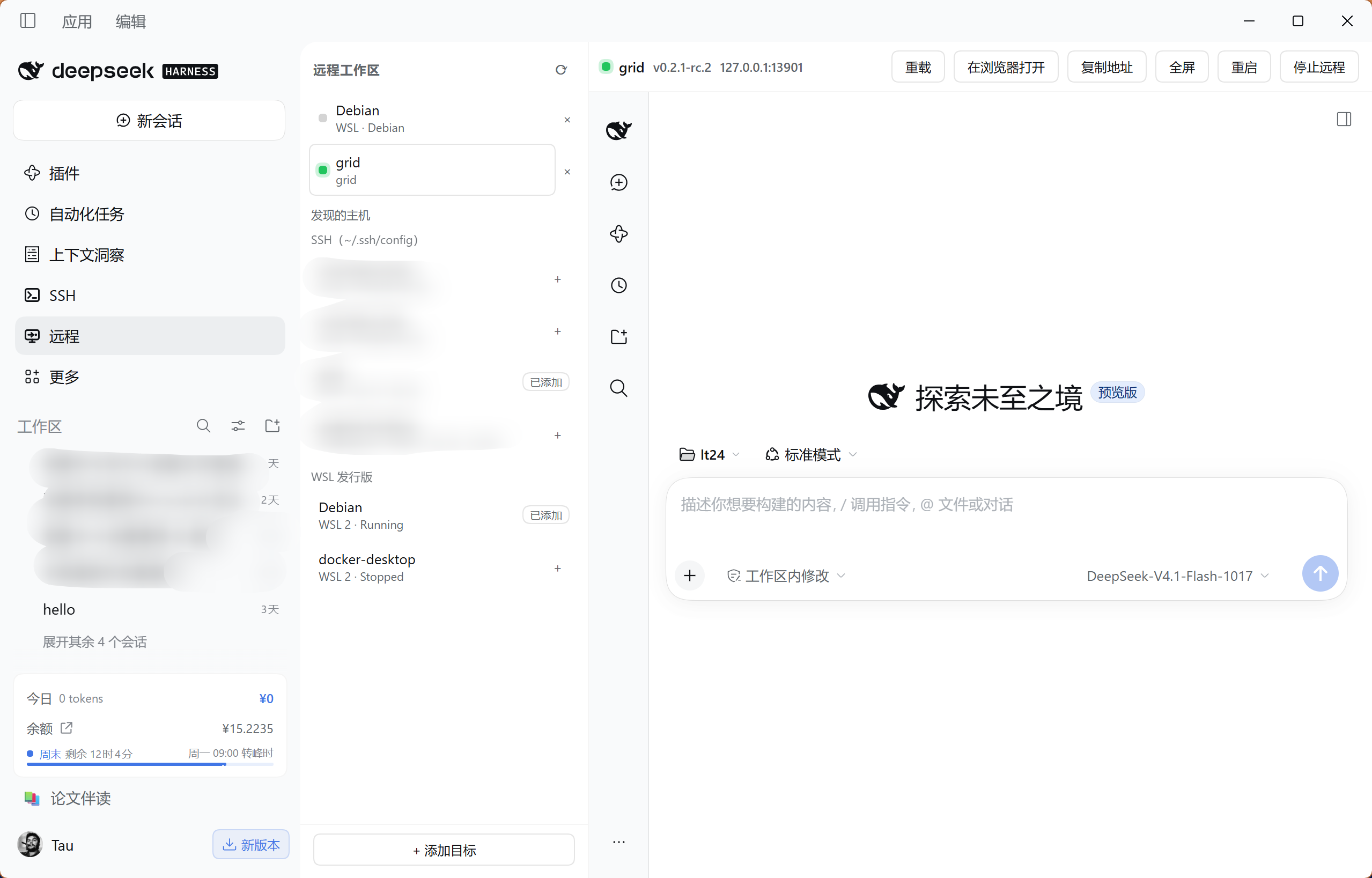
真实桌面截图。
功能
- SSH 与 WSL 目标管理:发现 SSH 配置中的主机和本机 WSL 发行版,也可手动添加。SSH 连接沿用本机密钥、agent 和跳板机配置。
- 远程环境准备:探测 Node 与 DSH,先展示安装计划,再按确认的步骤安装到用户目录,无需 sudo。
- 模型配置移植:将本机服务商配置、默认模型和 API 密钥复制到远程,写入前备份原文件。
- 连接管理:在面板内重载、全屏、重启或停止远程 DSH;重新连接时优先恢复已有实例,SSH 隧道断开后自动重试。
安装
需要 DSH 0.2.1-rc.2 或更新版本。在插件管理器中添加以下来源:
github:Lee-Eee-Eee/dsh-remote-dock#v0.1.5
安装后重启 DSH 并刷新页面,侧栏会出现 远程。
使用命令行安装
如果终端已能运行 dsh,可执行:
dsh plugin --profile desktop add "github:Lee-Eee-Eee/dsh-remote-dock#v0.1.5"
将 desktop 替换成宿主实际使用的 profile;网页版通常使用 web。安装到其他 profile 的插件不会出现在当前宿主中。
从旧名升级
本项目现名为 dsh-remote-dock,原名为 dsh-remote。先在当前 profile 的插件管理器中移除旧版,再添加上面的新来源并重启 DSH;新旧两份应只启用一份。已保存的目标、远程安装和模型配置会继续使用。
dsh-remote-workspace@0.1.0-alpha.* 是其他项目的旧 npm 包。本项目使用本页给出的 GitHub 来源安装。
首次连接
-
添加目标:打开「远程」,点 SSH 主机或 WSL 发行版旁的
+。也可用「添加目标」填写 SSH 别名或主机信息。 -
探测环境:选择目标,点击「探测环境」。缺少 Node 或 DSH 时,打开「查看安装计划」,确认要执行的步骤后安装。
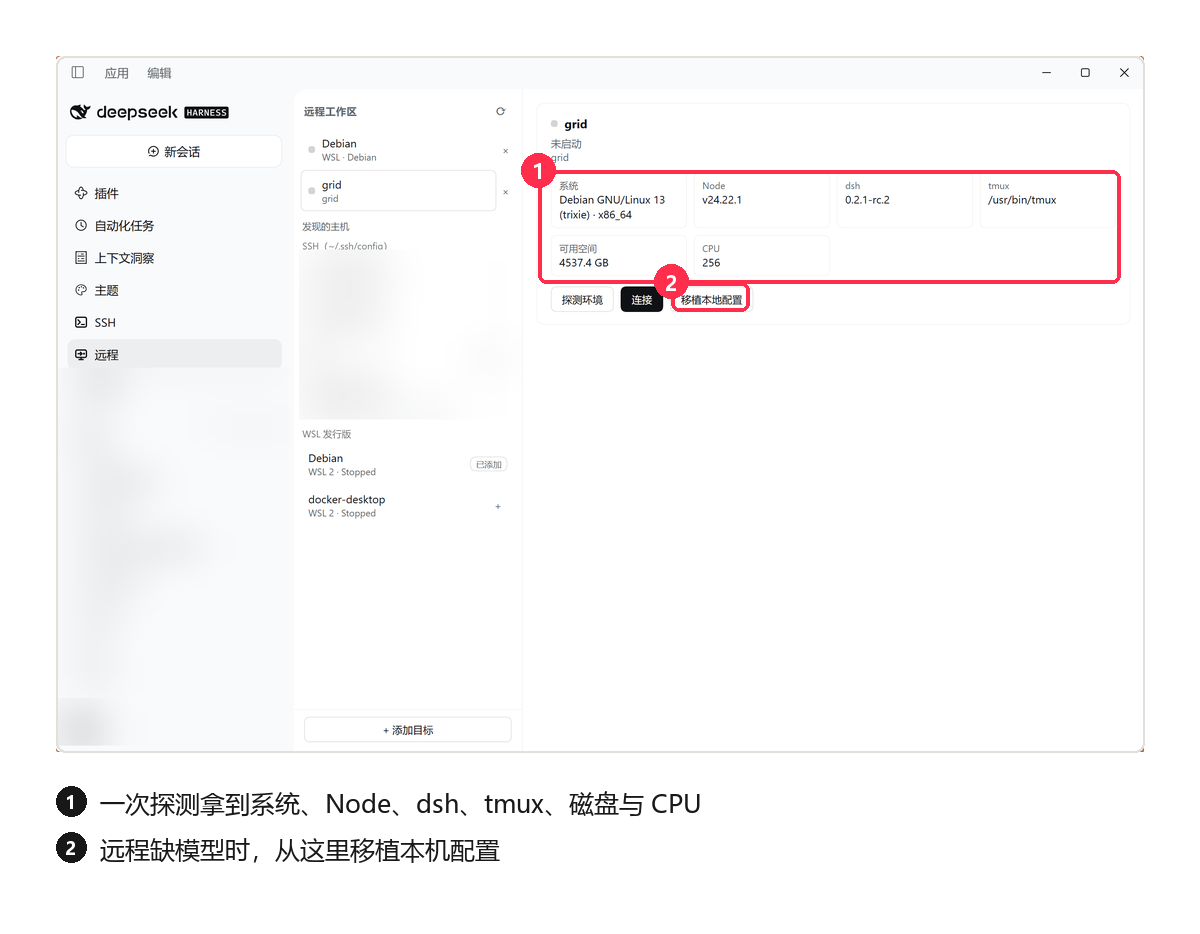
-
准备模型:远程尚未配置模型时,打开「移植本地配置」,选择所需的服务商、默认模型和 API 密钥组,点击「写入并重启」。API 密钥组会复制实际密钥值,请使用你信任的目标。远程已有可用模型时可跳过这步。
-
连接:点击「连接」,在主区打开远程 DSH,选择远程项目开始工作。连接后右侧即目标机器上的 DSH,模型与服务商沿用本机配置。
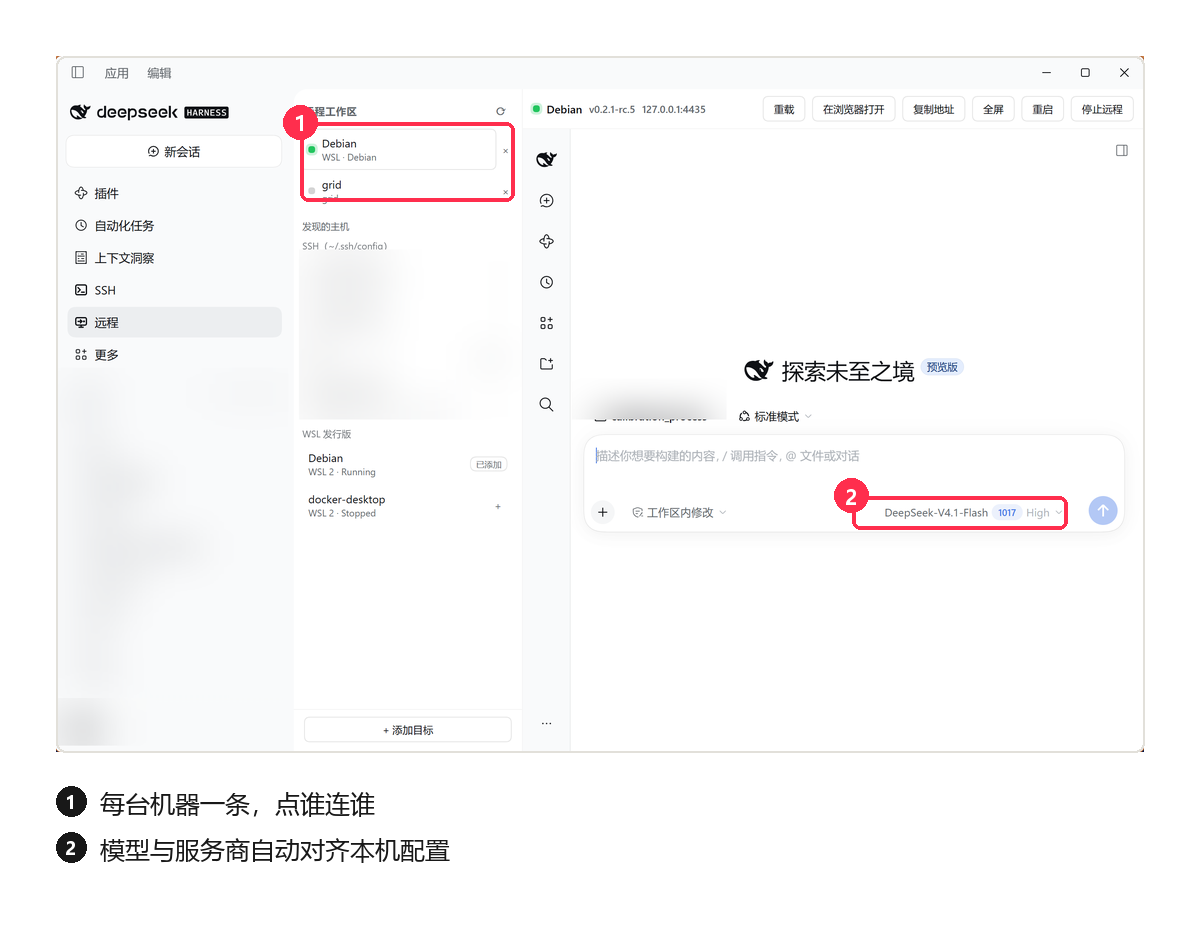
配置移植的预览只显示名称和数量,并排除本机浏览器会话凭据。远程会话与项目由嵌入的 DSH 界面管理。
连接后
多个目标可以同时保持连接,各自独立:切换目标就是切换一台机器的 DSH,互不影响。
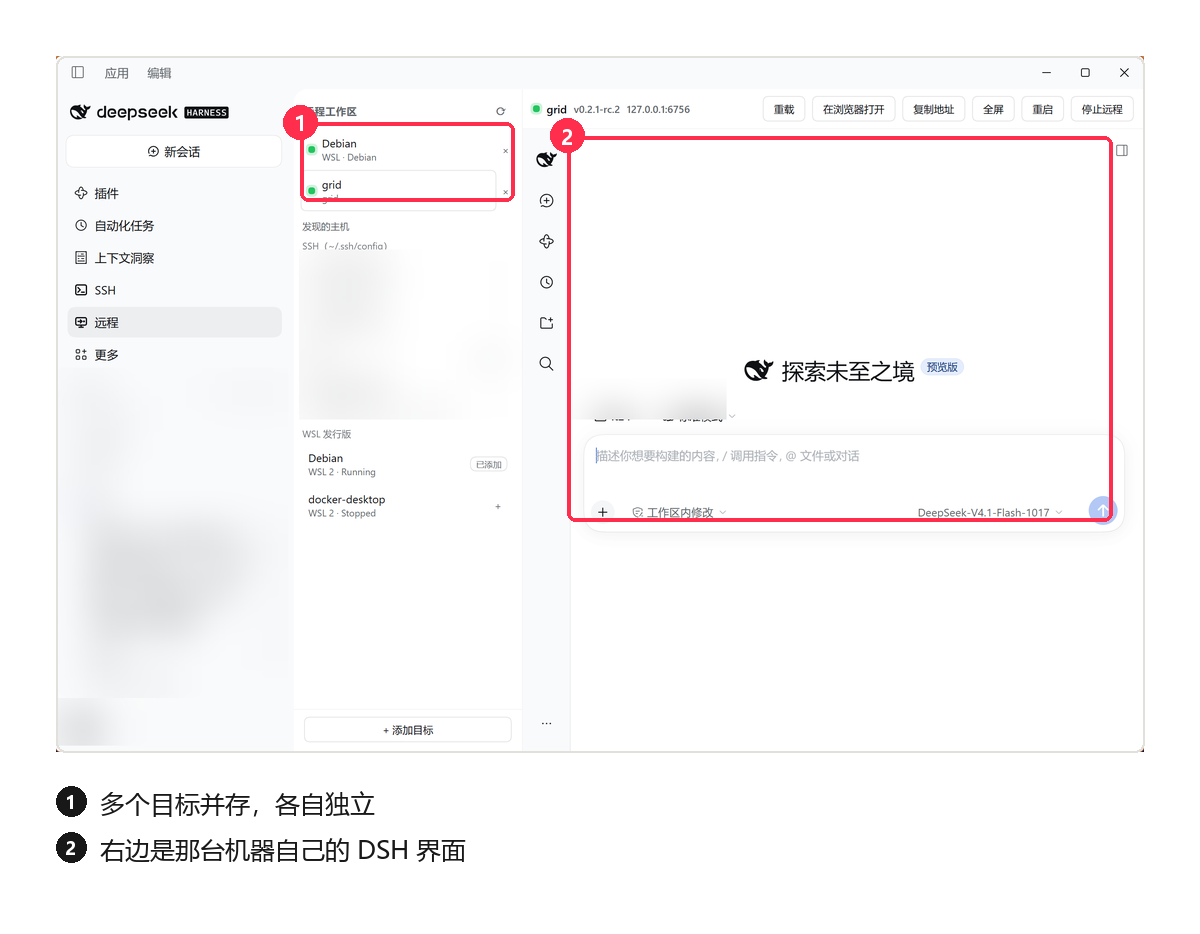
| 操作 | 作用 |
|---|---|
| 重载 | 刷新远程界面 |
| 重启 | 重新启动目标上的 DSH |
| 停止远程 | 结束目标实例并断开本地连接 |
| 关闭面板 / 退出本地 DSH | 保留远程进程,之后可重新连接 |
环境要求
| 环境 | 要求 |
|---|---|
| DSH 宿主 | 0.2.1-rc.2 或更新版本 |
| 宿主运行环境 | Node 22.x(≥ 22.19.0),或 24 及以上 |
| SSH 目标 | Linux x86_64 / arm64,使用密钥或 agent 免交互登录 |
| 自动安装环境 | bash、tar,以及 curl 或 wget |
| WSL | Windows 与发行版之间回环可达;支持 mirrored 网络或启用 localhost forwarding 的 NAT 网络 |
常见问题
安装后没有「远程」入口? 确认安装到了当前宿主使用的 profile,然后重启 DSH、刷新页面。
SSH 连接失败? 先在本机终端确认 ssh <别名> 可以免交互登录,并且服务器允许 SSH 端口转发。密码提示不受支持。
界面能打开,但模型无法使用? 检查远程模型配置;使用「移植本地配置」写入后,重启远程 DSH。
市场显示「宿主要求未知」或旧截图? 使用 dshmarket 1.73.0 或更新版本识别 GitHub 插件的宿主要求;截图随市场目录构建同步。见市场展示信息。
WSL 网络、主机密钥和内嵌认证问题见技术参考中的排错。
文档与反馈
许可
Comments
Loading…
Similar plugins
by MDR-EX1000
Remote-SSH-style workspaces: turn an SSH host and a remote directory into a native DSH workspace; the agent operates the remote filesystem directly via 12 rw_* tools (SFTP/exec), with workspace-confin
★ 3
MIT
TypeScript
Oct 19, 2026
dsh plugin --profile web add dsh-rwby CJYLZS
Remote development over SSH: pick a directory on a registered machine as the session workspace and the file, shell, bash, and search tools run on the remote host — the agent works there with the same
★ 5
MIT
JavaScript
Oct 8, 2026
dsh plugin --profile web add dsh-remote-developmentby flymysql
Remote-work assistant for DeepSeek Harness (DSH): connect SSH (key or password), pick a remote workspace, operate with rw_* tools, and SFTP-mirror it into a real local DSH workspace.
★ 235
↓ 29.1k/wk
MIT
JavaScript
Nov 3, 2026
dsh plugin --profile web add dsh-remoteby siqyka
Use a directory on an SSH host as a DSH workspace — hosts management, directory browser, five agent tools."
★ 7
MIT
JavaScript
Oct 23, 2026
dsh plugin --profile web add @dsh-community/dsh-ssh-workspaceSSH/SFTP remote sites and workspaces: manage connections and remote directories like local workspaces.
★ 0
dsh plugin --profile web add @dsh-external/dsh-remote-workspaceby FYL1025
DeepSeek Harness (DSH) 远程工作区插件:通过 SSH 连接一台或多台服务器,直接在 DSH 的 Web 界面里浏览文件、编辑代码、执行命令——体验类似 VS Code Remote-SSH,无需离开对话。
★ 3
↓ 80/wk
MIT
JavaScript
Aug 16, 2026
dsh plugin --profile web add dsh-remote-workspace