

dsh-drop-in
Manifest valid★ 5Drag/paste files into DeepSeek Harness Web: native reference bubbles in the input box, sent with the message (including absolute paths), with bubbles rendering as file cards. Drag/paste files into the DeepSeek Harness web GUI as native reference bubbles — absolute paths, file cards.
dsh-drop-in
🌐 中文版:README.zh.md
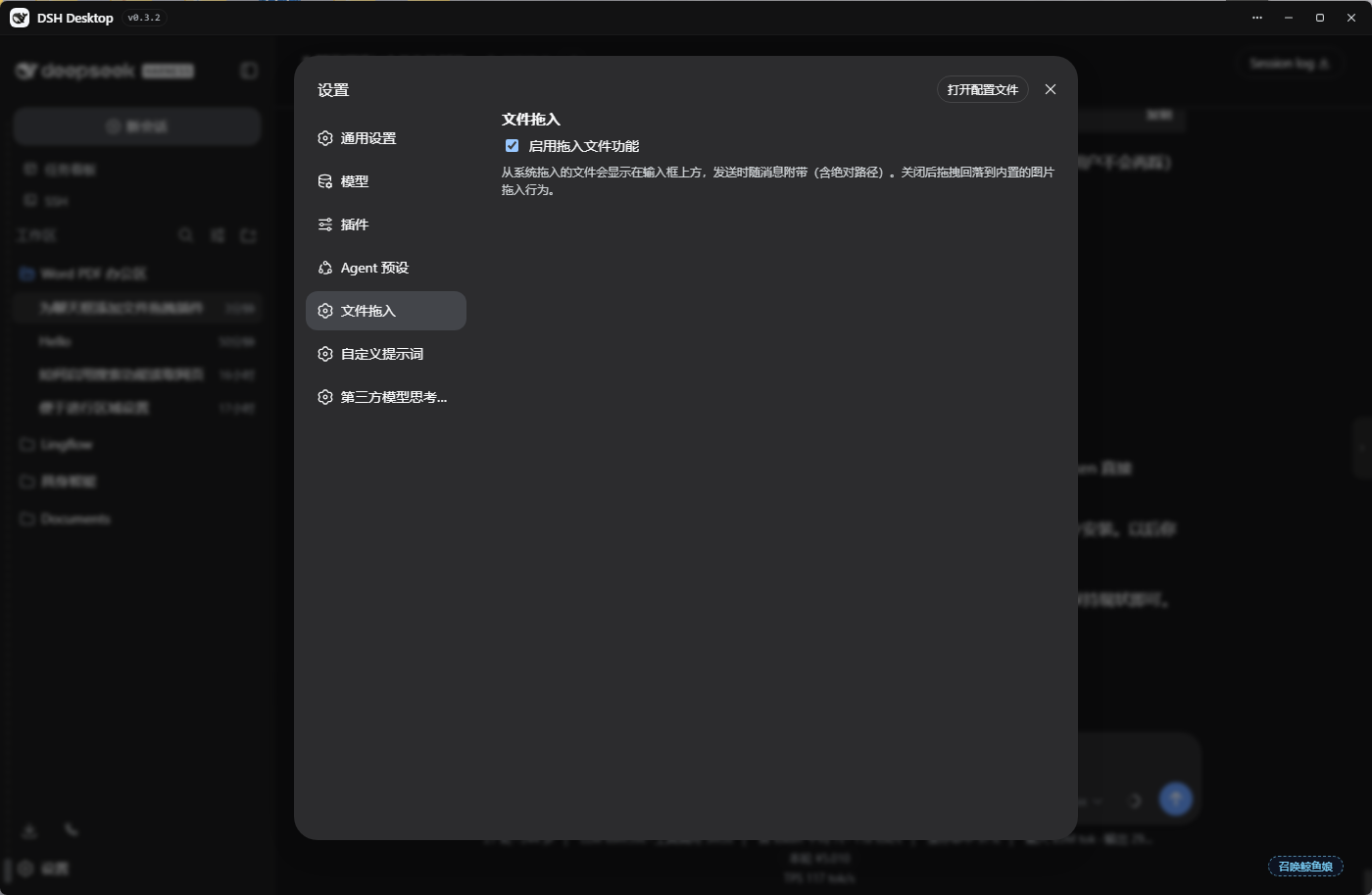
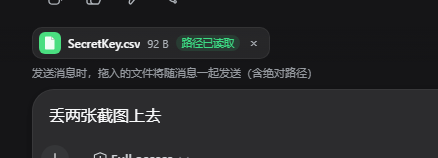
Drag files from your system file manager straight into the DeepSeek Harness web GUI. Files appear as a chip bar above the input box, or — with the composer focused — as a native reference bubble (file pill) embedded inline in the text you are typing; they are sent along with your message (including their absolute paths), and render as file cards inside the user bubble. The agent reads the real file paths — no upload, no content copy (plain-browser fallback copies small files into the workspace).
Features
- 📎 Drag in any file/folder (images are treated as files — the official image-drop overlay no longer steals the drag)
- 🫧 Inline file bubble: dropped/pasted files are inserted at the caret as a native reference pill (works mid-text); the pill shows
TYPE name(e.g.LNK 坚果云.lnk— the type survives name clipping, full name on hover) - 📤 Path on send: the pill expands to a reference carrying the absolute path (
@[filename](https://github.com/lbl61/dsh-drop-in/blob/HEAD/absolute-path)); the chat bubble renders it as a file card with a type badge — the agent can read the file straight from the path - 🔀 Messages sent while the agent is running ("interrupt-free") render the same file cards
- 🖼️ Clipboard paste: pasting an image/file into the composer goes through the same pipeline instead of the native image-attachment rail; pasted binaries are persisted (base64) under
.dsh-drops/<sessionId>/ - 🚀 Chip bar above the input: icon + name + size + path status, removable (×), deduplicated by path
- ✔️ Enter / Ctrl+Enter / the send button are all covered; chips clear automatically after sending
- 🔍 A
dropped_filestool lets the agent list still-unsent dropped files - 🖥️ Under DSH Desktop (Electron) absolute paths come from the preload bridge (
webUtils.getPathForFile— the only path source in modern Electron) - 🌐 Fallback: in a plain browser (no preload bridge) text files are copied to the workspace
.dsh-drops/
Install
dsh plugin --profile web add https://github.com/lbl61/dsh-drop-in/archive/refs/tags/v1.3.0.tar.gz
Manual (bundle) install:
- Extract
dsh-drop-ininto~/.dsh/profiles/web/node_modules/dsh-drop-in/ - Add
"dsh-drop-in"to thedsh.profile.bundlesarray in~/.dsh/profiles/web/package.json - Restart
dsh web(DSH Desktop: quit fully and reopen, or runwindow.dshDesktop.restartService()in DevTools)
Usage
- Drag files from Explorer into the chat page (or paste an image/file into the composer)
- Composer focused → files are inserted at the caret as native reference bubbles (file pills), mid-text allowed; otherwise they appear in the chip bar above the input
- Type your message and send (Enter / Ctrl+Enter / the send button all work; "interrupt-free" sending while the agent runs is supported too)
- The bubble shows file cards — the agent receives the absolute path (
@[name](https://github.com/lbl61/dsh-drop-in/blob/HEAD/path)or the📎 拖入文件block) and can read the files
How it works
- The client half intercepts file drags in the capture phase (the official image-upload flow never steals the events), keeps a per-session chip bar (
conversation.input.dock), renders user bubbles with file cards (conversation.chat.nodeuser/steeringkeys), and stitches the📎 拖入文件block into the draft before submit (Enter, Ctrl+Enter, and the send button are all covered); with the composer focused it inserts native reference bubbles via theslash/input-insert-referencescoped event (U+FFFC occurrences rendered by the composer backdrop) and the registeredinputTriggerscodec serializes them to@[filename](https://github.com/lbl61/dsh-drop-in/blob/HEAD/absolute-path)on submit - The host half keeps the per-session file registry behind the
dropped_filestool, writes fallback text copies to.dsh-drops/<sessionId>/, and persists pasted binaries via thefile-copyroute (base64, with an explicit workspace-write sandbox policy rooted at the session cwd) - Absolute paths under DSH Desktop rely on the preload bridge (see preload-bridge.md): Electron ≥ 32 removed
File.path
Configuration
| Setting | Description |
|---|---|
enabled | Master switch (Settings → 文件拖入). When off, drag/paste falls back to built-in behavior. |
Uninstall
- Remove
dsh-drop-infrom thedsh.profile.bundlesarray in~/.dsh/profiles/web/package.json - Delete
~/.dsh/profiles/web/node_modules/dsh-drop-in/ - Restart
dsh web
License
MIT
Compatibility
Versions
| Latest version | Published | Size |
|---|---|---|
| 1.3.0 | — | — |
| 1.1.0 | — | — |
| 1.1.1 | — | — |
Comments
Loading…
From the same category
DeepSeek Harness plugin for Reactive Resume: bridges your resumes and job applications into a Harness session over MCP.
★ 41.7k
↓ 215/wk
MIT
Aug 24, 2026
dsh plugin --profile web add dsh-plugin-reactive-resumeby dsh-market
The plugin market inside DeepSeek Harness — browse, search, one-click install · DSH 可视化插件市场
★ 10.1k
↓ 361.7k/wk
MIT
TypeScript
Nov 1, 2026
dsh plugin --profile web add dshmarketby Tencent
Let AI agents use your real, logged-in browser without interrupting your work. CLI + extension for browser automation across any shell-capable AI agent.
★ 9.9k
↓ 12.3k/wk
MIT
TypeScript
Nov 1, 2026
dsh plugin --profile terminal add @wxg-prc-cpg/browser-skill-dsh-pluginby yjh051108
dsh-routing-suite — injector + router-standard kit: install the runtime injector first, then the task-aware reasoning-mode router preset (measured P1-P23).
★ 7k
MIT
JavaScript
Sep 18, 2026
dsh plugin --profile web add @dsh-external/dsh-super-injectorby superdesigndev
OpenRouter for agent tools. Join community here: https://discord.gg/6mQYYfFMAn
★ 7k
NOASSERTION
Python
Nov 2, 2026
dsh plugin --profile web add treg-dshby Q00
Agent OS: the agent gets smarter on its own. We just hold the line: Interview-gated, staged evaluation, budgeted evolution loop. MCP server, 14 runtimes: Claude Code, Codex CLI, Gemini CLI, OpenCode,
★ 6.3k
MIT
Python
Nov 1, 2026