

dsh-git-worktree
Manifest valid★ 11DSH plugin for branch switching and git worktree isolation in the Web interface
dsh-git-worktree

简体中文 | English
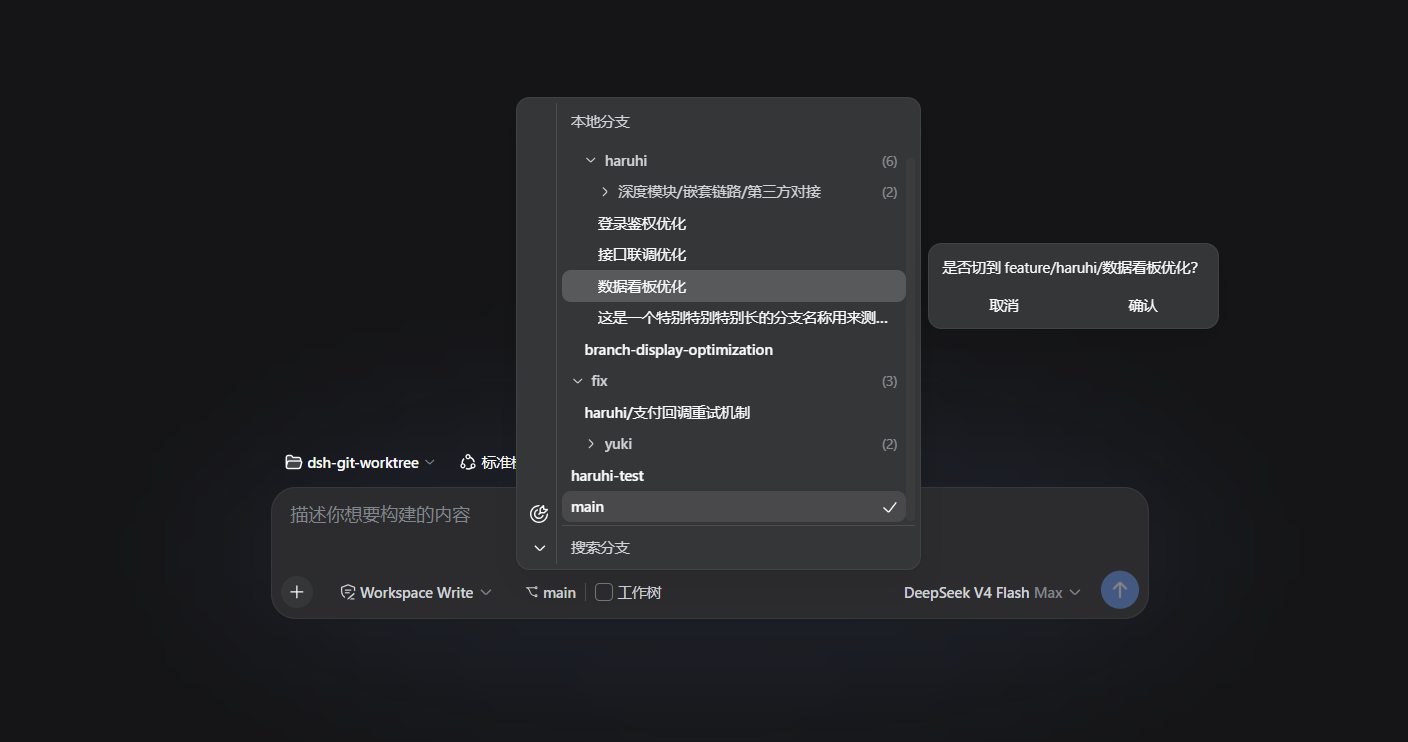
A dsh plugin for simple branch & worktree management in the Web UI. The composer tool row shows the current branch: pick another to switch in place, or flip the Worktree toggle to get an isolated worktree as a real workspace — as shown in the screenshot above.
Repo: https://github.com/LaoYueHanNi/dsh-git-worktree
[!IMPORTANT] GitHub direct installs have ended — the repository no longer carries prebuilt output. Install from npm instead:
dsh plugin --profile web add @laoyuehanni/dsh-git-worktreeUpgrading from a legacy
github:install (≤ 0.3.2, package namedsh-git-worktree)? An in-placeupdatefails to load — remove the old name first, then add again. Worktree folders and the plugin's settings carry over untouched.
Features
-
IDEA-style branch picker: the branch menu treats
/as a folder hierarchy — collapsible folders, last-segment labels, the checked-out branch's chain opens centered. Local and remote branches render as two collapsible groups (a single remote strips its prefix), with bottom search (ancestor folders kept, hits highlighted), locate-current-branch and expand/collapse tools, and ↑N/↓N divergence marks on tracking branches. -
Remote branch checkout: pick
origin/feat-xin the remote group and it checks out in place with a tracking branch directly (no confirmation); the worktree toggle sends the pick to an isolated worktree instead. -
Row context menu: right-click a branch row for six verbs — check out (immediate, no confirmation), new branch, new branch and check out, rename branch (local rows), delete branch (local rows, the safe
-d: git refuses unmerged commits and occupied branches), copy branch; a worktree row offers go-to-worktree + copy path. Second-level dialogs open IN PLACE of the menu; in-place actions keep the menu open, so rows can be acted on in a run. Keyboard: arrow keys + Enter. -
Worktree quick hop: the main checkout's blank-session menu groups branches held by live worktrees under Worktrees (hover shows the directory) — the row menu's "Go to this worktree" hops straight into that directory and starts a fresh session.
-
Branch switching: pick a branch — an in-place switch, no confirmation. Inside a linked worktree the entry scopes down: other branches stay listed but dimmed, with a hint to act from the main checkout; a started session's menu shows only its own branch (fetch and update still work).
-
Create from any branch, rename in place: right-clicking any branch row creates FROM that branch (checkouts untouched) or creates-and-checks-out (checked out on the spot); the create flyout validates as you type (git ref rules plus a duplicate check) and fires in one stroke, a failure keeping it open for a renamed retry. Local rows rename in place too.
-
Remote sync: the last toolbar tool fetches every remote and prunes stale tracking branches — the list refreshes in place, no terminal round-trip.
-
Branch update: update the CURRENT branch to its upstream (fast-forward only); divergence, a missing upstream, or conflicting uncommitted changes are refused with git's own explanation — the plugin never stashes or rewrites history on your behalf.
-
Worktree isolation: in a session that has not started, right-clicking any branch row offers Create worktree (reuse or fresh directory) or New branch and worktree (cut a new branch off that row, name typed by hand); confirming isolates into
~/.dsh/gitworktree/<repo>-<branch>/and registers a real workspace, with same-branch re-creates reusing the existing worktree. Once the session starts the directory is fixed — the worktree verbs hide along with the Worktrees group. -
Worktree removal: the ⋯ menu of a worktree row offers Remove worktree — the dialog first counts uncommitted files (red) and ahead commits, and warns the workspace's sessions will be archived; confirming removes the worktree, then archives the sessions. A git failure leaves the DSH side untouched and retries in place.
-
Ungrouped virtual directory groups: sessions no workspace accounts for cluster by directory under a trailing Ungrouped section (a dashed folder glyph sets them apart). A cluster matching a registered workspace is marked as its strays; an existing directory registers as a workspace in one click; a vanished slot under the storage root can be rebuilt empty — its historical sessions reattach automatically.
-
Storage root configurable: the Git Worktree card under Settings → Plugins — a folder picker or a typed path, effective on save; blank keeps the default
$DSH_HOME/gitworktree. A legacy~/.dsh/gitworktree/settings.jsonvalue migrates automatically on upgrade. -
Sidebar workspace grouping: the plugin replaces the native sidebar and clusters same-repository workspaces (main checkout plus worktrees) under collapsible repository groups — grouping derives from on-disk git facts, nothing extra is stored. The Group workspaces switch (experimental, default on) restores the native list instantly.

Install
dsh plugin --profile web add @laoyuehanni/dsh-git-worktree
The package declares
dsh.bundle, soaddwires the plugin into the profile's layer stack automatically — no config editing needed. Requires thewebprofile (dsh web) and a dsh 0.1.2-rc.1 (or later 0.1.2) host.
Running a dsh 0.1.2 alpha host? Install the dedicated compatibility build instead:
dsh plugin --profile web add @laoyuehanni/dsh-git-worktree@dsh-alpha
@dsh-alphais a dist-tag resolving to the latest alpha-host compatibility build (currently0.4.3-dsh-0.1.2-alpha.5) with peers pinned to the alpha line — a plainupdatenever mixes the two channels. On 0.1.2-rc.1 or later, use the default line above.
Update
dsh plugin --profile web update @laoyuehanni/dsh-git-worktree
Remove
dsh plugin --profile web remove @laoyuehanni/dsh-git-worktree
Worktree folders under ~/.dsh/gitworktree/ are kept; the plugin's own settings live in the dsh settings document.
Development
Build once, install a symlink, iterate:
npm install
npm run build && npm run build:client
npm test                # vitest
node scripts/smoke.mjs  # real-git smoke over the built lib
dsh plugin --profile web add link:D:/Code/dsh-worktree
Rebuild and restart dsh web to apply changes (npx tsdown --watch in the plugin directory hot-reloads the client). No prepare script by design — lib/ never enters the repo; npm publish builds it fresh into the tarball.
Temporary host-only mount (this launch only, no profile changes): create a cordis.yml next to the repo pointing at the built host half (Windows needs the file:/// form), then launch with it:
- insert:
    - id: git-worktree
      name: 'file:///D:/Code/dsh-worktree/lib/index.js'
dsh web --patch <plugin-dir>/cordis.yml
Only the host half mounts in this mode (the /plugin/git-worktree/* routes keep working); for UI work use the link: install above.
Compatibility
Versions
| Latest version | Published | Size |
|---|---|---|
| 0.4.0 | — | — |
| 0.4.1 | — | — |
| 0.4.1-dsh-0.1.2-alpha.3 | — | — |
| 0.4.2 | — | — |
| 0.4.3 | — | — |
| 0.4.3-dsh-0.1.2-alpha.5 | — | — |
| 0.4.4 | — | — |
| 0.4.5 | — | — |
| 0.4.6-rc.1 | — | — |
| 0.4.6 | — | — |
| 0.4.7 | — | — |
| 0.4.13 | — | — |
| 0.4.8 | — | — |
| 0.4.9 | — | — |
| 0.4.10 | — | — |
| 0.4.11 | — | — |
| 0.4.12 | — | — |
Comments
Loading…
Similar plugins
by JohnXu22786
DSH 插件:为任务自动创建隔离的 git 工作区,管理创建/同步/收尾全生命周期 (task-isolated git worktrees for DeepSeek Harness)
★ 2
MIT
JavaScript
Oct 24, 2026
dsh plugin --profile web add worktree-mgrby scccy
DSH 宿主插件:创建(或复用) git worktree 并自动开隔离 session,等价于 Claude Code /enterworktree。
★ 0
MIT
JavaScript
Oct 2, 2026
dsh plugin --profile web add dsh-enterworktreeby jackchen13755
VS Code 式源代码管理面板(DSH 原生右侧栏标签):改动/暂存/提交/diff/分支切换与合并/抓取拉取推送/冲突清单/Git worktree,适配 DSH 0.1.6
★ 0
MIT
TypeScript
Sep 29, 2026
dsh plugin --profile web add dsh-source-controlby HeathHe
Git worktree management panel for the DSH Web GUI — adds a project → worktree → sessions dimension to the sidebar.
★ 9
↓ 52/wk
MIT
JavaScript
Sep 15, 2026
dsh plugin --profile web add dsh-worktree-panelby sqfcyily
在DeepSeek Harness Web GUI 中浏览工作区的目录/文件,并结合 Git 显示文件改动。
★ 8
↓ 28/wk
MIT
JavaScript
Sep 3, 2026
dsh plugin --profile web add dsh-workspace-filesby shenkonghui
Git worktree management for dsh — group workspaces by repository, create and switch worktrees, and browse their changes, commit history and file diffs.
★ 0
JavaScript
Sep 18, 2026
dsh plugin --profile web add dsh-worktree-manager