
Rag-Coding
Manifest validLocal code memory with automatic source context, symbol lookup, vector search, and dependency graphs for JavaScript and TypeScript projects.
Code Memory for DeepSeek Harness
Give your coding agent the relevant source before its first step. Code Memory (CM) is a local code index and context plugin for JavaScript and TypeScript projects. It combines symbol lookup, dependency graphs, and semantic search to reduce repeated source discovery.
Unofficial community project. Independently developed; not affiliated with or endorsed by DeepSeek.
English · Русский · Download v0.9.0 · Windows installation
What it does
- Supplies compact source context before the first model call in DeepSeek Harness.
- Looks up named files and symbols directly; uses local MiniLM embeddings and LanceDB when discovery is needed.
- Expands relevant dependencies using the TypeScript compiler's symbol and call graph.
- Checks source versions and avoids repeating unchanged whole files already supplied to Harness.
- Exposes an MCP server for Codex and Claude Code and an optional
UserPromptSubmithook for automatic context. - Includes CM Atlas, a local map of modules, symbols, and their relationships.
The index, embeddings, and graph stay on your computer. Selected code is still sent to your model provider when you use a cloud model. CM does not include model credits or a model-provider subscription.
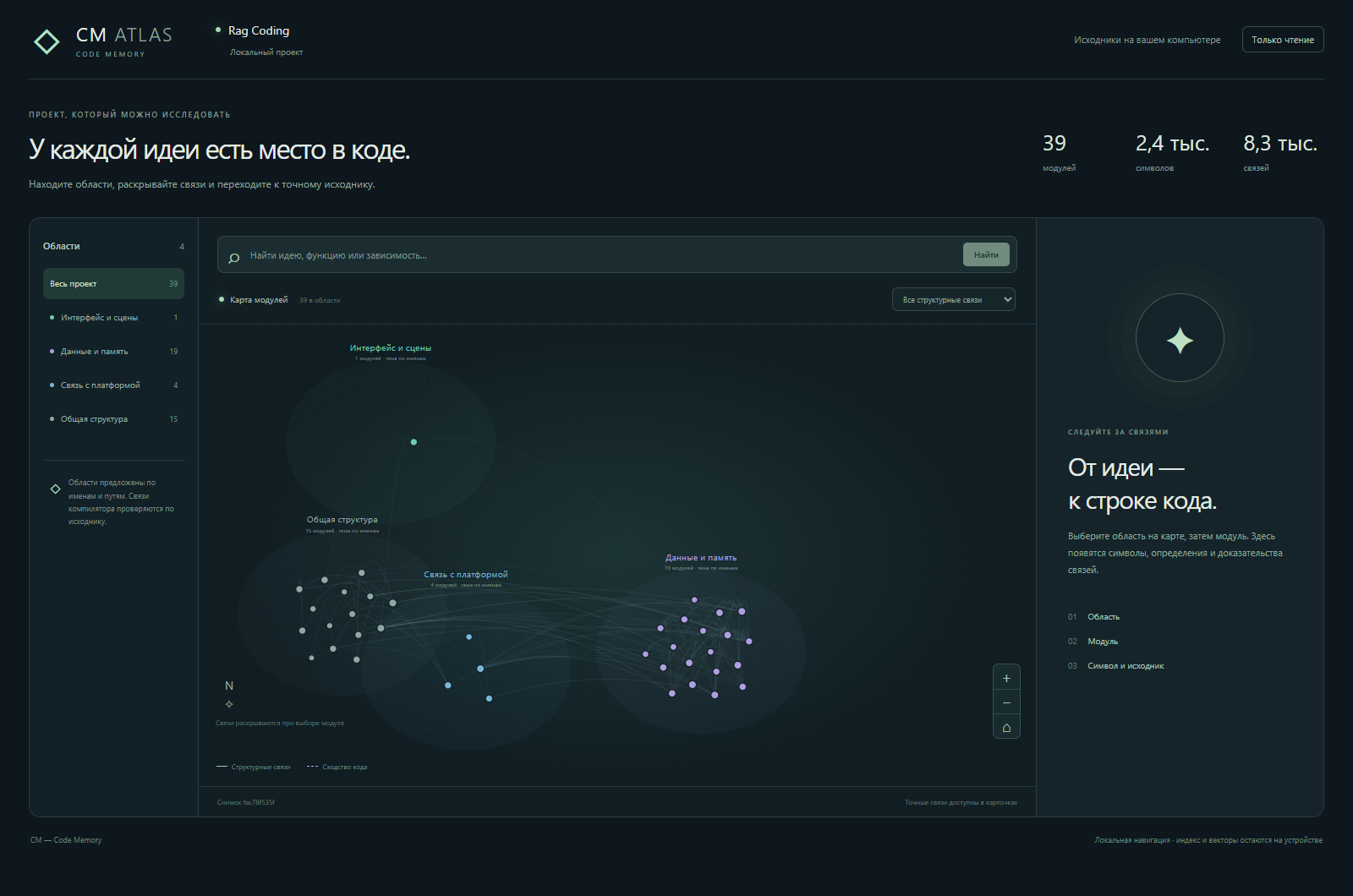
Actual CM Atlas screenshot of this repository's public src directory: 39 modules, 2,409 symbols, and 8,321 relationships. The current Atlas interface is in Russian; the installation guide below is in English.
Measured results, with limits
The published Harness pilot used GPT-6 Luna on six task types in one repository, Geo Dash. Three evaluation series each ran 36 sessions: no CM, the earlier CM, and the newer CM, with two repeats per task and arm.
| Newer CM versus no CM | Published result |
|---|---|
| Total model tokens | 45–66% fewer across the three series |
| Estimated model price | 30–47% lower |
| Total Harness session time | 18–37% lower |
| Independently checked solutions, pooled across series | 36/36 with newer CM; 35/36 without CM |
These are small, single-project pilot results, not guaranteed savings. The ranges are observed series results, not confidence intervals. Costs are estimates; session time does not include first-time installation or indexing. All attempts, including failures, are retained. Earlier approaches and native-client experiments have different outcomes; do not transfer these percentages to every client or workload.
Method, raw results, and reproduction · Codex and Claude Code experiments · What did not work
Install on Windows
Download CM-0.9.0-Windows.zip and SHA256SUMS.txt from the v0.9.0 release, verify the checksum, and extract the ZIP. From the extracted folder, run:
powershell -NoProfile -ExecutionPolicy Bypass -File .\install_cm.ps1 -ProjectRoot 'C:\path\to\your-project' -Clients harness
The installer uses a compatible Node.js or downloads a private runtime, installs CM and Harness 0.2.0-rc.2, downloads the embedding model, and prepares your index. Administrator rights and a source checkout are not required. Internet access is required for the initial dependencies and model downloads. Open the generated start-harness.ps1 path printed by setup, then configure your model provider in Harness.
Use -SourceScope src to index a subdirectory. Use -Clients harness,codex,claude to add project MCP connections for all three clients; Codex and Claude Code must be installed separately. Their automatic-context hook is currently a separate manual setup, not an installer default.
Install, launch, verify, and remove · Native-client hook setup
Build from source
Use Node.js 24 LTS, or Node.js 22.19.0+ within the 22.x line.
git clone https://github.com/kobubu/Rag-Coding.git
cd Rag-Coding
npm ci
npm run verify
npm run cm:index
npm run cm:vectors
npm run cm:search -- --query "how are embeddings reused between snapshots"
npm run plugin:smoke
plugin:smoke dispatches tools through the real Harness runtime without a model call. In PowerShell, use npm.cmd for commands that forward flags. For restricted cloud builds, ONNXRUNTIME_NODE_INSTALL=skip npm ci skips the native runtime download; running local embeddings still requires a working ONNX runtime.
The Windows bootstrap is the packaged installation path. A macOS/Linux installer, automatic release updates, and a subscription service are not included.
Documentation
The following engineering documents are currently in Russian; the README and Windows release guide are in English.
| Document | Contents |
|---|---|
| How CM works | Routing, graph expansion, context budgets, and source freshness |
| Harness integration | Bundle installation, configuration, and tools |
| MCP setup | Shared local retrieval for coding clients |
| CM Atlas | Local project visualization |
| Release notes | What is included in the public package |
| Release procedure | Rebuilding the installer and checking artifacts |
CM is written in TypeScript/Node.js. Project code is indexed without being executed. Supported inputs are JavaScript/TypeScript source files; current corpus limits are 500 files and 8 MiB of source. See contribution rules.
Try it on another repository
Show Your Plugins discussion · Community catalog submission
Independent A/B results are welcome: use the same task, model, reasoning settings, checks, and starting commit with CM on and off. Include indexing/setup time separately, all failed attempts, total tokens, elapsed time, and whether the patch actually passes independent checks. Report regressions as well as wins in Issues.
Versions
| Latest version | Published | Size |
|---|---|---|
| 0.9.0 | — | — |
Comments
Loading…
Similar plugins
by Roarpeng
Local-first code knowledge graph and context harness for coding agents. MCP + DeepSeek Harness (dsh) plugin.
★ 22
↓ 6.3k/wk
Apache-2.0
TypeScript
Oct 19, 2026
dsh plugin --profile web add @roarpeng/graphflowby zmh2000829
Local-first long-term memory and temporal knowledge graph plugin for DeepSeek Harness
★ 3
MIT
TypeScript
Aug 23, 2026
dsh plugin --profile web add dsh-memory-graphby AllenWES365
Project-isolated long-term memory for DeepSeek Harness: each project keeps its own bank, and one aggregate view sees them all.
★ 0
MIT
JavaScript
Sep 27, 2026
dsh plugin --profile web add dsh-local-memoryby yj-liuzepeng
Persistent project intelligence and memory plugin for DSH: architecture analysis, cross-session context, TODOs, and optional hybrid retrieval
★ 101
↓ 31/wk
MIT
JavaScript
Oct 8, 2026
dsh plugin --profile web add dsh-project-brainby imkelt
Local knowledge bases with explicit, source-backed retrieval for DeepSeek Harness Web.
★ 3
↓ 102/wk
MIT
TypeScript
Aug 26, 2026
dsh plugin --profile web add @kai232/dsh-ragby MkaliezZ
Lightweight read-only repository structure and symbol map for DSH; complements dsh-context-pack.
★ 0
MIT
TypeScript
Aug 29, 2026
dsh plugin --profile web add @mkaliezz/dsh-repo-map