

dsh-liang-skin
Manifest valid★ 333DeepSeek Harness Rheostat Skin
Sliding Liang · DeepSeek Harness Skin
Installation
-
Method 1, prompt-based installation:
点击展开提示词
Copy the following prompt to DSH; it checks for conflicts first, so it's longer:
请把“滑动变祖”皮肤安装到 DSH 的 web profile。必须先检查冲突,确认可以继续后再安装。

1. 安装前只读检查 web profile 的 package.json(dependencies 与 dsh.profile.bundles)、profile 的 cordis.patch.yml 和 $DSH_HOME/cordis.patch.yml(如有)。
2. 从当前启用的 bundles 中识别其他皮肤、主题或外观插件:排除 @deepseek-ai/dsh-base、@deepseek-ai/dsh-web-app、dsh-skin-market 和本次目标 dsh-client-liang-intensity-skin;读取候选 package.json 的名称、描述、dsh.client/dsh.bundle 声明,必要时再读 README。
3. 如果发现其他已启用的皮肤插件,列出它们并停在安装前,提醒我先停用;未经我确认不得修改任何 profile 文件,也不得执行安装。
4. 如果没有冲突,明确说“未检测到其他已启用的皮肤插件”,然后执行:

dsh plugin --profile web add 'github:kingOfSoySauce/dsh-liang-skin'

5. 安装后读取 web profile 的 package.json,确认 dependencies 和 dsh.profile.bundles 中都有 dsh-client-liang-intensity-skin;再检查目标 package.json 的 dsh.client/dsh.bundle 声明和 liang-intensity-skin loader 注册项。任一缺失都要报告安装或注册失败。
6. 告诉我如何重启 DSH Web。不要替我安装、停用或卸载其他皮肤。
-
Method 2 (recommended): after installing the skin marketplace plugin, search for “Sliding Liang” and install with one click
-
Method 3: or install via command; before running, close any other skin plugins to avoid conflicts
More DSH Skins
For more community skins, click browse the skin marketplace online
Effect Showcase

|
Interaction Rules
- Levels are read directly from the current model's
reasoning.efforts; no fixed count or names are used. - Any N levels are evenly distributed across 0–30: two levels are
0 / 30, three levels are0 / 15 / 30, five levels are0 / 7.5 / 15 / 22.5 / 30. - While dragging, only a continuous visual preview is shown; the value snaps to the nearest level only when the pointer is released, keyboard operation is completed, or the control loses focus, and that level's raw ID is then submitted via the official ModelDirectory.
- Models that do not support reasoning or that have only one selectable level do not show a slider.
- Addressed subagents neither show nor submit the slider.
Appearance Toggles
入口位于 设置 → 通用设置 → 外观皮肤:
滑动变祖: shows slider with character, background, and adaptive color scheme.原生: removes background layer, skin variables and slider; restores native Harness UI.
Stored in the local browser; model config unchanged.
CLI Install
You must first install DeepSeek Harness; the current version has been verified on 0.1.0-rc.6. Installation itself can be performed while DSH is running (it only modifies on-disk configuration), and takes effect after a restart. Choose one of the three methods:
Close any other skin plugins before installing to avoid conflicts.
Method 1: Install the latest version from GitHub (recommended)
dsh plugin --profile web add 'github:kingOfSoySauce/dsh-liang-skin'
dsh --profile web --dump-config | grep -B1 -A2 liang-intensity
Method 2: Install from a GitHub Release tarball
Download dsh-client-liang-intensity-skin-0.1.7.tgz from this repository's Releases page (the package already includes the built lib/client.js, so no prepare scripts need to run at install time), then:
dsh plugin --profile web add ./dsh-client-liang-intensity-skin-0.1.7.tgz
Useful where git is unavailable; relative paths resolve from your working directory.
Method 3: Local install after cloning (dev)
git clone https://github.com/kingOfSoySauce/dsh-liang-skin.git
cd dsh-liang-skin
dsh plugin --profile web add .
dsh plugin anchors relative paths to the directory from which you run the command (not the profile directory), so running add . inside the cloned directory installs a link dependency pointing to that cloned directory: after modifying the source, run npm run build and restart DSH for the changes to take effect — no reinstallation needed.
Verify & Restart
After a successful install, dsh plugin automatically registers the plugin in the profile's dsh.profile.bundles (see ~/.dsh/profiles/web/package.json), so no manual configuration changes are needed; the output of --dump-config should show a dsh-client-liang-intensity-skin config layer (the grep in the command above is there for that purpose).
If DSH is running, the agent should offer two choices:
- a. agent restarts on its own: the agent terminates the old process and re-runs
dsh web; - b. user restarts manually (recommended): in the terminal where DSH is running, press Ctrl+C, then run
dsh webagain.
After restart, the browser loads the new plugin automatically. The session is interrupted but persisted on disk, so it can be resumed.
Uninstall
dsh plugin --profile web remove dsh-client-liang-intensity-skin
remove automatically unregisters the plugin from dsh.profile.bundles; after restarting, the settings entry is completely removed.
FAQ
- pnpm blocks build scripts: pnpm ≥ 10 does not run third-party dependencies' build/prepare scripts by default. The current skin has no prepare scripts, so this normally won't trigger; if pnpm install fails and shows a prompt, follow the instructions printed by dsh to add the corresponding key under
allowBuildsin~/.dsh/profiles/web/pnpm-workspace.yamland retry. - Network: Method 1 requires access to github.com (pnpm fetches via codeload); Method 2 only requires the ability to download GitHub Release attachments.
- pnpm missing:
dsh pluginrelies on pnpm in PATH; it will give an explicit error if pnpm is missing. - Port in use:
dsh weblistens on port 3080 by default (changeable with--port); confirm the old process has exited before restarting.
Local Development
npm install
npm test
npm run build
After modifying the client source code, you need to run npm run build and commit the updated lib/client.js and source map together.
Credits & Sources
This plugin's “Sliding Liang” visual concept and character image assets come from Lichtspektrum/liang-intensity-calibrator. Building on the original project's 0–30 intensity axis, the plugin wires the visual changes into DeepSeek Harness's reasoning level selection.
Assets ship with the plugin; no extra downloads needed. 24 reviewed portrait anchors are wired in; sliding snaps to the nearest anchor with no crossfade.
Compatibility
Versions
| Latest version | Published | Size |
|---|---|---|
| 0.1.6 | — | — |
| 0.1.4 | — | — |
Comments
Loading…
Similar plugins
✦
No screenshots
by tsdfy
Skin switcher for DeepSeek Harness web UI: one-click theme switching with auto-discovery of community skins
★ 3
↓ 187/wk
MIT
JavaScript
Aug 19, 2026
dsh plugin --profile web add dsh-skin-switcherby EdwardHamu
一个DeepSeek Harness 磨砂玻璃主题
★ 0
↓ 19/wk
TypeScript
Aug 22, 2026
dsh plugin --profile web add @edwardhamu/dsh-glassmorphism-themeby linbin-mk
deepseek-harness 皮肤
★ 0
MIT
TypeScript
Oct 19, 2026
dsh plugin --profile web add @linbin-mk/dsh-brand-deepseek✦
No screenshots
by zhtx2024
DeepSeek Harness Web GUI 皮肤切换插件:设置界面一键切换已安装皮肤
★ 4
NOASSERTION
JavaScript
Aug 19, 2026
dsh plugin --profile web add dsh-skin-switcher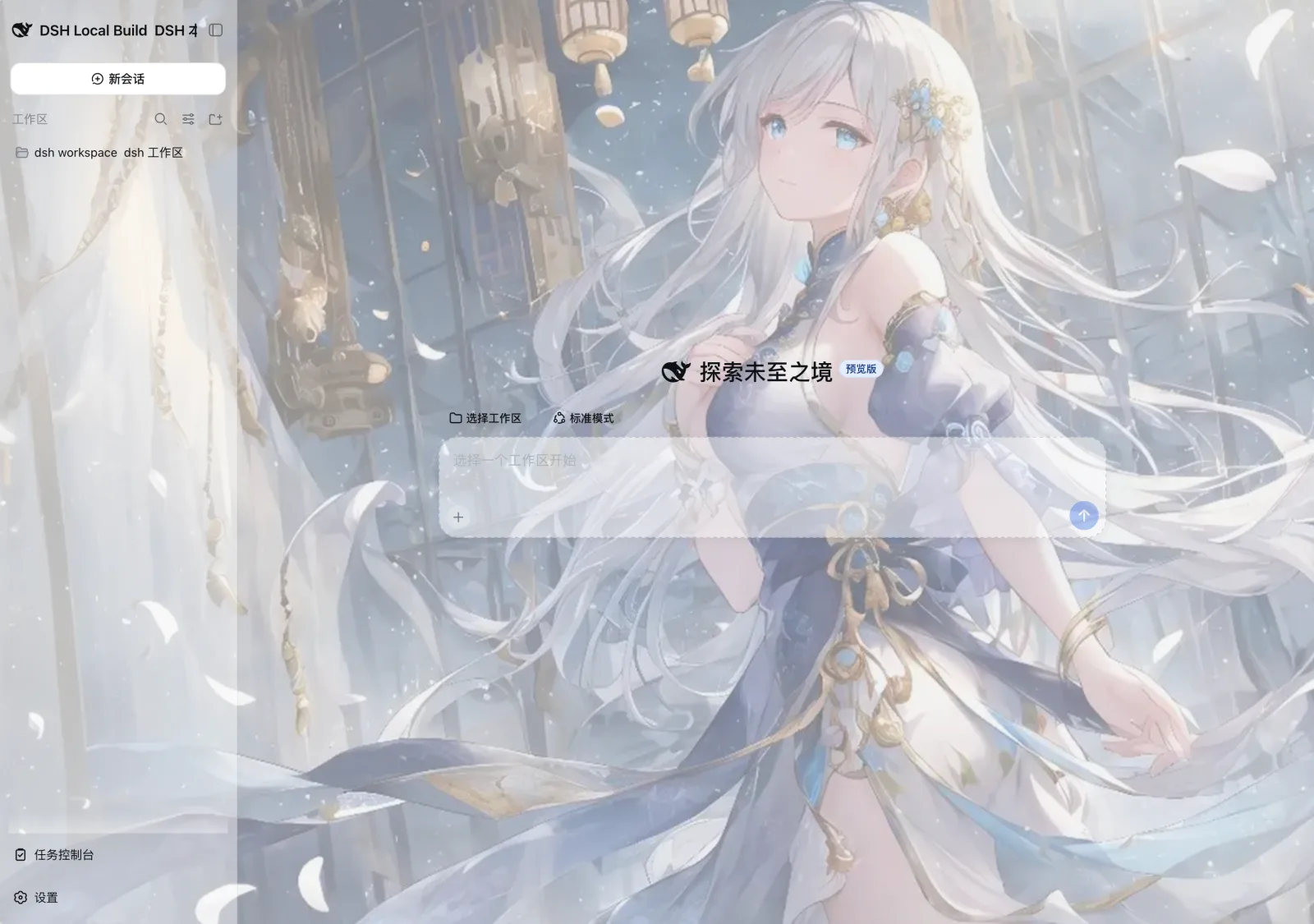 3
3No screenshots
by SLin-code
DSH自定义壁纸/皮肤插件——Custom wallpapers and translucent skins for DeepSeek Harness Web
★ 91
MIT
TypeScript
Sep 17, 2026
dsh plugin --profile web add dsh-custom-skinby iasiv5
DeepSeek Harness Web 界面主题/皮肤管理插件,可切换多种视觉风格。(本仓库后续更新提交至:https://github.com/iasiv5/dsh-skins)
★ 0
↓ 48/wk
MIT
JavaScript
Sep 6, 2026
dsh plugin --profile web add dsh-skins